Old-School Backend / 2026 ・ No.09
Old-School Backend
Part 9: Transactions and concurrent updates — the last save wins
Published
In a business system, several people touch the same claim or the same budget at once. Tested alone, everything works; with two people, the numbers stop adding up, and no error appears.
This time, with MyBatis on PostgreSQL, we measure an overwrite on screen, 150 simultaneous spends against one budget, a deadlock and an overlong transaction, and compare four fixes: subtracting in SQL, locking the row, a version number, and retrying.
The last save wins
AraiI put @Transactional on it, so simultaneous requests are fine, right?
Furui@Transactional guarantees “all or nothing”. “At the same time as someone else” is a different story.
AraiA different story…
FuruiToday the two of us will edit the same claim, and 150 people will spend from the same budget.
The 15-part route map (you are here: part 9)
- An overwrite on screen — both got 200, yet the first saver's change vanished (measured)
- 150 at once — all 150 told OK, and the budget fell by only 14,000–18,000 yen (measured)
- Four fixes — subtract in SQL, for update, a version, isolation level plus retry
- Deadlock — two opposite transfers; one got a 500 after 1.2 s (measured)
- A long transaction — wait 1 s inside it and the 12th request takes 12 s (measured)
Following last part's comparison, the storekeeper is MyBatis from now on. JPA is gone from the application (MyBatis 3.5.19, mybatis-spring-boot 4.1.0); the earlier counters keep JdbcClient, and the new ones are written with MyBatis.
# The toolkit (part 8's JPA + MyBatis, with JPA removed)
  part 8: jar 55,029,971 bytes, libraries 75
  part 9: jar 26,299,833 bytes, libraries 52, startup 3.945 s / 4.119 s / 4.058 s
In the database we added a departmental budget table, budget (100,000 yen each for dev and sales), and a version column, version, on the claims table expense.
An overwrite on screen
First, the most common shape. Arai and Furui open the same business-trip claim (EXP-2026-5001, 24,160 yen) on the edit screen. Arai adds a 1,500-yen taxi home and saves. Furui adds the destination “(Osaka)” to the item and saves. The counter simply updates with whatever item and amount arrive.
# Arai and Furui open the same claim and edit it (no version)
  Arai   open        200  item=出張-001  amount=24,160  version=0
  Furui  open        200  item=出張-001  amount=24,160  version=0
  Arai   save        200  item=出張-001  amount=25,660  version=0
  Furui  save        200  item=出張-001(大阪)  amount=24,160  version=0
  DB     look later  200  item=出張-001(大阪)  amount=24,160  version=0
An overwrite on screen (measured)
Furui's screen still held the 24,160 yen from when he opened it, and that went straight back. Arai's taxi vanished, yet both got 200, with no error and no log line. This is “the last save wins” (a lost update).
Minutes can pass between opening and saving. You can't hold a database transaction open that long, so database locks can't prevent this. Chapter 6 fixes it with a version number.
150 spends at once
Next, a much shorter time span. We wrote a clerk that subtracts each claim's amount from the department's budget: read what's left, check it's enough, write the new value. It has @Transactional, too.
# ① Read, subtract, write (BudgetService.java and BudgetMapper.xml)
@Transactional  // ① read, subtract, write
public void spendNaive(String dept, BigDecimal amount) {
    Budget b = budgets.find(dept);
    if (b.remaining().compareTo(amount) < 0) throw new BudgetShortException(dept);
    budgets.setRemaining(dept, b.remaining().subtract(amount));
}

<select id="find" resultType="example.expenses.v9.Budget">
  select dept, remaining, version from budget where dept = #{dept}
</select>
<update id="setRemaining">
  update budget set remaining = #{remaining} where dept = #{dept}
</update>
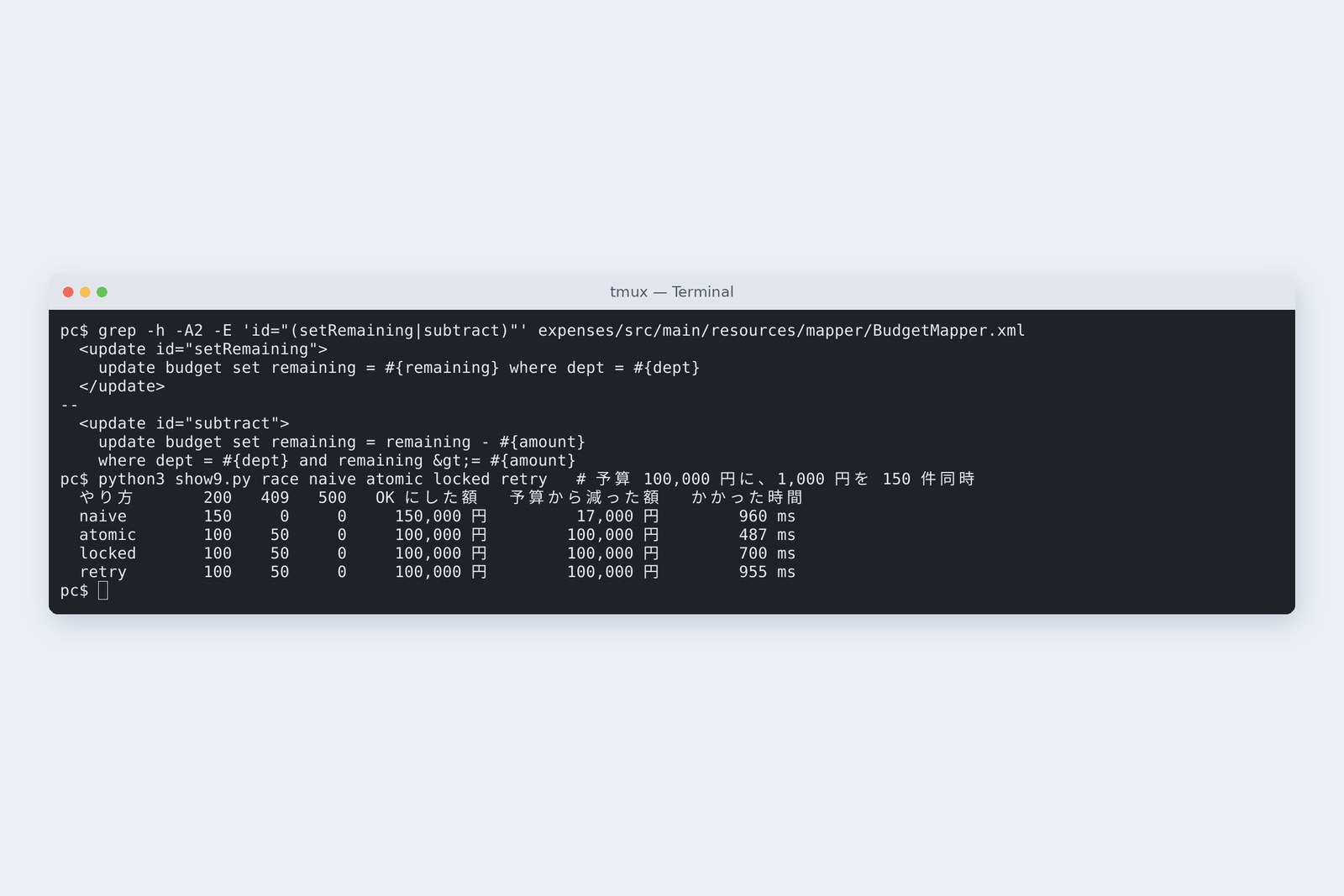
We sent 150 simultaneous 1,000-yen spends against dev's 100,000-yen budget. Done right, 100 go through, the budget ends at 0 yen, and the other 50 get “not enough budget” (409). For comparison, the fixes from chapters 4 and 5 are listed too.
# 150 simultaneous 1,000-yen spends against a 100,000-yen budget (three runs each)
  way           200  409  500   approved        taken from budget   time
  naive         150    0    0   150,000 yen     14,000 yen          606 ms
                150    0    0   150,000 yen     18,000 yen          557 ms
                150    0    0   150,000 yen     18,000 yen          441 ms
  atomic        100   50    0   100,000 yen     100,000 yen         378 ms
                100   50    0   100,000 yen     100,000 yen         323 ms
                100   50    0   100,000 yen     100,000 yen         311 ms
  locked        100   50    0   100,000 yen     100,000 yen         405 ms
                100   50    0   100,000 yen     100,000 yen         380 ms
                100   50    0   100,000 yen     100,000 yen         363 ms
① said OK to all 150: 150,000 yen approved, 50,000 over budget. Yet only 14,000–18,000 yen left the budget. The money doesn't add up in either direction.
What happens inside ①
Under PostgreSQL's default isolation level, READ COMMITTED, a select reads the values committed at that moment. A and B both read 50,000 yen and each computes 49,000. B's update waits for A's lock to go, but what it then writes is the 49,000 B computed. @Transactional undoes everything if something fails midway; it doesn't order you against other transactions.
AraiWhen I tested it alone, it went down by 1,000 yen every time.
FuruiAlone, you never overlap anyone. Bugs like this sleep through testing.
Subtract inside the SQL
The simplest fix is not to compute in Java but to subtract inside the SQL, with the “is it enough?” check in the same update's where clause.
# ② Subtract inside the SQL
<update id="subtract">
update budget set remaining = remaining - #{amount}
where dept = #{dept} and remaining >= #{amount}
</update>
@Transactional // ② subtract inside the SQL
public void spendAtomic(String dept, BigDecimal amount) {
if (budgets.subtract(dept, amount) == 0) throw new BudgetShortException(dept);
}
After waiting for A, B's update rechecks the where clause and subtracts from the latest value (49,000 yen). If there isn't enough, zero rows are updated, and we turn that into “not enough budget”. Result: 100 of 200, 50 of 409, and the budget at exactly 0 yen, with a single statement and slightly faster than ① (311–378 ms).
When you see “read the value, compute in Java, write it back”, first ask whether SQL can do it. The set column = column - #{value} form works as is for stock, balances, counters and anything else that goes up and down.
Lock the row
Sometimes the check won't fit in one where clause, say “read the department's rules, read the applicant's grade, then decide”. Then lock the row as you read it: select … for update.
# ③ Lock the row, then read (for update)
<select id="findForUpdate" resultType="example.expenses.v9.Budget">
  select dept, remaining, version from budget where dept = #{dept} for update
</select>

@Transactional  // ③ lock the row, then read
public void spendLocked(String dept, BigDecimal amount) {
    Budget b = budgets.findForUpdate(dept);
    if (b.remaining().compareTo(amount) < 0) throw new BudgetShortException(dept);
    budgets.setRemaining(dept, b.remaining().subtract(amount));
}
Once A has read a row for update, B's for update waits until A commits. B then reads the latest 49,000 yen, and the arithmetic is right. Same result as ②: 100 and 50, 0 yen (363–405 ms).
The lock stays until the transaction ends. Do something slow while holding it, and everyone else queues behind you (chapter 9).
Notice with a version
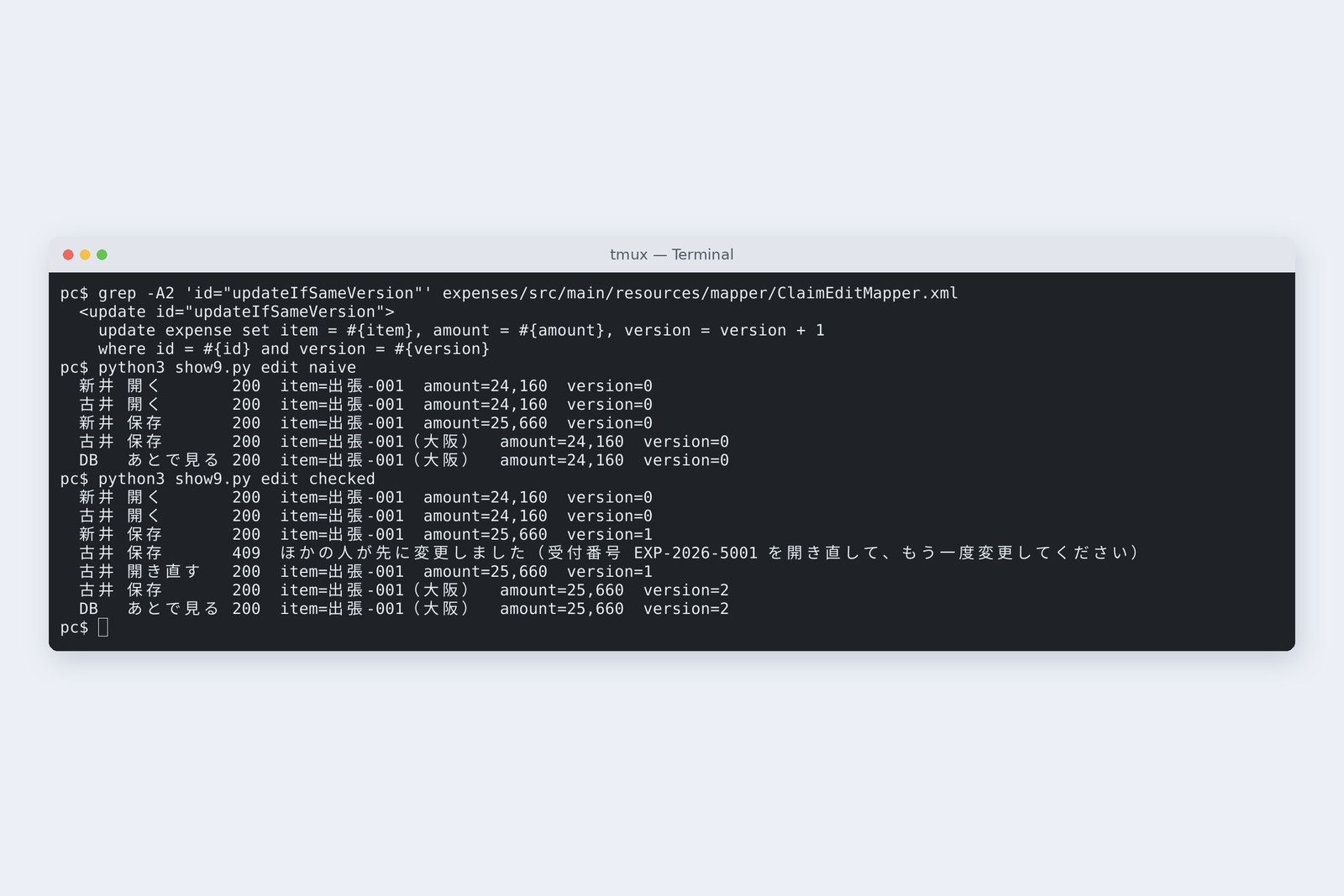
Back to chapter 2's overwrite. No lock can last the minutes a screen stays open. So each row gets a version number. The screen sends back the version it opened, the update's where clause checks it's still the same version, and a successful write bumps it by one.
# An update with a version (ClaimEditMapper.xml and ClaimEditService.java)
<update id="updateIfSameVersion">
  update expense set item = #{item}, amount = #{amount}, version = version + 1
  where id = #{id} and version = #{version}
</update>

@Transactional  // write only if the version is the one the screen opened
public ClaimEdit updateChecked(String id, EditRequest req) {
    if (claims.updateIfSameVersion(id, req.item(), req.amount(), req.version()) == 0) {
        find(id);  // missing → 404
        throw new StaleClaimException(id);  // exists → someone changed it first
    }
    return claims.find(id);
}
# The handler turns it into a 409 (added to ApiErrors.java)
@ExceptionHandler(StaleClaimException.class)  // someone changed it after you opened it → 409
ProblemDetail stale(StaleClaimException e) {
    return problem(HttpStatus.CONFLICT, "stale", "ほかの人が先に変更しました", "受付番号 " + e.id() + " を開き直して、もう一度変更してください");
}
# The same steps, with a version
  Arai   open        200  item=出張-001  amount=24,160  version=0
  Furui  open        200  item=出張-001  amount=24,160  version=0
  Arai   save        200  item=出張-001  amount=25,660  version=1
  Furui  save        409  ほかの人が先に変更しました
  Furui  reopen      200  item=出張-001  amount=25,660  version=1
  Furui  save        200  item=出張-001(大阪)  amount=25,660  version=2
  DB     look later  200  item=出張-001(大阪)  amount=25,660  version=2
Arai's save moved the version from 0 to 1, so Furui's update, still sent with version 0, touched zero rows. The counter turned that into a 409 saying “reopen it and change it again”. When Furui reopened it, he saw 25,660 yen including the taxi, added the destination, saved, and both changes stayed.
This finds the clash when writing instead of locking, so it's also called optimistic locking; the previous chapter's for update locks first and is pessimistic locking. Use optimistic locking for edits that span screens, and ② or ③ for arithmetic inside one transaction.
AraiI feel a bit sorry for whoever gets the 409.
FuruiFar better than being silently erased. The screen says “someone changed this first” and shows the latest.
Isolation levels and retrying
We kept ①'s code and only raised the transaction's isolation level to REPEATABLE READ.
# ④ Same as ①, at REPEATABLE READ
@Transactional(isolation = Isolation.REPEATABLE_READ)  // ④ same as ①, higher isolation level
public void spendRepeatable(String dept, BigDecimal amount) {
    Budget b = budgets.find(dept);
    if (b.remaining().compareTo(amount) < 0) throw new BudgetShortException(dept);
    budgets.setRemaining(dept, b.remaining().subtract(amount));
}

  way           200  409  500   approved        taken from budget   time
  repeatable     71    0   79   71,000 yen      71,000 yen          557 ms
                 47    0  103   47,000 yen      47,000 yen          510 ms
                 48    0  102   48,000 yen      48,000 yen          493 ms
# What the 500s were (app log; the same in 100 of 150)
org.springframework.dao.CannotSerializeTransactionException:
org.postgresql.util.PSQLException: ERROR: could not serialize access due to concurrent update
No more OKs beyond the budget, but 79–103 of the 150 got a 500. Under REPEATABLE READ a transaction keeps working from the values it saw at the start. If someone else changed the row first, PostgreSQL refuses the update with “could not serialize access due to concurrent update” (SQLState 40001), and its documentation says the application should retry the whole transaction from the beginning.
# ⑤ Refused? Start over (RetryingSpender.java)
public int spend(String dept, BigDecimal amount) {
    for (int attempt = 1; ; attempt++) {
        try {
            service.spendRepeatable(dept, amount);  // a new transaction each time
            return attempt;
        } catch (ConcurrencyFailureException e) {
            if (attempt == 10) throw e;
            log.debug("retry {}: {}", attempt, e.getClass().getSimpleName());
            BudgetService.pause(ThreadLocalRandom.current().nextLong(5, 20) * attempt);  // wait a little first (spread the waits)
        }
    }
}

  way           200  409  500   approved        taken from budget   time
  retry         100   50    0   100,000 yen     100,000 yen         626 ms
                100   50    0   100,000 yen     100,000 yen         578 ms
                100   50    0   100,000 yen     100,000 yen         584 ms
# Attempts (total over the 100 successes / most for one)
  232 / 5   203 / 5   244 / 6
Add a helper that waits a little and starts over when refused, and we get 100 and 50 with the budget at 0 yen. The 100 successes took 203–244 attempts in all; the slowest got through on its sixth. Each retry must be a fresh transaction, so the loop goes outside the @Transactional method. Spring Framework 7 also gained @Retryable, which does the same (by default up to 3 retries, 1 second apart).
| Fix | This part's result | Good for; watch out for |
|---|---|---|
| ② subtract in SQL | correct, 311–378 ms | counts going up and down; the check must fit in where |
| ③ for update | correct, 363–405 ms | read, then decide in Java; hold the lock briefly (ch. 9) |
| ④ REPEATABLE READ | 79–103 got 500 | not on its own; assumes a retry on refusal |
| ⑤ ④ + retry | correct, 578–626 ms | many rows, hard to lock; a retry limit, spread-out waits |
| version | 409 if changed first | edits that span screens; the screen must send the version back |
Deadlock
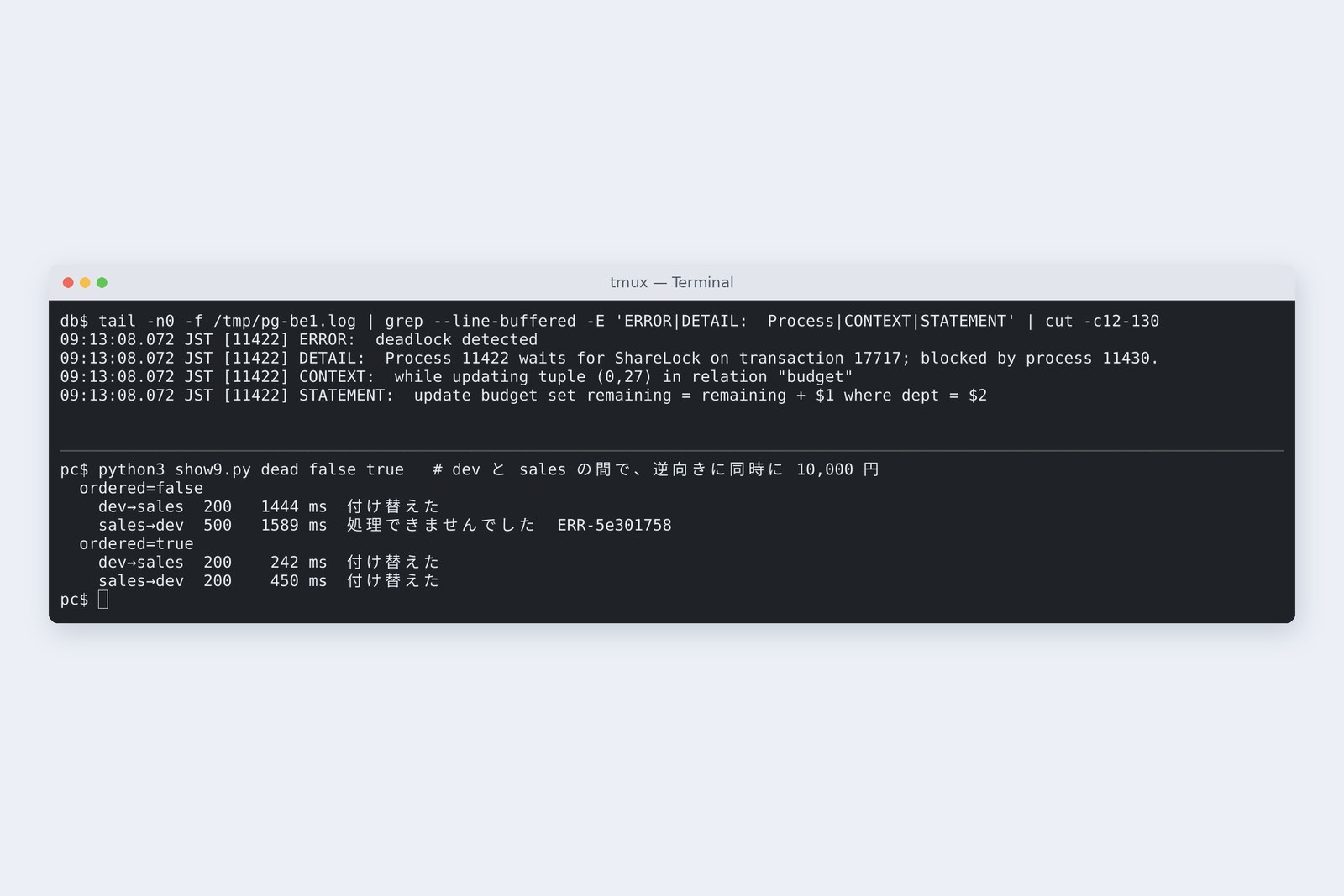
Once you use locks, you meet another problem. We wrote a budget transfer (10,000 yen from dev to sales) and ran it alongside the opposite transfer. To make it easy to see, it waits 0.2 s between subtracting and adding.
# Budget transfer (BudgetService.java)
@Transactional  // budget transfer: take from 'from', add to 'to'
public void transfer(String from, String to, BigDecimal amount, long pauseMs, boolean ordered) {
    if (ordered) {  // always lock in name order
        budgets.findForUpdate(from.compareTo(to) < 0 ? from : to);
        budgets.findForUpdate(from.compareTo(to) < 0 ? to : from);
    }
    if (budgets.subtract(from, amount) == 0) throw new BudgetShortException(from);
    pause(pauseMs);
    budgets.add(to, amount);
}
# dev→sales and sales→dev at once (10,000 yen; add 0.2 s after subtracting)
  ordered=false
    dev→sales  500   1220 ms  処理できませんでした  ERR-688287aa
    sales→dev  200   1218 ms  OK
    budget: dev 110,000, sales 90,000
  ordered=true
    dev→sales  200    413 ms  OK
    sales→dev  200    209 ms  OK
    budget: dev 100,000, sales 100,000
# The database log at that moment
09:08:01.035 JST [2605] ERROR:  deadlock detected
09:08:01.035 JST [2605] DETAIL:  Process 2605 waits for ShareLock on transaction 13552; blocked by process 2592.
09:08:01.035 JST [2605] CONTEXT:  while updating tuple (0,10) in relation "budget"
09:08:01.035 JST [2605] STATEMENT:  update budget set remaining = remaining + $1 where dept = $2
Deadlock: grabbing locks in opposite orders
① locks the dev row and waits for sales; ② locks sales and waits for dev. Each waits for the other to finish, forever. PostgreSQL waited 1 second (the default deadlock_timeout), looked for the circle and cancelled one. The cancelled one got a 500; the other got 200 after 1.2 s. The budgets moved by one transfer only.
The fix is to always take locks in the same order. Here we first lock both rows for update in name order, and both transfers got 200 (0.2 s and 0.4 s). The cancelled side's exception (DeadlockLoserDataAccessException) belongs to the same ConcurrencyFailureException family as in chapter 7, so it can be retried too.
Keep transactions short
Finally, how long a lock is held. After the spend we added “send a notice email” (here just a 1-second wait), and compared waiting inside the transaction with waiting after commit: 12 spends against the same budget at once, plus, 0.3 s later, one read that opens an unrelated claim.
# Waiting for the 1-second notice inside the transaction, or after commit
@Transactional  // after subtracting, wait for the notice inside the transaction
public void spendThenWaitInside(String dept, BigDecimal amount, long notifyMs) {
    spendAtomic(dept, amount);
    pause(notifyMs);  // pretend to send a notice email
}

case "notify-after" -> {
    budgets.spendAtomic(dept, amount);  // commit first
    BudgetService.pause(notifyMs);  // then wait for the notice
}
# 12 at once, seconds until each reply (+ one unrelated claim opened 0.3 s later)
  notify-inside 1.0 2.0 3.0 4.0 5.0 6.0 7.0 8.0 9.0 10.0 11.0 12.0
                unrelated claim: 2.73 s
  notify-after  1.0 1.0 1.0 1.0 1.0 1.0 1.0 1.0 1.0 1.0 1.0 1.0
                unrelated claim: 0.00 s
Where you wait for the notice changes the waiting like this (measured)
Waiting inside means waiting 1 s while holding the budget row's lock, so the 12 queue one by one and the last takes 12.0 s. Worse, a read that only opens a claim unrelated to the budget waited 2.73 s. The one holding the lock and the nine waiting for it each held a database connection, filling the pool of 10. Waiting after commit, all 12 took 1.0 s and the unrelated read under 0.01 s.
Move anything that might be slow, such as email, external APIs or writing files, outside the transaction. In Spring, @TransactionalEventListener can also run it “after commit”.
Concurrent updates aren't a rare accident; they happen every day from the moment you have two users. When you see read, compute, write, ask whether SQL can compute it, whether you need a lock, whether you need a version. And hold locks as briefly as you can.
Checking on your own PC
| What to try | How to write it |
|---|---|
| See the current isolation level | show default_transaction_isolation; |
| Cause an overwrite by hand with two psql sessions | begin; select … ; update … ; commit; (alternating windows) |
| See who is waiting for whom | select pid, pg_blocking_pids(pid), query from pg_stat_activity; |
| Time before a deadlock is detected | show deadlock_timeout; |
| Find read-then-write code | grep -rn 'set .* = #{' src/main/resources |
Open two psql windows, begin; in both, select the same row, then update it in each: the second update stops. The moment you commit; in the first, the second moves on. Once you've seen that “stop, then go” with your own eyes, the logs start to make sense.
§ — On one page, and next time
- @Transactional means all or nothing; it doesn't order you against simultaneous users.
- Read, compute, write: all 150 told OK, and the budget fell by only 18,000 yen, with no error.
- Do counting inside the SQL, with the check in the where clause.
- Read then decide: for update. Across screens: a version and a 409.
- REPEATABLE READ refuses. When refused, start over.
- Take locks in one fixed order, and briefly.
AraiI had no idea “at the same time” was this scary.
FuruiNext time, approval. A claim moves from draft to submitted to approved to paid. What if someone could quietly edit an approved claim? Let's talk about state transitions.
References
- PostgreSQL 16 — Transaction Isolation
- PostgreSQL 16 — Explicit Locking(Row-Level Locks, Deadlocks)
- PostgreSQL 16 — Lock Management(deadlock_timeout)
- Spring Framework — Transaction Management
- Spring Framework — Resilience Features(@Retryable)
- MyBatis 3 — Mapper XML Files
The recordings were made on 31 October 2026 on a cloud Linux machine (Ubuntu 24.04, kernel 6.18) with Spring Boot 4.1.2 (Spring Framework 7.0.10, MyBatis 3.5.19, mybatis-spring-boot 4.1.0), OpenJDK 25.0.4 and PostgreSQL 16.15. The claims server and the database server are separate network spaces (network namespaces) inside one machine, about 0.04 ms apart. Each concurrency experiment was run three times and results vary every run (the photos are separate runs). The database connection pool is Spring Boot's default of 10. Every number and output in the text is a real value read from the commands' output at the time. The characters are fictional.
Old-School Backend, part 9 — Transactions and concurrent updates / 2026.10