Old-School Backend / 2026 ・ No.11
Old-School Backend
Part 11: Authentication and authorisation — making sure of “who”, deciding “may they”
Published
Up to last time, the application believed whatever name was written in a header. Anyone could be Furui, and Arai could approve his own claims.
This time we add login and sessions with Spring Security, keep passwords as bcrypt hashes, and split actions by role. Then, on our own practice application, we confirm IDOR, where changing the claim number in a URL shows other people's claims, and close it with MyBatis's where clause.
Anyone can say they're furui
AraiIs it true, what you said at the end last time? That I can approve my own claim?
FuruiWrite my name in the header and see.
The 15-part route map (you are here: part 11)
# Arai writes X-User: furui and sends an approval of his own claim (EXP-2026-5010) to part 10's counter
POST /api/v10/claims/EXP-2026-5010/approve
X-User: furui
  → 200  status=approved   (applicant=新井)
# History
  submitted→approved furui
It went through, and the history says Furui approved it. The counter believed the name in X-User as it was, so one header line makes you anyone. However firmly part 10 guards the status, it means nothing if “who” is a lie.
- Login and sessions — send a number, not a name; the server looks up the name (measured)
- Passwords — 73 ms per bcrypt hash, slow on purpose (measured)
- Roles — 3 users × 5 actions; mismatches get 403 (measured)
- IDOR — changing the claim number alone showed 23 of someone else's claims (measured)
We added Spring Security (7.1.2) to the application. It guards only part 11's counters (/api/v11/**); the earlier ones stay for comparison.
# The toolkit (compared with part 10)
  part 10: jar 26,316,783 bytes, libraries 52
  part 11: jar 30,270,061 bytes, libraries 57, startup 4.134 s / 4.45 s / 4.805 s
Authentication and authorisation
The words are close, the jobs are not. Authentication makes sure who you are; authorisation decides whether that person may do this. Logging in is authentication; whether you may press approve is authorisation.
Who decides who you are
In Spring Security the gatekeeper's settings live in one place: which counters to guard, where logins are received, and which actions need which role.
# The gatekeeper (SecurityConfig.java)
@Bean
SecurityFilterChain api(HttpSecurity http) throws Exception {
    http.securityMatcher("/api/v11/**", "/api/login", "/api/logout", "/api/csrf")  // guard only part 11's counters
        .authorizeHttpRequests(a -> a
            .requestMatchers("/api/csrf", "/api/login").permitAll()
            .requestMatchers(HttpMethod.POST, "/api/v11/claims/*/approve", "/api/v11/claims/*/return",
                             "/api/v11/claims/*/reject").hasRole("APPROVER")  // approve, return, reject: approvers only
            .requestMatchers(HttpMethod.POST, "/api/v11/claims/*/pay").hasRole("ACCOUNTING")  // pay: accounts only
            .anyRequest().authenticated())  // anything else: just be logged in
        .formLogin(f -> f.loginProcessingUrl("/api/login")
            .successHandler((req, res, auth) -> res.setStatus(200))
            .failureHandler((req, res, e) -> res.sendError(401)))
        .logout(l -> l.logoutUrl("/api/logout").logoutSuccessHandler((req, res, auth) -> res.setStatus(204)))
        .exceptionHandling(e -> e.authenticationEntryPoint(new HttpStatusEntryPoint(HttpStatus.UNAUTHORIZED)));
    return http.build();
}

@Bean
PasswordEncoder passwordEncoder() {
    return PasswordEncoderFactories.createDelegatingPasswordEncoder();  // bcrypt by default
}
Keep passwords as hashes
The users table holds a hash, not the password. A hash can't be reversed; at login, the password received is hashed the same way and compared.
# The users table (setup11.sql) and what's in it
-- Part 11: users (password is a bcrypt hash, written by the app's --demo.seed=true)
create table if not exists app_user (
  username     varchar(30)  primary key,
  password     varchar(100) not null,
  display_name varchar(50)  not null,
  role         varchar(20)  not null check (role in ('APPLICANT', 'APPROVER', 'ACCOUNTING'))
);

  arai | 新井 | APPLICANT | {bcrypt}$2a$10$bgTjGTKBB.NSs5B…
  furui | 古井 | APPROVER | {bcrypt}$2a$10$OnboLx4LUMQCyGC…
  keiri | 経理 | ACCOUNTING | {bcrypt}$2a$10$MdHuG1f5v0oAEy1…
# Time to make one bcrypt hash (strength 10, 12, 14; five runs each)
  strength 10 : [73, 73, 73, 73, 73] ms
  strength 12 : [307, 294, 295, 293, 299] ms
  strength 14 : [1192, 1184, 1180, 1177, 1198] ms
# One login (POST /api/login), five runs
  83.7 ms, 80.0 ms, 81.9 ms, 81.5 ms, 82.5 ms
The weight of bcrypt (measured)
The leading {bcrypt} marks the method and $10$ is the strength. bcrypt mixes in a different “salt” every time, so the same password hashed to $2a$10$2MItAV… the first time and $2a$10$bgTjG… when written again.
And bcrypt is slow on purpose: 73 ms per hash at strength 10, 1.2 seconds at 14, so that even with a stolen table, trying passwords one by one is costly. Most of a login's 82 ms or so was this time.
# Bonus: MyBatis's DEBUG log printed the hash as is
==> Parameters: arai(String), {bcrypt}$2a$10$bgTjGTKBB.NSs5Ba8…
One thing we noticed: the MyBatis SQL log (DEBUG) we've had on since part 9 prints parameters as they are, so the hashes showed up in the log when the users were written. Even a hash doesn't belong in a log. What to log comes in part 13.
Login and sessions
After a successful login the server creates a “session” and returns its number in a cookie (JSESSIONID). From then on the browser sends only the number, and the server looks up “arai, applicant” from it.
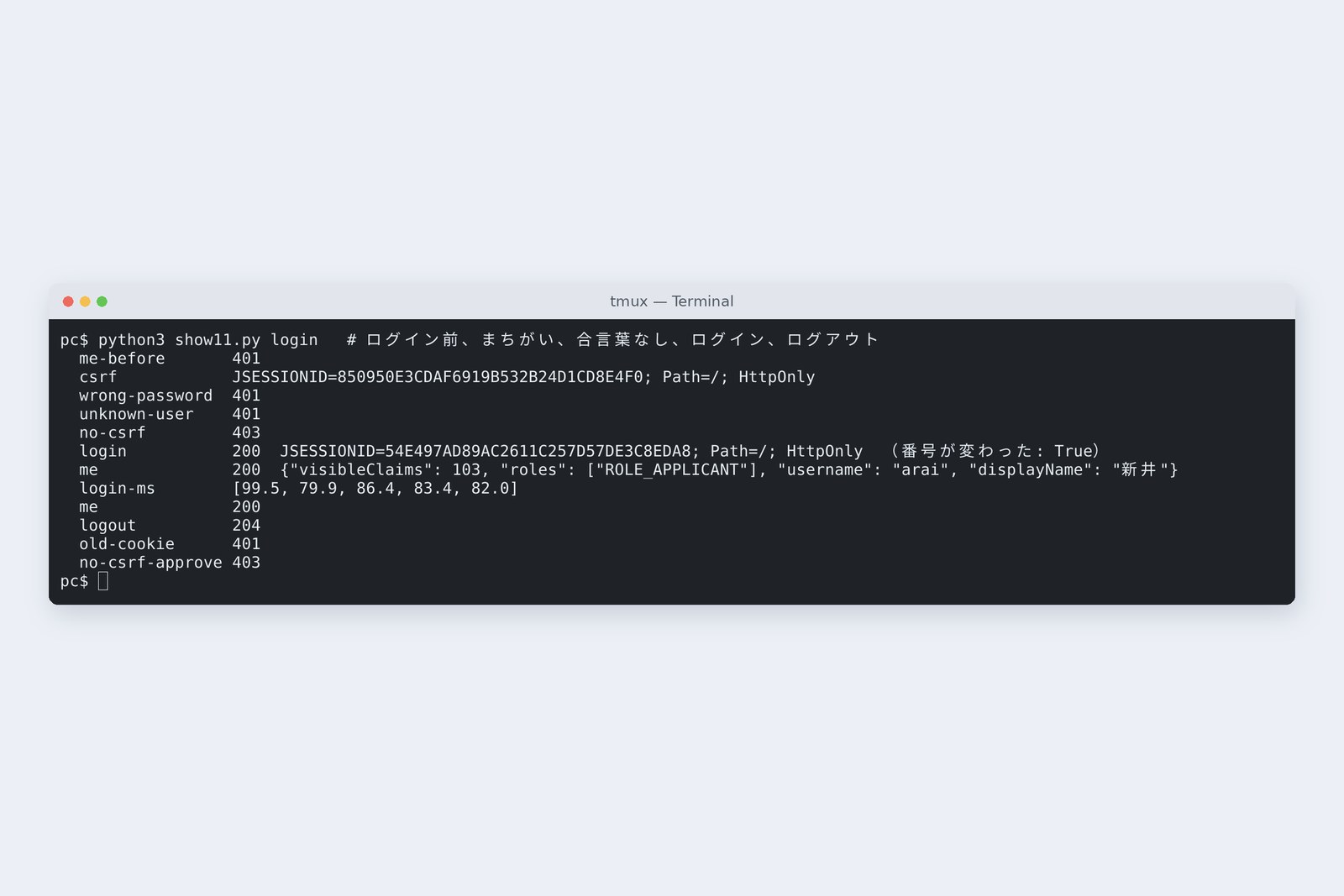
# Before and after logging in (Arai)
  /me before login           401
  get the token              Set-Cookie: JSESSIONID=1ECAF68D334E76EA7DC2E47C9A5CAA69; Path=/; HttpOnly
  wrong password             401
  unknown user               401
  login without the token    403
  login                      200  Set-Cookie: JSESSIONID=289FD9B72BBF0250883F5AFFF5AE46CF; Path=/; HttpOnly
  /me                        200  {"displayName": "新井", "username": "arai", "roles": ["ROLE_APPLICANT"], "visibleClaims": 103}
# After logout, with the old cookie / approving without the token
  /me                        200
  logout                     204
  /me with the old cookie    401
  approve, no token (Furui)  403
- The same 401 — a wrong password and an unknown user get the same reply; it doesn't reveal that the user exists
- The number changes — the number handed out before login became a different one after it, defeating the trick of planting a number in advance (session fixation)
- HttpOnly — the page's JavaScript can't read the cookie; in production, add Secure so it travels only over HTTPS (part 15)
- The token (CSRF) — writes need a token the page fetched first; a POST sent from another site gets 403
- Logout — throws the session away; the old number gets 401
Unlimited password guesses won't do, so production also needs rate limits or temporary lockouts. This part doesn't cover them.
Splitting by role
Each user gets one role: Arai is an applicant (APPLICANT), Furui an approver (APPROVER), accounts ACCOUNTING. The gatekeeper's settings say only approvers may approve, return or reject, and only accounts may pay.
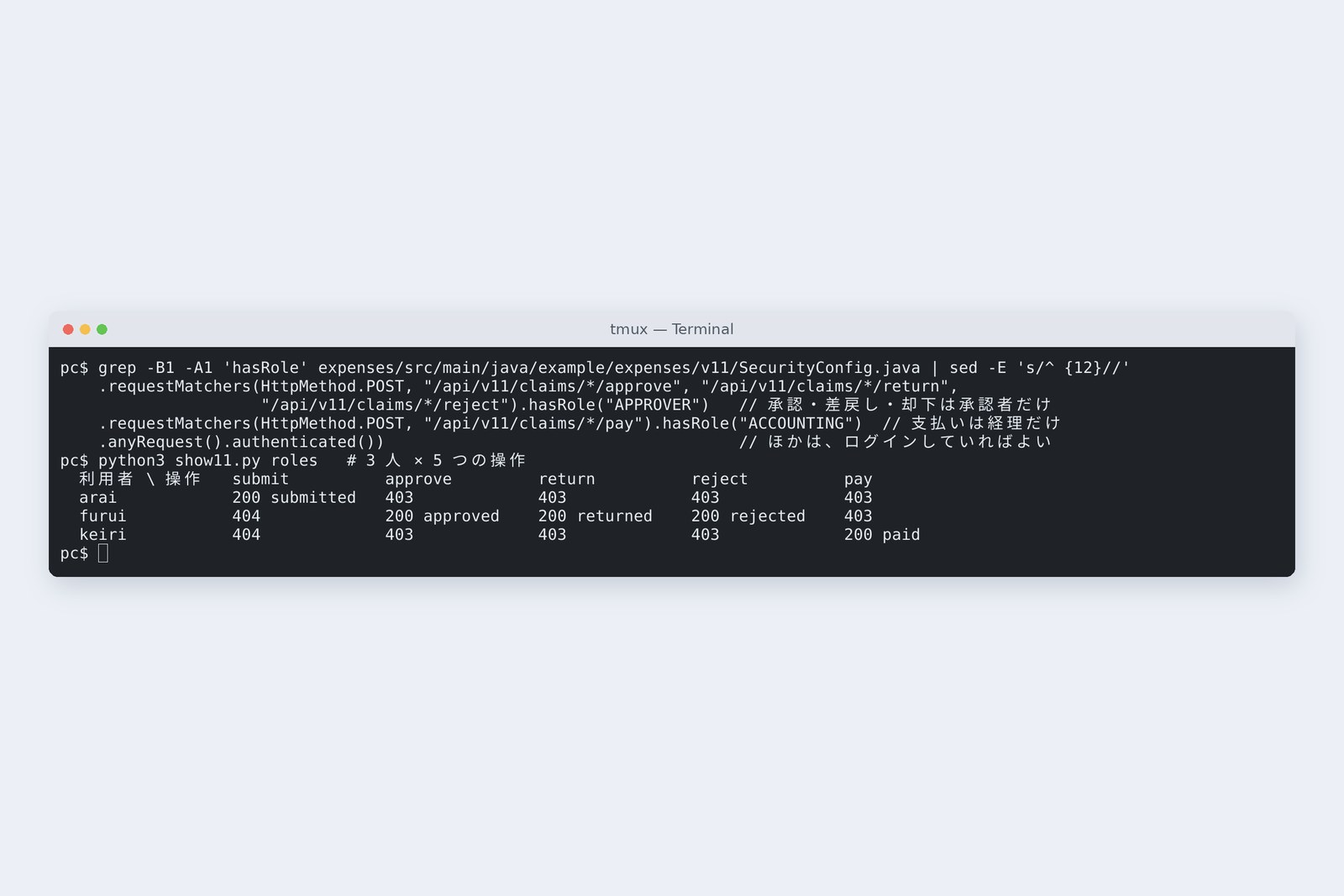
# 3 users × 5 actions (status reset to a workable one each time)
  user \ action   submit          approve         return          reject          pay
  arai            200 submitted   403             403             403             403
  furui           404             200 approved    200 returned    200 rejected    403
  keiri           404             403             403             403             200 paid
Actions that don't fit the role were stopped with 403 by the gatekeeper before reaching the counter. Furui's and accounts' submit got 404 because the clerk checks that only the applicant submits his own claim (next chapter).
IDOR: change the number, see the claim
Checking login still leaves a big hole. The URL to open a claim is /api/v11/claims/EXP-2026-0101. What if you change the number to 0102, 0103, 0104…?
# Opening all 126 claim numbers (naive = login checked only, fixed = narrowed in the where clause)
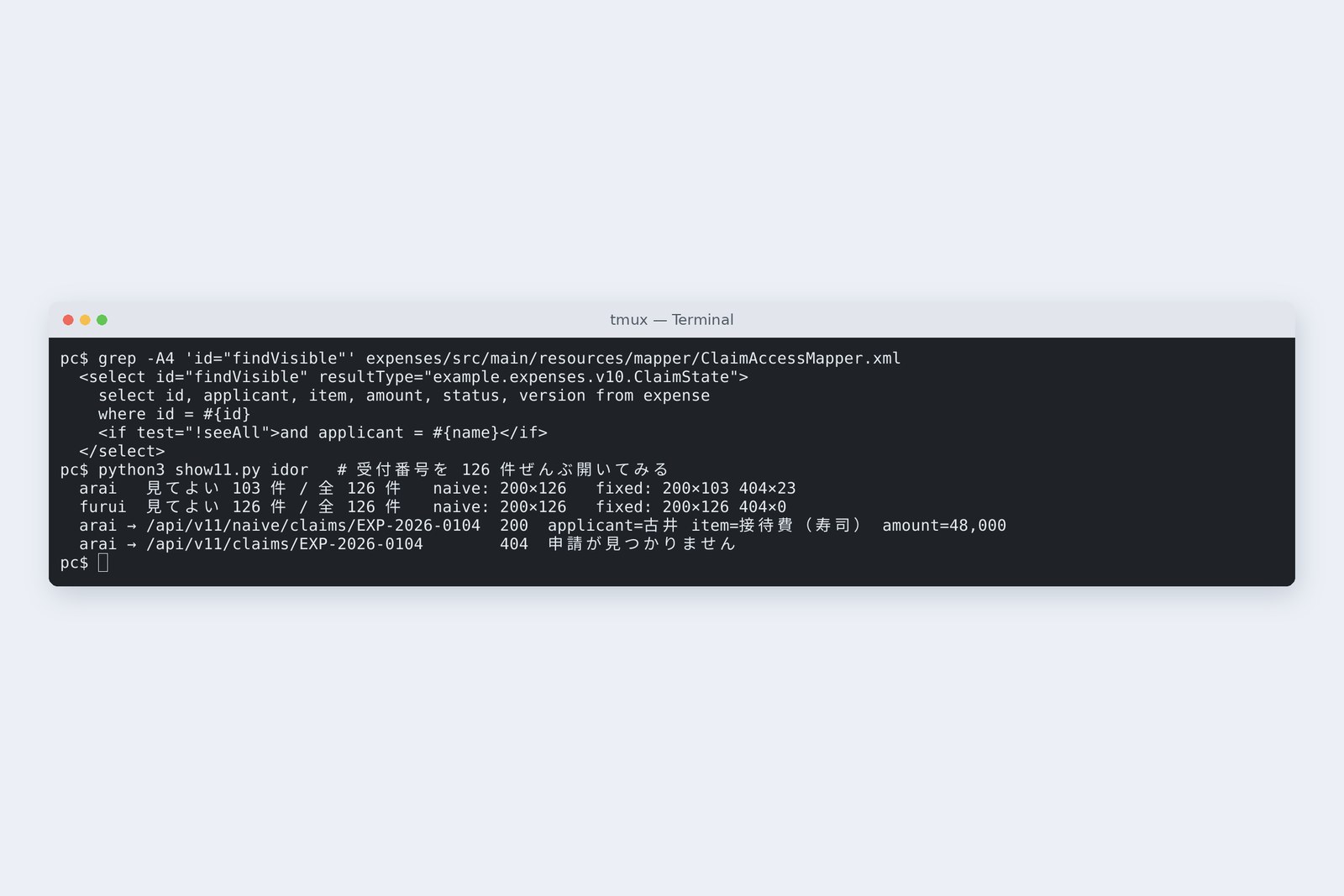
  arai   may see 103 / 126   naive: 200×126   fixed: 200×103  404×23
  furui  may see 126 / 126   naive: 200×126   fixed: 200×126  404×0
  arai  GET /api/v11/naive/claims/EXP-2026-0104  → 200  applicant=古井  item=接待費(寿司)  amount=48,000
  arai  GET /api/v11/claims/EXP-2026-0104        → 404  申請が見つかりません
Through the counter that only checks login (naive), Arai could see all 126 claims, Furui's 48,000-yen sushi entertainment included. A hole where changing a number in a URL lets you reach someone else's things is called IDOR (Insecure Direct Object Reference). In the OWASP Top 10 (2021), “Broken Access Control”, which includes it, is number one.
# Fetching only claims you may see (ClaimAccessMapper.xml and SecureClaimService.java)
<select id="findVisible" resultType="example.expenses.v10.ClaimState">
  select id, applicant, item, amount, status, version from expense
  where id = #{id}
  <if test="!seeAll">and applicant = #{name}</if>
</select>

public ClaimState find(String id, LoginUser u) {  // not yours to see: the same 404 as “not there”
    ClaimState c = claims.findVisible(id, u.displayName(), seesAll(u));
    if (c == null) throw new ExpenseNotFoundException(id);
    return c;
}
The fix is for the storekeeper's where clause to fetch only what you may see: applicants their own claims, approvers and accounts everything, added with MyBatis's <if>. A claim you may not see gets 404, the same as “not there”, not 403, because a 403 admits that a claim with that number exists.
AraiThe screen only lists my own claims, so I thought it was fine.
FuruiThe screen is a display choice; the counter is the promise. Anyone can type a URL.
Don't approve your own claim
Even an approver must not approve his own claim. That depends not on the role but on the relationship between this claim and this person, so the gatekeeper's URL rules can't express it; the clerk checks it.
# Check it's yours to touch, then hand it to part 10's clerk
public ClaimState act(String id, Action action, LoginUser u) {
    ClaimState c = find(id, u);
    if (action == Action.SUBMIT && !c.applicant().equals(u.displayName())) throw new ExpenseNotFoundException(id);
    if (action == Action.APPROVE && c.applicant().equals(u.displayName())) throw new SelfApprovalException(id);  // your own claim
    return flow.act(id, action, u.getUsername());  // the history records who logged in
}
# Furui approves his own claim and one of Arai's
  furui  POST /api/v11/claims/EXP-2026-5101/approve  (applicant=古井)  → 403  自分の申請は承認できません
         history: (none)
  furui  POST /api/v11/claims/EXP-2026-5011/approve  (applicant=新井)  → 200  approved
         history: submitted→approved furui
# Logged-in Arai sends an approval with X-User: furui in the header
  → 403 Forbidden   DB status=submitted  history=0
Furui couldn't approve his own claim (5101) and got 403; Arai's claim (5011) got 200, and the history records furui. The name recorded is no longer the header's but whoever logged in. When logged-in Arai wrote furui in the header, the gatekeeper still treated him as Arai, and he got 403.
401, 403, 404
Gates a request passes (measured)
The gates get finer from top to bottom. The gatekeeper (Spring Security) stops “not logged in” and “wrong role” before the counter. “This claim and this person” can't be known without the database, so the storekeeper's where clause and the clerk check it.
The server decides who you are; don't trust names sent to you. Roles belong to the gatekeeper; the relationship between data and person belongs in the where clause. Others' things get 404, and their existence stays hidden.
How much to own yourself
In this part the application kept its own users table and passwords. In-house systems often use other approaches too.
| Approach | Good for | Watch out for |
|---|---|---|
| Your own login + session (this part) | small in-house systems, few users, no outside services | you own password storage, rate limits and the forgotten-password flow |
| OpenID Connect (leave it to the company's identity platform) | many employees, one login across systems (SSO), multi-factor authentication | authentication can be handed off; authorisation (roles and data relationships) stays in the application |
| A token (such as a JWT) sent every time | mobile apps, APIs called by other servers | hard to revoke midway; keep lifetimes short |
None of them prevents IDOR. Hand authentication off if you like; authorisation is still the application's job. Spring Security supports each approach with the same gatekeeper shape.
Checking on your own PC
| What to try | How to write it |
|---|---|
| See the browser cookie's flags | Developer tools → Application → Cookies (the HttpOnly and Secure columns) |
| Check passwords aren't stored in plain text | select username, left(password, 12) from app_user; |
| Find selects that fetch by id alone | grep -n -B2 -A3 'where id = #{id}' src/main/resources/mapper/*.xml |
| Find places that trust a name from a header | grep -rn 'RequestHeader' src/main/java |
Check for IDOR in your own application, with two users you created: log in as one, put the other's record number in the URL, and see that you get 404. Please don't try it on other people's services.
§ — On one page, and next time
- Trust a header's name and anyone becomes anyone.
- Authentication is “who”, authorisation is “may they”. The server decides who.
- Keep passwords as bcrypt hashes, slow on purpose (73 ms at strength 10).
- Renew the number at login and throw it away at logout. Writes need a token.
- Roles at the gatekeeper; data relationships in the where clause. Others' things get 404.
- Hand authentication off if you like; authorisation is the application's job.
AraiNow I'm really me.
FuruiNext time, files. We want to attach receipt photos to claims: names, sizes, contents, where to keep them. Files are more dangerous than you think.
References
- Spring Security — Reference
- Spring Security — Session Management
- Spring Security — Cross Site Request Forgery (CSRF)
- OWASP — Password Storage Cheat Sheet
- OWASP — Insecure Direct Object Reference Prevention Cheat Sheet
- OWASP Top 10:2021 — A01 Broken Access Control
- MyBatis 3 — Dynamic SQL(if)
The recordings were made on 31 October 2026 on a cloud Linux machine (Ubuntu 24.04, kernel 6.18) with Spring Boot 4.1.2 (Spring Framework 7.0.10, Spring Security 7.1.2, MyBatis 3.5.19, mybatis-spring-boot 4.1.0), OpenJDK 25.0.4 and PostgreSQL 16.15. The claims server and the database server are separate network spaces (network namespaces) inside one machine, about 0.04 ms apart. The IDOR checks were done only against the author's own practice application and database. Passwords and hashes are practice ones, and the hashes are shown cut short. The session numbers are from the time of capture and no longer work. Every number and output in the text is a real value read from the commands' output at the time. The characters are fictional.
Old-School Backend, part 11 — Authentication and authorisation / 2026.10