Old-School Backend / 2026 ・ No.12
Old-School Backend
Part 12: Files — receiving receipt photos without trusting their names or contents
Published
Expense claims need receipts, and we want to attach photos taken on a phone. But unlike text and numbers, a file's size, name and contents are all whatever the sender decides.
This time we write a naive upload that stores files under the name received, and measure, on our own practice application, overwrites, writes outside the storage folder, files whose contents don't match, receipts used twice, and drift between database and disk. Then we fix it: choose names ourselves, tell types apart by the first bytes, and catch reuse by fingerprint.
Attaching a receipt
AraiIt's just attaching a receipt photo. Receive it, drop it in a folder. Five minutes.
FuruiWho decides the name? The size? Is the content really a photo?
Arai…Whoever sends it.
FuruiExactly. So we check all of it.
The 15-part route map (you are here: part 12)
- Size — by default a 3.5 MB phone photo is refused, and a 12 MB one gets no reply at all (measured)
- Names — same names overwrite; names with ../ escape the storage folder (measured)
- Contents — a .jpg full of text was accepted as an “image” (measured)
- Reuse and drift — one receipt on two claims; a file left behind that never reached the DB (measured)
First, the naive version. The counter receives the file as multipart/form-data, the clerk drops it in a folder under the name received, and one catalogue row goes into the database. Login is last part's.
# The naive clerk (NaiveReceiptService.java)
@Transactional
public Receipt store(String expenseId, MultipartFile file, String user) throws IOException {
    String name = file.getOriginalFilename();
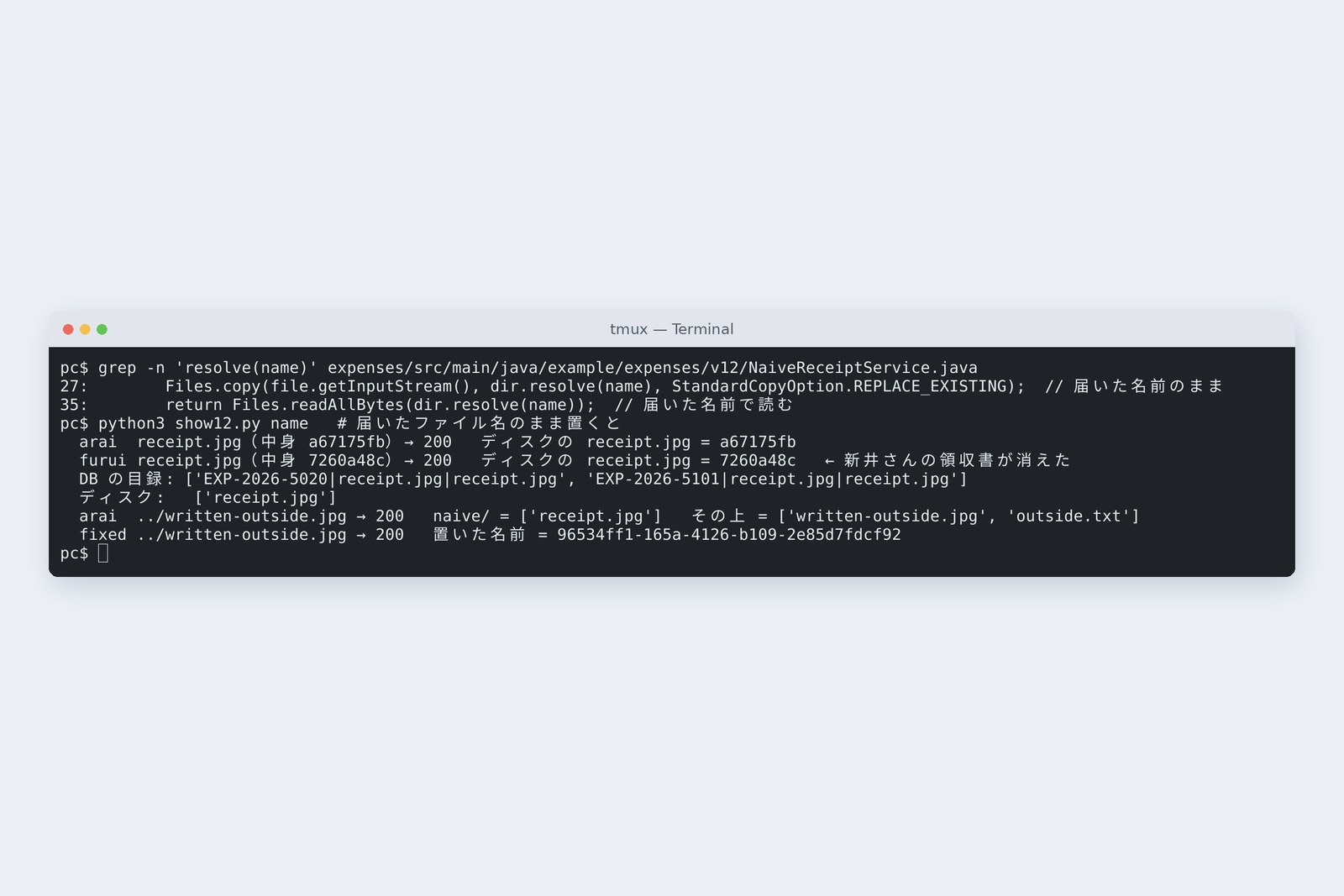
    Files.copy(file.getInputStream(), dir.resolve(name), StandardCopyOption.REPLACE_EXISTING);  // the name as received
    Receipt r = new Receipt(UUID.randomUUID().toString(), expenseId, name, file.getContentType(), file.getSize(),
            "-", name, user);
    receipts.insert(r);  // fail here and the file is already on disk
    return r;
}

public byte[] read(String name) throws IOException {
    return Files.readAllBytes(dir.resolve(name));  // read by the name received
}
# The catalogue table (setup12.sql)
-- Part 12: the receipt catalogue (the files live on disk), plus a bytea version for comparison
create table if not exists receipt (
  id            uuid          primary key,
  expense_id    varchar(20)   not null references expense(id),
  original_name varchar(100)  not null,
  content_type  varchar(100),
  size          bigint        not null,
  sha256        char(64)      not null,
  stored_name   varchar(255)  not null,
  uploaded_by   varchar(30)   not null,
  created_at    timestamptz   not null default now()
);
Size limits
We sent three files: a receipt image (0.04 MB), something the size of a phone photo (3.54 MB), and a big photo (12.05 MB).
# Three sizes under three settings (Arai, naive counter)
                   receipt-small 0.04 MB     photo-phone 3.54 MB       photo-big 12.05 MB
  defaults         200                       413                       no reply (cut off midway)
  raised to 10MB   200                       200                       no reply (cut off midway)
  + swallow 20MB   200                       200                       413
Size limits, and the photo that got no reply (measured)
Spring Boot's default is 1 MB per file, so the phone photo alone got 413 (too large). Raising the limit to 10 MB let it through, but the 12 MB photo got no reply at all. Before refusing, Tomcat reads and discards the rest of the body, but only up to 2 MB by default; beyond that it cuts the connection before writing a reply. The screen just says “network error”.
# Three lines added to application.properties
spring.servlet.multipart.max-file-size=10MB
spring.servlet.multipart.max-request-size=10MB
server.tomcat.max-swallow-size=20MB
Widening that discard allowance (swallow) to 20 MB brought a proper 413 with a reason for the 12 MB photo too. Set the limit from what the business needs, and it's kind to check the size on screen before sending as well.
Don't trust file names
Phones and scanners tend to use similar names. What if Arai and Furui both send receipt.jpg? And what if the name contains ../?
# Storing under the name received (naive)
  arai   receipt.jpg (md5 a67175fb) → EXP-2026-5020  200   disk receipt.jpg = a67175fb
  furui  receipt.jpg (md5 7260a48c) → EXP-2026-5101  200   disk receipt.jpg = 7260a48c  ← Arai's receipt is gone
  DB:   EXP-2026-5020|receipt.jpg|receipt.jpg   EXP-2026-5101|receipt.jpg|receipt.jpg
  disk: receipt.jpg
  arai   ../written-outside.jpg → 200   store/naive/ = ['receipt.jpg']   store/ = ['written-outside.jpg', 'outside.txt']
# The same name, through the fixed version
  arai   ../written-outside.jpg → 200   originalName = ../written-outside.jpg   store/receipts/ = ['32005963-9319-4470-877a-0aaae252428a']
What happened in the storage folder
Two catalogue rows, one file on disk: Arai's receipt was silently overwritten by Furui's. Tomcat and Spring passed the name ../written-outside.jpg through as it was, and the file was written outside the storage folder.
The fix: choose the stored name yourself. The fixed version names files with a UUID (a number that won't collide) and keeps the original name in the catalogue for display only.
Check the contents
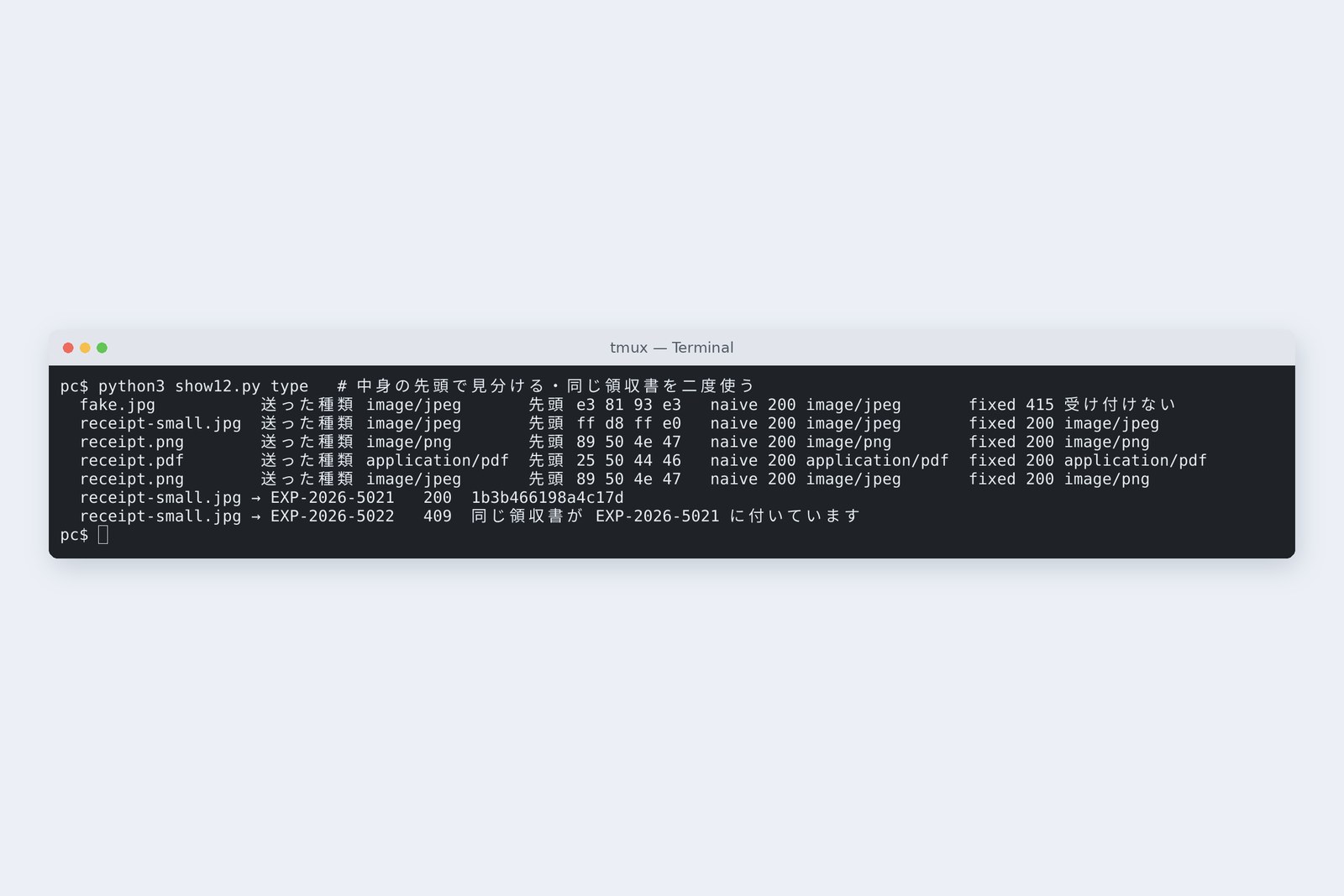
The Content-Type that arrives with a file (image or PDF) is, like the name, the sender's own claim, and so is the extension. We sent fake.jpg, which contains text, as “image/jpeg”.
# Contents versus the Content-Type sent
  fake.jpg          image/jpeg       e3 81 93 e3   naive 200 image/jpeg       fixed 415 rejected
  receipt-small.jpg image/jpeg       ff d8 ff e0   naive 200 image/jpeg       fixed 200 image/jpeg
  receipt.png       image/png        89 50 4e 47   naive 200 image/png        fixed 200 image/png
  receipt.pdf       application/pdf  25 50 44 46   naive 200 application/pdf  fixed 200 application/pdf
  receipt.png       image/jpeg       89 50 4e 47   naive 200 image/jpeg       fixed 200 image/png
# Telling types apart by the first bytes (FileType.java)
public static String detect(byte[] h) {
    if (h.length >= 3 && (h[0] & 0xff) == 0xFF && (h[1] & 0xff) == 0xD8 && (h[2] & 0xff) == 0xFF) return "image/jpeg";
    if (h.length >= 8 && (h[0] & 0xff) == 0x89 && h[1] == 'P' && h[2] == 'N' && h[3] == 'G') return "image/png";
    if (h.length >= 5 && h[0] == '%' && h[1] == 'P' && h[2] == 'D' && h[3] == 'F' && h[4] == '-') return "application/pdf";
    return null;  // not accepted as a receipt
}
The naive version accepted a text file as an image, and recorded a PNG as JPEG because it was told so. The fixed version looks at the first bytes: JPEG starts ff d8 ff, PNG 89 50 4e 47, PDF %PDF-. Anything else gets 415, and the recorded type comes from the contents, not the claim.
A correct start doesn't make the whole file safe. In business systems you may also add virus scanning, or load and redraw images.
Don't use a receipt twice
A problem peculiar to expense claims: what if the same receipt goes on another claim too? That's a double claim. The fixed version takes the contents' fingerprint (SHA-256) on receipt and records it in the catalogue.
# Attaching the same receipt to two claims
  receipt-small.jpg → EXP-2026-5021   200  sha256 1b3b466198a4c17d…
  receipt-small.jpg → EXP-2026-5022   409  同じ領収書が EXP-2026-5021 に付いています
Attaching the same photo to 5022 matched the fingerprint of 5021's receipt and got 409. Renaming doesn't change the fingerprint. A re-taken photo does, though, so this stops accidents; approvers still need to look at amounts and dates.
Return by number, too
Once files come in, you need a counter to show them. The naive version takes a name and returns that file.
# The counter that returns by name (naive)
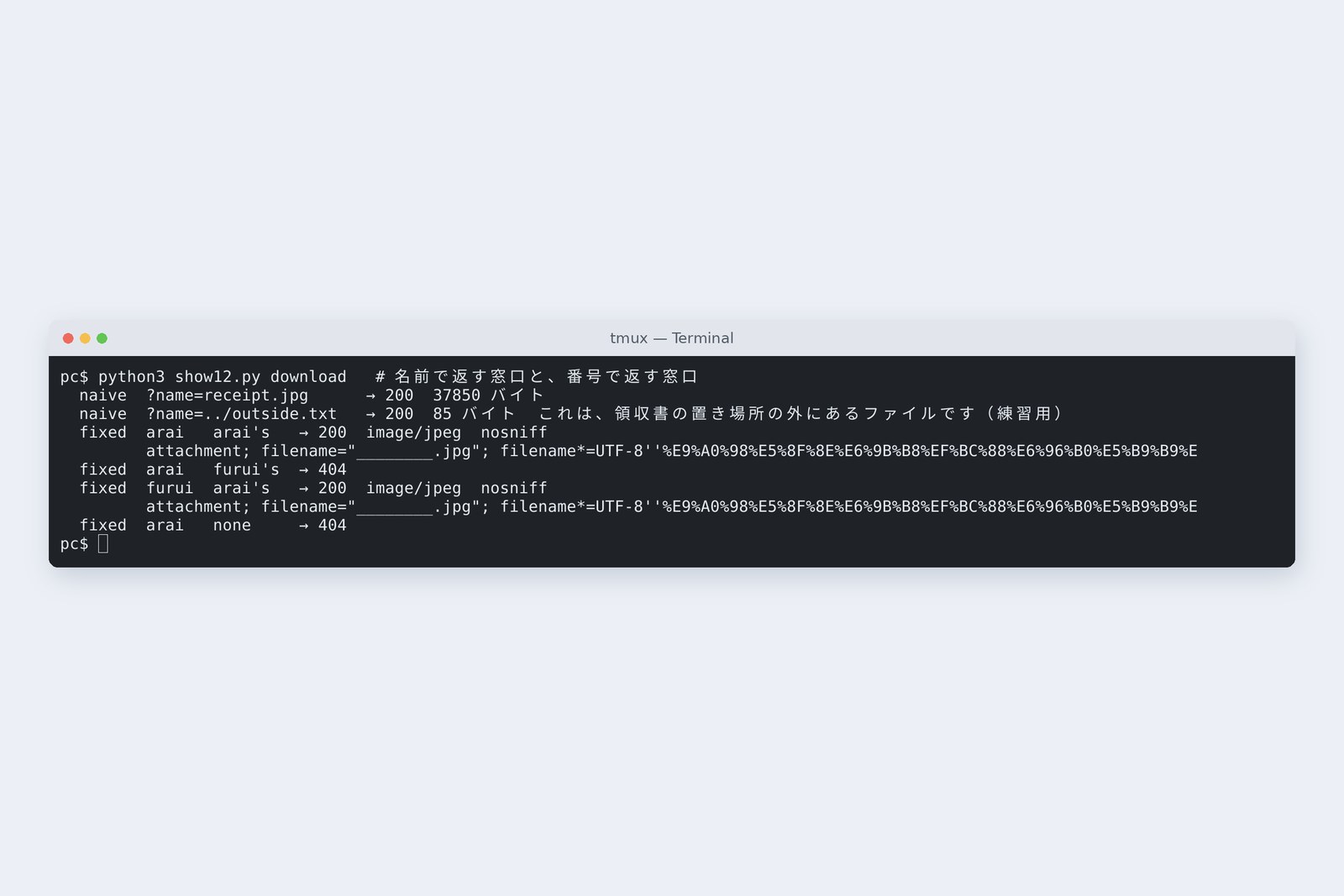
  GET /api/v12/naive/files?name=receipt.jpg     → 200  37850 bytes
  GET /api/v12/naive/files?name=../outside.txt  → 200  85 bytes  これは、領収書の置き場所の外にあるファイルです(練習用)
# The counter that returns by number (fixed)
  arai   → arai's   receipt  200
           Content-Type: image/jpeg
           Content-Disposition: attachment; filename="________.jpg"; filename*=UTF-8''%E9%A0%98%E5%8F%8E%E6%9B%B8%EF%BC%88%E6%96%B0%E5%B9%B9%E7%B7%9A%EF%BC%89.jpg
           X-Content-Type-Options: nosniff
           Cache-Control: no-cache, no-store, max-age=0, must-revalidate
  arai   → furui's  receipt  404
  furui  → arai's   receipt  200
           Content-Type: image/jpeg
           Content-Disposition: attachment; filename="________.jpg"; filename*=UTF-8''%E9%A0%98%E5%8F%8E%E6%9B%B8%EF%BC%88%E6%96%B0%E5%B9%B9%E7%B7%9A%EF%BC%89.jpg
           X-Content-Type-Options: nosniff
           Cache-Control: no-cache, no-store, max-age=0, must-revalidate
  arai   → none     receipt  404
# Returning by number (V12Controller.java)
@GetMapping("/api/v12/receipts/{rid}")
public ResponseEntity<FileSystemResource> download(@PathVariable String rid, @AuthenticationPrincipal LoginUser u) {
    Receipt r = receipts.find(rid, u);
    return ResponseEntity.ok()
            .contentType(MediaType.parseMediaType(r.contentType()))  // the type decided from the contents
            .header(HttpHeaders.CONTENT_DISPOSITION, ContentDisposition.attachment()
                    .filename(r.originalName(), StandardCharsets.UTF_8).build().toString())  // the name to save as
            .body(new FileSystemResource(receipts.path(r)));
}
The by-name counter returned a file outside the storage folder through ../outside.txt. Returning configuration or key files the same way is the hole called path traversal (here we checked it only in our own practice environment, with a harmless file placed for the purpose).
The fixed version takes a catalogue number. It looks up the catalogue row, uses part 11's clerk to check that you may see the receipt's claim, and answers 404 if not. The reply carries the type decided from the contents, attachment (save rather than open), filename* for Japanese names, and nosniff, which stops the browser guessing the type. nosniff and the no-cache instructions were added by Spring Security.
The receiving flow, and drift
Files live outside the database, so they're not part of its transactions. What if a file is left behind without a catalogue row? We made the name 150 characters (the catalogue column holds 100) so the insert would fail.
# Sending a 150-character name (the catalogue column holds 100)
  naive  → 500   receipt rows = 0   files on disk = 1
  fixed  → 500   receipt rows = 0   files on disk = 0
  ERROR: value too long for type character varying(100)
The naive version stores the file first and then the row, so after the 500 a file belonging to no one stayed on disk. The fixed version writes a temp file, checks, inserts the row, and only then moves the file to its own name. When the insert failed, the temp file was removed and nothing was left (the name length really should get a 400 at the door).
# The fixed clerk (store in ReceiptService.java)
@Transactional
public Receipt store(String expenseId, MultipartFile file, LoginUser u) throws IOException {
    claims.find(expenseId, u);  // a claim you may see? (part 11) if not, 404
    String type;
    try (InputStream in = file.getInputStream()) {
        type = FileType.detect(in.readNBytes(8));  // judge the type by the first 8 bytes
    }
    if (type == null) throw new ReceiptRejectedException(HttpStatus.UNSUPPORTED_MEDIA_TYPE, "JPEG・PNG・PDF だけ受け付けます");
    Path tmp = Files.createTempFile(dir, "up-", ".part");
    try {
        String sha = copyWithSha256(file, tmp);  // write a temp file while fingerprinting the contents
        Receipt same = receipts.findBySha(sha);
        if (same != null) throw new ReceiptRejectedException(HttpStatus.CONFLICT, "同じ領収書が " + same.expenseId() + " に付いています");
        String id = UUID.randomUUID().toString();  // we choose the stored name ourselves
        Receipt r = new Receipt(id, expenseId, file.getOriginalFilename(), type, file.getSize(), sha, id, u.getUsername());
        receipts.insert(r);
        Path dest = dir.resolve(id);
        Files.move(tmp, dest, StandardCopyOption.ATOMIC_MOVE);
        deleteIfRolledBack(dest);  // if the DB rolls back, delete the file too
        return r;
    } finally {
        Files.deleteIfExists(tmp);
    }
}
How the fixed version receives a file (measured)
For a commit that fails after the move, it also registers a cleanup that deletes the file if the transaction is rolled back. Even so, something like a power cut can leave drift. A standard answer is a separate nightly job that finds files missing from the catalogue and tidies them away.
Where to keep files
You can also put the files themselves in the database (bytea). We compared with twenty photos of about 0.94 MB.
# Twenty photos of about 0.94 MB each, to disk and to the DB (bytea)
  disk      468 ms     18,753,622 bytes
  bytea    1043 ms     19,529,728 bytes  (pg_total_relation_size)
  src                  18,753,622 bytes
| Where | Good for | Watch out for |
|---|---|---|
| The server's disk (this part) | one server, not too many files | two servers need shared storage; back up separately from the DB |
| The database (bytea) | few files that must always disappear with their rows | 2.2 times the time here; the DB and its backups grow by every photo |
| Object storage (S3-compatible and so on) | several servers, large volumes, long retention | the same drift cleanup; permission checks before showing are still the application's job |
With files, size, name and contents are all the sender's choice. Name them yourself, tell types apart by their first bytes, and catch reuse by fingerprint. Return them by number and permission. Disk and database never share a transaction, so write the cleanup for drift as well.
Checking on your own PC
| What to try | How to write it |
|---|---|
| See a file's first bytes | head -c 8 receipt.jpg | xxd |
| Take a file's fingerprint | sha256sum receipt.jpg |
| Find places that turn received names into paths | grep -rn 'getOriginalFilename' src/main/java |
| Find files missing from the catalogue | compare the disk listing with select stored_name from receipt |
In the browser's developer tools, look at a download reply's Content-Type, Content-Disposition and X-Content-Type-Options: you'll see that the server decides how the file is shown.
§ — On one page, and next time
- The default limit is 1 MB per file, refusing phone photos; Tomcat discards only 2 MB.
- Storing under the name received means overwrites and escapes from the folder. Name files yourself.
- Judge the type by the first bytes; Content-Type and extensions are self-declared.
- A fingerprint (SHA-256) of the contents catches a receipt used twice.
- Return files by number and permission; returning by name returns things outside the folder.
- Don't store the file first. Write the cleanup for drift.
AraiFive minutes, I said. It took all day.
FuruiWell done. By the way, when the 12 MB photo got no reply, what do you think the server log said? Next time: logging and monitoring, so that when things go wrong you can read afterwards what happened.
References
- Spring Framework — Multipart
- Spring Boot — Common Application Properties(spring.servlet.multipart.*、server.tomcat.max-swallow-size)
- Apache Tomcat 11 — The HTTP Connector(maxSwallowSize)
- OWASP — File Upload Cheat Sheet
- OWASP — Path Traversal
- RFC 6266 — Content-Disposition in HTTP
- PostgreSQL 16 — Binary Data Types(bytea)
The recordings were made on 31 October 2026 on a cloud Linux machine (Ubuntu 24.04, kernel 6.18) with Spring Boot 4.1.2 (Spring Framework 7.0.10, Tomcat 11.0.27, Spring Security 7.1.2, MyBatis 3.5.19), OpenJDK 25.0.4 and PostgreSQL 16.15. The claims server and the database server are separate network spaces (network namespaces) inside one machine, about 0.04 ms apart. Writing and reading outside the storage folder were checked only on the author's practice application, with a harmless file placed for the purpose. The photos are practice images made from random numbers, and the receipts were drawn for practice. Every number and output in the text is a real value read from the commands' output at the time. The characters are fictional.
Old-School Backend, part 12 — Files / 2026.10