Dev Guide / 2026 ・ No.05
Docker from the basics to practice
How it works, and how it changes developing, deploying and maintaining a Java web system
Published
"It works on my machine but not on the server." "Setting up a new team member takes a whole day."
"We should upgrade the production middleware, but nobody dares touch it."
Docker shrinks all of these everyday problems. This guide first explains how Docker works and the terms you need,
then the situations it is used in, and finally takes a client web system built with Spring Boot and Vue
to show, with a sample we actually ran, what gets easier in development, deployment, operations and maintenance.
What Docker is
Docker packs an application and everything it needs to run (OS libraries, a runtime such as Java, configuration files) into one box, a container, that runs the same way anywhere. Released in 2013, it is now the standard way to ship and run applications.
Think of shipping containers. Furniture or food, once it is in a standard box it travels the same way by ship, truck or train. A Docker container is the same: a Java app or a database, it starts with the same steps on any machine that has Docker.
Docker's value is that the environment travels with the app. "Java 25, these library versions, this configuration" is one unit, so the same thing runs on a developer's PC, the staging server and production. Most "works on my machine" problems end here.
How it works: containers versus virtual machines
Virtual machines have long offered "a whole environment". The difference is how much OS each one carries.
A VM brings an OS; a container brings just the app
Containers isolate processes with Linux kernel features: namespaces limit what they see, cgroups limit CPU and memory
| Virtual machine | Container | |
|---|---|---|
| Start-up | Tens of seconds to minutes (an OS boots) | Seconds or less (a process starts) |
| Size | Gigabytes | Tens to hundreds of MB |
| Per machine | A few to a dozen or so | Dozens or more |
| Isolation | Strong (separate kernel) | Weaker than a VM (shared kernel) |
| OS inside | Windows or Linux | Mainly Linux (uses the host kernel) |
Neither is better; they do different jobs. In the cloud and on-premises alike, Docker on top of VMs is entirely normal: VMs divide the machines, containers divide the applications.
Terms worth knowing
From Dockerfile to container
build, push, pull and run are the docker commands themselves
| Term | Meaning | Analogy |
|---|---|---|
| Image | A read-only template of the app and its environment, built in layers so shared parts are reused | A frozen meal kit |
| Container | A running instance of an image. Start as many as you like; they are meant to be thrown away and recreated | The plate you serve |
| Dockerfile | A text file saying how to build the image: which base to start from, what to copy, what to run | The recipe |
| Registry | Where images are stored: the public Docker Hub, AWS ECR, GitHub's GHCR, an in-house Harbor and so on | The cold store |
| Tag | An image's version name, the 18 in postgres:18 | The label |
| Volume | Storage that survives when containers are removed; database data lives here | An external store room |
| Network | A virtual network between containers. In Compose they reach each other by service name (db and so on) | Office extensions |
| Docker Compose | Describe a set of containers in compose.yaml and start them all with docker compose up | The set menu |
| Docker Engine | The core that runs containers (daemon and CLI). What you install on Linux servers; open source | The kitchen |
| Docker Desktop | For Windows and Mac: Engine, a GUI and a small Linux VM in one package | A home kitchen kit |
Images follow the industry-standard OCI format, so an image built with Docker also runs on Podman, Kubernetes and other tools.
Where Docker shines
| Use | Why it helps |
|---|---|
| Consistent dev environments | The whole team uses the same database and middleware versions. New members just run docker compose up |
| Automated testing | Start a real, throwaway database for every test run (Testcontainers) and catch SQL bugs that mocks miss |
| CI/CD | Build and test in a clean environment every time; the resulting image is the deliverable |
| Production deployment | Ship exactly the image you tested; roll back by switching to the previous tag |
| Versions side by side | Client A on Java 21 and client B on Java 25 can run on one PC or server without clashing |
| Disposable test environments | Spin up environments for bug reproduction, demos or training, and remove them just as fast |
| Microservices | Different languages and libraries per service, one way to ship and run them |
| Keeping old systems alive | Freeze an old runtime in an image and move it to new hardware, buying time to migrate |
| Data analysis, AI | Ship awkward combinations of Python and GPU libraries as an image |
On Windows, Mac and Linux
| OS | What to install | Notes |
|---|---|---|
| Linux (servers) | Docker Engine (free, open source) | The usual choice for production; containers run natively |
| Windows | Docker Desktop (uses WSL 2) | Keep source code inside WSL for faster file access |
| Mac | Docker Desktop | Apple Silicon uses arm64 images |
| Alternatives | Rancher Desktop, Podman Desktop and others | Free and open source; Compose files mostly work |
Docker Desktop needs a paid subscription for work in organisations with 250 or more employees or US$10 million or more in annual revenue (it is free for personal use, education, non-commercial open source and smaller companies). Docker Engine on Linux servers is not covered by this. Docker Hub also limits pulls: 100 per 6 hours per IP address without signing in, 200 for a free account. A private registry or cache for CI is a sensible precaution.
A Java web system: where Docker fits
From here on, the example is a business web system for a client (a CRM for managing customers). It uses what many Java projects use today: a Spring Boot (Java) API, Vue screens and a PostgreSQL database.
One container per service
web is the entry point: it serves the screens and forwards /api to app
| Part | How Docker is used | Example images |
|---|---|---|
| Dev environment | Run only the database and middleware in containers; run the app in the IDE for easy debugging | Collected in compose.yaml |
| Database | Same product and major version as production on every PC, plus throwaway copies for tests | postgres, mysql, mariadb; for Oracle, gvenzl/oracle-free |
| Middleware | Add caching, messaging, search, authentication or file storage as needed | redis, rabbitmq, elasticsearch, keycloak, minio |
| Dev tools | Things production doesn't need: email testing, a database admin UI | mailpit, pgadmin |
| The app | Package the Spring Boot jar with its Java runtime | Based on eclipse-temurin (JRE) |
| The screens | Serve the built Vue files with nginx, which also forwards API calls | Build with node, serve with nginx |
| Batch jobs | Night-time aggregation and the like: the same image started differently | Same image as app |
| CI | Build, test and create images in the same environment every time | GitHub Actions, GitLab CI, Jenkins |
| Staging, production | Compose on a single server; a container platform for larger setups | Compose, Kubernetes, ECS and others |
The sample in this guide (Spring Boot 4.1.1 on Java 25, Vue 3, nginx 1.30, PostgreSQL 18) was built, started, upgraded and rolled back for real on Docker Engine 29 with Compose v5.
Step 1: put the dev database in a container
Start where the payoff is biggest and the risk smallest: containerise just the database. Put this compose.yaml at the root of the project.
# crm/compose.yaml (development: database only)
services:
  postgres:
    image: postgres:18          # same major version as production
    environment:
      POSTGRES_DB: crm
      POSTGRES_USER: crm
      POSTGRES_PASSWORD: secret
    ports:
      - "5432"                  # mapped to a free port on your PC
Spring Boot has Docker Compose support (spring-boot-docker-compose). Add the dependency and, when you start the app from the IDE, Spring Boot runs docker compose up itself and points the database connection at the container. You don't even write the connection details in application.properties.
# Log at application start (excerpt, real output)
DockerComposeLifecycleManager : Using Docker Compose file .../crm/compose.yaml
DockerCli : Container crm-postgres-1 Started
DockerCli : Container crm-postgres-1 Healthy
DbMigrate : Migrating schema "public" to version "1 - create customer"
CrmApplication : Started CrmApplication in 7.271 seconds
For tests there is Testcontainers: a real PostgreSQL starts only while the tests run and is cleaned up afterwards. In Spring Boot, adding @ServiceConnection wires up the connection.
// Test configuration (much as Spring Initializr generates it)
@TestConfiguration(proxyBeanMethods = false)
class TestcontainersConfiguration {
    @Bean
    @ServiceConnection
    PostgreSQLContainer postgresContainer() {
        return new PostgreSQLContainer(DockerImageName.parse("postgres:18"));
    }
}
A new team member needs only Docker, a JDK and an IDE. No more runbooks for "install PostgreSQL, create a user, set the encoding...". Create the tables with a migration tool such as Flyway at application start, and everyone begins from the same state.
Step 2: turn the app into an image
Next, the Spring Boot app itself. The key is a multi-stage build: one stage to build (JDK and Maven), one to run (JRE only), so the production image carries neither compiler nor source.
# crm/Dockerfile
# syntax=docker/dockerfile:1

# ---- 1. Build stage (JDK and Maven make the jar) ----
FROM eclipse-temurin:25-jdk AS build
WORKDIR /src
COPY .mvn/ .mvn/
COPY mvnw pom.xml ./
RUN --mount=type=cache,target=/root/.m2 ./mvnw -B -q dependency:go-offline
COPY src/ src/
RUN --mount=type=cache,target=/root/.m2 ./mvnw -B -q -DskipTests package

# ---- 2. Runtime stage (a small JRE-only image) ----
FROM eclipse-temurin:25-jre
WORKDIR /app
RUN useradd --system --uid 10001 app
COPY --from=build /src/target/crm-*.jar app.jar
USER app
EXPOSE 8080
ENTRYPOINT ["java", "-XX:MaxRAMPercentage=75", "-jar", "app.jar"]
- Copy the dependency list first: if pom.xml hasn't changed, dependency download comes from cache. A small code change rebuilds in seconds to tens of seconds
- Don't run as root: a dedicated user (app) limits the damage if something goes wrong
- Size memory as a share: -XX:MaxRAMPercentage=75 caps the heap at 75% of the container's memory
- Or skip the Dockerfile: Spring Boot's ./mvnw spring-boot:build-image builds an image with Buildpacks
The Vue screens follow the same idea: build with node, then put only the static output into an nginx image.
# web/Dockerfile
FROM node:24-alpine AS build
WORKDIR /web
COPY package*.json ./
RUN npm ci
COPY . .
RUN npm run build

FROM nginx:1.30-alpine
COPY nginx.conf /etc/nginx/conf.d/default.conf
COPY --from=build /web/dist /usr/share/nginx/html
# web/nginx.conf
server {
    listen 80;
    root /usr/share/nginx/html;

    location / {                       # Vue screens (SPA)
        try_files $uri $uri/ /index.html;
    }
    location /api/ {                   # API goes to the Spring Boot container
        proxy_pass http://app:8080;
        proxy_set_header Host $host;
        proxy_set_header X-Forwarded-For $proxy_add_x_forwarded_for;
        proxy_set_header X-Forwarded-Proto $scheme;
    }
}
The app in proxy_pass http://app:8080 is the service name in the Compose file below. No IP addresses: containers find each other by name.
Step 3: describe production with Compose
For anything that fits on one server, Docker Compose is the easiest option. Staging and production get the same compose.yaml.
# deploy/compose.yaml (staging and production)
services:
  web:                      # Vue screens + entry point (nginx)
    image: registry.example.com/crm/web:${TAG}
    ports:
      - "80:80"
    depends_on:
      - app
    restart: unless-stopped

  app:                      # The Spring Boot business app
    image: registry.example.com/crm/app:${TAG}
    environment:
      SPRING_DATASOURCE_URL: jdbc:postgresql://db:5432/crm
      SPRING_DATASOURCE_USERNAME: crm
      SPRING_DATASOURCE_PASSWORD: ${DB_PASSWORD}
      TZ: Asia/Tokyo
    depends_on:
      db:
        condition: service_healthy   # start once the database is ready
    restart: unless-stopped

  db:                       # PostgreSQL (data kept in a volume)
    image: postgres:18
    environment:
      POSTGRES_DB: crm
      POSTGRES_USER: crm
      POSTGRES_PASSWORD: ${DB_PASSWORD}
      TZ: Asia/Tokyo
    volumes:
      - db-data:/var/lib/postgresql
    healthcheck:
      test: ["CMD-SHELL", "pg_isready -U crm -d crm"]
      interval: 5s
      retries: 10
    restart: unless-stopped

volumes:
  db-data:
# deploy/.env (one per server; not in Git)
TAG=1.0.0
DB_PASSWORD=change-me
- The version lives in one place, TAG: .env decides which release runs
- Passwords stay out of the file: pass them through .env or a secrets mechanism, never in the Compose file
- PostgreSQL 18 volumes: from 18 the data location changed; mount the volume at /var/lib/postgresql (17 and earlier used /var/lib/postgresql/data)
- restart: unless-stopped: containers come back by themselves after a server reboot or a crash
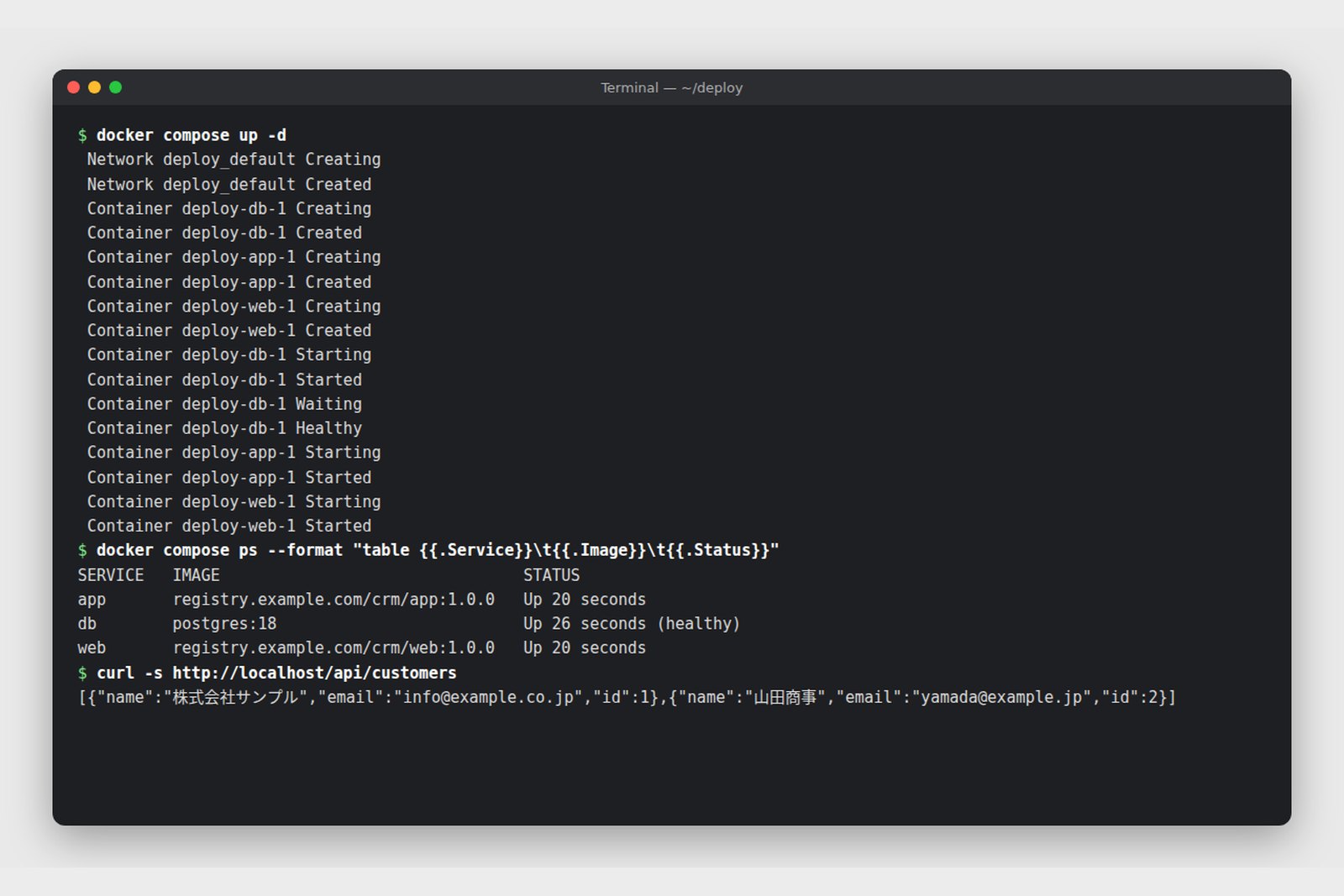
One command starts it all: docker compose up -d. The screen at the top of this guide is the real output; note that the app waits for the database to report healthy.
How deployment changes
Build once, ship the same thing everywhere
Besides private Docker Hub repositories, cloud and in-house registries work too
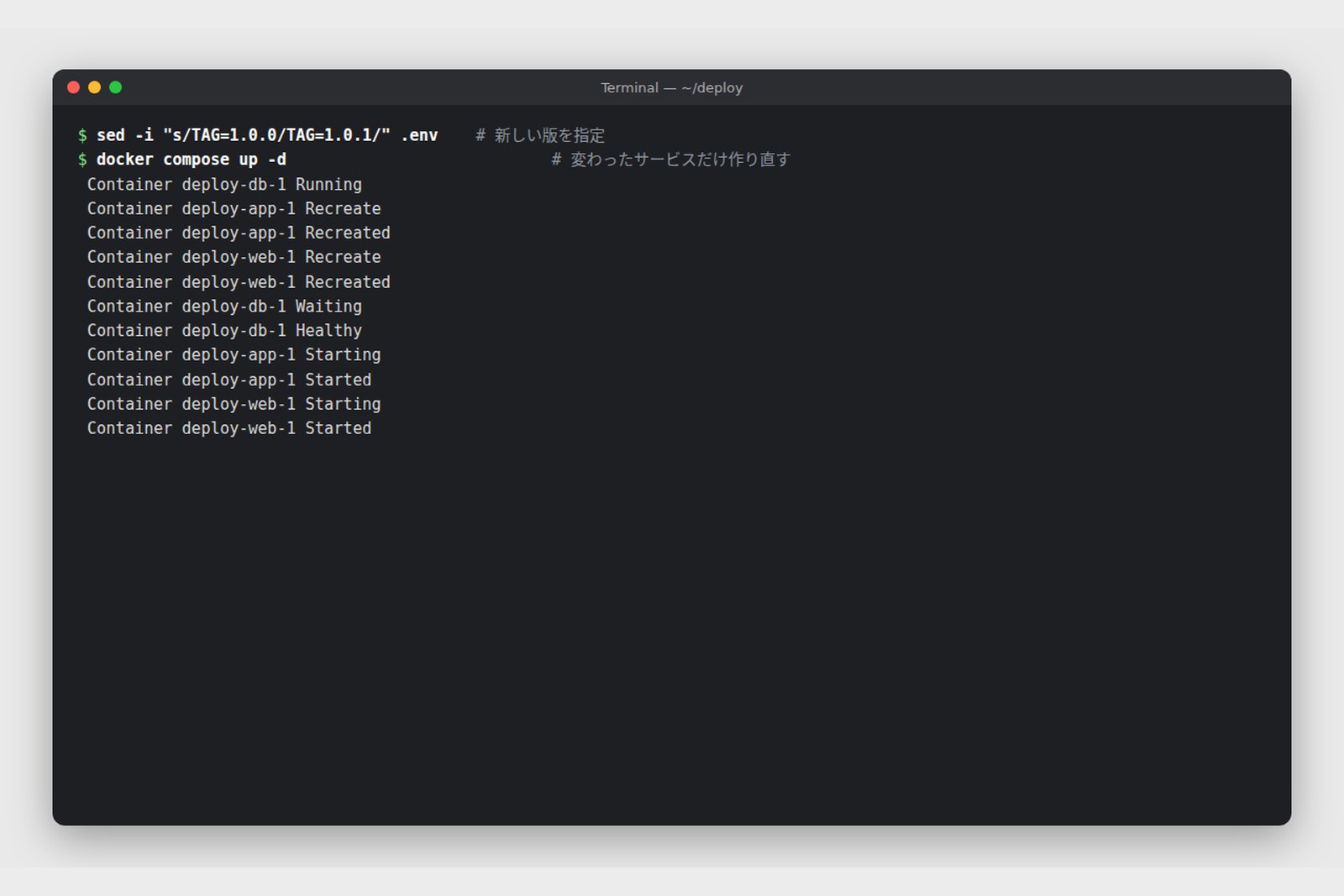
An upgrade is a matter of changing TAG in .env and running docker compose up -d again. Only the services that changed are recreated; the database keeps running.
| Before | With Docker | |
|---|---|---|
| What you ship | A war or jar, plus a runbook (Java and Tomcat settings) | One image, runtime included |
| The work | Log in to servers; copy, configure and restart by hand | Change TAG, run docker compose up -d |
| Drift from staging | Java and library versions differ between servers | The same image in staging and production |
| Rollback | Find the old war, redeploy it, revert the settings | Set TAG back (tens of seconds) |
| A new server | Build up from the OS; days | Install Docker, drop in two files; tens of minutes |
| Who can deploy | Whoever knows the runbook | Short steps, same result whoever runs them |
For releases that change the data structure (adding a table, say), let Flyway or a similar tool apply the change at application start, and swapping the image is all it takes. Decide in advance how the database will be rolled back: make changes reversible, or back up before upgrading.
How operations and maintenance change
Operations
- Status at a glance: docker compose ps for every service, docker compose logs -f app for the app's logs; the same commands on every server
- Self-healing: restart policies and health checks bring crashed containers back
- Fewer environment-specific incidents: OS and library differences, the usual cause of "garbled only in production" or "fails only in production", disappear
- Resource limits: cap CPU and memory per container so one runaway doesn't take everything down
- The same image at any scale: as users grow, move the same image to Kubernetes or a cloud container service
Maintenance
| Common task | How it goes with Docker |
|---|---|
| Upgrading Java (say 21 to 25) | Change FROM eclipse-temurin:21-jre to 25-jre, build and try it in staging; if it fails, go back to the old tag |
| Security patches | Update the base image, rebuild and redeploy; no more patching each server's OS by hand |
| Vulnerability checks | Docker Scout or Trivy list known vulnerabilities in an image's components, and can run in CI |
| Middleware upgrades (database, nginx) | Build a complete staging environment on the new tags and compare it with production. Planning ahead of end of support (EOSL) gets easier |
| Several clients | Even with different versions per client, one PC can switch between client A's and B's environments to reproduce a bug |
| Handovers | The Dockerfile and compose.yaml are the environment's design document; knowledge stops living in one person's head |
| Investigating incidents | Run the production image locally and reproduce the problem under the same conditions |
The biggest maintenance win is that upgrading and going back become cheap. Old versions of Java, Spring Boot and databases linger because upgrades feel risky and stall. If you can build the new environment alongside, try it, and go back with one line, you can upgrade on schedule, before support ends.
Things to watch
| Risk | What to do |
|---|---|
| Losing data | Always keep database data in a volume. docker compose down -v deletes volumes too: never in production. Take separate backups (pg_dump and the like) |
| The latest tag | Its contents change under you. Pin versions such as postgres:18 |
| Secrets | Keep passwords and keys out of images and Git; use .env, Docker secrets or a cloud secret manager |
| Stale base images | Don't build once and forget. Rebuild regularly to pick up patches |
| Time zone, encoding | Containers default to UTC; set TZ=Asia/Tokyo and check the database encoding |
| Speed on Windows and Mac | Sharing lots of files with the host is slow. Keep source in WSL and use in-container build caches |
| Production scale | Compose is plenty for one server. For several servers, zero-downtime updates or autoscaling, consider Kubernetes or a cloud container service |
| Client environments | Some clients can't install Docker. Using it only for development, testing and staging still pays off |
There's no need to containerise everything at once. A good order is (1) the dev database, (2) tests with Testcontainers, (3) image builds in CI, (4) staging, (5) production, checking the benefit of each step before the next.
§ — On one page
- Docker packs an app and its environment into a container that runs the same anywhere. Unlike a VM it shares the OS kernel, so it is light and fast.
- The vocabulary in order: Dockerfile, build, image, push, registry, pull, run, container. Data goes in volumes; Compose ties containers together.
- In a Java web system Docker fits the dev database and middleware, tests, the app and screens, CI, staging and production. Start with the dev database.
- Deployment means shipping one image and managing tags. Upgrade or roll back by changing TAG and running up -d.
- Maintenance (Java and middleware upgrades, vulnerability fixes) becomes "try it, and go back if needed". Mind Docker Desktop licensing and Docker Hub pull limits.
References
- Docker Docs: What is Docker?
- Docker Docs: Docker Engine release notes
- Docker Docs: Docker Compose
- Docker Docs: Multi-stage builds
- Docker Docs: Docker Desktop license agreement
- Docker Docs: Docker Hub pull usage and limits
- Spring Boot 4.1.1: Development-time Services (Docker Compose)
- Spring Boot 4.1.1: Testcontainers
- Spring Boot Maven Plugin: Packaging OCI Images
- Docker Hub: eclipse-temurin
- Docker Hub: postgres
- Docker Hub: nginx
The sample was built, started, upgraded and rolled back on 9 October 2026 with Docker Engine 29.4 and Compose v5.1, using Spring Boot 4.1.1 (Java 25), Vue 3, nginx 1.30 and PostgreSQL 18. The screens are real output redrawn for legibility, and the registry name (registry.example.com) is an example. Docker Desktop licensing and Docker Hub limits follow the official documentation as of October 2026.
Dev Guide No. 5 — Docker from the Basics to Practice / 2026.10