Old-School Front-End · Frameworks / 2026 ・ No.01
Old-School Front-End: Frameworks
Part 1: Why frameworks were born — the same items table, written three ways and measured
Published
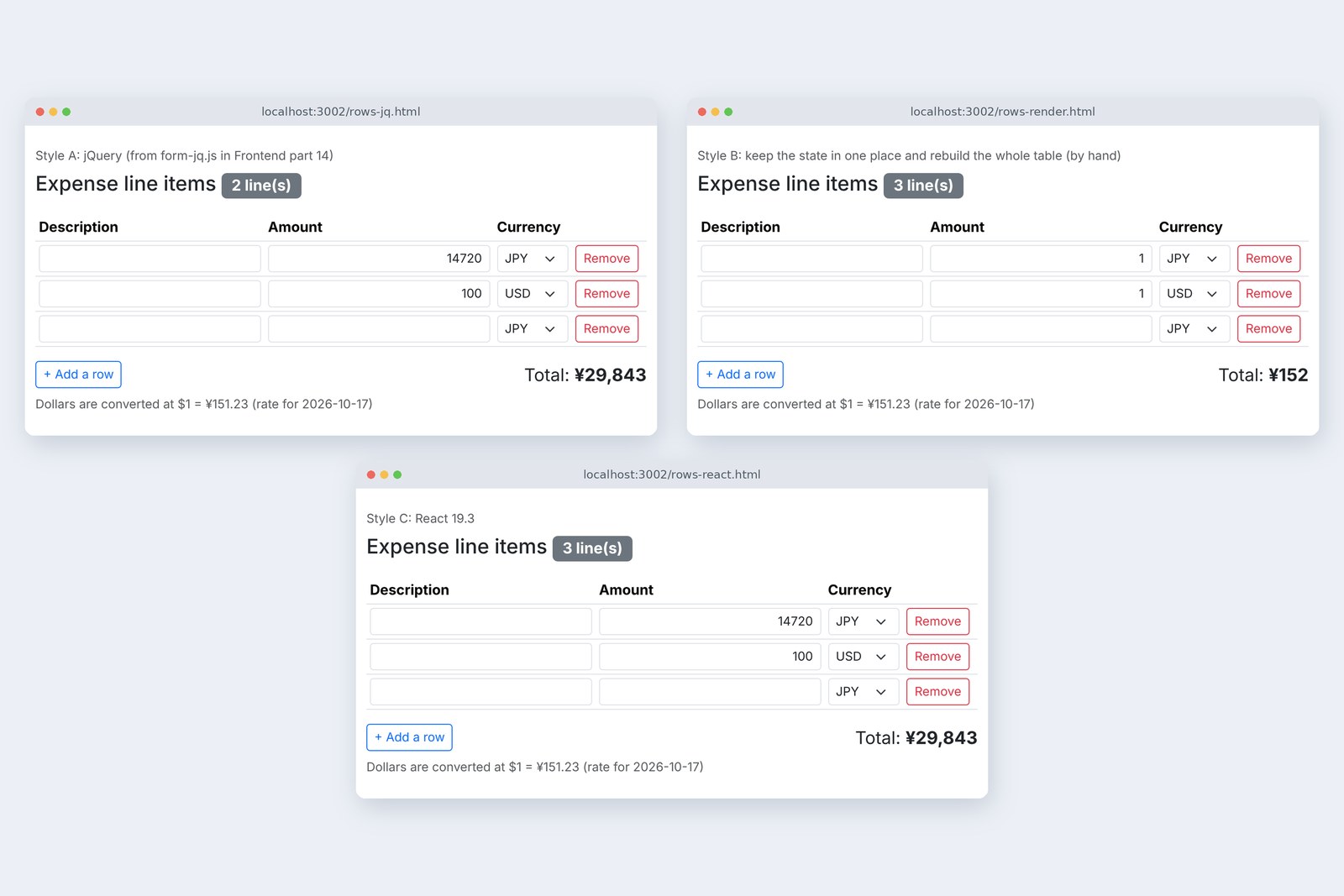
In the front-end series we built an expense claim form in plain JavaScript and jQuery. In the backend series we built the server that receives it. This new series goes back to the screen side, and its subject is frameworks. Over 15 parts it traces the history and the schools of thought, then looks closely at React and Next.js.
Part 1 asks why we need them at all. The claim form's items table is written three ways, with jQuery, by hand and with React. Each gets the same actions, and we measure where the screen drifts and where it slows down.
The front-end series' screen, again
AraiReact starts today! jQuery is old news, so let's rewrite everything.
FuruiWhether it's old can wait. First let's measure what about jQuery hurt enough for React to be born. Switch tools when nothing hurts, and all you gain is the new tool's pains.
Arai…I think I heard something like that last series, too.
A route map of all 15 parts (you are here: part 1)
The material is the jQuery claim form from front-end part 14 (form-jq.js). I took out just the items table (adding and removing rows, amount, currency, total) and wrote the same screen three ways.
- A jQuery — the items part of form-jq.js as it was (the front-end series' way)
- B by hand — keep the values in one variable and rebuild the whole table from it (no tools)
- C React — the same idea as B, handed to React 19.3
All three share the front-end series' app.js for the sums (yen and dollar totals, the amount that needs a receipt). Only the way the screen is updated differs. A browser-driving tool (Playwright) gave each the same eight actions, and I looked at the screen after every one.
Where the real values live
First, a count of form-jq.js.
# Counting Frontend part 14's claim form (form-jq.js, 187 non-blank lines)
  values kept in JavaScript variables         1   (let rate)
  places that write to the screen (DOM)       34   .text(…) .prop('hidden', …) .append(…) …
  places that read from the screen (DOM)      22   .val() .children('tr') .prop('checked') …
# Where are the rows, amounts, total, red outlines and error count?
  → only on the screen. To get the total, read the table's rows again one by one
Only one value, the exchange rate, sits in a JavaScript variable. The rows, the amounts, the total, which boxes have a red border: all of it is only on the screen (the DOM). To get a total, it reads the table back row by row (22 places), then writes the result back to the screen (34 places).
This isn't jQuery's fault. The plain JavaScript form.js from the front-end series had the same shape. It uses the screen itself as the place to keep values. While a screen is small, that is the quickest way to write it.
Functions to call, per action
If the screen is where values live, then whenever something changes, a person decides which parts of the screen to rewrite and calls the code for it. Take removing a row.
/** Remove a row */
function removeRow($row) {
  $row.remove();
  if ($tbody.children('tr').length === 0) addRow(false); // keep at least one row
  renumber();
  updateTotal();
  recheck();
  $addButton.trigger('focus');
}
Removing one row takes five follow-ups: redo the row numbers in the spoken labels, redo the total, redo the red borders, and decide where the cursor goes. Here is which functions each action calls.
Which functions fix the screen, per action (form-jq.js)
This table isn't written anywhere in the source. It lives in the author's head. The ★ column on the right is the "count" we add in the next section.
Just one more number
FuruiAccounting has a request: "Show how many items there are, next to the heading."
AraiThat's one line. Wherever the total is shown, show the count too.
# rows-jq.js: the line-item part of form-jq.js, plus two lines for the count (★)
/** Read the rows from the screen and show the total */
function updateTotal() {
  const items = [];
  $tbody.children('tr').each(function () {
    const text = $(this).find('[name="amount"]').val();
    const usd = $(this).find('[name="currency"]').val() === 'USD';
    const amount = usd ? toCents(text) : toAmount(text);
    if (amount === null || Number.isNaN(amount)) return;
    if (!usd) items.push({ amount });
    else if (rate !== null) items.push({ amount: centsToYen(amount, rate) });
  });
  const total = calcTotal(items);
  $total.text(formatYen(total));
  $receiptNote.prop('hidden', !needsReceipt(total));
  $count.text(ROWS_TEXT.count($tbody.children('tr').length)); // ★ show the count along with the total
}
One line showing the count went at the end of the total function (version A). The thinking: adding or removing a row surely redoes the total. Then the eight actions, looking at the screen after each.
# Style A: the same eight actions, looking at the screen after each
  action                rows  count shown     total shown
  opened                1     1 line(s)       ¥0
  14720 in row 1        1     1 line(s)       ¥14,720
  add a row             2     1 line(s)       ¥14,720       ← wrong
  12800 in row 2        2     2 line(s)       ¥27,520
  add a row             3     2 line(s)       ¥27,520       ← wrong
  row 3: USD 100        3     3 line(s)       ¥42,643
  remove row 2          2     2 line(s)       ¥29,843
  add a row             3     2 line(s)       ¥29,843       ← wrong
# After each of the three row additions the count is one behind; the total is always right
Three times, right after adding a row, the count was one behind. Section 3's table explains why. Adding a row doesn't call updateTotal. An empty row doesn't change the total, so there was never a reason to. Removing a row does call it, so that one stays right.
# rows-jq2.js: call updateTotal() when a row is added too (wrong 0 times in the eight actions)
/** Add a row */
function addRow(moveFocus = true) {
  const $row = $($template.html().trim());
  $tbody.append($row);
  renumber();
  updateTotal(); // ★ redraw the count when a row is added too
  if (moveFocus) $row.find('input').first().trigger('focus');
}
One more line in addRow and the drift dropped to zero (the same on the Japanese and Chinese pages). The fix is easy. What's hard is checking, for every row of the table, what needs fixing. Section 3's table has 7 columns with the ★ and 6 actions: 42 cells to think about. Every new thing on the screen adds a column.
AraiAnd nobody notices when it drifts. The total's still right.
FuruiExactly. No error, just stale. The hardest kind of bug to find.
Building the screen from state
So turn it around. Keep the real values in one place in JavaScript (this is called state). Actions only change the state. And the screen is built entirely from state, every time. Every action ends with the same render(), so there's no more deciding what to fix (version B, no tools).
// state: this screen's real values live here and only here
const state = { rows: [newRow()], rate: null, rateDate: '' };

/** Build the whole screen from the state */
function render() {
  const { rows, rate } = state;
  tbody.innerHTML = rows.map((r, i) => `
    <tr data-id="${r.id}">
      <td><input … name="item" value="${esc(r.item)}" …></td>
      <td><input … name="amount" value="${esc(r.amount)}" …></td>
      …
    </tr>`).join('');
  const total = calcTotal(rows.map((r) => yenOf(r, rate)).filter((y) => y !== null && !Number.isNaN(y)).map((amount) => ({ amount })));
  document.querySelector('#total').textContent = formatYen(total);
  document.querySelector('#receipt-note').hidden = !needsReceipt(total);
  document.querySelector('#count').textContent = ROWS_TEXT.count(rows.length);
  document.querySelector('#add-row').disabled = rows.length >= MAX_ROWS;
  document.querySelector('#rate-note').textContent = rate === null ? '' : ROWS_TEXT.rate(rate, state.rateDate);
}

// every action just changes the state and calls render()
tbody.addEventListener('input', (event) => {
  const row = state.rows.find((r) => r.id === Number(event.target.closest('tr').dataset.id));
  row[event.target.name] = event.target.value;
  render();
});
tbody.addEventListener('click', (event) => {
  if (!event.target.matches('[data-action="remove"]')) return;
  const id = Number(event.target.closest('tr').dataset.id);
  state.rows = state.rows.filter((r) => r.id !== id);
  if (state.rows.length === 0) state.rows.push(newRow());
  render();
});
document.querySelector('#add-row').addEventListener('click', () => {
  state.rows.push(newRow());
  render();
});
The count, the total, whether the button can be pressed: render() redoes all of it every time. The same eight actions:
# Style B: the same eight actions
  action                rows  count shown     total shown   amount boxes
  opened                1     1 line(s)       ¥0            —
  14720 in row 1        1     1 line(s)       ¥1            1
  add a row             2     2 line(s)       ¥1            1 / —
  12800 in row 2        2     2 line(s)       ¥2            1 / 1
  add a row             3     3 line(s)       ¥2            1 / 1 / —
  row 3: USD 100        3     3 line(s)       ¥153          1 / 1 / 1
  remove row 2          2     2 line(s)       ¥152          1 / 1
  add a row             3     3 line(s)       ¥152          1 / 1 / —
# The count is always right, but every box takes only one character
The count never drifted. But every amount box takes only one character. I typed 14720 and the total is ¥1.
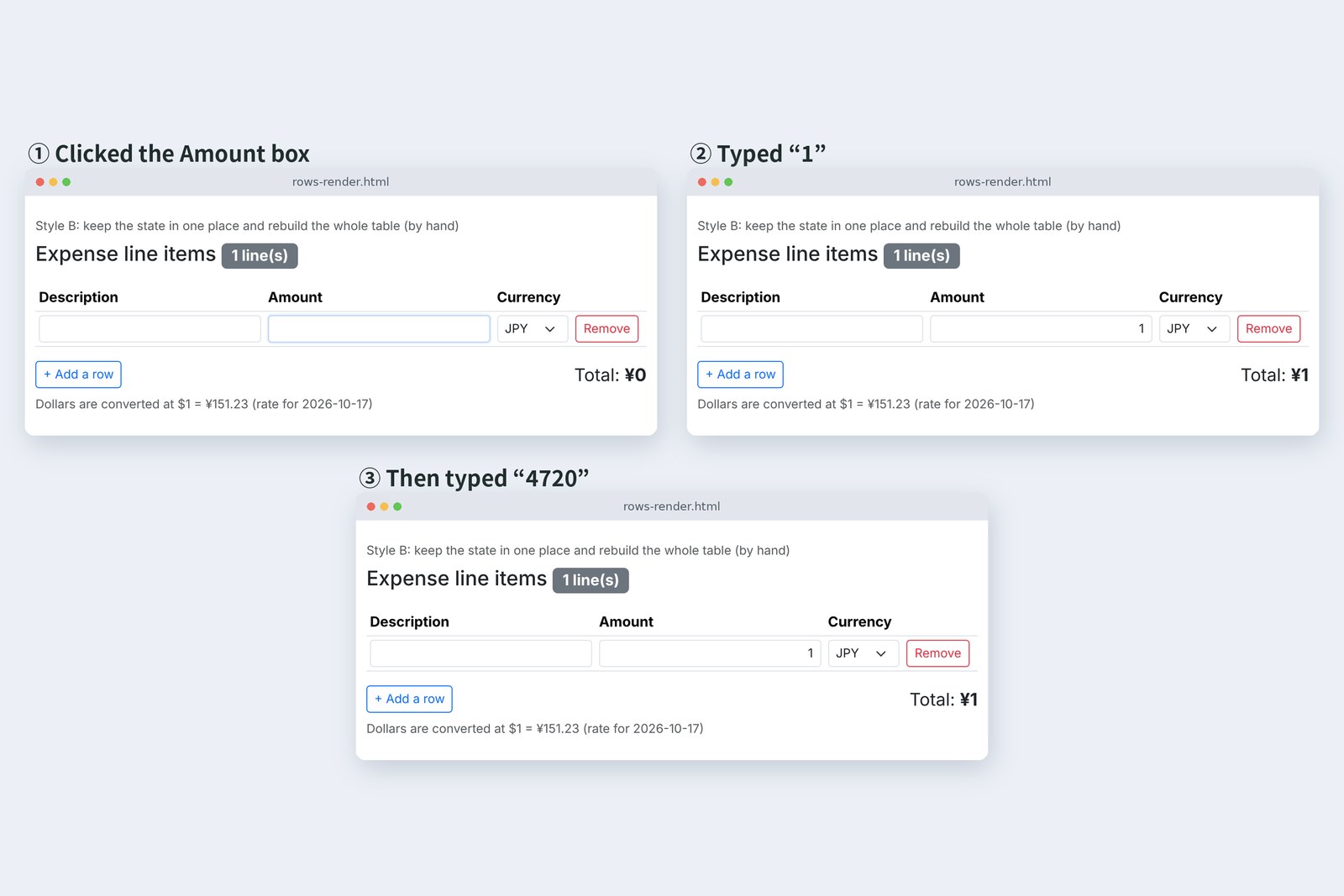
Typing 1 fires an input event, the state changes, and render() rebuilds the table's contents with innerHTML. The box you were typing in is swapped for a new one. The cursor leaves with the old box and falls back to the page body (BODY). The remaining 4720 goes into no box at all.
Rebuilding everything
Let's count what happens on the screen. The browser's MutationObserver keeps a record whenever a piece of the screen (a node) is added or removed, or an attribute or text changes. On a three-row table, I typed one character at a time.
# On a three-row screen, typing 1, 4, 7, 2, 0 into row 1's amount, counting screen changes with a MutationObserver after each
      key       records     nodes removed box value focus
  A   1         5           2             1         Row 1 Amount
  A   4         5           2             14        Row 1 Amount
  A   7         5           2             147       Row 1 Amount
  A   2         5           2             1472      Row 1 Amount
  A   0         5           2             14720     Row 1 Amount
  B   1         5           9             1         BODY
  B   4         0           0             1         BODY
  B   7         0           0             1         BODY
  B   2         0           0             1         BODY
  B   0         0           0             1         BODY
  C   1         23          0             1         Row 1 Amount
  C   4         23          0             14        Row 1 Amount
  C   7         23          0             147       Row 1 Amount
  C   2         23          0             1472      Row 1 Amount
  C   0         23          0             14720     Row 1 Amount
# 21 of C's 23 records are React re-setting the inputs' name and type to the same values; only the input's value and the total's text actually changed
A just rewrites the total and count text (the two removed nodes are the old text). B, on the first character, removes and rebuilds nine pieces including the table rows, and after that nothing happens, because the typing has nowhere left to go. C's numbers come in the next section.
The other problem is speed. With 10, 100 and 1000 rows, I timed one input until the next frame was drawn.
One input until the next frame is drawn (measured median)
# With 10, 100 and 1000 rows: from changing row 1's amount to the end of the next frame (median of 20, ms)
  rows      A jQuery      B rebuild all       C React
  10        16.6          16.5                16.7
  100       16.7          29.7                16.8
  1000      20.8          326.8               30.3
  (waiting for the next frame alone takes about 16.7 ms; Chromium 153 on this machine)
A browser draws about 60 times a second, so waiting for the next frame alone takes about 16.7 ms. A barely adds to that. B grows with the rows: at 1000 rows, 0.3 seconds per keystroke. An expense claim will rarely reach 1000 items, but a list screen gets there fast.
B's idea, building from state, ended the drift. But it wrecks the box you're typing in, and it's slow. If we could keep B's idea but only rewrite what actually changed, we'd have both. Taking that job on is what a framework does.
React's answer
function Rows() {
  const [rows, setRows] = useState(() => [newRow()]);
  const [rate, setRate] = useState(null);

  useEffect(() => { // fetch the rate once, after the screen appears
    fetch('/api/rates').then((res) => res.json()).then(setRate).catch(() => {});
  }, []);

  const change = (id, name, value) => setRows(rows.map((r) => (r.id === id ? { ...r, [name]: value } : r)));
  const remove = (id) => {
    const rest = rows.filter((r) => r.id !== id);
    setRows(rest.length > 0 ? rest : [newRow()]);
  };
  const total = calcTotal(rows.map((r) => yenOf(r, rate)).filter((y) => y !== null && !Number.isNaN(y)).map((amount) => ({ amount })));

  return (
    <>
      <h1 className="h4 mb-3">{ROWS_TEXT.heading} <span id="count" className="badge text-bg-secondary">{ROWS_TEXT.count(rows.length)}</span></h1>
      <table className="table table-sm align-middle mb-0">
        <thead>…</thead>
        <tbody id="items">
          {rows.map((r, i) => (
            <tr key={r.id}>
              <td><input … name="item" value={r.item} onChange={(e) => change(r.id, 'item', e.target.value)} /></td>
              <td><input … name="amount" value={r.amount} onChange={(e) => change(r.id, 'amount', e.target.value)} /></td>
              <td><select … value={r.currency} onChange={(e) => change(r.id, 'currency', e.target.value)}>…</select></td>
              <td><button … onClick={() => remove(r.id)}>{ROWS_TEXT.remove}</button></td>
            </tr>
          ))}
        </tbody>
      </table>
      <div className="d-flex flex-wrap justify-content-between align-items-center gap-2 mt-3">
        <button type="button" className="btn btn-outline-primary btn-sm" id="add-row" disabled={rows.length >= MAX_ROWS}
          onClick={() => setRows([...rows, newRow()])}>{ROWS_TEXT.add}</button>
        <p className="mb-0 fs-5">{ROWS_TEXT.total}<output id="total" className="fw-bold">{formatYen(total)}</output></p>
      </div>
      <p … id="receipt-note" hidden={!needsReceipt(total)}>{ROWS_TEXT.receipt}</p>
      <p … id="rate-note">{rate ? ROWS_TEXT.rate(rate.rate, rate.date) : ''}</p>
    </>
  );
}
This is version C. useState holds the state, and the function only returns "for this state, the screen looks like this". The HTML-like part is a syntax called JSX. Actions change the state with setRows. Unlike B, it never builds the screen directly. React compares the new shape with the last one and writes only the differences to the real screen. key={r.id} is the tag that tells React which row was which last time.
# Style C: the same eight actions
  action                rows  count shown     total shown   amount boxes
  opened                1     1 line(s)       ¥0            —
  14720 in row 1        1     1 line(s)       ¥14,720       14720
  add a row             2     2 line(s)       ¥14,720       14720 / —
  12800 in row 2        2     2 line(s)       ¥27,520       14720 / 12800
  add a row             3     3 line(s)       ¥27,520       14720 / 12800 / —
  row 3: USD 100        3     3 line(s)       ¥42,643       14720 / 12800 / 100
  remove row 2          2     2 line(s)       ¥29,843       14720 / 100
  add a row             3     3 line(s)       ¥29,843       14720 / 100 / —
# Count and total always right; but where the cursor goes after adding or removing a row differs from A
  A  add → the new row's Description; remove → the Add button (hand-written in part 8)
  C  add → stays on the Add button; remove → nowhere (BODY)
The count and total were right all eight times, and 14720 went in whole. Back in section 6's table, 21 of C's 23 records are React re-setting the input boxes' name and type to the same values, an internal step. The only real changes are two: the box's value and the total text. Zero nodes removed, so the box you're typing in, and the cursor, stay put. At 1000 rows it took 30 ms.
Three ways to write it: from action to screen
It doesn't do everything, though. After adding a row, A moves the cursor to the new row's description box. Front-end part 8 wrote that by hand for keyboard users. C leaves it on the Add a row button, and after a removal the cursor has nowhere to be. React lines up the screen's shape for you, but where the cursor goes is still the author's job (we'll fix it later in the series).
AraiSo React doesn't do it all for you.
FuruiIt takes on "make the shape match". Every other courtesy is still yours, just as in the jQuery days.
What you pay in return
No drift, and fast. There's a price, though.
# JavaScript sent to the browser (app.js and the text file are the same for all, so left out)
                                own lines       bytes sent    gzip
  A jQuery 4.0.0 + rows-jq.js   73              81,575 B      28,787 B
  B rows-render.js alone        58              3,496 B       1,582 B
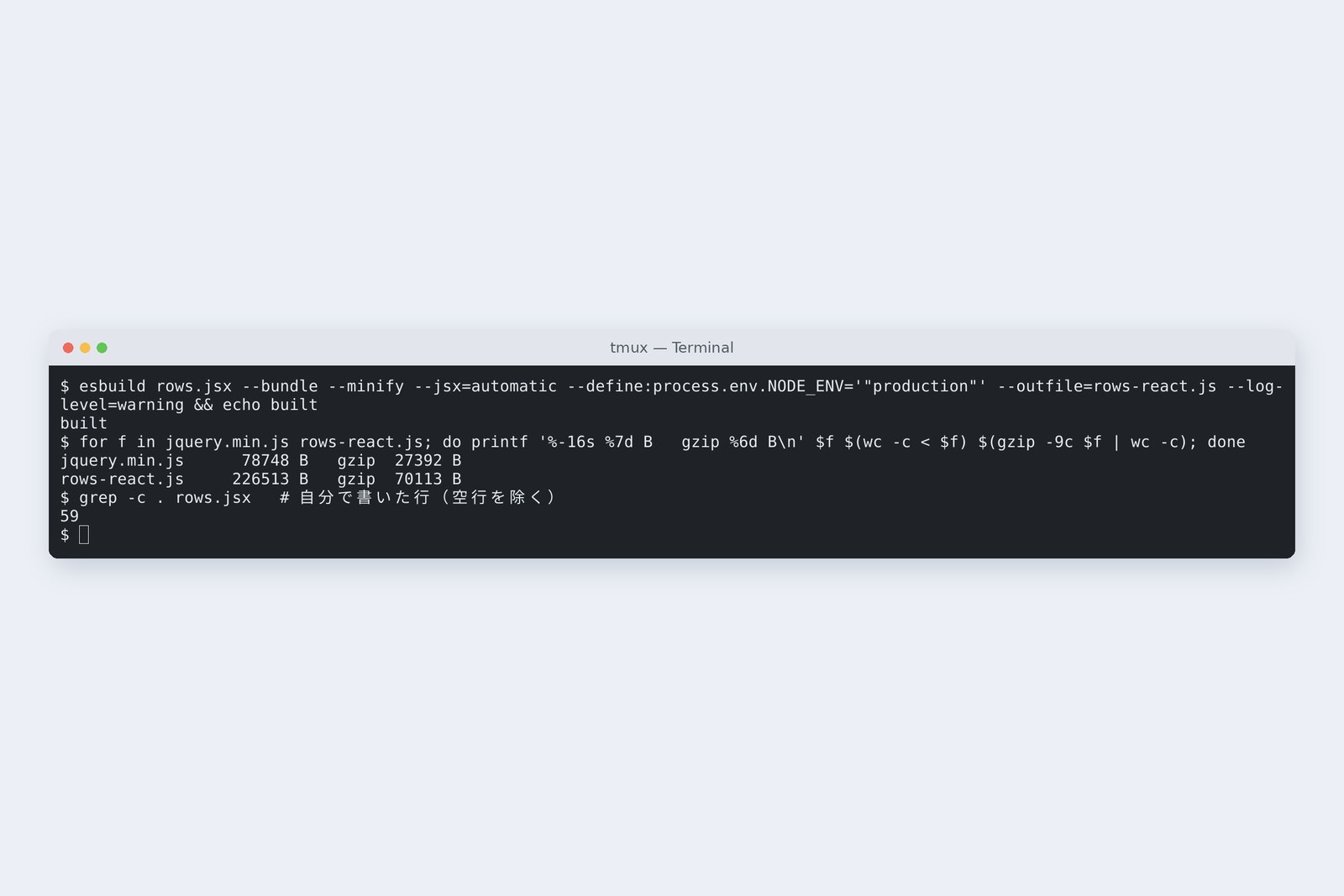
  C React 19.3.1 + rows.jsx     59              226,513 B     70,113 B
  (gzip: each file compressed separately, then added)
# Inside C (esbuild's metafile)
  react-dom 209,163 B   react 8,408 B   scheduler 3,689 B   rows.jsx 3,135 B
  Browsers can't read JSX as is, so esbuild turns it into JavaScript first (73 ms a build)
Hand-written lines were nearly the same for all three (58–73). What differs is how much reaches the browser. C ships React itself (mostly react-dom, the part that writes to the screen): 226 KB, 70 KB compressed. That's about 2.8 times A (2.4 times compressed). And one more thing: a build step. Browsers can't read JSX as it is, so esbuild turns it into JavaScript before it ships. It's the same doorway as in front-end part 15, where Vue without a build wouldn't run under a strict CSP.
In short, a framework is a tool that lets you build the screen from state without it getting slow. You pay in download size, a build step, and the time to learn the tool itself. For a small screen, staying with A can be the cheapest.
A map of this series
Before arriving at "build the screen from state", many schools of thought rose and gave way. Parts 2 and 3 trace that history, and from part 4 we rebuild the expense screens in React. The second half moves to Next.js, all the way to building screens on the server. The data comes from the Spring Boot server built in the backend series.
| Part | Title | What's in it |
|---|---|---|
| 1 | Why frameworks were born | this part |
| 2 | History 1: from jQuery to MVC | Backbone, Knockout, AngularJS |
| 3 | History 2: after React | Vue, Angular, Svelte, Solid; SSR and Server Components |
| 4 | First steps in React | Vite, JSX, components |
| 5 | State and re-rendering | useState, one-way flow, keys |
| 6 | Forms and checks | Actions, with backend part 6 |
| 7 | Fetching data | useEffect, Suspense, the Spring Boot API |
| 8 | The cost of re-rendering | Profiler, React Compiler |
| 9 | Where state lives | Context, useReducer, backend part 10 |
| 10 | Navigation | React Router, backend part 11 |
| 11 | Optimistic and concurrent updates | useOptimistic, 409, View Transitions |
| 12 | Next.js 1: Server Components | the 'use client' boundary, Server Actions |
| 13 | Next.js 2: rendering and caching | 'use cache', prefetching |
| 14 | Tests | Vitest, Testing Library, Playwright |
| 15 | Shipping and choosing | Docker, nginx; against Vue, Angular, Svelte |
Versions as of 1 November 2026: React 19.3.1 and Next.js 16.4.3.
On your own PC
This part's measurement works on any page. Open the browser's developer tools (F12), paste the following into the console, then type one character into a box on the page.
// count changes on the screen (gone when the page reloads)
new MutationObserver((list) => {
  console.log(list.length, 'changes,', list.reduce((n, m) => n + m.removedNodes.length, 0), 'removed');
}).observe(document.body, { subtree: true, childList: true, attributes: true, characterData: true });
To get ready for the next parts, gather the following.
| What you need | How to get it | How to check |
|---|---|---|
| Node.js | Install the LTS version from the official site | node -v |
| An editor | VS Code or similar | It opens a folder |
| A browser | Chrome, Edge or Firefox | Developer tools (F12) open |
| React Developer Tools | A browser extension | A Components tab appears in developer tools |
The backend series' server comes in at part 7 (fetching data). If you don't have it yet, a small practice server will carry you until then.
§ — On one page, and next time
- The front-end series' jQuery screen kept its real values only on the screen (one variable, 34 writes, 22 reads).
- So for every action, a person remembers what to fix. Showing one more number, a count, drifted in 3 of 8 actions.
- Keep the state in one place and build the whole screen from it, and the drift is gone. But the box you type in vanishes, and 1000 rows cost 0.3 s a keystroke.
- React uses the same idea but writes only what changed. Right, and 30 ms at 1000 rows. Where the cursor goes is still up to you.
- In return: 226 KB delivered (70 KB gzipped), and a build step.
AraiSo React was born by crushing jQuery's pains one by one.
FuruiReact didn't appear out of nowhere. In between, lots of people gave other answers to the same problem.
AraiOther answers?
FuruiNext time, history. From the jQuery days to Backbone, Knockout and AngularJS, as the schools split over how to tie the screen to the data.
References
- React — Thinking in React
- React — Render and Commit
- React — Rendering Lists(key)
- React — Manipulating the DOM with Refs
- jQuery 4.0.0
- MDN — Element: innerHTML
- MDN — MutationObserver
- esbuild — API(bundle)
Recorded by the author on a cloud Linux machine on 1 November 2026. The pages were served by a practice server (Node.js 22), and driven and measured with Chromium 153.0.8010.12 under Playwright. Version A uses jQuery 4.0.0; C is React 19.3.1 (react-dom 19.3.1) bundled with esbuild 0.28.2; all three are styled with Bootstrap 5.3.8. Each time is from setting a box's value and sending an input event until after the next frame, measured 25 times, dropping the first 5, as the median of 20. Numbers will differ on other machines.
Old-School Front-End, Frameworks part 1 — Why frameworks were born / 2026.11