Old-School Front-End · Frameworks / 2026 ・ No.02
Old-School Front-End: Frameworks
Part 2: History I, from jQuery to MVC — 2010's three answers: Backbone, Knockout, AngularJS
Published
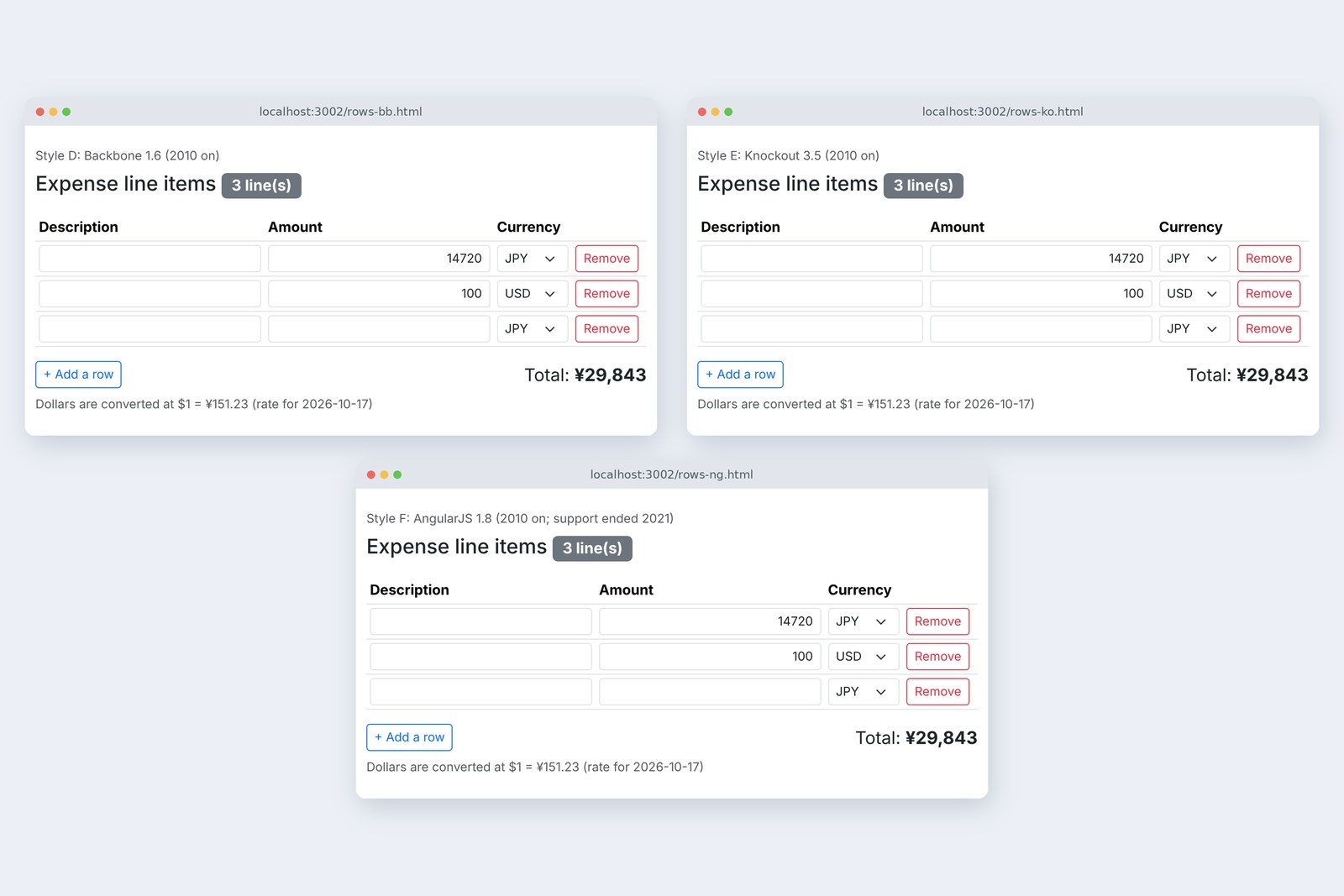
Part 1 measured how a jQuery screen makes a person remember what to fix, and how showing just one more number made it drift. In 2010 three answers to that problem arrived almost together: Backbone, Knockout and AngularJS.
Part 2 writes the same items table in all three and repeats part 1's actions. Does it drift, what gets rewritten, what happens with many rows, and does it run under today's strict CSP?
2010: screens got bigger
AraiBefore React there was only jQuery, right?
FuruiThree came out in 2010. And every one of them still has apps running on it.
AraiFossils, then.
FuruiLet's measure before we decide that.
A route map of all 15 parts (you are here: part 2)
Around then, more apps ran entirely inside the page without reloading, and their JavaScript grew from hundreds of lines to thousands. jQuery was enough for finding parts of the screen and rewriting them, but where the real values live, and when they reach the screen, was left to the author. Part 1's drifting count was exactly that problem.
The three schools, and before and after (timeline)
All three got part 1's items table (adding and removing rows, amount, currency, total, and the count). The sums are the same app.js as before. To match how things were written then, the server ran without CSP or other security headers; the CSP comes separately in section 8.
Backbone: values in Models
Backbone (version D) is a small library by the same author as Underscore. Its idea is MVC: the real values live in Models (one row) and a Collection (the rows), and Views own the parts of the screen. When a value changes the Model fires an event, and the View hears it and rewrites the screen.
// Style D: Backbone 1.6 (2010 on)
// The real values live in Models (one row) and a Collection (the rows). When a value changes, the Model fires an event.
// Views rewrite the screen. Which event rewrites what is still yours to write here.
const Row = Backbone.Model.extend({ defaults: { item: '', amount: '', currency: 'JPY' } });
const rows = new Backbone.Collection([], { model: Row });
const settings = new Backbone.Model({ rate: null, date: '' }); // exchange rate

/** A row View: owns one table row (tr) */
const RowView = Backbone.View.extend({
  tagName: 'tr',
  template: _.template($('#row-template').html()), // turn the template text into a function
  events: {
    'input [name="item"]': 'edit',
    'input [name="amount"]': 'edit',
    'change [name="currency"]': 'edit',
    'click [data-action="remove"]': 'drop',
  },
  edit(event) { this.model.set(event.target.name, event.target.value); }, // screen → Model: you write this yourself
  drop() { rows.remove(this.model); },
  render() { this.$el.html(this.template(this.model.toJSON())); return this; },
});

/** The View for the whole screen */
const AppView = Backbone.View.extend({
  el: '#page',
  events: { 'click #add-row': 'add' },
  initialize() {
    this.listenTo(rows, 'add', this.addOne);
    this.listenTo(rows, 'remove', this.removeOne);
    this.listenTo(rows, 'update change', this.renderSummary); // rows added or removed, or a value changed
    this.listenTo(settings, 'change', this.renderSummary);
  },
  add() { … },       // rows.add({}), then the cursor to the new row
  addOne(row) { … }, // make a RowView and append it
  removeOne(row) { … },
  /** Redraw the total, count, button and rate */
  renderSummary() {
    const total = …; // add up row by row with rows.each
    this.$('#total').text(formatYen(total));
    this.$('#receipt-note').prop('hidden', !needsReceipt(total));
    this.$('#count').text(ROWS_TEXT.count(rows.length)); // ★ count
    this.$('#add-row').prop('disabled', rows.length >= MAX_ROWS);
    this.$('#rate-note').text(rate === null ? '' : ROWS_TEXT.rate(rate, settings.get('date')));
  },
});
The line that shows the count (★) sits in renderSummary next to the total, the same spot as in part 1's jQuery. This time it doesn't drift. renderSummary isn't called by a button; it's called by the Collection's update (rows added or removed) and change (a value changed). Whatever action caused it, a changed value fires the same event. Part 1's "actions × functions" table became a "values × functions" table.
Rewriting the screen is still your job, though. this.$('#total').text(…) has the same shape as in jQuery, and the screen-to-Model direction (edit) is hand-written too.
Knockout: tie values to the screen
Knockout (version E) follows MVVM. Values go into observables (containers you can watch), and the HTML's data-bind says which value each part is tied to.
# rows-ko.html (excerpt): the HTML says which value each part is tied to
<h1 …>Expense line items <span id="count" data-bind="text: countText"></span></h1>
<tbody data-bind="foreach: rows">
  <tr>
    <td><input … data-bind="textInput: item"></td>
    <td><input … data-bind="textInput: amount"></td>
    <td><select … data-bind="value: currency">…</select></td>
    <td><button … data-bind="click: $root.remove">…</button></td>
  </tr>
</tbody>
<output id="total" … data-bind="text: totalText"></output>

# rows-ko.js (excerpt)
function RowModel() {
  this.item = ko.observable('');
  this.amount = ko.observable('');
  this.currency = ko.observable('JPY');
}

function RowsModel() {
  this.rows = ko.observableArray([new RowModel()]);
  this.rate = ko.observable(null);

  // total: recomputed whenever an observable it read (rows, amounts, currencies, rate) changes
  this.total = ko.pureComputed(() => {
    const rate = this.rate();
    const items = [];
    for (const row of this.rows()) {
      const usd = row.currency() === 'USD';
      const amount = usd ? toCents(row.amount()) : toAmount(row.amount());
      if (amount === null || Number.isNaN(amount)) continue;
      if (!usd) items.push({ amount });
      else if (rate !== null) items.push({ amount: centsToYen(amount, rate.rate) });
    }
    return calcTotal(items);
  });
  this.totalText = ko.pureComputed(() => formatYen(this.total()));
  this.countText = ko.pureComputed(() => ROWS_TEXT.count(this.rows().length)); // ★ count
textInput: amount ties both ways: type in the box and the value changes; change the value and the box changes. The total is a pureComputed: Knockout remembers which observables it read (rows, amounts, currencies, rate) and recalculates when any of them changes. The count (★) is one line. Not a single line of JavaScript rewrites the screen.
Arai37 lines of JavaScript! Half of jQuery's.
FuruiAnd 10 expressions written into the HTML. Both count as things you wrote.
AngularJS: watch plain values
AngularJS (version F) was built by developers at Google, and values just go into plain objects. In the HTML, ng-model ties a value and an input box both ways, and {{ }} shows a value as text.
# rows-ng.html (excerpt): ng-model ties values to boxes, {{ }} ties values to text
<main … ng-app="rows">
<div ng-controller="RowsController as vm">
<h1 …>Expense line items <span id="count">{{ vm.countText() }}</span></h1>
<tbody>
  <tr ng-repeat="r in vm.rows track by r.id">
    <td><input … ng-model="r.item"></td>
    <td><input … ng-model="r.amount"></td>
    <td><select … ng-model="r.currency">…</select></td>
    <td><button … ng-click="vm.remove(r)">…</button></td>
  </tr>
</tbody>
<output id="total" …>{{ vm.totalText() }}</output>

# rows-ng.js (excerpt): values are just plain objects
angular.module('rows', []).controller('RowsController', ['$http', function ($http) {
  const vm = this;
  let nextId = 1;
  const newRow = () => ({ id: nextId++, item: '', amount: '', currency: 'JPY' });
  vm.max = 10;
  vm.rows = [newRow()];
  vm.rate = null;

  vm.total = () => { … }; // add up vm.rows row by row (same sum as D and E)
  vm.totalText = () => formatYen(vm.total());
  vm.needsReceipt = () => needsReceipt(vm.total());
  vm.countText = () => ROWS_TEXT.count(vm.rows.length); // ★ count
  vm.rateText = () => (vm.rate ? ROWS_TEXT.rate(vm.rate.rate, vm.rate.date) : '');
With no observable containers, how does it know something changed? After every click or keystroke, AngularJS re-evaluates every expression on the screen (the watchers) and compares each with its last value. This is called dirty checking. Only the differences are written to the screen.
Three schools: from where values live to the screen
The same eight actions
Playwright ran part 1's eight actions (type amounts, add rows, switch to dollars, remove a row), and I looked at the screen after each.
# The same eight actions as part 1 (D, E and F were written with the count from the start); A and C for comparison
  style         count wrong   total wrong   cursor after add        after remove
  D Backbone    0 / 8         0 / 8         new row's Description   Add a row
  E Knockout    0 / 8         0 / 8         Add a row               BODY
  F AngularJS   0 / 8         0 / 8         Add a row               BODY
  A jQuery      3 / 8         0 / 8         new row's Description   Add a row
  C React       0 / 8         0 / 8         Add a row               BODY
# D, E and F: zero in all three languages. Only D moves the cursor like A, because it was written by hand
None of the three let the count or total drift even once (the same on the Japanese and Chinese pages). By 2010, part 1's problem already had answers.
The cursor went different ways. D does what jQuery did: after adding, the new row; after removing, the Add a row button. Backbone didn't do that; it was written by hand. E and F behave like React (C): write nothing, and nothing happens.
What one keystroke rewrites
On a three-row table I typed 14720 one character at a time and counted the screen changes with a MutationObserver each time (the same method as part 1).
# Typing 1, 4, 7, 2, 0 into row 1's amount on a three-row table: screen changes per key (MutationObserver)
  style         records     what changed
  D Backbone    7           replaces the total, count and rate text and re-sets the notice's hidden, changed or not
  E Knockout    1           only the total text
  F AngularJS   3 → 1       only the total text (3 on the first key, as the box's class gains ng-dirty)
  A jQuery      5           replaces the total and count text
  C React       23          21 are React re-setting name and type to the same values
The difference is clear. D replaces even the count and rate text that didn't change, every time, because renderSummary doesn't know what changed and redraws it all. E touches only the total text. Knockout remembers which part of the screen is tied to which value, so it writes only where a changed value leads. F also changed only the total text, but it got there by comparing every watcher.
With many rows
With 10, 1000 and 5000 rows, I timed the page's JavaScript work for one keystroke, and the time from opening the page until all rows were there. For comparison, part 1's A (jQuery) and C (React) were measured again on the same day.
# JavaScript time per keystroke, and time to open (median of 3 runs, each the median of 20)
  style         JS per key (ms)           open until all rows (ms)
                10      1000    5000      1000    5000
  D Backbone    0.5     0.8     1.6       741     3,016
  E Knockout    0.4     1.2     3.9       817     2,968
  F AngularJS   1.0     2.9     16.4      970     3,931
  C React       1.8     19.0    83.0      668     2,483
  A jQuery      0.7     11.0    —         9,716   —
  (no JS)       just setting a value and drawing: 28.5 ms at 1000 rows, 131.6 ms at 5000 (the browser's work)
# F's watchers: 76 at 10 rows, 7,006 at 1000, 35,006 at 5000 — seven per row
# A renames every row on each addition, so 5000 rows was not measured
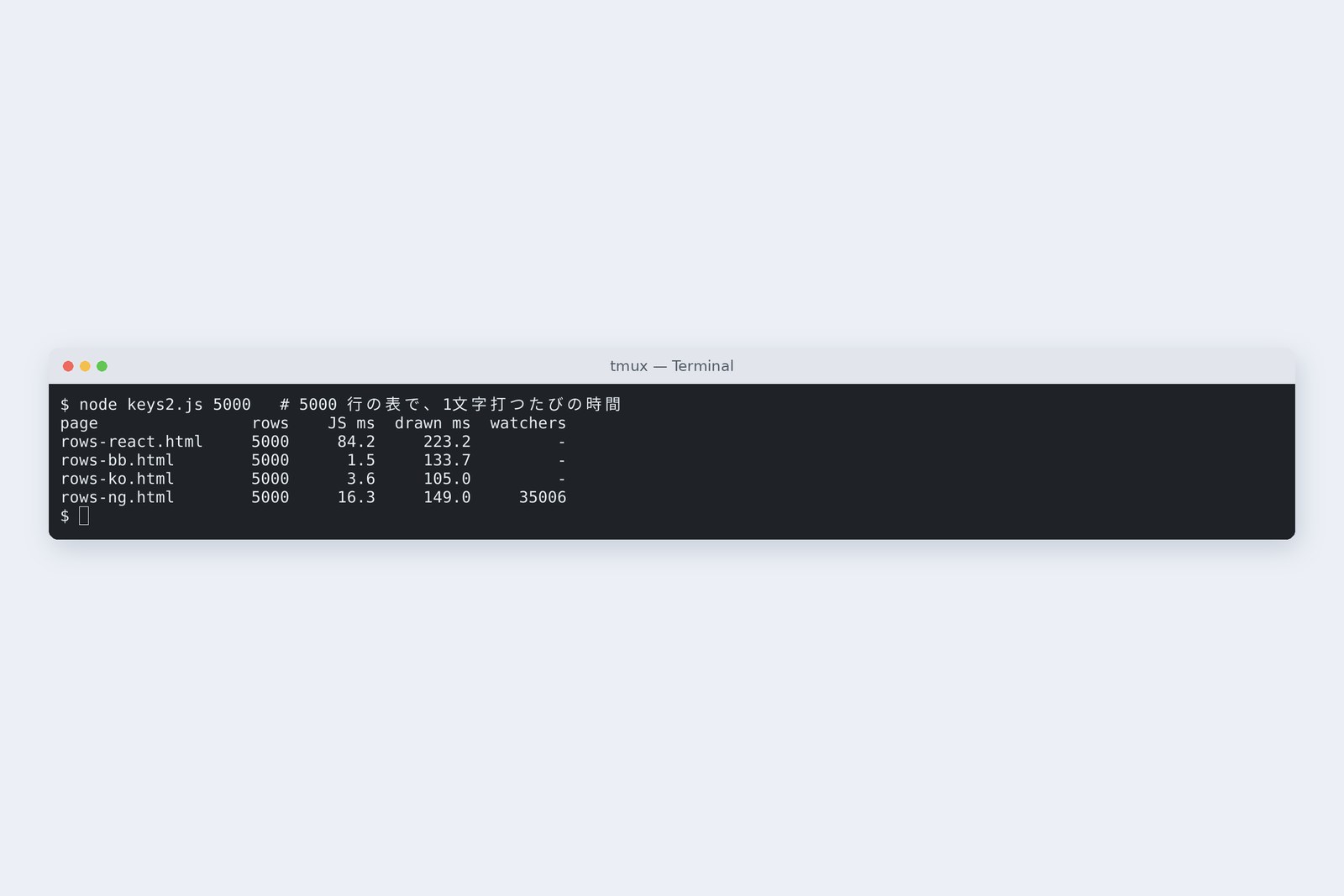
One keystroke on 5000 rows: JavaScript time
F has seven watchers per row (three input boxes and four spoken labels). At 5000 rows that's 35,006, all compared on every keystroke, so it took 16.4 ms. Even so, like E at 3.9 ms and D at 1.6 ms, it beat React's 83 ms. React rebuilds the shape of all 5000 rows and compares it on every keystroke (part 8 narrows that gap).
One more thing: at 5000 rows, just setting a value and drawing took about 132 ms. That's the browser's work and the same for every version. On a screen with many rows, the first lever is the number of rows, not the tool. And A, which renames every row each time one is added, took 9.7 seconds to open 1000 rows.
Under today's CSP
So far the security headers were off. With Frontend part 15's CSP (script-src 'self', style-src 'self') turned on, this happened.
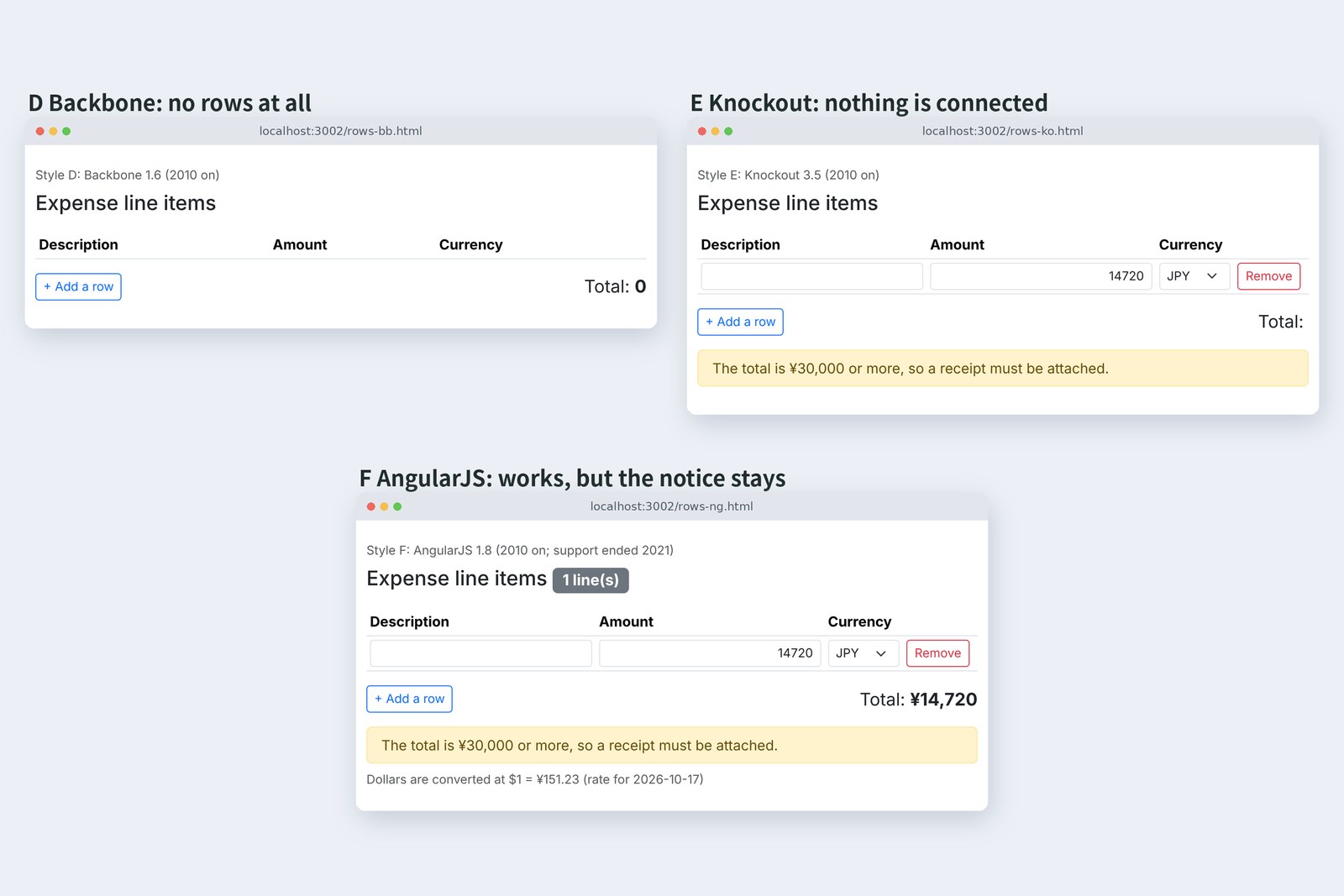
# Opened under Frontend part 15's CSP (script-src 'self', style-src 'self') and typed 14720 in row 1
  style           errors  what happened
  D Backbone      1       no rows; _.template can't build a function from text
  E Knockout      1       nothing is connected (Unable to parse bindings)
  F AngularJS     1       works, but can't add ng-hide's CSS, so the notice stays
  F + ng-csp      0       with ng-csp and angular-csp.css: no errors
  A / C           0       works
In D, _.template, which builds the row template, tried to make a function from text and was stopped (Backbone itself has no such spot that I could find). E stopped while turning the data-bind expressions into functions, and nothing was connected. Around 2010 it was normal to turn expressions written in HTML or strings into JavaScript on the spot; that style predates wide use of CSP.
F ran, but it couldn't add the CSS for ng-hide with a <style>, so the notice stayed although the total was under ¥30,000. AngularJS saw CSP coming and provided ng-csp plus a separate angular-csp.css; with those it ran with no errors. It's the same wall Vue hit without a build in Frontend part 15.
Size, and where each is now
# How much was hand-written, and how much reaches the browser (app.js and the text strings are the same for all and left out)
  style         JS lines  HTML ties       delivered     gzip
  D Backbone    77        0               127,724 B     44,950 B
  E Knockout    37        10              70,680 B      26,300 B
  F AngularJS   35        17              179,261 B     62,828 B
  A jQuery      73        0               81,575 B      28,787 B
  C React       59        —               226,513 B     70,113 B
# JS lines exclude blanks (comments included). HTML ties count data-bind, ng-* and {{ }}. D is jQuery 78,748 + Underscore 19,668 + Backbone 25,690
E and F halved the JavaScript but put expressions into the HTML. D also needs jQuery and Underscore: 128 KB for the three. F alone is 179 KB. All are smaller than React (226 KB).
  name        first release                 latest                now
  Backbone    Oct 2010                      1.6.1 (Apr 2025)      still maintained
  Knockout    Jul 2010                      3.5.3 (Mar 2026)      still maintained
  AngularJS   2010 (1.0 in Jun 2012)        1.8.3 (Apr 2022)      support ended 31 Dec 2021; deprecated on npm
# Latest versions and dates from npm's records (checked 1 November 2026)
AngularJS support ended on 31 December 2021; its successor, Angular, is a rebuilt and different thing. Backbone and Knockout still get new releases. Some stopped, some carry on. When you inherit an old business app, first check which one it's written in.
On your own PC
If you have an AngularJS screen at hand, you can count its watchers in the developer tools console (counting from the element with ng-app).
// on an AngularJS screen: the number of watchers
angular.element(document.querySelector('[ng-app]')).injector().get('$rootScope').$$watchersCount
Whether a page may build functions from text under its CSP can be tried anywhere with one line. On a page with a strict CSP it throws.
// can this page build a function from text? (throws if the CSP doesn't allow 'unsafe-eval')
new Function('return 1')()
Names starting with $$ are AngularJS internals; use them only for investigating.
§ — On one page, and next time
- In 2010 Backbone, Knockout and AngularJS arrived almost together. All of them keep the real values off the screen.
- Backbone announces changes with events and leaves the screen to you. Knockout ties values to the screen; AngularJS watches everything and compares.
- In the same eight actions, all three drifted zero times. Screen changes per keystroke: 7, 1 and 1.
- At 5000 rows, 1.6, 3.9 and 16.4 ms per keystroke: faster than React's 83 ms. The 132 ms just to draw is the browser's.
- Under a strict CSP, building expressions from text stops working. AngularJS runs with ng-csp, and its support ended in 2021.
AraiFast, no drift, and small. So why did everyone switch to React?
FuruiThis table is a ten-row exercise. Once a screen has hundreds or thousands of parts, two-way ties made it hard to trace where a change came from.
AraiTied up so much they got tangled?
FuruiNext time, history part two. From React bringing in "one way" to Vue, Angular, Svelte, Solid, and building screens on the server.
References
- Knockout — Introduction
- AngularJS — ngCsp
- AngularJS — Scopes($digest と watcher)
- Angular Blog — Discontinued Long Term Support for AngularJS
- Wikipedia — Knockout (web framework)
- versionlog — AngularJS 1.0
- Web Design Museum — React 2013
- MDN — CSP: script-src(unsafe-eval)
Recorded by the author on a cloud Linux machine on 1 November 2026. Pages were served by a practice server (Node.js 22), and driven and measured with Chromium 153.0.8010.12 under Playwright. D uses jQuery 4.0.0, Underscore 1.13.8 and Backbone 1.6.1; E Knockout 3.5.3; F AngularJS 1.8.3; all are styled with Bootstrap 5.3.8. Times come from setting a box's value and sending an input event: until it returns (JavaScript time) and until after the next frame, measured 25 times, dropping the first 5, as the median of 20, then the median of three such runs. Release years follow each project's records and the references; latest versions follow npm's records. Numbers will differ on other machines.
Old-School Front-End, Frameworks part 2 — History I, from jQuery to MVC / 2026.11