Old-School Front-End · Frameworks / 2026 ・ No.03
Old-School Front-End: Frameworks
Part 3: History II, after React — the rebuild-and-compare school and the signals school
Published
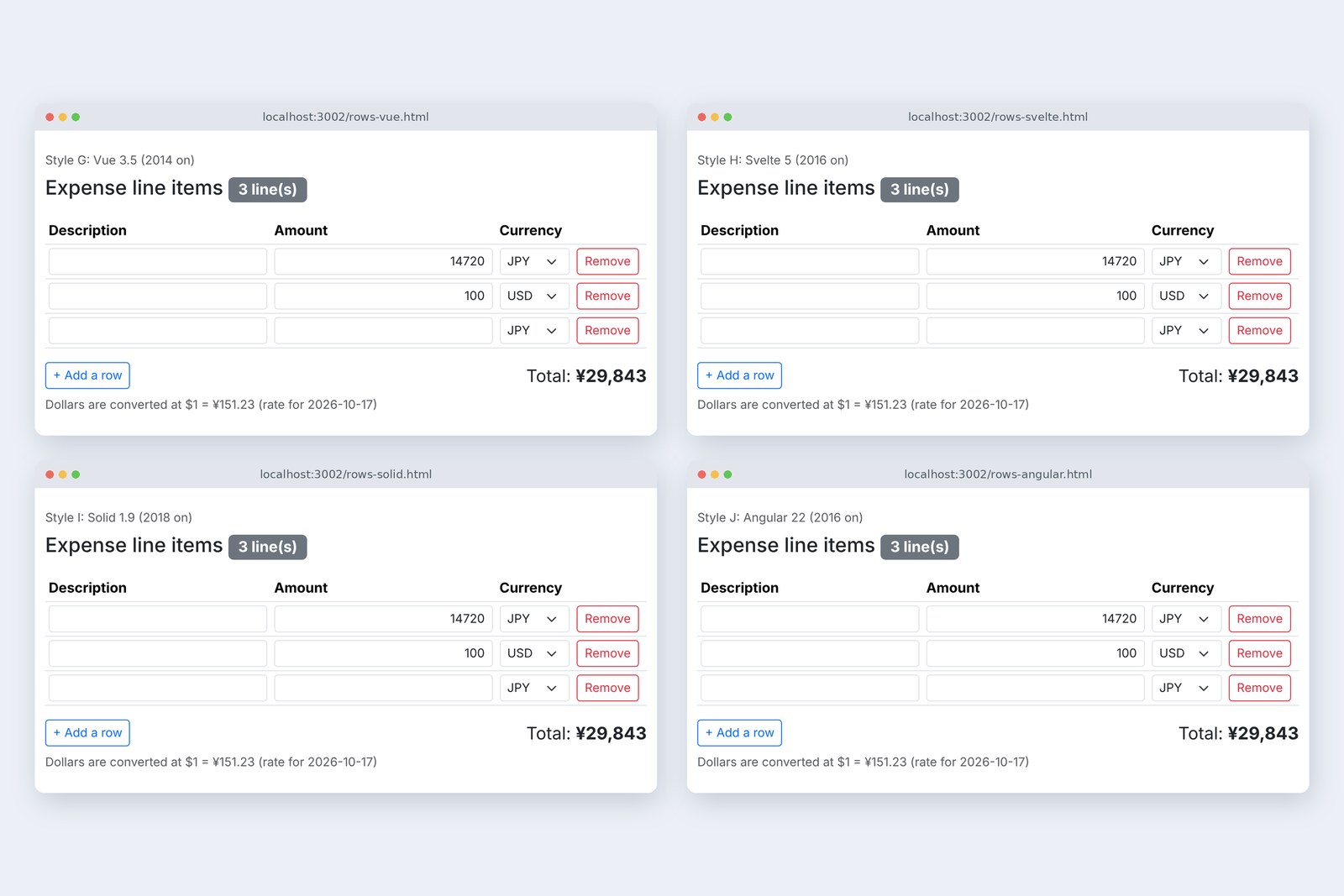
Part 2 measured how 2010's three schools kept the count from drifting and ran faster than React. Even so, React, released in 2013, spread, and new answers followed: Vue, Angular, Svelte, Solid.
Part 3 writes the same items table in current versions of those four and measures them beside part 1's React. At the end it touches on building screens on the server again.
What React brought
AraiReact was the slowest last time. So how did it win?
FuruiReact didn't sell speed. It sold clarity: once the state is fixed, there's only one possible screen.
A route map of all 15 parts (you are here: part 3)
Part 2's Knockout and AngularJS tied values and screen both ways. As screens grew, it got hard to trace whether a value was changed by an input box, another calculation or some other watcher. React fixed the direction: one way. State changes only through set entrances like setRows; the screen is rebuilt from state every time, compared with the last one, and only the differences are written (part 1's version C). The copy of the screen's shape used for comparing is called the virtual DOM.
After React (timeline)
The idea caught on, and the schools that followed all build on one-way, state to screen. What differs is how they decide what to rewrite. I wrote all four with part 1's items table. Each is built into JavaScript before shipping, and the server keeps Frontend part 15's strict CSP.
Vue: templates and watched values
Vue (version G) was started in 2014 by a developer who had used AngularJS and wanted something lighter. The HTML-like templates and v-model resemble AngularJS, but values go in refs and Vue remembers which value is read where (close to part 2's Knockout).
<!-- Style G: Vue 3.5. Values go in refs; the template's v-model and {{ }} tie them to the screen and become JavaScript at build time -->
<script setup>
import { ref, computed, onMounted } from 'vue';

let nextId = 1;
const newRow = () => ({ id: nextId++, item: '', amount: '', currency: 'JPY' });
const T = ROWS_TEXT;
const { formatYen, needsReceipt } = window; // app.js functions (the template only sees what is declared here)

const rows = ref([newRow()]);
const rate = ref(null);

function yenOf(row) { … } // same as part 1 (convert to yen)
// total: recomputed only when a value it read (rows, amounts, currencies, rate) changes
const total = computed(() => calcTotal(rows.value.map(yenOf).filter((y) => y !== null && !Number.isNaN(y)).map((amount) => ({ amount }))));

const add = () => rows.value.push(newRow());
const remove = (row) => {
  rows.value = rows.value.filter((r) => r !== row);
  if (rows.value.length === 0) rows.value.push(newRow());
};
onMounted(() => { fetch('/api/rates').then((res) => res.json()).then((data) => { rate.value = data; }).catch(() => {}); });
</script>

<template>
  <h1>{{ T.heading }} <span id="count">{{ T.count(rows.length) }}</span></h1>
  <table>
    <tbody id="items">
      <tr v-for="(r, i) in rows" :key="r.id">
        <td><input name="item" v-model="r.item"></td>
        <td><input name="amount" v-model="r.amount"></td>
        <td><select name="currency" v-model="r.currency">…</select></td>
        <td><button @click="remove(r)">{{ T.remove }}</button></td>
      </tr>
    </tbody>
  </table>
  …
  <output id="total">{{ formatYen(total) }}</output>
</template>
The count (★) is just {{ T.count(rows.length) }} in the template. To update the screen, though, Vue does what React does: it rebuilds the component's template and compares it with last time. Watching values is fine-grained; rewriting the screen happens per component. That combination shows in section 7's numbers.
Angular: a rewrite, then signals
Angular (version J) is AngularJS rewritten from scratch in TypeScript; 2.0 arrived in 2016. The names are close, but it's a different thing. For years it used zone.js to recheck the whole screen whenever something might have happened. Signals arrived in 16 (2023), and from 21 (2025) new apps run without zone.js by default.
// Style J: Angular 22. Values go in signals and computed gives the total. Templates become JavaScript at build time.
// From 21, no zone.js (zoneless) is the default; the screen is rechecked only when a signal changes
import { Component, ChangeDetectionStrategy, signal, computed } from '@angular/core';

type Row = { id: number; item: string; amount: string; currency: string };
type Rate = { rate: number; date: string };

@Component({
  selector: 'rows-app',
  changeDetection: ChangeDetectionStrategy.OnPush,
  template: `
    <h1>{{ T.heading }} <span id="count">{{ T.count(rows().length) }}</span></h1>
    <table>
      <tbody id="items">
        @for (r of rows(); track r.id; let i = $index) {
          <tr>
            <td><input name="item" [value]="r.item" (input)="change(r.id, 'item', $event)"></td>
            <td><input name="amount" [value]="r.amount" (input)="change(r.id, 'amount', $event)"></td>
            <td><select name="currency" [value]="r.currency" (change)="change(r.id, 'currency', $event)">…</select></td>
            <td><button (click)="remove(r.id)">{{ T.remove }}</button></td>
          </tr>
        }
      </tbody>
    </table>
    …
    <output id="total">{{ totalText() }}</output>
  `,
})
class RowsComponent {
  T = ROWS_TEXT;
  max = MAX_ROWS;
  rows = signal<Row[]>([newRow()]);
  rate = signal<Rate | null>(null);

  private yenOf(row: Row, rate: Rate | null) { … } // same as part 1 (convert to yen)
  // total: recomputed only when a signal it read (rows, rate) changes
  total = computed(() => calcTotal(this.rows().map((r) => this.yenOf(r, this.rate())).filter((y): y is number => y !== null && !Number.isNaN(y)).map((amount) => ({ amount }))));
  totalText = computed(() => formatYen(this.total()));
  receipt = computed(() => needsReceipt(this.total()));

  change(id: number, name: 'item' | 'amount' | 'currency', event: Event) {
    const value = (event.target as HTMLInputElement).value;
    this.rows.update((rows) => rows.map((r) => (r.id === id ? { ...r, [name]: value } : r)));
  }
  add() { … }
  remove(id: number) { … }
}
signal is a container for a value; computed is a value calculated from it. The template's @for tells rows apart with track r.id. With its type declarations, it has the most lines of the four.
Svelte: the compiler writes it
Svelte (version H) appeared in 2016 and took the position of a compiler. Instead of comparing in the browser, it emits JavaScript at build time that says "when this value changes, rewrite this text". Since Svelte 5 (2024), values are written as $state and computed values as $derived (runes).
<!-- Style H: Svelte 5. Values in $state read and write like plain variables; the compiler decides at build time what to rewrite -->
<script>
  let nextId = 1;
  const newRow = () => ({ id: nextId++, item: '', amount: '', currency: 'JPY' });
  const T = ROWS_TEXT;

  let rows = $state([newRow()]);
  let rate = $state(null);

  function yenOf(row) { … } // same as part 1 (convert to yen)
  // total: recomputed only when a value it read changes
  const total = $derived(calcTotal(rows.map(yenOf).filter((y) => y !== null && !Number.isNaN(y)).map((amount) => ({ amount }))));

  function remove(row) {
    rows = rows.filter((r) => r !== row);
    if (rows.length === 0) rows.push(newRow());
  }
  fetch('/api/rates').then((res) => res.json()).then((data) => { rate = data; }).catch(() => {});
</script>

<h1>{T.heading} <span id="count">{T.count(rows.length)}</span></h1>
<table>
  <tbody id="items">
    {#each rows as r, i (r.id)}
      <tr>
        <td><input name="item" bind:value={r.item}></td>
        <td><input name="amount" bind:value={r.amount}></td>
        <td><select name="currency" bind:value={r.currency}>…</select></td>
        <td><button onclick={() => remove(r)}>{T.remove}</button></td>
      </tr>
    {/each}
  </tbody>
</table>
…
<output id="total">{formatYen(total)}</output>
Write rows.push(newRow()) as if it were a plain array, and the screen follows. At 44 lines it was the shortest of the four.
Solid: components that run once
Solid (version I) is written in JSX like React, but works the opposite way. The component function runs only once. When a signal read inside a JSX {…} changes, only that spot is rewritten.
// Style I: Solid 1.9. Values go in signals (here the rows go in a store). The component function runs only once;
// when a signal read inside a JSX {…} changes, only that spot is rewritten
import { createSignal, createMemo, For } from 'solid-js';
import { createStore } from 'solid-js/store';
import { render } from 'solid-js/web';

let nextId = 1;
const newRow = () => ({ id: nextId++, item: '', amount: '', currency: 'JPY' });
const T = ROWS_TEXT;

function Rows() {
  const [rows, setRows] = createStore([newRow()]);
  const [rate, setRate] = createSignal(null);

  const yenOf = (row) => { … }; // same as part 1 (convert to yen)
  // total: recomputed only when a value it read changes
  const total = createMemo(() => calcTotal(rows.map(yenOf).filter((y) => y !== null && !Number.isNaN(y)).map((amount) => ({ amount }))));
  const change = (i, name) => (e) => setRows(i(), name, e.target.value);
  const remove = (row) => {
    const rest = rows.filter((r) => r !== row);
    setRows(rest.length > 0 ? rest : [newRow()]);
  };

  return (
    <>
      <h1>{T.heading} <span id="count">{T.count(rows.length)}</span></h1>
      <table>
        <tbody id="items">
          <For each={rows}>{(r, i) => (
            <tr>
              <td><input name="item" value={r.item} onInput={change(i, 'item')} /></td>
              <td><input name="amount" value={r.amount} onInput={change(i, 'amount')} /></td>
              <td><select name="currency" value={r.currency} onChange={change(i, 'currency')}>…</select></td>
              <td><button onClick={() => remove(r)}>{T.remove}</button></td>
            </tr>
          )}</For>
        </tbody>
      </table>
      …
      <output id="total">{formatYen(total())}</output>
    </>
  );
}
It looks like React and behaves like Knockout's line. Together with Svelte and Angular's signals, I'll call these three the signals family.
The same eight actions
# The same eight actions as part 1, under Frontend part 15's strict CSP
  style           count wrong   total wrong   CSP errors    cursor after add / remove
  G Vue 3.5       0 / 8         0 / 8         0             Add a row / BODY
  H Svelte 5      0 / 8         0 / 8         0             Add a row / BODY
  I Solid 1.9     0 / 8         0 / 8         0             Add a row / BODY
  J Angular 22    0 / 8         0 / 8         0             Add a row / BODY
  C React 19      0 / 8         0 / 8         0             Add a row / BODY
# The same in all three languages. All are built before shipping, so none builds functions from text
None of the four let the count or total drift, and the strict CSP produced zero errors (the same on the Japanese and Chinese pages). Unlike part 2's Backbone template and Knockout, the templates are already JavaScript after the build, so the browser never builds functions from text. As for the cursor, none of them does anything unless you write it.
# Typing 1, 4, 7, 2, 0 into row 1's amount on a three-row table: screen changes per key (MutationObserver)
  style           records     what changed
  G Vue 3.5       1           replaces the total text
  H Svelte 5      1           only the total text
  I Solid 1.9     2           the total text and the notice's hidden
  J Angular 22    1           only the total text
  C React 19      23          21 are React re-setting name and type to the same values
Each keystroke rewrote only the total text (Solid also re-set the notice's hidden). Only React includes 21 steps that re-set input attributes to the same values. What reaches the screen is nearly the same for every version. The difference lies in how much JavaScript work it takes to get there.
5000 rows, two families
With 10, 1000 and 5000 rows, I timed the JavaScript work and the browser's drawing for one keystroke. Vue, Svelte and Angular postpone the screen update slightly, so part 2's method (until the input event returns) isn't enough. This time the times come from Chromium's tracing, summed over 20 keystrokes. Part 2's Knockout and AngularJS were measured again the same way.
# With 10, 1000 and 5000 rows: time per keystroke, and time to open
  style           JS per key (ms)         drawing (ms)  open (ms)
                  10     1000   5000      5000          1000   5000
  C React 19      2.0    20.4   99.6      124.3         603    2,280
  G Vue 3.5       1.7    15.1   91.5      105.5         652    2,208
  H Svelte 5      0.8    3.0    9.6       106.0         574    2,540
  I Solid 1.9     1.3    2.1    11.4      117.5         473    1,936
  J Angular 22    1.2    2.4    6.7       127.7         575    2,079
  E Knockout      0.8    1.6    5.2       107.2         759    2,793
  F AngularJS     1.7    3.1    24.4      125.1         814    3,432
# JS and drawing times come from Chromium tracing, summed over 20 keystrokes and divided; median of 3 runs. This differs from part 2's method (until input returns)
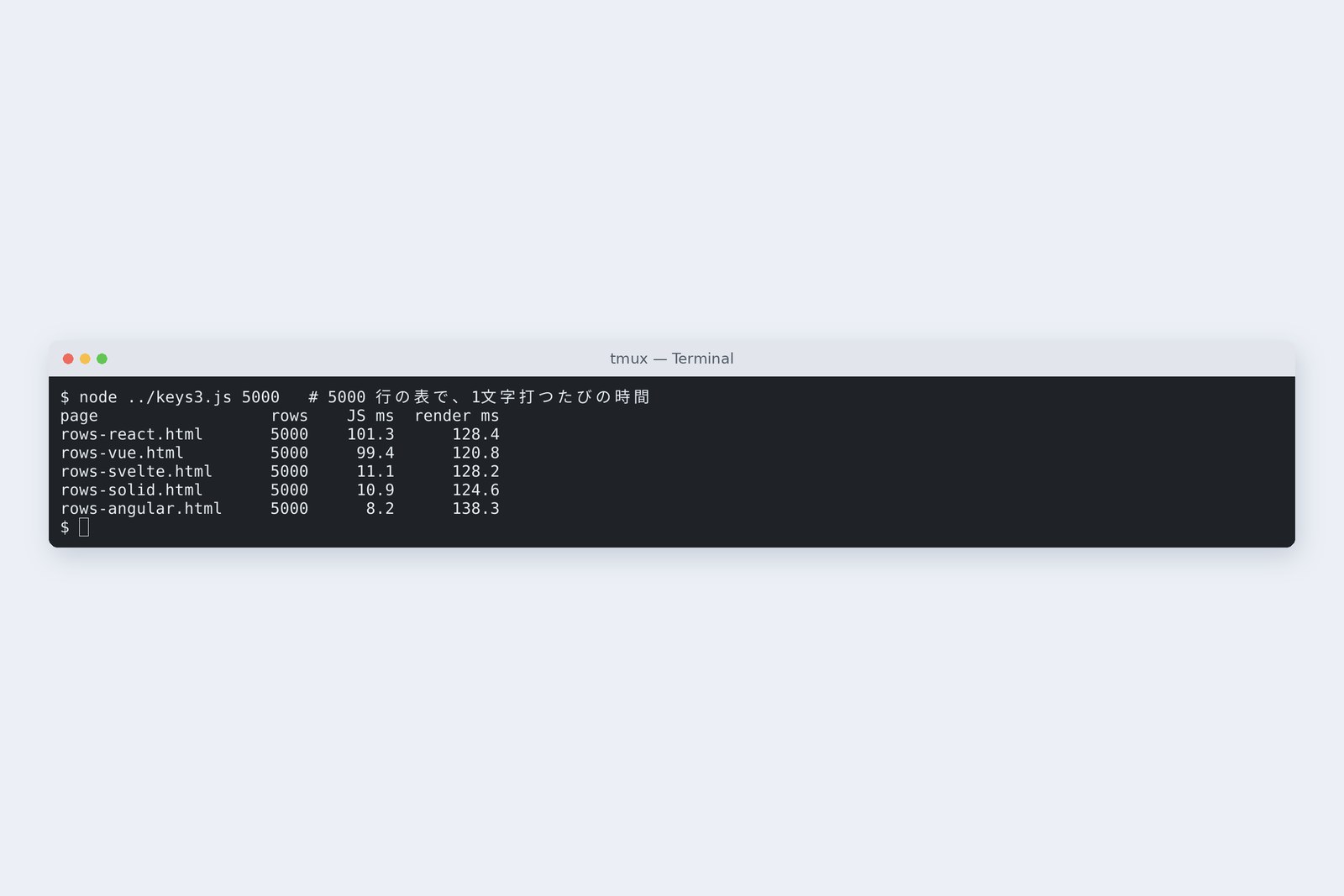
One keystroke on 5000 rows: JavaScript time
They split cleanly in two. React and Vue take 90-odd ms; Svelte, Solid and Angular about 10 ms, on the same side as 2010's Knockout (5.2 ms).
Two families: rebuild and compare / only what's tied
Even when a single amount changes, React and Vue run the component again, build the shape of all 5000 rows and compare. The signals family knows from the start where that amount is read (the total), so there's nothing to compare. You could say the 2020s' signals won back the price React paid for clarity in 2013. Drawing (a little over 100 ms), though, is the same for all. Putting a 5000-row table on screen is heavy in itself, the same conclusion as part 2.
AraiSo we drop React and switch to signals…
FuruiOn a ten-row table, every one of them finishes in about 2 ms. React has its own ways to cut this down; we'll measure them in part 8.
Builds and size
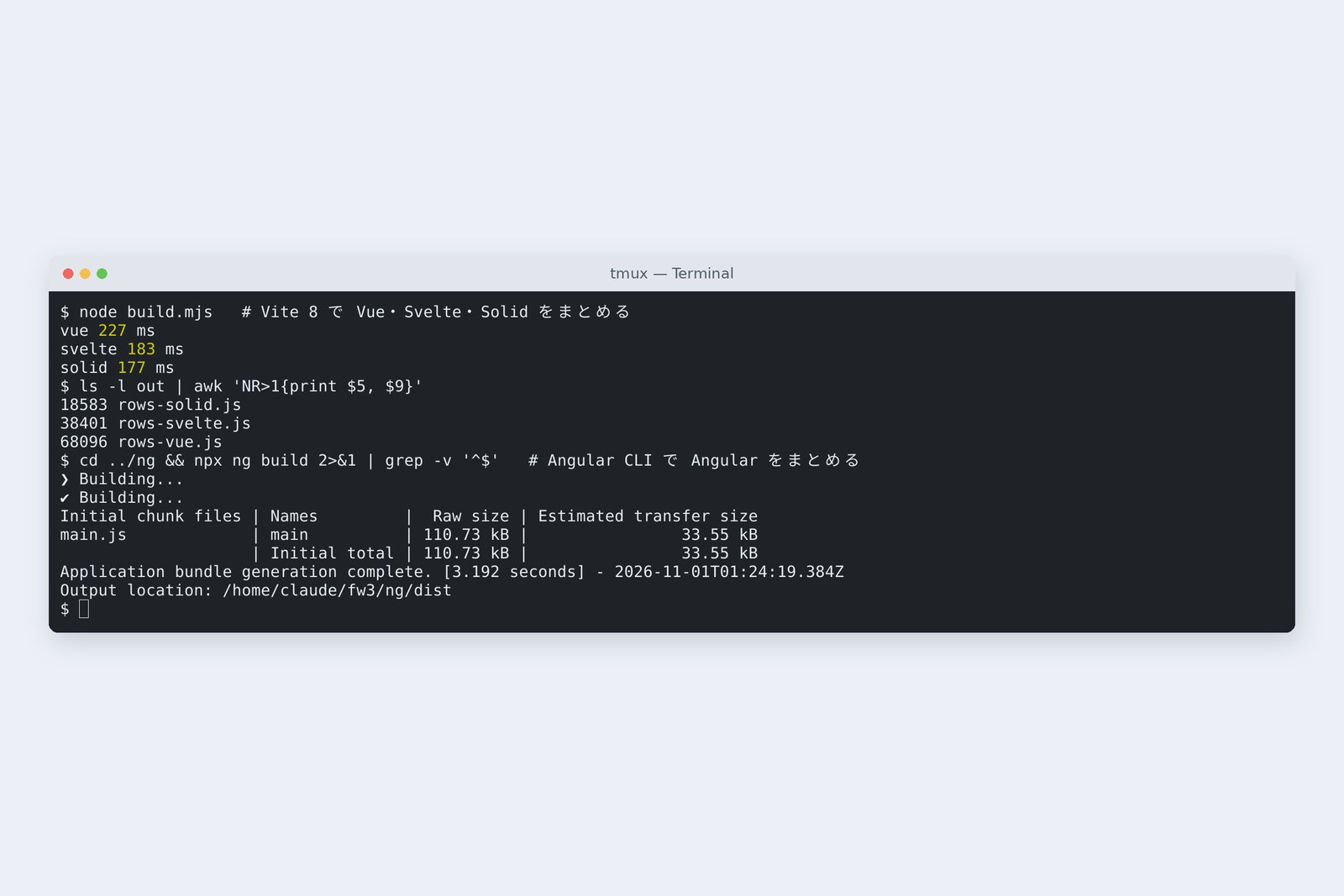
# How much was hand-written, and how much reaches the browser (app.js and the text strings are the same for all and left out)
  style           lines     delivered     gzip        build
  G Vue 3.5       47        68,096 B      26,359 B    Vite 8.3  0.2 s
  H Svelte 5      44        38,401 B      15,032 B    Vite 8.3  0.2 s
  I Solid 1.9     54        18,583 B      7,232 B     Vite 8.3  0.2 s
  J Angular 22    73        110,729 B     37,223 B    Angular CLI 22  3.2〜4.4 s
  C React 19      59        226,513 B     70,123 B    esbuild 0.28  73 ms
# Lines exclude blanks (comments included); J has 13 lines of type declarations. For reference, part 2's Knockout is 70,680 B
Delivered size ranged from Solid's 18 KB to React's 226 KB, a factor of 12. Svelte and Solid emit only the parts used, so they stay small. React, as in part 1, is mostly react-dom, the part that writes to the screen. Builds took 0.2 s with Vite and a few seconds with the Angular CLI. The build step part 1 called "what you pay in return" is now an ordinary step in every school.
Building screens on the server
All seven so far build the screen in the browser. The HTML that arrives first is nearly empty, and the items table doesn't appear until the JavaScript arrives and runs. So building HTML on the server and sending it came back.
- 2016 — Next.js 1.0. React screens are turned into HTML on the server before sending (SSR)
- 2023 — Next.js 13.4's App Router. Each part of the screen is marked to run on the server or in the browser
- 2024 — Server Components become stable in React 19. Parts that run only on the server send no JavaScript to the browser
It sits right between the days when a server like the backend series' Spring Boot returned HTML and the days of building everything in the browser. This series measures it on Next.js in parts 12 and 13.
On your own PC
Every school has a command that creates a starter project. With Node.js installed, one line gives you a practice project for each.
# Vite starters (choose react, vue, svelte, solid and more)
npm create vite@latest
# Angular starter
npx @angular/cli new my-app
Write the same screen in two schools and record one keystroke in the developer tools' Performance tab, and you'll see this part's two families for yourself. Compare the length of the yellow (Scripting).
§ — On one page, and next time
- React (2013) brought one way: rebuild the screen from state, compare with last time, write the differences.
- Current Vue, Angular, Svelte and Solid: zero drift in the eight actions and zero errors under a strict CSP. All are built before shipping.
- One keystroke at 5000 rows: rebuild-and-compare React and Vue take 90-odd ms; signal-based Svelte, Solid and Angular about 10 ms. Drawing is a little over 100 ms for all.
- Delivered size runs from Solid's 18 KB to React's 226 KB.
- Since 2016, building screens on the server has come back (Next.js, Server Components).
AraiGot the history. So which one is this series written in?
FuruiReact. It's the most used, and with Next.js it reaches all the way to the server. Where it's slow, we measure and fix.
FuruiNext time, first steps in React. A Vite starter, JSX and components, and the start of the expense screens.
References
- React — Preserving and Resetting State
- Vue — Rendering Mechanism
- Svelte — What are runes?
- Solid — Intro to reactivity
- Angular — Signals
- InfoQ — Angular 21 Released(zoneless が既定に)
- React Blog — React v19
- Chrome DevTools — Performance features reference
Recorded by the author on a cloud Linux machine on 1 November 2026. Pages were served by a practice server (Node.js 22), and driven and measured with Chromium 153.0.8010.12 under Playwright. G is Vue 3.5.44, H Svelte 5.57.3, I Solid 1.9.18, built with Vite 8.3.5; J is Angular 22.2.4, built with the Angular CLI 22.2.5. C is part 1's React 19.3.1. For timing, a value was set in the same box, an input event sent, and the next frame awaited, 20 times; from Chromium's tracing over that span, JavaScript (FunctionCall, RunMicrotasks, TimerFire and so on) and drawing work (Layout, Paint and so on) were summed without overlap and divided by 20, taking the median of three runs. Release years follow npm's records and the references. Numbers will differ on other machines.
Old-School Front-End, Frameworks part 3 — History II, after React / 2026.11