Old-School Front-End · Frameworks / 2026 ・ No.04
Old-School Front-End: Frameworks
Part 4: First steps in React — a starter, JSX, components and props
Published
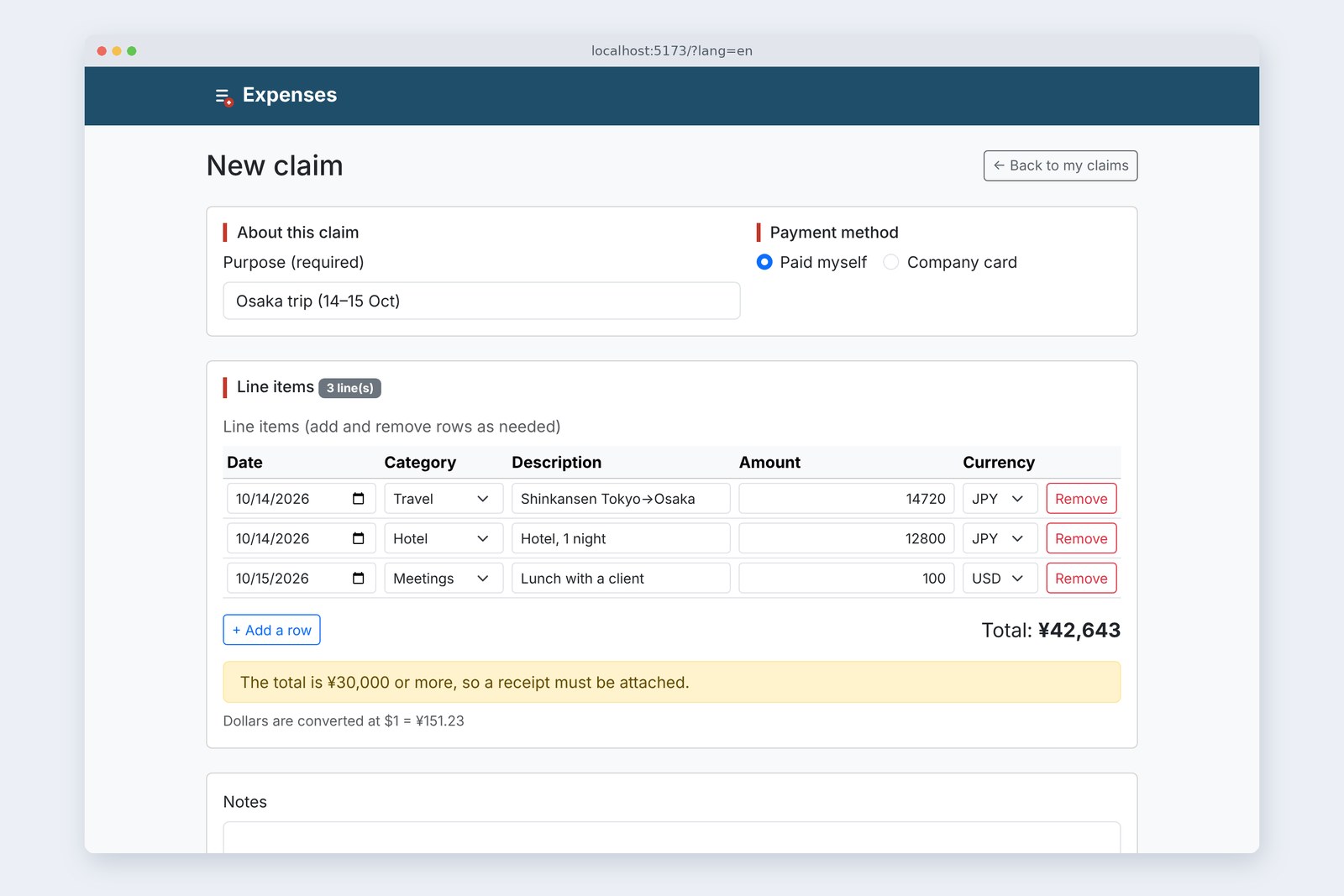
Three parts of history are done; now we write React. The subject is the front-end series' claim form.
Part 4 makes a starter with Vite, splits the screen into components, and passes the rows down as props. Adding and removing rows doesn't work yet (that's the job of state, in part 5). Instead we measure what JSX really is, the common mistakes, how saving a file changes the screen, and dev versus production.
Making a starter
AraiReact at last! What do I install first?
FuruiJust Node.js. Then three commands.
A route map of all 15 parts (you are here: part 4)
React itself decides the shape of the screen; it doesn't bundle files or run a dev server. That's left to Vite, the same tool that bundled Vue, Svelte and Solid in part 3.
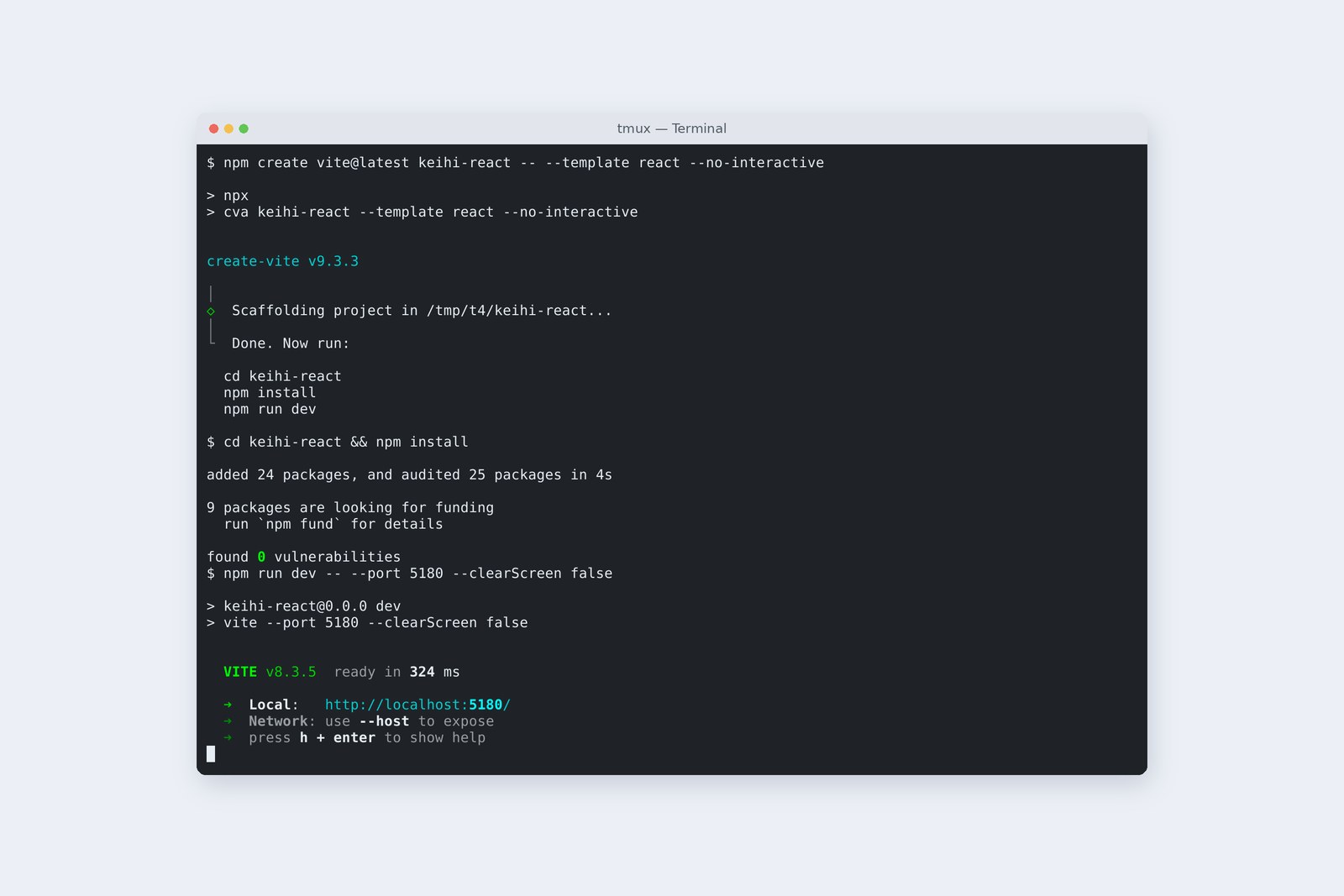
# What npm create vite@latest keihi-react -- --template react made (create-vite 9.3.3)
  .gitignore
  .oxlintrc.json                    settings for the linter (oxlint)
  README.md
  index.html                        entry HTML (just <div id="root">)
  package.json                      packages, and the dev and build commands
  vite.config.js                    Vite settings (just adds the React plugin)
  public/                           files served as is
  src/main.jsx                      starts rendering into #root
  src/App.jsx                       the outermost component
  src/App.css, index.css, assets/   sample styles and images (deleted this time)
# Creating took 1.3 s. npm install: 25 packages, 62 MB, 17.5 s (4 s the second time). npm run dev starts in about 0.3 s
The entry index.html holds a single <div id="root">; everything on screen is drawn by the JavaScript in src/. In the front-end series we wrote the HTML first and JavaScript rewrote it later. Here the order is reversed.
Splitting the screen into components
The claim form became six components. A component is a function, and its name starts with a capital letter.
The component tree, and how props flow
# src/sample.js
// Part 4: no state yet, so the rows are a fixed sample (part 5 makes them addable and removable)
import { T } from './text.js';

export const RATE = 151.23; // yen per dollar (fetched from the server in part 7)

export const SAMPLE_ROWS = [
  { id: 1, date: '2026-10-14', category: 'transport', item: T.sample[0], amount: '14720', currency: 'JPY' },
  { id: 2, date: '2026-10-14', category: 'hotel', item: T.sample[1], amount: '12800', currency: 'JPY' },
  { id: 3, date: '2026-10-15', category: 'meeting', item: T.sample[2], amount: '100', currency: 'USD' },
];

# src/App.jsx (inside main)
        <form>
          <AboutSection />
          <ItemsSection rows={SAMPLE_ROWS} rate={RATE} />
          …
        </form>
<ItemsSection rows={SAMPLE_ROWS} rate={RATE} /> looks like HTML attributes, but it's passing arguments to a function. Those arguments are called props.
# src/components/ItemsSection.jsx
import { T } from '../text.js';
import ItemTable from './ItemTable.jsx';
import TotalLine from './TotalLine.jsx';

/** The items card: just lays out the table and total, passing rows straight down */
export default function ItemsSection({ rows, rate }) {
  return (
    <div className="card mb-4">
      <fieldset className="card-body">
        <legend className="h6 section-title">{T.items} <span id="count" className="badge text-bg-secondary">{T.count(rows.length)}</span></legend>
        <ItemTable rows={rows} />
        <TotalLine rows={rows} rate={rate} />
      </fieldset>
    </div>
  );
}

# src/components/ItemTable.jsx (inside tbody)
        <tbody id="items">
          {rows.map((row, i) => <ItemRow key={row.id} row={row} n={i + 1} />)}
        </tbody>
ItemsSection just hands the rows it receives to the table (ItemTable) and the total (TotalLine). ItemTable makes an ItemRow per row with rows.map(…). Values flow only downward; a lower component never rewrites a value from above. Part 3's "one way" is exactly this shape.
One line item
import { T } from '../text.js';

/** One line item: turns the row received from the parent (props) into a table row */
export default function ItemRow({ row, n }) {
  return (
    <tr>
      <td><input type="date" className="form-control form-control-sm" name="date" defaultValue={row.date} aria-label={T.rowLabel(n, T.date)} /></td>
      <td>
        <select className="form-select form-select-sm" name="category" defaultValue={row.category} aria-label={T.rowLabel(n, T.category)}>
          <option value="">{T.choose}</option>
          {Object.entries(T.categories).map(([value, label]) => <option key={value} value={value}>{label}</option>)}
        </select>
      </td>
      <td><input type="text" className="form-control form-control-sm" name="item" defaultValue={row.item} aria-label={T.rowLabel(n, T.item)} /></td>
      <td><input type="text" className="form-control form-control-sm text-end" name="amount" defaultValue={row.amount} inputMode="numeric" autoComplete="off" aria-label={T.rowLabel(n, T.amount)} /></td>
      <td>
        <select className="form-select form-select-sm" name="currency" defaultValue={row.currency} aria-label={T.rowLabel(n, T.currency)}>
          <option value="JPY">{T.jpy}</option>
          <option value="USD">{T.usd}</option>
        </select>
      </td>
      <td><button type="button" className="btn btn-outline-danger btn-sm" aria-label={T.rowRemove(n)}>{T.remove}</button></td>
    </tr>
  );
}
It looks like HTML, with a few differences: className instead of class, htmlFor instead of for, inputMode for inputmode. Inside { } goes a JavaScript expression; {row.item} puts in the row's description.
The inputs only get a starting value through defaultValue. Handing "this box's value" to React starts in part 5; for now the browser itself holds whatever you type.
What JSX really is
Browsers can't read JSX. Vite turns it into ordinary JavaScript before handing it over. Here's a production build emitted without minifying.
# ItemRow as emitted by npm run build (unminified): JSX has become jsx() and jsxs() calls
function ItemRow({ row, n }) {
  return /* @__PURE__ */ (0, import_jsx_runtime.jsxs)("tr", { children: [
    /* @__PURE__ */ (0, import_jsx_runtime.jsx)("td", { children: /* @__PURE__ */ (0, import_jsx_runtime.jsx)("input", {
      type: "date",
      className: "form-control form-control-sm",
      name: "date",
      defaultValue: row.date,
      "aria-label": T.rowLabel(n, T.date)
    }) }),
    /* @__PURE__ */ (0, import_jsx_runtime.jsx)("td", { children: /* @__PURE__ */ (0, import_jsx_runtime.jsxs)("select", {
      className: "form-select form-select-sm",
      name: "category",
    …
  ] });
}
<tr>…</tr> became a function call, jsxs("tr", { children: [...] }), and the attributes became object keys. That explains JSX's rules.
- className — object keys use JavaScript names (the DOM also says element.className)
- Start with a capital — lower case becomes an HTML name (a string like "tr"); a capital becomes the function ItemRow
- Return one thing — a function returns one value; to put elements side by side, wrap them in <>…</> (a Fragment)
The total is just computed
import { T } from '../text.js';
import { calcTotal, needsReceipt } from '../money.js';

/** Total and receipt notice: the total is computed from props every time (stored nowhere) */
export default function TotalLine({ rows, rate }) {
  const total = calcTotal(rows, rate);
  return (
    <>
      <div className="d-flex flex-wrap justify-content-between align-items-center gap-2 mt-3">
        <button type="button" className="btn btn-outline-primary btn-sm" id="add-row">{T.add}</button>
        <p className="mb-0 fs-5">{T.total}<output id="total" className="fw-bold">{T.yen(total)}</output></p>
      </div>
      {needsReceipt(total) && <p className="alert alert-warning py-2 mt-3 mb-0" id="receipt-note">{T.receipt}</p>}
      <p className="small text-body-secondary mt-2 mb-0" id="rate-note">{T.rate(rate)}</p>
    </>
  );
}
The total is computed from rows every time and shown, and stored nowhere. The front-end series wrote the total into the screen's <output> and rewrote it whenever rows changed (that's where part 1 drifted). Here, once rows is settled the total is too, so there's nothing to drift.
The receipt notice is {needsReceipt(total) && <p>…</p>}; when the condition is false, nothing appears. Instead of toggling hidden, you write whether it's there at all. The calculation functions (money.js) are the front-end series' app.js with imports added.
Tripping on purpose
AraiIt's almost the same as HTML. I won't get this wrong.
FuruiThen let's make everyone's usual mistakes first, all of them.
# Each mistake made on purpose under the dev server (npm run dev): what the console said, and the screen
class and for as in HTML
  Invalid DOM property `class`. Did you mean `className`? (same for for)
  → the screen still renders (warning only)
lower-case component (itemRow)
  <itemRow /> is using incorrect casing. … start its name with an uppercase letter.
  → becomes an unknown <itemrow></itemrow>; no row appears
value without onChange
  You provided a `value` prop to a form field without an `onChange` handler. This will render a read-only field.
  → typing 0 leaves it at 14720
map without key
  Each child in a list should have a unique "key" prop.
  → renders for now (part 5 measures how it goes wrong)
assigned to props
  Cannot assign to read only property 'n' of object
  → blank screen (stopped by the error)
<img onerror=…> in the text
  (no message)
  → as text with { }; with dangerouslySetInnerHTML an img appeared and onerror ran
returned two sibling elements
  [PARSE_ERROR] Adjacent JSX elements must be wrapped in an enclosing tag.
  → the transform stops; Vite's error screen appears
![A browser showing Vite's error screen. [plugin:vite:oxc] Transform failed with 1 error: [PARSE_ERROR] Adjacent JSX elements must be wrapped in an enclosing tag. It points at the <p> on line 5 of src/lab/LabBroken.jsx and says Help: Did you want a JSX fragment <>...</>?](blog-img/framework-04/shot-overlay-en-1600.jpg)
Under the dev server, React writes the reason into the console when it spots a mistake (even suggesting className). But the screen usually doesn't stop, so you won't notice unless you look. A lower-case component name shows no rows at all, and it's still only a warning.
As for XSS, text put in with { } always comes out as text: the same protection part 8 of the front-end series got by choosing textContent, built in from the start. With the aptly named dangerouslySetInnerHTML, onerror ran.
Save, and it changes
When you save a file, the dev server swaps in just that component (HMR). After typing a purpose, I edited various files.
  file edited                     what happened                     typed purpose
  components/TotalLine.jsx        that component swapped (50 ms)    kept
  components/AboutSection.jsx     that component swapped (51 ms)    kept
  sample.js                       App.jsx swapped                   kept
  text.js                         full page reload                  lost
  main.jsx                        full page reload                  lost
# After typing a purpose, the file was edited. Times are medians of 5 (from saving the file to the screen changing)
# text.js is also imported by main.jsx, so the update spread up to main.jsx and became a full reload
Component files changed in about 50 ms, and the typed purpose and row descriptions stayed. But editing text.js, which holds the screen's text, reloaded the whole page and the purpose was gone. text.js is also imported by main.jsx, and main.jsx isn't a component, so it can't be swapped in place. Keep files that hold only components, and HMR works well.
Dev and production
I opened the same screen from npm run dev and from npm run build served by npm run preview.
                            dev (npm run dev)       production (npm run build)
  files loaded              22                      4
  of which JavaScript       20                      1
  bytes received            3.8 MB                  451 KB
  until the total shows     778 ms                  344 ms
# The biggest dev file is react-dom_client.js (3,132,085 B), with the warning machinery and source maps inside
# In dev, CSS arrives as JavaScript files too (bootstrap.min.css included). Times are medians of 5
Dev and production
Dev serves files one by one (so HMR can swap just one), with section 6's warning machinery and source maps inside: 3.8 MB. Production bundles and shrinks it all into one file: 451 KB. Measure speed, and show people, in production.
How many KB are ours?
                                        size          gzip
  React alone (a single <p>)            218,795 B     67,378 B
  this part's claim form                229,019 B     71,093 B
    → our own code                      10,224 B      3,715 B
  jQuery version (Frontend part 14)     95,275 B      35,125 B
# The jQuery version is five files (jquery, app, auth, validate, form-jq) and already submits and validates. This part's src is 228 non-blank lines
React with nothing but one <p> is already 219 KB; the difference to this part's claim form, the code we actually wrote, is 10 KB. React's entry fee is large, and after that each component adds a little. The jQuery version is 95 KB and already submits and validates. To be honest, right now the jQuery version is lighter and does more.
On your own PC
# make a starter, install, run the dev server
npm create vite@latest keihi-react -- --template react
cd keihi-react
npm install
npm run dev            # open http://localhost:5173/
# build for production and serve it locally
npm run build
npm run preview        # http://localhost:4173/
With React Developer Tools in your browser, the Components tab in developer tools shows the component tree and the props each one received. Compare it with section 2's figure. The <StrictMode> in the starter's main.jsx runs components twice, in dev only, to catch mistakes; part 7 measures what that means.
§ — On one page, and next time
- A starter takes three commands. React decides the screen's shape; Vite bundles and serves.
- Split the screen into components (functions). Pass values down as props, never up; children don't rewrite them.
- JSX is a call to jsx(). className, capitals and returning one thing all follow from that.
- The total isn't stored; it's just computed each time. For notices, write whether they appear.
- Dev, with warnings, is 3.8 MB; production is 451 KB. Our own code is 10 KB.
AraiThe screen's done. …But pressing Add a row does nothing.
FuruiBecause we haven't told React what changes when you press it.
FuruiNext time, state and re-rendering. Adding and removing rows with useState, through to what goes wrong when the key is wrong.
References
- Vite — Getting Started
- React — Your First Component
- React — Writing Markup with JSX
- React — Passing Props to a Component
- React — Conditional Rendering
- React — Rendering Lists
- React — dangerouslySetInnerHTML
- Vite — Hot Module Replacement
Recorded by the author on a cloud Linux machine on 1 November 2026. The starter is create-vite 9.3.3's react template (Vite 8.3.5, @vitejs/plugin-react 6.1.2, React 19.3.1, oxlint), with Bootstrap 5.3.8 added. Screens were opened in Chromium 153.0.8010.12 under Playwright to collect console output, file counts and sizes, and times. HMR time runs from saving a file to the screen changing; load time from the start of navigation to the total appearing; both are medians of 5. npm install times depend on the network.
Old-School Front-End, Frameworks part 4 — First steps in React / 2026.11