Old-School Front-End · Frameworks / 2026 ・ No.05
Old-School Front-End: Frameworks
Part 5: State and re-rendering — useState, the one-way loop, and getting the key wrong
Published
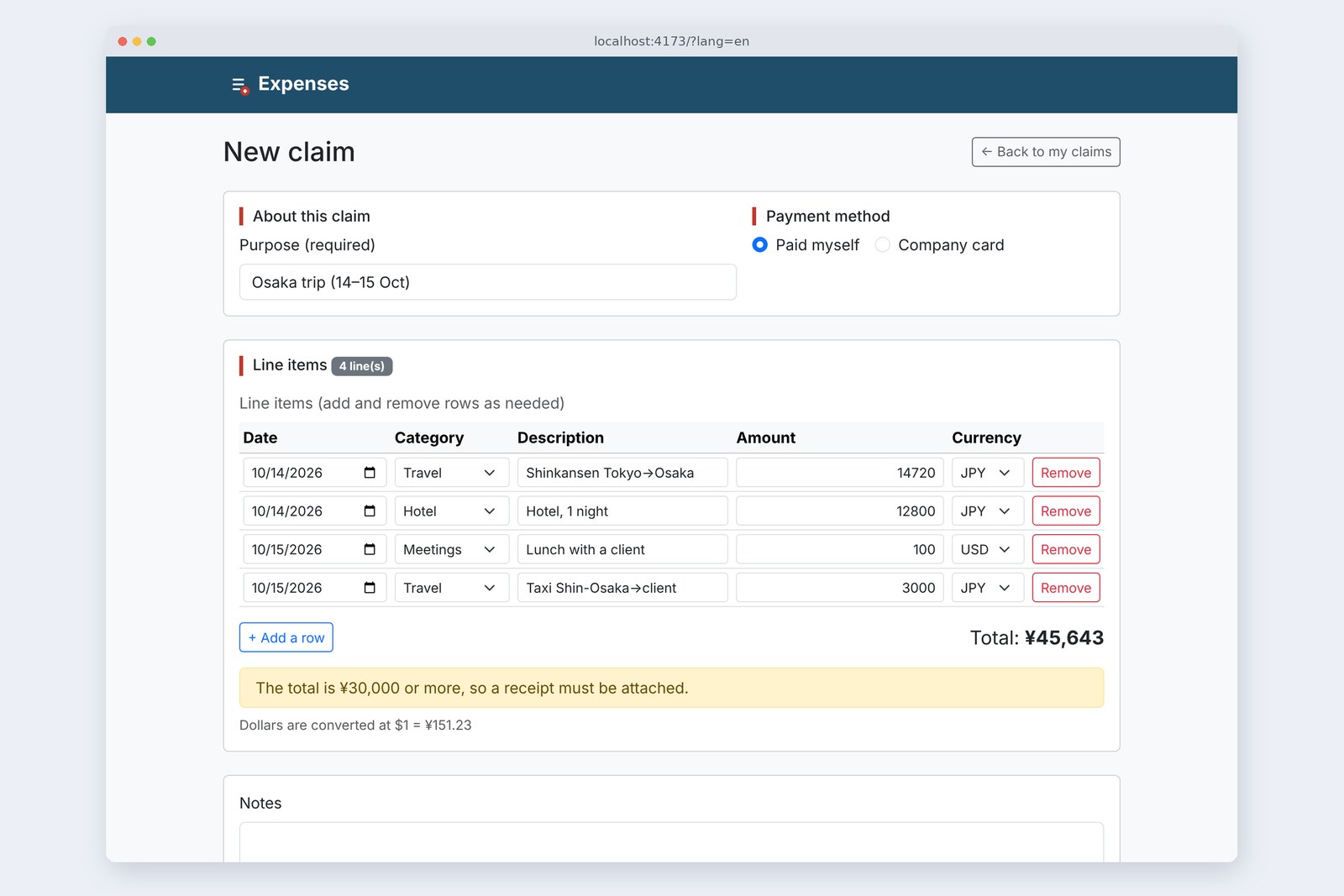
Part 4's claim form only looked right; Add a row did nothing. Part 5 brings in state (useState) so adding, removing and typing work.
Then we count what re-renders on each keystroke, and make three common state mistakes on purpose (mutating the array, changing it twice in a row, keying by position) to measure what happens.
Why pressing it did nothing
AraiFor Add a row, I just push a row onto the array, right?
FuruiWe'll test whether that changes the screen in section 6. First, learn when React draws.
A route map of all 15 parts (you are here: part 5)
Part 4's components called a function once and returned the screen's shape. React calls a component again only when state changes (or its parent re-renders). Change an ordinary variable and React never notices. So we use useState, a container that asks React to redraw when its value changes.
State in one place
import { useState } from 'react';
import { T } from './text.js';
import { SAMPLE_ROWS, RATE, newRow } from './sample.js';
import { countRender } from './renderCount.js';
import AboutSection from './components/AboutSection.jsx';
import ItemsSection from './components/ItemsSection.jsx';

/** The claim form screen. The rows state lives here, in one place only */
export default function App() {
  countRender('App');
  const [rows, setRows] = useState(SAMPLE_ROWS);

  // These three are the only ways in; each builds a new array and hands it over
  const change = (id, name, value) => setRows(rows.map((r) => (r.id === id ? { ...r, [name]: value } : r)));
  const add = () => setRows([...rows, newRow()]);
  const remove = (id) => {
    const rest = rows.filter((r) => r.id !== id);
    setRows(rest.length > 0 ? rest : [newRow()]); // keep at least one row
  };

  return ( … <ItemsSection rows={rows} rate={RATE} onChange={change} onAdd={add} onRemove={remove} /> … );
}
useState(SAMPLE_ROWS) returns a pair: the current value rows and a function to change it, setRows. The state lives in the topmost App. The count (ItemsSection), the total (TotalLine) and next part's submission all use the same rows, so it sits once in their common parent ("lifting state up").
The one-way loop
Values go down as props. Lower components don't rewrite them; they report "please change this" upward through functions like onChange. There are only three ways to change the state, change, add and remove, and each builds a new array for setRows.
Tying boxes to state
import { T } from '../text.js';
import { countRender } from '../renderCount.js';

/** One line item: reads values from row, and on input just tells the parent via onChange (never rewrites itself) */
export default function ItemRow({ row, n, onChange, onRemove }) {
  countRender('ItemRow');
  const edit = (event) => onChange(row.id, event.target.name, event.target.value);
  return (
    <tr>
      <td><input type="date" name="date" value={row.date} onChange={edit} /></td>
      <td><select … name="category" value={row.category} onChange={edit}>…</select></td>
      <td><input type="text" name="item" value={row.item} onChange={edit} /></td>
      <td><input type="text" name="amount" value={row.amount} onChange={edit} /></td>
      <td><select … name="currency" value={row.currency} onChange={edit}>…</select></td>
      <td><button type="button" data-action="remove" onClick={() => onRemove(row.id)}>{T.remove}</button></td>
    </tr>
  );
}
Part 4's defaultValue became value={row.amount}, with an onChange. In part 4's section 6, value without onChange made the box read-only; now the box's value is the same thing as React's state. This is called a controlled component. One keystroke goes all the way round: onChange → setRows → re-render → the new value in the box.
Checking with the same actions
# The state-driven claim form, checked after each action (the ja page)
  action                  rows  count shown   total shown
  opened                  3     明細 3 件42,643 円
  add 0 to row 1's amount 3     明細 3 件175,123 円
  Backspace it            3     明細 3 件42,643 円
  add a row               4     明細 4 件42,643 円
  3000 in row 4           4     明細 4 件45,643 円
  row 3: USD → JPY        4     明細 4 件30,620 円
  remove row 2            3     明細 3 件17,820 円
  type a purpose          3     明細 3 件17,820 円
# Every total matches a hand calculation ($1 = ¥151.23); the same in dev and production
The count and total changed correctly every time. As in part 4, the total is just computed from rows, so adding or removing rows leaves nothing to drift. The count that drifted three times in part 1's jQuery version stays right here without any effort.
How often does it re-render?
Each component got one line at the top counting how often it runs (purely for measuring).
// A line just for measuring: count how often each component function runs (renders). Real apps don't need it
export function countRender(name) {
  const c = (globalThis.__renders ??= {});
  c[name] = (c[name] ?? 0) + 1;
}
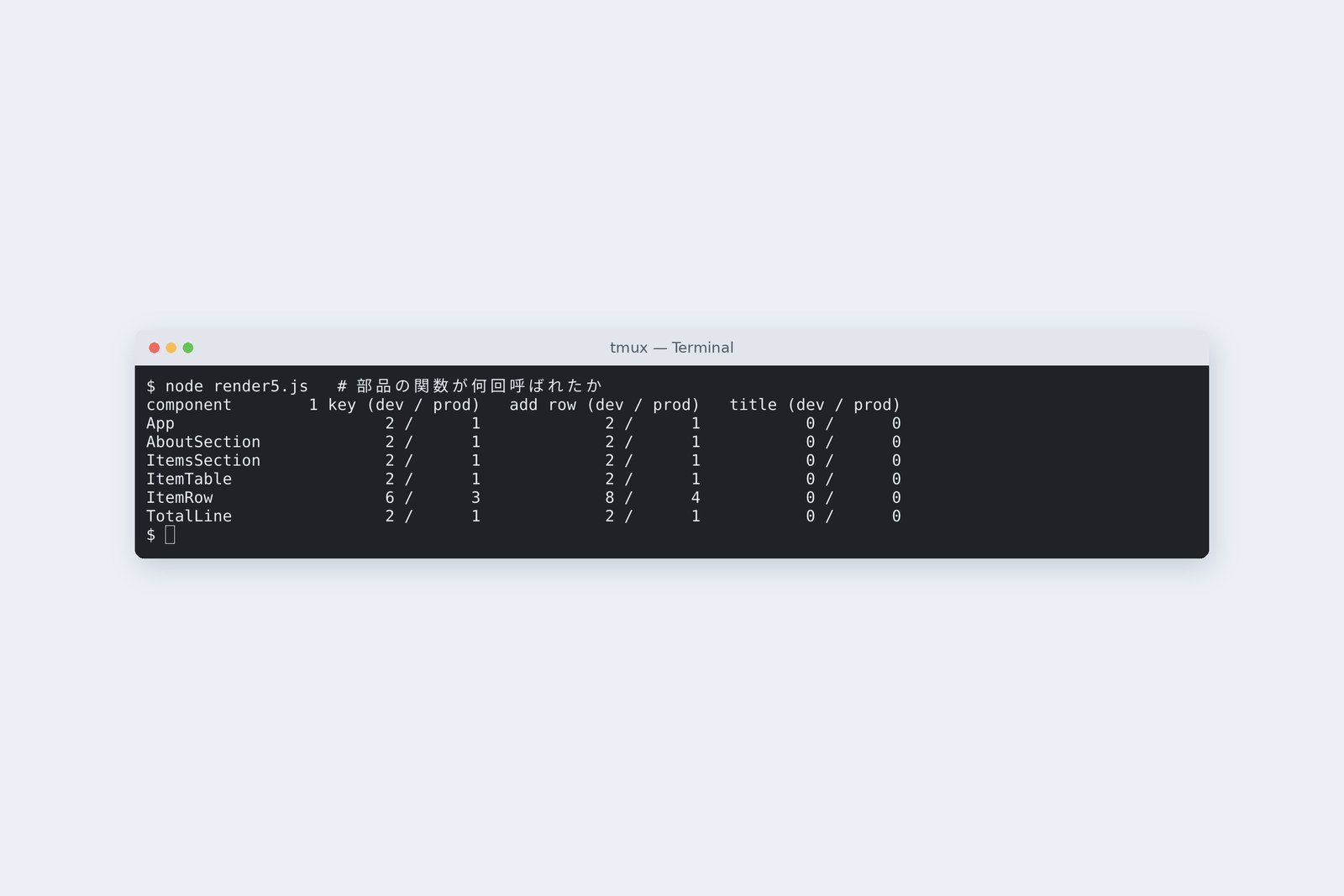
# How many times each component function ran (counted with countRender)
  component       one key           add a row         type purpose
                  dev / prod        dev / prod        dev / prod
  App             2 / 1             2 / 1             0 / 0
  AboutSection    2 / 1             2 / 1             0 / 0
  ItemsSection    2 / 1             2 / 1             0 / 0
  ItemTable       2 / 1             2 / 1             0 / 0
  ItemRow         6 / 3             8 / 4             0 / 0
  TotalLine       2 / 1             2 / 1             0 / 0
# Dev is exactly double because StrictMode calls each component function twice. The purpose box isn't tied to state, so nothing re-renders
One keystroke re-rendered all six components: even AboutSection (purpose and payment), which has nothing to do with amounts, and the ItemRows for rows 2 and 3 that nobody typed in. When App, which holds the state, re-renders, everything below it is called; that's React's rule. Dev is exactly double because <StrictMode> calls each function twice on purpose, to check it returns the same result every time.
# For the same keystroke, how much the screen (DOM) actually changed (MutationObserver; same in dev and production)
  42 records; only 2 changed anything (the box's value and the total text)
  The other 40 are React re-setting inputs' name, type and so on to the same values (as part 1's 21)
Calling functions isn't the same as rewriting the screen, though. React compared the results with last time and actually rewrote two places: the box you typed in and the total. At this table's size, nobody can tell how many functions ran. What to do when the rows grow is part 8.
State is next render's value
What happens if we write it the way Arai suggested in section 1?
  const addWrong = () => {
    rows.push({ id: rows.length + 1, item: '(新しい行)' }); // changed the contents
    setRows(rows);                                          // passed the same array
  };
  const addRight = () => setRows([...rows, { id: rows.length + 1, item: '(新しい行)' }]); // pass a new array

  const addTwoWrong = () => {
    setRows([...rows, newRow()]);
    setRows([...rows, newRow()]); // this rows still has one row
    window.__seen = rows.length;  // the length of rows read right after setRows
  };
  const addTwoRight = () => {
    setRows((prev) => [...prev, newRow()]); // take the current value, return the next one
    setRows((prev) => [...prev, newRow()]);
  };
# lab.html?lab=push and ?lab=twice
  action                                            count
  opened                                            1
  ① push, then setRows with the same array          1 (screen unchanged)
  ② then add one row with a new array               3 (①'s row suddenly appears)

  opened                                            1
  ③ setRows([...rows, newRow]) twice                2 (only one added)
     rows.length read right after                   1 (still old)
  ④ setRows((prev) => [...prev, newRow]) twice      4 (two added)
① Push, then pass the same array: the screen didn't change. React decides whether something changed by asking "is this the same array as before?", so a mutated array counts as unchanged. The trouble is ②: adding a row another way next brought ①'s silently added row along with it. The rule is don't mutate state arrays; make new ones.
③ calls setRows twice, meaning to add two rows at once. Only one appeared. rows is this render's value (a snapshot); calling setRows doesn't change it right away (read straight after, it's still 1). Both calls passed "the one-row array plus a row", so the result was two rows. To change from the previous value, pass a function as in ④; React hands it the current value each time.
Telling rows apart with key
In part 4 the screen rendered even with the missing-key warning. Where a missing key really hurts is removing or reordering rows. To test it, each row component got a small state of its own (a "check" ✓).
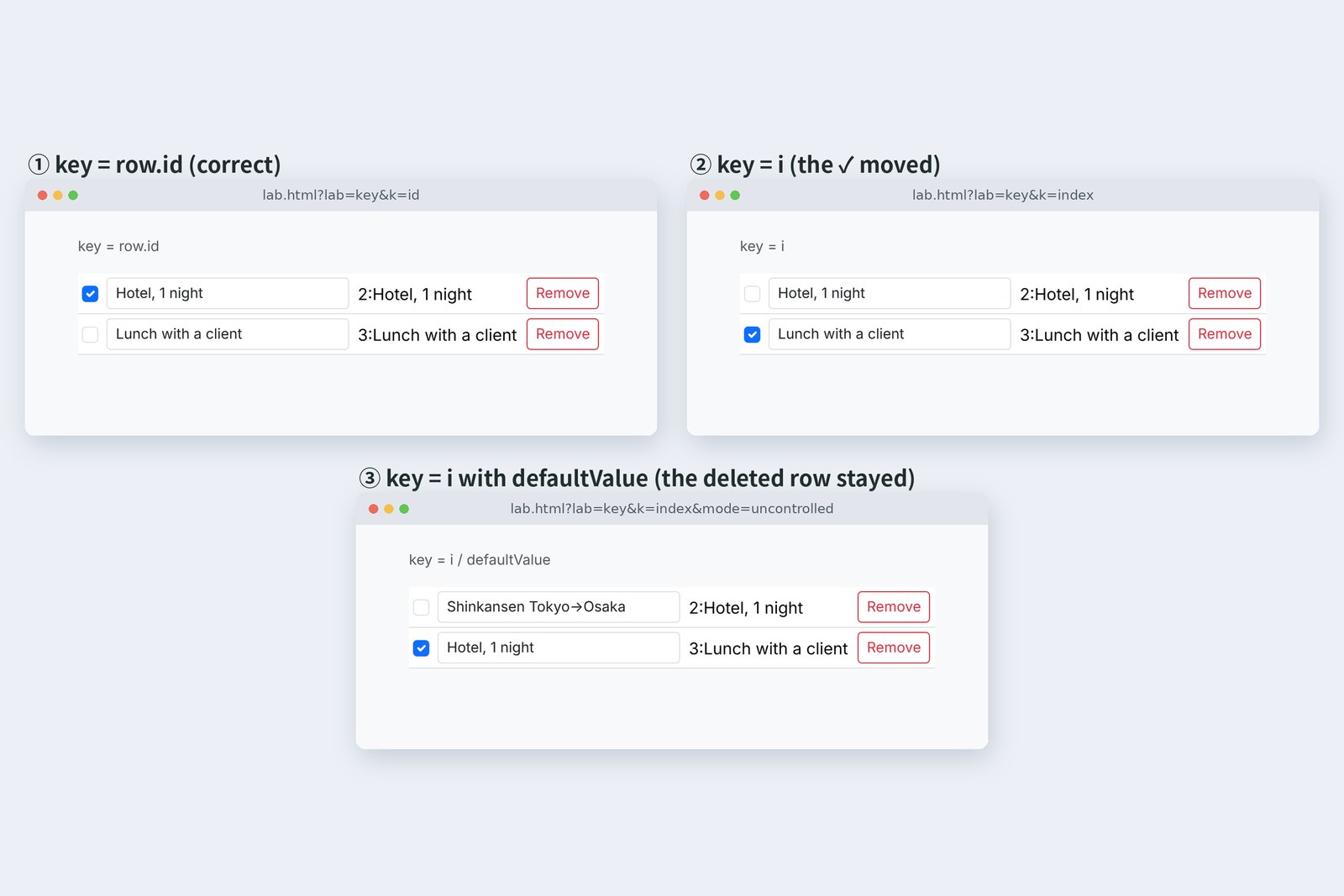
# Three rows (Shinkansen, Hotel, Lunch): check Hotel, then remove row 1, Shinkansen
  key             item box      ✓ (check)             text in boxes               typing in row 1
  row.id          value         ✓ on Hotel            correct                     fine
  i               value         ✓ moved to Lunch      correct                     fine
  i               defaultValue  ✓ on row 2 (moved)    deleted Shinkansen stayed   fine (but the wrong row)
  Math.random()   value         ✓ gone                correct                     box replaced after one character
  Math.random()   defaultValue  ✓ gone                correct                     fine (nothing re-renders)
# The ✓ is a small state each row component keeps (useState). Same key, and React treats it as the same component and keeps the state
Which component ends up on which row, by key
When re-rendering, React treats things with the same key as the same component and reuses its state and screen elements. Key by position (i), and the moment row 1 goes, component 0 (formerly Shinkansen) takes Hotel and component 1 (formerly the checked Hotel) takes Lunch. The ✓ belongs to the component, so it moved to Lunch.
③ is worse. With the description box left to the browser via defaultValue, the box's text stayed with its component too, and the deleted "Shinkansen" stayed on screen, though the data was Hotel. Key by the row's own id, never by position.
A key that kills the box
Rows 4 and 5 of the table use Math.random() as the key. The key differs on every render, so each time React sees all the old components gone and new ones arriving.
For the box tied to state (value), typing the first character triggered a re-render, the box itself was rebuilt, and the cursor vanished. Exactly what happened with part 1's version B (rebuilding the whole table with innerHTML), now inside React. React's comparing only works when the keys are right.
What not to make state
In section 5's right-hand column, typing a purpose re-rendered nothing, because that box isn't tied to state. This time, only the rows became state.
- Total, count, receipt notice — computable from rows, so not state (keep them twice and they drift, as in part 1)
- Purpose, notes — only needed when sending, so the browser keeps them for now (part 6 deals with them alongside submission)
- Exchange rate — a fixed value; it becomes state once it comes from the server (part 7)
The more state, the more triggers for re-rendering and places to drift. Rule one: if it can be computed from something else, don't make it state.
On your own PC
In React Developer Tools' settings (the gear on the Components tab), turn on "Highlight updates when components render." and re-rendered components flash with an outline. Type one character into an amount and watch even the purpose box light up. Type in the purpose, and nothing does.
For the key experiment, just change key={row.id} to key={i} in ItemTable.jsx. Switch row 2's description back to defaultValue, remove row 1, and you get screen ③. Change it back afterwards.
§ — On one page, and next time
- React draws a component again when state changes. Ordinary variables don't trigger it.
- Put state once, in the common parent of the components that use it. Values go down; "please change" goes up.
- One keystroke re-renders all six components (double in dev, from StrictMode); two places change on screen.
- Make new state arrays. To change from the previous value, pass setRows a function.
- Key by the row's id. Position keys move state; a fresh key every time kills the box.
AraiThe rows work! Now I'll add a submit button…
FuruiAnd if someone submits with no purpose? Types "abc" as an amount?
FuruiNext time, forms and validation. Submitting with React 19's Actions, lined up with the checks from backend part 6.
References
- React — State: A Component's Memory
- React — Render and Commit
- React — State as a Snapshot
- React — Queueing a Series of State Updates
- React — Updating Arrays in State
- React — Sharing State Between Components
- React — Preserving and Resetting State
- React — StrictMode
Recorded by the author on a cloud Linux machine on 1 November 2026. State was added to part 4's project (Vite 8.3.5, React 19.3.1), and both dev (npm run dev, with StrictMode) and production (npm run build served by npm run preview) were opened in Chromium 153.0.8010.12 under Playwright. Re-renders were counted with countRender at the top of each component, screen changes with a MutationObserver. The key and other experiments ran on separate screens in lab.html.
Old-School Front-End, Frameworks part 5 — State and re-rendering / 2026.11