Old-School Front-End / 2026 ・ No.06
Old-School Front-End
Part 6: CSS with Bootstrap, using the old-timers' toolbox once you know what's inside
Published
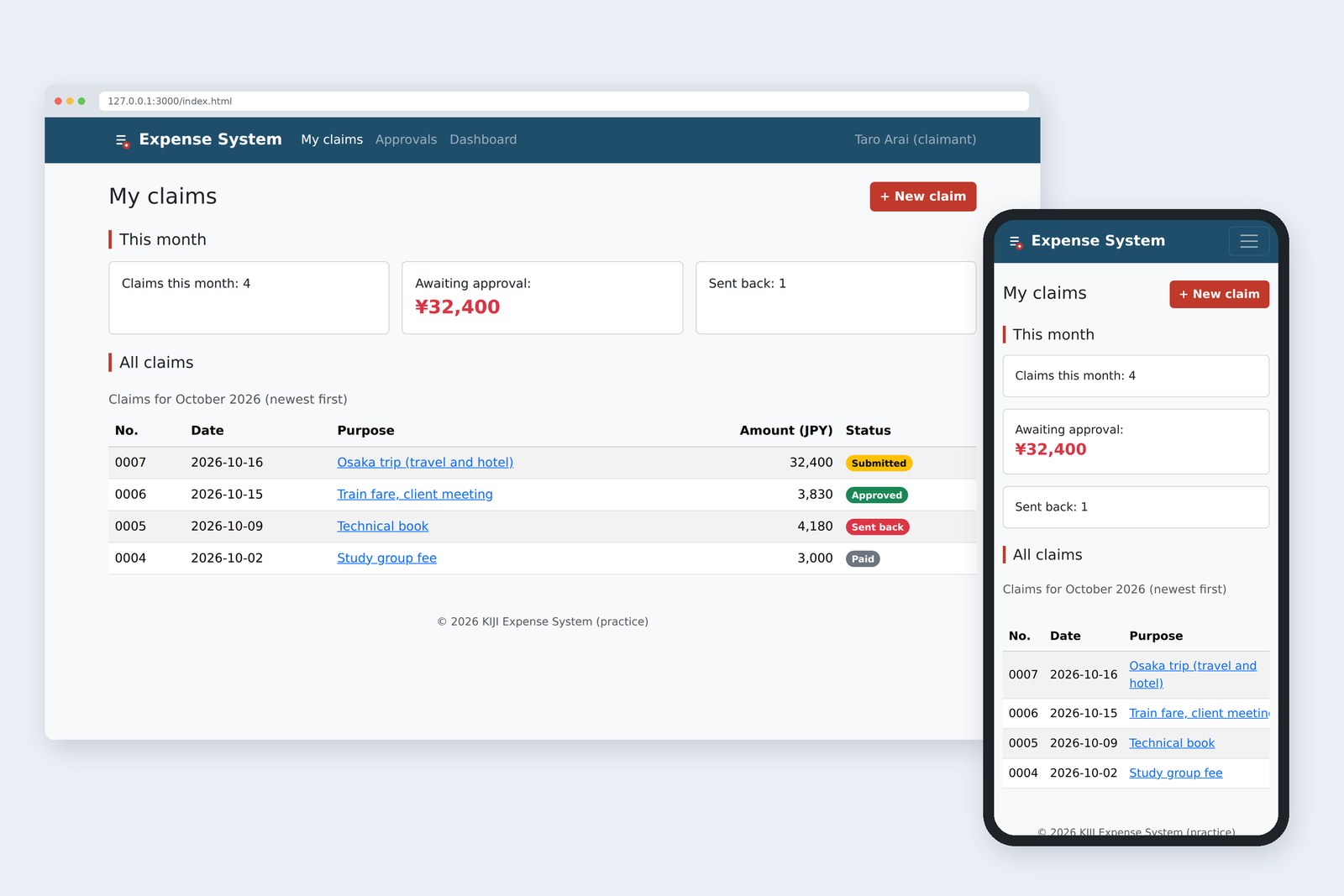
An "old-school" front-end course: no AI doing it for you, every line typed by hand. Part 6 is Bootstrap.
It's a toolbox that gives you what we hand-wrote in parts 4 and 5 just by adding classes.
We rebuild the claims list and the claim form with Bootstrap and check which class matches which piece of our hand-written CSS.
I also measured the weight behind the convenience, and the traps AI keeps stepping into.
This part's goal
AraiFurui, Bootstrap is the thing AI always uses, right? Pile on classes and it looks the part.
FuruiRight. A toolbox from people who were sick of writing the same CSS over and over. Developers at Twitter released it in 2011, and it became a standard.
AraiThen why not teach Bootstrap from the start…?
FuruiUse it without knowing what's inside and the tool ends up using you. After hand-writing parts 4 and 5, you should see a class name and think, "ah, that CSS".
You are here: part 6
We use the stable release at the time of writing, Bootstrap 5.3.8 (released 26 August 2025). The first preview of the next major version, 6.0.0-alpha.1, appeared on 8 October 2026, but it's still a preview, so a business app stays on 5.3. First, let's put it next to part 5's hand-written version.
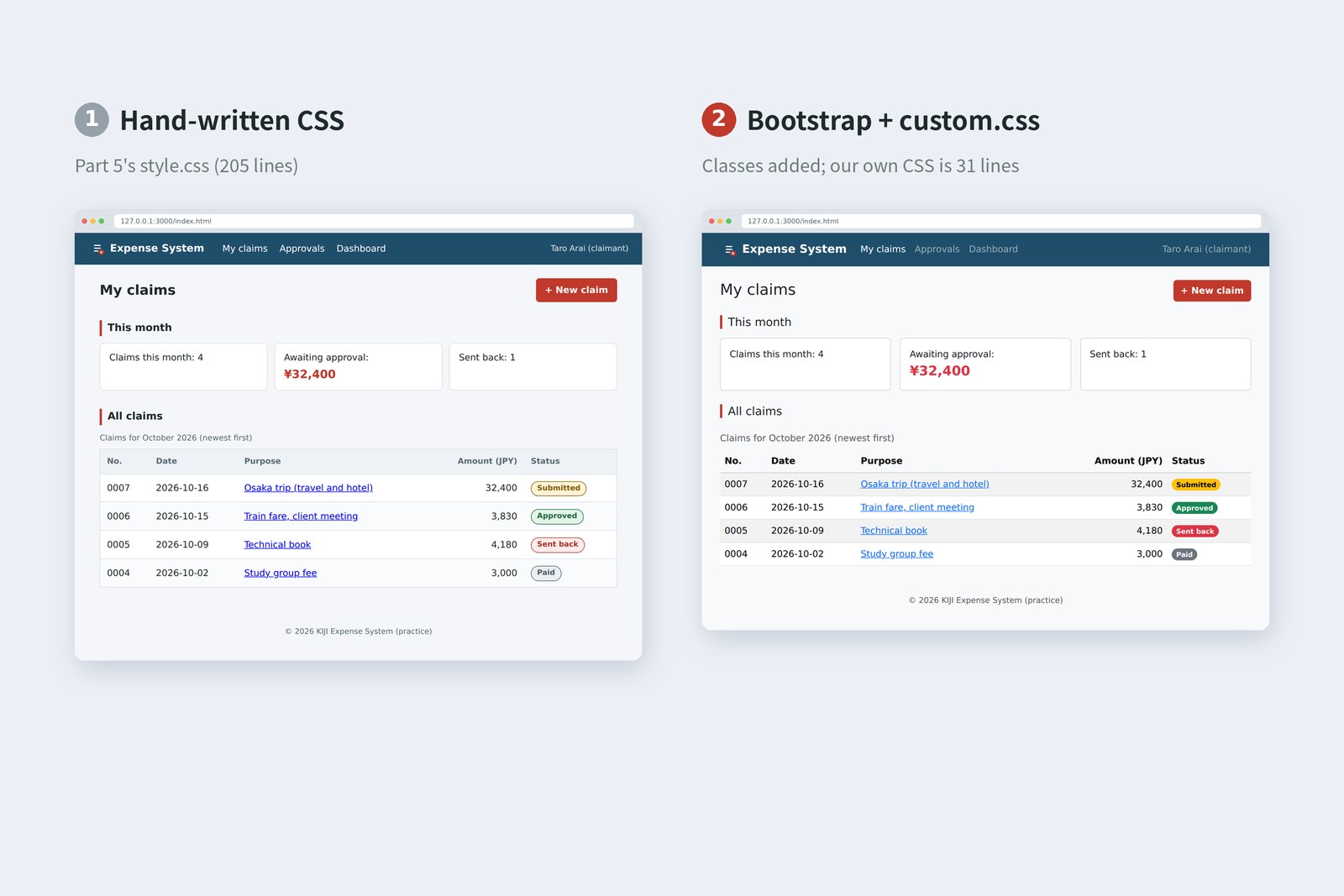
They look almost the same. The difference is inside. Number 1 has 205 lines of our own CSS (not counting blank lines, here and below). Number 2 adds Bootstrap classes to the HTML and needs only 31 lines of our own CSS (custom.css). Instead of writing CSS, you choose classes. That's how Bootstrap is used.
Loading Bootstrap
Underneath, Bootstrap is a box of ready-named CSS rules (bootstrap.min.css) plus JavaScript for behaviour such as opening the nav (bootstrap.bundle.min.js).
Load order
There are two ways to serve the files. Here I fetched them with npm and put them in a folder (vendor/bootstrap/). For a business app that only runs on the company network, that's the safer choice.
<!-- Kept in your own folder (what we do here) -->
<link rel="stylesheet" href="vendor/bootstrap/css/bootstrap.min.css">
<link rel="stylesheet" href="css/custom.css">
…
<script src="vendor/bootstrap/js/bootstrap.bundle.min.js"></script>

<!-- Loaded from a CDN (a delivery service) -->
<link rel="stylesheet"
  href="https://cdn.jsdelivr.net/npm/[email protected]/dist/css/bootstrap.min.css"
  integrity="sha384-sRIl4kxILFvY47J16cr9ZwB07vP4J8+LH7qKQnuqkuIAvNWLzeN8tE5YBujZqJLB"
  crossorigin="anonymous">
With a CDN, integrity says "if the file that arrives doesn't match this fingerprint (hash), don't use it". If the file on the CDN were ever tampered with, you wouldn't load it unawares. I calculated the value above from npm's 5.3.8 file and confirmed it matches the file served by jsDelivr.
Reading the classes
Bootstrap classes come in two kinds: components such as navbar and card, and small single-purpose utilities such as mb-3 and d-flex. Once you know the pattern, utility names read themselves.
Taking a utility name apart
Here's how our hand-written CSS from parts 4 and 5 lines up with Bootstrap classes.
| Hand-written CSS (parts 4 and 5) | Bootstrap classes |
|---|---|
| body > header { display: flex; … } | navbar navbar-expand-md + container |
| .user { margin-left: auto; } | ms-md-auto |
| .page-head { display: flex; justify-content: space-between; … } | d-flex flex-wrap justify-content-between align-items-center gap-3 |
| .summary { display: grid; … } | row g-3 + col-12 col-sm-6 col-lg-4 |
| .summary li { border: 1px solid; border-radius: 8px; … } | card + card-body |
| .table-wrap { overflow-x: auto; } | table-responsive |
| tbody tr:nth-child(even), tr:hover | table-striped, table-hover |
| .amount { text-align: right; white-space: nowrap; } | text-end text-nowrap |
| .status-approved { color: …; background: …; } | badge rounded-pill text-bg-success |
| @media (min-width: 768px) { … } | the -md- inside class names |
AraiIt's true… d-flex is display: flex, ms-md-auto is margin-left: auto from 768px. They don't look like spells any more!
FuruiThat's your reward for writing it by hand first.
The grid and screen widths
In part 5 we used grid's auto-fit for "as many as fit". Bootstrap's grid thinks differently: it splits the width into 12 columns, and a class says how many to use.
The 12-column grid
Read col-12 col-sm-6 col-lg-4 as "12 columns normally (one per row), 6 from sm (two across), 4 from lg (three across)". sm and lg are Bootstrap's predefined width tiers (breakpoints). Counting the min-width values in bootstrap.css gives five: 576, 768, 992, 1200 and 1400px. Here's what I measured while changing the width.
Width tiers and the measured result
container is a box that snaps the content width to a fixed value at each tier, replacing the max-width: 960px we wrote in part 5. The nav's navbar-expand-md means "spread out from md (768px); fold into the three-line button when narrower".
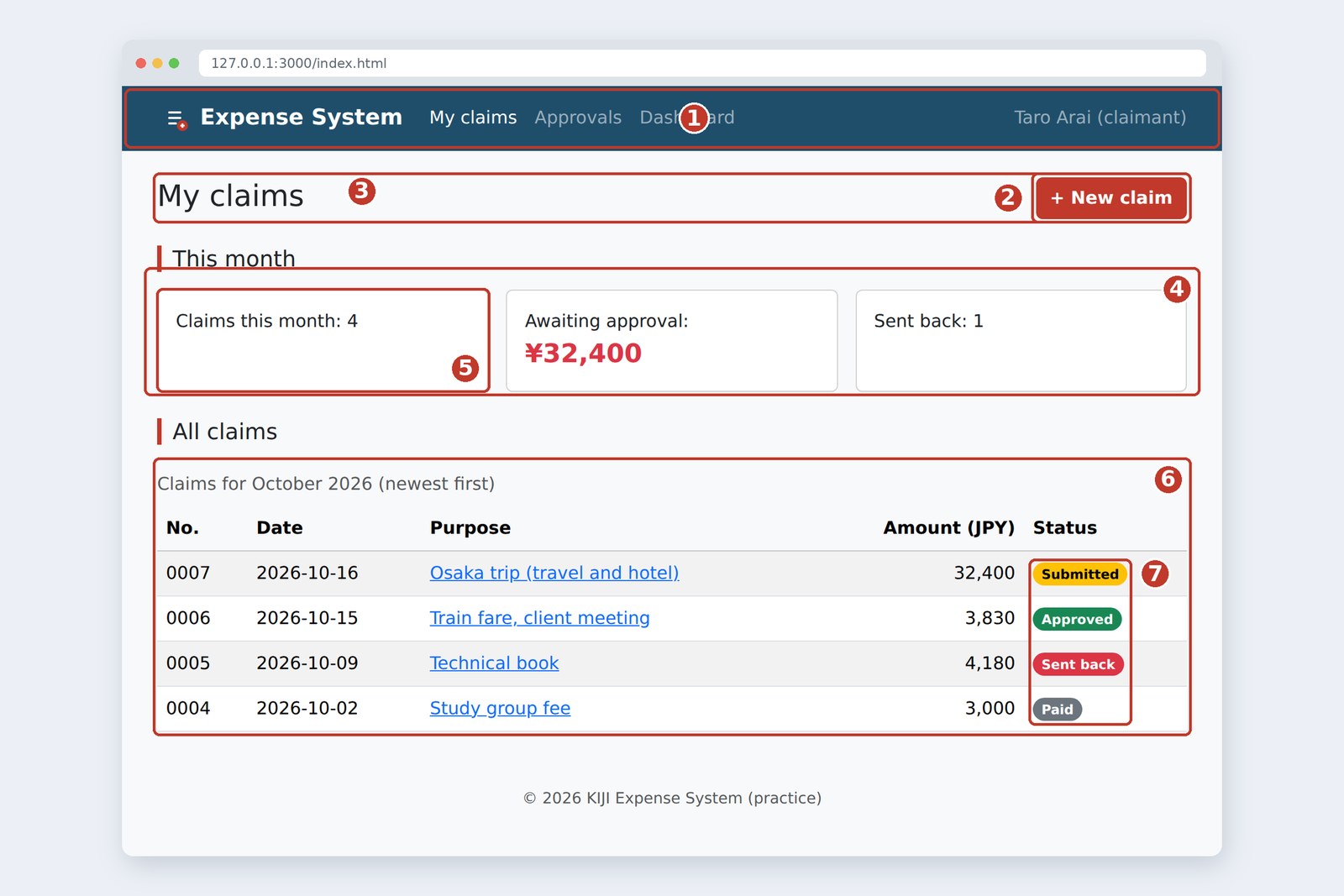
Components: nav, cards, tables, badges, buttons
Write a component's HTML in the expected pattern and you get its look and behaviour together. On a phone, the nav folds into a three-line button (the "hamburger").
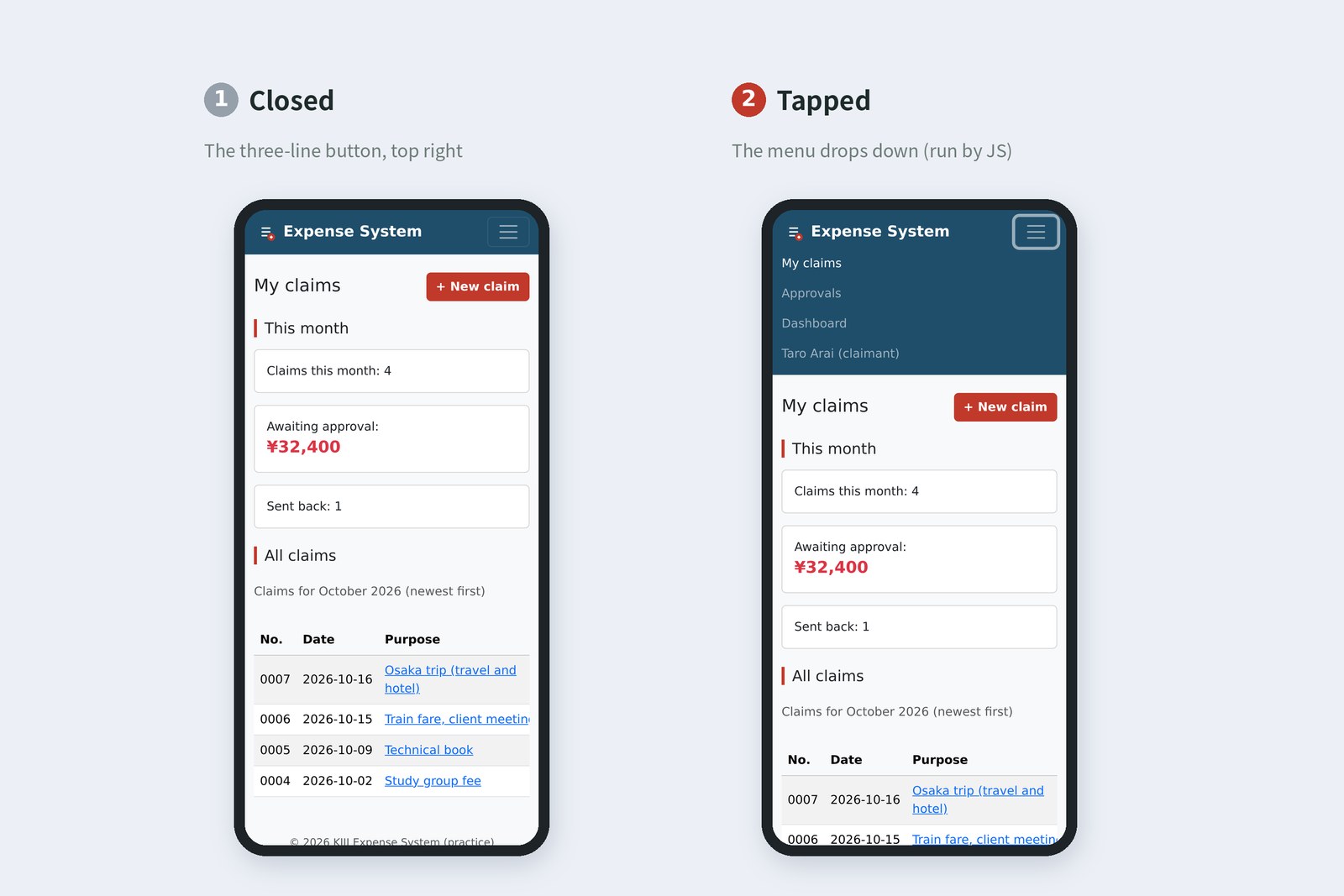
CSS alone can't open and close things, so bootstrap.bundle.min.js, loaded at the end of the body, does it. On the button, data-bs-toggle="collapse" and data-bs-target="#mainNav" are the signal: "when pressed, open or close #mainNav". From part 7 we'll write the JavaScript ourselves.
- card: a box with a border, rounded corners and padding; content goes in card-body. h-100 makes cards in a row the same height
- table: add table and you get rules and padding. Bootstrap puts the caption below the table, so we added caption-top to bring it back up
- badge: the status badges. text-bg-success and friends set a background and a matching text colour together
- btn: buttons. There are colour variants such as btn-primary, but we wanted the brand red, so custom.css defines btn-brand
Bootstrap 5.3 buttons keep their colours in CSS variables (part 4) such as --bs-btn-bg. Override the variables and you have a new button colour.
.btn-brand {
  --bs-btn-color: #fff;
  --bs-btn-bg: #c0392b;          /* normal background */
  --bs-btn-hover-bg: #a93226;    /* with the mouse over it */
  …
}
I also ran Bootstrap's colour pairs through the WCAG contrast formula.
| Class | Text / background (measured) | Contrast ratio |
|---|---|---|
| text-bg-warning | #000000 / #ffc107 | 12.88 : 1 |
| text-bg-success | #ffffff / #198754 | 4.53 : 1 |
| text-bg-danger | #ffffff / #dc3545 | 4.53 : 1 |
| text-bg-secondary | #ffffff / #6c757d | 4.69 : 1 |
| btn-primary (for reference) | #ffffff / #0d6efd | 4.50 : 1 |
| btn-brand (ours) | #ffffff / #c0392b | 5.44 : 1 |
All of them meet the 4.5:1 guideline for normal text (btn-primary only just). Badge text is small, though, so if you change the colours, make sure these numbers don't drop.
The form in Bootstrap too
I rebuilt part 3's claim form as well. Inputs get form-control, dropdowns form-select, and radio buttons and checkboxes the form-check pattern. Labels and names are exactly as in part 3. Correct HTML stays correct HTML, Bootstrap or not.
    <form action="/api/expenses" method="post" enctype="multipart/form-data">
      <div class="card mb-4">
        <div class="card-body">
          <div class="row g-3">
            <fieldset class="col-md-7">
              <legend class="h6 section-title">About this claim</legend>
              <label for="title" class="form-label">Purpose (required)</label>
              <input type="text" class="form-control" id="title" name="title" required maxlength="50">
              <div class="invalid-feedback">Please enter a purpose.</div>
            </fieldset>
            <fieldset class="col-md-5">
              <legend class="h6 section-title">Payment method</legend>
              <div class="form-check form-check-inline">
                <input class="form-check-input" type="radio" name="payment" id="pay-personal" value="personal" checked>
                <label class="form-check-label" for="pay-personal">Paid myself</label>
              </div>
              <div class="form-check form-check-inline">
                <input class="form-check-input" type="radio" name="payment" id="pay-corporate" value="corporate">
                <label class="form-check-label" for="pay-corporate">Company card</label>
              </div>
            </fieldset>
          </div>
        </div>
      </div>

      …

      <div class="form-check mb-4">
        <input class="form-check-input" type="checkbox" id="agree" name="agree" value="yes" required>
        <label class="form-check-label" for="agree">I have read the expenses policy (required)</label>
      </div>

      <div class="d-flex flex-wrap justify-content-end gap-2">
        <button type="submit" class="btn btn-outline-secondary" name="action" value="draft" formnovalidate>Save draft</button>
        <button type="submit" class="btn btn-brand" name="action" value="submit">Submit</button>
      </div>
    </form>
Bootstrap also has a look for showing check results in colour. When the form gets the class was-validated, fields turn red or green according to the browser's own checks (required and so on, from part 3).
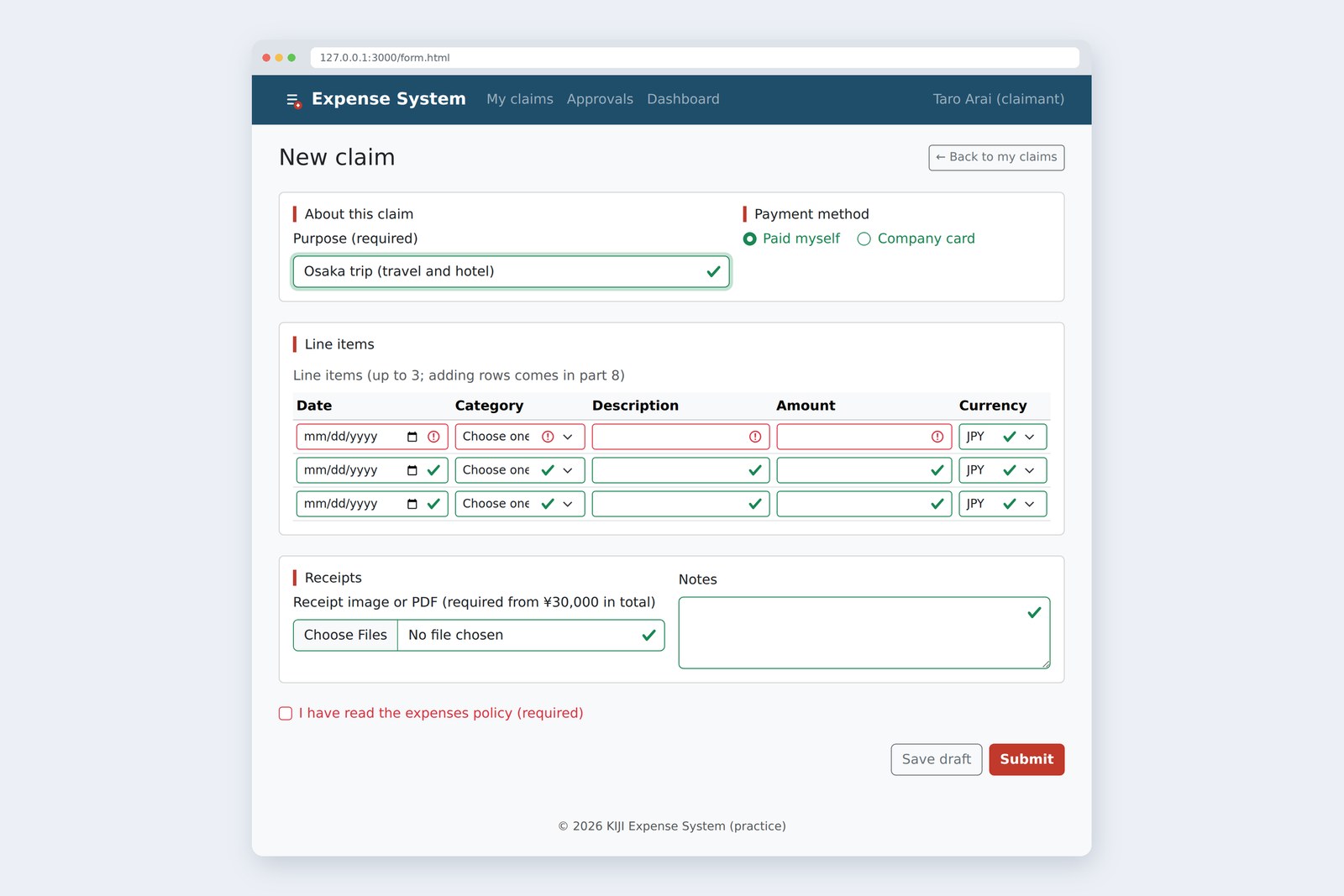
The photo shows the form with only the purpose filled in and was-validated added. Notice that empty optional fields, like lines 2 and 3, also get a green tick. "I didn't fill it in, but it's OK?" confuses people, so in practice you need a tweak, such as marking only fields that were filled in. And was-validated should be added "when the submit button is pressed", which is JavaScript's job. More in part 9, on validation.
The rewritten HTML
Here's the Bootstrap index.html (only the first table row shown).
<!DOCTYPE html>
<html lang="en">
<head>
  <meta charset="UTF-8">
  <meta name="viewport" content="width=device-width, initial-scale=1">
  <title>My claims | Expense System</title>
  <link rel="stylesheet" href="vendor/bootstrap/css/bootstrap.min.css">
  <link rel="stylesheet" href="css/custom.css">
</head>
<body class="bg-body-tertiary">
  <header class="navbar navbar-expand-md navbar-dark brand-bar">
    <div class="container">
      <a class="navbar-brand fw-bold" href="/"><img src="img/logo.svg" alt="" width="32" height="32"> Expense System</a>
      <button class="navbar-toggler" type="button" data-bs-toggle="collapse" data-bs-target="#mainNav" aria-controls="mainNav" aria-expanded="false" aria-label="Open the menu">
        <span class="navbar-toggler-icon"></span>
      </button>
      <div class="collapse navbar-collapse" id="mainNav">
        <nav aria-label="Main">
          <ul class="navbar-nav">
            <li class="nav-item"><a class="nav-link active" aria-current="page" href="/">My claims</a></li>
            <li class="nav-item"><a class="nav-link" href="approve.html">Approvals</a></li>
            <li class="nav-item"><a class="nav-link" href="dashboard.html">Dashboard</a></li>
          </ul>
        </nav>
        <p class="navbar-text mb-0 ms-md-auto">Taro Arai (claimant)</p>
      </div>
    </div>
  </header>

  <main class="container py-4">
    <div class="d-flex flex-wrap justify-content-between align-items-center gap-3 mb-4">
      <h1 class="h3 mb-0">My claims</h1>
      <a class="btn btn-brand" href="form.html">+ New claim</a>
    </div>

    <section class="mb-4">
      <h2 class="h5 section-title mb-3">This month</h2>
      <ul class="row g-3 list-unstyled">
        <li class="col-12 col-sm-6 col-lg-4"><div class="card h-100"><div class="card-body">Claims this month: 4</div></div></li>
        <li class="col-12 col-sm-6 col-lg-4"><div class="card h-100"><div class="card-body">Awaiting approval: <strong class="d-block fs-4 text-danger">¥32,400</strong></div></div></li>
        <li class="col-12 col-sm-6 col-lg-4"><div class="card h-100"><div class="card-body">Sent back: 1</div></div></li>
      </ul>
    </section>

    <section>
      <h2 class="h5 section-title mb-3">All claims</h2>
      <div class="table-responsive" tabindex="0" role="region" aria-label="All claims">
        <table class="table table-striped table-hover align-middle caption-top wide-table mb-0">
          <caption>Claims for October 2026 (newest first)</caption>
          <thead class="table-light">
            <tr>
              <th scope="col">No.</th>
              <th scope="col">Date</th>
              <th scope="col">Purpose</th>
              <th scope="col" class="text-end">Amount (JPY)</th>
              <th scope="col">Status</th>
            </tr>
          </thead>
          <tbody>
            <tr>
              <td>0007</td>
              <td class="text-nowrap"><time datetime="2026-10-16">2026-10-16</time></td>
              <td><a href="detail.html">Osaka trip (travel and hotel)</a></td>
              <td class="text-end text-nowrap">32,400</td>
              <td><span class="badge rounded-pill text-bg-warning">Submitted</span></td>
            </tr>
            …
          </tbody>
        </table>
      </div>
    </section>
  </main>

  <footer class="py-4 text-center text-body-secondary">
    <small>© 2026 KIJI Expense System (practice)</small>
  </footer>
  <script src="vendor/bootstrap/js/bootstrap.bundle.min.js"></script>
</body>
</html>
And this is all of our own CSS.
/* Load after Bootstrap and add only the brand colours */

/* The header bar colour */
.brand-bar {
  background-color: #1f4e6b;
}

/* A brand-coloured button (overriding Bootstrap's button variables) */
.btn-brand {
  --bs-btn-color: #fff;
  --bs-btn-bg: #c0392b;
  --bs-btn-border-color: #c0392b;
  --bs-btn-hover-color: #fff;
  --bs-btn-hover-bg: #a93226;
  --bs-btn-hover-border-color: #a93226;
  --bs-btn-active-color: #fff;
  --bs-btn-active-bg: #922b21;
  --bs-btn-active-border-color: #922b21;
  --bs-btn-focus-shadow-rgb: 192, 57, 43;
  font-weight: 700;
}

/* The red line left of headings (as in part 4) */
.section-title {
  padding-left: 10px;
  border-left: 4px solid #c0392b;
}

/* Tables never get narrower than this (they scroll on narrow screens) */
.wide-table {
  min-width: 640px;
}
.line-items {
  min-width: 720px;
}
Both passed the Nu Html Checker with no errors. The HTML got a little longer and the CSS almost vanished. Think of it as the styling moving house, from the CSS file into the HTML's classes.
Common traps
I tried two classic Bootstrap stumbles.
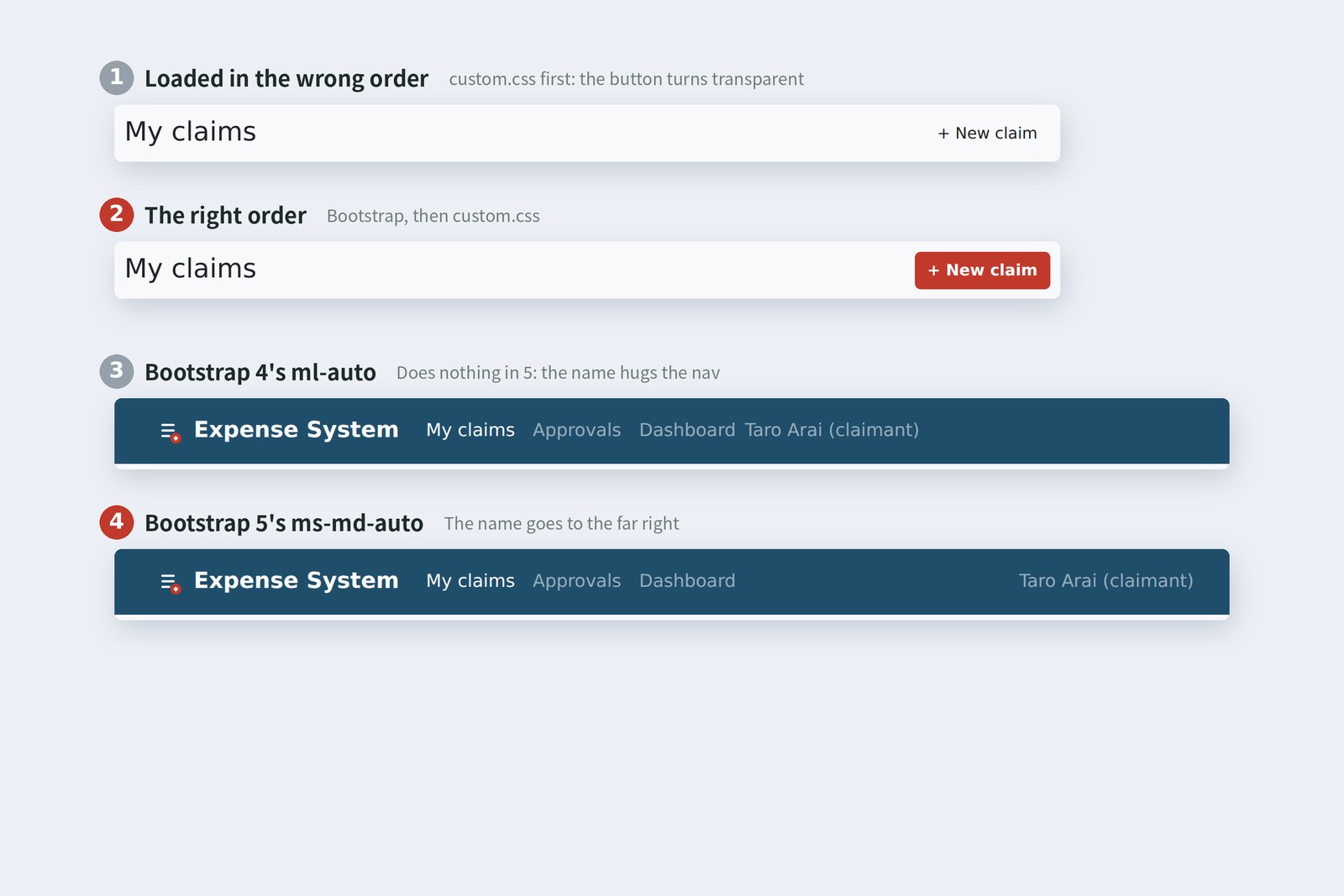
# 1. custom.css loaded before Bootstrap (computed values of .btn-brand)
color → rgb(33, 37, 41) (in the right order: rgb(255, 255, 255))
background-color → rgba(0, 0, 0, 0) transparent (in the right order: rgb(192, 57, 43))

# 2. Bootstrap 4 code mixed in (on a Bootstrap 5.3.8 page)
ml-auto (v4) → margin-left 0px name starts at 502px
ms-md-auto (v5) → margin-left 316.484px name starts at 819px
data-toggle (v4) → after tapping: aria-expanded="false", menu height 0px
data-bs-toggle (v5) → after tapping: aria-expanded="true", menu height 160px
- Load order: Bootstrap's .btn and our .btn-brand both score 0-1-0. On a tie the later rule wins (part 4), so with custom.css first, .btn's "transparent background" wins. Our own CSS always goes after Bootstrap
- Version differences: many class and attribute names changed between Bootstrap 4 and 5. The old spellings raise no error; they simply do nothing
| Bootstrap 4 | Bootstrap 5 |
|---|---|
| ml-*, mr-*, pl-*, pr-* | ms-*, me-*, ps-*, pe-* (left/right became start/end) |
| text-left, float-right | text-start, float-end |
| data-toggle, data-target | data-bs-toggle, data-bs-target |
| custom-select | form-select |
| form-group | removed (use spacing such as mb-3 instead) |
| sr-only | visually-hidden |
| needs jQuery | no jQuery needed |
The web is still full of Bootstrap 4 code, and AI happily mixes it into Bootstrap 5 pages. If you see ml-auto or data-toggle, be suspicious. Tell the AI "we use Bootstrap 5.3" up front, and check the classes it gives you against the official docs. That's the old-school way to work with it.
Weight, and the "Bootstrap look"
A handy toolbox has weight. Here are the file sizes, plus what Chromium's coverage feature (which counts the CSS a page actually uses) reported.
File sizes and the share actually used (measured)
The claims list uses only 7.4% of bootstrap.min.css; the rest serves other components. Gzipped for transfer it's about 31KB, and once loaded the browser caches it, so for an internal business app the weight rarely matters much. Still, "all of Bootstrap for one button" is worth a second thought.
AraiBut Furui, don't Bootstrap pages all look like something you've seen before?
FuruiThe famous "Bootstrap look". For a business app, a familiar face is reassuring. For a customer-facing showcase page, change the colours and shapes properly in custom.css, or write it by hand. Choose the tool for the job.
§ — On one page, and what is next
- Bootstrap is a box of ready-named CSS rules plus JS for behaviour. Instead of writing CSS, you choose classes.
- Load your own CSS after Bootstrap, always. At equal specificity, the later rule wins.
- Read utilities as what, which side, from which width, how much (e.g. ms-md-auto). The grid has 12 columns; the tiers are 576, 768, 992, 1200 and 1400px.
- Make button colours by overriding CSS variables. Check contrast and defaults such as caption position yourself.
- Bootstrap 4 spellings (ml-auto, data-toggle) silently do nothing in 5. Check the version first.
AraiSo the looks are basically done! …Although I'm still working out the line-item total on a calculator.
FuruiMaking it calculate is the job of the next muscle. JavaScript starts in part 7, beginning with a function for the total.
References
- Bootstrap — Get started with Bootstrap (v5.3)
- Bootstrap — Breakpoints
- Bootstrap — Grid system
- Bootstrap — Spacing
- Bootstrap — Navbar
- Bootstrap — Buttons
- Bootstrap — Tables
- Bootstrap — Validation
- Bootstrap — Migrating to v5
- npm — bootstrap
- MDN — Subresource Integrity
- Chrome for Developers — Coverage: Find unused JavaScript and CSS
The page photos show the author's demo pages, captured on 17 October 2026 in Chromium (Playwright) in the cloud. The phone is Playwright's mobile emulation (isMobile), not a real device. Segoe UI isn't available there, so the screenshots fall back to other system fonts. Bootstrap is the bootstrap 5.3.8 package from npm, and release dates come from npm's records. File sizes, coverage, spacing steps, container widths, card layout, button and badge colours, and the results of the load-order and Bootstrap 4 experiments are real values measured in the same Chromium. Contrast ratios were calculated with the WCAG 2.2 formula. The HTML and custom.css were checked with the Nu Html Checker (vnu) and showed no errors. The characters are fictional.
Old-School Front-End, part 6: CSS with Bootstrap / 2026.10