Old-School Front-End / 2026 ・ No.09
Old-School Front-End
Part 9: validation, stopping people kindly and telling them how to fix it
Published
An "old-school" front-end course: no AI doing it for you, every line typed by hand. Part 9 is validation.
In part 1 we promised "how to enforce the rules on the page comes in part 9", and in part 3 "enforcing a receipt from ¥30,000 comes in part 9".
We measure how far the browser's own checks can take us, hand the rest to JavaScript,
and end up with a form that reports everything at once, says how to fix it, and lets go as soon as it's fixed.
This part's goal
AraiFurui, I left the purpose empty and pressed Submit… huh, it stopped me. "Please fill out this field."
FuruiThat's the required we added in part 3. The browser's own check.
AraiSo validation is done!
FuruiType 約1万 ("about ten thousand") as the amount and press it again.
Arai…It went through.
FuruiAnd "a receipt from ¥30,000 in total" can't be written as required on any one field. Today we build the rest in JavaScript.
You are here: part 9
We add these checks to part 8's claim form.
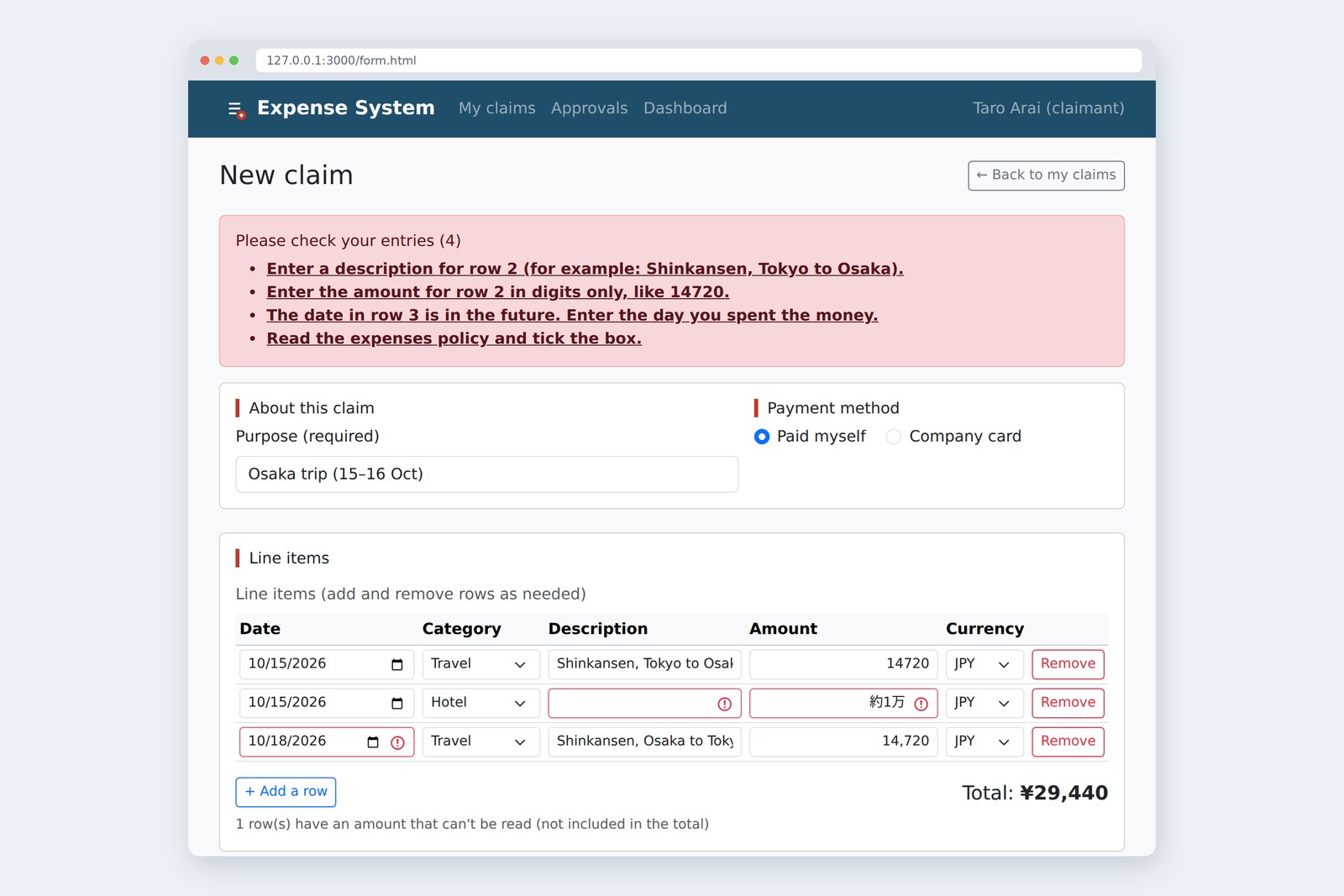
- Report everything at once — a list of the problems above the form. Click one to jump to that field
- Say how to fix it — "Enter the amount for row 2 in digits only, like 14720."
- Rules across fields — a receipt from ¥30,000 in total, no dates in the future, completely empty rows don't count
- Don't scold — no new red borders while someone is still typing, and red goes away the moment it's fixed
The rules go in a new file, js/validate.js; the page work goes into part 8's js/form.js. Part 7's js/app.js once again doesn't change by a single line.
How much can the browser check?
The required and pattern attributes from part 3 belong to the browser's built-in checking (constraint validation). I tried a small form without JavaScript to see what Chromium does.
# Leaving it to the browser (Chromium, English; a small form without JS)
Press submit → nothing is sent; the cursor goes to the first field (purpose)
Fields that fail → 3, but only the first one is reported
purpose (required, empty) → "Please fill out this field."
checkbox (required) → "Please check this box if you want to proceed."
amount (required) = 約1万 → passes (anything non-empty is fine)
amount (pattern="[0-9]+") → "Please match the requested format."
What the browser can and can't do for you
To stop empty fields, the browser is enough. But the wording depends on the browser and its language, and "Please match the requested format" doesn't tell anyone which format. One more thing: as we saw in part 6, Bootstrap's was-validated puts green ticks even on optional fields left empty. "OK, even though I typed nothing?" is confusing, so we don't use that either.
The plan: take over with novalidate
So we switch the browser's checks off and let JavaScript do the checking. The switch is the form's novalidate attribute, but we don't write it in the HTML. We set it from JavaScript.
form.noValidate = true; // Turn off the browser's checks only when the JS is running
That way, if the JavaScript fails to load, the browser's checks from required are still there. It's also why we keep required in the HTML: the browser's checks are a safety net.
After Submit is pressed
AraiIn part 3 we gave Save draft a formnovalidate. With novalidate on the form, isn't that pointless now?
FuruiTo the browser, yes. But the attribute is still there. event.submitter is the button that was pressed, so by looking at event.submitter.formNoValidate the JS can decide "it's a draft, don't check". The JS picks up the intention written in the HTML.
Press Enter in the purpose field and the form is submitted. The button that counts as "pressed" is then the first submit button in the form. In this form Save draft comes first, so sending with Enter was treated as an unchecked draft save. Since it's only a draft, little harm is done, but remember: the order of buttons means something too.
Rules as a function
As in parts 7 and 8, the rules are kept away from the page, in a function. validateClaim takes the contents of a claim (a plain object) and returns an array saying which field fails and why. An empty array means it passed.
| Field | Rule | Message (example) |
|---|---|---|
| Purpose | Spaces alone don't count | Enter a purpose. |
| Line items | Completely empty rows are skipped; at least one row is needed | Enter at least one line item. |
| Date | Required; no dates in the future | The date in row 3 is in the future. Enter the day you spent the money. |
| Category, description | Required | Enter a description for row 2 (for example: Shinkansen, Tokyo to Osaka). |
| Amount | Not empty, readable, not ¥0 | Enter the amount for row 2 in digits only, like 14720. |
| Receipt | Required when the yen rows total ¥30,000 or more | The total is ¥30,000 or more, so attach a receipt. |
| Policy | Must be ticked | Read the expenses policy and tick the box. |
Amounts are read with part 7's toAmount. Back then we decided it returns null for an empty field and NaN for something unreadable, precisely so that we can now tell "enter an amount" apart from "digits only".
// Expense System: the rules for checking input (part 9)
// Doesn't touch the page. Takes the claim and returns a list of which field is wrong and why
// Uses toAmount, calcTotal and needsReceipt from app.js

/** Return today's date as 'YYYY-MM-DD' (the local date on this computer's clock) */
function localDate(d = new Date()) {
  const month = String(d.getMonth() + 1).padStart(2, '0');
  const day = String(d.getDate()).padStart(2, '0');
  return `${d.getFullYear()}-${month}-${day}`;
}

/** Is a line-item row completely empty? (currency is pre-selected, so ignore it) */
function isBlankRow(row) {
  return row.date === '' && row.category === '' && row.item.trim() === '' && row.amount.trim() === '';
}

/**
 * Check the contents of a claim
 * claim = { title, rows: [{ date, category, item, amount, currency }], receipts, agreed }
 * Returns [{ field: 'amount-2', message: '…' }, …] (an empty array means it passed)
 */
function validateClaim(claim, today = localDate()) {
  const errors = [];
  const add = (field, message) => errors.push({ field, message });

  if (claim.title.trim() === '') add('title', 'Enter a purpose.');

  const items = [];
  let filled = 0;
  claim.rows.forEach((row, i) => {
    if (isBlankRow(row)) return; // Skip rows that are completely empty (return in forEach means 'next row')
    filled++;
    const n = i + 1;
    if (row.date === '') add(`date-${n}`, `Enter the date for row ${n}.`);
    else if (row.date > today) add(`date-${n}`, `The date in row ${n} is in the future. Enter the day you spent the money.`); // For 'YYYY-MM-DD' strings, comparing the text compares the dates
    if (row.category === '') add(`category-${n}`, `Choose a category for row ${n}.`);
    if (row.item.trim() === '') add(`item-${n}`, `Enter a description for row ${n} (for example: Shinkansen, Tokyo to Osaka).`);
    const amount = toAmount(row.amount);
    if (amount === null) add(`amount-${n}`, `Enter the amount for row ${n}.`);                // empty
    else if (Number.isNaN(amount)) add(`amount-${n}`, `Enter the amount for row ${n} in digits only, like 14720.`);       // can't be read as a number
    else if (amount === 0) add(`amount-${n}`, `The amount in row ${n} is ¥0. Enter the amount you spent.`);
    else if (row.currency === 'JPY') items.push({ amount });              // Only yen rows count towards the total (conversion comes in part 10)
  });
  if (filled === 0) add('date-1', 'Enter at least one line item.');

  if (needsReceipt(calcTotal(items)) && claim.receipts === 0) add('receipt', 'The total is ¥30,000 or more, so attach a receipt.');
  if (!claim.agreed) add('agree', 'Read the expenses policy and tick the box.');
  return errors;
}
- field is the id of a field on the page — form.js gives each field an id with its row number (such as amount-2) and uses it to find the field to mark red
- Empty rows aren't scolded — a spare row from pressing + Add a row once too often shouldn't produce four errors. The return inside forEach means "skip this row, go to the next"
- today can be passed in — normally it's today's date; in the tests we fix it at 2026-10-17 so the clock can't interfere
Because the function doesn't touch the page, we can write home-made tests as in part 7. The trick is always to include the edges (¥29,999 and ¥30,000, today and tomorrow).
✓ A correct claim passes
✓ Purpose is only a full-width space
✓ All line items empty
✓ Empty rows are skipped
✓ Amount 約1万
✓ Amount 0
✓ A date of tomorrow
✓ A date of today is fine
✓ Total ¥29,999, no receipt
✓ Total ¥30,000, no receipt
✓ Total ¥30,000, with receipt
✓ Dollar rows stay out of the total
✓ Policy box not ticked
✓ Only row 2 has no description
Input check tests: 14 tests, 14 passed
Reading the regex /^[0-9]+$/
This is the stock phrase in part 7's toAmount that we said we'd explain in part 9. A regular expression is a little language for describing how characters are arranged. Read it one character at a time and it stops being scary.
One symbol at a time
# Checking the regular expressions (run in Chromium)
string /^[0-9]+$/ /[0-9]+/
'14720' yes yes
'14,720' no yes
'14720' no no
'' no no
'12a' no yes   <- one digit anywhere is enough
'約1万' no yes   <- one digit anywhere is enough
'-500' no yes   <- one digit anywhere is enough
'1.5' no yes
'14720 ' no yes
Forget ^ and $ and it becomes "pass if there's a digit somewhere", so 約1万 and -500 both slip through. toAmount first turns full-width characters into half-width, removes commas and the spaces at either end, and then uses this pattern to make sure the text is digits from start to finish. That's why 14,720 can be read and 約1万 can't.
AraiWhen I ask the AI, I get much longer regexes. They look like spells. I can't read them…
FuruiIf you can't read it, line up examples and try them, like the table above: what should pass and what should be stopped. If both behave as expected, you can use it.
The date trap: toISOString
To check "no dates in the future" we need "today". A common recipe on the web is new Date().toISOString().slice(0, 10). I fixed the clock and the time zone and tried it.
# "Today" at a given moment (Chromium with a fixed clock and time zone)
zone and time toISOString() localDate()
Tokyo 08:30 2026-10-16 2026-10-17   <- wrong
Tokyo 09:30 2026-10-17 2026-10-17
Shanghai 07:30 2026-10-16 2026-10-17   <- wrong
New York 21:00 2026-10-18 2026-10-17   <- wrong
Same 17 October, but before 9 a.m. it's "yesterday"
toISOString() gives the date in Coordinated Universal Time (UTC). Japan is nine hours ahead of UTC, so until 9 a.m. it's still the previous day; in New York in the evening it's already tomorrow. Build "today" from it, and someone claiming this morning's taxi at 8:30 is told "that date is in the future". validate.js's localDate() builds the local date from getFullYear, getMonth (which counts from 0, hence the +1) and getDate.
One more small trick: padStart(2, '0') gives the month and day two digits each. With the digits lined up, as in '2026-10-09', you can tell which date comes first just by comparing the text ('2026-10-9' would be judged to come after '2026-10-10').
Messages that say how to fix it
An unhelpful message and a helpful one
- Where — which field in which row. When the same fields repeat, as in the line items, the row number is essential
- How to fix it — not "invalid", but the next thing to do
- An example — showing a format is faster than describing it
- Not by colour alone — words as well as the red border, plus aria-invalid="true" so screen readers know "this field has a problem" too
AraiI asked the AI to "add error messages" and every single one said "Invalid input".
Furui"Invalid" sounds like an accusation. They just didn't know our rules.
On the page: red borders, summary, focus
form.js's showErrors puts validateClaim's result on the page. It does three things.
- Red borders only on the failing fields — Bootstrap's is-invalid class plus aria-invalid. Without was-validated, empty optional fields get no green ticks (part 6's loose end, tied up)
- A summary above the form — a count and links to each item. However long the form, you learn first what to fix and how many
- Focus moves to the summary — the page scrolls up to it, and screen readers hear what's in it (the count) too
<div class="alert alert-danger" id="error-summary" tabindex="-1" hidden>
  <h2 class="h6 alert-heading">Please check your entries</h2>
  <ul class="mb-0"></ul>   <!-- JS puts the li and links in here -->
</div>
tabindex="-1" means "the Tab key won't stop here, but JS's focus() can". A div normally can't take focus, so we add it.
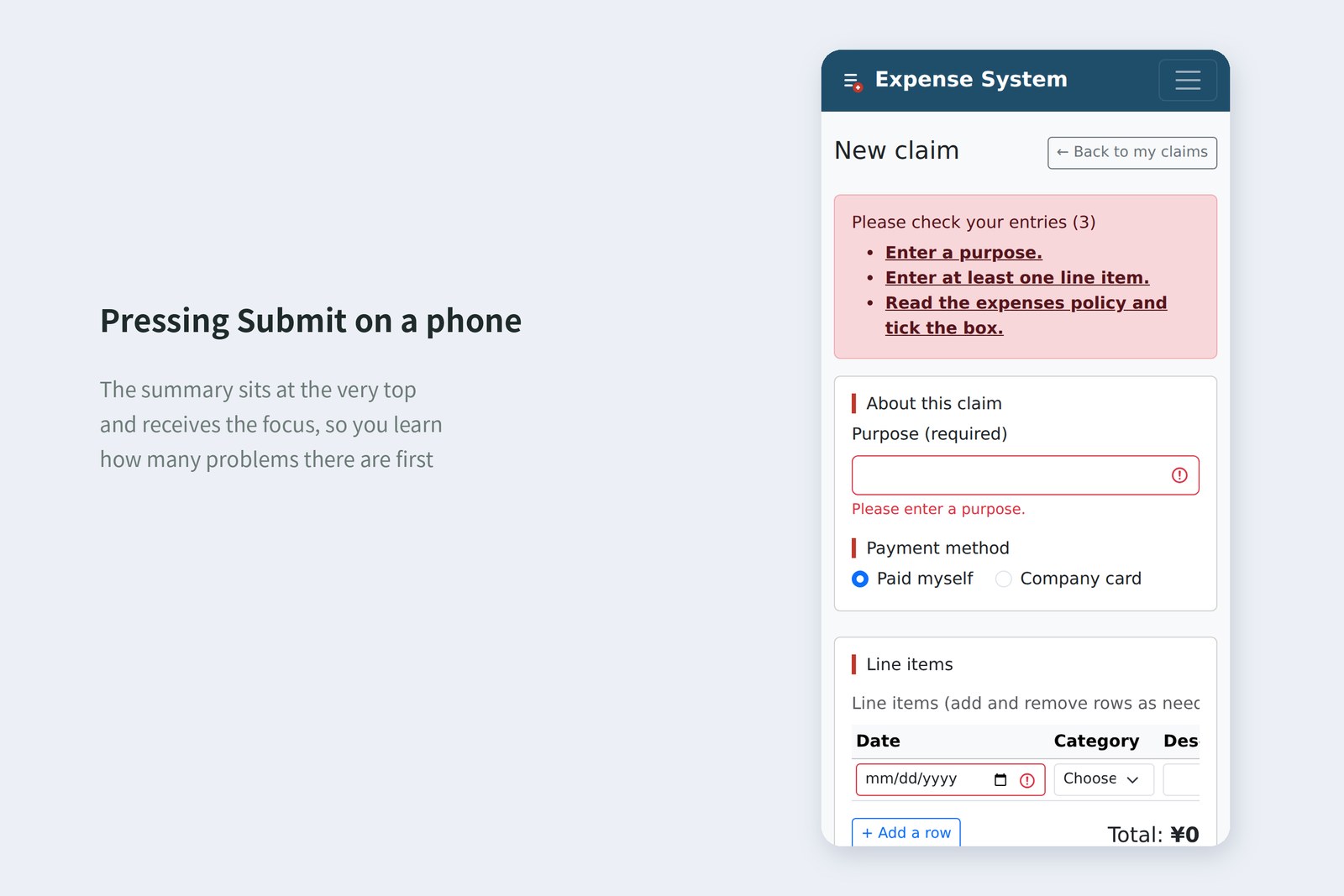
In fact, left as plain links, Chromium still put the cursor in the field (measured). But #amount-2 is added to the end of the URL and the browser's Back history gains an entry. On top of that, the field is pushed right to the top of the screen (measured), which tends to hide the heading and rows above it. So we take over the click, bring the field to the middle of the screen with scrollIntoView, and then focus it.
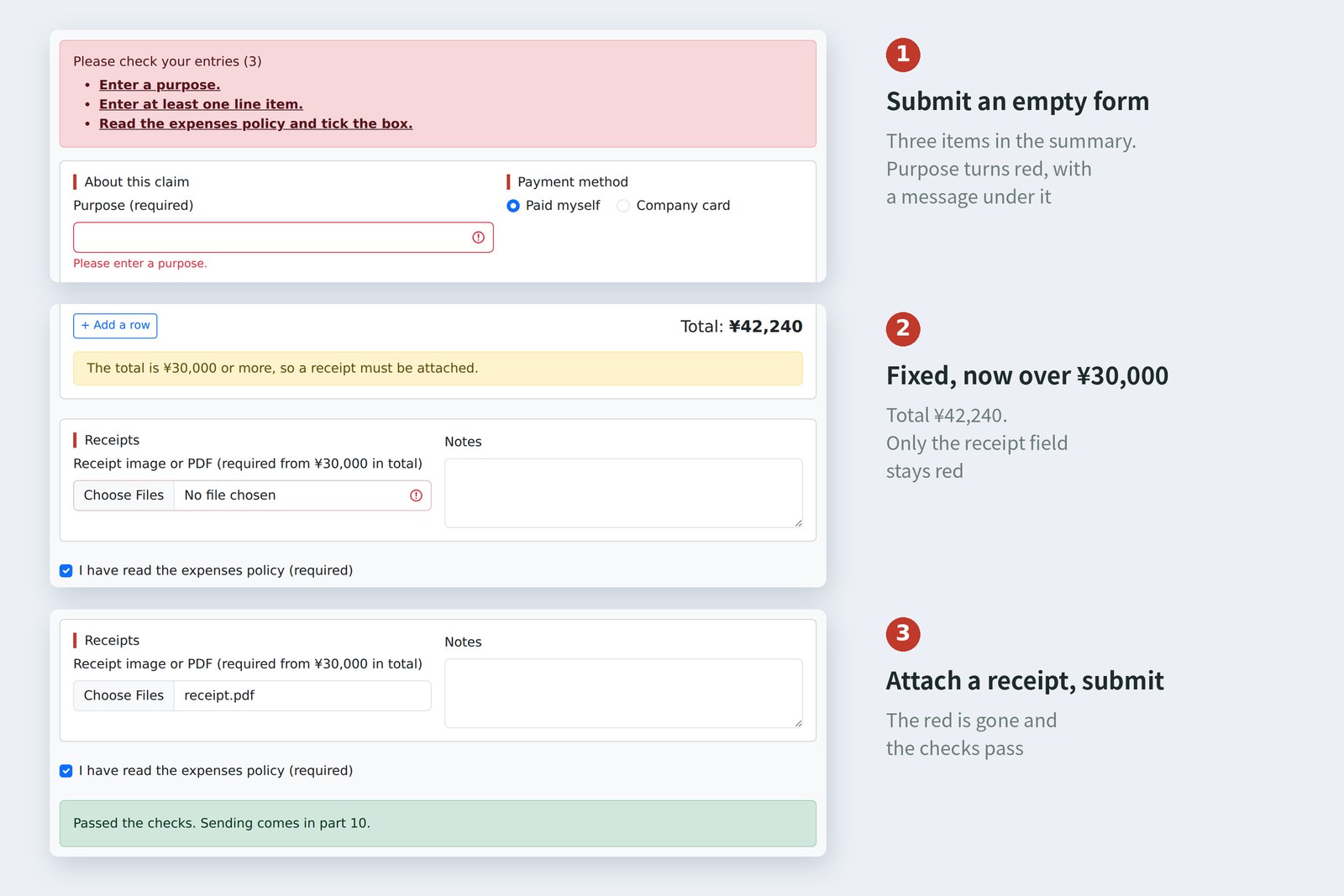
Finally, the rule that red borders are only added when Submit is pressed, and removed on the spot. Re-check everything on every keystroke and the moment you enter row 2's date, "enter a description" and "enter the amount" turn red, while you're still typing. So on each input we re-check only the fields already marked red, and take the red off once they're fixed.
// ---- Part 9: checking input ----
const form = document.querySelector('form');
const summary = document.querySelector('#error-summary');
const result = document.querySelector('#result');

form.noValidate = true; // Turn off the browser's checks and do our own (if JS doesn't run, the browser's checks remain)

/** Read the claim from the page */
function readClaim() {
  return {
    title: form.elements.title.value,
    rows: [...tbody.rows].map((row) => ({
      date: row.querySelector('[name="date"]').value,
      category: row.querySelector('[name="category"]').value,
      item: row.querySelector('[name="item"]').value,
      amount: row.querySelector('[name="amount"]').value,
      currency: row.querySelector('[name="currency"]').value,
    })),
    receipts: form.elements.receipt.files.length,
    agreed: form.elements.agree.checked,
  };
}

/** Show the result on the page (red borders and the summary at the top) */
function showErrors(errors) {
  for (const field of form.querySelectorAll('.is-invalid')) {
    field.classList.remove('is-invalid');
    field.removeAttribute('aria-invalid');
  }
  const items = errors.map(({ field, message }) => {
    const el = document.getElementById(field);
    el.classList.add('is-invalid');
    el.setAttribute('aria-invalid', 'true');
    const a = document.createElement('a');
    a.href = '#' + field;
    a.className = 'alert-link';
    a.textContent = message; // Text goes in with textContent (part 8)
    const li = document.createElement('li');
    li.append(a);
    return li;
  });
  summary.querySelector('ul').replaceChildren(...items);
  summary.querySelector('h2').textContent = `Please check your entries (${errors.length})`;
  summary.hidden = errors.length === 0;
}

/** Re-check only the fields already marked red (red goes as soon as a field is fixed; new red appears only on Submit) */
function recheck() {
  const marked = new Set([...form.querySelectorAll('.is-invalid')].map((el) => el.id));
  showErrors(validateClaim(readClaim()).filter((e) => marked.has(e.field)));
}

form.addEventListener('submit', (event) => {
  event.preventDefault(); // Sending comes in part 10; stop here for now
  result.hidden = true;
  if (event.submitter.formNoValidate) { // Save draft skips the checks (formnovalidate from part 3)
    result.textContent = 'Drafts are saved without checks (saving comes in part 10).';
    result.hidden = false;
    return;
  }
  const errors = validateClaim(readClaim());
  showErrors(errors);
  if (errors.length > 0) {
    summary.focus(); // Move to the summary, so screen readers also hear how many problems there are
  } else {
    result.textContent = 'Passed the checks. Sending comes in part 10.';
    result.hidden = false;
  }
});

form.addEventListener('input', recheck); // Fix a field and its red border goes at once

// Summary links: move the cursor into that field (no #… in the URL, no extra Back history)
summary.addEventListener('click', (event) => {
  const link = event.target.closest('a');
  if (!link) return;
  event.preventDefault();
  const field = document.getElementById(link.hash.slice(1));
  field.scrollIntoView({ block: 'center' }); // Put the field in the middle of the screen (so the rows and headings above stay visible)
  field.focus({ preventScroll: true });
});
Taking it for a spin
Playwright actually typed and clicked, and after each step I recorded the summary count, the fields with red borders and where the focus was. Because dates are checked, the browser's clock was fixed at 10:00 on 17 October 2026 (Tokyo).
# Values recorded while actually using the form (Chromium)
action summary red fields focus
just opened - - -
Submit with nothing filled in 3 title date-1 agree error-summary
type a purpose 2 date-1 agree title
fill in row 1 1 agree amount-1
fill in rows 2 and 3 * 1 agree amount-3
Submit 4 item-2 amount-2 date-3 agree error-summary
click "...amount for row 2..." 4 item-2 amount-2 date-3 agree amount-2
row 2 amount to 12800 3 item-2 date-3 agree amount-2
fix the rest, tick the box - - agree
Submit 1 receipt error-summary
attach a receipt - - -
Submit - "Passed the checks" BUTTON
* row 2: no description, amount 約1万; row 3: tomorrow (2026-10-18)
While rows 2 and 3 were being filled in, the summary stayed at 1. Only Submit took it to 4; each fix brought it down, and at 0 the summary disappeared. The receipt rule showed up on the Submit after the amount was fixed and the total reached ¥42,240.
All of these checks run inside the user's browser. With the browser's developer tools, anyone can rewrite the JavaScript or send data straight past the form, slipping through. Front-end checks are a courtesy; protection lives on the server. Checking the same rules again where the data arrives is an old, old rule.
§ — On one page, and what is next
- The browser's checks (required, pattern) are a safety net: they report only the first problem, the wording isn't yours, and rules across fields can't be written. Set novalidate only when the JS is running, and take over.
- Rules live as functions in validate.js. They don't touch the page and return an array of "which field and why", so home-made tests can check them right up to the edges.
- In a regex, ^ and $ pin it to "start to finish". Build "today" from the local date, not toISOString.
- Messages give where, how to fix it, and an example. Red borders go only on failing fields, and the focus moves to the summary at the top.
- Red borders are added only on Submit and removed as soon as it's fixed. Front-end checks are a courtesy; protection lives on the server.
AraiSo now pressing Submit sends it to accounts!
FuruiFor now it just says "passed" and stops. Next time: asynchronous requests. With fetch we talk to the server without switching pages, and we'll finally deal with the dollar conversion we keep putting off.
References
- MDN — Using HTML form validation and the Constraint Validation API
- MDN — HTML attribute: pattern
- MDN — SubmitEvent: submitter property
- MDN — Regular expressions
- MDN — Date.prototype.toISOString()
- MDN — ARIA: aria-invalid attribute
- MDN — tabindex
- MDN — Element: scrollIntoView() method
- Bootstrap 5.3 — Validation
- W3C — Understanding SC 3.3.1: Error Identification
- W3C — Understanding SC 3.3.3: Error Suggestion
- W3C — G139: Creating a mechanism that allows users to jump to errors
- OWASP — Input Validation Cheat Sheet
The page photos show the author's demo pages, captured on 17 October 2026 in Chromium (Playwright) in the cloud. Segoe UI isn't available there, so the screenshots fall back to other system fonts. The browser's own validation messages, the summary counts, the red-bordered fields and where focus went, how the summary links behaved, what happened when sending with Enter, the regex results, the dates from toISOString and localDate with a fixed clock and time zone, and the 14 home-made tests are real values recorded by driving and running the same Chromium with Playwright. The browser's validation messages vary with the browser and its language settings. form.html was checked with the Nu Html Checker (vnu) and showed no errors. The characters are fictional.
Old-School Front-End, part 9: validation / 2026.10