Old-School Front-End / 2026 ・ No.10
Old-School Front-End
Part 10: asynchronous requests, talking to the server with fetch without leaving the page
Published
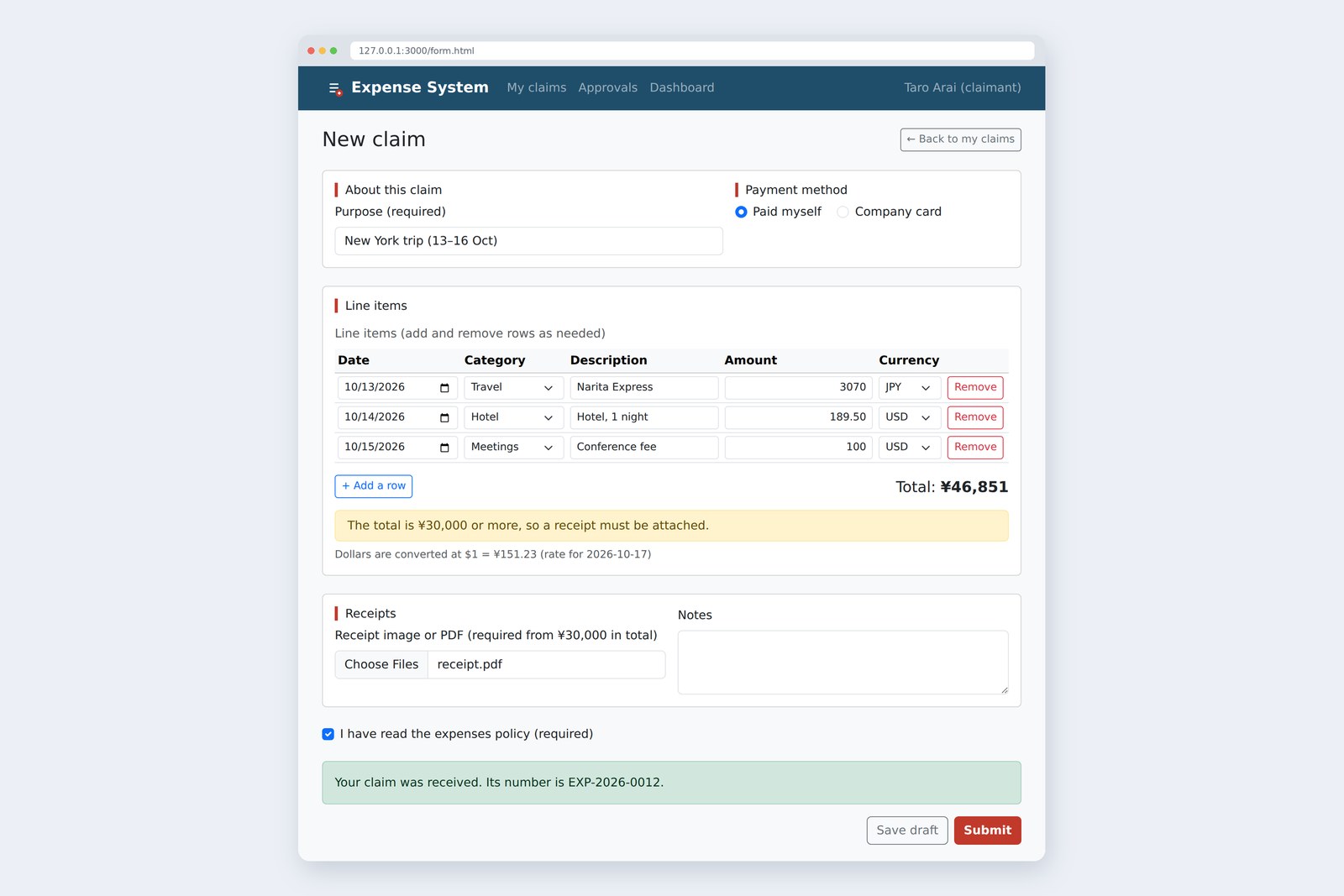
An "old-school" front-end course: no AI doing it for you, every line typed by hand. Part 10 is about asynchronous requests.
Since part 8 we've been saying "dollar conversion comes in part 10", and in part 9 "sending comes in part 10".
Today we settle both: with fetch we get an exchange rate from the server, send the claim and receive a claim number.
Requests keep you waiting and sometimes fail, and handling that is what this part is really about.
This part's goal
AraiFurui, when I press Submit it says "Sending comes in part 10". And here we are, part 10!
FuruiYes. We've also been writing "part 10" next to the dollar conversion for a while. Today we pay that off.
AraiI asked the AI to "submit the form", and the moment it sent, the screen went blank. When there was an error, everything I'd typed was gone…
FuruiThat's the classic way, where the whole page changes. Today the page stays put and we talk to the server behind the scenes.
You are here: part 10
- Fetch the rate — when the page opens, ask the server how many yen to the dollar, and convert the dollar rows into the total
- Send the claim — Submit sends everything, receipt included, and shows the claim number that comes back
- Never send twice — the buttons can't be pressed while sending
- Lose nothing on failure — server broken or connection gone, whatever was typed stays where it is
The server on the other end is a small practice one made for this part (about 60 lines of Node.js; it's not the topic, so knowing where to send things and what comes back is enough). The rate of 151.23 is a made-up value that this server returns.
Waiting, or not
A server's reply doesn't arrive instantly. With today's practice server it takes about 0.6 seconds; with a distant or busy server it can take several. If the page froze the whole time, that would be a problem.
On hold on the phone, or hand over an order slip and sit down
JavaScript's fetch is the second kind. It sends the request, moves straight on to the next line, and runs "the rest" when the reply arrives. I checked that with three lines.
console.log('A');
fetch('/api/rates').then(() => console.log('C'));
console.log('B');

# The order things ran in, and the time since A (measured in Chromium)
A: before calling fetch    0 ms
B: the line after fetch    0 ms
C: the reply arrived (inside then)  605 ms
Written A, C, B, they ran A, B, C. What fetch hands back at once is not the reply but a ticket saying "I'll give you the reply when it comes" (a Promise). You write the rest inside then, or inside a function marked async, using await to say "wait for the ticket here". The code in this part uses the easier-to-read await.
AraiSo "asynchronous" basically means "doesn't wait".
FuruiRight. The page keeps working while you wait. The catch: put the code that uses the reply in the wrong place, and it uses a value that's still empty.
Requests and replies: HTTP and JSON
The browser and the server talking
A request is a method plus an address. Use GET to just receive something and POST to hand something over. Every response carries a three-digit status code saying how it went.
| Code | Meaning | When we return it here |
|---|---|---|
| 200 | OK | returning the rate |
| 201 | Created | claim accepted, number returned |
| 400 | Bad request | the server's checks failed |
| 404 | No such address | a typo in the URL |
| 500 | The server broke | (the server's fault, not the user's) |
The body of a reply is usually JSON: text written much like a JavaScript object. The practice server returns the rate like this.
{"base":"USD","quote":"JPY","rate":151.23,"date":"2026-10-17"}
What arrives is still text, so res.json() turns it back into an object before we use it as data.rate.
Fetching the exchange rate
Here's loadRate, added to form.js. It's called once, at the end of the page's script.
/** Fetch the exchange rate from the server */
async function loadRate() {
  rateNote.textContent = 'Loading the exchange rate…';
  try {
    const res = await fetch('/api/rates', { signal: AbortSignal.timeout(10000) }); // give up after 10 seconds
    if (!res.ok) throw new Error(`HTTP ${res.status}`); // 404 and 500 are not errors as far as fetch is concerned
    const data = await res.json();                       // turn the JSON body into an object
    rate = data.rate;
    rateNote.textContent = `Dollars are converted at $1 = ¥${rate} (rate for ${data.date})`;
  } catch (error) {
    rateNote.textContent = "Couldn't load the exchange rate. Dollar rows are not in the total.";
  }
  updateTotal();
}
- async and await — await means "carry on with this function once the ticket becomes a reply". Only this function waits; the page doesn't stop
- null to begin with — until the rate arrives, rate is null. Dollar rows stay out of the total meanwhile, and the page says it's loading
- The caller doesn't wait — the final loadRate(); has no await, so the first row is set up without waiting for the reply
- Decide on a timeout — fetch has none of its own. AbortSignal.timeout(10000) says "give up after 10 seconds"
Open form.html by double-clicking it, as in earlier parts (the address starts with file://), and the rate never arrives. Chromium's console says "Cross origin requests are only supported for protocol schemes: … http, https …" and the page shows "Couldn't load the exchange rate". When trying fetch, the rule is: run a server and open the page over http://.
What fetch doesn't call an error
The code above has a line if (!res.ok) throw …. To see why, I pointed fetch at all sorts of targets.
# What fetch gives you (measured in Chromium)
target throws? what you get
an existing URL (/api/rates) no ok: true / 200
a missing URL (/api/nothing) no ok: false / 404   <- treated as success unless you check ok
a server fault (500) no ok: false / 500   <- treated as success unless you check ok
the server is not running yes TypeError: Failed to fetch
a slow reply (1 s timeout) yes TimeoutError: signal timed out
A missing address (404) and a broken server (500) are both, as far as fetch is concerned, "a reply arrived", so a success. It only throws (jumping to catch) when it couldn't reach the server or ran out of time. So check res.ok yourself (true for status codes in the 200s), and throw to hand the rest to catch.
The ways a fetch can end
AraiThe fetch the AI wrote never looked at res.ok…
FuruiIf you only try it on good days, you'll never notice. The day the server goes down always comes.
Dollars to yen: money in whole numbers
With the rate in hand, we convert. Dollars have cents, like the $189.50 hotel. It's tempting to just write dollars × rate, but try it…
# Converting $100.00 at $1 = ¥151.23 (measured in Chromium)
100 * 151.23 → 15122.999999999998   // multiply the decimals
Math.floor(100 * 151.23) → 15122   <- one yen short
centsToYen(10000, 151.23) → 15123   // with whole cents and hundredths of a yen (centsToYen)
A hundred dollars came out one yen short. Just like part 7's 0.1 + 0.2, a computer can't hold a decimal like 151.23 exactly. So we turn dollars into cents and the rate into whole hundredths of a yen before multiplying.
Whole numbers first, multiply, divide once at the end
// ---- Part 10: converting dollars ----

/**
 * Turn the text in a dollar field into whole cents. '189.5' -> 18950
 * Returns null for an empty field, NaN if it can't be read (same deal as toAmount)
 */
function toCents(text) {
  const s = String(text).normalize('NFKC').replaceAll(',', '').trim();
  if (s === '') return null;
  if (!/^[0-9]+(\.[0-9]{1,2})?$/.test(s)) return NaN; // at most two decimal places
  const [dollars, cents = ''] = s.split('.');
  return Number(dollars) * 100 + Number(cents.padEnd(2, '0')); // '.5' means 50 cents
}

/**
 * Convert cents to yen (anything under ¥1 is dropped)
 * rate is the 151.23 in $1 = ¥151.23. Multiplying decimals gives rounding errors, so make it whole numbers first
 */
function centsToYen(cents, rate) {
  const sen = Math.round(rate * 100);     // 151.23 -> 15123 (whole hundredths of a yen)
  return Math.floor(cents * sen / 10000); // whole numbers times whole numbers: no rounding errors
}
The regex in toCents carries on from part 9's /^[0-9]+$/. ( … ) groups things, ? means "optional" and {1,2} means "one or two times": digits, optionally followed by a point and one or two more digits. Dropping anything under ¥1 is a company-policy question, so in real work, check with accounts.
The total (part 8's updateTotal) now treats dollar rows like this.
  for (const row of tbody.rows) {
    const text = row.querySelector('[name="amount"]').value;
    const usd = row.querySelector('[name="currency"]').value === 'USD';
    const amount = usd ? toCents(text) : toAmount(text);
    if (amount === null) continue;                          // Empty fields don't count
    if (Number.isNaN(amount)) { unreadable++; continue; }  // Can't be read as an amount
    if (!usd) items.push({ amount });
    else if (rate === null) waiting++;                     // no rate yet
    else items.push({ amount: centsToYen(amount, rate) }); // convert dollars to yen
  }
Part 9's validateClaim also takes the rate as a third argument, so dollar rows count towards the total (and the ¥30,000 receipt rule). The home-made tests grew by four, to 18.
✓ A correct claim passes
✓ Purpose is only a full-width space
✓ All line items empty
✓ Empty rows are skipped
✓ Amount 約1万
✓ Amount 0
✓ A date of tomorrow
✓ A date of today is fine
✓ Total ¥29,999, no receipt
✓ Total ¥30,000, no receipt
✓ Total ¥30,000, with receipt
✓ Dollar rows are converted into the total (receipt from ¥30,000)
✓ Policy box not ticked
✓ Only row 2 has no description
✓ Without a rate, dollar rows can't be claimed
✓ toCents('189.5') is 18950
✓ toCents('1.234') can't be read
✓ centsToYen(10000, 151.23) is 15123
Input check and conversion tests: 18 tests, 18 passed
Sending the claim: POST and FormData
What we send is made with new FormData(form, button). It gathers the form's fields by name and packs the receipt files in too, in the same shape as the enctype="multipart/form-data" we put on the form in part 3.
/** While sending, the submit buttons can't be pressed (no double submissions) */
function setSending(sending, button) {
  button.dataset.label ??= button.textContent;
  for (const b of form.querySelectorAll('button[type="submit"]')) b.disabled = sending;
  button.textContent = sending ? 'Sending…' : button.dataset.label;
  form.setAttribute('aria-busy', String(sending));
}

/** Show the result (kind is 'success' or 'danger') */
function showResult(kind, message) {
  result.className = `alert alert-${kind}`;
  result.textContent = message;
  result.hidden = false;
}

/** Send the claim to the server */
async function send(data, button) {
  setSending(true, button);
  try {
    const url = form.getAttribute('action'); // form.action returns the buttons named "action" instead (measured)
    const res = await fetch(url, { method: 'POST', body: data, signal: AbortSignal.timeout(15000) }); // give up after 15 seconds
    if (res.status === 400) { // the server's checks failed (it answers in the same shape as part 9)
      const body = await res.json();
      showErrors(body.errors);
      summary.focus();
      return; // finally still runs after return
    }
    if (!res.ok) throw new Error(`HTTP ${res.status}`);
    const body = await res.json();
    showResult('success', body.draft ? `Draft saved (${body.id}).` : `Your claim was received. Its number is ${body.id}.`);
  } catch (error) {
    showResult('danger', "Couldn't send. Check your connection and press it again. Nothing you typed has been lost.");
  } finally {
    setSending(false, button); // success or failure, put the buttons back
  }
}

form.addEventListener('submit', async (event) => {
  event.preventDefault(); // stop the page change; send with fetch instead
  result.hidden = true;
  const button = event.submitter;
  if (!button.formNoValidate) { // Save draft is not checked (part 9)
    const errors = validateClaim(readClaim(), localDate(), rate);
    showErrors(errors);
    if (errors.length > 0) {
      summary.focus();
      return;
    }
  }
  await send(new FormData(form, button), button); // pack the form, files and all (plus the button that was pressed)
});
FuruiConfession: my first try was fetch(form.action, …), and it posted to "/[object RadioNodeList]".
AraiWhat on earth is that?
FuruiIn part 3 we gave the buttons name="action". A form exposes its named controls as its own properties, so form.action pointed at the two buttons, not the address.
I checked the other pitfalls of sending a form with fetch as well.
# Pitfalls when sending a form with fetch (measured in Chromium)
form.action → [object RadioNodeList] (the two buttons named "action")
form.getAttribute('action') → '/api/expenses'
new FormData(form).get('action') → null (the pressed button is missing)
new FormData(form, button).get('action') → 'submit'
receipt with nothing attached → one file arrives, named '' with 0 bytes
writing 'Content-Type' in headers yourself → the server answers 400 (no boundary, unreadable)
- Read the address with getAttribute — form.action loses to a control named "action"; MDN warns about the same thing
- Pass the pressed button too — give FormData the submitter as its second argument and, like a normal submission, action=submit goes along. That's how the server tells a draft from a claim
- Empty file fields — with nothing attached, a file with no name and 0 bytes still arrives. The server counts by size, not by number
- Don't write Content-Type — with FormData the browser writes it, including the boundary marker. Write it yourself and the marker disappears, so the server can't read the body
On the server side, the claim is checked again with the same validate.js as the page. Because part 9 made it a function that doesn't touch the page, the server can use it as is (real servers are often written in another language; then you copy the same rules across). Pretending to use the developer tools, I removed the page's checks and sent the claim with no purpose…
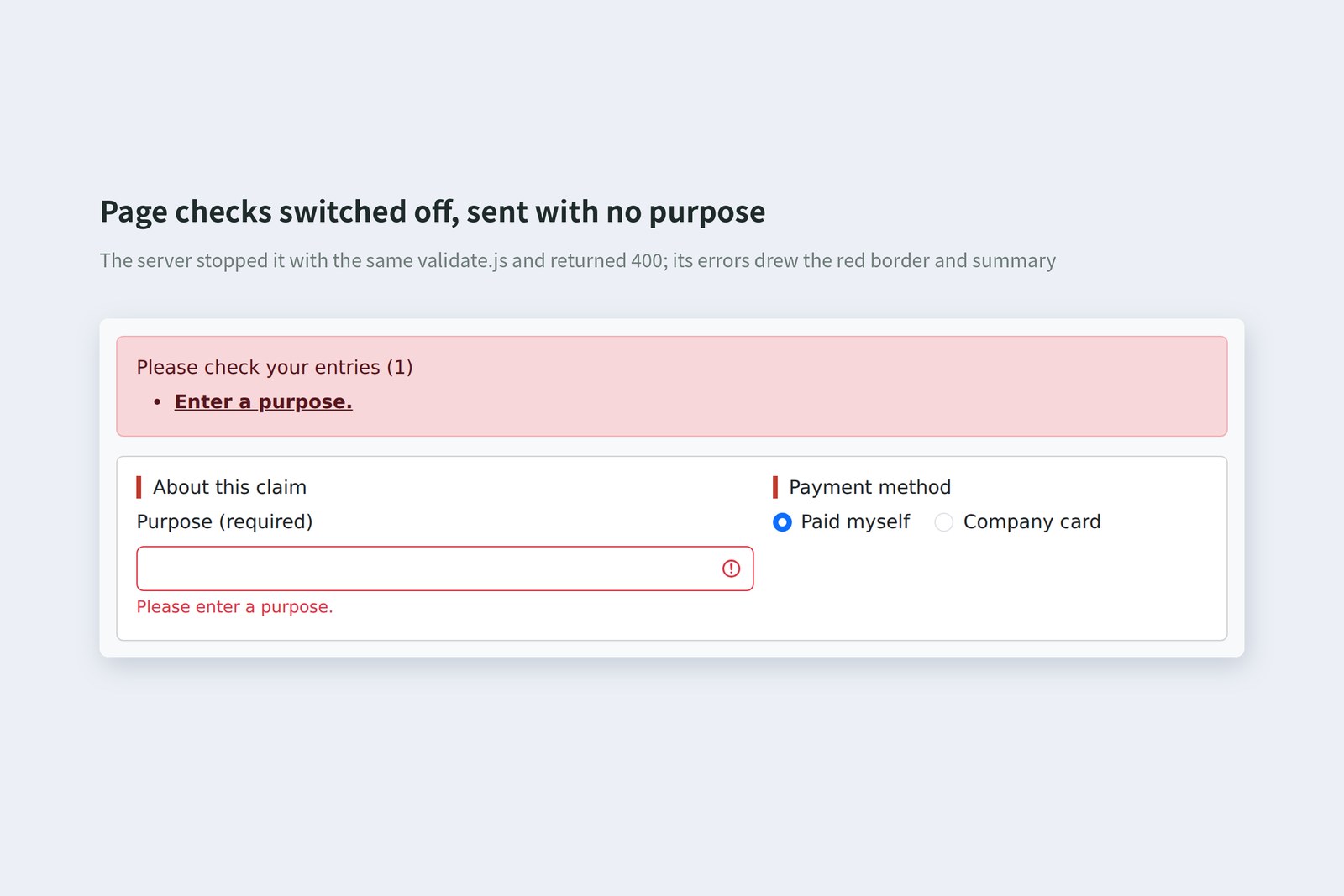
The server returned 400 and { errors: [{ field, message }] }, the same shape as in part 9. Because the shapes match, the page just calls showErrors with it.
Showing sending, success and failure
The life of a submit button
If the button still works while sending, an impatient person presses it twice and the same claim arrives twice. Sure enough, double-clicking the version that leaves the button enabled reached the server twice. setSending makes both buttons disabled while sending and changes the pressed button's label to "Sending…".
Putting things back goes in finally. Success, failure, or a return halfway through on a 400: finally always runs, so nothing is left disabled by mistake.
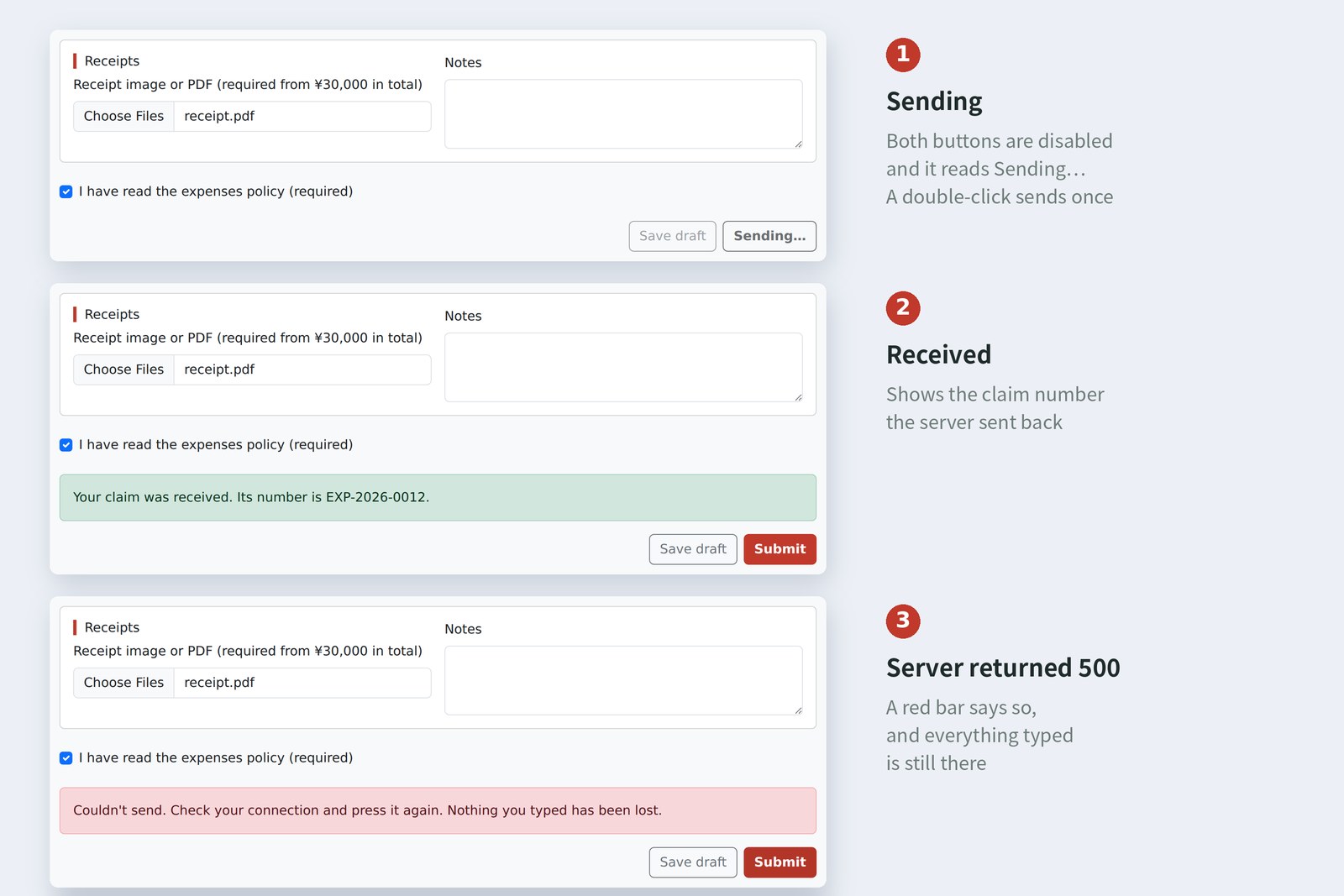
The failure message says two things: what to do, and that nothing typed has been lost. With the classic whole-page submission, this is where input could vanish. With fetch the page stays as it is, so pressing again is all it takes.
Taking it for a spin
I ran the practice server and let Playwright actually type and click. The rate reply takes about 0.6 seconds and the claim reply about 1.2 seconds. The browser's clock was fixed at 10:00 on 17 October 2026 (Tokyo).
# Values recorded while actually using the form (Chromium; practice server)
action total buttons shown
just opened ¥0 Save draft Submit Loading the exchange rate…
about 0.6 s later (rate arrives) ¥0 Save draft Submit Dollars are converted at $1 = ¥151.23 (rate for 2026-10-17)
3 rows typed (2 in dollars) ¥46,851 Save draft Submit -
Submit ¥46,851 Save draft Submit The total is ¥30,000 or more, so attach a receipt.
receipt attached, Submit ¥46,851 [×]Save draft [×]Sending… -
about 1.2 s later (201) ¥46,851 Save draft Submit Your claim was received. Its number is EXP-2026-0012.
Submit while the server returns 500 ¥46,851 Save draft Submit Couldn't send. Check your connection and press it again. Nothing you typed has been lost.
page checks off, no purpose, sent (400) ¥46,851 Save draft Submit Enter a purpose.
- Just after opening it said it was loading; about 0.6 seconds later the rate arrived and the note changed
- With the two dollar rows converted, the total is 3,070 + 28,658 + 15,123 = ¥46,851. That's over ¥30,000, so part 9's rule asked for a receipt
- While sending, neither button could be pressed; about 1.2 seconds later the claim number appeared
- When the server returned 500, the purpose, the line items and the receipt were all still there
Write network code assuming it will be slow, fail, and be pressed twice. There's one way for things to go right and several ways for them to go wrong. Whichever way it goes, the user should know what's happening now and what to do next. That's the page's job.
§ — On one page, and what is next
- fetch doesn't wait. It hands back a ticket (a Promise); the rest goes after await.
- 404 and 500 are not errors to fetch. Check res.ok and throw yourself. Set a timeout with AbortSignal.timeout.
- Money in whole numbers: dollars as cents, the rate as hundredths of a yen, multiply, then divide once at the end.
- Send FormData(form, button). Get the address with getAttribute('action') and don't write Content-Type.
- Disable the buttons while sending and restore them in finally. Never wipe the input on failure. Check the same rules on the server.
AraiI got a claim number! …But Furui, who is this claim actually from?
FuruiGood question. Right now "Taro Arai" is just text on the page. Next time: signing in and moving between screens. We'll check who's using the system and let them move between the claim list and the approval screens.
References
- MDN — Using the Fetch API
- MDN — Response: ok property
- MDN — async function
- MDN — try...catch
- MDN — AbortSignal: timeout() static method
- MDN — FormData: FormData() constructor
- MDN — HTMLFormElement (named controls and native properties)
- MDN — HTTP response status codes
- MDN — JSON
The page photos show the author's demo pages, served by a practice server (Node.js) and captured on 17 October 2026 in Chromium (Playwright) in the cloud. Segoe UI isn't available there, so the screenshots fall back to other system fonts. The exchange rate of 151.23 and the claim numbers are made-up values returned by the practice server. The order and timing of execution, the fetch results, the decimal arithmetic, the FormData and form pitfalls, the double-submission counts, the message when opened from file://, how the page changed, and the 18 home-made tests are real values recorded by driving and running the same Chromium with Playwright. form.html was checked with the Nu Html Checker (vnu) and showed no errors. The characters are fictional.
Old-School Front-End, part 10: asynchronous requests / 2026.10