Old-School Front-End / 2026 ・ No.12
Old-School Front-End
Part 12: the approval flow — check it in a dialog, then move it on with one button
Published
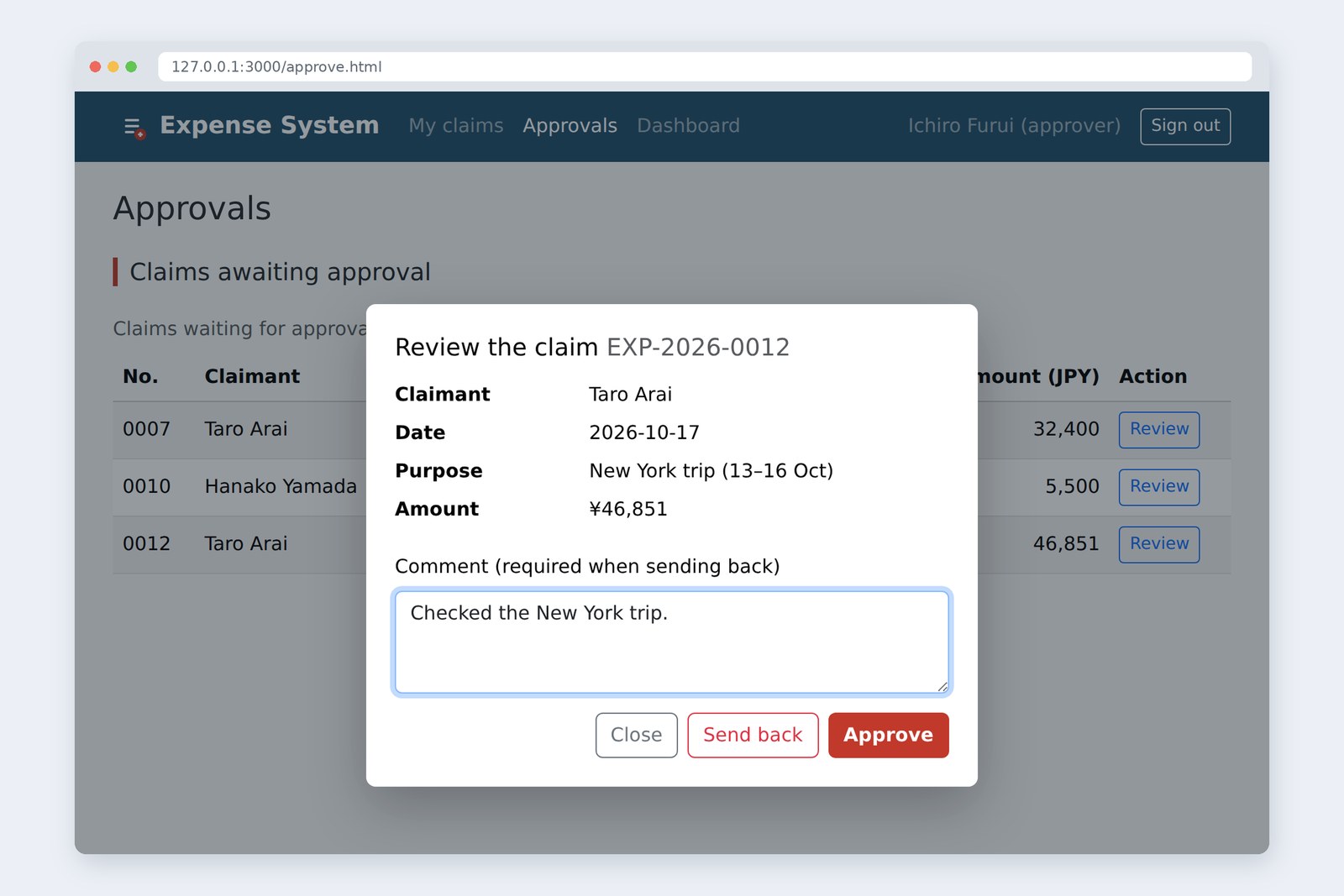
An “old-school” front-end course: no AI doing it for you, every line typed by hand. Part 12 is about the approval flow.
Last time, Arai's New York trip turned up on Furui's Approvals page. But there was nothing to press.
This time we build a window with <dialog> to check a claim, and send approve or send back to the server as JSON.
Then we deliberately make two approvers act on the same claim at once, and see what happens.
This part's goal
AraiFurui, is my New York trip approved yet? It's on your list, isn't it?
FuruiIt's on the list. There's just no button to press. Today we make one.
AraiIt's one Approve button. The AI would do that in three seconds.
FuruiPlacing it takes three seconds. The trouble starts after it's pressed. What if I press it by mistake? If I send it back, why? What if Ishida presses it too?
Arai…Who's Ishida again?
FuruiThe other approver. Starts today.
You are here: part 12
- Look before you press — Review in the list opens a <dialog>; you see the claim, then Approve or Send back
- A send-back needs a reason — with an empty comment, nothing is sent. The server checks the same thing
- Safe when two press at once — send the “version” you read; if someone got there first, the server refuses with 409
- History for the claimant — who sent it back, when and why, one click away from Arai's list
On the other end is last part's practice server, now with a decision API and a history. Besides Ichiro Furui there is a second approver, Misaki Ishida ([email protected] / demo-ishida). Both are made-up demo accounts. Fixing and resubmitting a sent-back claim is left out this time.
Statuses and arrows
Before building buttons, let's map the statuses a claim goes through. The claim data has always had a status: draft, submitted, approved, paid, returned. This part builds the two arrows that leave “submitted”.
Statuses are boxes, actions are arrows. We build the two red ones
Two rules for the page fall out of this map.
- Only offer buttons for arrows that leave the current status — the waiting list holds only submitted claims, so every row can have Review. An approved claim never shows Approve
- The server decides whether an arrow may be followed — no button on the page doesn't stop anyone calling fetch (part 11: hiding is not refusing). The server looks at the current status and who pressed, then allows or refuses
AraiSo once it's paid, there's no “actually, send it back”.
FuruiSend it back after the money's gone out and accounts will cry. That's what “no arrow” means.
A window made with <dialog>
When Review is pressed, a small window opens over the page with the claim, a comment box and buttons. A window like this is called a modal. People used to build them out of stacked divs; today HTML has an element just for it: <dialog>.
<dialog id="decide" aria-labelledby="decide-h">
  <h2 id="decide-h">Review the claim <span id="d-no"></span></h2>
  <dl>
    <dt>Claimant</dt><dd id="d-who"></dd>
    <dt>Date</dt><dd id="d-date"></dd>
    <dt>Purpose</dt><dd id="d-title"></dd>
    <dt>Amount</dt><dd id="d-amount"></dd>
  </dl>
  <label for="decide-comment">Comment (required when sending back)</label>
  <textarea id="decide-comment" rows="3"></textarea>
  <p id="decide-error" role="alert" hidden></p>
  <div>
    <button type="button" id="d-close">Close</button>
    <button type="button" id="d-return">Send back</button>
    <button type="button" id="d-approve">Approve</button>
  </div>
</dialog>
Inside are a heading, a description list (dl), a label and textarea, and buttons. Plain HTML, all of it. None of the buttons submits a form, so they are type="button". As in part 9, the error box is role="alert" so it is read out when it appears.
JavaScript opens it. The list's buttons are rebuilt with every row, so we use event delegation from part 8: the tbody takes all the clicks.
// Buttons are handled on tbody (event delegation, part 8)
document.querySelector('#approvals').addEventListener('click', (event) => {
  const button = event.target.closest('button[data-id]');
  if (button) openDecision(claims.find((x) => x.id === button.dataset.id));
});

/** Put the claim in the dialog and open it */
function openDecision(claim) {
  current = claim;
  document.querySelector('#d-no').textContent = claim.id;
  document.querySelector('#d-who').textContent = claim.ownerName;
  document.querySelector('#d-date').textContent = claim.date;
  document.querySelector('#d-title').textContent = claim.title;
  document.querySelector('#d-amount').textContent = formatYen(claim.amount);
  comment.value = '';
  decideError.hidden = true;
  dialog.showModal(); // showModal: the page behind can't be used
}
A dialog can be opened two ways. show() just shows it. showModal() opens it as a modal, and the browser takes several chores off your hands.
Four things the browser does when you call showModal()
The dimming is CSS: ::backdrop. For the look, we just matched Bootstrap: no border, rounded corners, a shadow.
.app-dialog {
  width: min(32rem, calc(100% - 2rem));
  border: 0;
  border-radius: .5rem;
  padding: 1.5rem;
  box-shadow: 0 1rem 3rem rgba(0, 0, 0, .25);
}
.app-dialog::backdrop {  /* the curtain that dims the page behind */
  background: rgba(20, 30, 40, .45);
}
Poking the dialog
“The browser does it for you” — does it really? We opened it in Chromium and poked it with Playwright standing in for the keyboard and mouse.
# How <dialog> behaves (measured in Chromium)
what we did result
open it with showModal() focus goes to the comment box (textarea)
probe where Sign out is the point hits DIALOG; the page behind is out of reach
press Esc the dialog closed (open = false)
focus after closing back on the button that opened it (EXP-2026-0007, Review)
Send back with no reason “To send it back, write the reason in the comment.”
- The moment it opens, focus is in the comment box. You can start typing straight away
- Asking document.elementFromPoint() what sits where the header's Sign out button is returned the dialog (its backdrop). The buttons behind can't be clicked
- Esc closed it, and focus went back to the Review button that opened it (the 0007 row). A keyboard user isn't thrown back to the top of the page
With a home-made div modal you write “keep hands off the page”, “move focus inside”, “close on Esc” and “go back where you were” all yourself. The old-school crowd wept over this many times. When the browser has a part for the job, use it first. Write by hand only what the part doesn't cover.
Sending the decision
Pressing Approve or Send back has to reach the server. The address is POST /api/expenses/EXP-2026-0012/decision, and the content is three things: the decision, the comment, and the version we read (used in section 6).
In part 10 we sent the claim form with FormData. This time it isn't a form but a small piece of data we put together ourselves, so we send it as JSON. There's a trap here.
FormData and JSON treat Content-Type in opposite ways
# What Content-Type the browser picks for each body (measured in Chromium)
body Content-Type the browser set
JSON.stringify(…) (just a string) text/plain;charset=UTF-8
 → the practice server refused it with 415 (JSON only)
new FormData(…) (part 10) multipart/form-data; boundary=…
Part 10 said “don't set Content-Type yourself”, because the browser picks the boundary. JSON is the opposite: JSON.stringify() makes a plain string, so the browser labels it text/plain. To say it's JSON, write it yourself.
/** Send approve or send back to the server */
async function decide(decision) {
  decideError.hidden = true;
  if (decision === 'return' && comment.value.trim() === '') { // Sending back needs a reason (the server checks the same)
    decideError.textContent = 'To send it back, write the reason in the comment.';
    decideError.hidden = false;
    comment.focus();
    return;
  }
  const buttons = dialog.querySelectorAll('button');
  for (const b of buttons) b.disabled = true;
  try {
    const res = await fetch(`/api/expenses/${current.id}/decision`, {
      method: 'POST',
      headers: { 'Content-Type': 'application/json' }, // Sending JSON, write Content-Type yourself (the opposite of FormData)
      body: JSON.stringify({ decision, comment: comment.value, version: current.version }), // The version we read. If someone changed it first: 409
    });
    const no = current.id.slice(-4);
    if (res.status === 409) { // 409 = someone else got there first
      const body = await res.json();
      const by = body.by, what = WHAT[body.status];
      dialog.close();
      pageStatus.className = 'alert alert-warning';
      pageStatus.textContent = `${by} had already ${what} ${no}. The list has been refreshed.`;
      await loadApprovals();
      pageStatus.focus(); // the button we pressed went with the old list, so move focus to the result message
      return;
    }
    if (!res.ok) throw new Error(`HTTP ${res.status}`);
    dialog.close();
    pageStatus.className = 'alert alert-success';
    pageStatus.textContent = decision === 'approve' ? `Approved ${no}.` : `Sent back ${no}.`;
    await loadApprovals();
    pageStatus.focus(); // the button we pressed went with the old list, so move focus to the result message
  } catch (error) {
    decideError.textContent = "Couldn't send. Check your connection and try again.";
    decideError.hidden = false;
  } finally {
    for (const b of buttons) b.disabled = false; // Success or failure, put the buttons back
  }
}
- A send-back with an empty reason isn't sent; the dialog says so (the same idea as part 9's checks)
- While sending, every button in the dialog is disabled so a double press doesn't send twice (part 10). finally always turns them back on
- On success: close the dialog, show a green banner, reload the list
That last pageStatus.focus() came out of testing. At first the line wasn't there. Approving rebuilds the list, and the Review button you pressed disappears with the table. The dialog tries to hand focus back to the button that opened it, but that button is gone. Checking showed focus had dropped to BODY, the top of the page. Someone using the keyboard would lose their place. So focus now moves to the result message (<p id="page-status" role="status" tabindex="-1">). After the fix we checked that it lands on page-status.
AraiWith a mouse you'd never notice that in a million years.
FuruiWhich is why you go through it once with the Tab key. Old-school manners.
When two people press at once
There are two approvers now. Furui leaves the Approvals page open and goes to make tea. Meanwhile Ishida approves 0007. When Furui comes back, his screen still lists 0007 as Submitted. What if he sends it back…?
Built without thinking, the server lets the later send-back overwrite it. Ishida's approval vanishes without anyone knowing. From Arai's side, a claim that was approved has quietly become sent back. Not good.
Send the version you read. If it doesn't match, the server refuses
So each claim gets a version, a number that goes up by 1 with every change. The page remembers the version it read in the list and sends it along. If the version that arrives differs from the current one, the server knows someone changed it first, and instead of overwriting it refuses with 409 Conflict. The reply carries the current status and who changed it.
This is called optimistic locking: assume you probably won't collide with anyone, and refuse only when you do. There is also the lock-it-the-moment-you-open-it approach (pessimistic locking), but then if someone goes off to make tea, everybody waits.
We threw all sorts of things at the server.
# Throwing things at the decision API (as Furui; measured with fetch in Chromium)
what we sent status server says
a JSON string, no Content-Type 415 send JSON
{decision: approve} (not JSON) 400 bad JSON
decision is maybe 400 bad decision
send back, comment is only spaces 400 a reason is required
an old version (0) 409 changed by someone else
approve (version 1) 200 status: approved, version: 2
send the same thing again 409 changed by someone else
the claimant (Arai) sends it 403 approvers only
- No Content-Type: 415. Not readable as JSON: 400. A strange decision: 400. A reason that is only spaces: 400 too. Even if something slips past the page's checks, the server stops it
- An old version: 409. Send the same thing twice and the second is 409 as well (the version has moved on), which also guards against double presses
- When Arai, the claimant, sends it: 403 (part 11)
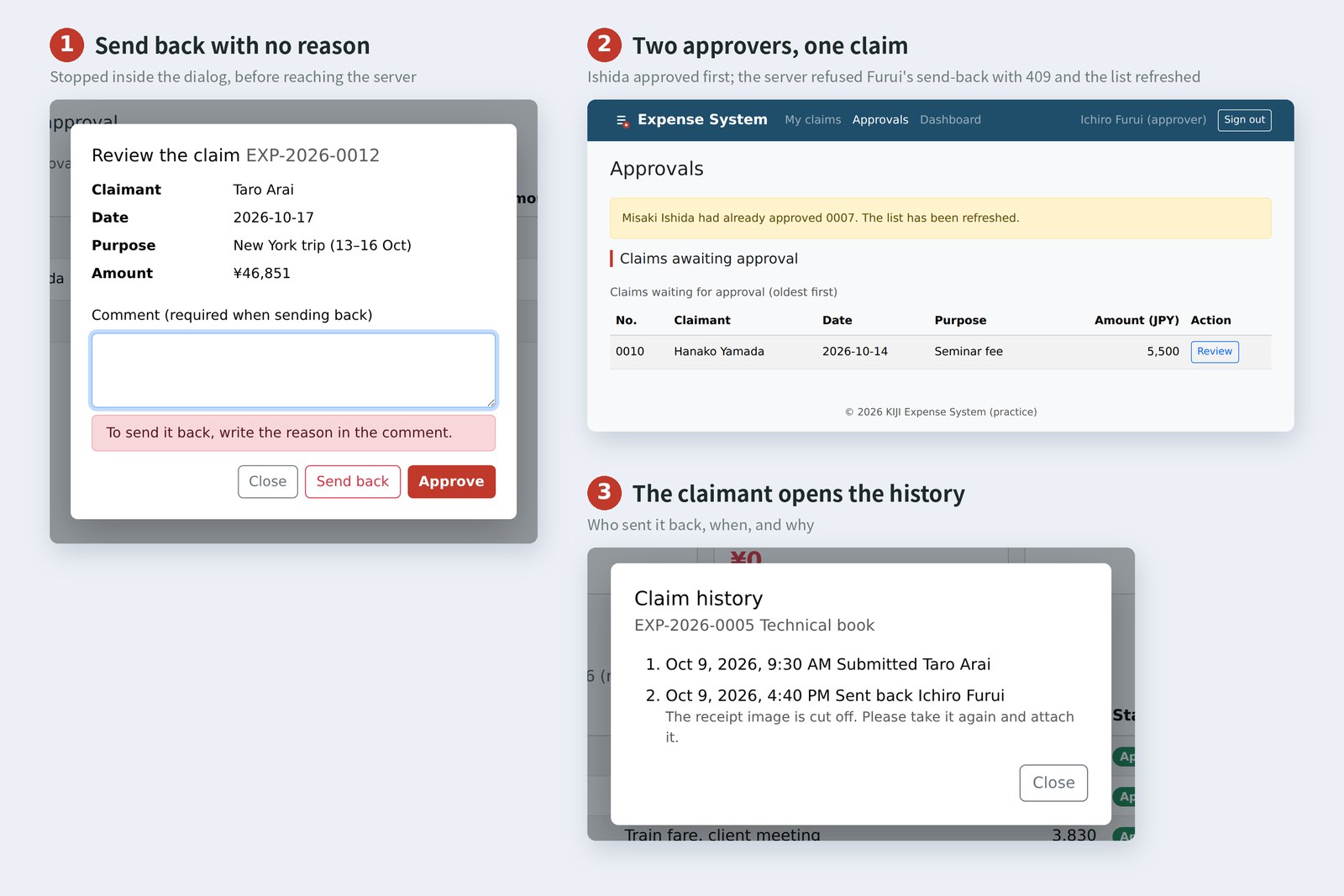
When 409 comes back, the page closes the dialog, shows a yellow banner saying “Misaki Ishida had already approved 0007. The list has been refreshed.” and reloads the list. The trick is to say who did what. “An error occurred” on its own just makes Furui press again.
AraiThe world changes while you're making a cup of tea.
FuruiWhat's on screen is the world as it was when you read it, not the world now. Don't forget that.
Keeping and showing the history
What Arai wants to know after a send-back is: why? So every claim keeps a history of what happened. The status gets overwritten, but the history is never erased; one line is added per event.
Overwrite the status, append to the history
The server stamps the time, because people's browser clocks can be off. It stores it in a worldwide format that includes the offset (ISO 8601), like 2026-10-17T01:06:00.000Z (10:06 in Japan), and the page converts it to Japan time, written the way each language writes it, when showing it.
/** Times in Japan time, written the way that language writes them */
function formatTime(iso) {
  return new Date(iso).toLocaleString('en-US', { timeZone: 'Asia/Tokyo', dateStyle: 'medium', timeStyle: 'short' });
}

/** Show a claim's history in a dialog */
async function openHistory(id) {
  const res = await fetch(`/api/expenses/${id}`);
  if (!res.ok) throw new Error(`HTTP ${res.status}`);
  const claim = await res.json();
  document.querySelector('#h-claim').textContent = `${claim.id}  ${claim.title}`;
  const items = claim.history.map((h) => {
    const li = document.createElement('li');
    li.className = 'mb-2';
    const head = document.createElement('div');
    head.textContent = `${formatTime(h.at)}  ${ACT[h.action]}  ${h.byName}`;
    li.append(head);
    if (h.comment) {
      const note = document.createElement('div');
      note.className = 'small text-body-secondary';
      note.textContent = h.comment;
      li.append(note);
    }
    return li;
  });
  document.querySelector('#h-list').replaceChildren(...items);
  historyDialog.showModal();
}
The comment was written by an approver, not by Arai, so it goes in with textContent, not innerHTML (the XSS story from part 8). Because timeZone: 'Asia/Tokyo' is given, it shows Japan time whatever country the computer is set to.
# The same moments in three languages (toLocaleString; measured in Chromium)
locale approval of 0012 submission of 0005
ja-JP 2026/10/17 10:06 2026/10/09 9:30
zh-CN 2026年10月17日 10:06 2026年10月9日 09:30
en-US Oct 17, 2026, 10:06 AM Oct 9, 2026, 9:30 AM
The same moment is written differently in each language. Japanese doesn't pad the hour (“9:30”), Chinese does (“09:30”), English adds AM/PM (“9:30 AM”). Glue it together yourself with getHours() and you have to remember every one of these differences. Leave this to the browser, too.
Taking it for a spin
We started the practice server and drove three browsers, Furui's, Ishida's and Arai's, with Playwright. Furui's page was opened before Ishida approved, and left as it was.
# Values recorded while actually using it (Chromium; practice server)
who did what the page showed
Furui open Approvals 3 waiting: 0007, 0010, 0012
Furui send back 0012, no reason To send it back, write the reason in the comment.
Furui approve 0012 Approved 0012. (2 left)
Ishida approve 0007 Approved 0007. (1 left)
Furui send back 0007 (stale list) Misaki Ishida had already approved 0007. (409)
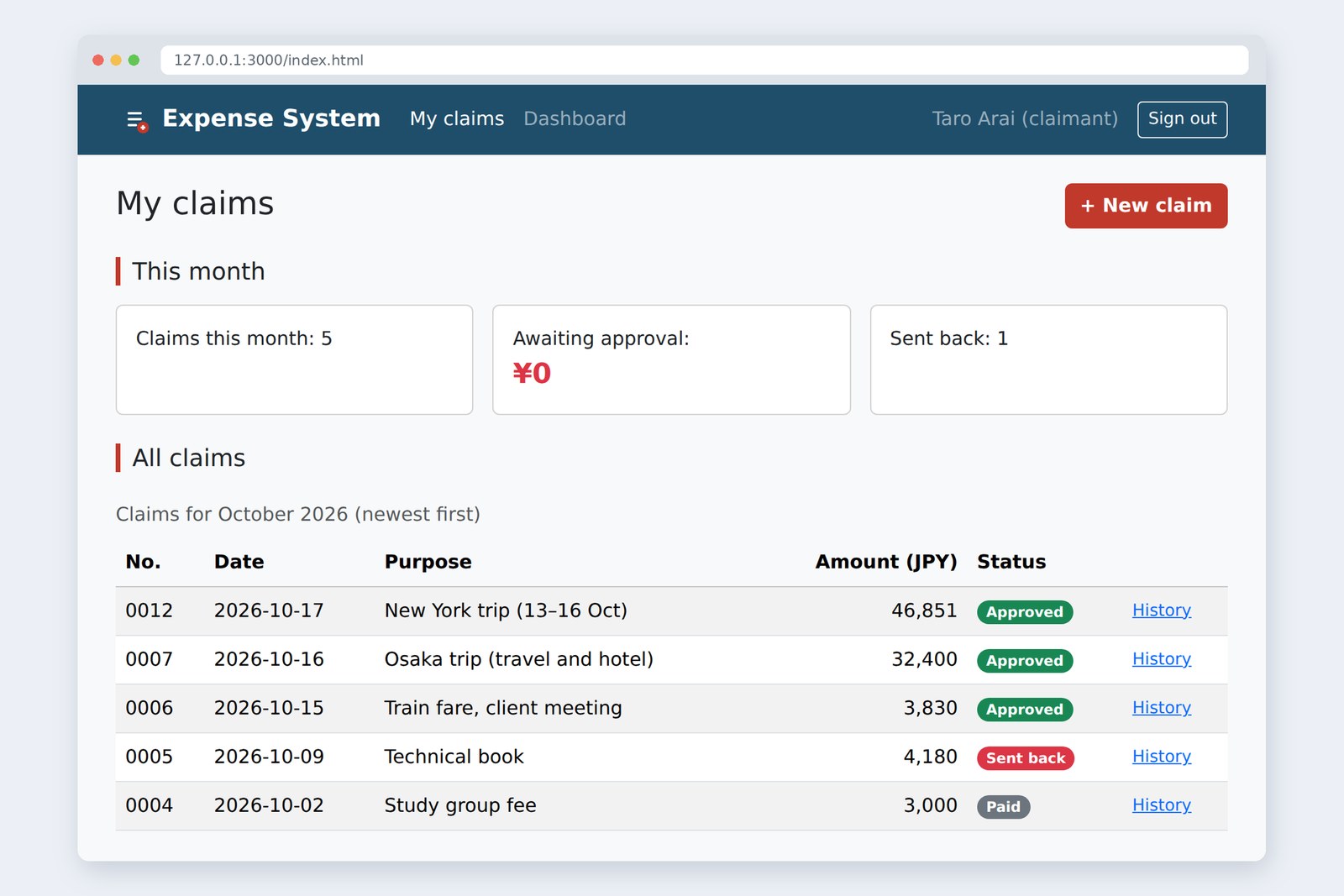
Arai open My claims 0012 Approved / 0007 Approved / 0006 Approved / 0005 Sent back …
Arai open history of 0005 2 entries; last: Oct 9, 2026, 4:40 PM Sent back Ichiro Furui
- The send-back with no reason was stopped inside the dialog. Nothing was sent to the server
- After Furui approved 0012 his list had 2 rows; after Ishida approved 0007 hers had 1
- When Furui sent back 0007 from his stale list, the server refused with 409 and the page named Ishida. The reloaded list had only 0010
- In Arai's list, 0012 and 0007 are Approved. Opening the history of 0005 shows Furui's reason for sending it back
In an approval flow the page doesn't do much: make people look before they press, don't offer what can't be pressed, and when refused, say what happened. Whether the status may move, and whether someone got there first, is still the server's call.
§ — On one page, and what is next
- A claim has a status. Offer buttons only for arrows leaving it; the server decides whether they may be followed.
- The checking window is <dialog> with showModal(). Keeping hands off the page, moving focus in, closing on Esc and going back are the browser's job.
- Rebuild the list and the pressed button is gone. Decide where focus goes yourself.
- Sending JSON? Write Content-Type: application/json yourself — the opposite of FormData.
- Send the version; a mismatch is 409. When refused, say who did what and reload the list.
- Append to the history, never erase. The server stamps the time; show it with toLocaleString.
AraiThe New York trip says Approved! So when does the ¥46,851 hit my account?
FuruiAsk accounts. Next time: totals and printing. Monthly and per-person totals, and a page that still looks good on paper. Accounts will love it.
AraiIf accounts love us, will they pay faster?
References
- MDN — <dialog>: The Dialog element
- MDN — HTMLDialogElement: showModal() method
- MDN — ::backdrop
- W3C WAI-ARIA APG — Dialog (Modal) Pattern
- MDN — Using the Fetch API
- MDN — 409 Conflict
- MDN — HTTP response status codes (400, 403, 415)
- Martin Fowler — Optimistic Offline Lock
- MDN — Date.prototype.toLocaleString()
- MDN — Intl.DateTimeFormat() constructor
The page photos show the author's demo pages, served by a practice server (Node.js) and captured on 17 October 2026 in Chromium (Playwright) in the cloud. Segoe UI isn't available there, so the screenshots fall back to other system fonts. The accounts, claims and comments are made-up data on the practice server. How the dialog behaved, the messages on the page, the status codes, the Content-Type values, how the history times are written and where focus ended up are real values recorded by driving and running the same Chromium with Playwright. Every page's HTML was checked with the Nu Html Checker (vnu) and showed no errors. The characters are fictional.
Old-School Front-End, part 12: the approval flow / 2026.10