Old-School Front-End / 2026 ・ No.13
Old-School Front-End
Part 13: totals and printing — add up by month, draw a bar chart by hand, and put it on paper
Published
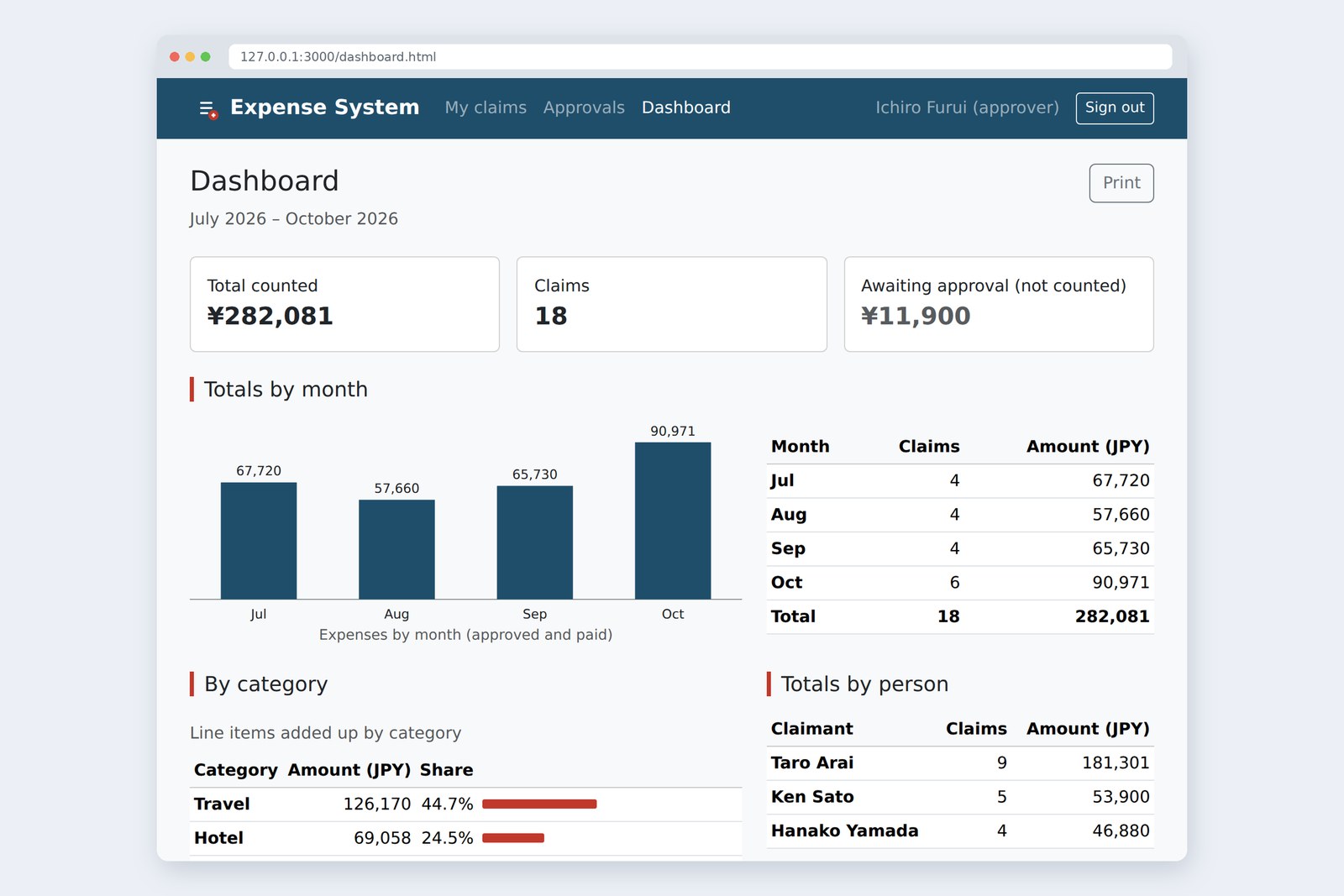
An “old-school” front-end course: no AI doing it for you, every line typed by hand. Part 13 is about totals and printing.
The menu has had a “Dashboard” link all along, leading to nothing.
This time it gets tables that add claims up by month, category and person, and a bar chart drawn by hand in SVG.
Then we make it print nicely on paper, which the head of accounts loves. Along the way we step on an old trap with dates and time zones.
This part's goal
FuruiThe head of accounts wants something: “Expenses since July, by month, on paper.”
AraiPaper…? Not a PDF?
FuruiPaper. Apparently there will be red pen.
AraiWe'll need a chart, then. Chart.js, one line. Three seconds with the AI.
FuruiNothing wrong with a library. But today we draw it ourselves. A bar chart is, in the end, just rectangles in a row. Know what's inside and you'll notice when a library draws something odd.
You are here: part 13
- Decide what counts — add up only approved and paid claims; show the ones awaiting approval separately
- Group and add — by month, category and person, all with one function and a different key
- Draw the bar chart by hand — SVG rectangles placed with JavaScript; the numbers go in a table too
- Put it on paper — print CSS that drops the menu, adds the time and who printed it, and tidies page breaks
On the other end is last part's practice server plus /api/report for the totals. There's a bit more data, too. The July to September claims, the story goes, were moved over from the Excel ledger Furui used to keep (hence numbers like XL-2026-07-01). A new claimant, Ken Sato ([email protected] / demo-sato), has joined. It's all made-up demo data.
What to count
“Total expenses” sounds simple, but the number depends on what goes in. Claims awaiting approval? Sent-back ones? Drafts? Decide that before writing any code.
Add up only what will be, or has been, paid out
After talking it over with the head of accounts (in the story), we count approved and paid claims. Submitted ones may not be paid yet, so they stay out of the total and appear on their own card as awaiting approval. Drafts and sent-back claims aren't counted. That agreement gets a name at the top of the code.
const COUNTED = ['approved', 'paid']; // Only count claims that will be (or have been) paid
As in part 11, the server decides whose claims you can see: /api/report gives approvers everyone's claims and claimants only their own. The page just adds up what it gets.
Grouping and adding up
Monthly totals mean “split the claims by month, then add up each group”. Make a label to group by (a key) and add to the box for that key. The boxes live in a Map.
Make a key, add to the box with that key
/** Group items by keyOf(item) and add up the count and the amount */
function sumBy(items, keyOf) {
  const totals = new Map();
  for (const item of items) {
    const key = keyOf(item);
    const t = totals.get(key) ?? { count: 0, amount: 0 };
    t.count += 1;
    t.amount += item.amount;
    totals.set(key, t);
  }
  return totals;
}
Part 7's calcTotal added everything into one number. sumBy is the per-key version. Because the key is made by a function you pass in, it works by month, by category and by person. ?? means “if the left is missing, use the right”: a new key starts from a box with 0 claims and 0 yen. Some people would write this in one line with reduce; here it's a step-by-step for…of, as in part 7.
Here is where it's used.
const counted = report.claims.filter((c) => COUNTED.includes(c.status));
const waiting = report.claims.filter((c) => c.status === 'submitted');
const total = calcTotal(counted); // the function from part 7

// by month
const byMonth = sumBy(counted, (c) => monthOf(c.date));
const months = monthRange(report.from, report.to).map((m) => ({ label: monthLabel(m), ...(byMonth.get(m) ?? { count: 0, amount: 0 }) }));
drawBars(document.querySelector('#chart-month'), months.map((m) => ({ label: m.label, value: m.amount })));
document.querySelector('#by-month').replaceChildren(...months.map((m) => row([m.label, String(m.count), yen(m.amount)], [1, 2])));
document.querySelector('#by-month-total').replaceChildren(row(['Total', String(counted.length), yen(total)], [1, 2]));

// Categories live on the line items, not the claims, so collect the rows first, then add
const lines = counted.flatMap((c) => c.rows);
const byCat = [...sumBy(lines, (r) => r.category)].sort((a, b) => b[1].amount - a[1].amount);
- The list of months comes from monthRange, not the Map. A Map only holds months that had claims, so empty months would silently drop out of the chart
- Categories live on the line items, not on the claims, so flatMap lays all the rows out first. The New York trip goes in as three rows: travel, hotel and meetings
AraiCouldn't a plain object {} do this instead of a Map?
FuruiIt could. But an object comes with things like toString already hanging off it. When you don't know what the keys will be, an empty Map is safer.
Cut dates as text
The month key is '2026-10-16'.slice(0, 7): the first seven characters. “It's a date, though. Isn't the proper way to make a Date and call getMonth()?” Let's try.
# The month of a Date made from the same text (measured in Chromium, changing the time zone)
time zone new Date('2026-07-01') new Date('2026-07-01T00:00') .slice(0, 7)
Tokyo Jul Jul 2026-07
Shanghai Jul Jul 2026-07
London Jul Jul 2026-07
Los Angeles Jun Jul 2026-07   ← 30 June, 5 PM

# What new Date('2026-07-01') holds in Los Angeles: Tue Jun 30 2026 17:00:00
Only in Los Angeles did July turn into June. A date-only '2026-07-01' is, by the rules, read as midnight UTC on 1 July. At that instant it's 9 AM on 1 July in Tokyo, but still 5 PM on 30 June in Los Angeles, so asking “which month?” gets June. To make it more confusing, '2026-07-01T00:00' with a time is read as local midnight. In part 9 it was “today” that shifted; this time it's the month.
The same new Date('2026-07-01') is a different date in different places
We tried it on the dashboard: a browser on Los Angeles time, with monthOf swapped for a version that makes a Date first.
# The monthly table, opened on Los Angeles time (measured in Chromium)
month cut the text (right) Date first, then month
Jul  4 /  67,720  4 /  87,740
Aug  4 /  57,660  4 /  74,100
Sep  4 /  65,730  3 /  27,290
Oct  6 /  90,971  6 /  90,971

rows added up 17 / 280,101
the Total row 18 / 282,081
Every claim made on the 1st moved back a month. The ¥1,980 from 1 July went to June and fell off the table. The rows add up to 17 claims and ¥280,101, but the Total row says 18 and ¥282,081. The Total row adds up all the claims, so it doesn't shift. This is exactly why accountants who build totals by hand add up the rows and the columns at the end to cross-check. Testing only in Tokyo, you'd never see this trap.
If all you need is to group by month, the safest thing is not to turn the date into a Date at all. To show “Oct” on screen, build the date from numbers, like new Date(2026, 9, 1); that form uses local time, so it doesn't shift.
/** '2026-10-16' → '2026-10'. Don't turn the date into a Date; just cut the text (the trap in section 4) */
function monthOf(date) {
  return date.slice(0, 7);
}

/** List every month from '2026-07' to '2026-10', none skipped (months with no claims show 0) */
function monthRange(from, to) {
  const months = [];
  let [y, m] = from.split('-').map(Number);
  const [toY, toM] = to.split('-').map(Number);
  while (y < toY || (y === toY && m <= toM)) {
    months.push(`${y}-${String(m).padStart(2, '0')}`);
    m += 1;
    if (m > 12) { y += 1; m = 1; }
  }
  return months;
}

/** '2026-10' → the month the way the language writes it ('Oct' in English) */
function monthLabel(month) {
  const [y, m] = month.split('-').map(Number);
  return new Date(y, m - 1, 1).toLocaleDateString(LOC, { month: 'short' }); // pass year, month and day as numbers and it is built in local time
}
Drawing a bar chart by hand
The chart is SVG. The HTML holds one <svg id="chart-month">, and JavaScript adds rectangles (rect) and text (text) to it. First, how the coordinates work.
In SVG, y grows downward
/** Make an SVG element: createElementNS, not createElement (it needs the namespace) */
function svgEl(name, attrs = {}, text = '') {
  const el = document.createElementNS(SVG_NS, name);
  for (const [k, v] of Object.entries(attrs)) el.setAttribute(k, v);
  el.textContent = text;
  return el;
}

/** Draw a vertical bar chart. data = [{ label, value }] */
function drawBars(svg, data) {
  const W = 640, H = 240, TOP = 28, BOTTOM = 30;
  const max = Math.max(...data.map((d) => d.value), 1);
  const step = W / data.length;
  const barW = step * 0.55;
  const parts = [svgEl('line', { x1: 0, y1: H - BOTTOM, x2: W, y2: H - BOTTOM, class: 'chart-axis' })];
  data.forEach((d, i) => {
    const h = (H - TOP - BOTTOM) * d.value / max;
    const x = step * i + (step - barW) / 2;
    const y = H - BOTTOM - h; // SVG's y axis points down: top of a bar = axis position − bar height
    parts.push(svgEl('rect', { x, y, width: barW, height: h, class: 'chart-bar' }));
    parts.push(svgEl('text', { x: x + barW / 2, y: y - 8, class: 'chart-value' }, d.value.toLocaleString(LOC)));
    parts.push(svgEl('text', { x: x + barW / 2, y: H - 8, class: 'chart-label' }, d.label));
  });
  svg.setAttribute('viewBox', `0 0 ${W} ${H}`);
  svg.replaceChildren(...parts);
}
The largest month gets the full height and the others shrink in proportion. Each bar has its amount above it and its month below. The colour comes from CSS (.chart-bar { fill: #1f4e6b; }), not an SVG attribute. Because viewBox fixes the coordinate space at 640×240, CSS width: 100% alone lets it grow and shrink with the screen.
Here is a trap every old-schooler has stepped in once. Inside svgEl it's createElementNS, not createElement. What happens with a plain createElement('rect')?
# Adding a rect inside <svg> (measured in Chromium)
made with namespace what it is size
createElement http://www.w3.org/1999/xhtml HTMLUnknownElement 0 × 0   <- not drawn
createElementNS http://www.w3.org/2000/svg SVGRectElement 84 × 42
A rect made with createElement becomes an HTML “unknown element” (HTMLUnknownElement), size 0, and nothing is drawn. No error, either. SVG elements belong to a different namespace from HTML (http://www.w3.org/2000/svg), and you have to name it when you make them.
The chart has role="img" and aria-labelledby, taking its name from the caption underneath (figcaption). The numbers themselves are all in the table next to it. The chart is a picture you take in at a glance; the exact numbers are in the table. The red pen on the printout will probably land on the table, too.
Rounded shares
The category breakdown shows each share of the total to one decimal place. Let's add them up.
# Shares by category (toFixed(1); measured in Chromium)
category amount (JPY) share
Travel   126,170  44.7%
Hotel    69,058  24.5%
Meetings    45,723  16.2%
Other    30,280  10.7%
Supplies    10,850   3.8%
added up  99.9%
99.9%. Not a calculation error: when you round each one separately, the bits rounded up and rounded down don't always cancel out. Write “100.0%” on the Total row and whoever checks the paper will say it doesn't add up. So the Total row has no share, and a line under the table says the shares may not add up to exactly 100.0%. If they must add up, agree a rule with accounts, such as giving the difference to the item with the largest remainder.
AraiNobody cares about 0.1%.
FuruiThe head of accounts does. With a red pen.
On paper
All the Print button does is open the browser's print screen with window.print(). How it looks on paper is written in CSS, inside @media print. Screen and paper need different things.
Drop what can't be clicked on paper; add what only paper needs
Bootstrap classes handle the dropping and adding. d-print-none hides something only when printing; d-none d-print-block hides it on screen and shows it only when printing.
<header class="d-print-none navbar navbar-expand-md navbar-dark brand-bar"> … </header>

<p class="print-head d-none d-print-block"><strong>Expense report</strong> <span id="print-meta"></span></p>
<div class="d-flex flex-wrap justify-content-between align-items-center gap-3 mb-1">
  <h1 class="h3 mb-0">Dashboard</h1>
  <button type="button" class="btn btn-outline-secondary d-print-none" id="print">Print</button>
…
<footer class="d-print-none py-4 text-center text-body-secondary"> … </footer>
JavaScript fills the print heading with the period, when it was printed and who printed it. Papers get mixed up on desks; “when, and by whom” helps. The rest is CSS we write ourselves.
/* Part 13: the category share bars (painted with a background colour) */
.share-bar {
  display: block;
  height: .6rem;
  border-radius: 2px;
  background-color: #c0392b;
}

/* Part 13: when printing */
@page {
  size: A4;
  margin: 14mm 12mm;
}
@media print {
  body {
    background: #fff !important;
    font-size: 10pt;
  }
  .container {
    max-width: none;
    padding: 0;
  }
  .keep,
  .card,
  tr {
    break-inside: avoid; /* don't split across pages */
  }
  h2 {
    break-after: avoid; /* don't leave a heading alone at the bottom of a page */
  }
  .share-bar {
    -webkit-print-color-adjust: exact; /* for older browsers */
    print-color-adjust: exact; /* print the background colour too (browsers skip backgrounds by default) */
  }
  .report-list th,
  .report-list td {
    white-space: nowrap; /* don't wrap numbers and dates */
  }
  .report-list td:nth-child(4) {
    white-space: normal; /* only the purpose may wrap */
  }
  .print-head {
    border-bottom: 2px solid #212529;
    padding-bottom: .25rem;
  }
}
- @page sets the paper size and margins
- break-inside: avoid keeps cards, table rows and the chart block from being split
- print-color-adjust: exact makes the bars' background colour print
That last one is needed because by default, browsers don't print background colours or images (to save ink; ticking “Background graphics” on the print screen prints them). The category bars are painted with a background colour, so as they are, they vanish on paper. The chart bars, on the other hand, are SVG fill, part of the picture itself, so they stay. We checked by saving PDFs from Chromium.
# How it prints (Chromium: emulating @media print, and saving PDFs)
what we checked result
header (d-print-none) display: none → not printed
Print button display: none
print-only heading (d-print-block) display: block → only on paper
A4 PDF 3 pages; the table on page 3 got its header row too
chart bars (SVG fill) printed even without background graphics
category bars (CSS background) with print-color-adjust: exact → printed / without → gone
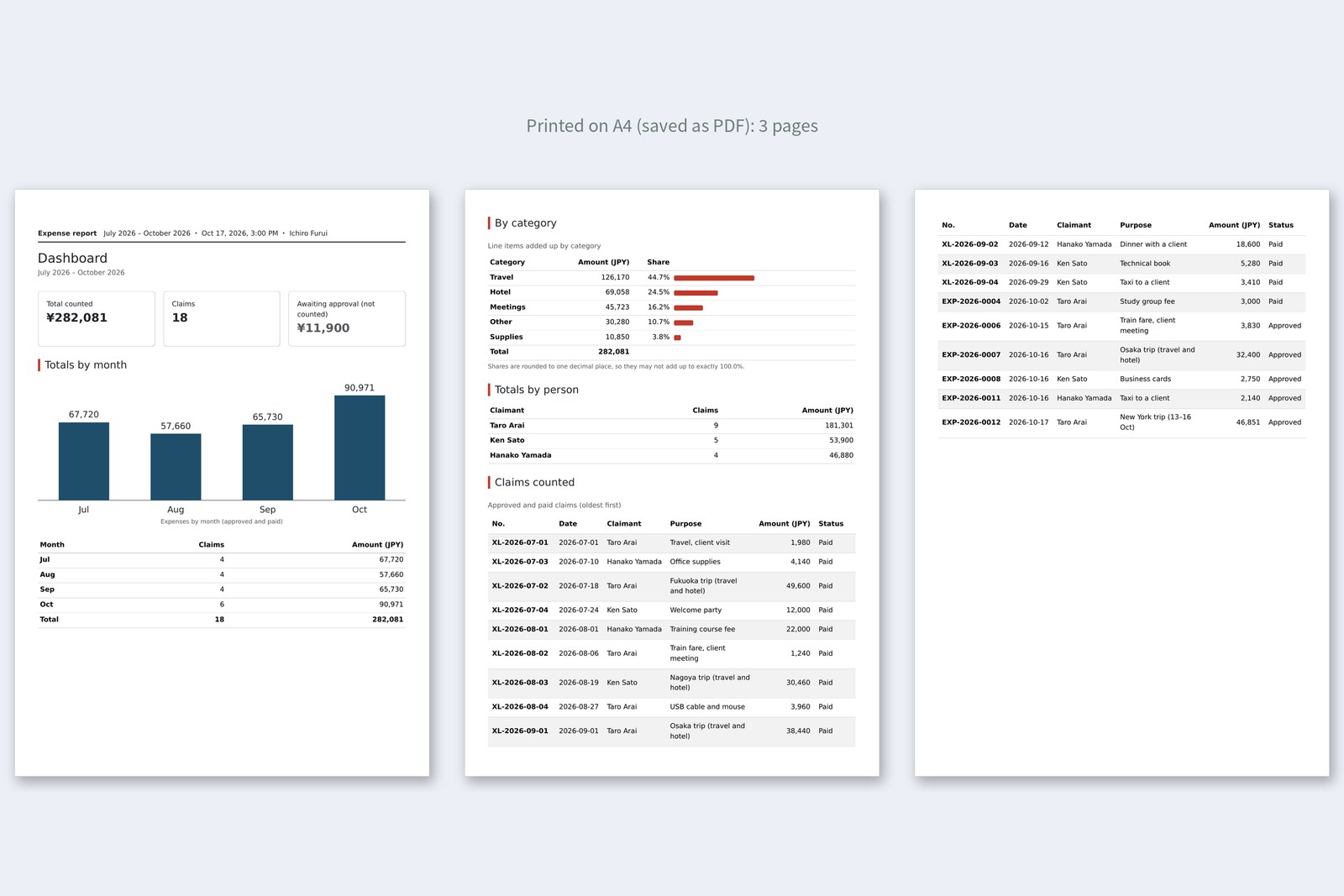
Page 1 has the summary and the monthly chart, page 2 the breakdowns and the list of claims, page 3 the rest of the list. The table on page 3 has its header row again (a table's thead repeats when it runs across pages). The category breakdown didn't fit at the bottom of page 1, so break-inside: avoid sent the whole block to page 2. When you print from a real browser, it may add the URL and date in the margins; turn that off with “Headers and footers” on the print screen.
Taking it for a spin
We started the practice server and opened the dashboard with Playwright as Furui (approver) and as Arai (claimant). We also tried a browser on Los Angeles time and a PDF without background graphics.
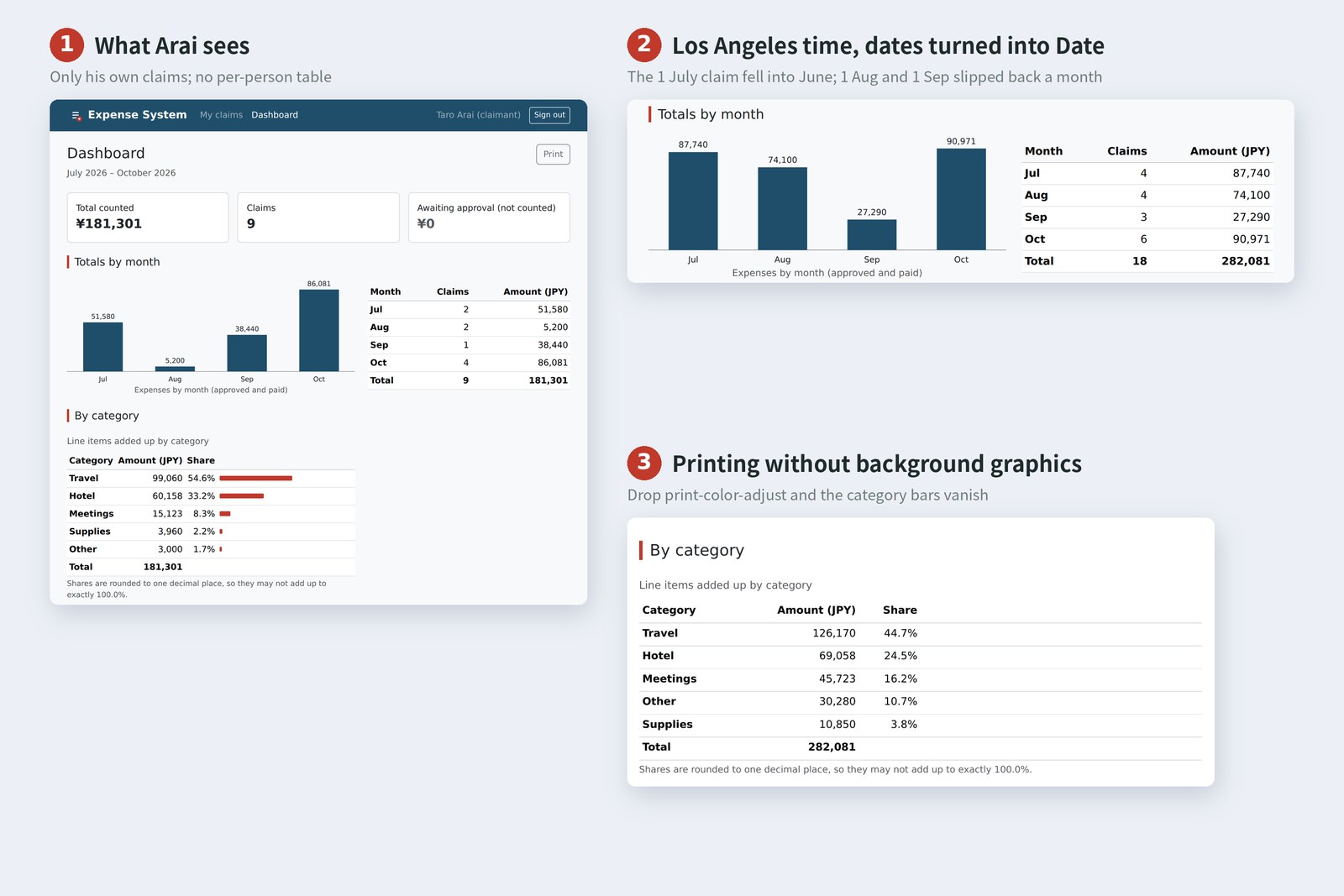
# Who opened it (measured in Chromium)
 Furui (approver) Arai (claimant)
total counted ¥282,081 ¥181,301
claims 18 9
awaiting approval ¥11,900 ¥0
per-person table shown not shown
claims counted 18 rows 9 rows
- Same dashboard.html: Furui sees all 18 claims, Arai his own 9. Arai's page has no per-person table (and the server never sent him anyone else's claims)
- Arai has ¥0 awaiting approval, because 0012 and 0007 were approved last time
- With Date on Los Angeles time, claims from the 1st slipped back a month and the rows no longer matched the Total row. Cutting the text gives the same numbers in every time zone
- With background graphics off, the bars vanished without print-color-adjust and stayed with it
What matters on a totals page isn't the look; it's numbers that add up. Decide what counts and say so. Treat dates as text. Check that the rows match the Total row, in another time zone too. The chart is those numbers as a picture, and on paper, keep only what the reader of the paper needs.
§ — On one page, and what is next
- Before totalling, decide what counts. Here: approved and paid. Show awaiting approval separately.
- Group and add with a Map and a key. Build the month list with monthRange so empty months don't vanish.
- To group by month, don't make a Date; cut the text. '2026-07-01' is read as midnight UTC.
- Make SVG elements with createElementNS. y points down. Put the exact numbers in a table too.
- Rounded shares may not add up to 100.0%. Decide how to show them, and say so.
- Printing is @media print: hide with d-print-none, tidy with @page and break-inside, and use print-color-adjust for background colours.
AraiI gave the boss the printout, and the Fukuoka trip in July got a red circle. “What's this?”
FuruiThat's your trip. Go and explain it. …Next time: jQuery. We rewrite the DOM, events and fetching from parts 8 to 10 in jQuery and compare them side by side. The old school of the old school.
AraiThe one with dollar signs ($) everywhere.
References
- MDN — Date.parse() (date-only forms are UTC)
- MDN — Date() constructor
- MDN — Document: createElementNS() method
- MDN — SVG namespaces crash course
- MDN — Printing (CSS)
- MDN — print-color-adjust
- MDN — break-inside
- MDN — @page size
- Bootstrap 5.3 — Display property (Display in print)
The page photos show the author's demo pages, served by a practice server (Node.js) and captured on 19 October 2026 in Chromium (Playwright) in the cloud, with the page clock fixed at 3:00 PM on 17 October 2026. Segoe UI isn't available there, so the screenshots fall back to other system fonts. The accounts, claims and amounts are made-up data on the practice server. The totals, the month of a Date in each time zone, the difference between createElement and createElementNS, the sum of the shares, and the printed result (what shows when printing, the A4 PDFs, page count, and whether the bars and chart appear) are real values recorded by driving and running the same Chromium with Playwright. The print photo is those PDFs turned into images and laid side by side. Every page's HTML was checked with the Nu Html Checker (vnu) and showed no errors. The characters are fictional.
Old-School Front-End, part 13: totals and printing / 2026.10