Old-School Front-End / 2026 ・ No.14
Old-School Front-End
Part 14: jQuery — rewrite the same page with “$” and compare side by side
Published
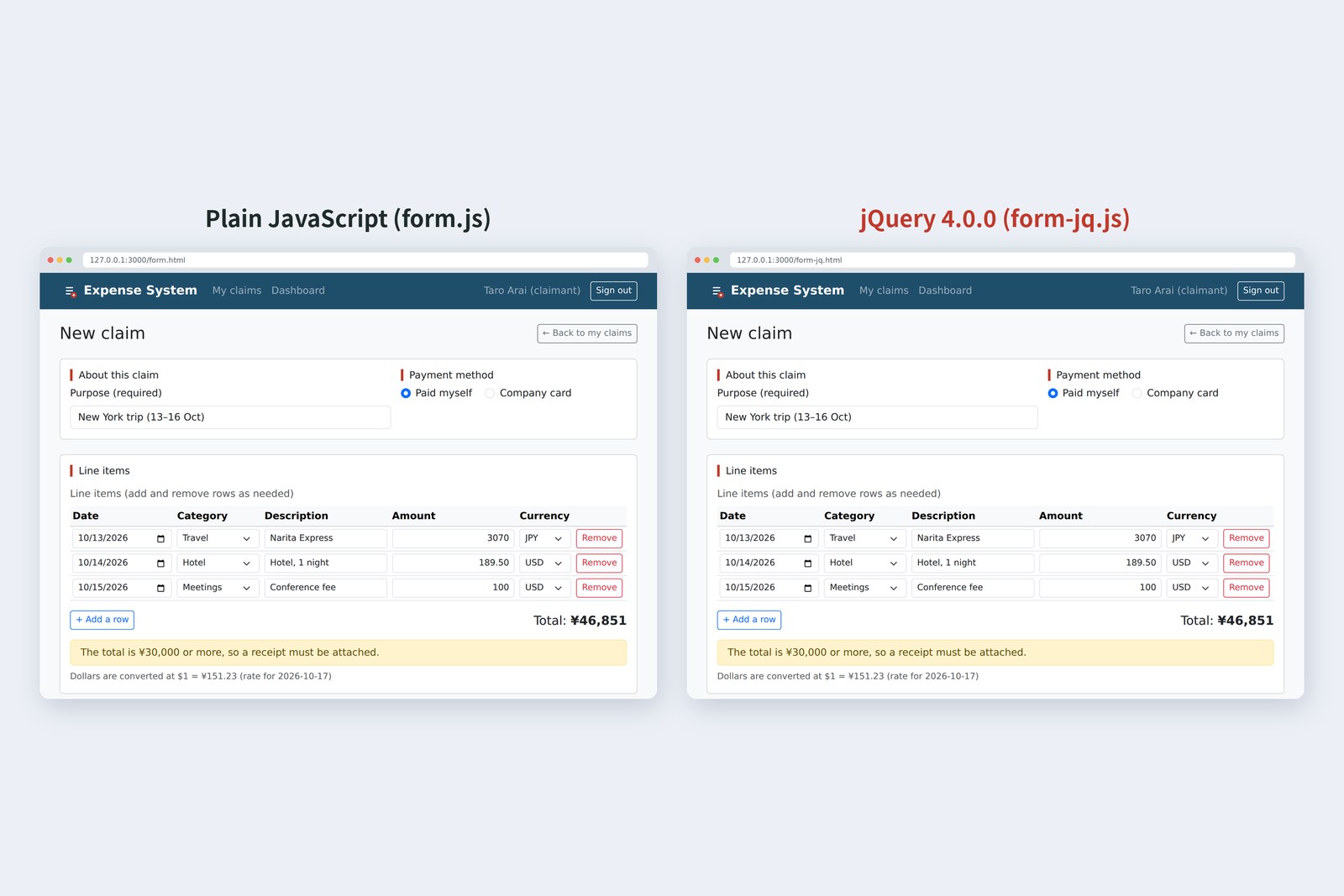
An “old-school” front-end course: no AI doing it for you, every line typed by hand. Part 14 is about jQuery.
We take the claim form JavaScript we wrote by hand in parts 8 to 10 and rewrite all of it in jQuery 4.0.0.
Then we run both versions through the same steps to see whether they really behave the same.
Rewriting shows what jQuery makes easy, how far plain JavaScript has caught up, and where the traps are.
This part's goal
FuruiToday, jQuery. When I was young, every web screen was written with it.
AraiThe one with dollar signs everywhere. I've seen it maintaining old sites. Couldn't read it.
FuruiYou'll need to. Over 60% of websites still use it. Today we rewrite the claim form from parts 8 to 10, all of it, in jQuery.
AraiRewrite something that already works?
FuruiWrite the same thing two ways and you see the good and bad of both. Think of it as translation practice.
You are here: part 14
- Know what $ gives you — not the element itself but a “wrapper”. Getters read the first; setters touch all
- Rewrite — adding and removing rows, the error summary, talking to the server. The maths (app.js) and checks (validate.js) stay as they are
- Check they behave the same — drive both versions through the same steps, record what the page shows, and compare
- Try the traps — collect the spots where the rewrite stumbled onto one page and actually run them
We use jQuery 4.0.0, released on 17 January 2026, its first major version in about ten years. For comparison we also try the previous version, 3.7.1.
What $ gives you
At the heart of jQuery is a function called $. Give it a CSS selector and it returns the elements it found inside a wrapper, which carries lots of methods for handling them together.
$() returns a wrapper holding the elements
# Results of actually running each line on lab.html (Chromium, jQuery 4.0.0)
# what we tried result
1 ask $('#total') for textContent undefined
2 with $('#total')[0] instead 46,851
3 $('[name="amount"]').val() (there are 3) "3070"
4 all of them with map(…).get() ["3070","189.50","100"]
5 $('#nothing').text('x') on a missing element no error (length = 0)
6 querySelector('#nothing').textContent = 'x' on a missing element TypeError: Cannot set properties of null (setting 'textContent')
- The wrapper isn't an element, so asking it for textContent gives undefined. Take the element out with [0]
- Getters like .val() read only the first element. For all of them, use map(…).get()
- Setters like .addClass(), on the other hand, apply to every element inside (implicit looping). No for loop: that's what makes jQuery feel good
- Nothing found means an empty wrapper, not an error. Where plain JavaScript would hit null and stop, jQuery silently does nothing, so a mistyped selector is easy to miss
That's why variables holding wrappers get a $ at the front ($tbody and so on), to tell them from plain elements. An old habit.
Loading it
As with Bootstrap (part 6), the file goes in vendor/jquery/. It must load before form-jq.js, which uses it. They are all defer, so they run in the order written.
<script src="vendor/jquery/jquery.min.js" defer></script>
<script src="js/app.js" defer></script>
<script src="js/auth.js" defer></script>
<script src="js/validate.js" defer></script>
<script src="js/form-jq.js" defer></script>
We compared the sizes.
# Sizes (bytes; gzip shows roughly what is sent compressed)
file bytes gzip lines (no comments or blanks)
form.js (plain JS)   9,579  3,562  185
form-jq.js (jQuery)   8,170  3,249  168
jquery.min.js 4.0.0  78,748 27,519
jquery.slim.min.js 4.0.0  56,032 19,424
jquery.min.js 3.7.1  87,533 30,336
(for reference) bootstrap.bundle.min.js  80,496 23,743
The rewritten form-jq.js is about 10% shorter than form.js. In return, every page load brings jquery.min.js, about 79KB (about 27KB compressed), roughly as heavy as Bootstrap's JavaScript. The slim build is smaller but has no networking ($.ajax); we check that in section 8. Since we're rewriting the network code, we use the regular build.
Rewriting adding and removing rows
First, part 8's function that renumbers the line items. Plain JavaScript on top, jQuery below.
/** Rename the fields for screen readers to match the row numbers */
function renumber() {
  [...tbody.rows].forEach((row, i) => {
    const n = i + 1;
    for (const field of row.querySelectorAll('[data-label]')) {
      const label = field.dataset.label;
      field.id = `${field.name}-${n}`; // ids for the summary links (part 9)
      field.setAttribute('aria-label', `Row ${n} ${label}`);
    }
    row.querySelector('[data-action="remove"]').setAttribute('aria-label', `Remove row ${n}`);
  });
  addButton.disabled = tbody.rows.length >= MAX_ROWS; // No more adding once there are 10 rows
}
/** Rename the fields for screen readers to match the row numbers */
function renumber() {
  const $rows = $tbody.children('tr');
  $rows.each(function (i) { // Inside each, this is that row (a plain DOM element)
    const n = i + 1;
    $(this).find('[data-label]').each(function () {
      $(this).attr({ id: `${this.name}-${n}`, 'aria-label': `Row ${n} ${$(this).data('label')}` });
    });
    $(this).find('[data-action="remove"]').attr('aria-label', `Remove row ${n}`);
  });
  $addButton.prop('disabled', $rows.length >= MAX_ROWS); // States such as disabled use prop; attributes written in the HTML use attr
}
- .each(function () {…}) instead of for…of. Inside, this is that round's element (a plain element, not a wrapper)
- Attributes use .attr(); current states like disabled and checked use .prop(). .attr() takes an object to set several at once
Next, event delegation (part 8). This is where jQuery shines.
// Recalculate on every input (listen on tbody so rows added later work too)
tbody.addEventListener('input', (event) => {
  const name = event.target.name;
  if (name === 'amount' || name === 'currency') updateTotal();
});

// The Remove buttons (also handled on tbody)
tbody.addEventListener('click', (event) => {
  const button = event.target.closest('[data-action="remove"]');
  if (button) removeRow(button.closest('tr'));
});

addButton.addEventListener('click', () => addRow());
// Event delegation (part 8): just name the child as the second argument of on
$tbody.on('input', '[name="amount"], [name="currency"]', updateTotal);
$tbody.on('click', '[data-action="remove"]', function () {
  removeRow($(this).closest('tr'));
});
$addButton.on('click', () => addRow());
Put a selector for “which child” as the second argument of .on(), and jQuery does the closest search for you. this is then the button that was pressed. But only when you write a function.
# Results of actually running each line on lab.html (Chromium, jQuery 4.0.0)
# what we tried result
13 this in an arrow function inside on window
14 this in a function inside on <button id="lab-btn">
Arrow functions have no this of their own, so you get the outer one (here, window). Use function where you need jQuery's this, and arrows where you don't.
Rewriting the error summary
Part 9's function that shows the error summary: lots of making elements and filling them in.
/** Show the result on the page (red borders and the summary at the top) */
function showErrors(errors) {
  for (const field of form.querySelectorAll('.is-invalid')) {
    field.classList.remove('is-invalid');
    field.removeAttribute('aria-invalid');
  }
  const items = errors.map(({ field, message }) => {
    const el = document.getElementById(field);
    el.classList.add('is-invalid');
    el.setAttribute('aria-invalid', 'true');
    const a = document.createElement('a');
    a.href = '#' + field;
    a.className = 'alert-link';
    a.textContent = message; // Text goes in with textContent (part 8)
    const li = document.createElement('li');
    li.append(a);
    return li;
  });
  summary.querySelector('ul').replaceChildren(...items);
  summary.querySelector('h2').textContent = `Please check your entries (${errors.length})`;
  summary.hidden = errors.length === 0;
}
/** Show the result on the page (red borders and the summary at the top) */
function showErrors(errors) {
  $form.find('.is-invalid').removeClass('is-invalid').removeAttr('aria-invalid');
  const items = errors.map(({ field, message }) => {
    $(document.getElementById(field)).addClass('is-invalid').attr('aria-invalid', 'true'); // Find the element with getElementById and wrap it, so symbols in an id can't cause trouble
    return $('<li>').append($('<a>', { href: '#' + field, class: 'alert-link', text: message })); // Passing text: is the same as textContent (part 8; html: would be a way in for XSS)
  });
  $summary.find('ul').empty().append(items);
  $summary.find('h2').text(`Please check your entries (${errors.length})`);
  $summary.prop('hidden', errors.length === 0);
}
Pass a tag and its attributes together, as in $('<a>', { … }), and an element takes one line. Chaining methods, as in .removeClass().removeAttr(), is very jQuery too (method chaining).
Take care where text goes in. Part 8 showed why we use textContent, not innerHTML. In jQuery, .html() is innerHTML and .text() is textContent.
# Results of actually running each line on lab.html (Chromium, jQuery 4.0.0)
# what we tried result
19 .html(text) with an img carrying a script it ran
20 .text(text) with the same didn't run (shown as text)
The onerror on the img put in with .html() really ran. Text that people typed goes in with .text() (or text:). Old jQuery code often glues text together with .html(), so watch for it when reading.
Rewriting the network code
Part 10's function that sends the claim to the server. fetch becomes $.ajax.
/** Send the claim to the server */
async function send(data, button) {
  setSending(true, button);
  try {
    const url = form.getAttribute('action'); // form.action returns the buttons named "action" instead (measured)
    const res = await fetch(url, { method: 'POST', body: data, signal: AbortSignal.timeout(15000) }); // give up after 15 seconds
    if (res.status === 401) { // the sign-in had expired (part 11)
      showResult('danger', 'Your sign-in has expired. Please sign in again (what you typed is still on this page).');
      return;
    }
    if (res.status === 400) { // the server's checks failed (it answers in the same shape as part 9)
      const body = await res.json();
      showErrors(body.errors);
      summary.focus();
      return; // finally still runs after return
    }
    if (!res.ok) throw new Error(`HTTP ${res.status}`);
    const body = await res.json();
    showResult('success', body.draft ? `Draft saved (${body.id}).` : `Your claim was received. Its number is ${body.id}.`);
  } catch (error) {
    showResult('danger', "Couldn't send. Check your connection and press it again. Nothing you typed has been lost.");
  } finally {
    setSending(false, button); // success or failure, put the buttons back
  }
}
/** Send the claim to the server */
async function send(data, button) {
  setSending(true, button);
  try {
    const body = await $.ajax({
      url: $form.attr('action'), // attr reads the attribute, so the buttons named "action" can't get in the way (the part 10 trap)
      method: 'POST',
      data, // In 4.0 a FormData can go straight in (3.x needs processData: false and contentType: false; measured in section 6)
      dataType: 'json',
      timeout: 15000,
    });
    showResult('success', body.draft ? `Draft saved (${body.id}).` : `Your claim was received. Its number is ${body.id}.`);
  } catch (xhr) { // 400 and 401 land here too
    if (xhr.status === 401) {
      showResult('danger', 'Your sign-in has expired. Please sign in again (what you typed is still on this page).');
      return;
    }
    if (xhr.status === 400) {
      showErrors(xhr.responseJSON.errors);
      $summary.trigger('focus');
      return;
    }
    showResult('danger', "Couldn't send. Check your connection and press it again. Nothing you typed has been lost.");
  } finally {
    setSending(false, button);
  }
}
The biggest difference is where 400 and 401 go.
fetch asks “did a reply come?”; $.ajax asks “did it work?”
# Results of actually running each line on lab.html (Chromium, jQuery 4.0.0)
# what we tried result
7 $.ajax with just a FormData as data (4.0.0) status 400 / Content-Type: multipart/form-data
8 the same in 3.7.1 TypeError: Illegal invocation
9 $.ajax gets a 400 rejected (to catch) status 400 / responseJSON.errors 2
10 fetch gets a 400 resolved (to then) ok false / status 400
11 event.submitter on a jQuery event undefined
12 event.originalEvent.submitter <button value="submit">
- To fetch, any reply is a success, 400 included; that's why part 10 checked res.status. To $.ajax, a 400 is a failure and lands in catch, with the JSON reply in xhr.responseJSON
- In jQuery 4.0.0 a FormData can go straight into data, and the browser set the Content-Type (multipart/form-data). The same thing in 3.7.1 stops with TypeError: Illegal invocation; 3.x code needs processData: false and contentType: false
- A jQuery event has no submitter (the submit button that was pressed); take it from originalEvent
$form.on('submit', async function (event) {
  event.preventDefault();
  $result.prop('hidden', true);
  const button = event.originalEvent.submitter; // jQuery's event has no submitter; take it from the original event
  if (!button.formNoValidate) {
    const errors = validateClaim(readClaim(), localDate(), rate);
    showErrors(errors);
    if (errors.length > 0) {
      $summary.trigger('focus');
      return;
    }
  }
  await send(new FormData(this, button), button);
});
You can await what $.ajax returns (jQuery's Deferred is shaped so it can be awaited like a Promise). Older code typically chains .done() and .fail() instead.
Do they behave the same?
The scariest outcome of a rewrite is “roughly the same”. So Playwright drove both versions through the same steps, and at each scene we recorded what the page showed (total, notes, error summary, red borders, result, buttons, rows, screen-reader names, where the focus was, and more) and compared.
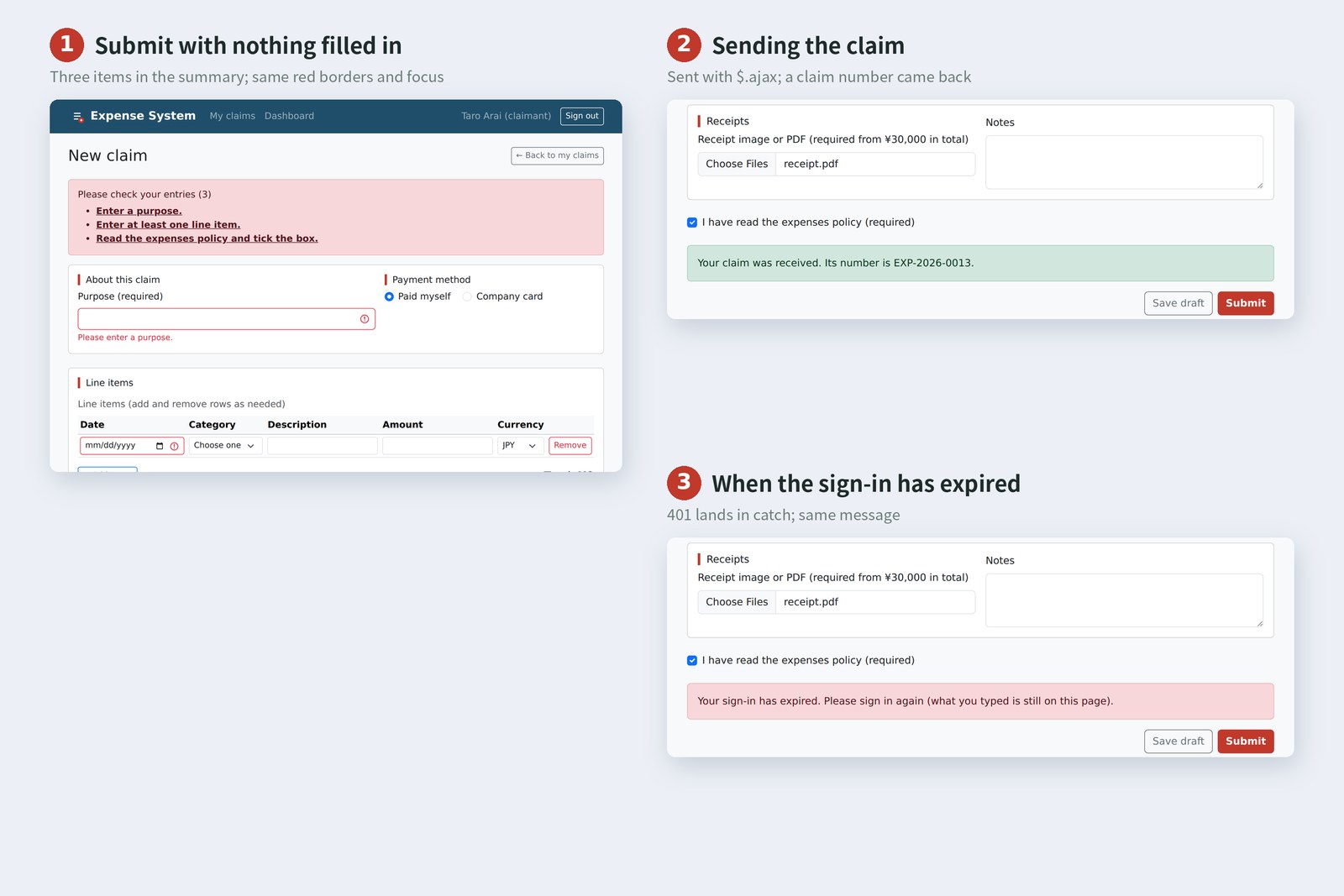
# The same steps on both pages, recording what the page showed (Chromium; all three languages)
scene plain JS (form.js) jQuery (form-jq.js) same?
Submit with nothing in 3 / focus error-summary 3 / focus error-summary same
Add a row focus date-2 focus date-2 same
three rows, total ¥46,851 ¥46,851 same
add row 4, remove it 3 / focus add-row 3 / focus add-row same
while sending [x]Save draft [x]Sending… [x]Save draft [x]Sending… same
sent success Your claim… success Your claim… same
Save draft, signed out danger Your sign-… danger Your sign-… same

# All 14 recorded items (total, 3 notes, summary heading and items, red borders, result, buttons, aria-busy, rows, screen-reader names, Add-a-row state, focus) matched in all 8 scenes
In all three languages, every recorded value matched in all eight scenes. That even the focus went to the same places (the error summary, the new row's date, Add a row after removing) means the “keyboard users don't get lost” behaviour from parts 8 and 9 survived the rewrite.
AraiAll “same”. The jQuery one is shorter, so why not just use it?
FuruiTen percent shorter, 79KB heavier. And the only parts that got shorter are the for loops and closest. You can compare them because you learned plain DOM in part 8.
From 3.x to 4.0
Most jQuery out there is 3.x. To see what 4.0.0 changed, we loaded 3.7.1 and the slim build on the same page and compared.
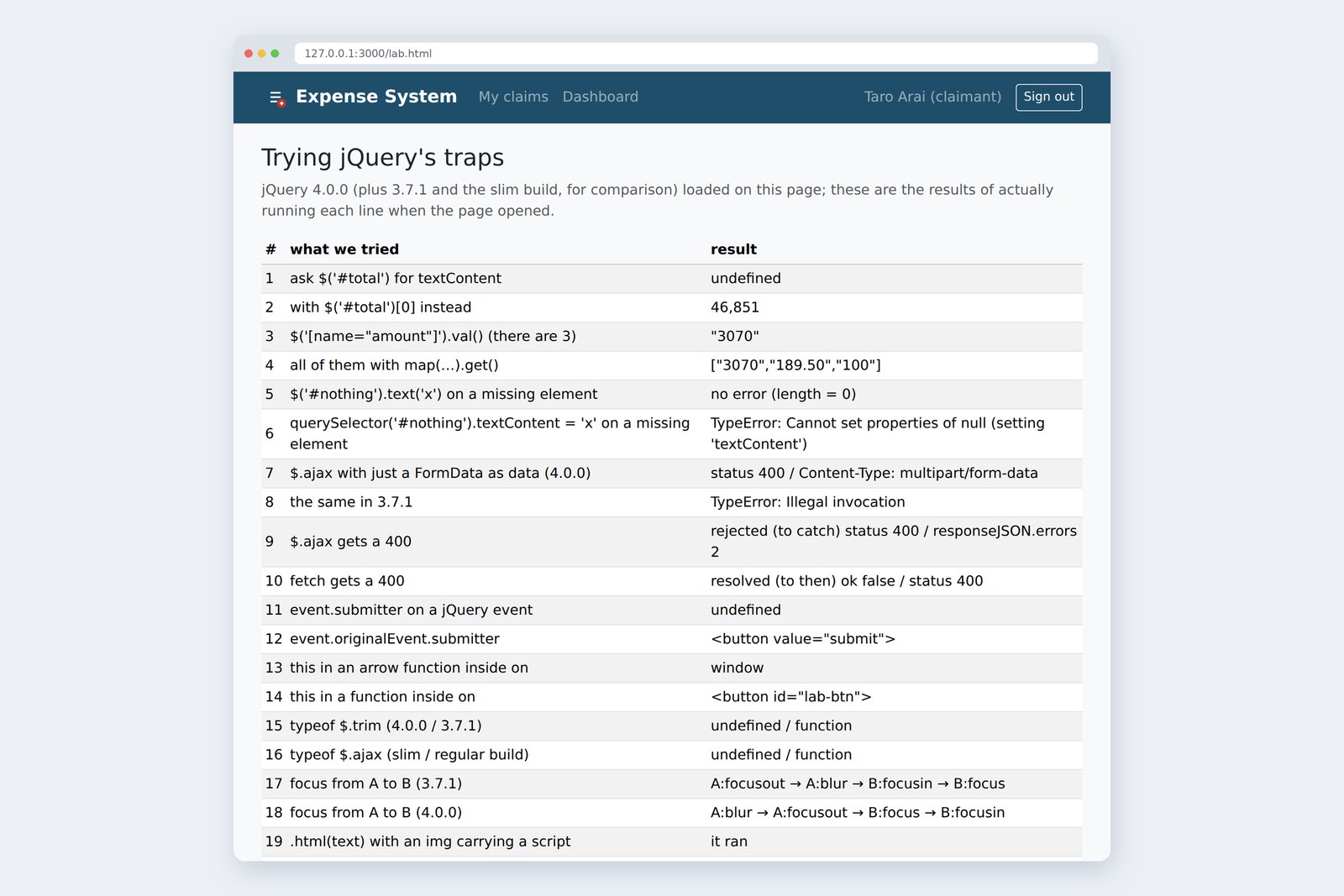
# Results of actually running each line on lab.html (Chromium, jQuery 4.0.0)
# what we tried result
15 typeof $.trim (4.0.0 / 3.7.1) undefined / function
16 typeof $.ajax (slim / regular build) undefined / function
17 focus from A to B (3.7.1) A:focusout → A:blur → B:focusin → B:focus
18 focus from A to B (4.0.0) A:blur → A:focusout → B:focus → B:focusin
- Functions the browser now has, such as $.trim, $.isArray and $.parseJSON, are gone. Use ' a '.trim(), Array.isArray() and JSON.parse()
- The slim build has no $.ajax (and no Deferred). For networking, use the regular build or fetch
- Focus events now fire in the browser's own (W3C) order. Code relying on the old order will behave differently
The order of events when focus moves from field A to B
4.0 also drops IE10 and earlier and old Edge, moves its source to ES modules, and handles FormData itself. When upgrading, the quickest route is the official upgrade guide plus jQuery Migrate, which warns about outdated code.
Living with jQuery today
Rewriting makes it clear that nearly every jQuery method has a plain JavaScript counterpart.
jQuery and plain JavaScript side by side
When jQuery appeared in 2006, every browser had its own way of doing DOM work, and there was no querySelector, classList or fetch. jQuery smoothed over those differences and was indispensable. Today the right-hand column is standard and works the same everywhere. You could say jQuery's ideas (find with selectors, handle things in bulk) were absorbed into the browser itself.
Even so, it still runs on a great many sites
- Building something new? — plain JavaScript is enough. This series' claim form was written entirely without jQuery
- Already running on jQuery? — no need to rewrite it for its own sake, but you need to be able to read it. To upgrade, go from the latest 3.x to 4.0 with the upgrade guide at hand
- Either way — understand what happens inside in plain DOM terms. Most jQuery traps come from “wrapper versus element” and “silently does nothing”
jQuery is a tool for writing plain JavaScript more briefly. Once you know what the tool is doing on your behalf, you can read jQuery code, and AI-written code, calmly. Rewrite, record, compare: what we did here is the basic routine for touching old code.
§ — On one page, and what is next
- $() returns a wrapper. Getters read the first; setters touch all. [0] gives the element. Nothing found, nothing said.
- jQuery's strengths: delegation with on, method chaining, one-line elements. Use function for this inside each.
- Put text in with .text(). .html() is innerHTML, and scripts run.
- $.ajax sends 400 and 401 to catch, the opposite of fetch. 4.0 takes FormData as is (3.x needs two more lines).
- Run both through the same steps and record, to check a rewrite behaves the same. Here: 8 scenes × 14 items × 3 languages, all matching.
- New code: plain JavaScript. Running jQuery: be able to read it.
AraiSomehow, old code doesn't scare me any more.
FuruiNext is the last part: finishing touches. Quality, safety, going live. And a quick look through the door at “frameworks” like React and Vue. Time to send what we built with old-school tools out into today's world.
AraiThe last part… can the wrap party go on expenses?
References
- jQuery blog — jQuery 4.0.0
- jQuery Core 4.0 Upgrade Guide
- jQuery API — .on()
- jQuery API — jQuery.ajax()
- jQuery API — .text()
- MDN — Using the Fetch API
- MDN — SubmitEvent: submitter property
- W3Techs — Usage statistics of jQuery
The page photos show the author's demo pages, served by a practice server (Node.js) and captured on 19 October 2026 in Chromium (Playwright) in the cloud, with the page clock fixed at 3:00 PM on 17 October 2026. Segoe UI isn't available there, so the screenshots fall back to other system fonts. The accounts and claims are made-up data on the practice server. The record of driving both versions through the same steps, the file sizes and the results on the test page (lab.html) are real values recorded by driving and running the same Chromium with Playwright. jQuery came from the jquery 4.0.0 and 3.7.1 packages on npm. jQuery usage figures are W3Techs' for 19 October 2026. Every page's HTML was checked with the Nu Html Checker (vnu) and showed no errors. The characters are fictional.
Old-School Front-End, part 14: jQuery / 2026.10