Old-School Front-End / 2026 ・ No.15
Old-School Front-End
Part 15 (the last): finishing touches — check with tools, shore up the defences, go live, and stand at the door to frameworks
Published
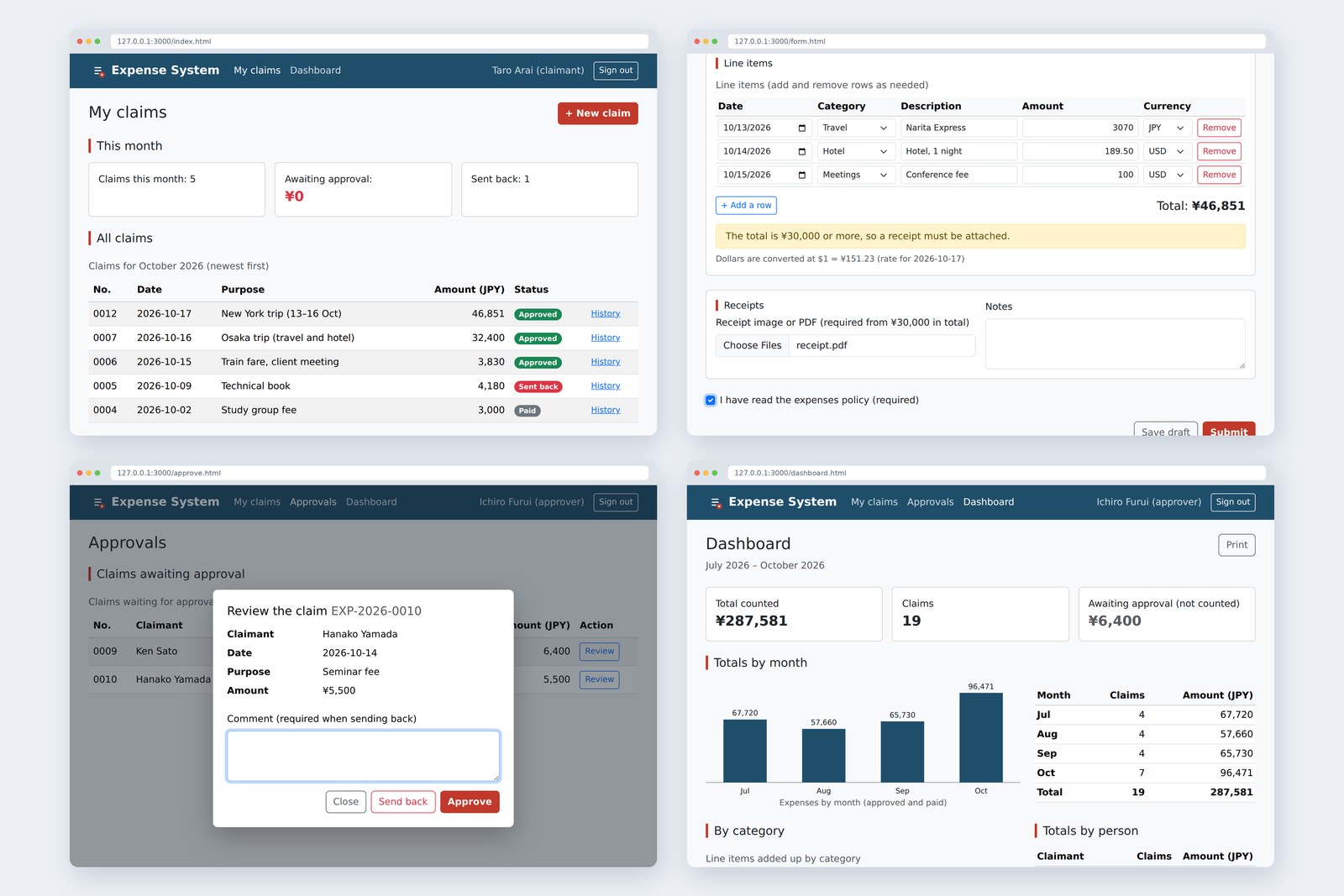
An “old-school” front-end course: no AI doing it for you, every line typed by hand. The last part is about finishing touches.
We check with tools the expense system built over 15 parts, and fix what turns up.
Then we add defences for the day a hole slips through, and sort out how to go live.
Finally, we write the same line items table in Vue and peek through the door to frameworks.
The last part's goal
AraiFurui, every screen is done! Claims, approvals, totals, even printing. It's finished, right?
FuruiIt works. Finished means ready for other people to use. Check it, shore it up, send it out.
AraiCheck it by looking at every screen?
FuruiEyes get tired and miss things. Let tools do what tools can. Even old-school craftsmen used a ruler.
You are here: part 15, the last
- Check — count HTML problems, accessibility issues and page weight with tools, and fix what turns up
- Shore up — don't run scripts you didn't write (CSP), don't let other sites frame you, notice when borrowed files are swapped (SRI)
- Know how to go live — where the page files go, where the API goes, and what to do first
- Stand at the door to frameworks — write part 8's line items table in Vue and see what gets easier and what it newly needs
Checking with tools
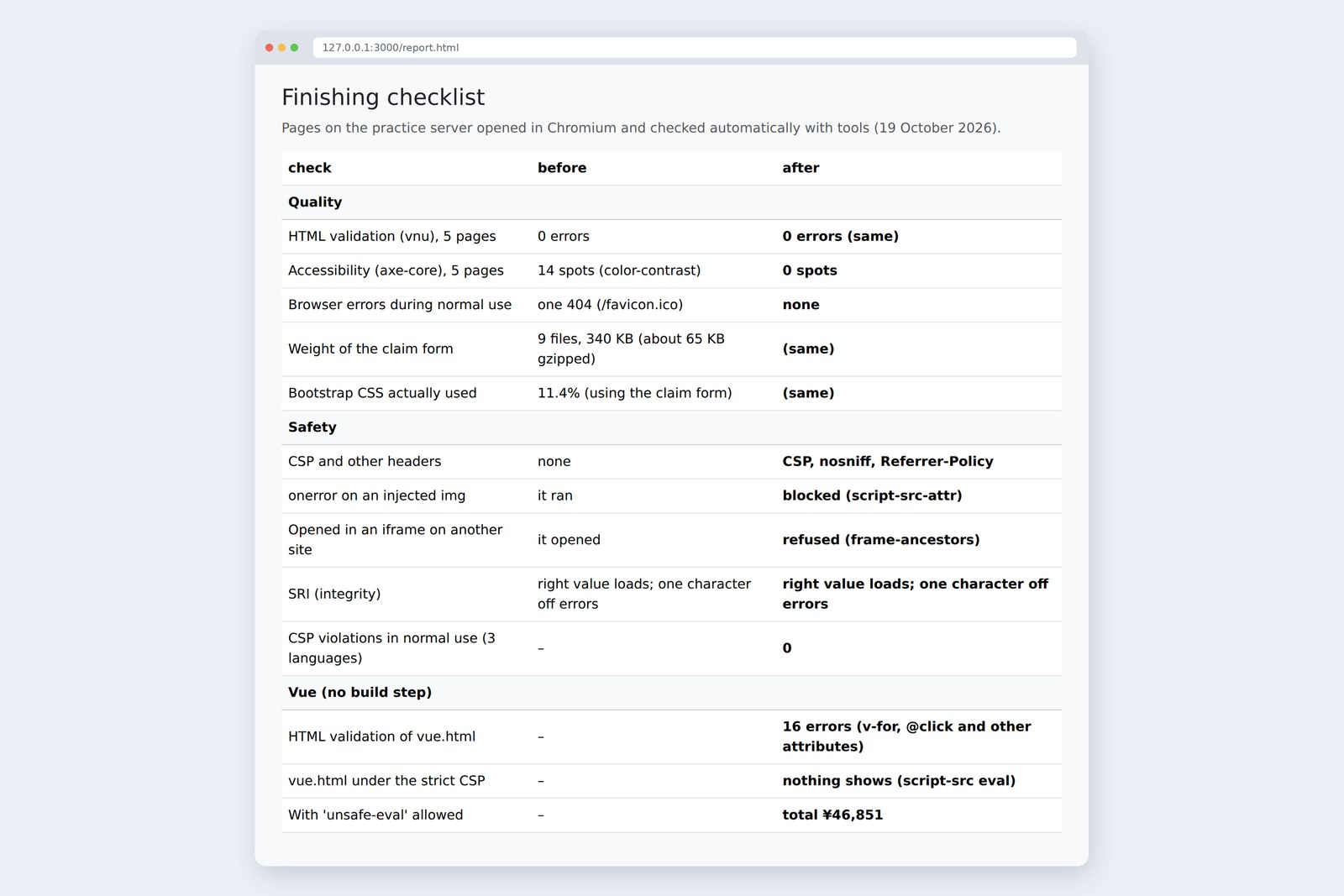
Every part of this series checked its HTML with the Nu Html Checker (vnu). To finish, we checked all five screens (sign-in, My claims, the claim form, Approvals, the dashboard) together, and checked accessibility with axe-core (4.14.0). The results are collected on a single checklist page.
# HTML validation (Nu Html Checker; the same in all three languages)
page errors
login.html 0
index.html 0
form.html 0
approve.html 0
dashboard.html 0
vue.html 16   ← Vue template attributes (v-for, :key, @click and so on)
No HTML errors on any of the five screens. The 16 in vue.html belong to the Vue page in section 8; we'll come back to them. axe-core, on the other hand, found something we'd missed.
# What axe-core flagged (color-contrast; “before” from axe-core’s record, “after” by the same formula)
part text background before after
header menu and name #9aafbc → #d2dce1 #1f4e6b 3.91:1 6.38:1
grey buttons (Back, Save draft, Print) #6c757d → #5c636a #f8f9fa 4.44:1 5.78:1

# Flags (5 pages in total)
before 14 → after 0 (all three languages)
The two fixes: readable to the eye, short in the numbers
Part 4 said text needs at least 4.5:1 contrast with its background, yet the header text was 3.91:1, because we'd kept the default colour of Bootstrap's dark navbar (55% white). The grey buttons were 4.44:1, just short. Both were fixed by rewriting two CSS variables each.
/* Part 15: at least 4.5:1 contrast between text and background (fixed after axe-core flagged it) */
.brand-bar {
  --bs-navbar-color: rgba(255, 255, 255, .8); /* header text (was 55% white) */
  --bs-navbar-hover-color: #fff;
}
.btn-outline-secondary {
  --bs-btn-color: #5c636a; /* grey buttons (were #6c757d) */
  --bs-btn-border-color: #5c636a;
}
After the fix, there were no flags on any of the five screens in all three languages. One more thing: the browser's record of normal use showed one 404. The browser went looking for /favicon.ico for the tab icon, and there wasn't one. Adding <link rel="icon" href="img/logo.svg"> to every page's <head> brought that to zero.
AraiAfter fourteen parts of looking at these screens, there was still stuff.
FuruiThe more familiar a thing is, the less we see it. Hence tools. But tools only find some of it. Whether it works with a keyboard alone, whether it makes sense read aloud: a person has to try that, as we did in parts 8 and 12.
Weighing the page
We counted the files the claim form loads, and used Chromium's coverage to measure how much was actually used while operating it (checking, adding and removing rows, the phone-width menu).
# Files loaded by the claim form (bytes) and how much was actually used while operating it (Chromium coverage, measured on the Japanese version)
file bytes gzip used
form.html   7,682  2,310
css/custom.css   2,922  1,336   30%
vendor/bootstrap/css/bootstrap.min.css 232,111 30,869   11%
vendor/bootstrap/js/bootstrap.bundle.min.js  80,496 23,743   22%
js/app.js   2,056  1,011   61%
js/auth.js   1,680    889   54%
js/validate.js   3,216  1,419   53%
js/form.js   9,579  3,562   70%
img/logo.svg     356    235
total (9 files) 340,098 65,374
- About 342 KB in all, 232 KB of it Bootstrap's CSS, of which about a tenth was used
- Over half of our own JavaScript (app.js, form.js and so on) was used; the rest runs only on errors or when dollars are chosen
- Sent gzipped, the whole thing is about 67 KB. Compression is usually done by the hosting service (section 7)
To drop unused CSS, build Bootstrap from Sass with only the parts you need, or use a tool that strips unused rules. Both are jobs for a build tool that transforms files. That's where the hand-written road and the tool-assembled road part (section 8). For an internal screen like expense claims, 342 KB is light enough, so we left it.
Defence 1: stop scripts you didn't write
Part 8 settled it: text people typed goes in with textContent, never innerHTML. Part 14 showed a script put in with jQuery's .html() really running. Holes are closed by how you write code. But what if one slips through? The second line of defence is CSP (Content Security Policy).
The page arrives with a promise about what may run on it
The server adds CSP as a response header. We added this function to the practice server.
// Part 15: protective headers, on pages and API replies alike (S.secure = 0 turns them off, for comparison)
function secureHeaders(res, p) {
  if (!S.secure) return;
  const evalOk = S.cspEval && p === '/vue.html'; // Only the build-free Vue page may turn strings into code (for comparison)
  res.setHeader('Content-Security-Policy', [
    "default-src 'self'",
    "script-src 'self'" + (evalOk ? " 'unsafe-eval'" : ''),
    "style-src 'self'",
    "img-src 'self' data:",
    "connect-src 'self'",
    "object-src 'none'",
    "base-uri 'self'",
    "form-action 'self'",
    "frame-ancestors 'none'",
  ].join('; '));
  res.setHeader('X-Content-Type-Options', 'nosniff');
  res.setHeader('Referrer-Policy', 'same-origin');
}
- script-src 'self' — scripts only from this site's files. Scripts written into the HTML, onclick="…", and eval turning strings into code don't run
- style-src 'self' — styles only from this site's CSS files. A style="…" in the HTML has no effect (JavaScript's el.style.width = … still works)
- img-src 'self' data: — Bootstrap's CSS draws checkbox ticks and such as data: images, so we allow those
- frame-ancestors 'none' and nosniff — see section 5
Because this series kept scripts and styles in files from the start, adding the header needed no rewrites. Running through sending a claim, approving and opening the dashboard in all three languages produced not a single violation. We tried injecting something with and without the headers.
# Checking the protection (measured in Chromium; left without the headers, right with)
what we tried no headers headers
onerror on an img injected with innerHTML it ran blocked (script-src-attr)
open in an iframe on another site (:3001) it opened refused (frame-ancestors)
SRI: the right integrity loaded loaded
SRI: integrity off by one character error (not loaded) error (not loaded)
violations in normal use (claim, approval, dashboard) – 0 (3 languages)
An <img onerror> injected with innerHTML ran without the headers and was blocked with them (the violation was script-src-attr, a script written in an attribute). Incidentally, axe-core, used for the checks, is also a script injected into the page, and CSP stopped it too; we turn CSP off in the browser settings only while running such tools. That's how well it works.
Defence 2: no framing, no swapping
No framing. A malicious site can lay the Approvals page in a transparent frame (iframe) and get you to press Approve while you think you're pressing “Claim your gift” (clickjacking). With frame-ancestors 'none', the page won't open inside anyone else's frame. As the table shows, framed from another site (port 3001), it opened without the headers and was refused with them.
No guessing. X-Content-Type-Options: nosniff stops the browser from sniffing a file declared as “not JavaScript” and running it as JavaScript anyway.
Notice a swap. This series kept Bootstrap and jQuery on its own site, but loading them from a CDN is common. What if the CDN's file were altered? SRI (Subresource Integrity) puts the file's fingerprint (a hash) in the HTML, and the browser won't run a file that doesn't match.
<script src="https://cdn.jsdelivr.net/npm/[email protected]/dist/jquery.min.js"
        integrity="sha384-fgGyf7Mo7DURSOMnOy7ed+dkq5Job205Gnzu6QIg0BOHKaqt4D76Dt8VlDCzcMHV"
        crossorigin="anonymous"></script>
This value was computed from the jQuery 4.0.0 distribution file on npm. With the right value it loaded; change one character and it errored and didn't run (see the table). Upgrade the file, and rewrite the fingerprint.
Defence 3: what the page can't protect
The defences so far ask the browser to keep a promise. But the page's JavaScript runs on the user's machine, so anyone can read it and anyone can change it. Here, as a table, is what this series kept saying: the server does the protecting.
What the page can do, and what only the server can
- Input checks: guidance on the page, the real thing on the server (part 9). Calling fetch directly walks right past the page's checks
- Sign-in and permissions (part 11) and the 409 for simultaneous presses (part 12) can only be decided on the server
- The server never stores passwords as they are (it hashes them). Secret keys for outside services never go in the page's JavaScript; writing one there is the same as handing it to everyone
AraiI asked the AI to “put in the API key and call it from the page”, and it just wrote it into the JavaScript.
FuruiIt did what you asked. Deciding where things belong is the asker's job.
Going live
The nice thing about hand-written pages: put the files up as they are, and they work. No conversion step. This very blog is published that way, its HTML, CSS and images placed on a static file hosting service (Cloudflare Pages).
Page files to static hosting, the API to a server
- https — mark the sign-in cookie (part 11) Secure so it only travels encrypted. The practice server is http, so it isn't set there
- Protective headers — on static hosting, a settings file replaces server code. Cloudflare Pages, for example, reads them from a file called _headers
- Caching — browsers and CDNs remember files by name. When the content changes, change the name too (form.js?v=2 or form.2.js) so the old one isn't used
- Close the back doors — the practice /__ctl and the demo accounts and passwords don't belong in production
The door to frameworks
Finally, part 8's “add and remove line items, show the total”, written in Vue 3 (3.5.44). Frameworks such as React and Vue are everyday tools in today's workplaces. What's different?
From “how to change the page” to “how data and page relate”
Here is part 8's total. It reads the rows itself, calculates, and rewrites the text on the page itself.
/** Read the line items from the page and show the total and notes (part 10: dollars are converted and added) */
function updateTotal() {
  const items = [];
  let unreadable = 0;
  let waiting = 0;
  for (const row of tbody.rows) {
    const text = row.querySelector('[name="amount"]').value;
    const usd = row.querySelector('[name="currency"]').value === 'USD';
    const amount = usd ? toCents(text) : toAmount(text);
    if (amount === null) continue;                          // Empty fields don't count
    if (Number.isNaN(amount)) { unreadable++; continue; }  // Can't be read as an amount
    if (!usd) items.push({ amount });
    else if (rate === null) waiting++;                     // no rate yet
    else items.push({ amount: centsToYen(amount, rate) }); // convert dollars to yen
  }
  const total = calcTotal(items);
  totalOutput.textContent = formatYen(total);
  receiptNote.hidden = !needsReceipt(total);

  const notes = [];
  if (unreadable > 0) notes.push(`${unreadable} row(s) have an amount that can't be read (not included in the total)`);
  if (waiting > 0) notes.push(`No exchange rate, so ${waiting} dollar row(s) are not in the total`);
  skipNote.textContent = notes.join(' / ');
  skipNote.hidden = notes.length === 0;
}
In Vue, the HTML side says “show each item of the rows data as a table row” and “the total goes here” (the template).
<div id="app" v-cloak>
    <div>
      <table>
        <thead><tr><th scope="col">Category</th><th scope="col">Description</th><th scope="col">Amount</th><th scope="col">Currency</th><th scope="col"><span>Remove</span></th></tr></thead>
        <tbody>
          <tr v-for="(row, i) in rows" :key="row.id">
            <td><select v-model="row.category" :aria-label="`Row ${i + 1} Category`">…</select></td>
            <td><input v-model="row.item" :aria-label="`Row ${i + 1} Description`"></td>
            <td><input v-model="row.amount" inputmode="numeric" autocomplete="off" :aria-label="`Row ${i + 1} Amount`"></td>
            <td><select v-model="row.currency" :aria-label="`Row ${i + 1} Currency`"><option value="JPY">JPY</option><option value="USD">USD</option></select></td>
            <td><button type="button" @click="remove(i)" :aria-label="`Remove row ${i + 1}`">Remove</button></td>
          </tr>
        </tbody>
      </table>
    </div>
    <div>
      <button type="button" id="add-row" @click="add" :disabled="rows.length >= MAX_ROWS">+ Add a row</button>
      <p>Total: <strong id="total">{{ formatYen(total) }}</strong></p>
    </div>
    <p v-if="needsReceipt(total)">The total is ¥30,000 or more, so a receipt must be attached.</p>
    <p id="rate-note">{{ rate === null ? 'Loading the exchange rate…' : `Dollars are converted at $1 = ¥${rate}` }}</p>
</div>
The JavaScript side is just data and calculation. No querySelector to find things, no textContent to rewrite them. Removing a row is removing an item from an array.
// Expense System: the line items table, Vue edition (part 15)
// Part 8's “add and remove rows, show the total” in Vue 3. Instead of rewriting the page, change the data and the page follows

const { createApp, ref, computed, onMounted } = Vue;
const MAX_ROWS = 10;

createApp({
  setup() {
    let nextId = 1;
    const newRow = () => ({ id: nextId++, category: '', item: '', amount: '', currency: 'JPY' });
    const rows = ref([newRow()]); // The line items. The page just mirrors this
    const rate = ref(null); // Yen to the dollar (from the server, as in part 10)

    const total = computed(() => { // Recalculated automatically whenever rows or rate change
      let sum = 0;
      for (const row of rows.value) {
        const usd = row.currency === 'USD';
        const amount = usd ? toCents(row.amount) : toAmount(row.amount); // The maths reuses the functions from parts 7 and 10
        if (amount === null || Number.isNaN(amount)) continue;
        if (!usd) sum += amount;
        else if (rate.value !== null) sum += centsToYen(amount, rate.value);
      }
      return sum;
    });

    const add = () => {
      if (rows.value.length < MAX_ROWS) rows.value.push(newRow());
    };
    const remove = (i) => {
      rows.value.splice(i, 1);
      if (rows.value.length === 0) add(); // Always keep at least one row
    };

    onMounted(async () => { // Once the page is up, go and get the rate
      const res = await fetch('/api/rates');
      if (res.ok) rate.value = (await res.json()).rate;
    });

    return { rows, rate, total, add, remove, formatYen, needsReceipt, MAX_ROWS }; // Hand the template (inside #app in vue.html) what it uses
  },
}).mount('#app');

requireLogin(); // Check the sign-in and show the name in the header (auth.js from part 11)
Here's how it ran.
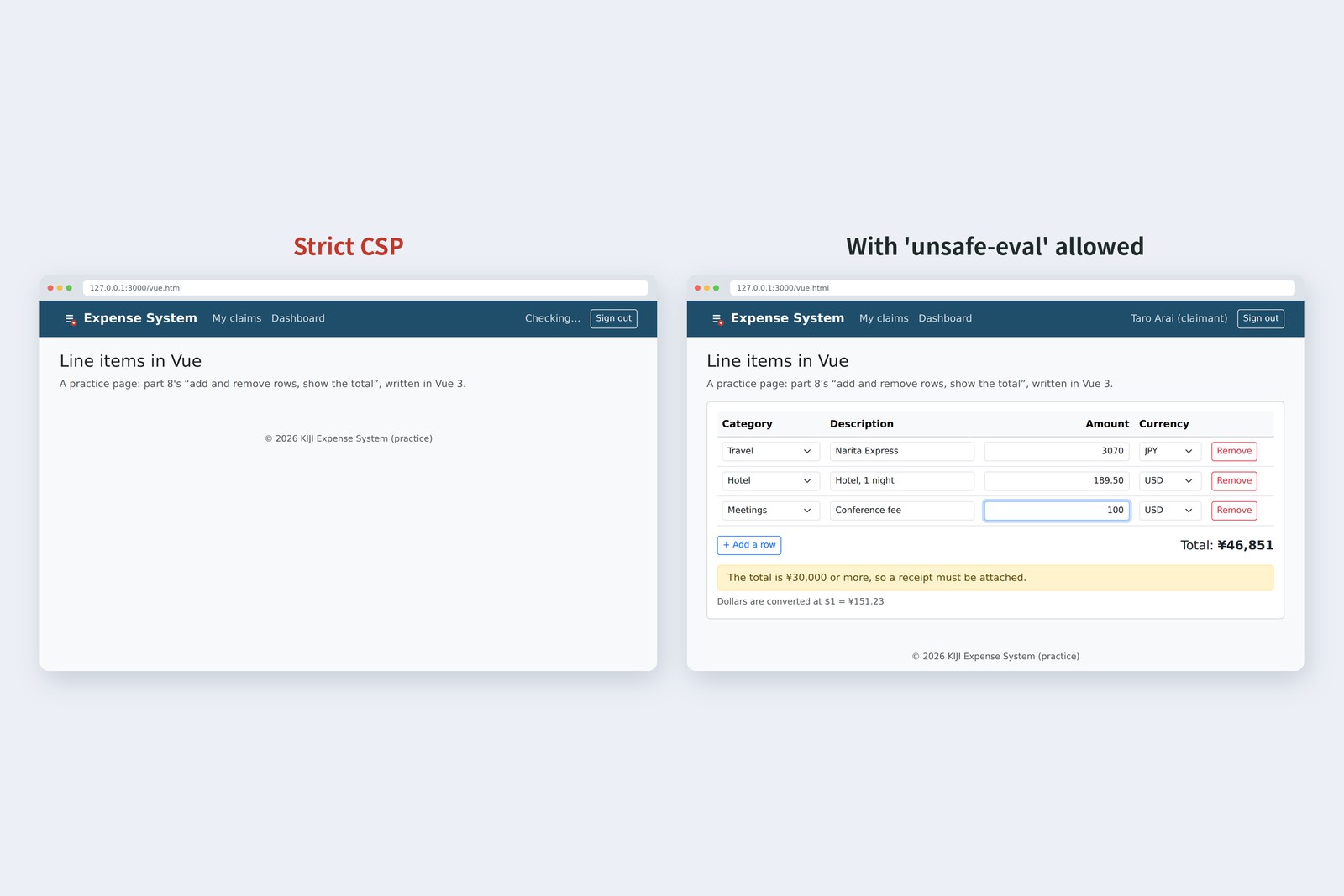
# Opening vue.html (measured in Chromium)
CSP page record
strict (script-src 'self') no table violation: script-src eval
add 'unsafe-eval' 3 rows, total ¥46,851 remove one: 2 rows, ¥18,193
Under the strict CSP, the whole table is missing. Vue without a build step turns the HTML template into code inside the browser, which means making code from a string (the same as eval), so section 4's CSP stopped it. The code after that point (showing the name in the header) didn't run either, leaving “Checking…”. With 'unsafe-eval' allowed, it behaved exactly like part 8, down to the ¥46,851 total. And because v-for and @click aren't part of HTML, vnu reports 16 errors (section 2).
In real projects, Vue templates live in dedicated .vue files and a build tool (Vite and the like) turns them into plain JavaScript before going live. Then no eval is needed and the CSP can stay strict. React likewise writes HTML-like JSX that a build step turns into JavaScript. So at the door to frameworks stands another gate: the build tool. This series stops at “put the files up and they work” because we wanted to see, by hand, what goes on inside before passing through that gate.
AraiVue feels great… change the data and the page follows.
FuruiDoesn't it. So what's inside “follows”?
Arai…Reading the rows, calculating, rewriting textContent. What we did in part 8, Vue does for us.
FuruiKnow that, and you won't get lost whatever tool you use.
Looking back on 15 parts
What we built and learned over 15 parts
We wrote meaning in HTML, styled it with CSS, added behaviour with JavaScript, talked to a server, built sign-in, approvals and totals, rewrote it in jQuery, and finally checked it and shored it up. Every part repeated the same loop: write, run it in the browser, record, check. Every number in the tables came from actually running things.
“Old-school” isn't clinging to old tools. It's being able to check what happens inside with your own hands. With that, you can read, fix and protect code calmly, whether an AI or a framework wrote it. The ability to write by hand is the foundation for making good use of AI.
§ — On one page, and what comes next
- Checks: count with tools. vnu for HTML, axe-core for accessibility. Here, two contrast shortfalls; fixed, 14 → 0.
- Weight: measure with coverage. Only about a tenth of Bootstrap's CSS is used; trimming it is a build tool's job.
- CSP stops scripts you didn't write. Keep scripts and styles in files and it's a matter of adding a header.
- frame-ancestors stops framing, nosniff stops guessing, SRI spots swaps.
- No secret keys or passwords in the page. The server does the protecting.
- Going live: page files to static hosting, the API to a server. Mind https, headers, caching and back doors.
- Frameworks describe how data and page relate. At their door stands the build tool.
AraiFurui, thank you for all fifteen parts. Next, I'm going to try Vite and Vue properly.
FuruiGood. Use AI too. But run what it gives you, record it, check it, like today.
AraiWill do. …By the way, can I claim the receipt for the wrap party?
FuruiOver ¥30,000, don't forget to attach the receipt. The page will remind you.
References
- The Nu Html Checker (v.Nu)
- axe-core (Deque Systems)
- W3C — Understanding SC 1.4.3: Contrast (Minimum)
- MDN — Content Security Policy (CSP)
- MDN — CSP: script-src
- MDN — CSP: script-src-attr
- MDN — CSP: frame-ancestors
- MDN — X-Content-Type-Options
- MDN — Subresource Integrity
- Cloudflare Pages — Headers
- Vue.js — Quick Start
The page photos show the author's demo pages, served by a practice server (Node.js) and captured on 19 October 2026 in Chromium (Playwright) in the cloud, with the page clock fixed at 3:00 PM on 17 October 2026. Segoe UI isn't available there, so the screenshots fall back to other system fonts. The accounts and claims are made-up data on the practice server. HTML validation (Nu Html Checker), accessibility (axe-core 4.14.0), page weight and usage (Chromium coverage), the effect of CSP, frame-ancestors and SRI, and the behaviour of the Vue (3.5.44) page are real values recorded by driving and running the same Chromium with Playwright. CSP was turned off in the browser settings only while injecting axe-core for the checks. The characters are fictional. Thank you for reading all fifteen parts.
Old-School Front-End, part 15 (the last): finishing touches / 2026.10