Old-School Networking / 2026 ・ No.05
Old-School Networking
Part 5: Routers — routing tables, TTL, traceroute, and what your “home router” really is
Published
In part 4 we got as far as: if the destination is on another network, hand it to the router. This time: what does that router do with it?
We build a practice network with four routers, read routing tables, trace the path with traceroute, and send a packet round in circles on purpose.
The second half is about the box at home called a “router” (it's mostly NAT), and how the world's networks tell each other the way (BGP).
The direction-giving layer
AraiA router's the white box at home with the antennas, right? The one with the blinking lights.
FuruiThat's a router too, but that box has about seven jobs crammed into it. Only one of them is actually routing.
AraiWait, what are the other six doing?
FuruiSecond half. First, the real job: giving directions. I've lined up four routers.
The 12-part route map (you are here: part 5)
- What a router does — receive, look up, decrement the TTL, pass it on
- Routing tables and traceroute — the longest match, the TTL, and mapping a path (measured)
- ICMP — notices like “time exceeded” and “no route to that network”
- The home router — NAT rewrites addresses. What happens without it, and from outside (measured)
- The internet — ASes, BGP, and about 1.07 million routes
This part's practice network is a single road: from the home (Arai's PC and the home router r1), through the provider's r2, a transit network's r3 and the data centre's r4, to the server that receives the submission. Addresses have changed from part 4's 10.0.x.x to a more home-like 192.168.1.10.
The practice road: four routers, five networks
What a router does
A router is a machine standing on two or more networks. Take r2 in the figure: on the left network (198.51.100.0/30) it is 198.51.100.1, and on the right (198.51.100.4/30) it is 198.51.100.5. Two addresses. Every time a packet arrives, a router does the same things.
- Receive a frame addressed to its own MAC and open the layer-2 envelope (part 3).
- Look at only the destination address in the IP header. Not the source.
- Look up the routing table to choose the next hop and which interface to leave by.
- Decrement the TTL in the header. If it hits 0, drop the packet and tell the sender.
- Find the next hop's MAC with ARP, put the packet in a new envelope and send it.
The envelope (MAC) is replaced on every leg; the destination inside (IP) stays the same to the end. That's why part 3 said “MAC gets you next door, IP gets you all the way”: routers are doing this.
A router doesn't care where a packet came from. It reads the destination and passes it on. That will matter when we get to the home router.
Routing tables
AraiIs a routing table like a phone book, with every address in the world in it?
FuruiThe home router's has three lines. Have a look.
# Home router r1: anything unknown goes to the provider (198.51.100.1)
r1$ ip route
    default via 198.51.100.1 dev wan0
    192.168.1.0/24 dev lan0
    198.51.100.0/30 dev wan0
# Provider's r2: no default, only the three it knows
r2$ ip route
    198.51.100.0/30 dev e0
    198.51.100.4/30 dev e1
    203.0.113.0/24 via 198.51.100.6 dev e1
# Data-centre r4: everything not on its LAN goes to r3
r4$ ip route
    default via 198.51.100.9 dev e0
    198.51.100.8/30 dev e0
    203.0.113.0/24 dev e1
Each line is one direction. There are only three ways to read them.
| Form | Meaning | Example |
|---|---|---|
| … dev iface | A network we're directly on. Find the target with ARP and deliver directly | 192.168.1.0/24 dev lan0 |
| … via address | For this network, hand it to the router at this address | 203.0.113.0/24 via 198.51.100.6 |
| default via address | If no line matches, send it here (0.0.0.0/0) | default via 198.51.100.1 |
The home router r1 knows only the home network (192.168.1.0/24) and the little network between it and the provider. Everything else is default: “if in doubt, ask the provider”. It's the same idea as the PC's “default gateway” in part 4, and for most machines it's all they need.
The provider's r2 has no default. A provider's core routers hold a separate route to every network in the world, and there's nobody to hand “I don't know” to (section 8). Our practice r2 knows three lines.
The longest match wins
What if a destination matches more than one line? Let's add a rough line, 203.0.0.0/8, to r2.
Which line sends 203.0.113.20?
# Add a rough route, 203.0.0.0/8, to r2
r2$ ip route add 203.0.0.0/8 via 198.51.100.6
# 203.0.113.20 matches both /8 and /24 → the longer /24 wins (same next hop here)
r2$ ip route get 203.0.113.20
    203.0.113.20 via 198.51.100.6 dev e1 src 198.51.100.5 uid 0
r2$ ip route get 203.0.9.9
    203.0.9.9 via 198.51.100.6 dev e1 src 198.51.100.5 uid 0
# 8.8.8.8 matches nothing and there's no default → can't send
r2$ ip route get 8.8.8.8
    RTNETLINK answers: Network is unreachable
203.0.113.20 matches whether you look at the first 8 bits or the first 24. In that case a router picks the longest matching line (longest prefix match): the longer the match, the more specific the directions. A default is a line of length 0: it matches everything, but it's the weakest. 8.8.8.8 matches nothing, so it couldn't be sent: Network is unreachable.
In this practice network the author wrote the routing tables by hand (static routes). Company and provider routers swap routes with their neighbours and build their tables automatically (routing protocols: BGP between networks, from section 8, and things like OSPF inside them).
traceroute and TTL
The IP header has an 8-bit number called the TTL (Time To Live). It starts at something like 64, goes down by one at every router, and the packet is dropped when it reaches 0. When the server received our ping, the TTL was 60: it started at 64 and lost four at four routers.
traceroute turns that lifetime into a way of mapping the path.
Send with the TTL one higher each time
# The path from Arai's PC to the server in the data centre
$ traceroute -n -q 1 203.0.113.20
    traceroute to 203.0.113.20 (203.0.113.20), 30 hops max, 60 byte packets
     1  192.168.1.1  0.070 ms
     2  198.51.100.1  0.046 ms
     3  198.51.100.6  0.042 ms
     4  198.51.100.10  0.038 ms
     5  203.0.113.20  0.040 ms
# four routers, and the server at hop 5
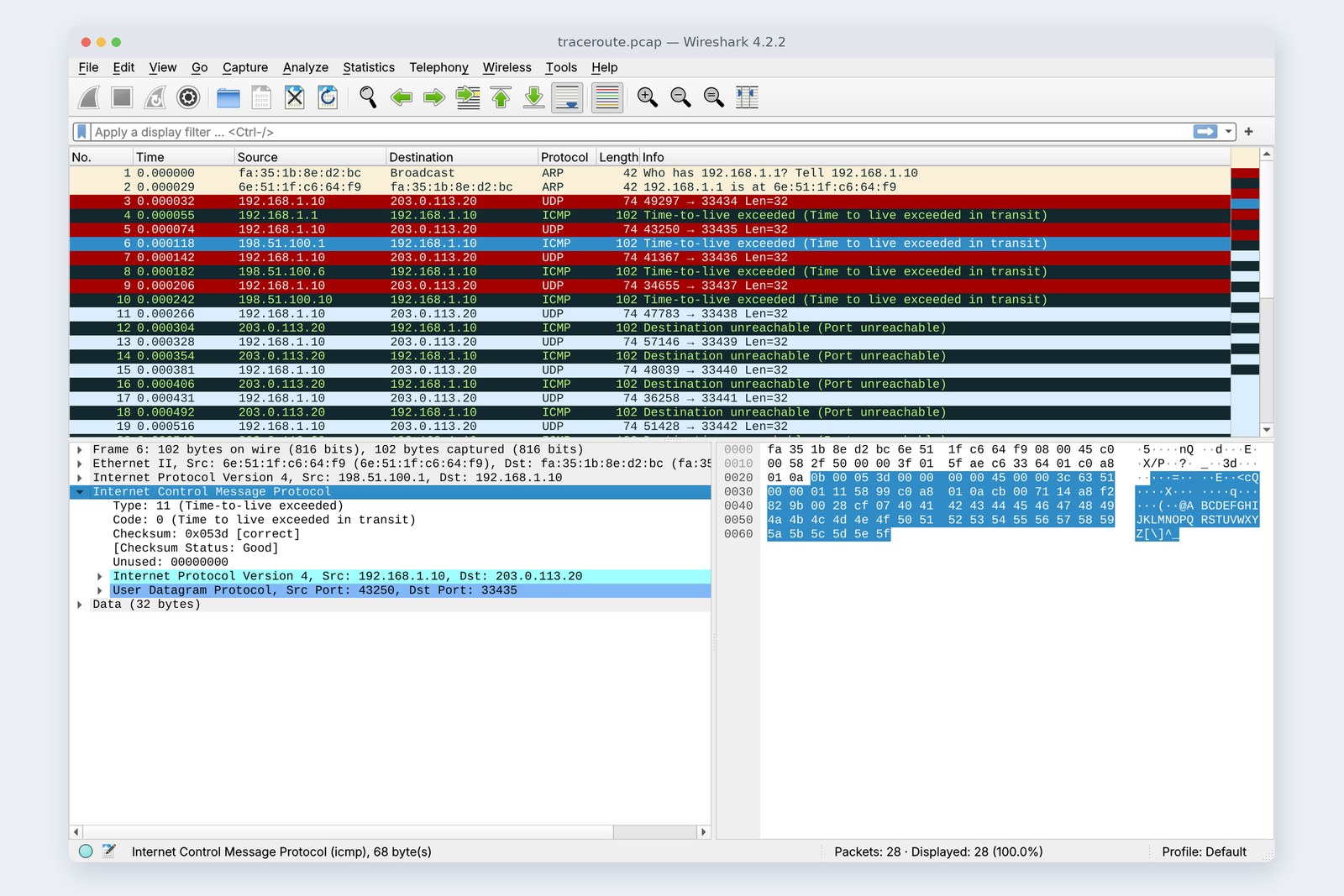
A packet with TTL 1 expires at the first router, which sends back a “time exceeded” message. Its sender is the first router's address. TTL 2 finds the second, and so on, until the packet reaches the far end. Linux traceroute sends to UDP ports that are probably unused (from 33434), so the target replies “port unreachable”, and that's how traceroute knows it has arrived.
The cover photo is that recording. The time-exceeded notice carries the headers of the packet that expired, so the sender can match each notice to the packet it sent.
What you see is the address of the router's interface facing you: r2 shows as 198.51.100.1, not 198.51.100.5. Routers set not to send notices show up as * * *, which doesn't necessarily mean the road ends there. Windows tracert uses ping (ICMP) instead of UDP.
When the road loops
AraiWhat's the lifetime for, anyway? If the directions are right, you wouldn't need it.
FuruiDirections are sometimes wrong. Let's make them wrong.
r2 hands 203.0.113.0/24 to r3. We point r3's line for it back at r2, on purpose. Now a packet bounces between r2 and r3.
# Deliberately point r3's 203.0.113.0/24 at r2 (r2 still points at r3), making a loop
r3$ ip route replace 203.0.113.0/24 via 198.51.100.5
pc$ ping -c 1 203.0.113.20
    From 198.51.100.1 icmp_seq=1 Time to live exceeded
# Counting on the r2–r3 link: one ping went across 31 times each way
    r2 e1  tx 31  rx 31  (tcpdump 62)
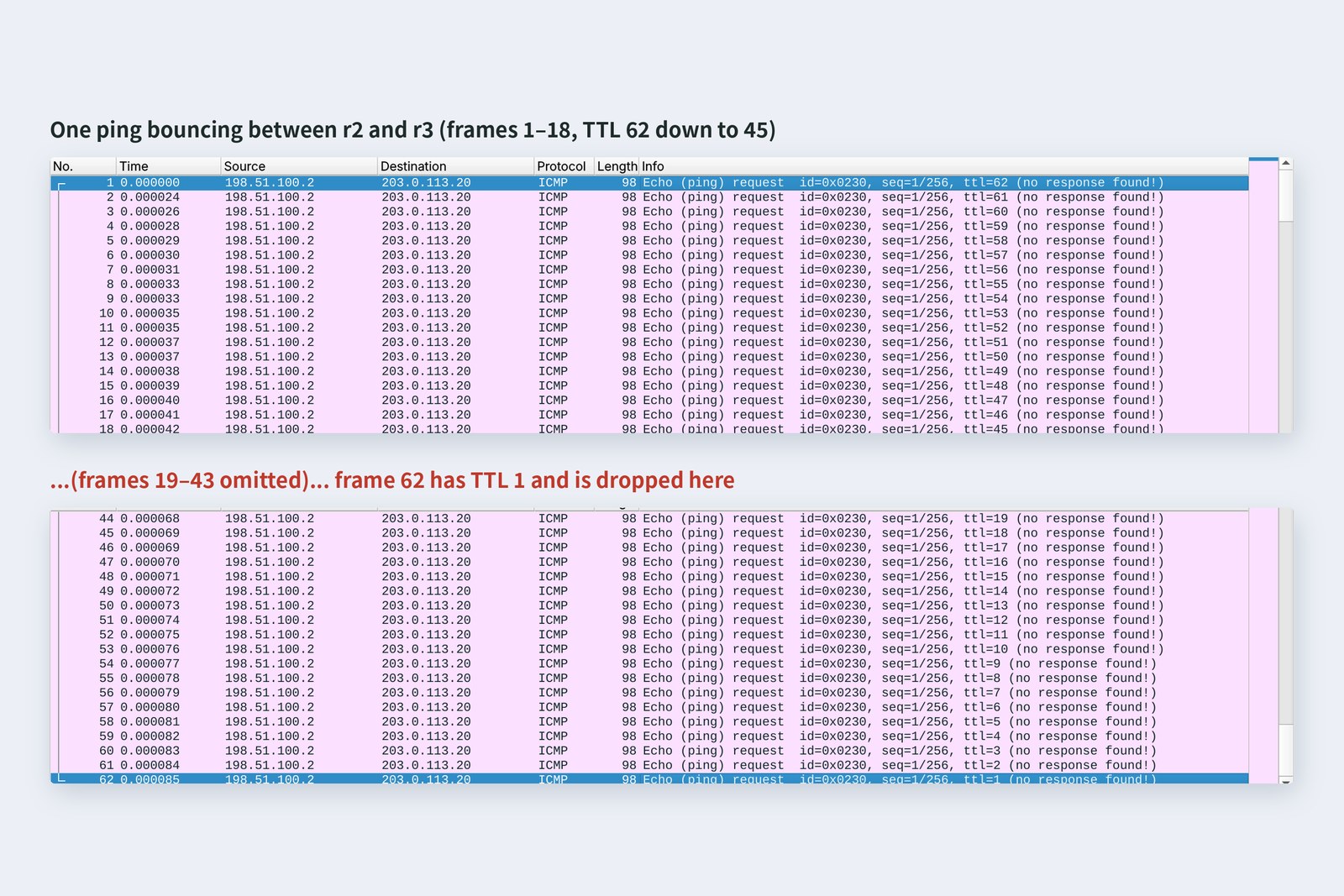
The PC's ping lost one TTL at r1 and one at r2, entering the r2–r3 link at 62. From there each round trip took two more, and at packet 62 the TTL was 1; it was dropped and r2 sent back “time exceeded”. All in 0.085 milliseconds. Without a TTL, that packet would circle on the wire forever, and every new packet caught in the loop would fill it further.
It's like the switch loop (broadcast storm) in part 3. But layer-2 frames have no lifetime, so there we used STP to break the loop itself. Layer 3 has the TTL, so even when a loop forms, packets eventually die.
ICMP notices
“Time exceeded” and “port unreachable” are ICMP (Internet Control Message Protocol) messages: notices that serve IP. ping is one of them too, a pair of “please reply” (Echo request) and “here I am” (Echo reply). Here are the notices we collected when things went wrong on the practice network.
# To a destination with no route: the provider's r2 replies “no route to that network”
pc$ ping -c 1 8.8.8.8
    From 198.51.100.1 icmp_seq=1 Destination Net Unreachable
# From outside (the server) to 192.168.1.10 inside the home: stopped at r3 on the way
srv$ ping -c 1 192.168.1.10
    From 198.51.100.9 icmp_seq=1 Destination Net Unreachable
# From outside to the home router's address 198.51.100.2: nothing is listening
srv$ curl http://198.51.100.2:3000/
    Failed to connect to 198.51.100.2 port 3000 after 0 ms: Couldn't connect to server
| Type | Meaning | When |
|---|---|---|
| Echo request / reply | please reply / here I am | ping |
| Time exceeded | the lifetime ran out | traceroute, routing loops |
| Net unreachable | no route to that network | no matching line in the table |
| Port unreachable | nobody on that port | nothing listening on a UDP port (part 7) |
| Fragmentation needed | too big to pass | a smaller MTU on the way (part 2) |
Company and cloud firewalls often block ICMP. ping failing while the web works is nothing unusual. Don't conclude “it's not connected” from ping alone (part 12).
What the home router really is
What's inside the box called a “home router”
The box at home is a real router with a switch (part 3), a Wi-Fi access point (part 2), DHCP (part 4), a DNS relay (part 9) and more packed in. What lets the machines inside reach the outside, though, is NAT (Network Address Translation).
Rewriting the source address on the way out
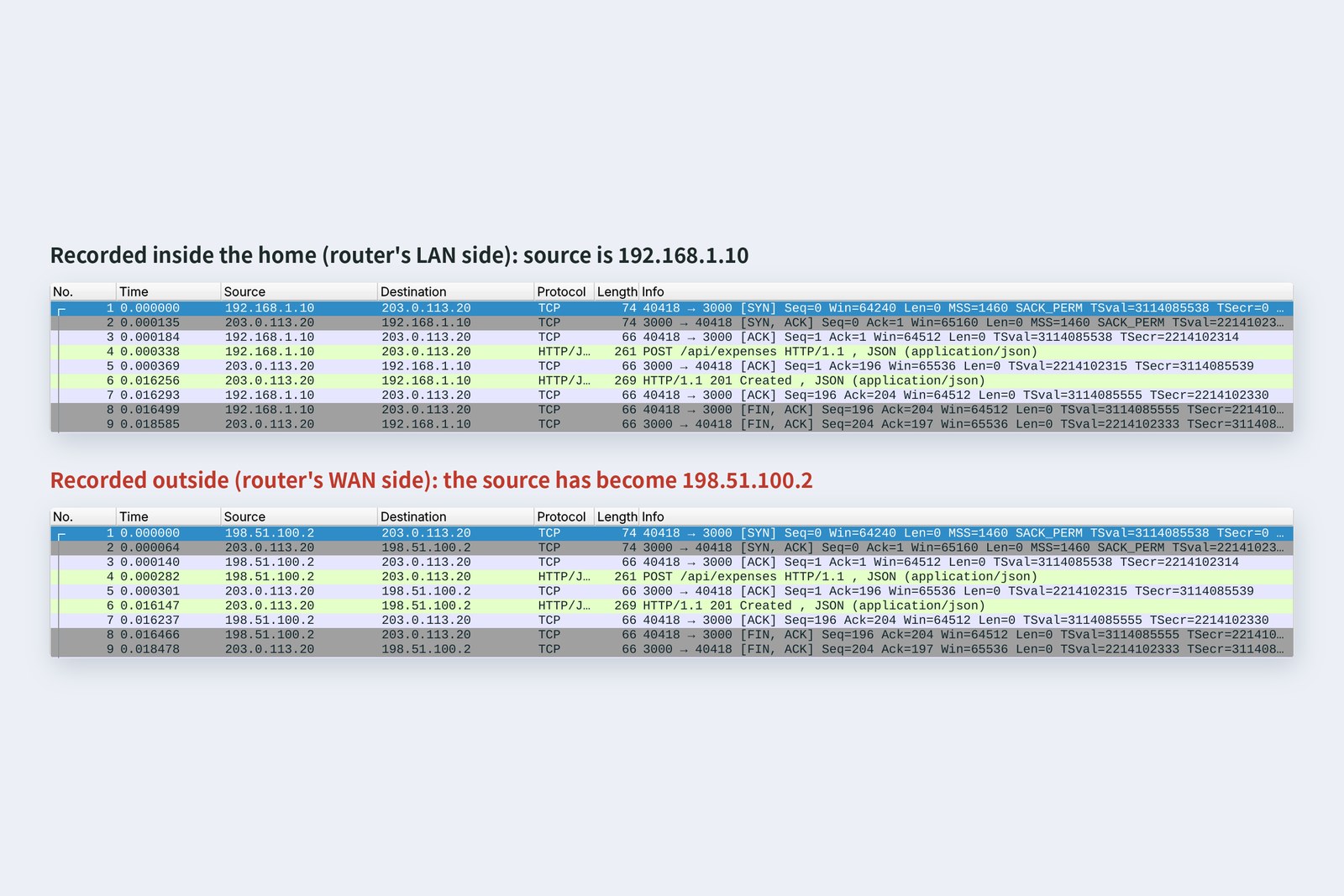
The PC's address, 192.168.1.10, is a private address (part 4). Homes all over the world use the same 192.168.1.10, so routers outside have no route to it. So the home router rewrites the source of outgoing packets to its own outside address, 198.51.100.2, and remembers the mapping in a table. The reply arrives at 198.51.100.2, and the table turns it back into 192.168.1.10. The submission got through and came back 201.
# The “translation table” the home router remembers (conntrack)
r1$ conntrack -L -p tcp
    tcp      6 119 TIME_WAIT src=192.168.1.10 dst=203.0.113.20 sport=40418 dport=3000
      src=203.0.113.20 dst=198.51.100.2 sport=3000 dport=40418 [ASSURED]
# out: 192.168.1.10 → 203.0.113.20 / back: 203.0.113.20 → 198.51.100.2 (turned back into 192.168.1.10)
The table holds not just addresses but numbers (ports) such as 40418 and 3000. Even with several machines at home talking to the outside at once, the numbers tell them apart so replies go back to the right one. (Here the port was kept; if two clash, the router changes the port as well.) What those numbers really are is next time's topic: TCP.
Without NAT
# Remove NAT from the home router and ping again
pc$ ping -c 3 203.0.113.20
    3 packets transmitted, 0 received, 100% packet loss
# Server-side capture: the request arrived and was answered, but r3 (198.51.100.9) stopped the reply: “no route to that destination”
    192.168.1.10   -> 203.0.113.20   Echo (ping) request seq=1/256, ttl=60
    203.0.113.20   -> 192.168.1.10   Echo (ping) reply seq=1/256, ttl=64
    198.51.100.9   -> 203.0.113.20   Destination unreachable (Network unreachable)
Without NAT, every ping failed. Surprisingly, the server-side capture shows the request (ping) did arrive, and the server replied. Routers only look at the destination, so the outbound packet was delivered even with a 192.168 source. But the reply was addressed to 192.168.1.10, and r3 had no route there, so it dropped it with “no route to that network”. Out it goes, and the reply gets lost: that's a home without NAT.
No way in from outside
The second and third entries in the previous section's ICMP recording were attempts from outside (the server) to get into the home. To 192.168.1.10: r3 has no route. To the home router's address, 198.51.100.2: it reaches only the router itself, which has no table entry saying which machine inside should get it. Nobody outside can start a conversation with a NATed home. That's handy for security, and most home routers add a firewall that blocks incoming connections too.
To show a development server at home to the outside world, you either set up port forwarding, which points a fixed port at a machine inside, or use a tunnel service that keeps a connection open from inside and lends you an entrance outside (part 11). If your provider adds another layer of NAT (CGNAT, part 4's 100.64.0.0/10), even port forwarding won't work.
How the internet hangs together
Arair2 only knows three lines because it's practice, right? How many does a real provider know?
FuruiAt the end of July 2026: 1,065,956.
Arai...So it is a phone book.
The internet is a collection of networks (providers, clouds, universities, large companies) each run under its own policy. Each one is an AS (Autonomous System) with a number of its own. ASes tell each other “this block of addresses is beyond us” using BGP (Border Gateway Protocol).
ASes telling each other the way (numbers reserved for documentation)
When the data centre announces “203.0.113.0/24 is here”, the transit network adds its own AS number in front and passes it to the provider. From the routes it receives, the provider picks one by policy (cost, contracts) and by how many ASes it passes through, and puts it in its table. An AS that finds its own number in the list rejects the route, which keeps loops between ASes rare.
| Figure (as of 31 July 2026) | Value |
|---|---|
| Lines in the global BGP table (IPv4) | 1,065,956 |
| ASes present in the table | 78,975 |
| Lines in our practice r2 | 3 |
ASes connect by running cables directly to each other, or at an IX (Internet Exchange), a place where many ASes gather and plug into each other. BGP trusts what neighbours announce, so one wrong announcement can travel far. When Facebook went dark for several hours in October 2021, a maintenance command cut its own backbone; its DNS servers noticed and withdrew their routes over BGP, and the whole world lost the ability to look up Facebook's names.
Checking your own PC
| To see | Mac | Windows | Linux |
|---|---|---|---|
| The path | traceroute host | tracert host | traceroute host |
| Your routing table | netstat -rn | route print | ip route |
| Which line a destination uses | route get host | Find-NetRoute -RemoteIPAddress host | ip route get host |
| Reachability | ping host | ping host | ping host |
Run traceroute from home and hop 1 should be your home router (an address starting 192.168), with your provider's routers from around hop 2. A few * * * lines along the way are fine as long as it gets to the end. Your PC's routing table will have a default line and one for the home network, plus extra lines if you run a VPN or Docker (part 11).
§ — On one page, and next time
- A router reads only the destination address, picks the next hop from its table, and sends the packet on in a new envelope (MAC).
- Routing table lines come in three kinds: directly connected, via an address, and default. If several match, the longest match wins.
- The TTL drops by one per router. traceroute raises it one at a time and collects who sent “time exceeded”.
- With a routing loop, one ping crossed between r2 and r3 62 times before its TTL ran out.
- ICMP carries IP's notices. Firewalls often block it, so the web may work even when ping doesn't.
- A home router is mostly NAT: rewrite the source, map it back from a table. Without it, requests arrive but replies get lost. Nothing gets in from outside.
- The internet is about 79,000 ASes telling each other about 1.07 million routes over BGP.
AraiSo what are those numbers in the NAT table, 40418 and 3000?
FuruiIf an address is a building, the number is a room. And packets get lost on the way or arrive out of order. How do you put that right? Next time: TCP.
References
- RFC 1812 — Requirements for IP Version 4 Routers
- RFC 792 — Internet Control Message Protocol
- traceroute(8) — Linux manual page
- RFC 3022 — Traditional IP Network Address Translator (Traditional NAT)
- RFC 4271 — A Border Gateway Protocol 4 (BGP-4)
- RFC 5737 — IPv4 Address Blocks Reserved for Documentation
- RFC 5398 — Autonomous System (AS) Number Reservation for Documentation Use
- Weekly Global IPv4 Routing Table Report (AFNOG, 2026-07-31)
- Geoff Huston — BGP in 2025 (ISP Column, January 2026)
- Engineering at Meta — More details about the October 4 outage (2021)
- Microsoft Learn — Find-NetRoute
The recordings were made on 25 October 2026 on a practice network the author built with network namespaces on Linux (Ubuntu 24.04) in the cloud. The routers are Linux forwarding, the routes are hand-written static routes, NAT is iptables MASQUERADE, the table was read with conntrack 1.4.8, and traceroute is version 2.1.5. Every number in the text is a real value read from those recordings and the commands' output. All addresses and AS numbers come from ranges reserved for documentation. The global routing-table figures are from the Weekly Global IPv4 Routing Table Report posted to the AFNOG mailing list (31 July 2026). The characters are fictional.
Old-School Networking, part 5 — Routers / 2026.10