Old-School Networking / 2026 ・ No.08
Old-School Networking
Part 8: Layers 5 and 6, and TLS — putting a lock on the submission
Published
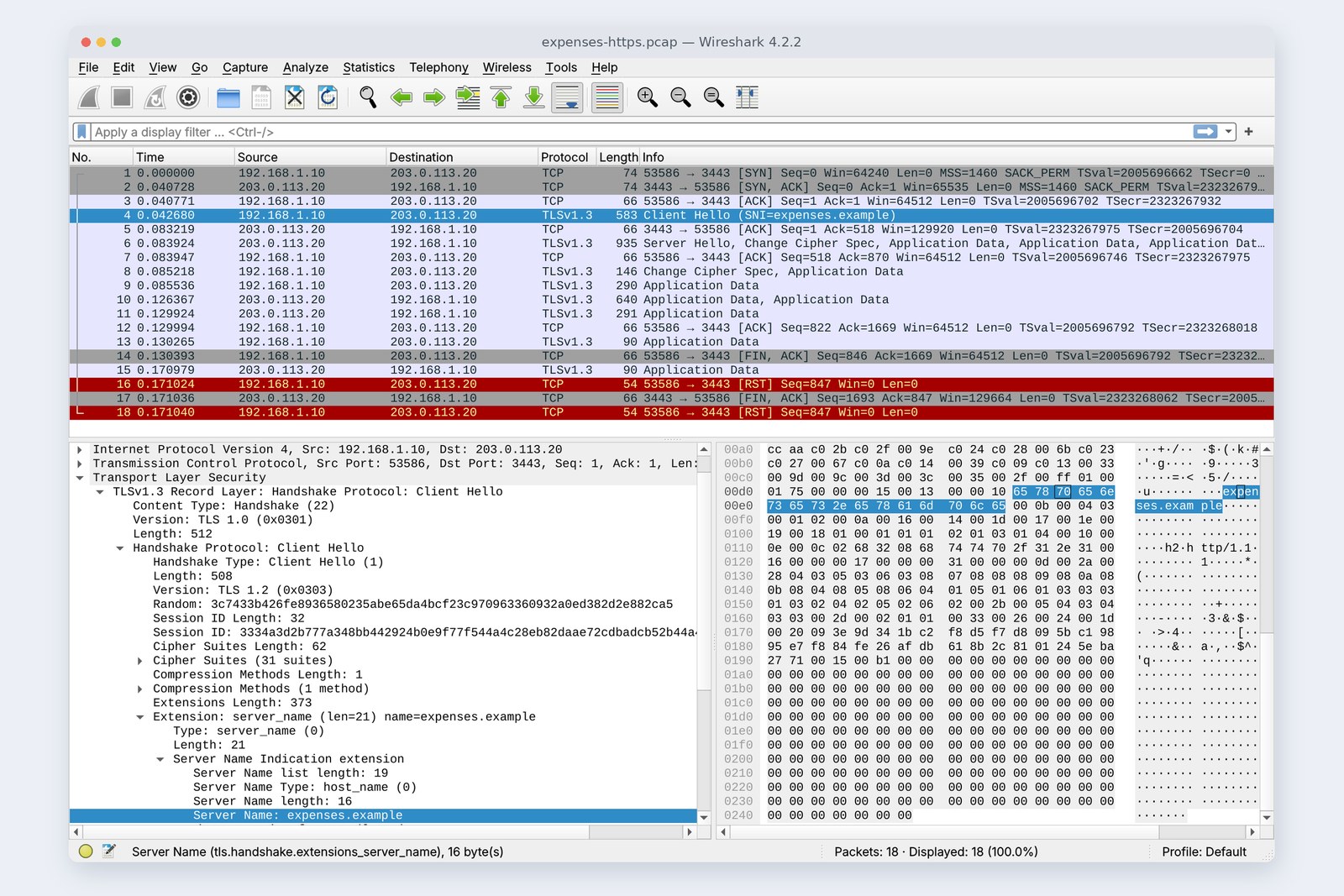
So far every submission has travelled in a form anyone along the way could read. This part is about TLS, which sits between TCP and the application and locks the submission up. It's the S in HTTPS.
We make a practice CA (the role that issues certificates), give the server a certificate, and switch to HTTPS: what disappears from view, what's still visible, and how much slower is it? We also cause the four verification failures you're most likely to meet, on purpose.
Presentation and session
AraiStop 8 on the route map says “layers 5 and 6”. Why do they share a part?
FuruiOn the real internet, layers 5 and 6 barely exist on their own. They're folded into TLS and applications. So we deal with them together.
The 12-part route map (you are here: part 8)
- Layers 5 and 6 — presentation (character encoding, JSON, compression, encryption) and session
- Switching to HTTPS — what disappears and how much slower it is (measured)
- Keys and certificates — sharing a key, certificate chains, four ways verification fails (measured)
- Still visible — the name (SNI) and ECH, which hides it; certificate lifetimes getting shorter
Layers 5 and 6 sit between the application and TCP
Layer 6 is presentation. The same word is unreadable unless both sides lay it out by the same rules. Today's rules: UTF-8 for text, JSON for data, gzip for compression.
# 交通費 (“travel”) is 9 bytes in UTF-8 (also visible in the bytes pane of part 7's cover)
    交通費 → e4 ba a4 e9 80 9a e8 b2 bb
# gzip on the 2 MB CSV (the same line repeated, so it shrinks absurdly)
    2,097,152 bytes → 6,179 bytes
Layer 5 is session: starting and ending a conversation and resuming it after a break. In practice it's spread across TCP connections, HTTP cookies, TLS session resumption and so on. Encryption is a form of presentation too, so TLS does work that spans both layers.
A submission in plain view
At the end of part 7 we noticed the submission's JSON was readable in Wireshark. Let's search the capture files for the submission's text.
# Searching the capture files for the submission's text
    HTTP   '"amount":1280'       found
    HTTP   'POST /api/expenses'  found
    HTTPS  '"amount":1280'       not found
    HTTPS  'POST /api/expenses'  not found
    HTTPS  'expenses.example'    found  ← Client Hello SNI
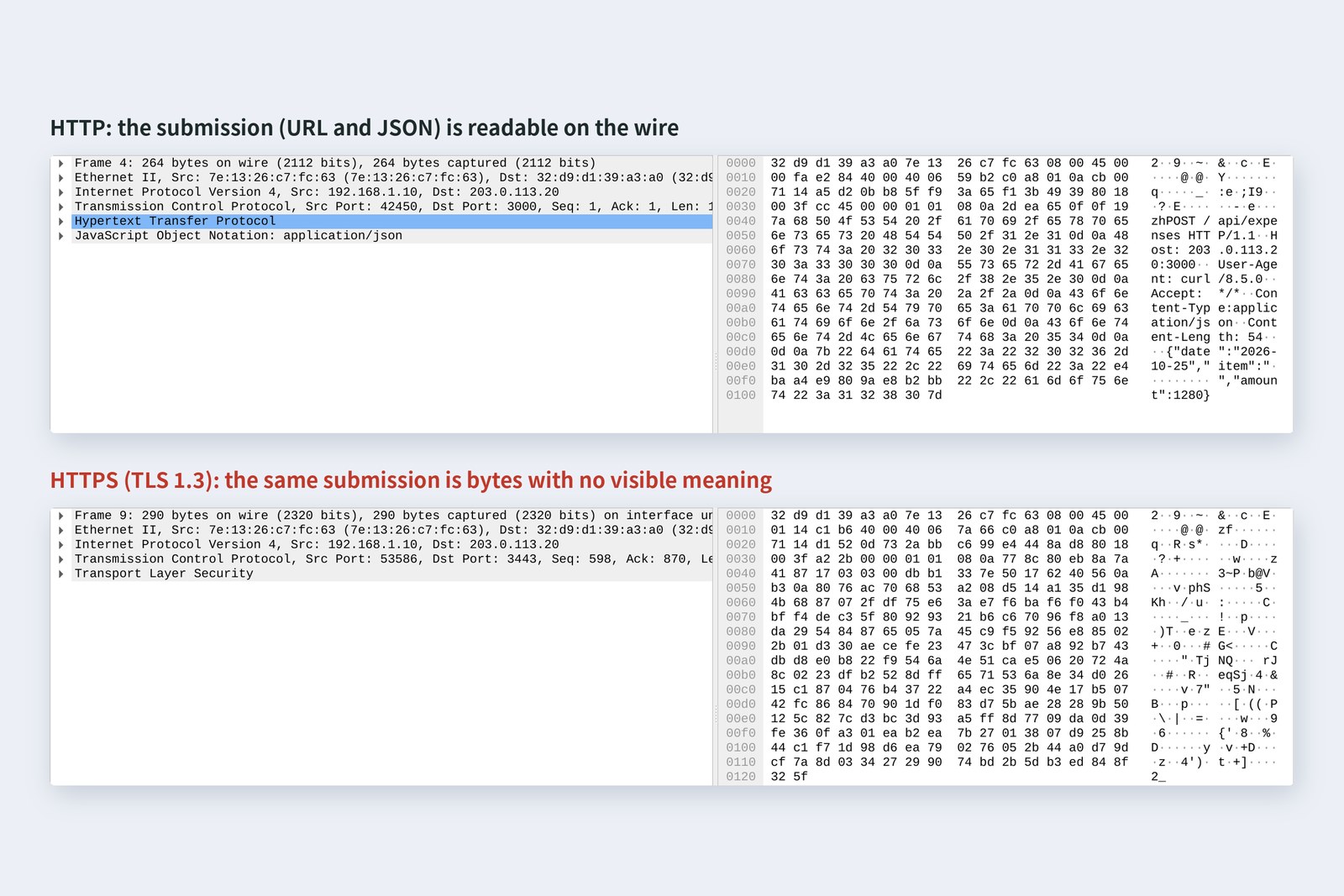
The HTTP capture contains the URL and the amount as is. Past every router along the way, anyone on the same Wi-Fi, every machine at the provider, it travelled readable. And what can be read can be altered and passed on. In the HTTPS capture, neither the URL nor the amount could be found, with one exception: the name expenses.example (section 7).
TLS's three promises
Switching to HTTPS
We gave the server a certificate for the name expenses.example and ran the expenses API over Node.js https on port 3443 (.example is a name reserved for documentation). The certificate was issued by a practice CA the author created, “Kiji Practice Root CA”, and the PC's curl was told about that CA with --cacert.
| Connected | TLS done | First byte of reply | Round trips | |
|---|---|---|---|---|
| HTTP | 0.041 s | — | 0.083 s | 2 |
| HTTPS (TLS 1.3) | 0.041 s | 0.085 s | 0.127 s | 3 |
| HTTPS (TLS 1.2) | 0.041 s | 0.126 s | 0.168 s | 4 |
With a 0.041 s round trip, HTTP took 2 round trips to the reply. HTTPS with TLS 1.3 added one round trip for the TLS greeting, making 3, and the older TLS 1.2 added two, making 4. The cryptography itself took only a few milliseconds. The slowness is round trips, not computation.
# TLS 1.3 (20 ms each way): after TCP's greeting, TLS's takes one round trip; the request (no. 9) is encrypted
   1  0.000  pc  → srv  TCP      [SYN]
   2  0.041  srv → pc   TCP      [SYN, ACK]
   3  0.041  pc  → srv  TCP      [ACK]
   4  0.043  pc  → srv  TLSv1    Client Hello (SNI=expenses.example)
   5  0.083  srv → pc   TCP      [ACK]
   6  0.084  srv → pc   TLSv1.3  Server Hello, Change Cipher Spec, Application Data, Application Data, Application Data, Application Data
   7  0.084  pc  → srv  TCP      [ACK]
   8  0.085  pc  → srv  TLSv1.3  Change Cipher Spec, Application Data
   9  0.086  pc  → srv  TLSv1.3  Application Data
  10  0.126  srv → pc   TLSv1.3  Application Data, Application Data
  11  0.130  srv → pc   TLSv1.3  Application Data
# TLS 1.2: two round trips of TLS greeting before the request (no. 10)
   1  0.000  pc  → srv  TCP      [SYN]
   2  0.041  srv → pc   TCP      [SYN, ACK]
   3  0.041  pc  → srv  TCP      [ACK]
   4  0.042  pc  → srv  TLSv1    Client Hello (SNI=expenses.example)
   5  0.083  srv → pc   TCP      [ACK]
   6  0.083  srv → pc   TLSv1.2  Server Hello, Certificate, Server Key Exchange, Server Hello Done
   7  0.083  pc  → srv  TCP      [ACK]
   8  0.085  pc  → srv  TLSv1.2  Client Key Exchange, Change Cipher Spec, Encrypted Handshake Message
   9  0.128  srv → pc   TLSv1.2  Change Cipher Spec, Encrypted Handshake Message
  10  0.128  pc  → srv  TLSv1.2  Application Data
  11  0.170  srv → pc   TLSv1.2  Application Data
The TLS 1.3 handshake (measured times)
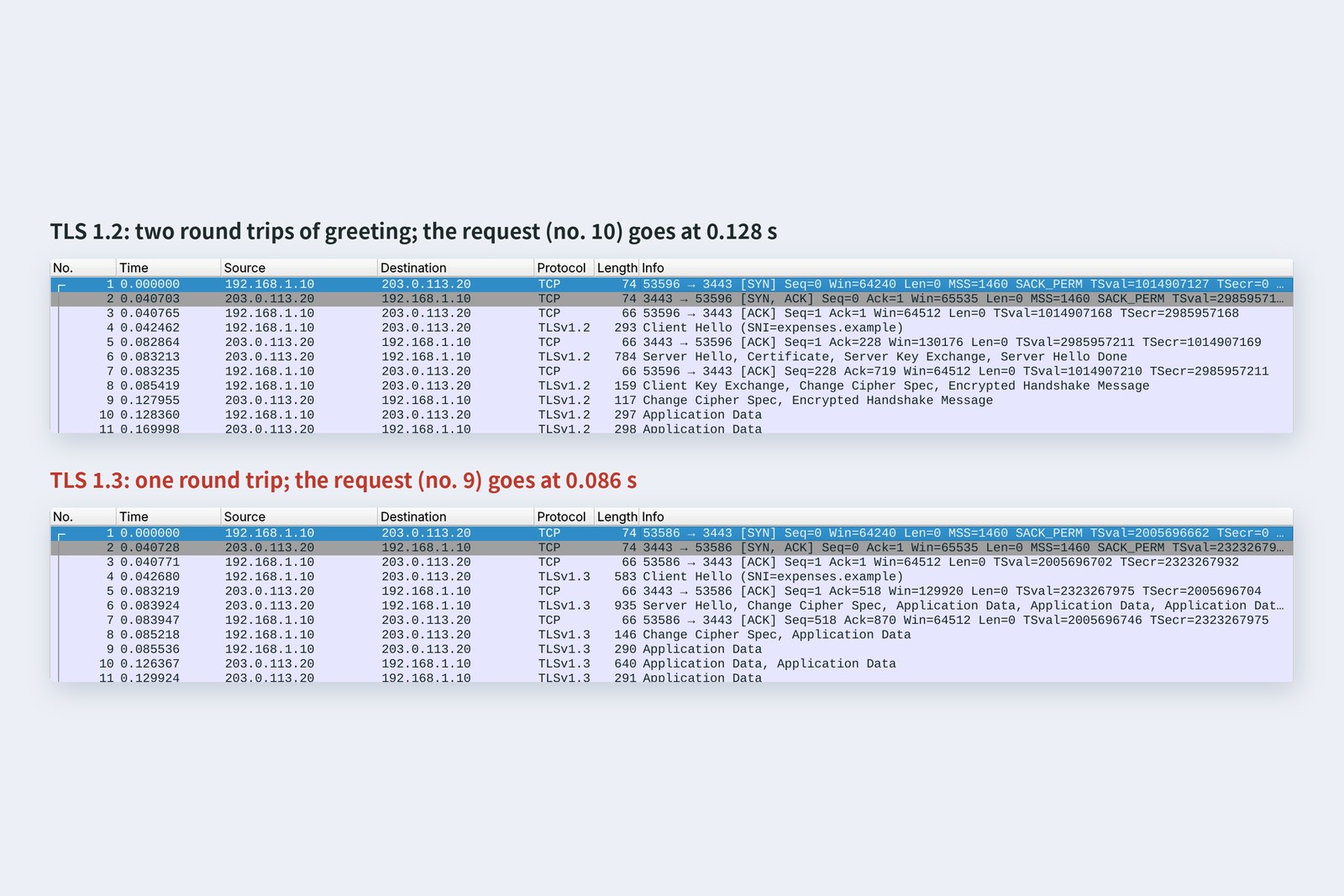
In TLS 1.3 the PC sends its key material up front in the first Client Hello, so encryption is ready as soon as the server's reply (Server Hello) arrives. Everything after Server Hello, the certificate included, is already encrypted. TLS 1.2 needed another round trip to exchange that material. TLS 1.0 and 1.1 were formally deprecated in 2021.
More round trips make part 6's “reuse the connection” matter even more. Over HTTPS, every fresh connection costs two round trips for TCP and TLS. Keep-alive and connection pools are a must (part 10).
Agreeing on a key
AraiHow do you hand the other side the encryption key? If you send it down the wire, it gets read on the way.
FuruiYou never send the key. Each side computes the same key on its own.
Don't send the key; compute the same one on both sides
The PC and the server each make a secret number and exchange only a “public” number computed from it, in the Client Hello and Server Hello. Combining your own secret with the other side's public number gives both sides the same key. Seeing the public numbers along the way isn't enough to compute it. The secrets are made fresh for each connection and thrown away, so even if the server's long-term key leaks later, old recordings can't be unlocked (forward secrecy).
# openssl s_client shows what was agreed
pc$ openssl s_client -connect 203.0.113.20:3443 -servername expenses.example -CAfile ca.pem -brief
    Protocol version: TLSv1.3
    Ciphersuite: TLS_AES_256_GCM_SHA384
    Peer certificate: CN = expenses.example
    Hash used: SHA256
    Signature type: ECDSA
    Verification: OK
    Server Temp Key: X25519, 253 bits
# The chain (0 is the server; i: is who signed it)
    0 s:CN = expenses.example
    i:CN = Kiji Practice Root CA
    Verify return code: 0 (ok)
# The server's certificate
    subject=CN = expenses.example
    issuer=CN = Kiji Practice Root CA
    notBefore=Oct 24 23:40:01 2026 GMT
    notAfter=Jan 22 23:40:01 2027 GMT
    DNS:expenses.example
openssl s_client shows this connection used TLS 1.3, X25519 to share the key and TLS_AES_256_GCM_SHA384 for the contents. AES-256-GCM encrypts and adds a “not tampered with” check at the same time, covering two of the three promises. The third, whether the other side is genuine, is the certificate's job.
Is it really them? Certificates
However safely you share a key, if the server is a fake you're just talking safely to a fake. So the server shows a certificate saying “I am expenses.example”. It holds a name, validity dates and a public key, and is signed by a trusted CA.
Do the signatures lead back to a trusted root?
A real site's certificate is signed via an intermediate CA by a “root CA” that the OS or browser trusts out of the box. The PC checks three things: the name matches, it's within its dates, and the signatures lead to a root. This part's practice CA isn't in the PC's list, so we told curl to trust it.
Four ways verification fails
Here are the errors every developer meets sooner or later, caused on purpose. The wrong-name, expired and self-signed certificates were all made for the exercise.
# Connect without telling curl about the practice CA
    curl: (60) SSL certificate problem: unable to get local issuer certificate
# Connect by address (IP); the certificate's name is expenses.example
    curl: (60) SSL: no alternative certificate subject name matches target host name '203.0.113.20'
# An expired certificate (valid until 2026-09-29)
    curl: (60) SSL certificate problem: certificate has expired
# A certificate signed by itself
    curl: (60) SSL certificate problem: self-signed certificate
# Practice CA given, connecting by name → verification succeeds
    HTTP 404 (GET /api/expenses)
| Error | Which check failed | The right fix |
|---|---|---|
| unable to get local issuer certificate | the signatures don't lead to a root | configure the intermediate certificate on the server too; for an internal CA, add it to the trusted list |
| no alternative certificate subject name matches | name mismatch | connect by the name on the certificate; put the names you need into it |
| certificate has expired | expired | renew, and automate renewal (section 8) |
| self-signed certificate | no trusted signature | get it issued by a CA; for development, run a local development CA |
Don't make the error go away by switching verification off (curl's -k, Node.js's NODE_TLS_REJECT_UNAUTHORIZED=0, Python requests' verify=False and the like). The traffic is still encrypted, but you no longer know who's on the other end, and one of the three promises is gone. Settings added “just for now” during development and left in production have caused accidents for as long as TLS has existed.
What's still visible
As the cover photo shows, the Client Hello's SNI carries the name of the server being contacted, expenses.example, in the clear. When one server hosts sites under many names, it has to know which certificate to present before encryption starts. Beyond that, the server's IP address, how much is sent and when are all visible along the way even with TLS.
To hide the name, ECH (Encrypted Client Hello), which encrypts the Client Hello itself, became a standard as RFC 9849 in March 2026. The name also leaks through DNS lookups (part 9), though, so both need covering before it's truly hidden.
Certificate lifetimes and automation
Maximum validity of public website certificates (CA/Browser Forum)
The CA/Browser Forum, the industry body of browsers and CAs, has decided to shorten public certificate lifetimes in stages: at most 200 days from 15 March 2026, and 47 days from 15 March 2029. Renewing by hand several times a year isn't realistic, so issuing and renewing automatically with the ACME protocol becomes the norm. Let's Encrypt, the free CA, hands out its certificates over ACME.
For developers, the job is to prevent “the site went down because the certificate expired” with monitoring and automatic renewal. You can check the dates with openssl x509 -noout -dates or through the browser's padlock.
Checking your own PC
| To see | How |
|---|---|
| TLS version and cipher | openssl s_client -connect example.com:443 -servername example.com -brief |
| Handshake steps and certificate | curl -v https://example.com/ -o /dev/null |
| Handshake time | curl -o /dev/null -s -w '%{time_connect} %{time_appconnect}\n' URL |
| Certificate dates | openssl x509 -in cert.pem -noout -dates |
| Trusted CAs | Mac: Keychain Access; Windows: certmgr.msc; Linux: /etc/ssl/certs |
Click the icon to the left of the browser's address bar to see a site's certificate. Have a look at the issuing CA, the name and the dates.
§ — On one page, and next time
- Layer 6 is presentation (UTF-8, JSON, gzip, encryption); layer 5 is session. In practice both are folded into TLS and applications.
- The HTTP capture showed the URL and the amount; in the HTTPS capture they weren't there.
- TLS makes three promises: can't be read, changes are noticed, it's really them.
- HTTPS with TLS 1.3 costs one more round trip than HTTP; TLS 1.2 costs two. Slowness comes from round trips, not computation.
- The key is never sent: public numbers are swapped and each side computes it (X25519), fresh for every connection.
- Certificates are checked for name, dates and the signature chain. If a check fails, never switch checking off.
- The SNI name, IP, volume and timing remain visible; ECH (RFC 9849) hides the name. Certificate lifetimes fall to 47 days in 2029.
AraiCome to think of it, curl always had --resolve saying “expenses.example is 203.0.113.20”. Isn't that cheating?
FuruiIt is. There's a real system for looking up an address from a name. Next time: DNS, the internet's phone book.
References
- RFC 8446 — The Transport Layer Security (TLS) Protocol Version 1.3
- RFC 8996 — Deprecating TLS 1.0 and TLS 1.1
- RFC 5280 — Internet X.509 Public Key Infrastructure Certificate and CRL Profile
- RFC 9525 — Service Identity in TLS
- RFC 9849 — TLS Encrypted Client Hello (2026-03)
- RFC 8555 — Automatic Certificate Management Environment (ACME)
- RFC 2606 — Reserved Top Level DNS Names(.example)
- DigiCert — Public TLS certificates: 199-day validity(SC-081)
- DNSimple — SSL Certificate Validity Changes (2026–2029)
- Let's Encrypt — How It Works
- curl — SSL Certificate Verification
- Node.js — TLS (SSL)
The recordings were made on 25 October 2026 on a practice network the author built with network namespaces on Linux (Ubuntu 24.04, kernel 6.18) in the cloud, with part 6's mischief wire (20 ms each way) between the PC and the server. The certificates were issued by a practice CA the author made with OpenSSL 3.0.13 (the expired one was created with Python's cryptography library, setting its dates explicitly); the server is Node.js 22 (OpenSSL 3.5) and the client curl 8.5.0. Every number in the text is a real value read from those recordings and the commands' output. The certificate lifetime rules are taken from DigiCert's and DNSimple's announcements of CA/Browser Forum ballot SC-081. The characters are fictional.
Old-School Networking, part 8 — Layers 5 and 6, and TLS / 2026.10