Old-School Networking / 2026 ・ No.09
Old-School Networking
Part 9: DNS — looking up addresses from names, the internet's phone book
Published
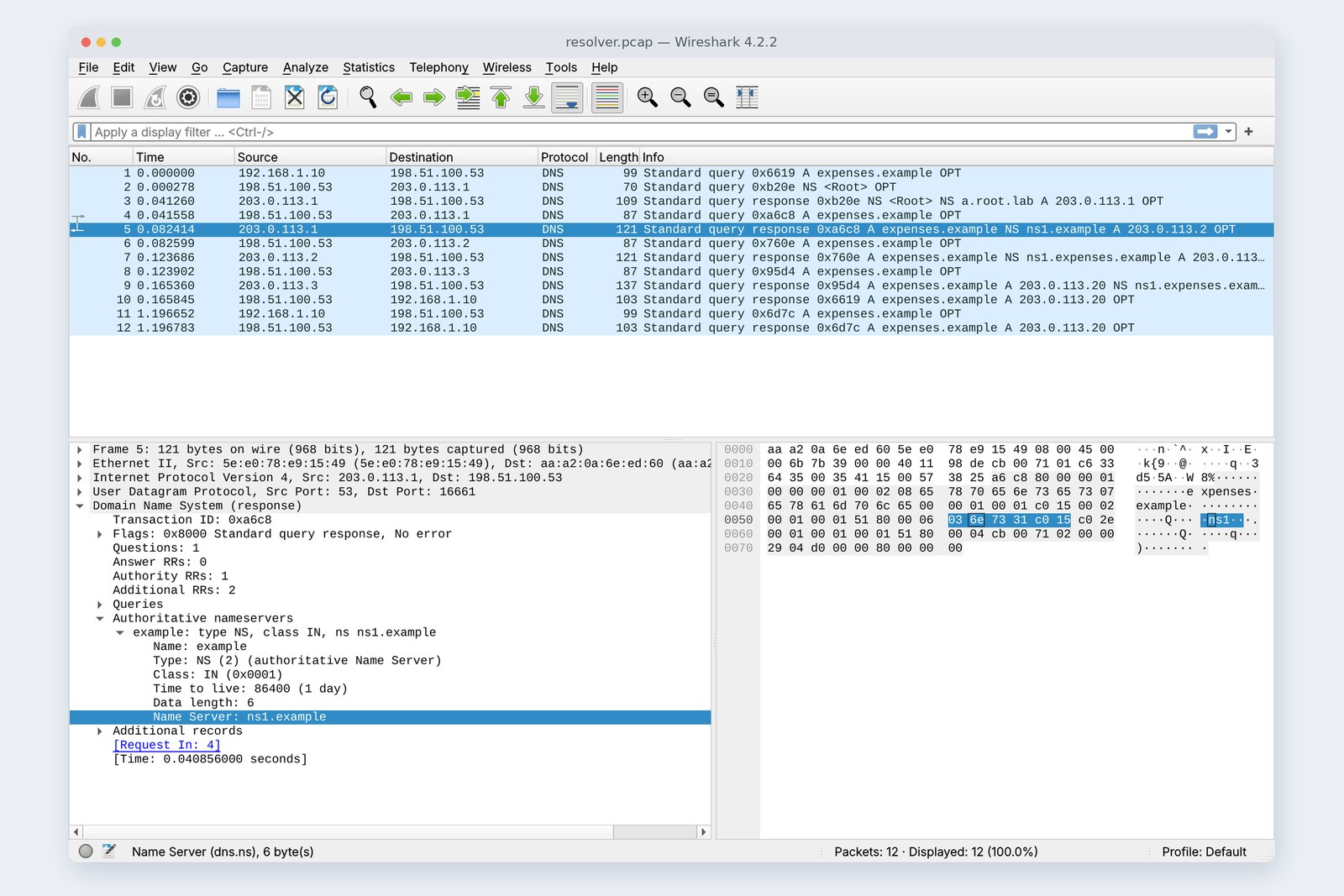
Up to part 8 we told curl “expenses.example is 203.0.113.20” with --resolve. This time we drop that and let the real system, DNS, look up the name.
For practice we set up three tiers of DNS servers (the root, .example and expenses.example) and a resolver playing the provider's role. We measure the walk down the name tree, how long answers are remembered (TTL), disagreements with the hosts file, and what happens when DNS stops.
The naming layer
AraiAbout last time's --resolve: how does a name actually turn into an address?
FuruiNo single machine knows every name in the world. Names are split up like a tree, with someone in charge of each branch. If they don't know, they say “ask over there”, and you follow that.
AraiSo it's being passed from pillar to post.
FuruiYes, very well-organised pillar to post. And once an answer has been found, it's remembered for a while.
The 12-part route map (you are here: part 9)
- The name tree — the root, .example, expenses.example, each tier with its own servers
- The resolver — walks the tree for the PC: 0.166 s the first time (measured)
- TTL and caching — 0 ms while remembered, asked again when it expires (measured)
- Developer pitfalls — hosts vs dig, and what a DNS outage looks like (measured)
In TCP/IP terms DNS is an application-layer (layer 7) system, but since it always runs before the application talks, it belongs here. The practice network puts the PC and the provider's resolver (Unbound) on the near side, and the three tiers of DNS servers (NSD) plus the expenses server beyond the mischief wire, 20 ms each way.
The name tree
Names are split into a tree, with DNS servers in charge of each branch
Read www.expenses.example from the right. The invisible dot at the far right is the root; below it is example, then expenses, then www. The root's DNS servers know who handles example, and example's know who handles expenses. Handing a branch to someone else like this is called delegation.
On the real internet the root has 13 names, a to m, run by 12 organisations; in practice more than a thousand copies with identical contents sit around the world, and the nearest one answers. For this practice the author made the root too (a.root.lab, 203.0.113.1).
The resolver's path
The PC doesn't walk the tree itself. It asks a resolver (a caching DNS server) provided by the home router or the provider, once: “what's the address of expenses.example?” Here's the recording at the resolver.
# Recorded at the resolver: for the PC's single question, it asked three places in turn (20 ms each way)
  0.000                PC → resolver          A expenses.example
  0.000          resolver → root              NS <Root>
  0.041              root → resolver          NS <Root> NS a.root.lab A 203.0.113.1
  0.042          resolver → root              A expenses.example
  0.082              root → resolver          A expenses.example NS ns1.example A 203.0.113.2
  0.083          resolver → .example          A expenses.example
  0.124          .example → resolver          A expenses.example NS ns1.expenses.example A 203.0.113.3
  0.124          resolver → expenses.example  A expenses.example
  0.165  expenses.example → resolver          A expenses.example A 203.0.113.20 NS ns1.expenses.example A 203.0.113.3
  0.166          resolver → PC                A expenses.example A 203.0.113.20
The PC asks once; the resolver does the walking (measured times)
The resolver first checks that the root is alive (the root's NS) and then asks the root. The root's answer is a referral: “I don't know. For .example, ask ns1.example (203.0.113.2)” (the cover photo). .example refers it on to expenses.example in the same way, and finally expenses.example's DNS server answers 203.0.113.20. Four round trips on the wire: 0.166 s.
dig +trace walks the same path itself from the PC so you can watch it.
# dig +trace: the PC follows the chain itself from the root (← marks who answered)
pc$ dig +trace expenses.example
    .  86368  IN  NS  a.root.lab.
    ← 198.51.100.53 (198.51.100.53)
    example.  86400  IN  NS  ns1.example.
    ← a.root.lab (203.0.113.1)
    expenses.example.  3600  IN  NS  ns1.expenses.example.
    ← ns1.example (203.0.113.2)
    expenses.example.  30  IN  A  203.0.113.20
    expenses.example.  3600  IN  NS  ns1.expenses.example.
    ← ns1.expenses.example (203.0.113.3)
Many real resolvers show each server only as much of the name as it needs: just “example” to the root, just “expenses.example” to .example (QNAME minimisation). It's switched off here to keep the flow easy to read.
Remembering: TTL and caching
Spending 0.166 s walking the tree every time would make the web unbearably slow, so the resolver remembers answers. How long is set by the answer's TTL in seconds. For practice, expenses.example's address has a TTL of 30.
# PC to the resolver (198.51.100.53): the answer's TTL (seconds left to remember it) and time taken
pc$ dig expenses.example @198.51.100.53
    first time            expenses.example.  30  IN  A  203.0.113.20    168 ms
    1 s later             expenses.example.  29  IN  A  203.0.113.20      0 ms
    10 s later            expenses.example.  19  IN  A  203.0.113.20      0 ms
    20 s later            expenses.example.  10  IN  A  203.0.113.20      0 ms
    30 s later (expired)  expenses.example.  30  IN  A  203.0.113.20     44 ms
The TTL counts down, and the resolver asks again when it expires (measured)
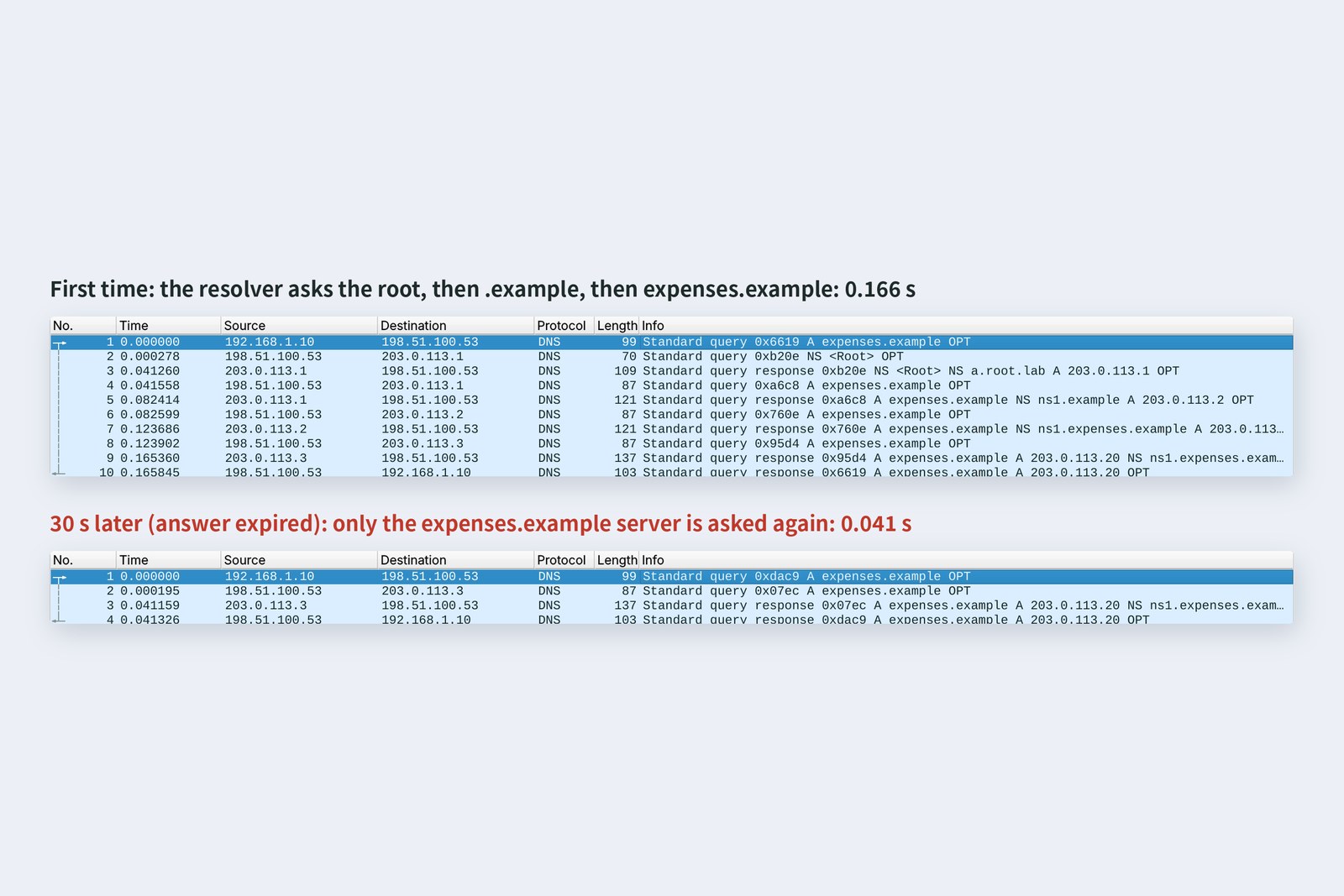
While remembered, answers took 0 ms and the TTL counted down 29, 19, 10. When it expired at 30 s the resolver asked again, but it still remembered the root's and .example's referrals (TTLs of a day and an hour), so it asked only expenses.example: 0.044 s.
When you move a server to a new address, the old answer lingers in resolvers around the world until its TTL runs out. That's what “waiting for DNS to propagate” really means. The standard move is to shorten the TTL a few days before the move.
Record types
DNS answers more than addresses. Each line attached to a name is a record, and there are several types.
# Various records for expenses.example (the number is the TTL in seconds)
    expenses.example.  29  IN  A  203.0.113.20
    expenses.example.  30  IN  AAAA  2001:db8::20
    www.expenses.example.  300  IN  CNAME  expenses.example.
    expenses.example.  3600  IN  MX  10 mail.expenses.example.
    expenses.example.  3600  IN  TXT  "kiji practice zone for part 9"
    expenses.example.  3600  IN  NS  ns1.expenses.example.
| Type | Meaning | Where developers meet it |
|---|---|---|
| A / AAAA | IPv4 / IPv6 address | registering a server's address |
| CNAME | alias: “this name is the same as that one” | pointing www at the domain's apex or at a cloud service |
| MX | mail server (the number is the priority) | receiving mail on your own domain |
| TXT | free text | proving domain ownership, sender checks (SPF etc.) |
| NS | the DNS servers in charge of this zone | choosing a DNS service after buying a domain |
| SOA | basic zone information (including how long “doesn't exist” lasts) | next section |
A name with a CNAME can't have any other records. The apex of a domain (here, expenses.example itself) always has NS and SOA records, so the apex can't be a CNAME, a rule worth knowing.
Names that don't exist
# Asking for a name that doesn't exist
pc$ dig nosuch.expenses.example
    status: NXDOMAIN
    expenses.example.  60  IN  SOA  ns1.expenses.example.  admin.expenses.example.  2026102501  1800  900  604800  60
# The “doesn't exist” answer is remembered too, for the SOA's last number (60 s)
    1st: 40 ms    2nd: 0 ms
Ask for a name that doesn't exist and the answer is NXDOMAIN (no such name). It comes with the SOA, whose last number (60 s) is how long the “doesn't exist” answer may be remembered. The second time took 0 ms. Mistyped names don't send the resolver down the tree every time. Conversely, look a new name up just before you register it, and the “doesn't exist” can stick around for a while.
When an app looks up a name
Finally, curl sends the submission without --resolve: twice in a row, starting with an empty resolver cache.
# An HTTPS submission with curl (no --resolve), twice, starting with an empty resolver cache
    1st  namelookup 0.1667  connect 0.208  tls 0.252  total 0.294  (201)
    2nd  namelookup 0.0006  connect 0.041  tls 0.087  total 0.144  (201)
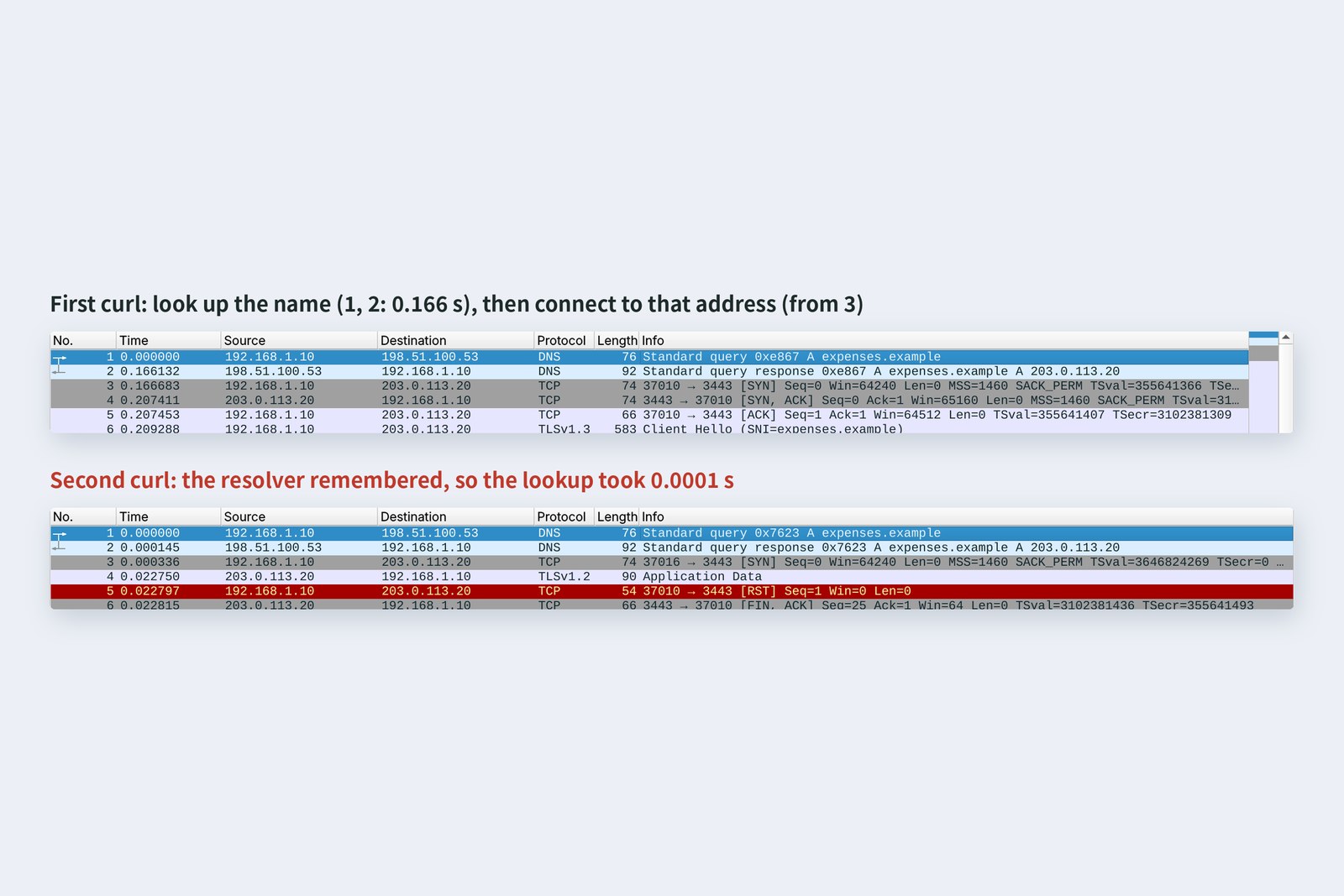
The first time, the lookup took 0.167 s, followed by part 6's TCP and part 8's TLS. The second time it took 0.0006 s, and the whole request dropped from 0.294 s to 0.144 s. That's why a site you haven't visited is a little slower the first time.
Name lookups search from nearest to farthest
Applications such as curl and browsers check nearer places before asking DNS, and the hosts file is checked before DNS. A line left over from development does this:
# If the PC's hosts file still has an old address, 203.0.113.21
    /etc/hosts:  203.0.113.21  expenses.example
# The OS's name lookup (checks hosts first)
pc$ getent ahostsv4 expenses.example
    203.0.113.21  STREAM  expenses.example
# dig (asks DNS only)
pc$ dig +short expenses.example
    203.0.113.20
# curl (uses the OS's lookup)
    curl: (28) Failed to connect to expenses.example port 3443 after 3002 ms: Timeout was reached
dig correctly answers 203.0.113.20, but curl went to the old address in hosts, 203.0.113.21, and timed out after 3 seconds. dig asks DNS only and ignores hosts. When “dig is right but the app can't connect”, suspect hosts and the OS's and browser's caches.
When DNS stops
# The resolver program is stopped (ICMP says nobody is there)
    curl: (6) Could not resolve host: expenses.example
    total 0.0001 s
# The resolver can't be reached (the link is down)
    curl: (6) Could not resolve host: expenses.example
    total 6.023 s
With only the resolver program stopped, the OS reports “nobody there” (part 7's ICMP) and curl failed at once with Could not resolve host. When the resolver couldn't be reached at all, the same error came only after 6 seconds; here, the PC asked for the resolver's MAC six times with ARP. If queries vanish further along the way, Linux's defaults (timeout 5 s and attempts 2 in resolv.conf) can make the wait even longer.
When DNS stops, things addressed by number keep working while everything addressed by name stops. To users it looks like “the internet is down” or “it's slow”. The first step in diagnosis is to try both the name and the address (part 12).
Hiding DNS
Everything recorded in this part was DNS on UDP port 53, with the names asked for readable as is. Part 8 noted that HTTPS still shows the name (SNI); DNS queries reveal it too.
Ways to wrap DNS queries
So DNS queries can now be wrapped in TLS (DoT, port 853) or HTTPS (DoH, port 443). Major browsers and operating systems can be set to use DoH. The resolver itself still sees the names, though, so which resolver to trust remains a separate question. Large answers can also make DNS retry over TCP instead of UDP (part 7's 1232 bytes), so TCP port 53 is DNS too.
Checking your own PC
| To see | Mac | Windows | Linux |
|---|---|---|---|
| Look up a name | dig example.com | Resolve-DnsName example.com | dig example.com |
| Walk the path | dig +trace example.com | (step by step with nslookup) | dig +trace example.com |
| The OS's answer (with hosts) | dscacheutil -q host -a name example.com | ping -n 1 example.com | getent ahosts example.com |
| Which resolver you use | scutil --dns | ipconfig /all | resolvectl status |
| Flush the OS cache | sudo killall -HUP mDNSResponder | ipconfig /flushdns | resolvectl flush-caches |
The second column of a dig answer is the TTL. Look the same name up a few times and watch it count down.
§ — On one page, and next time
- Names form a tree read right to left: root → .example → expenses.example, each tier with its own servers (delegation).
- The PC asks the resolver once; the resolver follows the referrals. The first time took four round trips: 0.166 s.
- Answers are remembered for their TTL: 0 ms while remembered; after expiry only what's needed is asked again (0.044 s).
- A, AAAA, CNAME, MX, TXT, NS, SOA. The apex can't be a CNAME.
- “Doesn't exist” (NXDOMAIN) is remembered too, for the SOA's number of seconds.
- Apps check hosts before DNS; dig ignores hosts, so they can disagree.
- If the resolver can't be reached, everything addressed by name waits and then fails. DoT and DoH hide the queries.
AraiWe know the name, we're connected, and it's locked. Finally it's the submission's turn.
FuruiNext time: HTTP. We'll read the POST /api/expenses we've been sending since part 1, line by line.
References
- RFC 1034 — Domain Names: Concepts and Facilities
- RFC 1035 — Domain Names: Implementation and Specification
- RFC 2308 — Negative Caching of DNS Queries
- RFC 9156 — DNS Query Name Minimisation to Improve Privacy
- RFC 7858 — DNS over Transport Layer Security (TLS)
- RFC 8484 — DNS Queries over HTTPS (DoH)
- RFC 2606 — Reserved Top Level DNS Names(.example)
- Root Server Technical Operations Association — root-servers.org
- IANA — Root Zone Database
- resolv.conf(5) — timeout と attempts の既定値
- NLnet Labs — Unbound
- NLnet Labs — NSD
The recordings were made on 25 October 2026 on a practice network the author built with network namespaces on Linux (Ubuntu 24.04, kernel 6.18) in the cloud. The resolver is Unbound 1.19.2 (DNSSEC validation and QNAME minimisation off); the root, .example and expenses.example DNS servers are NSD 4.8.0, and every name and address is either reserved for documentation or made up for the practice. Between the resolver and the DNS servers runs part 6's mischief wire (20 ms each way). Every number in the text is a real value read from those recordings and the commands' output. Root server figures are from root-servers.org. The characters are fictional.
Old-School Networking, part 9 — DNS / 2026.10