Dev Guide / 2026 ・ No.07
Playwright in Practice
Where it came from, how it works, testing an expense form, and working with AI
Published
Write the test; the browser does the checking
Open the page, type, click, and check with your own eyes. People repeat that routine before every release.
Playwright turns it into code you can replay at will. This article first maps out where Playwright came from and how it works,
then writes and runs real tests against an expense-claim page. The second half covers what to prepare at the design and
development stages, how to make AI tools follow your testing rules, what already exists, and where things seem to be heading.
What Playwright is
Playwright is Microsoft's open-source tool for browser automation and testing (Apache 2.0 licence). From code, it launches a browser, opens pages, types, clicks and checks what is shown, reproducing a person's actions precisely.
- Three browser engines — Chromium (Chrome, Edge), Firefox and WebKit (Safari), on Windows, macOS and Linux
- Four languages — TypeScript/JavaScript, Python, Java and .NET (C#). This article uses TypeScript
- A full testing kit — a test runner (Playwright Test), codegen to record actions as code, a trace viewer to replay failures, and an HTML report
Its home ground is end-to-end (E2E) testing: running through the whole system, from screen to database, to check that it behaves as expected when a user does something. Tests come in layers, often drawn as a pyramid.
The testing pyramid, and where Playwright fits
E2E tests are realistic, and slow for it. Leave combinations of small rules to unit tests; use E2E to see that the important flows work from end to end
Playwright makes the checks people do on screen fast, repeatable and identical every time. But people still decide what to check. Good tests grow out of good specifications and good screen design, which is the theme of the second half.
Background: Selenium, Puppeteer, then Playwright
People have been automating browsers for over twenty years. The first big wave was Selenium. According to Selenium's own history page, it started in 2004 at ThoughtWorks in Chicago, where Jason Huggins built it to test an internal "Time and Expenses" application. An expense app, then, is a fitting subject for this article. Selenium later merged with WebDriver, and driving a browser from outside became a W3C standard (WebDriver).
In 2017 Google's Chrome DevTools team released Puppeteer. It drove Chrome directly over the protocol the DevTools use (CDP), which made it fast and precise. But at first it was Chrome (Chromium) only, while real users also browse with Safari and Firefox.
So the core of the Puppeteer team moved to Microsoft and released Playwright in January 2020. InfoQ's report at the time quoted them: "We are the same team that originally built Puppeteer at Google." They had two aims: drive Chromium, Firefox and WebKit through one API, and make that API friendlier for testing. Andrey Lushnikov, once Puppeteer's tech lead, is introduced publicly as a member of the Playwright core team.
The road to Playwright, and since
The test runner arrived in 2021 and made it a complete testing tool; since 2025, features that connect it to AI have multiplied
It spread quickly. On Thoughtworks' Technology Radar it went from Assess (October 2020) to Trial (April 2021) to Adopt (September 2023). On npm, @playwright/test was downloaded about 76 million times a week in October 2026 (6–12 October; that includes automated installs by CI and AI agents, so it is not a head count). At the time of writing the latest release is 1.64.1 (14 October 2026), and a new version lands almost every month.
How it works 1: the link to the browser
Playwright has three layers: a library for the language you write tests in, Playwright itself (the server), which turns commands into browser actions, and the browsers.
How a command reaches the browser
With TypeScript the server runs in the same process as the tests; Python, Java and .NET connect to the Node.js server over a WebSocket
- An interpreter for each browser — CDP for Chromium, a protocol called Juggler for Firefox, and a dedicated protocol for WebKit. Playwright's source tree carries the Juggler code and the WebKit patches
- A direct pipe to the browser — the launched browser is connected through a pipe between processes. Commands go one way, and events such as page loads and screen changes come back the other
- Patched browsers — Firefox and WebKit are special builds with the extra automation hooks, installed by npx playwright install. For Chromium you can also use Chrome or Edge themselves
Classic WebDriver makes an HTTP round trip for every command. Playwright keeps one line open and talks both ways, so it learns about changes in the browser straight away. That is the foundation for the auto-waiting described next.
How it works 2: browser contexts
One of Playwright's key ideas is the browser context. Inside one browser you can create as many incognito-style windows as you like, each with its own cookies and storage. In the documentation's words, they are "fast and cheap to create".
Several people, sharing one browser
For expense claims, one test can have the applicant and the approver signed in at the same time (chapter 10)
Playwright Test gives every test a new context. Nothing carries over from the previous test, so you can run tests in parallel or in any order and get the same result, and one failure does not drag the following tests down with it.
How it works 3: waiting by itself
The most common trouble in UI test automation is waiting. The test clicks a button that is not there yet, and fails. Write "wait two seconds" to avoid it, and on fast days you waste time while on slow days it still fails. Playwright solved this with auto-waiting.
Never write how many seconds to wait
The checks depend on the action (typing also checks the field is editable). If the conditions are not met before the timeout, the action fails with a TimeoutError
Assertions work the same way. Write expect(total).toHaveText('3,000円') and Playwright keeps checking until the text reads 3,000 yen. These are called web-first assertions. The default limits are 5 seconds per assertion and 30 seconds per test (the failure output in this article's runs shows both values).
How it works 4: finding elements, and the tools
A locator says which part of the page to act on. Playwright's guide recommends finding things by the cues users can see.
Locators, in order of preference
The "role" in getByRole is the kind of element (button, text box, table, heading) that screen readers also announce
Locators are also strict: if the target of an action matches two or more elements, Playwright refuses with an error instead of guessing. That stops a test from clicking the first match and passing by luck. It saved this article's tests twice (chapter 11).
There are tools for writing and fixing tests, too.
| Tool | Command or place | What it is for |
|---|---|---|
| codegen | npx playwright codegen | Act in a browser and get matching test code, with locators picked in the order above |
| UI Mode | npx playwright test --ui | List and run tests, step back in time through the page, rerun on save |
| Trace viewer | npx playwright show-trace | Replay each action with the page before and after, network and console. For tests that failed on CI |
| HTML report | npx playwright show-report | The results, with screenshots and traces of failures |
| VS Code extension | Playwright Test for VS Code | Run and debug from the editor; pick locators |
Practice: an expense-claim page
Now for real tests. The subject is something most companies have: expense claims. The author built a small demo app for this (Node.js, no outside libraries, Japanese UI). The applicant signs in and enters line items; the approver approves.
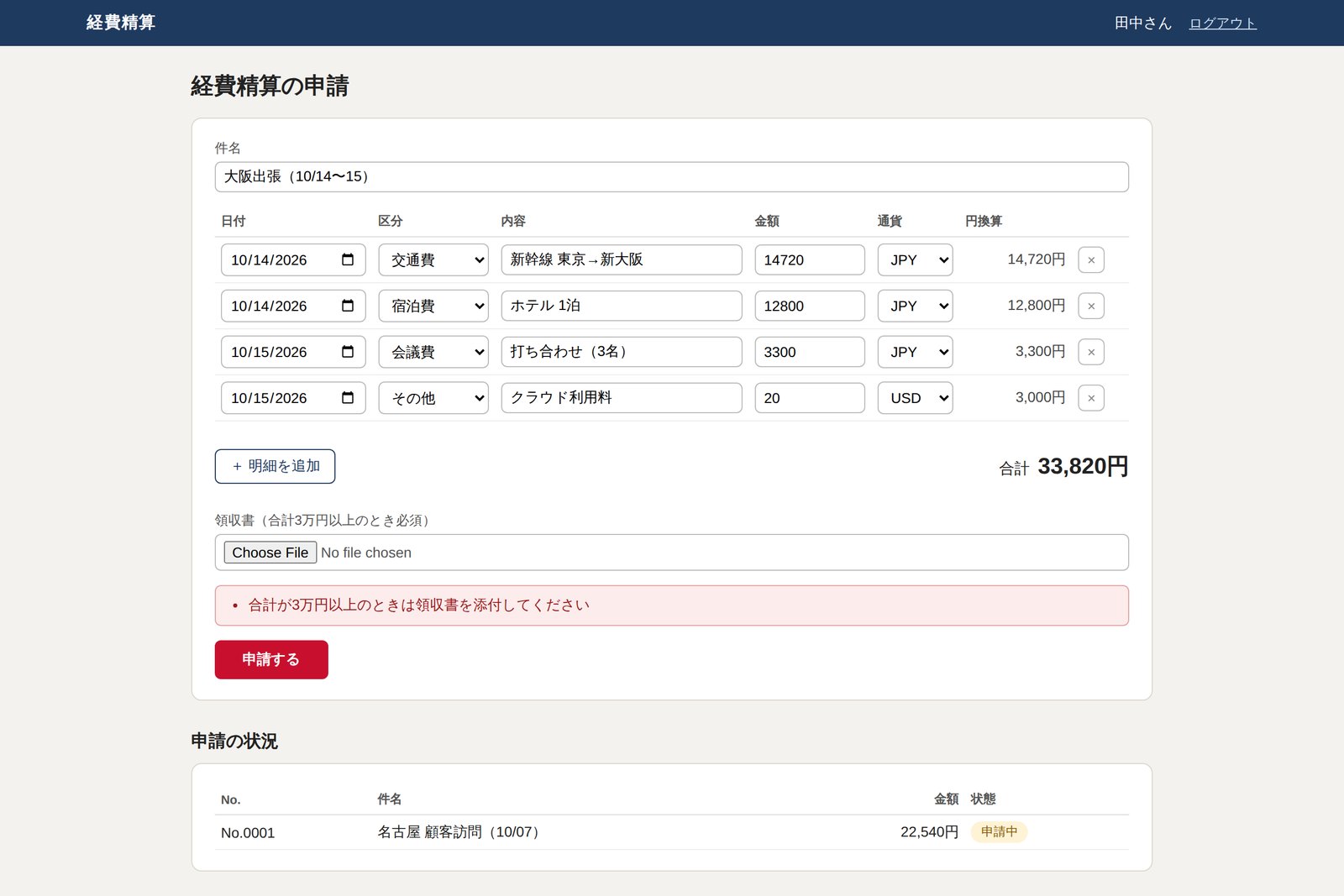
The page follows these rules. Before writing any test, start by putting the rules in a table.
| # | Rule (acceptance criterion) | How to check it |
|---|---|---|
| R1 | Enter amounts and the total is calculated | Enter two lines and check the total |
| R2 | Dollar lines are converted to yen at the exchange rate | Pin the rate API to a fixed value (1 dollar = 150 yen) and check |
| R3 | With a total of 30,000 yen or more, no receipt means no submission | Error without a receipt; passes once one is attached |
| R4 | Future dates cannot be claimed | Use tomorrow's date and expect an error |
| R5 | Once the approver approves, the applicant's list says "approved" | Drive the applicant and the approver together |
R1 to R4 are rules inside one screen; R5 is a flow across two users. Fine-grained combinations, such as the edge of R3 (29,999 versus 30,000 yen), belong in unit or API tests; E2E is more efficient when it checks representative cases.
Putting the suite together
Installing Playwright takes one line. npm init playwright@latest creates a config file and samples (here it was installed with npm i -D @playwright/test and the files were written by hand). The suite fits together like this.
Who does what
First, the config. Starting the app before the tests (webServer) and running the sign-in setup first (setup) are declared here.
// playwright.config.ts
import { defineConfig, devices } from '@playwright/test';

export default defineConfig({
  testDir: './tests',
  fullyParallel: true,                       // Run tests in parallel
  retries: process.env.CI ? 2 : 0,           // On CI, retry failures up to twice
  reporter: [['list'], ['html', { open: 'never' }]],
  use: {
    baseURL: 'http://localhost:3000',
    locale: 'ja-JP',                         // Japanese date and number formats
    timezoneId: 'Asia/Tokyo',
    trace: 'on-first-retry',                 // Keep a trace only on retry
    screenshot: 'only-on-failure',
  },
  projects: [
    { name: 'setup', testMatch: /.*\.setup\.ts/ },
    { name: 'chromium', use: { ...devices['Desktop Chrome'] }, dependencies: ['setup'] },
    // Firefox and Safari (WebKit) go here the same way
  ],
  webServer: {                               // Start the app before the tests
    command: 'node app/server.js',
    env: { APP_ENV: 'test' },
    url: 'http://localhost:3000/login',
    reuseExistingServer: !process.env.CI,
  },
});
Next, the setup that runs once at the start. It resets the data, signs in as the applicant and as the approver, and saves each session (cookies and so on) to a file as storageState. Every test then simply loads that file and starts signed in, which is much faster and steadier than going through the login screen each time.
// tests/auth.setup.ts
import { test as setup, expect } from '@playwright/test';

// Test accounts (exist only in the test environment)
const accounts = [
  { id: 'tanaka', password: 'pass-tanaka', file: '.auth/applicant.json', home: '/' },        // applicant
  { id: 'sato',   password: 'pass-sato',   file: '.auth/approver.json',  home: '/approve' }, // approver
];

setup('テストデータを初期化する', async ({ request }) => {
  const res = await request.post('/api/test/reset');   // A test-only API
  expect(res.ok()).toBeTruthy();
});

for (const a of accounts) {
  setup(`${a.id} でログインしておく`, async ({ page }) => {
    await page.goto('/login');
    await page.getByLabel('社員ID').fill(a.id);
    await page.getByLabel('パスワード').fill(a.password);
    await page.getByRole('button', { name: 'ログイン' }).click();
    await expect(page).toHaveURL(a.home);
    await page.context().storageState({ path: a.file });   // Save the session to a file
  });
}
The Page Object and the tests
How to operate the screen goes into one class, a Page Object. Knowledge such as "find the amount field by its label" or "find the submit button by its name" lives there, so when the screen changes there is one place to fix.
// tests/pages/expense-page.ts
import { type Page, type Locator } from '@playwright/test';

type Line = { date: string; kind: string; memo: string; amount: number; currency?: 'JPY' | 'USD' };

// How to operate the submit screen, in one place (Page Object)
export class ExpensePage {
  readonly lines: Locator;
  readonly total: Locator;
  readonly errors: Locator;
  readonly done: Locator;

  constructor(readonly page: Page) {
    this.lines  = page.getByTestId('expense-line');
    this.total  = page.getByTestId('total-amount');
    this.errors = page.getByRole('alert');
    this.done   = page.getByRole('status', { name: '申請結果' });
  }

  async goto() {
    await this.page.goto('/');
  }

  async fillLine(i: number, l: Line) {
    if (await this.lines.count() <= i)
      await this.page.getByRole('button', { name: '明細を追加' }).click();
    const row = this.lines.nth(i);
    await row.getByLabel('日付').fill(l.date);
    await row.getByLabel('区分').selectOption(l.kind);
    await row.getByLabel('内容').fill(l.memo);
    await row.getByLabel('金額').fill(String(l.amount));
    if (l.currency) await row.getByLabel('通貨').selectOption(l.currency);
  }

  async attachReceipt(name = 'receipt.pdf') {
    await this.page.getByLabel(/領収書/).setInputFiles({
      name, mimeType: 'application/pdf', buffer: Buffer.from('%PDF-1.4 dummy'),
    });
  }

  async submit() {
    await this.page.getByRole('button', { name: '申請する' }).click();
  }
}
Each line item carries a data-testid="expense-line" marker, because a row has no name a user can see. Use a marker agreed with developers only where visible cues cannot reach: that is how the order of preference is meant to work.
Then the fixture, the per-test setup. This is where the external exchange-rate API is swapped for a mock. The real rate changes daily, so otherwise you could never write "this should be 3,000 yen". page.route() catches the browser's request on its way out and returns a fixed answer.
// tests/fixtures.ts
import { test as base, expect } from '@playwright/test';
import { ExpensePage } from './pages/expense-page';

export const test = base.extend<{ expensePage: ExpensePage }>({
  expensePage: async ({ page }, use) => {
    // Swap the external rate API for a mock that always answers the same
    await page.route('https://api.rates.example/**', route =>
      route.fulfill({ json: { base: 'USD', rates: { JPY: 150 } } }));
    const expensePage = new ExpensePage(page);
    await expensePage.goto();
    await use(expensePage);
  },
});
export { expect };
And the tests themselves. Rules R1 to R4 became four tests, one for one.
// tests/expense.spec.ts
import { test, expect } from './fixtures';

test.use({ storageState: '.auth/applicant.json' });   // Start signed in as the applicant

test('明細の合計が自動で計算される', async ({ expensePage }) => {
  await expensePage.fillLine(0, { date: '2026-10-14', kind: '交通費', memo: '新幹線 東京→新大阪', amount: 14720 });
  await expensePage.fillLine(1, { date: '2026-10-14', kind: '会議費', memo: '打ち合わせ(3名)', amount: 3300 });
  await expect(expensePage.total).toHaveText('18,020円');
});

test('ドル建ての明細は為替レートで円に換算される', async ({ expensePage }) => {
  await expensePage.fillLine(0, { date: '2026-10-14', kind: 'その他', memo: 'クラウド利用料', amount: 20, currency: 'USD' });
  await expect(expensePage.total).toHaveText('3,000円');            // 20 dollars × 150 yen
});

test('3万円以上は領収書がないと申請できない', async ({ expensePage }) => {
  await expensePage.fillLine(0, { date: '2026-10-14', kind: '宿泊費', memo: 'ホテル 2泊', amount: 32000 });
  await expensePage.submit();
  await expect(expensePage.errors).toContainText('領収書を添付してください');

  await expensePage.attachReceipt();
  await expensePage.submit();
  await expect(expensePage.done).toContainText('申請しました');
});

test('未来の日付は申請できない', async ({ expensePage }) => {
  const tomorrow = new Date(Date.now() + 86400000).toISOString().slice(0, 10);
  await expensePage.fillLine(0, { date: tomorrow, kind: '交通費', memo: 'タクシー', amount: 2400 });
  await expensePage.submit();
  await expect(expensePage.errors).toContainText('未来の日付は申請できません');
});
Look at the second test. When the currency switches to USD, the page asks the rate API before rewriting the total, yet the test has no line that waits for the response. toHaveText('3,000円') keeps checking until the total reads 3,000 yen.
Submit to approval: two people
R5 involves two people: Tanaka, the applicant, and Sato, the approver. This is where browser contexts pay off. One browser holds a context for each, and each opens pages with their own sign-in.
Two people taking turns in one test
// tests/approval.spec.ts
import { test, expect } from '@playwright/test';
import { ExpensePage } from './pages/expense-page';

test('申請して承認されると「承認済み」になる', async ({ browser }) => {
  // Two contexts, applicant and approver, in one browser
  const applicant = await browser.newContext({ storageState: '.auth/applicant.json' });
  const approver  = await browser.newContext({ storageState: '.auth/approver.json' });
  let no = '';                                              // e.g. "No.0003"

  await test.step('田中さんが申請する', async () => {
    const p = new ExpensePage(await applicant.newPage());
    await p.goto();
    await p.page.getByLabel('件名').fill('大阪出張');
    await p.fillLine(0, { date: '2026-10-14', kind: '交通費', memo: '新幹線 往復', amount: 29440 });
    await p.submit();
    await expect(p.done).toContainText('申請しました');
    no = (await p.done.textContent())!.match(/No\.\d{4}/)![0];   // Find it later by the assigned number
  });

  await test.step('佐藤さんが承認する', async () => {
    const page = await approver.newPage();
    await page.goto('/approve');
    const row = page.getByRole('row').filter({ hasText: no });
    await row.getByRole('button', { name: '承認' }).click();
    await expect(row.getByText('承認済み')).toBeVisible();
  });

  await test.step('田中さんの画面でも「承認済み」になっている', async () => {
    const page = await applicant.newPage();
    await page.goto('/');
    const row = page.getByRole('table', { name: '申請一覧' }).getByRole('row').filter({ hasText: no });
    await expect(row).toContainText('承認済み');
  });

  await applicant.close();
  await approver.close();
});
Splitting the test with test.step() gives the report and trace headings such as 田中さんが申請する ("Tanaka submits"), so you can see at a glance where a failure happened.
Results, and where we tripped
Running it is just npx playwright test. Starting the app, the sign-in setup and all eight tests happen on their own.
$ npx playwright test
Running 8 tests using 1 worker

  ✓  1 [setup] › tests/auth.setup.ts:9:6 › テストデータを初期化する (44ms)
  ✓  2 [setup] › tests/auth.setup.ts:15:8 › tanaka でログインしておく (606ms)
  ✓  3 [setup] › tests/auth.setup.ts:15:8 › sato でログインしておく (472ms)
  ✓  4 [chromium] › tests/approval.spec.ts:4:5 › 申請して承認されると「承認済み」になる (1.2s)
  ✓  5 [chromium] › tests/expense.spec.ts:5:5 › 明細の合計が自動で計算される (600ms)
  ✓  6 [chromium] › tests/expense.spec.ts:11:5 › ドル建ての明細は為替レートで円に換算される (435ms)
  ✓  7 [chromium] › tests/expense.spec.ts:16:5 › 3万円以上は領収書がないと申請できない (536ms)
  ✓  8 [chromium] › tests/expense.spec.ts:26:5 › 未来の日付は申請できない (461ms)

  8 passed (6.3s)
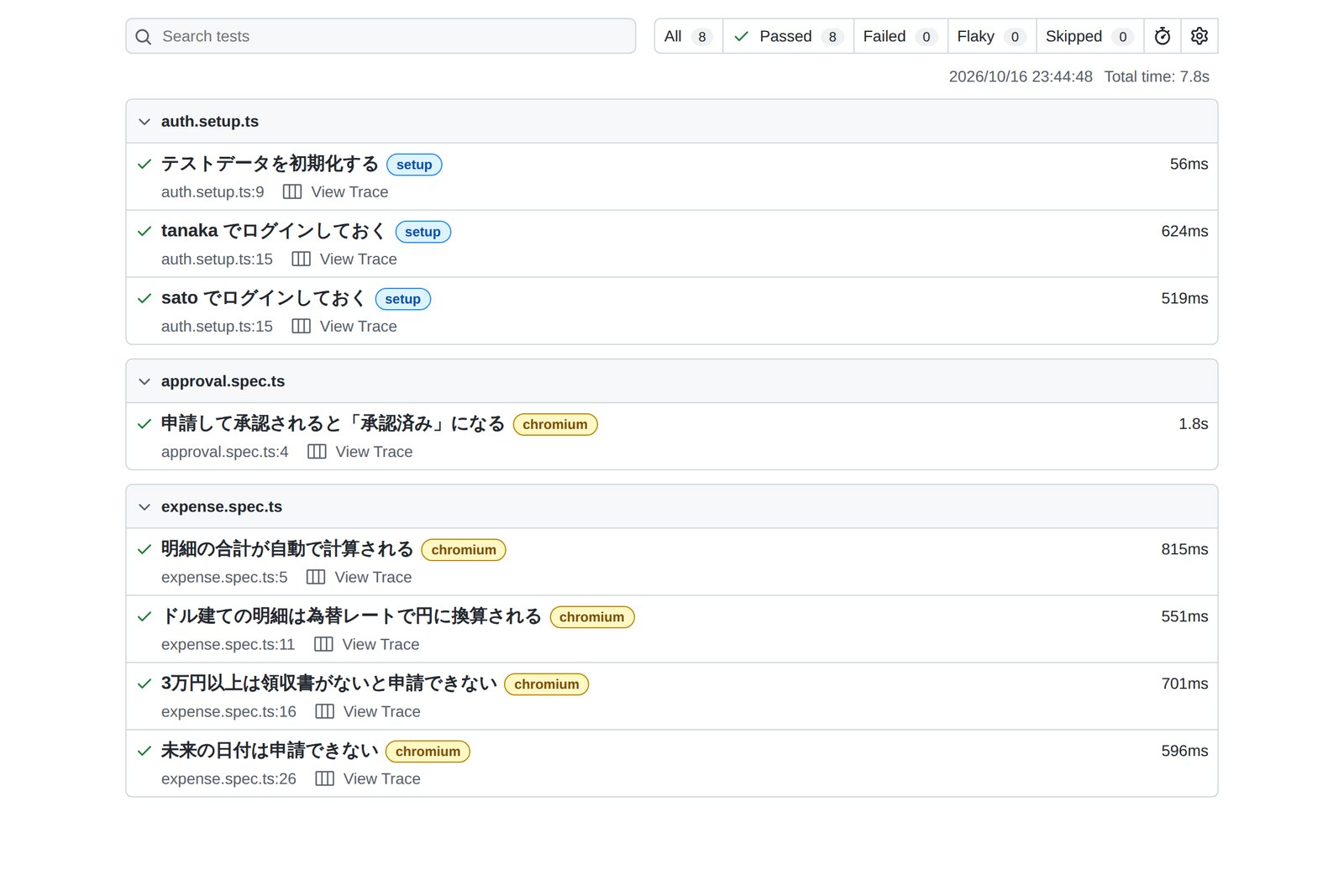
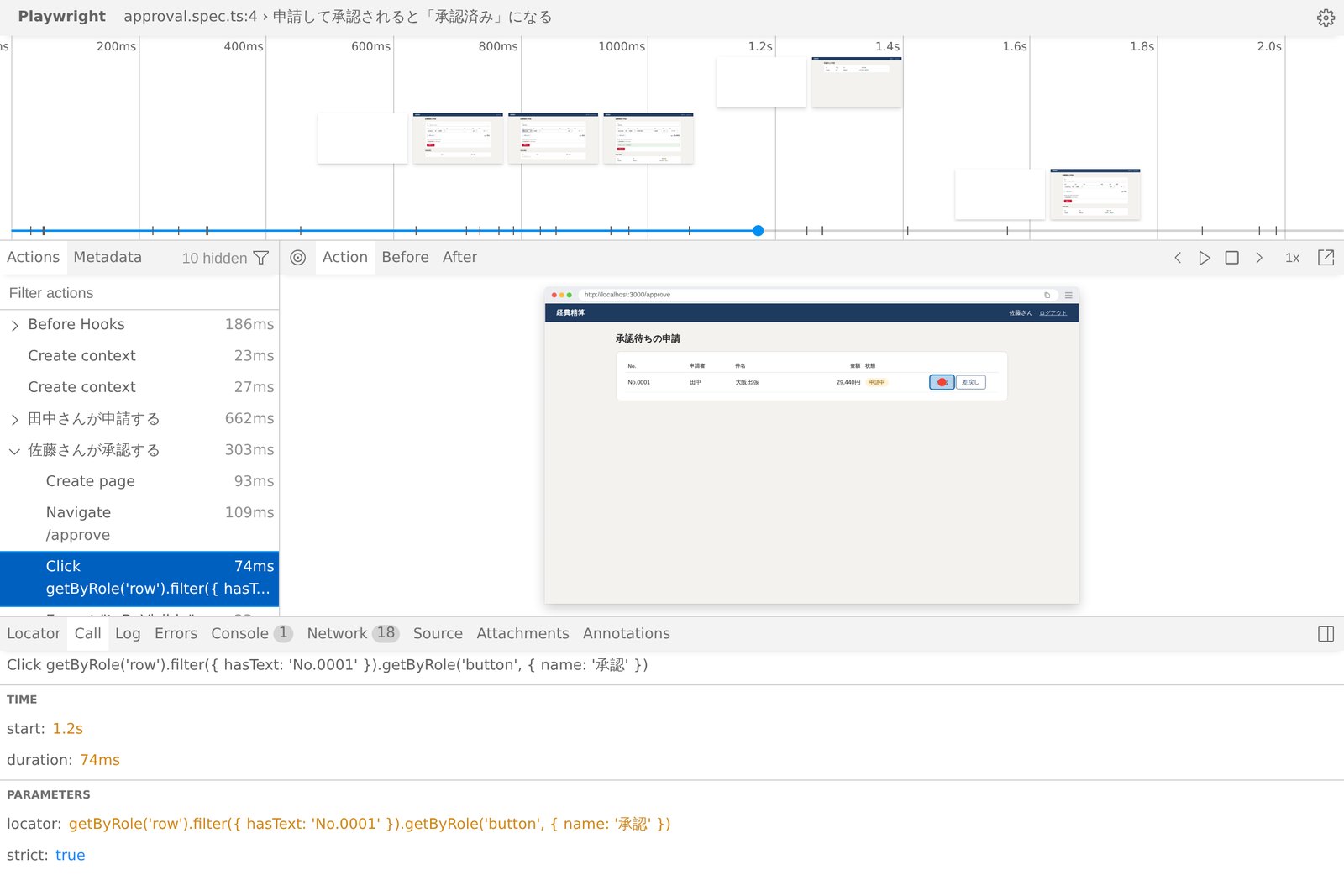
It did not all work first time, though. Strictness stopped us twice.
- First: two "submitted" messages — looking for the confirmation with getByRole('status') also matched the <output> element showing the total, which HTML gives the same "status" role. Naming the message with aria-label="申請結果" and using getByRole('status', { name: '申請結果' }) told them apart
- Second: two rows with the same title in parallel runs — at first the test found its row by a unique string in the title. Under a stress run that repeats each test five times in parallel (--workers 4 --repeat-each 5) that string was the same across repeats, and two rows matched. Switching to reading the number the app assigned (No.0003 and so on) off the screen and finding the row by it made all 28 runs pass
Without strictness, both would have been tests that pass because the first match happened to be right. Tests that lean on luck eventually fail for no visible reason; those are the infamous flaky tests.
We also broke one on purpose. Renaming the button from 申請する ("submit") to 提出する ("hand in") makes the test fail like this:
  1) [chromium] › tests/expense.spec.ts:26:5 › 未来の日付は申請できない ────────────────────────────────────────
    Test timeout of 30000ms exceeded.
    Error: locator.click: Test timeout of 30000ms exceeded.
    Call log:
      - waiting for getByRole('button', { name: '申請する' })
       at pages/expense-page.ts:41
      39 |
      40 |   async submit() {
    > 41 |     await this.page.getByRole('button', { name: '申請する' }).click();
         |                                                           ^
      42 |   }
      43 | }
      44 |
The key point: Playwright cannot tell whether the test is out of date or the screen has a bug. If the new label is intended, fix the test; if not, fix the screen. That judgment stays with people even in the AI era discussed below.
Groundwork at the design stage
The tests above came out short and steady because the app was built to be testable from the start. Whether Playwright pays off is largely settled before any test is written, at the design and development stages.
Build testability in early
| Prepare | Why | In the expense app |
|---|---|---|
| Acceptance criteria you can check | "Easy to use" cannot be tested; "receipt required from 30,000 yen" can | Rules R1–R5 in chapter 7 |
| Labels on inputs, names on buttons | getByRole and getByLabel can find them, and screen readers benefit (accessibility) | 金額 (amount), 申請する (submit) |
| One way to show errors and success | The same locator works on every screen | Errors as role="alert", success as role="status" |
| A naming rule for test IDs | Markers for parts with no visible cue; inconsistent names cannot be found | expense-line, total-amount (kebab-case) |
| A way to reset and seed data | Start from the same state every time, faster than building data through the UI | POST /api/test/reset, live only in test mode |
| Swappable external services | Pin down rates, payments, email and anything else that changes between runs | The rate API, mocked with page.route() |
| Test accounts and roles | To check what each role can do, without touching production accounts | Applicant tanaka, approver sato |
| Control over time and numbering | Steady tests that would otherwise depend on "today" or sequence numbers | Show the assigned No. on screen; Playwright's Clock API can also fix the time |
The reset endpoint, for instance, is only this. It exists only when the app starts in test mode and is absent in production.
// app/server.js (excerpt)
// Test only: reset the data (disabled in production)
if (TEST_MODE && req.method === 'POST' && url.pathname === '/api/test/reset') {
  db = { seq: 0, expenses: [] };
  return send(res, 200, { ok: true });
}
Testability is a quality that planners, designers and UI designers share. Add one column to the screen spec for each field's label, how errors appear and the test ID, and the later testing effort changes a great deal. The same groundwork pays off again when an AI writes the tests (chapter 14).
Groundwork in development and CI
Tests that are only written are worth half as much. Only when they run automatically on every change do they stop things from quietly breaking.
The same checks on every pull request
With GitHub Actions it can look like this (trimmed from the documentation's example to fit this article's setup).
# .github/workflows/e2e.yml
name: e2e
on: [pull_request]
jobs:
  test:
    runs-on: ubuntu-latest
    steps:
      - uses: actions/checkout@v7
      - uses: actions/setup-node@v7
        with:
          node-version: 24
      - run: npm ci
      - run: npx playwright install chromium --with-deps   # Install only what you use
      - run: npx playwright test
        env:
          CI: true                                  # Turns on 2 retries and traces
      - uses: actions/upload-artifact@v7
        if: ${{ !cancelled() }}                     # Keep results even on failure
        with:
          name: playwright-report
          path: playwright-report/
The other piece is checking the house style by machine. With the ESLint plugin eslint-plugin-playwright and a TypeScript rule, fragile habits such as finding things by CSS selector, waiting two seconds or forgetting an await are caught before anything runs.
// eslint.config.mjs
import tseslint from 'typescript-eslint';
import playwright from 'eslint-plugin-playwright';

export default tseslint.config({
  files: ['tests/**/*.ts'],
  extends: [playwright.configs['flat/recommended']],
  languageOptions: { parser: tseslint.parser, parserOptions: { projectService: true } },
  plugins: { '@typescript-eslint': tseslint.plugin },
  rules: {
    '@typescript-eslint/no-floating-promises': 'error',   // A missing await
    'playwright/no-raw-locators': 'error',                // No CSS or XPath lookups
    'playwright/no-wait-for-timeout': 'error',            // No 'just wait two seconds'
    'playwright/prefer-web-first-assertions': 'error',
  },
});
We wrote a deliberately bad example and ran the check on it.
// A 'bad example' an AI might write
import { test, expect } from '@playwright/test';

test('合計が出る(悪い例)', async ({ page }) => {
  await page.goto('/');
  await page.locator('#lines tr:nth-child(1) td:nth-child(4) input').fill('14720');
  page.locator('button.primary').click();
  await page.waitForTimeout(2000);
  expect(await page.locator('#total').isVisible()).toBe(true);
});
$ npx eslint tests
tests/bad/bad.spec.ts
  5:9   error  Usage of raw locator detected. Use methods like .getByRole() or .getByText() instead of raw locators  playwright/no-raw-locators
  6:3   error  Promises must be awaited, end with a call to .catch, ... or be explicitly marked as ignored with the `void` operator  @typescript-eslint/no-floating-promises
  6:3   error  Usage of raw locator detected. ...  playwright/no-raw-locators
  7:9   error  Unexpected use of page.waitForTimeout()  playwright/no-wait-for-timeout
  8:3   error  Replace isVisible() with toBeVisible()  playwright/prefer-web-first-assertions
  8:16  error  Usage of raw locator detected. ...  playwright/no-raw-locators

✖ 6 problems (6 errors, 0 warnings)
All six problems were stopped. This works the same for tests written by people and by AI.
- Do not tolerate flaky tests — tests that pass only on a CI retry show up in the report as Flaky. Find the cause and fix it, or quarantine the test until you do
- Only the browsers you need — start with Chromium, and add WebKit if many users are on Safari
- Split when it gets slow — divide the run with --shard=1/2 and run the parts on several machines
AI and Playwright: what exists today
Since 2025 Playwright has also become a way to let AI use a browser. The key is the accessibility snapshot, the page turned into text.
How an AI sees a page
It reads a list of roles, names and refs rather than a screenshot, so it is quick and less likely to go astray
Here are examples that existed at the time of writing (October 2026).
| Example | Since | What it does |
|---|---|---|
| Playwright MCP | March 2025 | An MCP server (MCP is a common way to connect AI to tools). AI in VS Code, Cursor, Claude and others can open a browser, type, click and take snapshots. The README stresses that no screenshots or vision models are needed |
| GitHub Copilot coding agent | July 2025 | GitHub's AI agent has a browser powered by Playwright MCP out of the box (on by default), so it can open web pages to check its work |
| Copy prompt and error context | March 2025 (1.51) | Errors in the HTML report, trace viewer and UI Mode got a "Copy prompt" button that copies a ready-made prompt for an AI. Today each failed test also writes an error-context.md with the error, a page snapshot and the code (confirmed with 1.64.1) |
| Test agents | October 2025 (1.56) | npx playwright init-agents adds definitions for three AI agents: planner, generator and healer. At the time of writing it supports Claude Code, Codex, GitHub Copilot, OpenCode and VS Code |
| playwright-cli and skills | 2026 (expanded in 1.59, bundled in 1.62) | A command-line tool for AI coding agents. Its README says it passes less data than MCP and so saves tokens (the AI's workload) |
| WebMCP support | October 2026 (1.64) | Tests can list and call the tools a page registers for AI through WebMCP, an experimental browser feature |
We drove the demo app's login screen with playwright-cli. When the AI says "type tanaka into ref e8", Playwright runs it as code that uses getByRole and hands that code back. The AI can drop it straight into a test.
$ playwright-cli open http://localhost:3000/login
$ playwright-cli fill e8 tanaka
### Ran Playwright code
await page.getByRole('textbox', { name: '社員ID' }).fill('tanaka');
$ playwright-cli fill e10 pass-tanaka
### Ran Playwright code
await page.getByRole('textbox', { name: 'パスワード' }).fill('pass-tanaka');
$ playwright-cli click e11
### Ran Playwright code
await page.getByRole('button', { name: 'ログイン' }).click();
### Page
- Page URL: http://localhost:3000/
- Page Title: 経費精算の申請
This is where chapter 12 pays off. Because the field had a label, the code came back as getByRole('textbox', { name: '社員ID' }), readable and hard to break. On a screen without labels, an AI has no choice but fragile lookups too. A screen that is clear to people is clear to AI.
We also installed the test agents (without running an AI; we checked the generated files only).
$ npx playwright init-agents --loop=claude
 🎭 Using project "chromium" as a primary project
 📝 specs/README.md - directory for test plans
 🌱 tests/seed.spec.ts - default environment seed file
 🤖 .claude/agents/playwright-test-generator.md - agent definition
 🤖 .claude/agents/playwright-test-healer.md - agent definition
 🤖 .claude/agents/playwright-test-planner.md - agent definition
 🔧 .mcp.json - mcp configuration
 ✅ Done.
How the test agents divide the work
The healer's definition says it may skip a test if it decides the feature itself is broken. Always have a person review what it changed
Here is the error-context.md Playwright wrote for the test we broke on purpose in chapter 11. It holds instructions for the AI, the error and a snapshot of the page at the moment of failure, so an AI can see that the 申請する button is gone and a 提出する button is there instead.
# error-context.md (excerpt, written automatically)
# Instructions
- Following Playwright test failed.
- Explain why, be concise, respect Playwright best practices.
- Provide a snippet of code with the fix, if possible.

# Error details
Error: locator.click: Test timeout of 30000ms exceeded.
  - waiting for getByRole('button', { name: '申請する' })

# Page snapshot
      - status [ref=e39]: 2,400円
      ...
      - button "提出する" [ref=e42] [cursor=pointer]
Making AI follow the rules
Letting AI write tests is fast, but the style tends to drift: CSS selectors here, a two-second sleep there, tests that share data. So use two layers: write the project's rules down for the AI, and enforce them with machine checks.
Rules, tests and people
Start with a rules file. Most AI coding agents read a file in the repository before they start, such as AGENTS.md (CLAUDE.md for Claude Code, .github/copilot-instructions.md for GitHub Copilot; more in AGENTS.md Field Notes). For this article's tests, a section might read:
## E2E tests (Playwright)

- Tests live in tests/. Screen actions go in Page Objects under tests/pages/;
  the tests themselves say only what is checked
- Find elements with getByRole, then getByLabel, getByText, getByTestId.
  No CSS selectors, XPath or nth-child
- Wait with web-first assertions such as expect(...).toBeVisible().
  Never use waitForTimeout()
- Keep tests independent. Do not rely on other tests' data or on order.
  Find rows by the number the app assigned
- Sign in with the storageState saved by auth.setup.ts
- Mock external services (the rate API and so on) with page.route()
- When building screens, label every input and name every button.
  Add data-testid only when needed (kebab-case)
- When fixing a failing test, do not change the expected values. If you
  cannot tell a spec change from a bug, stop and explain why
- When done, run npx eslint tests and npx playwright test and report the results
Next, keep a prompt template for asking for tests. The points: name the file to imitate, ask for a plan before any code, and ask for the run results.
# Request to the AI (template)
Add an E2E test for sending an expense claim back.

- Spec: when the approver sends a claim back, the applicant's list shows 差戻し (returned)
- Model it on tests/approval.spec.ts and follow the
  "E2E tests (Playwright)" section of AGENTS.md
- First write the steps and expected results to specs/reject.md and wait for my review
- Then implement it and paste the output of npx eslint tests and npx playwright test
- If the screen lacks labels or names, do not work around it in the test; propose a fix to the screen
Then check by machine that the rules were followed: that is the ESLint setup from chapter 13. An AI may skim past written rules; it cannot skim past a lint step in CI. Point the way with a rules file, stop deviations with lint and tests. It works for human teams and for AI alike.
When an AI drives a browser, give it only the test environment and test accounts, never production data or personal accounts. Attacks are also known in which text on a web page slips into the AI's instructions (prompt injection). If it must open outside sites, restrict what it is allowed to do and have a person check the results.
Looking ahead
Finally, where things may be going. What follows is the author's reading, based on features that already exist.
- Specs and tests move closer — the test agents already turn a Markdown plan into tests. If acceptance criteria are written well, it may become normal for AI to draft the tests from them, which makes writing those criteria matter even more
- From fixing tests to guarding them — the healer already updates tests when screens change. But a healer that fixes everything turns tests into a mirror of today's screen and lets bugs through. Requiring human approval for any change to expected values will matter more and more
- Accessibility moves to the centre of quality — AI and Playwright both read screens through labels and roles. A screen built with screen readers in mind is also easy to test and easy for AI. Three goals pointing the same way is good news for development teams
- Pages offer AI a front door — as with the WebMCP support in 1.64, pages are starting to declare actions for AI themselves. It is experimental, but driving the screen and calling declared actions may end up side by side
- People decide what is right — writing, running and repairing tests are steadily being taken on by AI and tools. What remains is deciding which behaviour is correct, and judging the changes an AI proposes
§ — On one page
- Playwright is a browser automation and testing tool Microsoft released in 2020. The people who built Puppeteer made it to drive Chromium, Firefox and WebKit through one API.
- Its pillars: an always-open link to the browser, a fresh browser context for every test, auto-waiting and web-first assertions, and locators that find things by visible cues.
- For the expense page: a table of rules, then a Page Object, then the tests. With saved sign-ins, a mocked rate API and two contexts, eight tests passed in about six seconds, and strictness blocked two tests that would have passed by luck.
- Design testability in: checkable acceptance criteria, labels and names, one way to show errors, test IDs, a reset endpoint, swappable external services. Guard it on every change with CI and lint.
- With AI: point the way with a rules file, stop drift with lint and tests, and keep the call on expected values with people. MCP, the CLI and the test agents are already usable. A screen that is clear to people is clear to AI.
References
- Playwright Docs — Installation
- Playwright Docs — Release notes
- Playwright Docs — Best Practices
- Playwright Docs — Locators
- Playwright Docs — Auto-waiting (Actionability)
- Playwright Docs — Isolation (Browser contexts)
- Playwright Docs — Authentication
- Playwright Docs — Continuous Integration
- Playwright Docs — Playwright Test Agents
- GitHub — microsoft/playwright-mcp
- GitHub — microsoft/playwright-cli
- InfoQ — Microsoft Announces Playwright Alternative to Puppeteer (2020-01-30)
- Wikipedia — Playwright (software)
- Selenium — History
- Thoughtworks Technology Radar — Playwright
- GitHub Changelog — Copilot coding agent now has its own web browser (2025-07-02)
- GitHub — eslint-plugin-playwright
- npm — @playwright/test
The tests were run on 16 October 2026 with Playwright 1.64.1 (@playwright/test) against the author's expense demo app (Node.js 22). They ran on Chromium only, in a cloud sandbox; Firefox and WebKit were not tested. The CI configuration is an example based on the documentation and was not run for this article. For the test agents, only the generated definition files were checked. Download figures are npm's public statistics (6–12 October 2026); feature dates come from Playwright's release notes and npm publish dates. "Looking ahead" is the author's view.
Dev Guide No. 7 — Playwright in Practice / 2026.10