Old-School Backend / 2026 ・ No.03
Old-School Backend
Part 3: HTTP by hand — ServerSocket, threads and the JDK's HttpServer
Published
In part 1 we wrote a claims API in Spring Boot and took claims at a small “front desk”. But what received, read and answered the HTTP underneath was not our code.
This time there is no Spring, only the JDK. We read HTTP line by line with a ServerSocket, count Content-Length, hand clients to threads and read JSON by hand, and measure where doing it barehanded cuts our fingers.
Taking it barehanded
AraiIn Spring Boot one line of @PostMapping does it. Why go barehanded?
FuruiIf you don't know what happens beneath that line, then when production says “every so often one reply gets cut off”, you won't know where to look.
AraiDoes that really happen?
FuruiToday we make it happen ourselves.
The 15-part route map (you are here: part 3)
- Line by line — HTTP is lines of text: headers up to a blank line, then Content-Length bytes of body (measured)
- Length in bytes — written as a character count, the reply was cut at 56 bytes (measured, and in Wireshark)
- Threads — one at a time, 50 requests took 5.26 s; a thread each, 0.2 s. One silent client stops everyone (measured)
- JSON by hand — quotes, \u escapes and nesting garbled the values read (measured)
- The JDK's HttpServer — 31 lines, and it even answers 400. But it won't read JSON for you (measured)
The stage is the same lab network as before. The PC (192.168.1.10) sends claims to port 8080 on the claims server (192.168.1.20, named expenses.example). The server programs are RawServer.java (86 non-blank lines) and JdkServer.java (31), written with JDK 25 alone, without a single library.
Reading line by line with ServerSocket
As we saw in part 10 of the network series, an HTTP request is just lines of text, so a server can take it by reading lines. First, the receiving code.
String first = readLine(in);  // e.g. POST /api/expenses HTTP/1.1
if (first == null) { log("何も来ないまま切れた"); return; }
log("1行目 " + first);
Map<String, String> headers = new LinkedHashMap<>();
for (String line; (line = readLine(in)) != null && !line.isEmpty(); ) { // until the blank line
    int c = line.indexOf(':');
    headers.put(line.substring(0, c).trim().toLowerCase(), line.substring(c + 1).trim());
}
log("ヘッダー " + headers.size() + " 行");
int len = Integer.parseInt(headers.getOrDefault("content-length", "0"));
String body = new String(in.readNBytes(len), StandardCharsets.UTF_8);
log("本文 " + len + " バイト " + body);
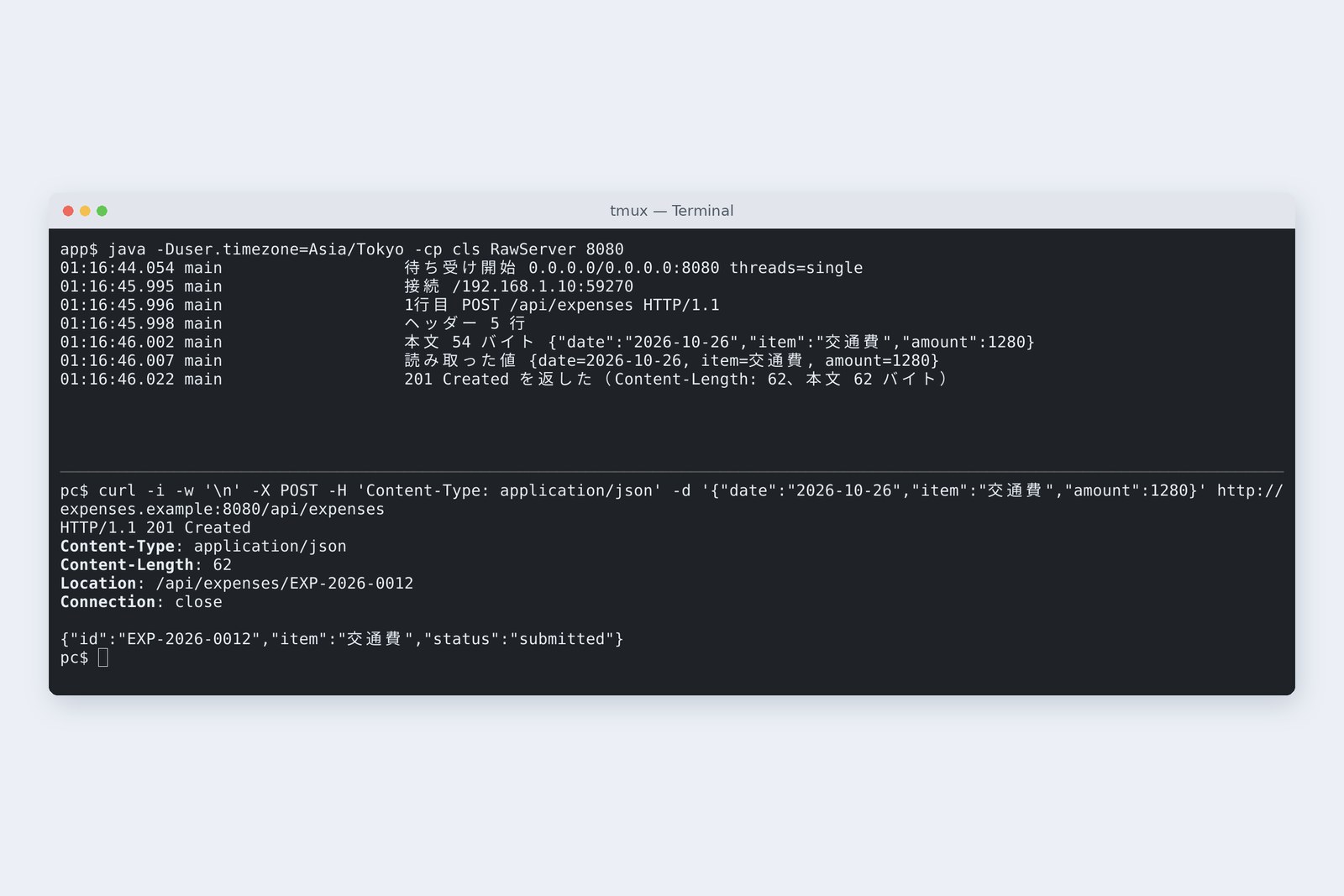
Read the first line, read headers one at a time until a blank line, and finally read as many body bytes as Content-Length says. We sent one claim from the PC with curl.
# One submission from the PC with curl -v (> = lines sent, < = lines received)
> POST /api/expenses HTTP/1.1
> Host: expenses.example:8080
> User-Agent: curl/8.5.0
> Accept: */*
> Content-Type: application/json
> Content-Length: 54
>
} [54 bytes data]
< HTTP/1.1 201 Created
< Content-Type: application/json
< Content-Length: 62
< Location: /api/expenses/EXP-2026-0012
< Connection: close
<
{ [62 bytes data]
{"id":"EXP-2026-0012","item":"交通費","status":"submitted"}
# Meanwhile, the claims server (RawServer) log
01:11:52.825 main                   待ち受け開始 0.0.0.0/0.0.0.0:8080 threads=single
01:11:55.189 main                   接続 /192.168.1.10:34696
01:11:55.191 main                   1行目 POST /api/expenses HTTP/1.1
01:11:55.196 main                   ヘッダー 5 行
01:11:55.204 main                   本文 54 バイト {"date":"2026-10-26","item":"交通費","amount":1280}
01:11:55.221 main                   読み取った値 {date=2026-10-26, item=交通費, amount=1280}
01:11:55.267 main                   201 Created を返した(Content-Length: 62、本文 62 バイト)
How a server reads an HTTP request
Lines can be split by reading up to each line break (CRLF), and the end of the headers is a line with nothing on it. The body, though, has no end marker: it may contain line breaks itself, so they can't delimit it. The sender therefore announces in a header how many bytes the body has, and the receiver reads exactly that many. Get this wrong and you get the next section.
Length in bytes, not characters
Here is the code that writes the reply. It turns the body into bytes and writes their length in Content-Length. For comparison there is also a version that carelessly writes the character count (-Dbug.cl=true).
byte[] b = json.getBytes(StandardCharsets.UTF_8);
int cl = BUG_CL ? json.length() : b.length;  // the buggy version uses the character count
String head = "HTTP/1.1 " + status + "\r\nContent-Type: application/json\r\nContent-Length: " + cl + "\r\n" + extra + "Connection: close\r\n\r\n";
out.write(head.getBytes(StandardCharsets.US_ASCII));
out.write(b);
out.flush();
# -Dbug.cl=true: Content-Length computed from the character count
01:11:58.764 main                   201 Created を返した(Content-Length: 56、本文 62 バイト)
# What curl -v received
< HTTP/1.1 201 Created
< Content-Type: application/json
< Content-Length: 56
< Location: /api/expenses/EXP-2026-0012
< Connection: close
<
{ [62 bytes data]
* Excess found writing body: excess = 6, size = 56, maxdownload = 56, bytecount = 56
{"id":"EXP-2026-0012","item":"交通費","status":"submi
56 characters, 62 bytes: write the length in characters and the body is cut
The server sent all 62 bytes. But curl said, in effect, “I was told Content-Length 56 and there are six bytes too many”, stopped reading at 56, and the body ended at "submi. As we saw in part 2, 交通費 (travel) is three characters and nine bytes; the six-byte difference spilled straight over.
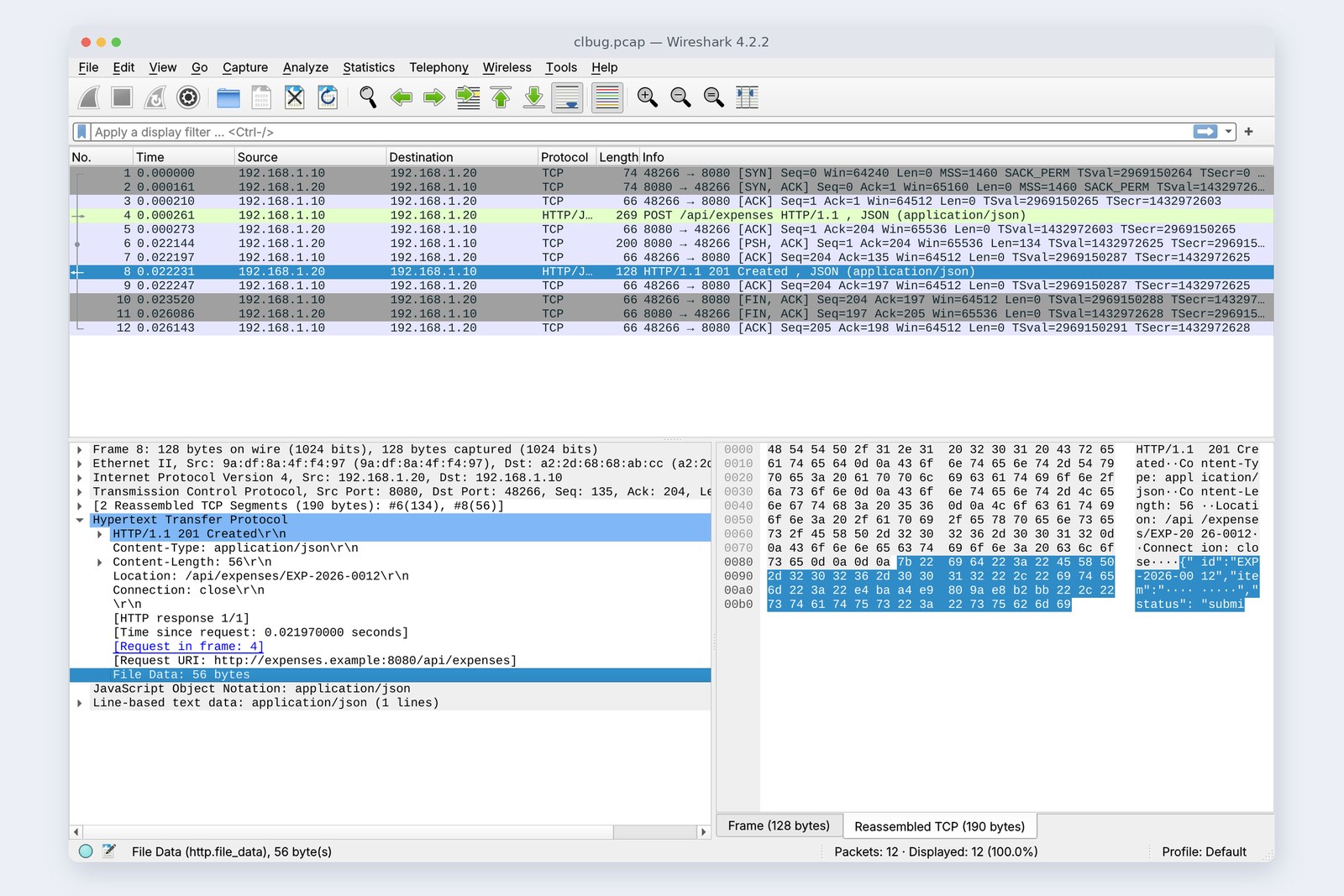
Wireshark shows all 62 bytes on the wire, yet only 56 are read as HTTP. The wire is right but the promise (the header) is wrong, and the receiver believes the promise. Here every exchange closes its connection (Connection: close), so the six extra bytes were simply thrown away. Had the connection been reused, those six bytes would have been read as the start of the next reply, breaking that one too. With items made only of ASCII letters and digits, the bug never shows up at all.
AraiSo that's “every so often one reply gets cut off”… only when the item is in Japanese.
FuruiExactly. On old-school sites they called it “only breaks with full-width characters”.
One at a time, one silent client stops everyone
Next, many clients at once. The most naive design accepts one client (accept), serves it until it's done, and only then accepts the next.
ExecutorService pool = switch (mode) {
    case "platform" -> Executors.newCachedThreadPool();
    case "virtual" -> Executors.newVirtualThreadPerTaskExecutor();
    default -> null;
};
try (var server = new ServerSocket(Integer.parseInt(args[0]))) {
    log("待ち受け開始 " + server.getLocalSocketAddress() + " threads=" + mode);
    while (true) {
        Socket s = server.accept();  // blocks here until someone connects
        if (pool == null) handle(s);  // one at a time, in order
        else pool.submit(() -> handle(s));  // each arrival goes to its own worker
    }
}
Run with -Dthreads=single, pool is null, so handle(s) is called on the spot. We first planted a client that connects and says nothing, then sent a claim with curl.
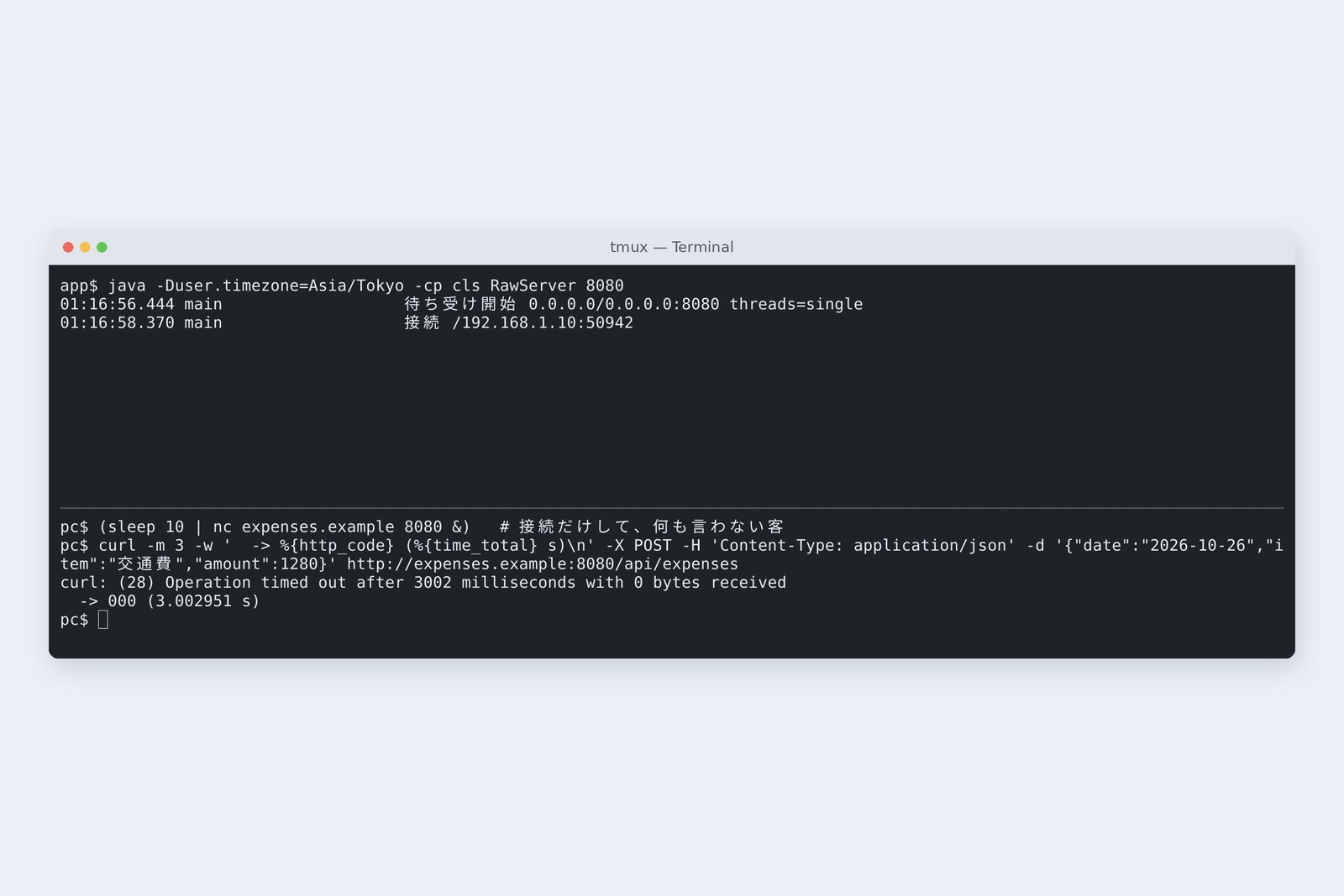
curl waited three seconds, received not a single byte, and gave up. The server log has one line: the silent client's connection. The server sits in readLine waiting for that client's first line, so the next client's turn never comes. curl's connection itself was accepted by the OS (the three-way handshake from the network series had completed), so from curl's side it is “connected, but no reply”.
Clients need not be malicious: a phone with poor signal or a program stuck halfway does the same. There are also attacks that send deliberately slowly to stall a server, and real servers have a way to drop silent clients after a set time.
Threads and virtual threads
The standard fix is to give each arriving client its own worker, a thread. -Dthreads=platform gives each one an OS thread; -Dthreads=virtual gives each one a virtual thread, available since Java 21. With 100 ms of “pretending to work” per request, we sent 50 requests at once from the PC.
# 50 simultaneous submissions from the PC; 100 ms of work each (-Dwork=100)
    single    {201: 50}  total 5.261 s  slowest 5.194 s  fastest 0.151 s  workers 1
    platform  {201: 50}  total 0.196 s  slowest 0.179 s  fastest 0.120 s  workers 50
    virtual   {201: 50}  total 0.225 s  slowest 0.214 s  fastest 0.125 s  workers 50
50 at once: one at a time versus a thread each (measured)
One at a time took 5.261 s: 100 ms × 50 requests, queued end to end. A thread each took about 0.2 s, and counting thread names in the log gave 50 workers. With virtual threads, we planted the silent client again.
# Virtual-thread version: curl while a silent client holds a connection
{"id":"EXP-2026-0012","item":"交通費","status":"submitted"}
  -> 201 (0.026412 s)
# Server log (virtual-22 is the silent client, virtual-29 is curl)
01:12:26.955 virtual-22             接続 /192.168.1.10:33352
01:12:27.436 virtual-29             接続 /192.168.1.10:33362
01:12:27.438 virtual-29             1行目 POST /api/expenses HTTP/1.1
01:12:27.440 virtual-29             ヘッダー 5 行
01:12:27.443 virtual-29             本文 54 バイト {"date":"2026-10-26","item":"交通費","amount":1280}
01:12:27.446 virtual-29             読み取った値 {date=2026-10-26, item=交通費, amount=1280}
01:12:27.464 virtual-29             201 Created を返した(Content-Length: 62、本文 62 バイト)
The silent client (virtual-22) was left waiting, and curl's claim (virtual-29) got its 201 in 0.026 s.
Each OS thread reserves its own memory, so they don't suit thousands or tens of thousands of clients. A virtual thread lets go of its OS thread while it waits, so it can hold many waiting clients cheaply. Silent clients don't go away, though: the connection and the virtual thread stay for as long as the client stays quiet. A limit on waiting (a timeout) is needed either way. Part 1's Tomcat serves clients from a pool of OS threads (200 at most), and Spring Boot switches it to virtual threads with one setting (spring.threads.virtual.enabled=true).
The traps in reading JSON by hand
We read the JSON body “well enough” with a regular expression that just picks out "name":"text" or "name":number in order.
Matcher mt = Pattern.compile("\"(\\w+)\"\\s*:\\s*(\"([^\"]*)\"|([-\\d.]+))").matcher(body);
while (mt.find()) m.put(mt.group(1), mt.group(3) != null ? mt.group(3) : mt.group(4));
The ordinary claim read fine. So we sent three slightly mean, but on real sites perfectly ordinary, claims.
# a An ordinary submission
    body sent: {"date":"2026-10-26","item":"交通費","amount":1280}
    server read: {date=2026-10-26, item=交通費, amount=1280}
    → {"id":"EXP-2026-0012","item":"交通費","status":"submitted"}  -> 201 (0.057934 s)
# b An item containing quotes (会議費 "A社")
    body sent: {"date":"2026-10-26","item":"会議費 \"A社\"","amount":3300}
    server read: {date=2026-10-26, item=会議費 \, amount=3300}
    → {"id":"EXP-2026-0013","item":"会議費 \","status":"submitted"}  -> 201 (0.004617 s)
# c Sent with Python's json.dumps (escapes Japanese as \u by default)
    body sent: {"date": "2026-10-26", "item": "\u4ea4\u901a\u8cbb", "amount": 1280}
    server read: {date=2026-10-26, item=\u4ea4\u901a\u8cbb, amount=1280}
    → 201 {"id":"EXP-2026-0014","item":"\u4ea4\u901a\u8cbb","status":"submitted"}
# d With a receipt breakdown (nested amount)
    body sent: {"date":"2026-10-26","amount":1280,"item":"交通費","receipts":[{"amount":500},{"amount":780}]}
    server read: {date=2026-10-26, amount=780, item=交通費}
    → {"id":"EXP-2026-0015","item":"交通費","status":"submitted"}  -> 201 (0.003378 s)
- b Quotes — in JSON a " inside text is written \". The regex stops at the first ", so the item became 会議費 \, and since we pasted it straight into the reply, the reply's JSON broke too
- c \u escapes — Python's json.dumps writes Japanese as 交… by default. Perfectly valid JSON, stored verbatim as the item
- d Nesting — it picked up the amount inside the breakdown, turning ¥1,280 into ¥780, with no error and a 201
d is the scariest. An exception you'd notice; this quietly accepted the wrong amount. The JSON standard (RFC 8259) is short, but read properly, with its escapes, nesting and number syntax, it isn't worth writing by hand. Writing is no different: paste values into a string and one quote breaks the JSON, or worse, lets someone slip in another field. In part 5 we leave reading and writing JSON to Jackson.
The JDK's HttpServer
The JDK actually ships a small HTTP server: the com.sun.net.httpserver package (module jdk.httpserver). The same claims API takes 31 lines.
    HttpServer server = HttpServer.create(new InetSocketAddress(8080), 0);
    server.createContext("/api/expenses", ex -> {
        String body = new String(ex.getRequestBody().readAllBytes(), StandardCharsets.UTF_8);
        if (!ex.getRequestMethod().equals("POST")) { reply(ex, 405, "{\"error\":\"method not allowed\"}"); return; }
        var req = RawServer.naiveJson(body);  // JSON is still read by hand
        String id = "EXP-2026-%04d".formatted(seq.getAndIncrement());
        ex.getResponseHeaders().add("Location", "/api/expenses/" + id);
        reply(ex, 201, "{\"id\":\"%s\",\"item\":\"%s\",\"status\":\"submitted\"}".formatted(id, req.get("item")));
    });
    server.setExecutor(Executors.newVirtualThreadPerTaskExecutor()); // one virtual thread per request
    server.start();
…
static void reply(HttpExchange ex, int code, String json) throws IOException {
    byte[] b = json.getBytes(StandardCharsets.UTF_8);
    ex.getResponseHeaders().add("Content-Type", "application/json");
    ex.sendResponseHeaders(code, b.length);  // length in bytes
    try (OutputStream os = ex.getResponseBody()) { os.write(b); }
Reading the request line and headers, Content-Length and handing out threads become HttpServer's job; for the length, you just pass the byte count to sendResponseHeaders. We sent a broken request and compared it with our own server.
# A broken request (just the line HELLO), sent with nc
pc$ printf 'HELLO\r\n\r\n' | nc -w 2 expenses.example 8080
# Reply from our RawServer
HTTP/1.1 404 Not Found
Content-Type: application/json
Content-Length: 21
Connection: close

{"error":"not found"}
# Reply from the JDK HttpServer
HTTP/1.1 400 Bad Request
Content-Length: 40
Content-Type: text/html
Connection: close

<h1>400 Bad Request</h1>Bad request line
# Ordinary POST and GET to the JDK HttpServer
POST → {"id":"EXP-2026-0012","item":"交通費","status":"submitted"}  -> 201 (0.063106 s)
GET  → {"error":"method not allowed"}  -> 405
Our server accepted the meaningless line HELLO as “a request with the method HELLO” and earnestly answered 404. HttpServer said “bad request line” and answered 400. Checking the shape of a request is an important part of a server's job. On the other hand, the 405 for GET is a line we wrote ourselves, and JSON is still read by hand. As a tool it is just the right size for a fake API in tests or a small in-house utility.
What doing it by hand taught us
The jobs we did by hand, and who does them
In part 1's Spring Boot, Tomcat accepts connections and assigns workers, reads the request line, headers and body, turns away broken requests and drops silent clients after a set time. Spring MVC picks the front desk by URL and method, and Jackson reads and writes JSON. This time we did some of that ourselves, and got some of it wrong.
Writing it barehanded is for understanding. In production code, leave HTTP to a proven server (Tomcat and the like) and JSON to a proven library (Jackson and the like). Even so, four things are landmarks whenever you read settings or logs, whatever the tool: lengths in bytes, a worker per client, a limit on waiting, and never read JSON by hand.
AraiTomcat is pretty impressive…
FuruiIt is. That's why you do its job yourself once, to see what it does. Old-school apprentices copied the master's work once before they were allowed the master's tools.
Checking on your own PC
| What to try | Command |
|---|---|
| Run the source file directly (no compiling) | java RawServer.java 8080 |
| See the lines sent and received | curl -v -d '{"item":"交通費"}' localhost:8080/api/expenses |
| The character-count length bug | java -Dbug.cl=true RawServer.java 8080 |
| Type HTTP by hand (line by line, then a blank line) | nc localhost 8080 |
| Make a silent client | sleep 10 | nc localhost 8080 |
| Run with virtual threads | java -Dthreads=virtual RawServer.java 8080 |
| The JDK's small file server (Java 18+) | jwebserver -p 8000 |
On Windows, use a WSL terminal instead of nc, or PowerShell's curl.exe. Stop the server with Ctrl+C.
§ — On one page, and next time
- HTTP is lines of text: a request line, headers up to a blank line, and Content-Length bytes of body. A ServerSocket can read it.
- The body has no end marker. Write lengths in bytes; written in characters, the reply broke only for Japanese items.
- One at a time, one silent client stops everyone. 50 requests took 5.26 s.
- A thread each: 0.2 s. Virtual threads hold waiting clients cheaply, but a limit on waiting is still needed.
- JSON read by hand breaks on quotes, \u and nesting. An amount quietly became ¥780.
- The JDK's HttpServer answers even 400 in 31 lines. In Spring Boot, Tomcat, Spring MVC and Jackson share this work.
AraiBack to Spring Boot next?
FuruiNot yet. Next time the database goes barehanded too. We build SQL with JDBC and check, on our own database, why you must never make SQL by gluing strings together.
References
- RFC 9112 — HTTP/1.1(Message Format、Content-Length)
- RFC 9110 — HTTP Semantics(400、404、405)
- RFC 8259 — The JavaScript Object Notation (JSON) Data Interchange Format
- Java SE 25 API — ServerSocket
- Java SE 25 API — Executors(newVirtualThreadPerTaskExecutor)
- Java SE 25 API — com.sun.net.httpserver.HttpServer
- JEP 444 — Virtual Threads
- JEP 408 — Simple Web Server
- JEP 330 — Launch Single-File Source-Code Programs
- Spring Boot — Task Execution and Scheduling(spring.threads.virtual.enabled)
The recordings were made on 27 October 2026 on a cloud Linux machine (Ubuntu 24.04, kernel 6.18) with OpenJDK 25.0.4, curl 8.5.0 and Wireshark 4.2.2. The PC and the claims server are separate network spaces (network namespaces) inside one machine, with the same addresses as in the network series. Times are from a single run and vary slightly each time. Every number and output in the text is a real value read from the commands' output at the time. The characters are fictional.
Old-School Backend, part 3 — HTTP by hand / 2026.10