Old-School Networking / 2026 ・ No.10
Old-School Networking
Part 10: HTTP — reading the submit button's message, line by line
Published
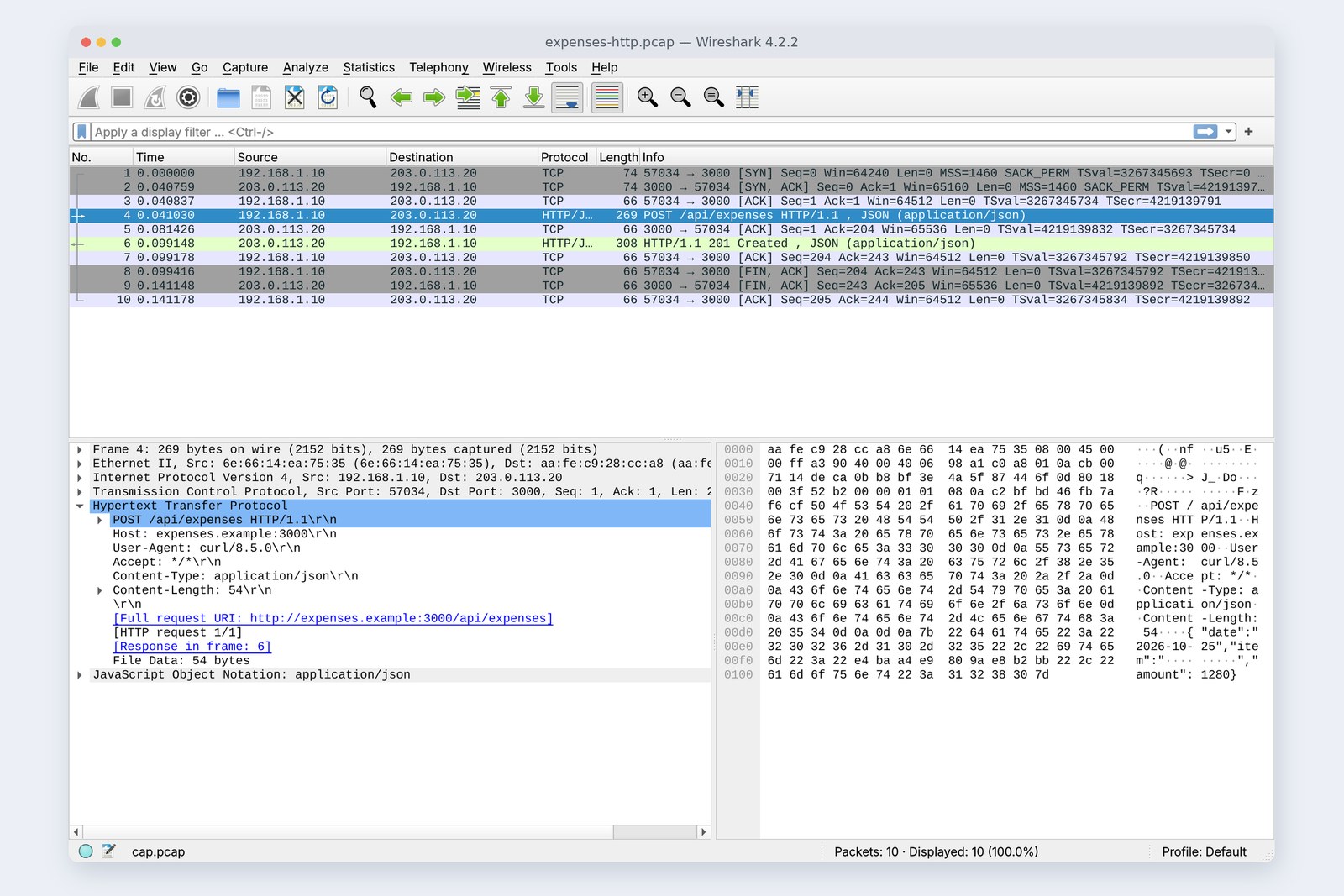
The POST /api/expenses we've been sending since part 1. We looked up the name (part 9), connected (part 6) and locked it (part 8); now, at last, we read what's inside.
HTTP is requests and replies made of plain lines of text. Its shape, methods, status codes, caching (ETag and 304), cookies, CORS, compression and the differences between HTTP/1.1, 2 and 3, all measured on a practice server.
The layer that reads the submission
AraiNine parts since part 1, and we finally get to what the submission says. What a journey.
FuruiThe address on the envelope, the postal route, the registered-mail lock: those were the lower layers. Today we open the letter.
AraiAnd what's written in it?
FuruiDisappointingly ordinary text. “POST /api/expenses, the body is JSON, 54 bytes.” A human can read it.
Route map of all 12 parts (you are here: part 10)
- Shape — first line, headers, a blank line, body. The submission is a 149-byte header plus a 54-byte body (measured)
- Methods and status — what to do, and what happened. We made the server return ten different codes (measured)
- Speed-ups — 304 sends a 0-byte body, gzip turns 2 MB into 6 KB, HTTP/2 runs requests together on one connection (measured)
- Developer pitfalls — the three cookie flags, and who fixes a CORS error
In TCP/IP terms HTTP is layer 7, the topmost agreement in the application layer. The practice network is the same as in part 9: a PC, and across part 6's mischief wire (20 ms each way) the expense server, written in Node.js. It listens for HTTP (port 3000), HTTPS (port 3443, both HTTP/1.1 and HTTP/2) and unencrypted HTTP/2 (port 3080, for observation).
The shape of a request and response
To see inside, we sent the submission over plain, unlocked HTTP and recorded it with curl -v and Wireshark (the Wireshark window is the cover picture).
# Request: first line (method, path, version), headers, a blank line, the body
    POST /api/expenses HTTP/1.1
    Host: expenses.example:3000
    User-Agent: curl/8.5.0
    Accept: */*
    Content-Type: application/json
    Content-Length: 54

    {"date":"2026-10-25","item":"交通費","amount":1280}
# Response: first line (version, status code), headers, a blank line, the body
    HTTP/1.1 201 Created
    Location: /api/expenses/EXP-2026-0012
    Content-Type: application/json
    Content-Length: 43
    Date: Sun, 25 Oct 2026 00:28:31 GMT
    Connection: keep-alive
    Keep-Alive: timeout=5

    {"id":"EXP-2026-0012","status":"submitted"}
Requests and responses alike: first line, headers, blank line, body
The request's first line says what (POST), where (/api/expenses) and which version (HTTP/1.1). The headers that follow are “name: value” lines. Host names the destination (one server answers for many names, so it's required), Content-Type gives the kind of body, and Content-Length its length. A blank line ends the headers, and the 54 bytes of JSON follow.
Part 6 said TCP is a “stream” with no boundaries, so the layer above has to decide where one submission ends. Here is the answer: everything up to the blank line is headers, and the next Content-Length bytes are the body. That rule is how the server cuts up the stream.
The response's first line is version, status code and a short description. 201 Created means “made it”, and Location gives the new submission's address. The closing Connection: keep-alive and Keep-Alive: timeout=5 mean “I'll keep this connection open for five seconds; feel free to use it for your next request.” The connection reuse from parts 6 and 8, which skips the TCP and TLS greetings, is agreed right here.
Packet 4 in Wireshark is 269 bytes. Ethernet 14, IP 20, TCP 32 (with timestamps), the HTTP header 149 and the body 54 add up to exactly 269. Every layer since part 2 is packed into one packet.
Methods: what to do
The first word of the first line is the method. On the same /api/expenses, GET means “show me the list” and POST means “file a new submission”.
| Method | Meaning | Read-only (safe) | Same result if repeated (idempotent) | In the expense app |
|---|---|---|---|---|
| GET | fetch | ✓ | ✓ | view the list |
| POST | send for processing | ✗ | ✗ | submit |
| PUT | replace entirely | ✗ | ✓ | (405 on this practice server) |
| PATCH | change part of it | ✗ | ✗ | fix just the amount |
| DELETE | remove | ✗ | ✓ | withdraw a submission |
The column that matters is the second from the right: idempotent. It means “sending the same request any number of times has the same effect as sending it once.” The HTTP specification (RFC 9110) makes the safe methods such as GET, HEAD and OPTIONS idempotent, along with PUT and DELETE. With an idempotent request, if the reply never comes and you time out, you can safely send it again.
AraiSo POST isn't idempotent… What if the reply is slow and I press the submit button twice?
FuruiTwo ¥1,280 train fares, and two apologies to accounting. So the button greys out once pressed, and the server spots duplicate submissions. You need both.
Status codes: what happened
We deliberately sent the practice server all sorts of requests and lined up the first lines of the replies.
# Replies from the same API to different requests (status line and relevant headers)
    GET /api/expenses                  → 200 OK
    POST /api/expenses (JSON)          → 201 Created Location: /api/expenses/EXP-2026-0013
    POST (broken JSON)                 → 400 Bad Request
    POST (Content-Type: text/plain)    → 415 Unsupported Media Type
    POST (amount is a string)          → 422 Unprocessable Entity
    PUT /api/expenses                  → 405 Method Not Allowed Allow: GET, POST
    GET /expenses (old URL)            → 301 Moved Permanently Location: /api/expenses
    GET /api/expenses/EXP-2026-9999    → 404 Not Found
    DELETE (no key)                    → 401 Unauthorized WWW-Authenticate: Bearer
    DELETE (with key)                  → 204 No Content
Five classes by the first digit (boxes: codes this part's measurements returned)
The first digit of the three gives the class: 2xx success, 3xx “go elsewhere”, 4xx “your request was wrong”, 5xx “the server failed”. A 4xx is for the sender (the front end) to fix; a 5xx is for the server side. In an outage, that one digit is the first thing to look at.
Within 4xx there are distinctions. 400: the JSON is broken and can't be read. 415: “I only take JSON, and you sent text/plain.” 422: “I could read it, but the amount is a string, so the content is wrong.” 401 means “I don't know who you are (show me a key)”, with WWW-Authenticate naming the kind of key. Knowing who you are and still saying “not for you” is 403.
Read the number, not the words after it. RFC 9110 renamed 422 to “Unprocessable Content”, yet this part's Node.js returned the old “Unprocessable Entity”, and nothing broke. HTTP/2 drops the words altogether: in chapter 6's recording the line is just HTTP/2 200.
Caching: ETag and 304
Most times you open the expense list, the same content comes back. Carrying all of it every time is a waste, so the server sends the list along with a tag for its contents, the ETag.
# 1st: the list comes back with a fingerprint of its contents (ETag)
pc$ curl -D - http://expenses.example:3000/api/expenses
    HTTP/1.1 200 OK
    ETag: "41dc1e7dc5a9"
    Cache-Control: no-cache
    (body: 153 bytes)
# 2nd: ask again, saying “I already have the one with this ETag”
pc$ curl -D - -H 'If-None-Match: "41dc1e7dc5a9"' http://expenses.example:3000/api/expenses
    HTTP/1.1 304 Not Modified
    ETag: "41dc1e7dc5a9"
    (body: 0 bytes)
If nothing changed, the reply is just “304, keep what you have”
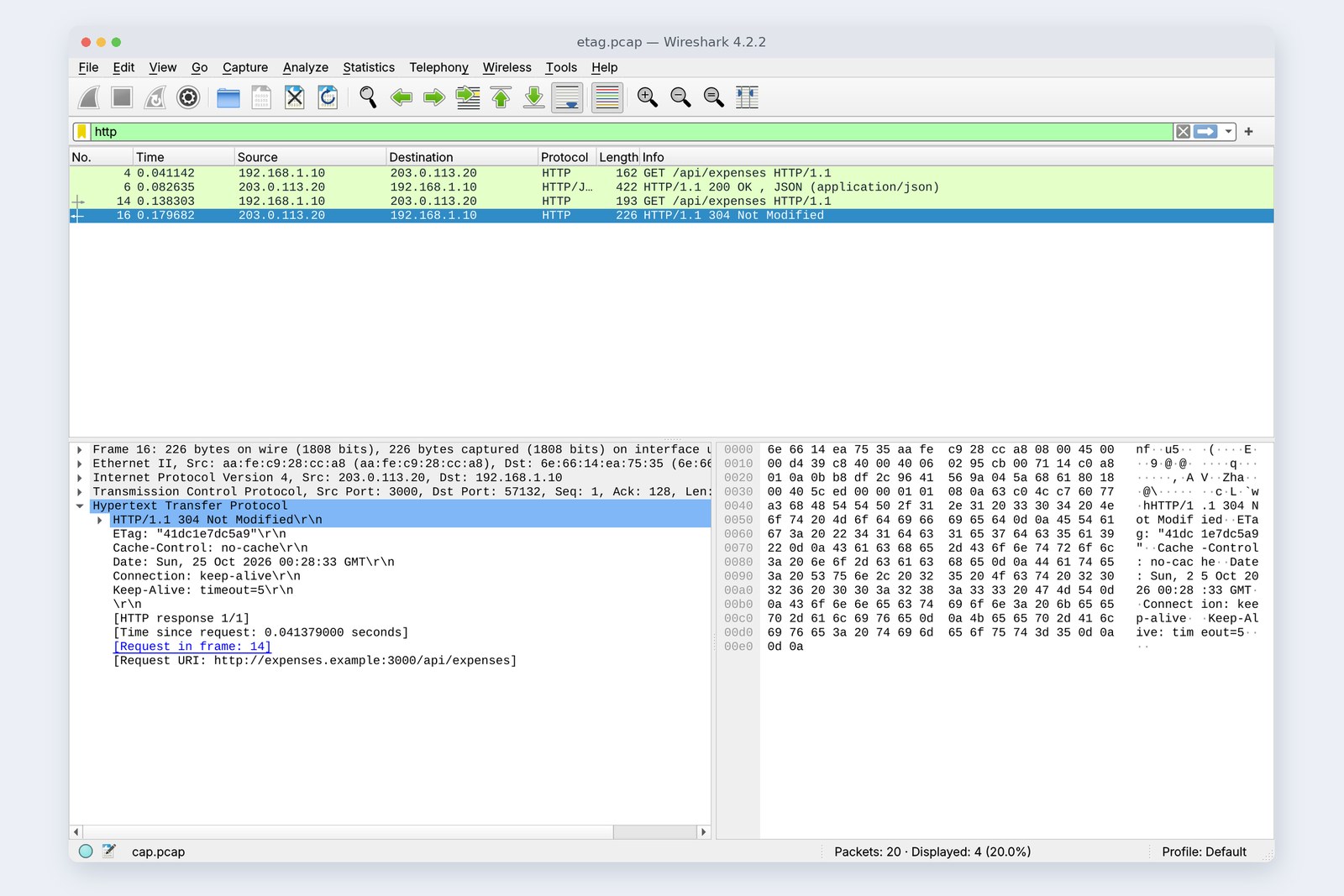
The second time, If-None-Match says “I already have the one with this tag”, and since nothing had changed the server replied 304 Not Modified with a 0-byte body. The number of round trips is the same, but the bigger the list, the more it saves. Browsers do this automatically without being asked.
Despite its name, Cache-Control: no-cache doesn't mean “don't store this”. It means “you may store it, but check with the server before every use” (RFC 9111). To really forbid storing, use no-store. max-age=600 means “use it for ten minutes without asking”, and during that time even the round trip disappears.
“I fixed it but the page didn't change” is usually the cache. While developing, tick “Disable cache” on the Network tab of the browser's developer tools and save yourself a lot of head-scratching.
Forgetful HTTP and cookies
Once a request is done, HTTP forgets everything (it's stateless). So how does it remember that you're logged in? From here on we tried things over HTTPS (port 3443).
# Ask “who am I?” before logging in
pc$ curl https://expenses.example:3443/api/me
    {"error":"login required"}
# Log in, and the server hands over a cookie
pc$ curl -c jar.txt -X POST … https://expenses.example:3443/login
    HTTP/2 200
    set-cookie: sid=480df7…; Path=/; HttpOnly; Secure; SameSite=Lax
# Ask again with the cookie attached
pc$ curl -b jar.txt https://expenses.example:3443/api/me
    {"user":"arai"}
Hand out a numbered ticket, then ask to see it every time
On login the server hands over a numbered ticket (sid) with Set-Cookie. The PC keeps it and attaches it as a Cookie to every later request to the same server, and the server looks the number up: “ah, Arai.” HTTP stays forgetful; cookies let it act as if it remembers. The “session management” job of OSI layer 5, which we met in part 8, is in practice done right here.
The three flags after the ticket are what developers worry about most. HttpOnly hides it from JavaScript, Secure sends it only over HTTPS, and SameSite=Lax leaves it off most requests that arrive from other sites. The ticket is the key itself, so it should be hard to steal and hard to misuse.
A Secure cookie is never sent to an http:// page. If you log in during development and are immediately logged out again, suspect this first. Browsers also often treat localhost specially; more on that in part 11.
CORS: the browser's guard
Say the page lives at https://app.expenses.example and the API at https://expenses.example:3443. The names differ, so they are different origins (the combination of http/https, name and port). Normally a browser won't let one page's JavaScript read replies from another origin. CORS is the agreement by which the API answers whether that's allowed.
When POSTing JSON, the browser first sends an OPTIONS “preflight” before the real request. We reproduced that preflight with curl.
# Preflight: may a page on https://app.expenses.example POST here?
    OPTIONS /api/expenses
    Origin: https://app.expenses.example
    Access-Control-Request-Method: POST
    Access-Control-Request-Headers: content-type
  →
    HTTP/2 204
    access-control-allow-origin: https://app.expenses.example
    access-control-allow-methods: GET, POST, DELETE
    access-control-allow-headers: Content-Type, Authorization
    access-control-max-age: 600
# From an unknown Origin (https://other.example), no permission headers come back
  →
    HTTP/2 204
The browser checks first and sends the real request only if allowed
An allowed origin gets Access-Control-Allow-Origin and friends; an unknown origin gets nothing. Both replies are 204, so note that the server never says “no”. It's the browser that stops it. Without the permission headers the browser doesn't send the real request and prints a CORS error in the developer tools' Console.
AraiI had a CORS error that wouldn't go away no matter how much I changed the front-end code.
FuruiOf course. The fix belongs in the server's reply. That's also why curl never shows it: curl has no guard.
Compression
We exported the expense CSV (2 MB) over a wire throttled to 10 Mbit/s.
# A 2 MB CSV, as is and gzipped (10 Mbit/s, 20 ms each way)
pc$ curl https://expenses.example:3443/api/export.csv
    2,097,152 bytes   1.934 s
pc$ curl --compressed …   (Accept-Encoding: deflate, gzip, br, zstd → Content-Encoding: gzip)
        6,179 bytes   0.142 s
The PC says “I can read these encodings” with Accept-Encoding, and the server compresses and replies with Content-Encoding: gzip. 2,097,152 bytes became 6,179, and 1.934 seconds became 0.142. Browsers do this automatically too.
This CSV, though, is one line repeated, so it shrank absurdly. A 2 MB CSV with varied numbers, dates and amounts, compressed the same way, came to 428,597 bytes, about a fifth. Text (HTML, JSON, CSV) compresses well; JPEGs and video, already compressed, barely shrink at all.
Compressed replies carry Vary: Accept-Encoding, meaning “this reply depends on Accept-Encoding”. It stops a cache along the way from handing a compressed reply to a client that can't read gzip.
HTTP/1.1, 2 and 3
A single page usually takes dozens of requests. We fetched six reports that each take 100 ms, over HTTPS, and compared.
# Six reports that each take 100 ms (HTTPS, 20 ms each way)
    HTTP/1.1, one by one   0.953 s   1 connection(s)
    HTTP/1.1, in parallel  0.246 s   6 connection(s)
    HTTP/2, in parallel    0.245 s   1 connection(s)
Time to fetch six reports (measured)
HTTP/1.1 handles only one request at a time per connection. One after another took 0.953 s, even reusing the connection. The only way to speed up is more connections: six took 0.246 s. Browsers open around six connections to each server for the same reason, which also means six rounds of TCP and TLS greetings.
HTTP/2 numbers the requests on a single connection (streams) and runs them together (multiplexing): 0.245 s on one connection. The text lines became binary frames, but methods, status codes and headers mean exactly the same.
![A Wireshark packet list, every protocol HTTP2. Packets 5, 6 and 7 send three GET /api/report requests as HEADERS[1], HEADERS[3] and HEADERS[5], back to back at 0.041 s. Packet 18 carries HEADERS[1]: 200 OK, HEADERS[3]: 200 OK, DATA[1] and DATA[3] together; packet 20 brings HEADERS[5] and packet 23 DATA[5]](blog-img/network-10/shot-h2-en-1600.jpg)
Over HTTPS, the version is settled in passing during the TLS handshake (ALPN: the Client Hello from part 8 carries a note saying “I speak h2 too”). Browsers use HTTP/2 only over HTTPS; the unencrypted HTTP/2 in the picture is a special setup for observation.
HTTP versions and the layers below
HTTP/2 still had a weak spot. TCP underneath is a single stream, so when one packet is lost, unrelated streams wait for the resend too (part 7's head-of-line blocking). So HTTP/3 moved onto QUIC, on top of UDP. QUIC keeps order per stream and has TLS 1.3 built in. Browsers learn that a server also speaks HTTP/3 from an Alt-Svc header in a reply or a DNS HTTPS record (part 9), and switch over from then on.
Checking your own PC
| What to check | Browser (developer tools) | curl |
|---|---|---|
| Request and reply, line by line | Network tab, pick a row, Headers | curl -v https://example.com/ |
| Just the status code | Status column on the Network tab | curl -s -o /dev/null -w '%{http_code}\n' URL |
| Which version | Right-click a column header and add Protocol (h2, h3) | curl -sI --http2 URL |
| Caching | “(disk cache)” in the Size column, 304 rows | curl -D - -H 'If-None-Match: "…"' URL |
| Compression | Size column (bytes carried vs unpacked size) | curl --compressed -w '%{size_download}\n' URL |
| CORS preflight | Rows of type preflight, errors in the Console | curl -X OPTIONS -H 'Origin: …' -i URL |
Start by opening a site you use every day and watching the Network tab. You'll see how many requests one page makes, which version they use and how much they were compressed.
§ — On one page, and next time
- HTTP is lines of text: first line, headers, blank line, body. Content-Length gives the body's length (how the TCP stream gets cut up).
- The method says what to do. GET, PUT and DELETE are idempotent and safe to resend; beware double submissions with POST.
- Read status codes by the first digit: 4xx is the sender's to fix, 5xx the server's. The words are decoration.
- With ETag and 304, an unchanged resource costs a 0-byte body. no-cache means “check every time”.
- HTTP forgets. A cookie ticket lets it act as if it remembers. HttpOnly, Secure, SameSite.
- The browser enforces CORS; the fix is in the server's reply.
- gzip turned 2 MB into 6 KB (a typical CSV shrinks to about a fifth). HTTP/2 runs requests together on one connection; HTTP/3 runs over QUIC (UDP).
AraiThat's the submit button's whole journey! But where on this map is the localhost:3000 on my own PC?
FuruiGood question. Next time: the developer's network. localhost, inside and outside Docker, proxies. The places you use every day and still get lost in.
References
- RFC 9110 — HTTP Semantics
- RFC 9111 — HTTP Caching
- RFC 9112 — HTTP/1.1
- RFC 9113 — HTTP/2
- RFC 9114 — HTTP/3
- RFC 9000 — QUIC: A UDP-Based Multiplexed and Secure Transport
- RFC 2068 — Hypertext Transfer Protocol -- HTTP/1.1(1997)
- RFC 7540 — Hypertext Transfer Protocol Version 2(2015)
- RFC 6265 — HTTP State Management Mechanism(Cookie)
- RFC 7838 — HTTP Alternative Services(Alt-Svc)
- RFC 9460 — SVCB and HTTPS Resource Records
- WHATWG — Fetch Standard(CORS)
- MDN — Cross-Origin Resource Sharing (CORS)
- MDN — Connection management in HTTP/1.x
- curl — man page
- Node.js — HTTP/2
The recordings were made on 25 October 2026 on a practice network the author built with network namespaces on Linux (Ubuntu 24.04, kernel 6.18) in the cloud. The server is a practice program written with the http and http2 modules of Node.js 22.23; the PC side is curl 8.5.0. Every name and address is either reserved for documentation or made up for the practice. Between the PC and the server runs part 6's mischief wire (20 ms each way, plus 10 Mbit/s in the compression chapter only). Every number in the text is a real value read from those recordings and the commands' output. The varied-CSV figure is a 2 MB CSV the author generated, compressed with gzip at the same level (6). The characters are fictional.
Old-School Networking, part 10 — HTTP / 2026.10