Old-School Backend / 2026 ・ No.07
Old-School Backend
Part 7: Exceptions and replies — graduating from “A system error has occurred”
Published
Last time the server learned to refuse claims. But the replies say only “Bad Request” or 500, and the screen has no idea what to tell the user.
This time we decide where to catch exceptions, which status code to use and what to write back. We measure plain Spring Boot, ProblemDetail (RFC 9457), an exception helper (@RestControllerAdvice), swallowed exceptions, reference numbers, and what must never be sent back.
“A system error has occurred”
AraiFor errors, “A system error has occurred. Please contact the administrator” will do, right?
FuruiWhat should a user who sees that screen fix?
Arai…Ask the administrator?
FuruiAnd which log should I, the administrator, look at? On old-school sites, that one sentence brought in hundreds of enquiries.
The 15-part route map (you are here: part 7)
- Nothing added — a missing reference number and a double click are both 500s: the user's doing, looking like failures (measured)
- ProblemDetail — one setting tidies the shape, but the content is “Invalid request content.” (measured)
- An exception helper — 400 with per-field reasons, 404, 409, and 500 with a reference number (measured)
- Swallowing — nothing was written, yet 201 and a reference number came back (measured)
- What never to send — one setting put the SQL and the row's contents in the reply (measured)
The application is last time's Spring Boot 4.1.2 plus an experimental counter (/api/v3), a clerk who swallows exceptions, and an exception helper (ApiErrors). The database has a unique index allowing one claim per applicant, date, item and amount (for the double-click experiment).
Replies with nothing added
First, five kinds of troublesome requests to Spring Boot with nothing added.
# Spring Boot's replies with nothing added
## 1 fails the marks (empty item, negative amount)
HTTP/1.1 400   Content-Type: application/json
{"timestamp":"2026-10-30T16:08:06.420Z","status":400,"error":"Bad Request","path":"/api/v3/expenses"}
## 2 broken JSON
HTTP/1.1 400   Content-Type: application/json
{"timestamp":"2026-10-30T16:08:06.519Z","status":400,"error":"Bad Request","path":"/api/v3/expenses"}
## 3 a reference number that doesn't exist
HTTP/1.1 500   Content-Type: application/json
{"timestamp":"2026-10-30T16:08:06.609Z","status":500,"error":"Internal Server Error","path":"/api/v3/expenses/EXP-2026-9999"}
## 4 the same claim twice (a double click)
HTTP/1.1 201   Content-Type: application/json
{"id":"EXP-2026-2894"}
HTTP/1.1 500   Content-Type: application/json
{"timestamp":"2026-10-30T16:08:06.763Z","status":500,"error":"Internal Server Error","path":"/api/v3/expenses"}
## 5 the DB refuses (a negative amount through the counter without @Valid)
HTTP/1.1 500   Content-Type: application/json
{"timestamp":"2026-10-30T16:08:06.824Z","status":500,"error":"Internal Server Error","path":"/api/novalid/expenses"}
A claim failing the marks and broken JSON got 400. Fine so far, except both say only “Bad Request”. And “a missing reference number” and “the same claim twice” got 500. Nobody caught the clerk's “not found” exception or the double click refused by the database's unique index, so both came back as “server failure”. The user's mistakes look like breakdowns. Monitoring counts 500s and raises alarms, so the operations team gets woken up at night too (part 13).
Turning on ProblemDetail
There is a standard shape for HTTP APIs reporting failures: ProblemDetail (RFC 9457, formerly RFC 7807). Spring Boot turns it on with one setting.
# Started with spring.mvc.problemdetails.enabled=true
## 1 fails the marks (empty item, negative amount)
HTTP/1.1 400   Content-Type: application/problem+json
{"detail":"Invalid request content.","instance":"/api/v3/expenses","status":400,"title":"Bad Request"}
## 2 broken JSON
HTTP/1.1 400   Content-Type: application/problem+json
{"detail":"Failed to read request","instance":"/api/v3/expenses","status":400,"title":"Bad Request"}
## 3 a reference number that doesn't exist
HTTP/1.1 500   Content-Type: application/json
{"timestamp":"2026-10-30T16:08:13.943Z","status":500,"error":"Internal Server Error","path":"/api/v3/expenses/EXP-2026-9999"}
## 4 the same claim twice (a double click)
HTTP/1.1 201   Content-Type: application/json
{"id":"EXP-2026-2897"}
HTTP/1.1 500   Content-Type: application/json
{"timestamp":"2026-10-30T16:08:14.102Z","status":500,"error":"Internal Server Error","path":"/api/v3/expenses"}
## 5 the DB refuses (a negative amount through the counter without @Valid)
HTTP/1.1 500   Content-Type: application/json
{"timestamp":"2026-10-30T16:08:14.161Z","status":500,"error":"Internal Server Error","path":"/api/novalid/expenses"}
The 400s became application/problem+json with title, detail and instance. But the content is “Invalid request content.”, with no hint of which field was wrong, and what should be 404 or 409 is still 500. The machinery for a tidy shape is there, but which exception means what is something only the application can decide.
One exception helper
The clerk simply throws a business exception when a claim isn't there. It knows nothing about HTTP.
@Transactional(readOnly = true)
public Expense find(String id) {
    return repo.findById(id).orElseThrow(() -> new ExpenseNotFoundException(id));  // not there → a business exception
}
Then we put one helper in the whole application to catch exceptions and build replies. The @ExceptionHandler methods of a class marked @RestControllerAdvice pick a status code and wording for each kind of exception.
@RestControllerAdvice
@ConditionalOnProperty("demo.advice")
public class ApiErrors {
    private static final Logger log = LoggerFactory.getLogger(ApiErrors.class);

    @ExceptionHandler(MethodArgumentNotValidException.class)  // fails the marks → 400, reasons per field
    ProblemDetail invalid(MethodArgumentNotValidException e) {
        ProblemDetail p = problem(HttpStatus.BAD_REQUEST, "invalid-request", "入力に誤りがあります", "直してから、もう一度送ってください");
        List<Map<String, String>> errors = e.getBindingResult().getFieldErrors().stream()
                .map(f -> Map.of("field", f.getField(), "message", String.valueOf(f.getDefaultMessage()))).toList();
        p.setProperty("errors", errors);
        return p;
    }

    @ExceptionHandler(HttpMessageNotReadableException.class)  // unreadable as JSON → 400
    ProblemDetail unreadable(HttpMessageNotReadableException e) {
        return problem(HttpStatus.BAD_REQUEST, "unreadable", "申請の形が読めません", "JSON の書き方か、項目の型が違います");
    }

    @ExceptionHandler(ExpenseNotFoundException.class)  // not there → 404
    ProblemDetail notFound(ExpenseNotFoundException e) {
        return problem(HttpStatus.NOT_FOUND, "expense-not-found", "申請が見つかりません", "受付番号 " + e.id() + " の申請はありません");
    }

    @ExceptionHandler(DuplicateKeyException.class)  // the same claim exists → 409
    ProblemDetail duplicate(DuplicateKeyException e) {
        return problem(HttpStatus.CONFLICT, "duplicate", "同じ申請がすでにあります", "同じ日・品目・金額の申請は、1回だけ出せます");
    }

    @ExceptionHandler(Exception.class)  // anything else → 500; hide details, link by number
    ProblemDetail unexpected(Exception e) {
        String no = "ERR-" + HexFormat.of().toHexDigits(ThreadLocalRandom.current().nextInt());
        log.error("問い合わせ番号 {}", no, e);
        ProblemDetail p = problem(HttpStatus.INTERNAL_SERVER_ERROR, "unexpected", "処理できませんでした", "時間をおいてもう一度お試しください。続くときは問い合わせ番号をお知らせください");
        p.setProperty("errorId", no);
        return p;
    }
# With an exception-catching helper (ApiErrors) added
## 1 fails the marks (empty item, negative amount)
HTTP/1.1 400   Content-Type: application/problem+json
{"detail":"直してから、もう一度送ってください","instance":"/api/v3/expenses","status":400,"title":"入力に誤りがあります","type":"https://expenses.example/problems/invalid-request","errors":[{"field":"item","message":"must not be blank"},{"field":"amount","message":"must be greater than 0"}]}
## 2 broken JSON
HTTP/1.1 400   Content-Type: application/problem+json
{"detail":"JSON の書き方か、項目の型が違います","instance":"/api/v3/expenses","status":400,"title":"申請の形が読めません","type":"https://expenses.example/problems/unreadable"}
## 3 a reference number that doesn't exist
HTTP/1.1 404   Content-Type: application/problem+json
{"detail":"受付番号 EXP-2026-9999 の申請はありません","instance":"/api/v3/expenses/EXP-2026-9999","status":404,"title":"申請が見つかりません","type":"https://expenses.example/problems/expense-not-found"}
## 4 the same claim twice (a double click)
HTTP/1.1 201   Content-Type: application/json
{"id":"EXP-2026-2900"}
HTTP/1.1 409   Content-Type: application/problem+json
{"detail":"同じ日・品目・金額の申請は、1回だけ出せます","instance":"/api/v3/expenses","status":409,"title":"同じ申請がすでにあります","type":"https://expenses.example/problems/duplicate"}
## 5 the DB refuses (a negative amount through the counter without @Valid)
HTTP/1.1 500   Content-Type: application/problem+json
{"detail":"時間をおいてもう一度お試しください。続くときは問い合わせ番号をお知らせください","instance":"/api/novalid/expenses","status":500,"title":"処理できませんでした","type":"https://expenses.example/problems/unexpected","errorId":"ERR-6ec9cea0"}
Plain Spring Boot versus with the helper (measured)
The 400 gained per-field reasons, the missing reference number became 404, and the double click 409 (Conflict: it clashes with the current state). Only the database refusal is still a 500, and now it carries a reference number. The counter's code has not a single try-catch.
ProblemDetail fields and their readers
Reasons in the user's language
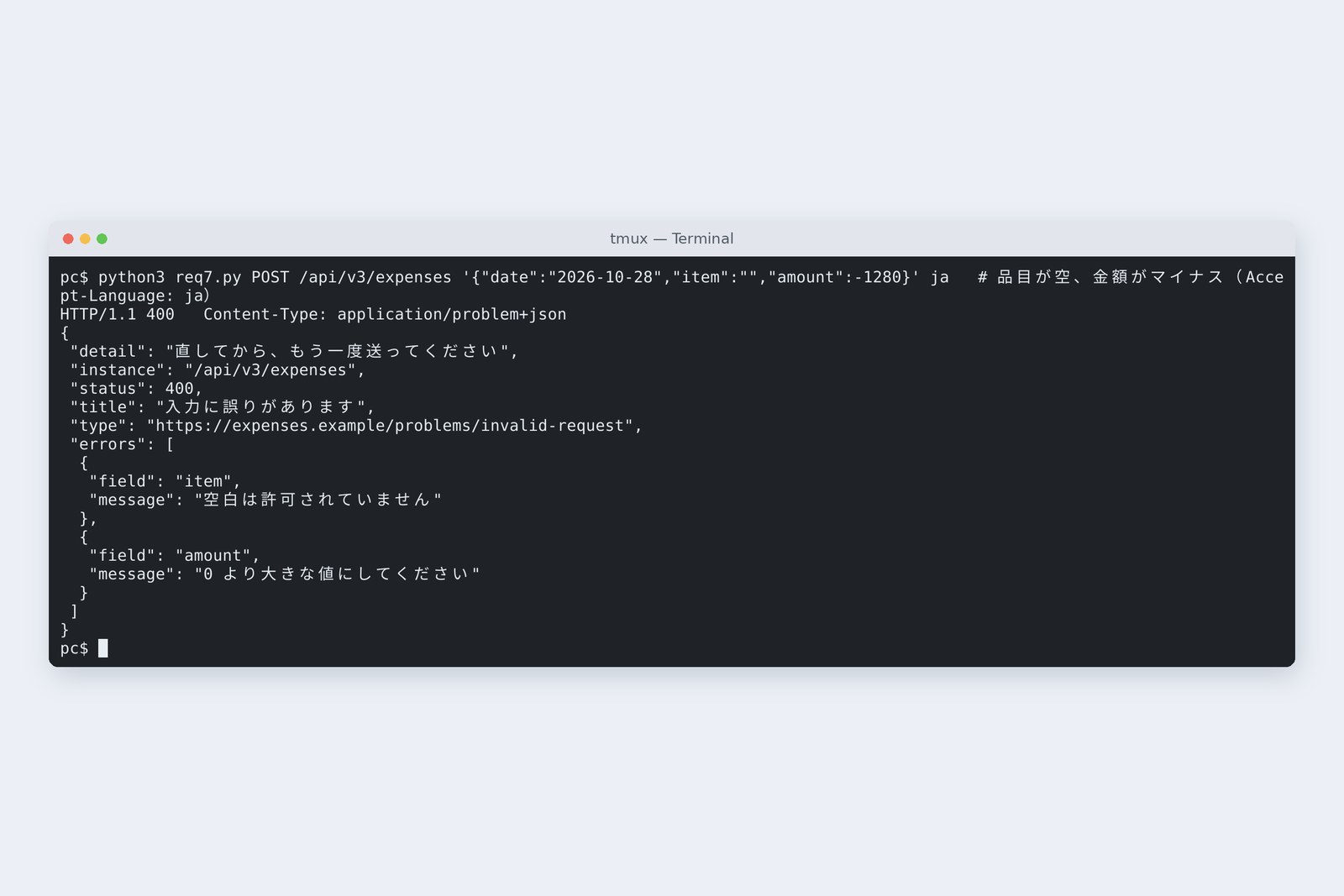
Right after adding the helper, the 400's reasons were in English, like “must not be blank”. We sent the same claim with different language preferences (Accept-Language).
# The same claim with a different Accept-Language
## 1 fails the marks (Accept-Language: ja)
HTTP/1.1 400   Content-Type: application/problem+json
{"detail":"直してから、もう一度送ってください","instance":"/api/v3/expenses","status":400,"title":"入力に誤りがあります","type":"https://expenses.example/problems/invalid-request","errors":[{"field":"item","message":"空白は許可されていません"},{"field":"amount","message":"0 より大きな値にしてください"}]}
## 1 fails the marks (Accept-Language: en)
HTTP/1.1 400   Content-Type: application/problem+json
{"detail":"直してから、もう一度送ってください","instance":"/api/v3/expenses","status":400,"title":"入力に誤りがあります","type":"https://expenses.example/problems/invalid-request","errors":[{"field":"amount","message":"must be greater than 0"},{"field":"item","message":"must not be blank"}]}
With Accept-Language: ja the reasons came back in Japanese. Spring picks the marks' wording to match the request's language, and browsers send the user's language automatically, so claims from the screen get reasons in that language. The default wording is a little stiff, though; in production, write your own in the marks (message = "…") or provide a message list (ValidationMessages.properties).
Don't swallow exceptions
Here is a pattern common in old-school code before helpers existed: catch the exception, print it, carry on.
# The old-school clerk (the gist of SwallowService)
public String submit(ExpenseRequest req) {
    String id = "EXP-2026-%04d".formatted(repo.nextNumber());
    try {
        repo.insert(id, "新井", req);
    } catch (Exception e) {
        e.printStackTrace();  // the screen learns nothing
    }
    return id;  // returns a number even if nothing was written
}
## 6 a negative amount to the clerk who swallows exceptions
HTTP/1.1 201   Content-Type: application/json
{"id":"EXP-2026-2903"}
# Looking up that reference number
HTTP/1.1 404   Content-Type: application/problem+json
{"detail":"受付番号 EXP-2026-2903 の申請はありません","instance":"/api/v3/expenses/EXP-2026-2903","status":404,"title":"申請が見つかりません","type":"https://expenses.example/problems/expense-not-found"}
# Application log (part of the stack trace printed to stderr)
    at java.base/java.lang.Thread.run(Thread.java:1474)
Caused by: org.postgresql.util.PSQLException: ERROR: new row for relation "expense" violates check constraint "amount_positive"
  Detail: Failing row contains (EXP-2026-2903, 2026-10-28, 交通費, -1280.00, submitted, 2026-10-31 01:08:22.039223+09, 新井).
    at org.postgresql.core.v3.QueryExecutorImpl.receiveErrorResponse(QueryExecutorImpl.java:2993)
The database refused the negative amount, yet the screen got 201 and a reference number. The user goes home thinking it worked, and at month end accounting says “there's no such claim”. The log does show the exception, but nothing links it to the request. If you catch and do nothing, don't catch. Let exceptions rise to the helper and the transaction rolls back (part 5) and the reply is right.
AraiWith a reference number on screen, anyone would believe it…
FuruiWorse than an error is a false success. Users notice errors; accounting notices false successes a month later.
Link 500s with a reference number
Whatever matches no exception type (the database refused, another system is down, a bug) really is the server's problem, so it's a 500. The helper writes no details into the reply, just a number, and logs everything under the same number.
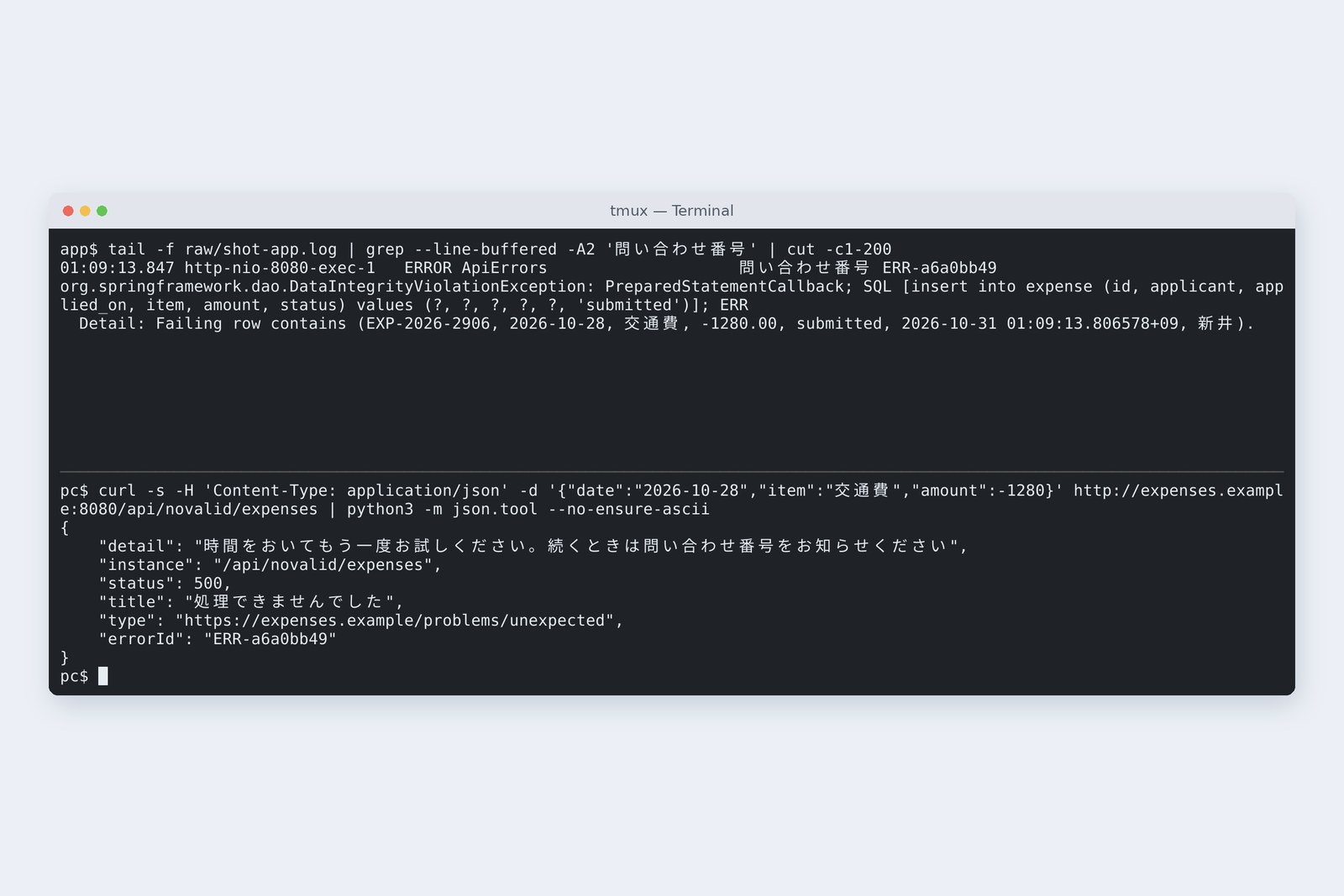
# Meanwhile, the application log (same reference, full details)
01:08:21.825 http-nio-8080-exec-7   ERROR ApiErrors                    問い合わせ番号 ERR-6ec9cea0
org.springframework.dao.DataIntegrityViolationException: PreparedStatementCallback; SQL [insert into expense (id, applicant, applied_on, item, amount, status) values (?, ?, ?, ?, ?, 'submitted')]; ERR
  Detail: Failing row contains (EXP-2026-2902, 2026-10-28, 交通費, -1280.00, submitted, 2026-10-31 01:08:21.818124+09, 新井).
	at org.springframework.jdbc.support.SQLStateSQLExceptionTranslator.doTranslate(SQLStateSQLExceptionTranslator.java:140)
If the user tells us “it said ERR-6ec9cea0”, we land on the log's first line. Conversely, there are settings that write the details into the reply.
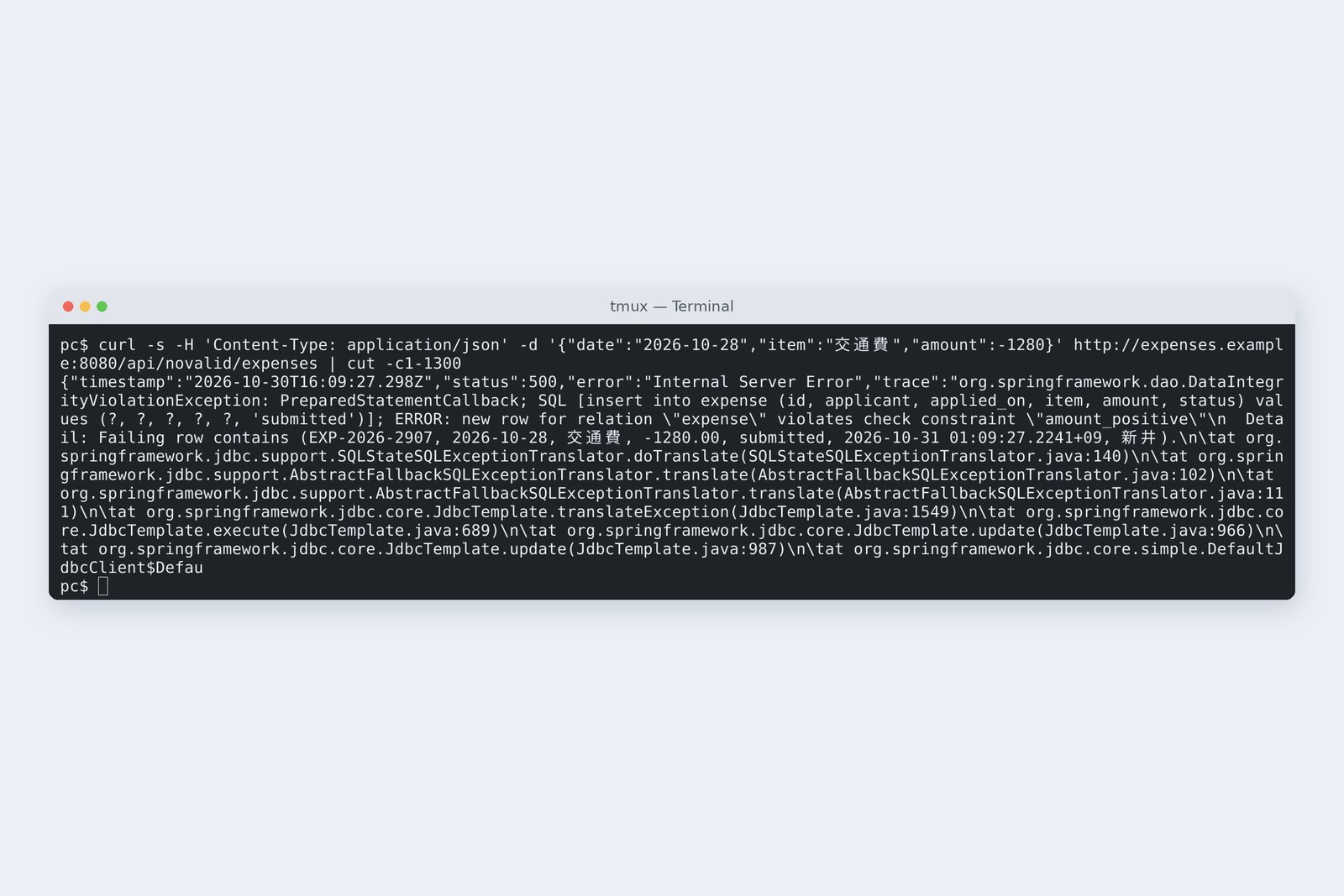
# Started with spring.web.error.include-message=always and include-stacktrace=always
## 5 the DB refuses (include-message=always, include-stacktrace=always)
HTTP/1.1 500   Content-Type: application/json
{"timestamp":"2026-10-30T16:08:28.782Z","status":500,"error":"Internal Server Error","trace":"org.springframework.dao.DataIntegrityViolationException: PreparedStatementCallback; SQL [insert into expense (id, applicant, applied_on, item, amount, status) v…(91 行、8842 文字)","message":"PreparedStatementCallback; SQL [insert into expense (id, applicant, applied_on, item, amount, status) values (?, ?, ?, ?, ?, 'submitted')]; ERROR: new row for relation \"expense\" violates check constraint \"amount_positive\"\n  Detail: Failing row contains (EXP-2026-2904, 2026-10-28, 交通費, -1280.00, submitted, 2026-10-31 01:08:28.733548+09, 新井).","path":"/api/novalid/expenses"}
The reply carried a 91-line, 8,842-character stack trace, the SQL, table and column names, the constraint name and the failing row's contents. Component names and line numbers tell an attacker which weaknesses to try (part 11). Use include-stacktrace and include-message nowhere but your own development PC.
Choosing status codes
| Status | Meaning | In the expense system | Who fixes it |
|---|---|---|---|
| 400 | the request's shape is wrong | empty item, broken JSON | the sender (fix and resend) |
| 401 / 403 | unknown caller / not allowed | not logged in, someone else's claim (part 11) | the sender |
| 404 | not there | a missing reference number | the sender |
| 409 | clashes with the current state | double click, editing an approved claim (part 10) | the sender (recheck the state) |
| 500 | the server's problem | database refused, a bug | the server side (reference number) |
| 503 | can't take it right now | mid-deployment, overloaded (part 15) | waiting fixes it |
Exceptions go up and become a reply in one place
4xx means “the sender can fix it”; 5xx means “the server's problem”. Keep that line and the screen can choose between showing how to fix and apologising, and monitoring counts only real failures. When unsure, ask: would it pass if the user changed something?
How the screen takes it
The “red text next to the field” from part 9 of the frontend series can show the server's reasons too. For example:
const res = await fetch("/api/v3/expenses", {
  method: "POST",
  headers: { "Content-Type": "application/json" },   // the browser adds Accept-Language
  body: JSON.stringify(form),
});
if (res.ok) { /* show the reference number */ }
else if (res.headers.get("Content-Type")?.startsWith("application/problem+json")) {
  const p = await res.json();
  (p.errors ?? []).forEach(e => showFieldError(e.field, e.message));   // next to each field
  if (p.status === 409) showMessage(p.title);                           // double click
  if (p.errorId) showMessage(`${p.title} (reference ${p.errorId})`);
}
The screen chooses how to show it by status and type, and can show title and detail as they are. The screen should also disable the button against double clicks (frontend series); the server's 409 is the last brake for when that's bypassed.
Checking on your own PC
| What to try | How to write it |
|---|---|
| Use the ProblemDetail shape | spring.mvc.problemdetails.enabled=true |
| Add an exception helper | @RestControllerAdvice + @ExceptionHandler |
| Add fields | problem.setProperty("errors", …) |
| Try another language | curl -H 'Accept-Language: ja' … |
| See the reply's shape and status | curl -si … | head |
| Never in production | spring.web.error.include-stacktrace=always |
In Spring Boot 4, the settings for including stack traces and the like in replies moved from server.error.* to spring.web.error.*. Copying setting names from older articles may do nothing; in this experiment the old names changed nothing.
§ — On one page, and next time
- With nothing added, “not found” and double clicks are 500s: the user's mistakes look like failures.
- ProblemDetail (RFC 9457) tidies the shape, but the application decides which exception means what.
- The clerk throws; one @RestControllerAdvice helper turns exceptions into status codes and wording. No try-catch in counters.
- 400s carry per-field reasons in the user's language.
- Don't swallow exceptions. A false success, a 201 for nothing written, is the worst.
- 500s hide the details and link to the log by reference number. Never send stack traces.
AraiSo we've graduated from “A system error has occurred”.
FuruiWe have. Next time, back to the storekeeper: JdbcClient with hand-written SQL, JPA and MyBatis. We'll write the same claims list three ways and compare what happens.
References
- RFC 9457 — Problem Details for HTTP APIs
- RFC 9110 — HTTP Semantics(Status Codes)
- Spring Framework — Error Responses(ProblemDetail)
- Spring Framework — Controller Advice
- Spring Boot — Servlet Web Applications(Error Handling)
- OWASP — Error Handling Cheat Sheet
The recordings were made on 31 October 2026 on a cloud Linux machine (Ubuntu 24.04, kernel 6.18) with Spring Boot 4.1.2 (Spring Framework 7, Tomcat 11, Hibernate Validator 9), OpenJDK 25.0.4 and PostgreSQL 16.15. The PC, the claims server and the database server are separate network spaces (network namespaces) inside one machine. Reference numbers change every run. The screen code is an illustrative example. Every number and output in the text is a real value read from the commands' output at the time. The characters are fictional.
Old-School Backend, part 7 — Exceptions and replies / 2026.10