Old-School Backend / 2026 ・ No.13
Old-School Backend
Part 13: Logging and monitoring — so you can read afterwards what happened
Published
![A terminal. show13.py trace: reply 500, X-Request-Id 436fec6c, errorId ERR-436fec6c. grep 436fec6c app.log returns two lines: ERROR [436fec6c] ApiErrors 問い合わせ番号 ERR-436fec6c, and INFO [436fec6c] access POST /api/v12/claims/EXP-2026-5020/receipts 500 296 ms user=arai. 182 lines from the same moment carry no number](blog-img/backend-13/shot-cover-en-1600.jpg)
Last time, the user who sent a 12 MB photo never got a reply. What did the server's log say at that moment?
This time we start by rereading our application's logs. We measure unknown URLs turning into 500s, hashes and claim contents in the log, and one request's lines buried among everyone else's, and then make it readable afterwards with request numbers, structured logs, Actuator's numbers and health checks. Finally, we stop the database.
What the log said about 12 MB
AraiWith the 12 MB photo, there must be a big error in the log.
FuruiLet's look.
The 15-part route map (you are here: part 13)
# The application log when the 12.05 MB photo was sent (all of it)
10:52:56.867 INFO  [4a5dcd45] access               POST /api/v12/claims/EXP-2026-5020/receipts 413 51 ms user=arai
# The sender
  ERR BrokenPipeError  (1070.3 ms)
One line, and it says “returned 413”. The server believes it wrote a refusal, but the user never received it (last part's Tomcat discard limit). A log only records what the server saw. What happened on the user's screen has to be learned some other way.
- Unknown URLs — one /favicon.ico gave a 500 and 59 log lines (measured)
- Volume — under development settings, one GET wrote 5 lines, 533 bytes (measured)
- What must not be logged — hashes, SQL values and file names in the log (measured)
- Numbers, metrics, health — gather one request's lines, watch counts, 30 s when the DB stops (measured)
We added Spring Boot Actuator and Micrometer, which publishes numbers in Prometheus format. The logging settings now look like this for production.
# application.properties for production (what part 13 changed)
logging.pattern.console=%d{HH:mm:ss.SSS} %-5level [%X{reqId:--}] %-20.20logger{0} %msg%n
management.server.port=8081
management.endpoints.web.exposure.include=health,metrics,prometheus
management.endpoint.health.show-details=always
spring.servlet.multipart.max-file-size=10MB
spring.servlet.multipart.max-request-size=10MB
Unknown URLs were 500s
Browsers fetch /favicon.ico (the little tab icon) without being asked. Here is the log after opening it once.
# The log after opening /favicon.ico once (before the fix)
10:51:57.108 ERROR [9734d104] ApiErrors            問い合わせ番号 ERR-9734d104
org.springframework.web.servlet.resource.NoResourceFoundException: No static resource favicon.ico for request '/favico…
	at org.springframework.web.servlet.resource.ResourceHttpRequestHandler.handleRequest(ResourceHttpRequestHandler.java:…
  … (56 lines of at follow; 59 lines in all)
# The reply
  500  処理できませんでしたerrorId=ERR-9734d104
Part 7's “everything else is a 500” handler was turning unknown URLs into 500s too, with a 59-line stack trace. Every time a browser or a bot pokes at a random URL, another ERROR piles up, and the real 500s get buried. We now answer unknown URLs with 404 and no stack trace.
This 500 had been there since part 7. Without the habit of reading logs, you don't notice.
Log volume and levels
Throughout this series we've added DEBUG logging to see the SQL. We sent the same GET 500 times with those settings as they were (development) and with production settings.
# The same GET 500 times (logged-in Arai, two runs each)
  settings      time      lines   bytes     per request
  development   2655 ms   2500    266,514   5 lines / 533 B
  production    1820 ms   500     52,001    1 lines / 104 B
  development   2091 ms   2500    266,502   5 lines / 533 B
  production    2052 ms   500     52,002    1 lines / 104 B
# Lines written by one GET under the development settings
10:53:08.968 DEBUG [c415eb98] DataSourceUtils      Fetching JDBC Connection from DataSource
10:53:08.969 DEBUG [c415eb98] findVisible          ==>  Preparing: select id, applicant, item, amount, status, version…
10:53:08.969 DEBUG [c415eb98] findVisible          ==> Parameters: EXP-2026-5001(String), 新井(String)
10:53:08.971 DEBUG [c415eb98] findVisible          <==      Total: 1
10:53:08.972 INFO  [c415eb98] access               GET /api/v11/claims/EXP-2026-5001 200 5 ms user=arai
Under development settings, one GET writes 5 lines and 533 bytes; under production settings, one register line of 104 bytes. At 100,000 requests a day that's 53 MB against 10 MB (calculated). The timing difference wasn't clear in this experiment, but the more you log, the more disk and reader time it takes.
| Level | What to write | Example here |
|---|---|---|
| ERROR | something a person must look at and act on | an unexpected 500 (with enquiry number) |
| WARN | works for now, but trouble if it continues | the pool threw away broken connections |
| INFO | the business flow; roughly one line per request | the register (who, what, result, time) |
| DEBUG | development only; off in production | SQL and its values |
What must never be logged
In part 11 we noticed bcrypt hashes in MyBatis's DEBUG log. We re-seeded the users, logged in, uploaded a receipt and approved a claim, then counted.
# Counting the log after login, a receipt and an approval (users re-seeded first)
  bcrypt hash               development 3   production 0
  password                  development 0   production 0
  cookie                    development 0   production 0
  SQL values (Parameters:)  development 13  production 0
  file name                 development 1   production 0
# Lines that appeared under the development settings (excerpt)
10:53:55.442 DEBUG [-] save                 ==> Parameters: arai(String), {bcrypt}$2a$10$B0GlrG… 新井(String), APPLICANT(String)
10:54:04.956 DEBUG [c128d0d7] insert               ==> Parameters: d43b4ac3-fa09-4449-9b0f-cd2e4464b185(String), EXP-2026-5020(String), 領収書(新幹線).jpg(S…
Neither setting logged the password itself or the cookie (in this experiment, neither Spring Security nor Tomcat wrote them). But under development settings, hashes and receipt file names appeared as SQL values. In the previous chapter's GET, the claim number and the applicant's name were there as SQL values too. Far more people read logs than read the database.
With production settings, the SQL value lines disappeared. Logs should carry numbers and results: the claim number is enough to know which claim; the contents live in the database.
Request numbers
A server handles many people's requests at once, so log lines from different people interleave. We give each request a number as it arrives, put it on every log line, and also return it in a reply header (X-Request-Id).
# The filter that numbers each request (RequestIdFilter.java)
@Override
protected void doFilterInternal(HttpServletRequest req, HttpServletResponse res, FilterChain chain)
        throws ServletException, IOException {
    String id = HexFormat.of().toHexDigits(ThreadLocalRandom.current().nextInt());
    MDC.put("reqId", id);
    res.setHeader("X-Request-Id", id);  // return it to the screen too, for enquiries
    long t = System.nanoTime();
    try {
        chain.doFilter(req, res);
    } finally {
        Object user = req.getAttribute("loginUser");  // set by UserMdcFilter
        access.info("{} {} {} {} ms user={}", req.getMethod(), req.getRequestURI(), res.getStatus(),
                (System.nanoTime() - t) / 1_000_000, user == null ? "-" : user);
        MDC.clear();
    }
}
The number goes into SLF4J's MDC (a container carried only for that request), and writing %X{reqId} in the log pattern puts it on every line. Part 7's enquiry number is now this same number.
# Making the enquiry number the request number (ApiErrors.java)
@ExceptionHandler(Exception.class)  // anything else → 500; hide the details, link by number
ProblemDetail unexpected(Exception e) {
    String reqId = MDC.get("reqId");  // part 13: the enquiry number is the request number
    String no = "ERR-" + (reqId != null ? reqId : HexFormat.of().toHexDigits(ThreadLocalRandom.current().nextInt()));
    log.error("問い合わせ番号 {}", no, e);
    ProblemDetail p = problem(HttpStatus.INTERNAL_SERVER_ERROR, "unexpected", "処理できませんでした", "時間をおいてもう一度お試しください。続くときは問い合わせ番号をお知らせください");
    p.setProperty("errorId", no);
    return p;
}
# Causing a 500 with a 150-character receipt name, then searching the log by number
  HTTP 500   X-Request-Id: 23c165c8   errorId: ERR-23c165c8
$ grep 23c165c8 app.log
10:54:31.882 ERROR [23c165c8] ApiErrors            問い合わせ番号 ERR-23c165c8
10:54:31.927 INFO  [23c165c8] access               POST /api/v12/claims/EXP-2026-5020/receipts 500 245 ms user=arai
  (182 lines from the same moment carry no number: the rest of the stack trace)
# The same with structured logs (ECS JSON)
  ERROR reqId=6be6d7be  問い合わせ番号 ERR-6be6d7beerror.stack_trace: 182 lines
  INFO  reqId=6be6d7be  POST /api/v12/claims/EXP-2026-5020/receipts 500 264 ms user=…
  (lines without the number: 0)
What's in one log line
If a user tells you “it said ERR-23c165c8”, grepping for that number brings up that request's lines. The continuation lines of a stack trace (at …) carry no number, though. Structured logs, next, solve that.
Structured logs
With one setting, Spring Boot writes logs as JSON (in a fixed format such as ECS). One event is always one line.
# One line with logging.structured.format.console=ecs (wrapped for reading)
{
  "@timestamp": "2026-10-31T01:54:41.576648739Z",
  "log": {
    "level": "INFO",
    "logger": "access"
  },
  "process": {
    "pid": 1766,
    "thread": {
      "name": "http-nio-8080-exec-6"
    }
  },
  "service": {
    "name": "expenses",
    "version": "0.0.1-SNAPSHOT",
    "node": {}
  },
  "message": "GET /api/v11/claims/EXP-2026-5001 200 58 ms user=arai",
  "user": "arai",
  "reqId": "465dac40",
  "ecs": {
    "version": "8.11"
  }
}
The number (reqId) and the user put in the MDC became fields of their own. Writing the earlier 500 as JSON put the stack trace inside error.stack_trace, and the lines without the number dropped to zero. It's harder for human eyes, but better suited to log tools (search and graphs).
Watching the numbers
Logs tell one request's story. How things stand overall is told by numbers. Actuator counts requests and time per counter and per reply, without any code from us.
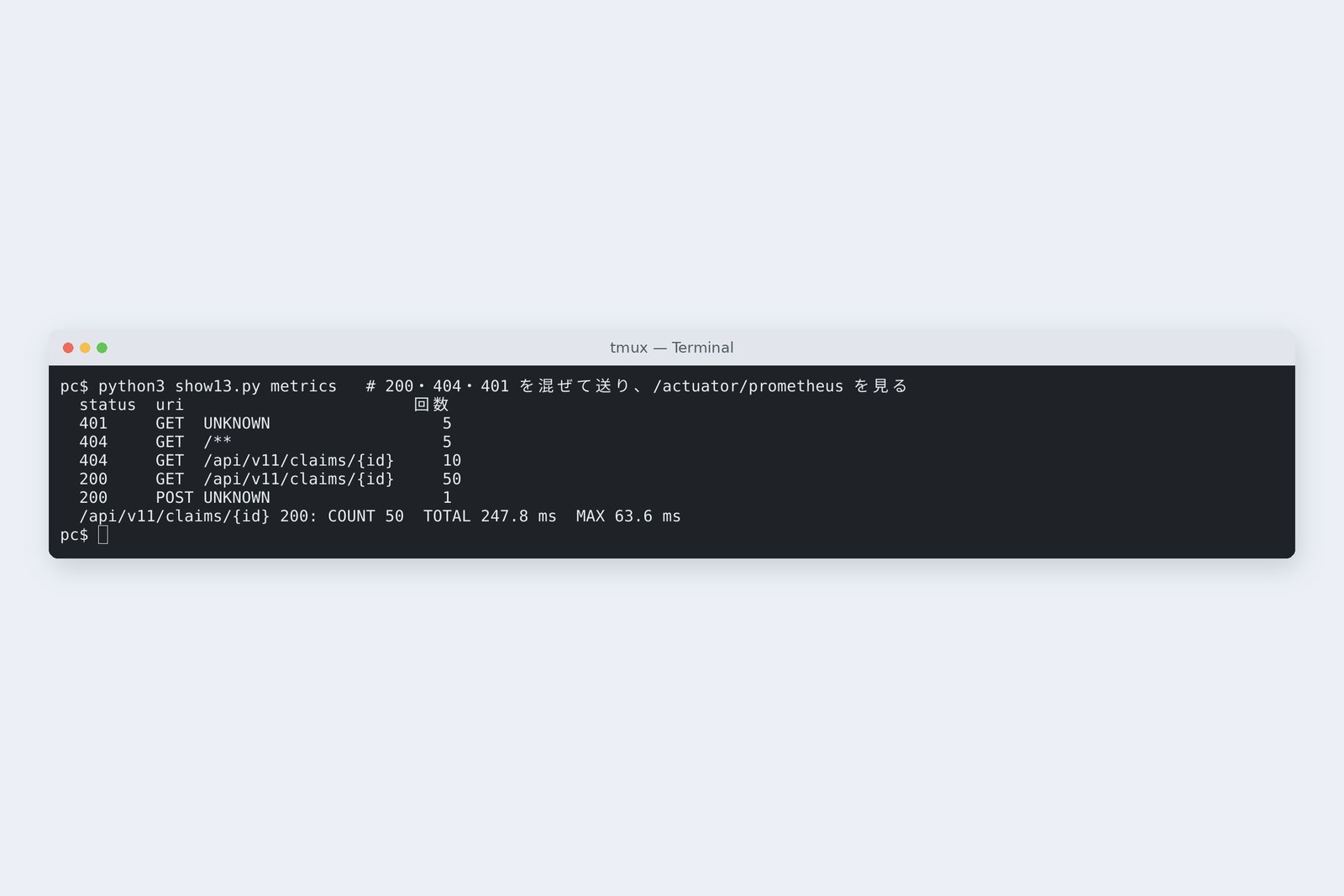
# 50 × 200, 10 × 404 on others' claims, 5 without login, 5 × /favicon.ico
  http_server_requests_seconds_count{method="GET",status="401",uri="UNKNOWN"} 5
  http_server_requests_seconds_count{method="GET",status="404",uri="/**"} 5
  http_server_requests_seconds_count{method="GET",status="404",uri="/api/v11/claims/{id}"} 10
  http_server_requests_seconds_count{method="GET",status="200",uri="/api/v11/claims/{id}"} 50
  http_server_requests_seconds_count{method="POST",status="200",uri="UNKNOWN"} 1
# GET /actuator/metrics/http.server.requests?tag=uri:/api/v11/claims/{id}&tag=status:200
  COUNT 50   TOTAL_TIME 0.312 s   MAX 0.060 s
URLs are counted by their {id} pattern, so they don't scatter by claim number. The 401s without login were stopped by the gatekeeper, so their uri is UNKNOWN; unknown URLs' 404s are /**. Before the fix, 500s would have been listed here.
Numbers can be watched over time, too. We sent twelve of part 9's “wait one second inside the transaction” at once and looked at the connection pool every 0.25 seconds.
# Twelve of part 9's “wait inside” at once; the pool every 0.25 s (seconds, active, pending)
   0.11  0 0    0.37  0 0    0.63  0 0    0.90 10 2    1.16 10 2
   1.43 10 2    1.70 10 2    1.96 10 1    2.22 10 1    2.48 10 1
   2.74 10 1    3.00 10 0    3.26 10 0    3.52 10 0    3.78 10 0
   4.04  9 0    4.30  9 0    4.56  9 0    4.82  9 0    5.08  7 0
   5.35  7 0    5.61  7 0    5.87  7 0    6.13  6 0    6.39  6 0
   6.65  6 0    6.90  6 0    7.16  5 0    7.42  5 0    7.68  5 0
   7.94  5 0    8.20  4 0    8.46  4 0    8.72  4 0    8.97  4 0
   9.24  3 0    9.49  3 0    9.75  3 0   10.01  3 0   10.26  2 0
  10.52  2 0   10.78  2 0   11.04  2 0   11.30  1 0   11.56  1 0
  11.81  1 0   12.07  1 0
The connection pool (measured)
Active connections stuck at the limit of 10 at once, and two requests waited. In part 9 we inferred this from “the 12th took 12 seconds”; with the numbers you see it as it happens. Actuator's counter listens on a different port (8081) from the business counters, and exposes only health, metrics and prometheus.
When the database stops
Finally, we stopped the practice database. We open a claim, then look at the health check (/actuator/health).
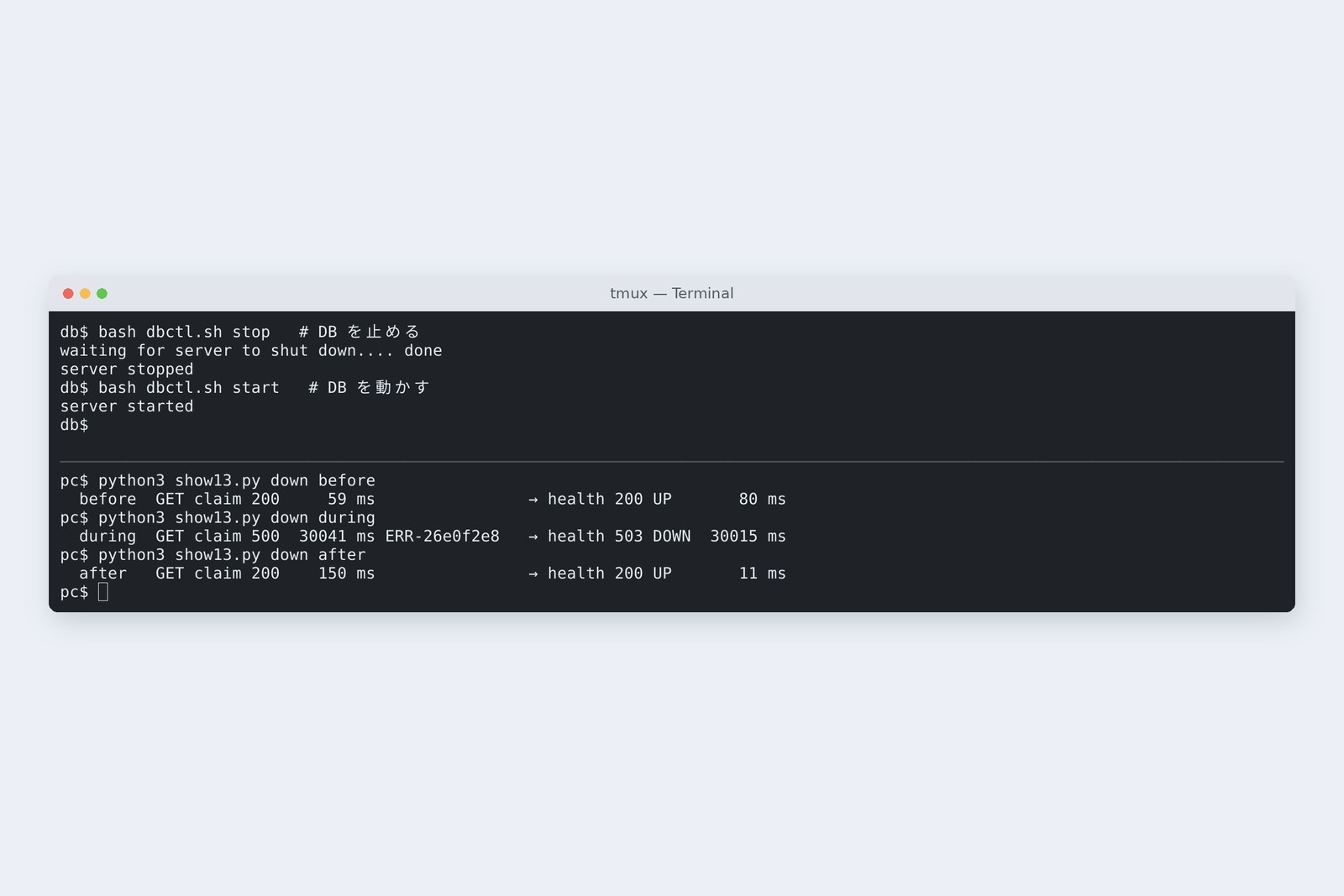
# Before, during and after stopping the DB (open a claim, then the health check)
  before        GET claim 200     90 ms                health 200 UP       74 ms
  during        GET claim 500  30178 ms ERR-d8bb10ab   health 503 DOWN  30024 ms
  after         GET claim 200   2793 ms                health 200 UP       13 ms
# Log lines added by one GET while the DB was down
  678 lines in all (1 ERROR, 631 lines of at, 14 WARN)
  Caused by: java.sql.SQLTransientConnectionException: HikariPool-1 - Connection is not available, request timed out after 30001ms (total=0, a…
Waiting while the database is down (measured)
A GET that only opens a claim waited 30 seconds and then got a 500: the pool couldn't make a new connection and waited out HikariCP's connectionTimeout (30 s by default). The health check likewise took 30 seconds to go DOWN. And that single request added 678 lines to the log.
Giving up early with “unavailable right now” is kinder than making users wait 30 seconds: shorten spring.datasource.hikari.connection-timeout, put a time limit on the health check, and so on. Once the database was back, the first GET took 2.8 seconds to reconnect, and the health check was UP in 13 ms.
What to watch
| Watch | Where | Example here |
|---|---|---|
| share of 5xx | http.server.requests (status) | 500s on unknown URLs; 500s with the DB down |
| reply time (the slowest few percent) | http.server.requests (time) | 30 s with the DB down |
| waiting for connections | hikaricp.connections.pending | 2 with twelve waiting inside |
| health | /actuator/health | DOWN when the DB stops (after 30 s) |
| ERROR line count | the log | kept growing from favicon 500s |
Logs tell one request's story, numbers show the whole, health checks say alive or not. Log numbers and results, never contents or secrets. And the habit of reading logs comes before any tool.
Checking on your own PC
| What to try | How to write it |
|---|---|
| Gather one request's lines | grep 23c165c8 app.log |
| Count ERRORs | grep -c ' ERROR ' app.log |
| Find what must not be logged | grep -c -e '{bcrypt}' -e 'Parameters:' app.log |
| Counts per counter | curl -s localhost:8081/actuator/prometheus | grep http_server_requests_seconds_count |
| Switch to JSON logs | logging.structured.format.console=ecs |
Start by reading a day of your own application's log as it is. How many ERRORs, and how many of them really need action? That alone is half of this part.
§ — On one page, and next time
- Logs record only what the server saw: the 12 MB photo left one line saying 413.
- Unknown URLs were 500s with 59-line stack traces; unread, unnoticed.
- Left on DEBUG, one GET writes 5 lines, hashes and SQL values included. Production: INFO, one line per request.
- Give each request a number and put it on every line and in error replies.
- One request: logs. The whole: numbers (Actuator). Alive: health checks.
- With the DB down, 30 seconds, then 500. Decide your own waiting time.
AraiThat favicon 500 has been there since part 7…
FuruiAnd now it's fixed. But can you promise it won't come back when someone rewrites the handler next month? Next time: testing, so the machine remembers what we fixed.
References
- Spring Boot — Logging(Structured Logging)
- Spring Boot — Actuator Endpoints(health)
- Spring Boot — Metrics(http.server.requests、hikaricp)
- SLF4J — User Manual(MDC)
- Elastic Common Schema(ECS)
- OWASP — Logging Cheat Sheet
The recordings were made on 31 October 2026 on a cloud Linux machine (Ubuntu 24.04, kernel 6.18) with Spring Boot 4.1.2 (Spring Framework 7.0.10, Spring Security 7.1.2, Actuator, Micrometer's Prometheus output, HikariCP 7.0.2, MyBatis 3.5.19), OpenJDK 25.0.4 and PostgreSQL 16.15. The claims server and the database server are separate network spaces (network namespaces) inside one machine, about 0.04 ms apart. Logs were written to a file and counted. The database we stopped is the author's practice one. Hashes are shown cut short. Every number and output in the text is a real value read from the commands' output at the time (only the 100,000-a-day figure is calculated from the measured size per request). The characters are fictional.
Old-School Backend, part 13 — Logging and monitoring / 2026.10