Old-School Backend / 2026 ・ No.15
Old-School Backend
Part 15 (final): Running it — taking the claims app off your own PC
Published
This series' application has always run inside the author's practice room: its network spaces and practice database. In the final part we take it outside.
First we run part 14's jar against a brand-new database. Then we put the database's shape in the source (Flyway), build a Docker image, and arrange the database, the app and nginx with compose. With that in place we measure how much it can handle, what virtual threads change, and what happens at shutdown and in a small box. Finally we look back over all 15 parts.
Outside the practice room
AraiWe have 107 tests. It'll run anywhere.
FuruiTry it on a brand-new database.
The 15-part route map (you are here: part 15)
# Settings inside part 14's jar (unzip -p app.jar BOOT-INF/classes/application.properties)
  spring.datasource.url=jdbc:postgresql://db.internal:5432/expenses
  spring.datasource.password=practice
  spring.sql.init.mode=always
  demo.store=/home/claude/be13/store
# An empty PostgreSQL 16 in Docker; part 14's jar with only the DB address changed
  Started ExpensesApplication in 6.051 seconds
  tables created  expense   (only schema.sql's one)
  GET  /api/expenses                 200  []
  GET  /api/v10/claims/EXP-2026-0012 500   ← column "applicant" does not exist
  POST /api/login                    401   ← relation "app_user" does not exist
The jar contained the practice database's address (db.internal), the password, and a storage folder inside the author's working directory. With only the database address changed, the app started in 6 seconds. But the database got just one table, from part 1's schema.sql. Opening a claim gave 500, and logging in gave 401.
The 401 looks exactly like “wrong password”, but the real cause was the missing user table (the log said so). It started, the tests were green, and it didn't work outside. Part 14's tests passed because they kept their own separate copy of the database's shape.
- Shape — the database's shape in the source (Flyway), an image, compose (measured)
- Front door — one nginx setting changes cookies, 413s and 502s (measured)
- Throughput — work that virtual threads speed up, and work they don't (measured)
- Stopping — the grace period, and the heap in a 512 MB box (measured)
The database's shape, in the source
Since part 4 we changed the database by running each part's SQL by hand. Flyway keeps those changes in the source as numbered files and, when the app starts, applies only the ones not yet applied, in order. If Flyway is on the classpath, Spring Boot runs it at start-up.
# src/main/resources/db/migration/
  V1__baseline.sql                 parts 1–13 (26 statements, from pg_dump -s)
  V2__expense_applicant_index.sql  create index … on expense (applicant);
# ① Start on an empty DB
  Migrating schema "public" to version "1 - baseline"
  Successfully applied 1 migration … now at version v1 (execution time 00:00.039s)
# ② Start again
  Schema "public" is up to date. No migration necessary.
# ③ Add one comment line to the applied V1, then start
  Migration checksum mismatch for migration version 1
  -> Applied to database : -1908829391
  -> Resolved locally    : -853976515
  → the app exits without starting (Exited (1))
# ④ Restore V1, add V2, start
  Migrating schema "public" to version "2 - expense applicant index"   (00:00.014s)
  flyway_schema_history:  1 | baseline | 39 ms     2 | expense applicant index | 14 ms
What was applied is recorded in the database's flyway_schema_history, so the second start does nothing. In ③, adding a single comment line to the already-applied V1 stopped the app from starting: the file's fingerprint (checksum) no longer matched. Never edit an applied file; to change things, add the next number. V2 applied in 14 ms.
Part 14's tests now use the same V1 and V2 instead of their own test DDL, and all 107 still pass. Tests and production start from the same shape.
Into an image
Next, the Docker image. Dropping the jar into an image with Java in it (eclipse-temurin:25-jre) would work, but we made a few changes.
# Copy in layers, and run as a user who isn't root
FROM eclipse-temurin:25-jre AS build
WORKDIR /w
COPY app.jar .
RUN java -Djarmode=tools -jar app.jar extract --layers --launcher --destination out

FROM eclipse-temurin:25-jre
RUN useradd --system --uid 10001 app && mkdir -p /data/store/receipts && chown -R app /data
WORKDIR /app
COPY --from=build /w/out/dependencies/ ./
COPY --from=build /w/out/spring-boot-loader/ ./
COPY --from=build /w/out/snapshot-dependencies/ ./
COPY --from=build /w/out/application/ ./
USER app
ENV DEMO_STORE=/data/store
EXPOSE 8080 8081
ENTRYPOINT ["java", "org.springframework.boot.loader.launch.JarLauncher"]
# Image sizes (docker image ls)
  eclipse-temurin:25-jre  480MB   (Ubuntu 26.04 and Java 25.0.5)
  expenses:naive          543MB   (one jar copied in)
  expenses:15             544MB   (in layers)
# Layers that changed after a one-line code change and a rebuild
  expenses:naive   1 layer  35.7MB   COPY app.jar /app.jar
  expenses:15      1 layer  451kB    COPY /w/out/application/   (the 35.6MB of libraries unchanged)
# Who it runs as (docker run --entrypoint id)
  expenses:naive   uid=0(root) gid=0(root) groups=0(root)
  expenses:15      uid=10001(app) gid=999(app) groups=999(app)
# Where the password is
  password lines in the jar's settings   part 14: 1 → part 15: 0
  practice password in the image history   0
  → compose passes it from .env as an environment variable at start-up
Both images are about 540 MB, mostly the Ubuntu and Java underneath. The difference shows when you rebuild. With the whole jar copied in, every one-line change replaces a 35.7 MB layer. Split into layers with Spring Boot's jarmode=tools, only your own code changes: 451 kB. The library layer is reused, so there is less to ship and less to wait for.
Also, the naive image ran as root. If the app can write files somewhere unexpected, as in part 12, root can write anywhere in the container. We create a dedicated user and run as that. The password is gone from both the jar and the image and is passed in as an environment variable at start-up.
Three services together
The database, the app and nginx go into compose.yaml. The app's part looks like this.
services:
  db:  …
  app:
    build: .
    image: expenses:15
    environment:
      SPRING_DATASOURCE_URL: jdbc:postgresql://db:5432/expenses
      SPRING_DATASOURCE_USERNAME: app
      SPRING_DATASOURCE_PASSWORD: ${DB_PASSWORD}
      JAVA_TOOL_OPTIONS: ${JAVA_OPTS:-}
      SPRING_THREADS_VIRTUAL_ENABLED: ${VIRTUAL:-false}
      SERVER_FORWARD_HEADERS_STRATEGY: ${FORWARD:-native}
      DEMO_SEED: ${SEED:-false}
    volumes:
      - store:/data/store
    restart: ${RESTART:-no}  # restart it if it falls over
    stop_grace_period: 40s  # longer than Spring's wait (30 s); docker's default is 10 s
    depends_on:
      db:
        condition: service_healthy
    healthcheck:  # no curl in the image, so ask 8081's health with bash
      test: ["CMD", "bash", "-c", "exec 3<>/dev/tcp/localhost/8081 && printf 'GET /actuator/health HTTP/1.0\\r\\n\\r\\n' >&3 && grep -q '\"status\":\"UP\"' <&3"]
      interval: 5s
      timeout: 3s
      retries: 3
      start_period: 60s
  web:  …
The Java image has no curl, so the health check asks port 8081 directly with bash (part 13's /actuator/health). With depends_on and service_healthy, the app starts once the database is healthy, and nginx once the app is. The password comes from .env next to the compose file and goes into neither the image nor Git.
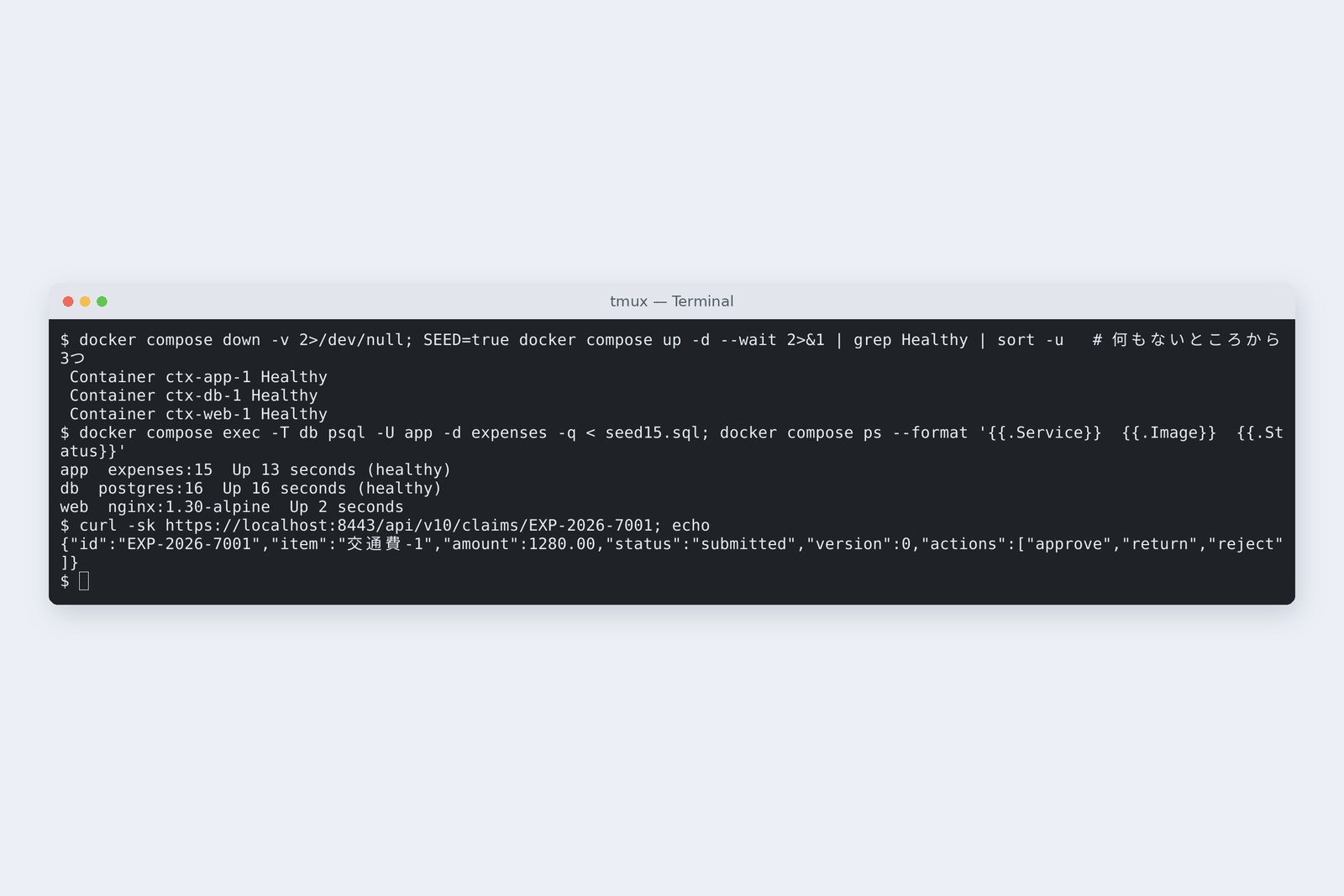
# docker compose up -d --wait from nothing (empty database too)
  db   Healthy → app   Healthy → web   Healthy        11.1 s
  inside the app   Flyway V1 39 ms,  Started ExpensesApplication in 5.457 seconds
  GET https://localhost:8443/api/v10/claims/EXP-2026-7001   200
The finished shape
From nothing, 11 seconds later Flyway had built the database and a claim opened over https. On another PC, the same compose.yaml and .env bring up the same shape.
nginx in front
nginx sits between users and the app. It handles https (TLS), and the app is visible only on the internal network. We compared a naive “just pass it on” configuration with a production one (the certificate is a self-signed practice one).
# lab15.py nginx: log in, send two receipts, look at http and the list
                                naive config                  production config
  login cookie                  HttpOnly                      Secure; HttpOnly
  3.54 MB photo                 413 text/html                 200 application/json
  12.05 MB photo                413 text/html                 413 application/problem+json
  open over http (port 80)      200                           301 → https
  Server header                 nginx/1.30.6                  nginx
  list of 100, size             10,293 B                      701 B (gzip)
# The naive 413 body (nginx's HTML, not the app)
  <html> <head><title>413 Request Entity Too Large</title></head> <body> <center><h1>413 Request E…
# Production nginx, but the app's forward-headers-strategy left at none
  JSESSIONID=…; Path=/; HttpOnly   ← no Secure
# Production: http goes to https, tell the app where requests came from, match its size limit
upstream app {                                # with a bare name in proxy_pass, connections weren't reused (measured)
    server app:8080;
    keepalive 32;                             # reuse connections; the upstream default since 1.29.7 (written out anyway)
}

server {
    listen 80;
    server_tokens off;
    return 301 https://$host:8443$request_uri;
}

server {
    listen 443 ssl;
    server_tokens off;                        # don't put nginx's version in replies
    ssl_certificate     /etc/nginx/certs/cert.pem;
    ssl_certificate_key /etc/nginx/certs/key.pem;

    client_max_body_size 10m;                 # match the app's limit (10MB); the default is 1m
    error_page 413 = @too_large;              # refuse in the same JSON shape as the app

    location @too_large {
        default_type application/problem+json;
        return 413 '{"type":"https://expenses.example/problems/too-large","title":"ファイルが大きすぎます","status":413}';
    }

    location /api/ {
        proxy_pass http://app;
        proxy_http_version 1.1;                # also the default since 1.29.7; older nginx needs them
        proxy_set_header Connection "";
        proxy_set_header Host $host;
        proxy_set_header X-Forwarded-For $proxy_add_x_forwarded_for;
        proxy_set_header X-Forwarded-Proto $scheme;
        proxy_set_header X-Forwarded-Port 8443;
        gzip on;
        gzip_types application/json application/problem+json;
    }
}
With the naive configuration, a 3.54 MB phone photo was refused with nginx's 413, in HTML. nginx's default limit is 1 MB, so part 12's 10 MB limit in the app never came into play. The screen expects JSON and gets HTML. The production config matches the app's 10 MB and refuses in the app's own JSON shape.
The login cookie lacked Secure (send only over https) because, to the app, requests from nginx arrived over http. Once nginx adds X-Forwarded-Proto: https and the app trusts it with server.forward-headers-strategy=native, the flag appears. Neither half alone is enough (measured). We also redirect http to https, gzip the list JSON from 10,293 to 701 bytes, and stop announcing nginx's version.
How much it can take
With wrk, we sent the GET that opens one claim for 10 seconds at a time. This machine has two CPUs, and wrk, nginx, the app and the database all compete for them. The numbers are for comparing within this box.
# wrk on GET /api/v10/claims/EXP-2026-7001 for 10 s (range of 3 runs, requests per second)
  conns   app directly      nginx (naive)             nginx (keepalive)
  1       1765–1909/s       374–945/s                 1164–1197/s
  10      2565–2902/s       794–1190/s                1728–1822/s
  50      2562–2886/s       657–1199/s                1685–1885/s
  200     2679–2998/s       627–1109/s (502 209)      1734–1923/s
  median latency (50 conns)   18–20 / 38–69 / 27–29 ms
# Inside the naive nginx (after 200 conns)
  TIME_WAIT 20159
  [crit] connect() to 172.20.0.3:8080 failed (99: Address not available)   × 253   → 502
# Check: what makes nginx 1.30.6 reuse (connections to the app after 200 conns for 10 s)
  proxy_pass http://app:8080;       TIME_WAIT 5472
  upstream block only               ESTABLISHED 37   TIME_WAIT 354
  upstream + keepalive 32 etc.      ESTABLISHED 25   TIME_WAIT 1138
Straight to the app: 2,500–3,000 a second. Through the naive nginx it fell by more than half, and at 200 connections 502s appeared. Inside nginx, 20,000 connections to the app sat in TIME_WAIT (the wait after closing): every request opened a new connection to the app until the local port numbers ran out.
With an upstream block, connections were reused, the 502s vanished, and it ran at 1,700–1,900 a second. Since nginx 1.29.7, reusing upstream connections is the default. Yet on 1.30.6, writing the app's name directly in proxy_pass still didn't reuse them. Even when a default changes, measure whether your own config gets it.
Waiting work and virtual threads
A claims app often waits on someone else's API (checking a fare, notifying the accounting system). We made a counter that stands in for that with a 200 ms sleep.
/** Part 15: sleep as if waiting on outside work (another company's API). Outside the transaction, or inside */
@Service
public class WaitService {
    private final ClaimFlowService flow;

    public WaitService(ClaimFlowService flow) {
        this.flow = flow;
    }

    public ClaimState waitOutside(String id, long ms) {  // wait, then a short DB read
        sleep(ms);
        return flow.find(id);
    }

    @Transactional  // wait while holding a DB connection
    public ClaimState waitInside(String id, long ms) {
        ClaimState c = flow.find(id);
        sleep(ms);
        return c;
    }

    static void sleep(long ms) {
        try {
            Thread.sleep(ms);
        } catch (InterruptedException e) {
            Thread.currentThread().interrupt();
        }
    }
}
Tomcat's ordinary (platform) threads are capped at 200. Virtual threads, in Java since 21, give up their carrier thread while waiting, so the count stops mattering. In Spring Boot it takes one line: spring.threads.virtual.enabled=true.
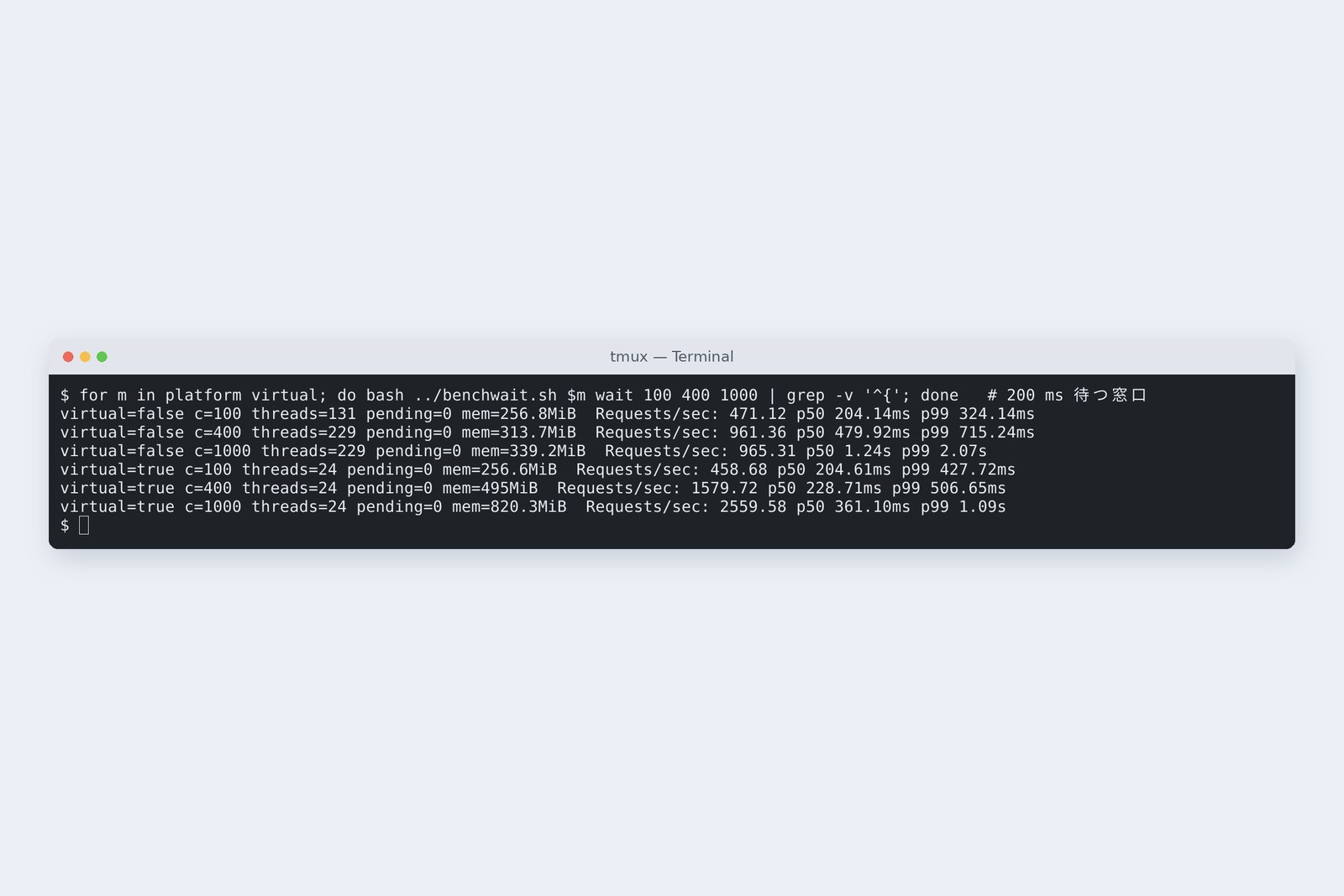
# A counter that waits 200 ms, then reads the DB; 100 → 400 → 1000 conns, 15 s each (range of 3 runs)
                            req/s         median        threads
  platform c=100            471–475       204 ms        131
  platform c=400            961–967       468–486 ms    229
  platform c=1000           959–965       1240–1260 ms  228–229
  virtual  c=100            459–460       203–205 ms    24
  virtual  c=400            1516–1689     220–238 ms    24
  virtual  c=1000           2452–2760     347–376 ms    24
# Sending only 1000 conns with virtual threads right after start-up (before warm-up)
  1196 / 1060 / 1042 / 930 /s   (1509 /s on the same JVM's second run)
Requests per second, waiting counter (measured)
Ordinary threads level off at 200 threads ÷ 0.2 s = 1,000 a second, and at 1000 connections the median wait grew to 1.24 s. Virtual threads did 2,450–2,760 a second at 1000 connections, with a median near 0.35 s, on just 24 real OS threads.
One caution. Sending only 1000 connections right after start-up gave virtual threads 930–1,200 a second. A second run on the same JVM gave 1,509, and after warming up under lighter load, about 2,500. The JVM gets faster once it's warm (the same story as part 1's slow first request). When you measure, write down how you warmed up.
What virtual threads don't add
This time the same 200 ms wait happens inside a transaction, the shape of part 9's “waiting for a notification inside the transaction”.
# Waiting 200 ms inside a transaction (15 s)
                        req/s       median        waiting for conn  threads
  platform c=100        49.0        2.02 s        90                130
  platform c=400        42.7        5.81 s        191               229
  virtual  c=100        48.4        2.03 s        90                24
  virtual  c=400        41.7        7.71 s        392               24
  pool of 10 × 5 per second (200 ms) = 50 per second at most
About 49 a second with either kind of thread. The pool has 10 connections; hold each for 200 ms and 50 a second is the ceiling. Virtual threads only made the queue for connections (pending) grow to 392. Virtual threads add room to wait, not database connections. Part 9's conclusion, wait for outside work outside the transaction, still holds.
The old problem of virtual threads being unable to release their OS thread inside synchronized was fixed in JDK 24 (JEP 491). This part runs on Java 25.
Stopping, and small boxes
Deploying a new version means stopping the old one. We stopped the app with 20 requests in flight.
# docker compose stop app with 20 requests in flight
  3 s each, 10 s grace (default)      stopped in 2.9 s   200 × 20
  15 s each, 10 s grace (default)     stopped in 10.4 s  ConnectionError × 20   Exited (137)
  15 s each, 40 s grace               stopped in 15.0 s  200 × 20                 Exited (143)
  log  Commencing graceful shutdown. Waiting for active requests to complete
When stopping, Spring Boot waits for requests in flight to finish (up to 30 seconds by default). But docker's default grace period is 10 seconds, after which it kills the process (137). All 20 fifteen-second requests were cut off. With a 40-second grace period in compose, all 20 finished with 200 before it stopped. Make the stopper wait at least as long as the stopped.
Then, box size. In the cloud an app runs in a box with fixed memory and CPU.
# Same image, different box: java -XX:+PrintFlagsFinal -XshowSettings:system
  box                                     CPU   max heap
  no limit (this machine: 8 GB, 2 CPUs)   2     2,008 MB
  --memory=512m --cpus=1                  1     128 MB   (25%)
    + -XX:MaxRAMPercentage=75             1     384 MB
The JVM reads the box size and, by default, sets the heap to 25% of it: 128 MB in a 512 MB box. In that box we sent 1000 connections to virtual threads.
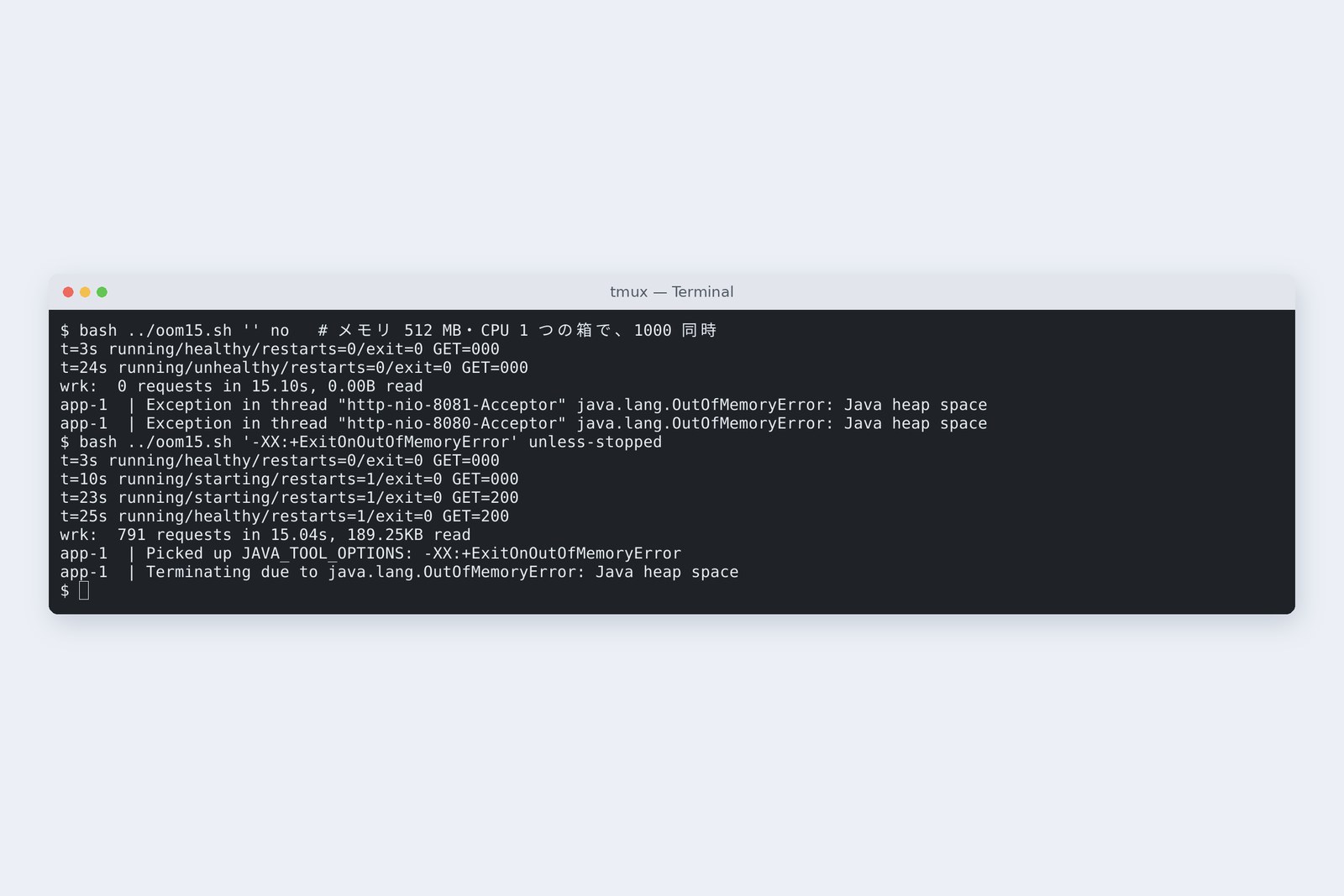
# 512 MB, 1 CPU, virtual threads, 1000 conns to the 200 ms counter (15 s)
  heap 25% (default)                heap exhausted; the Acceptor threads die, nothing is accepted
                                    0–247 requests served (4 runs); the process stays alive
                                    unhealthy after about 25 s, yet still running
  heap 75%                          heap plus the rest passes 512 MB; the kernel kills it (OOMKilled)
  25% + ExitOnOutOfMemoryError      exits at once → restarted, 200 again after 20-odd s
  heap 60%                          7121 requests in 15 s; 466 MiB of 512 MiB used
Changing the heap share in a 512 MB box (measured)
At the default 25% the heap ran out and even the threads that accept connections stopped. The process was still alive, so Docker showed it still running. The health check turned it unhealthy, but restart policies act when the process exits, so nothing brought it back. With -XX:+ExitOnOutOfMemoryError the JVM exits, gets restarted, and returned 200 again in 20-odd seconds.
At 75% the heap plus everything outside it (thread stacks, the JIT, libraries) went past 512 MB and the kernel killed it. At 60% it served 7,121 requests in 15 seconds using 466 MiB. The heap follows the box, and too little or too much both stop you. Load it, look at what it uses, then decide.
All 15 parts
Over 15 parts, an app that only accepts expense claims gathered a lot of things we take for granted.
| Part | Theme | The one line to keep |
|---|---|---|
| 1 | The big picture | One claim travels Tomcat → counter → clerk → storekeeper → DB |
| 2 | Java basics | Money in BigDecimal, moments as Instant, mind time zones |
| 3 | HTTP by hand | Lengths are bytes; one at a time, a silent client stops all |
| 4 | DB by hand | Never build SQL by joining strings |
| 5 | Spring Boot | One bean: never keep request data in fields |
| 6 | Input checks | Rules at the counter, the last guard is the DB's CHECK |
| 7 | Exceptions and replies | Reply with ProblemDetail; give 500s an enquiry number |
| 8 | Database access | Same answer, but count the SQL (N+1) |
| 9 | Concurrent updates | Don't read, subtract, write: subtract in SQL, or use versions |
| 10 | State transitions | Decide transitions in a table; guard them with where |
| 11 | Authn and authz | Don't trust names; others' claims are 404 |
| 12 | Files | Trust neither name nor declared type; name files yourself |
| 13 | Logs and monitoring | One line and a number per request; numbers for the whole; health |
| 14 | Tests | After a fix, break it and watch the test fail |
| 15 | Running it | Schema in the source, secrets outside; choose your waits and box size |
Every part wrote something naive first, measured it, and fixed what hurt. Part 14's tests remember the fixes, and this part made the app run with the same shape somewhere else. New tools will keep coming, but write it, measure it, break it and check has not changed since the old days.
§ — On one page, and goodbye
- Outside the practice room it built only one table: 500 and 401. Put the database's shape in the source with Flyway, and never edit applied files.
- Build images in layers (only 451 kB changes), not as root, with secrets in environment variables.
- compose starts things in order, waiting for health: three services in 11 seconds.
- Give nginx the limit, the forwarded headers and connection reuse. Naive means HTML 413s, no Secure, and 502s.
- Virtual threads lifted waiting work from 960 to 2,560 a second; waiting inside a transaction stayed at 49.
- Give stopping more time than Spring needs. Size the heap from the box, and never leave it alive but stuck.
AraiThe old-school ways turned out to be things we still use today.
FuruiTool names change, but a request arrives, someone checks it, something gets written, and a reply goes back. That flow stays the same. Fifteen parts — well done.
References
- Flyway — Versioned migrations
- Flyway — Validate(checksum)
- Spring Boot — Dockerfiles(jarmode tools、layers)
- Spring Boot — Graceful Shutdown
- Docker — Control startup and shutdown order in Compose
- nginx — ngx_http_upstream_module(keepalive)
- NGINX Blog — Keep-alive to upstreams is now default in NGINX 1.29.7
- JEP 444: Virtual Threads
- JEP 491: Synchronize Virtual Threads without Pinning
The recordings were made on 31 October 2026 on a cloud Linux machine (Ubuntu 24.04, kernel 6.18, 2 CPUs, 8 GB of memory) with Docker 29.9.2 and Docker Compose 5.6.1, running Spring Boot 4.1.2 (Flyway 12.4.0, Tomcat 11.0.27, HikariCP 7.0.2, MyBatis 3.5.19) in an eclipse-temurin:25-jre image (Temurin 25.0.5, Ubuntu 26.04) alongside PostgreSQL 16.15 (postgres:16) and nginx 1.30.6 (nginx:1.30-alpine). Load came from wrk 4.1.0 on the same machine (they compete for CPU, so the numbers are for comparison). Table ranges are the minimum and maximum of three runs; the chart bars are medians. The certificate and passwords are for practice. Every number and output in the text is a real value read from the commands' output at the time. The characters are fictional.
Old-School Backend, part 15 (final) — Running it / 2026.10