Old-School Networking / 2026 ・ No.01
Old-School Networking
Part 1: the big picture — from pressing Submit to reaching the server, seen through seven layers
Published
After the front-end series comes networking. As a bridge before we move on to the back end, we will go through the networking basics every programmer should know, in twelve parts.
There is a single thread running through it: we follow one request sent by the Submit button of the expense-claim app, going one layer deeper each time.
Part 1 is the big picture. We map out the seven layers of the OSI reference model and the four layers of TCP/IP, then actually catch one submission and take it apart layer by layer.
Behind the Submit button
AraiI graduated from all fifteen front-end parts! Next up is the server side, right?
FuruiOne question first. The fetch('/api/expenses') you wrote in part 10. How did it get to the server?
AraiUm... I wrote fetch, and it got there.
FuruiFine while it works. On the day it doesn't, can you say where it stopped? The cable, the Wi-Fi, the name, the port, the server?
Arai...I'd ask an AI.
FuruiEven then, you decide where to look. So this time we follow that one request all the way.
In part 10 of the front-end series, the claim form learned to send a claim to the server with fetch and get a claim number back. From the page's side it is one line. Underneath that line, though, several jobs are running: looking up a name, finding the other machine, setting up a connection, and carrying the data in small pieces. In this series we look at them layer by layer.
The route map of all 12 parts (you are here: part 1)
- Get the big picture — the seven layers of the OSI reference model and the four TCP/IP layers that actually run. Which devices and protocols live on which layer
- Go down, then up — from the physical layer (cables, radio) in part 2 to HTTP in part 10
- Use it day to day — part 11 covers Docker and cloud networks, part 12 troubleshooting when things won't connect
- Measure every time — record real packets on a practice network and explain with those numbers
What is a network?
In a sentence, a network is a way of connecting computers and delivering data between them. Roughly drawn, the road from Arai's PC to the server looks like this.
From the Submit button to the server (roughly)
The network inside a home or office is a LAN (local area network). At the edge of the LAN sits a router; beyond it is the provider's (ISP's) network, then other networks, and so on. That network of networks is the internet. The server, too, lives on a LAN in a data centre.
The devices along the way don't push the data through in one go. They split it into small parcels called packets and hand them from one device to the next. Rather than reserving a dedicated line to the other end like a phone call, it works like the post: each parcel carries its own address and takes whatever road is free. Many conversations can share one line, so nothing goes to waste.
So that sender and receiver read the data the same way, there are agreements on its format and the steps to follow. These are called protocols. HTTP, TCP, IP and Ethernet are all names of protocols.
A network is made of lines that connect, steps that deliver, and agreements (protocols). Data is split into parcels (packets) and passed from device to device.
Thinking in layers
There is a lot to do before anything arrives, so networking splits the work into layers. Think about posting a letter.
The postal analogy: content, addressee, address and van are each someone else's job
What goes in the letter is the writer's business. “To: Accounts” on the envelope decides who gets it inside the building. The street address decides which building. The van only reads the address and takes the letter to the next post office; it never reads the letter. The road has no idea what the van is carrying.
Networks work the same way, with a job for each layer. This brings three benefits.
- Swappable parts — switch from a cable to Wi-Fi and the way you write HTTP doesn't change. Replace a lower layer and the upper ones keep working
- Think about your own layer only — nobody worries about cable voltages while writing fetch
- Narrow down faults — if the name resolved but the connection fails, look below the naming layer (part 12)
AraiThat's like “HTML is the bones, CSS the clothes, JavaScript the muscles” from the front-end series. Split by job.
FuruiExactly. Split it, and you only fix the part that broke. An old-school craftsman never stuffs everything into one box.
The seven OSI layers
The best-known “ruler” for splitting the layers is the OSI reference model. The International Organization for Standardization (ISO) started on it in 1977 and published it in 1984 as ISO 7498. It divides communication into seven layers.
The seven OSI layers. The lower, the closer to the machine; the higher, the closer to the app
When sending, data is handed from the upper layers down; when receiving, from the bottom up. Each layer has its own main devices and protocols. On one table it looks like this (each part goes into detail).
| Layer | Main devices | Main protocols and standards | This series |
|---|---|---|---|
| 7 Application | servers and PCs (their apps), proxies, L7 load balancers, WAFs | HTTP, DNS, SMTP, SSH, DHCP | parts 9, 10 |
| 6 Presentation | (no dedicated device) | character encoding (UTF-8), compression, TLS encryption | part 8 |
| 5 Session | (no dedicated device) | TLS sessions (older ones such as NetBIOS) | part 8 |
| 4 Transport | firewalls, L4 load balancers | TCP, UDP, QUIC | parts 6, 7 |
| 3 Network | routers, L3 switches | IPv4, IPv6, ICMP | parts 4, 5 |
| 2 Data link | switches (L2 switches), Wi-Fi access points, NICs | Ethernet, Wi-Fi (IEEE 802.11), ARP, VLANs | part 3 |
| 1 Physical | cables, optical fibre, connectors, repeaters, hubs | standards such as 1000BASE-T, radio standards | part 2 |
The name for the data changes with the layer too: a segment at layer 4, a packet at layer 3, a frame at layer 2 and bits at layer 1. In everyday talk people often call all of them packets, but when discussing layers it pays to keep them apart.
AraiI have to memorise all seven...?
FuruiTop down: “All People Seem To Need Data Processing”. Application, Presentation, Session, Transport, Network, Data link, Physical.
AraiSounds like something you'd say about me.
FuruiIt's about everyone. Even the people who say they don't need data.
The four TCP/IP layers
What actually runs the internet today, however, is not the OSI protocols but TCP/IP. Vint Cerf and Bob Kahn sketched it in a 1974 paper, and on 1 January 1983 the ARPANET of the day switched over to TCP/IP all at once. From the late 1980s into the early 1990s, opinion was split on whether OSI or TCP/IP would win (the “Protocol Wars”); TCP/IP is the one that spread.
The TCP/IP way of thinking was summed up in four layers in RFC 1122 (1989). Next to the OSI ruler it looks like this.
OSI is the ruler; TCP/IP is the real thing
There are two big differences. First, the work of OSI layers 5 and 6 is folded into the application layer in TCP/IP: TLS encryption and character encoding are jobs for the app and its libraries. Second, OSI layers 1 and 2 are merged into a single link layer.
Even so, the OSI numbers are part of everyday vocabulary. “L2 switch”, “L3 switch”, “L4 load balancer” and “routing at L7” all use OSI layer numbers. In this series too we will talk TCP/IP but count in OSI.
The OSI reference model is a ruler for naming layers. What runs is the four-layer TCP/IP. Layers 5 and 6 barely show up as separate layers; they live inside apps and TLS.
Catching one submission
With the map in hand, let's look at the real thing. On a Linux machine in the cloud I used network namespaces to build a small network of three machines (part 11 shows how).
| Role | IP address | MAC address | Job |
|---|---|---|---|
| Arai's PC | 10.0.1.10 | 02:00:00:00:01:10 | sends the claim |
| Router (PC side) | 10.0.1.1 | 02:00:00:00:01:01 | forwards; also answers names (DNS) |
| Router (server side) | 10.0.2.1 | 02:00:00:00:02:01 | forwards |
| Server | 10.0.2.20 | 02:00:00:00:02:20 | receives /api/expenses in Node.js |
The server is called api.keihi.example (.example is a name reserved for documentation). With tcpdump recording on both the PC side and the server side, I sent one claim. curl stands in for the browser, and the content is a small JSON rather than the full form from part 10.
# On Arai's PC (10.0.1.10), the same submission reproduced with curl
$ curl -X POST -H 'Content-Type: application/json' \
    --data-binary '{"title":"ニューヨーク出張","total":46851}' \
    http://api.keihi.example:3000/api/expenses
{"id":"EXP-2026-0012","status":"submitted"}
# A claim number came back (HTTP status 201 Created)
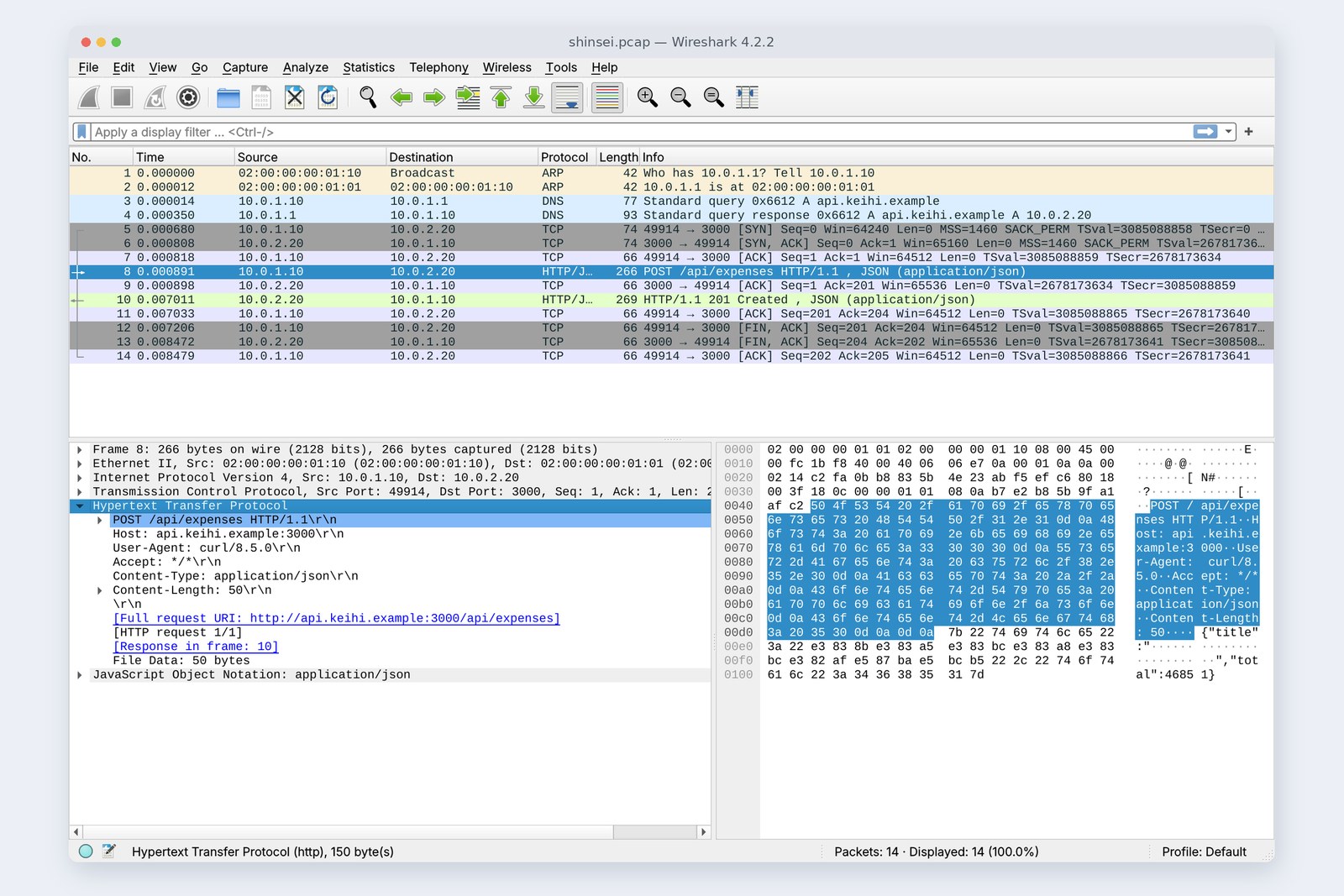
Claim number EXP-2026-0012 came back. During that time, 14 packets in all crossed Arai's PC.
# Everything recorded on Arai's PC for one submission (no., elapsed time, source, destination, protocol, bytes, info)
# 1. ARP: ask everyone for the router's (10.0.1.1) MAC address
 1   0.000ms  02:00:00:00:01:10 -> broadcast         ARP   42  Who has 10.0.1.1? Tell 10.0.1.10
 2   0.012ms  02:00:00:00:01:01 -> 02:00:00:00:01:10 ARP   42  10.0.1.1 is at 02:00:00:00:01:01
# 2. DNS: ask the router's DNS for the IP address of api.keihi.example
 3   0.014ms  10.0.1.10         -> 10.0.1.1          DNS   77  query A api.keihi.example
 4   0.350ms  10.0.1.1          -> 10.0.1.10         DNS   93  response A api.keihi.example A 10.0.2.20
# 3. TCP: connect to port 3000 on the server (three messages)
 5   0.680ms  10.0.1.10         -> 10.0.2.20         TCP   74  49914 -> 3000 [SYN] Seq=0
 6   0.808ms  10.0.2.20         -> 10.0.1.10         TCP   74  3000 -> 49914 [SYN, ACK] Seq=0 Ack=1
 7   0.818ms  10.0.1.10         -> 10.0.2.20         TCP   66  49914 -> 3000 [ACK] Seq=1 Ack=1
# 4. HTTP: send the claim, get a claim number back
 8   0.891ms  10.0.1.10         -> 10.0.2.20         HTTP 266  POST /api/expenses HTTP/1.1 + JSON
 9   0.898ms  10.0.2.20         -> 10.0.1.10         TCP   66  3000 -> 49914 [ACK] Seq=1 Ack=201
10   7.011ms  10.0.2.20         -> 10.0.1.10         HTTP 269  HTTP/1.1 201 Created + JSON
11   7.033ms  10.0.1.10         -> 10.0.2.20         TCP   66  49914 -> 3000 [ACK] Seq=201 Ack=204
# 5. TCP: close the connection
12   7.206ms  10.0.1.10         -> 10.0.2.20         TCP   66  49914 -> 3000 [FIN, ACK] Seq=201 Ack=204
13   8.472ms  10.0.2.20         -> 10.0.1.10         TCP   66  3000 -> 49914 [FIN, ACK] Seq=204 Ack=202
14   8.479ms  10.0.1.10         -> 10.0.2.20         TCP   66  49914 -> 3000 [ACK] Seq=202 Ack=205
The order of the 14 packets. The numbers on the left are the No. column above
Seven packets went back and forth before the claim (packet 8) was even sent. First the PC asked everyone for the router's MAC address (ARP), then looked up the server's IP address from its name (DNS), then opened a connection to the server (the three TCP messages), and only then came the POST itself. Once the claim number arrived, the connection was closed. Each of these is the star of a later part.
| Measured (PC side) | Value |
|---|---|
| Packets | 14 (ARP 2, DNS 2, TCP open 3, HTTP and acks 4, close 3) |
| Total bytes | 1,333 bytes |
| The actual content (claim JSON 50 + reply JSON 43) | 93 bytes (about 7%) |
| From the first ARP to the last ack | 8.479 ms (very fast, since the whole practice network is on one machine) |
AraiThe content is 93 bytes, but the total is 1,333... What's the rest?
FuruiEnvelopes, addressees and delivery slips. In the next section we open one.
Envelopes in envelopes
Packet 8, the claim itself, was 266 bytes. Select the layers one at a time in Wireshark and the bytes each one is responsible for turn blue.
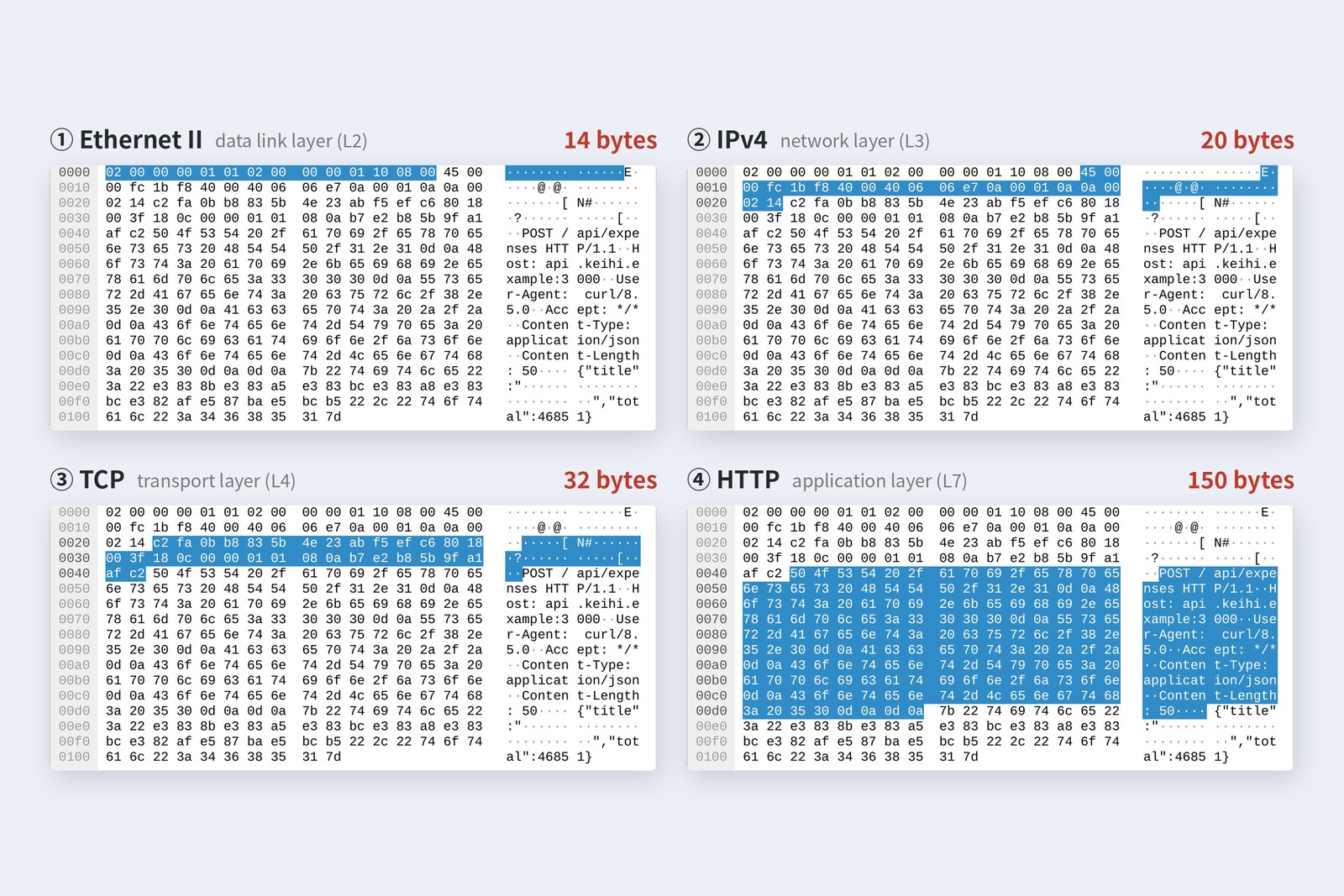
From the start, the Ethernet, IP and TCP headers come one after another, followed by the HTTP text and the JSON body. Written out layer by layer, it looks like this.
# 1. Ethernet II (14 bytes)
#   destination MAC 02:00:00:00:01:01 (the router), source MAC,
#   type 08 00 (IPv4 inside)
02 00 00 00 01 01 02 00 00 00 01 10 08 00
# 2. IPv4 (20 bytes)
#   byte 9 (40) = TTL 64, byte 10 (06) = TCP inside,
#   0a 00 01 0a = from 10.0.1.10, 0a 00 02 14 = to 10.0.2.20
45 00 00 fc 1b f8 40 00 40 06
06 e7 0a 00 01 0a 0a 00 02 14
# 3. TCP (32 bytes)
#   c2 fa = source port 49914, 0b b8 = destination port 3000,
#   then sequence numbers, flags and so on
c2 fa 0b b8 83 5b 4e 23 ab f5 ef c6 80 18 00 3f
18 0c 00 00 01 01 08 0a b7 e2 b8 5b 9f a1 af c2
# 4. HTTP (150 bytes)
#   from here on it is text. Lines end in 0d 0a (\r\n); a blank line ends the headers
POST /api/expenses HTTP/1.1
Host: api.keihi.example:3000
User-Agent: curl/8.5.0
Accept: */*
Content-Type: application/json
Content-Length: 50

# 5. JSON (50 bytes)
#   the claim itself. The Japanese is UTF-8, three bytes per character
{"title":"ニューヨーク出張","total":46851}
The 266 bytes. Each outer layer carries everything inside it as its content
On the sending side, each layer from the top down adds its own header in front and passes the result down. HTTP made 200 bytes; TCP added a 32-byte header for 232, IP added 20 for 252, and Ethernet added 14 for 266. This is encapsulation. The receiving side does the reverse: from the bottom up, each layer reads and strips its header and passes the rest up.
Every layer reads only its own header. IP doesn't read the TCP header, and TCP doesn't read the HTTP text. That is what makes the layers swappable.
Encapsulation means envelopes inside envelopes. A lower layer carries the upper layer's data whole as its content and only adds its own header in front. This claim's 50 bytes of content travelled with 216 bytes of headers.
The 266 bytes Wireshark shows don't include what gets added before and after on the cable itself (an 8-byte signal at the start and 4 bytes for checking damage at the end). We'll see those in parts 2 and 3.
Past the router
I recorded the same claim packet in two places: before the router (on Arai's PC) and after it (at the server). Here they are side by side.
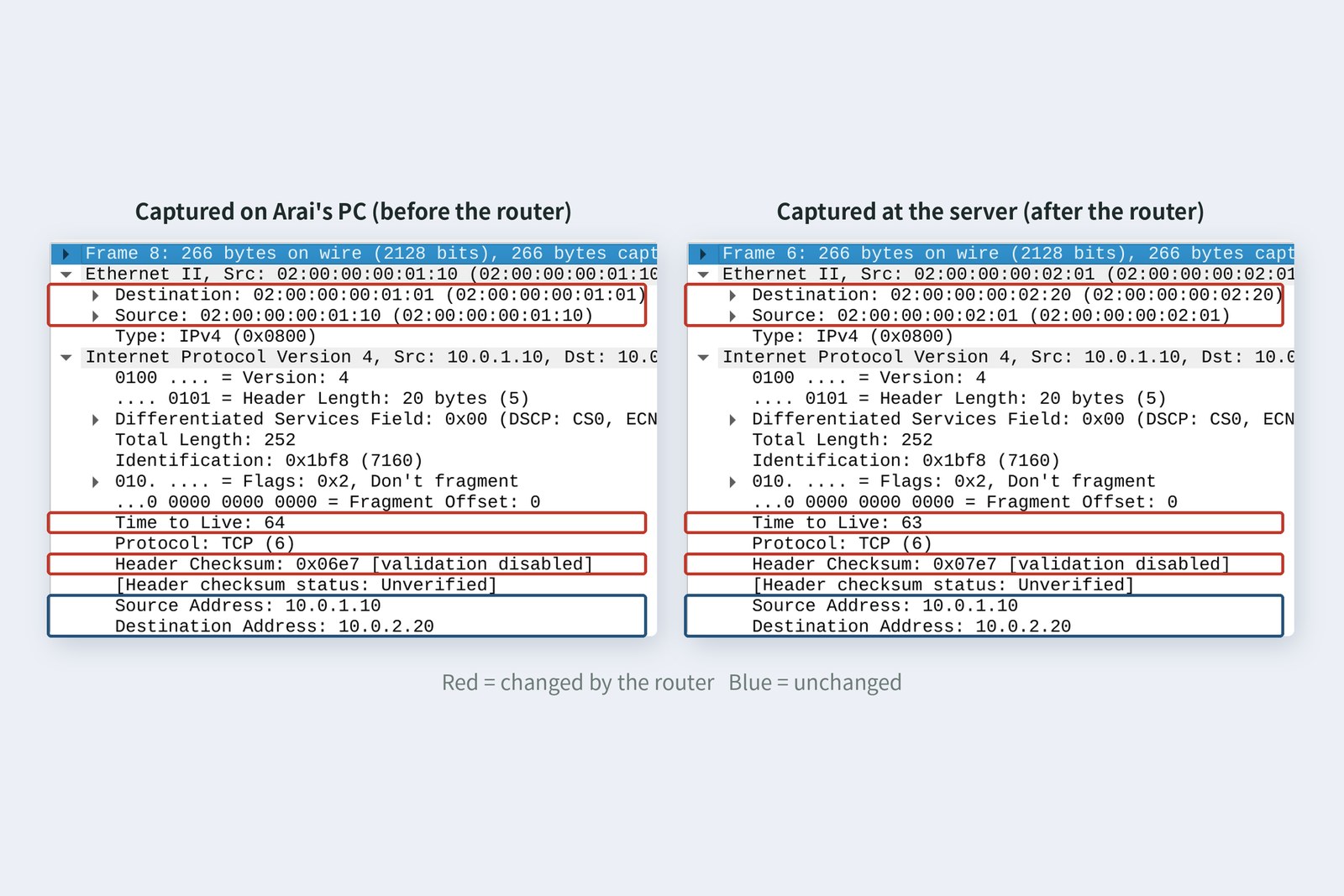
| Field | PC side | Server side |
|---|---|---|
| Destination MAC | 02:00:00:00:01:01 | 02:00:00:00:02:20 |
| Source MAC | 02:00:00:00:01:10 | 02:00:00:00:02:01 |
| TTL (hops left) | 64 | 63 |
| IP checksum | 0x06e7 | 0x07e7 |
| Source IP → destination IP | 10.0.1.10 → 10.0.2.20 | same |
| Ports, HTTP, JSON, total length | 49914 → 3000, 266 bytes | same |
Both MAC addresses were swapped out. On the PC side it was “PC to router”; on the server side, “router to server”. That is because a MAC address is the address of the next device. The IP addresses, on the other hand, never change: they are the final destination. In postal terms, the letter changes vans at every post office but the address on the envelope is never rewritten.
The TTL is a number that drops by one at every router. A packet whose TTL reaches zero is thrown away, so a lost packet can't circle forever (traceroute in part 5 uses exactly this). Because the TTL changed, the IP header's check value (the checksum) was recalculated too.
How far up each device looks
Devices open the envelopes to different depths. A switch looks at layer 2, the MAC address, to choose which port to send the frame out of. A router looks up to layer 3, the IP address, to decide where to hand it next, then puts on a new layer 2 and sends it off. Only the two ends, the PC and the server, read TCP and HTTP (some devices, such as firewalls and load balancers, deliberately peek higher).
AraiI thought routers read everything inside.
FuruiOnly as far as the address. That's why JSON and video travel at the same speed. The price is that protecting the content is the ends' job. That's TLS in part 8.
The toolkit
Throughout the series we will check things with tools like these. All of them work on an ordinary PC.
| To find out | Mac | Windows | Linux | Part |
|---|---|---|---|---|
| Your own IP and MAC address | ifconfig | ipconfig /all | ip addr | 3, 4 |
| Whether the other end is reachable | ping | ping | ping | 5 |
| The route in between | traceroute | tracert | traceroute | 5 |
| Ports in use | lsof -i | netstat -ano | ss -tan | 6, 7 |
| A name's IP address | dig | nslookup | dig | 9 |
| An HTTP exchange | curl -v | curl.exe -v | curl -v | 10 |
| The packets themselves | Wireshark (to view), tcpdump (to record) | every part | ||
Wireshark is free and runs on Windows, Mac and Linux (the latest release at the time of writing is 4.6.9 from 23 September 2026; the screenshots here are Ubuntu's 4.2.2). Open this part's capture, select the layers one by one, and you should see what the photo in §7 shows.
Only capture packets on networks you manage yourself. On a company or school network you may see other people's traffic, so always get the administrator's permission first.
§ — On one page, and next time
- A network splits data into packets and passes them from device to device. The agreements on how to read them are protocols.
- The work is split into layers. Swap a lower layer and the upper ones carry on; faults are easier to pin down.
- The OSI reference model is a seven-layer ruler (All People Seem To Need Data Processing). What runs is the four-layer TCP/IP.
- One submission put 14 packets (ARP, DNS, TCP, HTTP, close) and 1,333 bytes on the PC's wire. The content was 93 bytes.
- The 266-byte claim packet was Ethernet 14, IP 20, TCP 32, HTTP 150 and JSON 50. That is encapsulation.
- Past a router, the MACs are swapped, the IPs stay, and the TTL drops by one.
- A switch looks up to layer 2, a router up to layer 3. Only the two ends read TCP and HTTP.
AraiNext is the physical layer. Isn't a cable just something you plug in?
FuruiPlugging it in works because machines keep, to the letter, agreements somebody made. Let's go and see what those 266 bytes look like on the cable.
References
- ITU-T X.200 — Open Systems Interconnection: Basic Reference Model
- Wikipedia — OSI model
- RFC 1122 — Requirements for Internet Hosts: Communication Layers (1989)
- IEEE Milestone — Transmission Control Protocol (TCP) Enables the Internet, 1974
- RFC 2606 — Reserved Top Level DNS Names (.example)
- Wireshark — 4.6.9 and 4.4.19 released (2026-09-23)
- Wireshark — Documentation
- tcpdump & libpcap
The captures were taken with tcpdump on 24 October 2026 on a practice network the author built with network namespaces on Linux (Ubuntu 24.04) in the cloud: a PC, a router that also answers DNS (dnsmasq), and a server (Node.js). The request was sent with curl 8.5.0 and viewed in Wireshark 4.2.2; every number in the tables was read from these captures. The MAC addresses were set by hand for readability (locally administered addresses starting with 02). This practice network does not use IPv6 (that comes in part 4). The characters are fictional.
Old-School Networking, part 1 — the big picture / 2026.10