Old-School Networking / 2026 ・ No.03
Old-School Networking
Part 3: the data link layer — MAC addresses, switches, and ARP asking everyone
Published
In part 2 we watched bits become signals on the cable.
This time we go one layer up, to the data link layer: MAC addresses on each frame, switches that learn addresses and deliver accordingly, and ARP, which finds a MAC address from an IP address.
On a practice network of one switch and three PCs we find out why, in part 1, the PC's very first move was to ask everyone. We also watch a loop turn one frame into 550,000 a second.
The addressing layer
AraiIn part 1, the PC's first move was asking everyone “what's 10.0.1.1's MAC?”. Isn't that a bit rude? Shouting at everybody straight away.
FuruiIt doesn't know the other machine's face, so it has to call out in the classroom: “Is Furui here?” Only the person called raises a hand.
AraiAnnoying for everyone else.
FuruiWhich is why there are tricks so that you only call out to everyone the first time. That's today.
The route map of all 12 parts (you are here: part 3)
- MAC addresses — what the 6 bytes hold, company numbers, local versus global, everyone
- Switches — they learn destinations and send only where needed; until then, out of every port
- ARP — find the MAC address for an IP address, and remember the answer for about 30 seconds
- MTU, VLANs, STP — how much fits in one frame, splitting one switch, and preventing loops
The data link layer's job
The data link layer's job is to deliver to the next device on the same network. As we saw in part 1, the MAC addresses were replaced at every router. The data link layer is only responsible for “the next box along this line”.
To do that, it cuts the stream of bits into units called frames, writes the addressing (destination and source MAC) and the type of content, adds part 2's FCS at the end, and drops anything damaged. Ethernet (wired) and Wi-Fi (IEEE 802.11) are the main examples, and both use the same kind of MAC address.
The data link layer delivers to the next device. The address is a MAC address, the unit a frame. Finding the way to a distant host is the next layer's job (layer 3, IP).
MAC addresses
A MAC address is a 6-byte (48-bit) number, usually written as hexadecimal pairs joined by colons. The first three bytes are a number the IEEE assigns to a company (the OUI); the last three are set by that company for each device.
Inside 02:00:00:00:01:10, the MAC address of this series' PC
The lowest two bits of the first byte mean something. If the lowest is 1, the address is for a group (multicast); all ones, ff:ff:ff:ff:ff:ff, means everyone (broadcast). If the second-lowest is 1, it is a locally administered number set by you rather than the manufacturer. This series' MACs start with 02 because I set them by hand for readability.
Counting the company list bundled with Wireshark 4.2.2 gives 34,621 three-byte OUIs. Apple has the most with 1,193, followed by Cisco with 1,111 and Huawei with 1,097. One OUI makes room for about 16.78 million devices, so large companies hold many.
Recent phones and PCs, however, increasingly don't use their real MAC address on Wi-Fi. iPhones have “private Wi-Fi addresses” since iOS 14, and Android has used a random MAC per network by default since Android 10, so that shop Wi-Fi and the like can't track the same person by MAC address. Remember: a MAC address isn't necessarily “a device's unique number worldwide”.
The frame header
An Ethernet frame header is just 14 bytes.
The Ethernet header (and with a VLAN tag added)
Because the destination comes first, a switch can start looking up the outgoing port after reading only the first 6 bytes (some switches even start forwarding before the whole frame arrives). The third field, the type (EtherType), is 2 bytes saying what the content is: 0800 for an IPv4 packet, 0806 for ARP. The receiver uses this number to hand the content to the next layer up.
Switches learn
In part 2 I said a switch only sends a frame to the destination's port. So how does it know who is on which port? The answer: it looks at the source of each frame it receives and remembers it.
Switch learning: remember senders, flood unknown destinations
I rebuilt the practice network with a Linux bridge as the switch, connecting PCs for Arai (10.0.1.10), Furui (.11) and Yamada (.12), plus the router (.1). With all four recording, Arai pinged Furui three times.
# The table the switch (bridge) has learned: empty before the ping
$ bridge fdb show br br0
    (nothing)
# After Arai pings Furui (MAC and the port it lives on)
$ bridge fdb show br br0
    02:00:00:00:01:10  p1
    02:00:00:00:01:11  p2
# Entries unused for 300 seconds are forgotten (the default ageing_time)
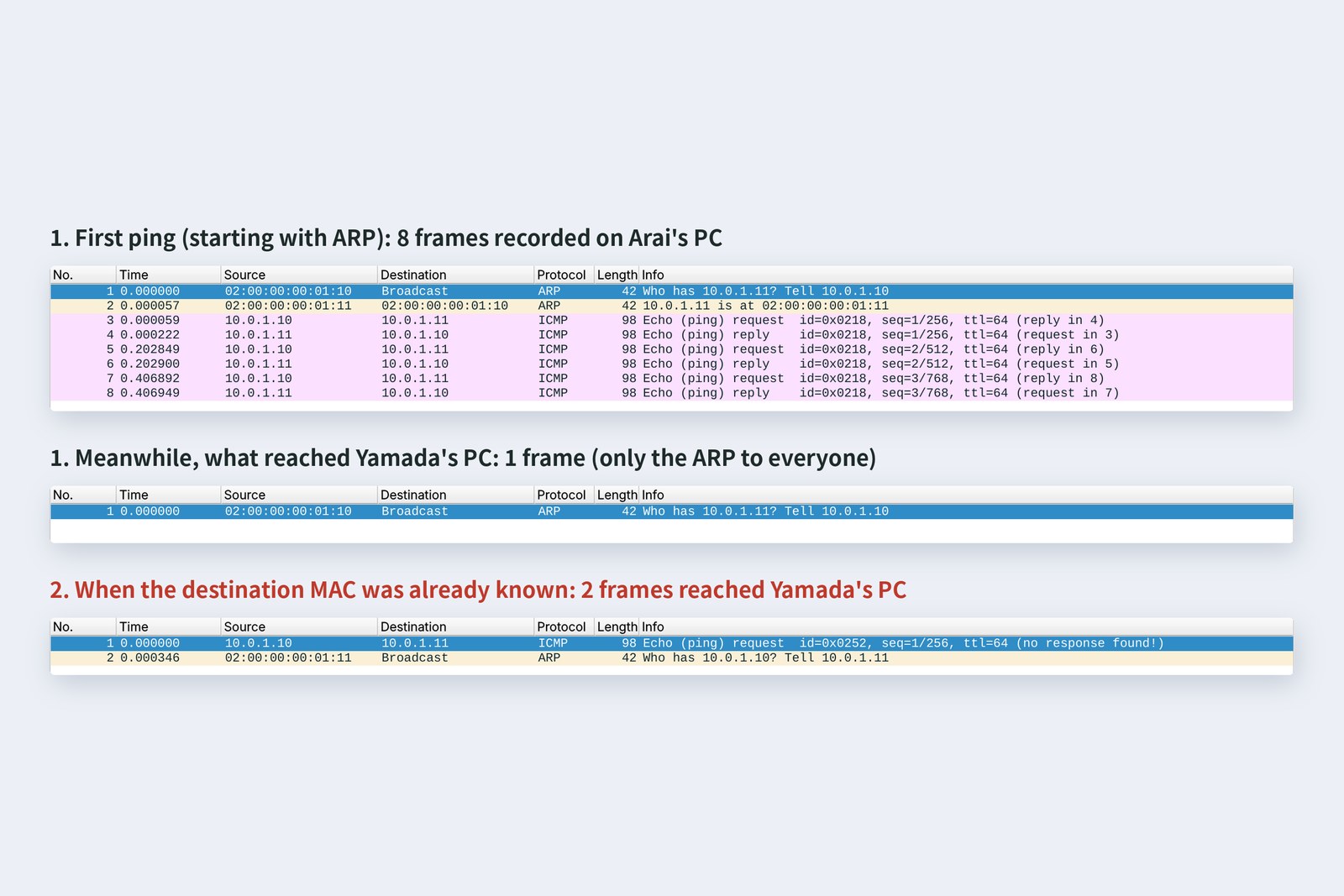
| Frames received | Arai | Furui | Yamada | Router |
|---|---|---|---|---|
| 1. Ordinary ping (starting with ARP) | 8 | 8 | 1 | 1 |
| 2. With Furui's MAC known in advance | 8 | 8 | 2 | 2 |
In case 1, Yamada and the router only received the one ARP addressed to everyone; the switch sent the six pings that followed only to the ports it had learned. In case 2, Arai skipped ARP and sent straight to Furui, so the switch didn't yet know Furui's port and sent the first ping out of every port (unknown destinations go to everyone). Interestingly, Furui's PC then didn't know Arai's MAC and sent its own ARP question to everyone in the other direction.
AraiIn case 2, Yamada got a ping that wasn't hers.
FuruiIt isn't addressed to her PC, so it just throws it away. But on the same LAN you can sometimes see other people's frames like this. That's why important content gets encrypted (part 8).
ARP: from IP to MAC
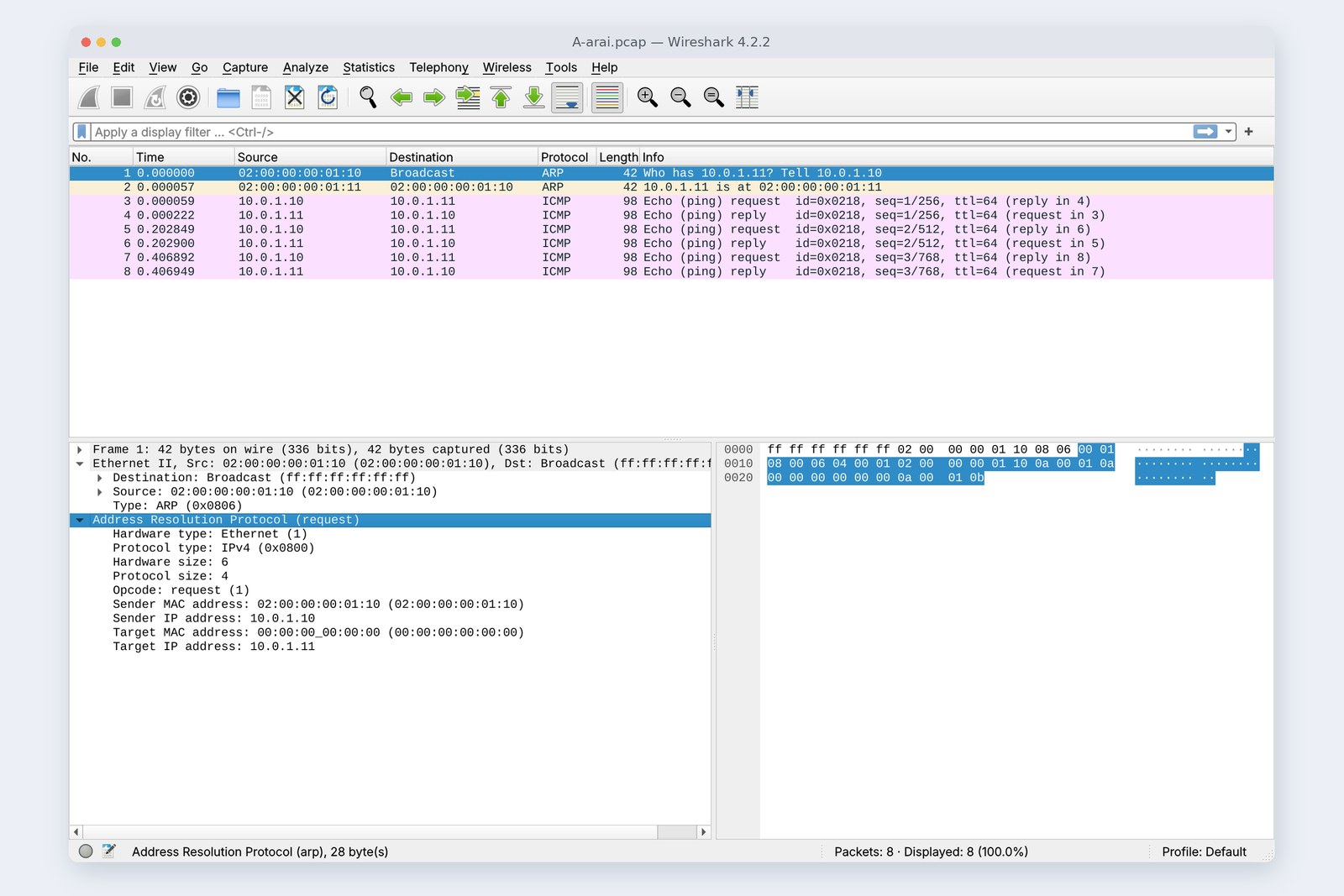
The app knows the other side's IP address (10.0.2.20 in part 1), but a frame needs a MAC address. Enter ARP, the Address Resolution Protocol. The cover photo is the very ARP question Arai's PC sent.
ARP: ask everyone, only the owner answers
The question goes to everyone (destination ff:ff:ff:ff:ff:ff) and says: “I am 10.0.1.10 at 02:00:00:00:01:10; tell me the MAC of 10.0.1.11.” The MAC being asked for isn't known yet, so that field is zero. Only Furui at 10.0.1.11 answers, directly to Arai. The answer is kept in the ARP cache for a while, so next time there's no need to ask.
# The ARP cache right after the ping (an IP-to-MAC table)
$ ip neigh show
    10.0.1.11 dev eth0 lladdr 02:00:00:00:01:11 REACHABLE
# Then just wait... (checked every second)
# after 32 s it turned STALE (maybe out of date)
$ ip neigh show
    10.0.1.11 dev eth0 lladdr 02:00:00:00:01:11 STALE
# It changes after about 30 s (somewhere in 15–45 s). It isn't deleted
If the other side is on a different network, asking for its MAC gets no answer. So the PC asks for the MAC of its exit router (the default gateway) instead. That's why, in part 1, Arai's PC asked about 10.0.1.1 rather than 10.0.2.20.
ARP has no way to check that an answer is genuine. A malicious machine on the same LAN can claim “10.0.1.1 is me” and intercept traffic (ARP spoofing). Some business switches have features to stop this.
MTU: how much fits
An Ethernet frame can carry at most 1,500 bytes of content. That limit is the MTU (maximum transmission unit). Add the 14-byte header and 4-byte FCS and a frame is at most 1,518 bytes; with part 2's 64-byte minimum, frames fall between 64 and 1,518 bytes.
I sent a ping that fills the MTU exactly, and one just a byte over.
# 1472 bytes of content + ICMP 8 + IP 20 = 1500, sent with “don't fragment” (-M do)
$ ping -c 1 -M do -s 1472 10.0.1.11
    PING 10.0.1.11 (10.0.1.11) 1472(1500) bytes of data.
    1480 bytes from 10.0.1.11: icmp_seq=1 ttl=64 time=0.053 ms
# one byte more, 1501...
$ ping -c 1 -M do -s 1473 10.0.1.11
    PING 10.0.1.11 (10.0.1.11) 1473(1501) bytes of data.
    ping: local error: message too long, mtu=1500
Up to 1,500 bytes gets through; 1,501 can't be sent
For large data, TCP cuts it into pieces that fit the MTU (part 6). Watch out when part of the path has a smaller MTU. Home fibre with PPPoE (1,492) or a VPN tunnel adds headers, so the MTU shrinks. If only large packets then fail, you get the strange fault where “small pages open but big files stall” (covered in part 12).
VLANs: splitting one switch
When an office wants the accounts PCs and guest Wi-Fi on the same switch but kept apart, instead of buying more switches it uses VLANs: treating the ports of one switch as separate LANs by number.
Split into VLAN 10 and VLAN 20, and “to everyone” is split too
On links between switches or to a router, one cable carries several VLANs (a trunk), so a 4-byte tag is inserted into each frame. 81 00 marks “there's a tag here”, and the 12 bits that follow are the VLAN number.
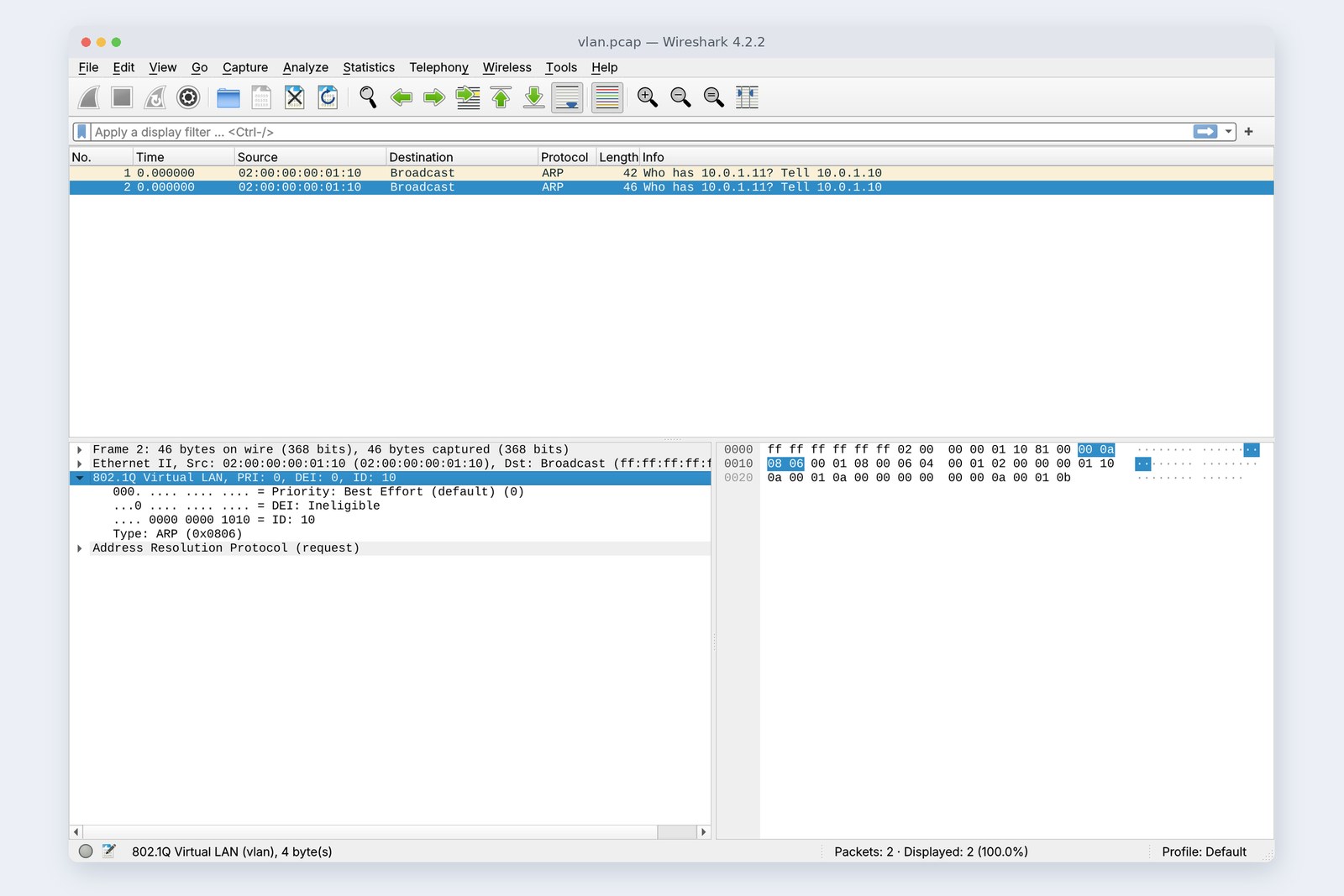
I wanted to build VLANs on the practice network too, but the cloud Linux used for this article lacks VLAN support, so they couldn't be set up. The frame in the photo was made by inserting a tag into a recorded ARP by hand and loading it into Wireshark.
Loops and STP
A switch sends unknown destinations and broadcasts out of every port. So what happens if you connect two switches with two cables, making a ring (a loop)? Add a cable “as a spare” and it really happens. I measured it.
Measured: after sending one frame to everyone
When hA sent just one frame to everyone, the two switches kept passing it back and forth around the ring. hB received about 550,000 a second (556,079 to 582,306 across three runs), and it didn't stop until a cable was pulled. Frames have no “lifetime” like layer 3's TTL, so they never die out on their own. This is a broadcast storm, and in a real office it brings the whole network down.
STP (Spanning Tree Protocol) prevents it. The switches talk to each other and keep one cable switched off so that no ring forms.
# Port states on the two STP switches (converged in 5.0 s)
# SW1
    pa   forwarding
    l1   forwarding
    l2   forwarding
# SW2: the second cable (l2) is blocking
    pb   forwarding
    l1   forwarding
    l2   blocking
With STP on, the same single frame reached hB just once. When I then cut the cable in use, it took 4.2 seconds to switch to the blocked one, and 39 pings went unanswered. That's with the classic STP (802.1D) timers set short; at the defaults it takes about 30 seconds. Modern business switches normally use RSTP (802.1w), which switches over much faster.
AraiOne frame became 550,000... That's what a “spare” cable does.
FuruiIn the old days, someone would plug both ends of a leftover cable into the same hub under their desk and the whole floor went down. Many home switches don't do STP. Don't make rings.
Checking your own PC
| To find out | Mac | Windows | Linux |
|---|---|---|---|
| Your MAC address | ifconfig en0 | ipconfig /all | ip link |
| The ARP cache | arp -a | arp -a | ip neigh |
| MTU | ifconfig en0 | netsh interface ipv4 show subinterfaces | ip link |
In arp -a you should always find your home router (the default gateway) with its IP and MAC address, because every frame headed for the internet is addressed to it.
A Wi-Fi access point is a data link layer machine too: a “bridge” between the radio side and the wired side, forwarding by MAC address. Frames on the air (802.11) look different, with up to four addresses, but the PC converts them to the Ethernet shape, so in Wireshark they look almost the same.
§ — On one page, and next time
- The data link layer delivers to the next device. Addresses are MACs, units are frames.
- A MAC is 6 bytes, the first half a company number (OUI). ff:ff:ff:ff:ff:ff is everyone. Phones often use random MACs on Wi-Fi.
- The header is 14 bytes (destination, source, type). Type 0800 is IPv4, 0806 ARP.
- Switches learn from source addresses; known destinations get one port, unknown ones and broadcasts get every port.
- ARP asks everyone and only the owner answers. Answers are cached; measured, they turned STALE after 32 seconds.
- The MTU is 1,500: 1,472 + 28 got through, one byte more couldn't be sent.
- VLANs split one switch, told apart by a 4-byte tag. A loop turns one frame into 550,000 a second; STP blocks one cable.
AraiMAC only gets you to the next box. So who decides the route to somewhere far away like 10.0.2.20?
FuruiThat's layer 3, next time. Starting with IP addresses themselves. Can you explain what the “/24” in 10.0.1.10/24 means?
References
- Wikipedia — MAC address
- IEEE Registration Authority (OUI)
- Apple Support — Use private Wi-Fi addresses on Apple devices
- Android Open Source Project — MAC randomization behavior
- RFC 826 — An Ethernet Address Resolution Protocol
- Wikipedia — Maximum transmission unit
- Wikipedia — IEEE 802.1Q (VLAN)
- Wikipedia — Spanning Tree Protocol
- Wikipedia — Broadcast radiation (broadcast storm)
- bridge(8) — Linux manual page
- ip-neighbour(8) — Linux manual page
The recordings were made on 24 October 2026 on a practice network the author built with network namespaces on Linux (Ubuntu 24.04) in the cloud. The switch was a Linux bridge (default 300-second ageing, IGMP announcements turned off), and the loop experiment used two Linux bridges (802.1D STP, forward_delay 2 s, hello_time 1 s, max_age 6 s). Every number was read from these recordings and the command output at the time. Only the VLAN frame was made by inserting a tag into a recorded ARP, since VLANs weren't available in this environment. The company-number counts come from the list bundled with Wireshark 4.2.2 (tshark -G manuf). The characters are fictional.
Old-School Networking, part 3 — the data link layer / 2026.10