Old-School Networking / 2026 ・ No.04
Old-School Networking
Part 4: IP addresses — 32-bit addresses and “/24”, DHCP, and IPv6
Published
Part 3's MAC addresses only reach the next device. From this part we're in layer 3, the network layer.
The first half is about IP addresses themselves. How many bits is 10.0.1.10, and what does “/24” mean? We find out what one wrong mask does by actually getting it wrong.
The second half covers how a machine gets an address (DHCP), how addresses ran out, and IPv6. How routers find the way is next time.
The addressing layer
AraiThe meaning of “/24” was homework, right? I looked it up! ...It's the subnet mask's, um, thing.
FuruiHalf right. So if you mistyped it as /16, what would happen to the claim?
AraiEh, it's just a bit wider, so it'd still get there?
FuruiLet's try. If you're going to make a mistake, a practice network is the cheapest place to make it.
The route map of all 12 parts (you are here: part 4)
- Inside an IP address — 32 bits, network number and machine number, /24 and masks
- The decision before sending — is the target on the same network? What happens when you get it wrong (measured)
- Special addresses and DHCP — private, 127, 169.254, and the four messages that hand out an address (measured)
- Exhaustion and IPv6 — the pools that ran dry in 2011, and 128-bit addresses
An IP address is 32 bits
Part 3's MAC addresses reach only the next device and are replaced at every router. An IP address, by contrast, is the address of the final destination and never changes on the way.
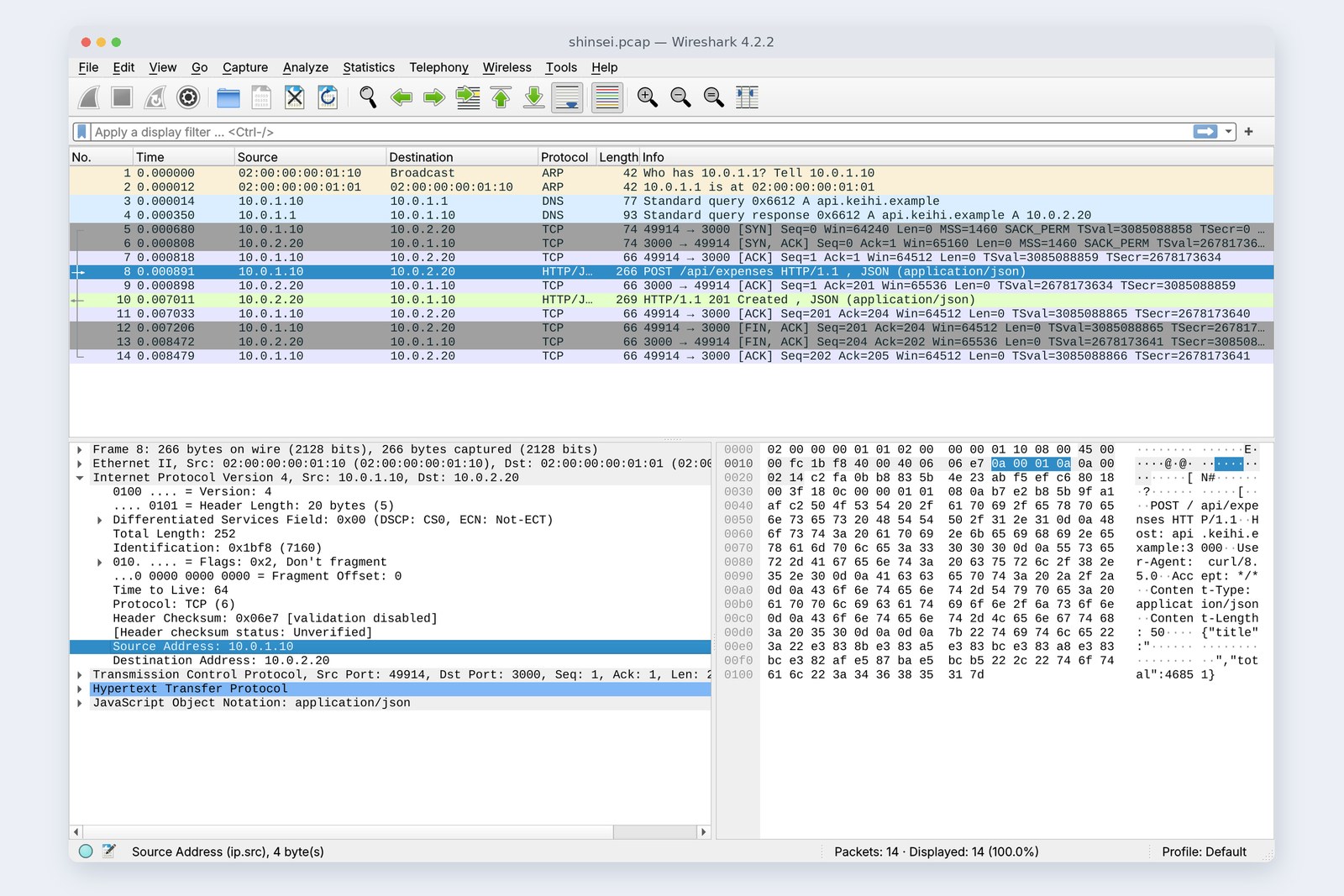
An IPv4 address is 32 bits (4 bytes). Split it into four 8-bit parts, write each as a decimal from 0 to 255 and join them with dots, and you get the familiar 10.0.1.10.
10.0.1.10 is thirty-two 0s and 1s
An address has two parts. The front is the network number (which town), the back the machine number (which house). The “/24” says where to split: the first 24 bits are the network number.
# The address of part 1's PC
$ ip -4 addr show eth0
    inet 10.0.1.10/24 scope global eth0
# In binary (/24 = the first 24 bits are the network number, the last 8 the machine number)
address  00001010.00000000.00000001.00001010   10.0.1.10
mask     11111111.11111111.11111111.00000000   255.255.255.0
# Address AND mask (1 only where both are 1) = the network number
network  00001010.00000000.00000001.00000000   10.0.1.0
The “/” number and masks
/24 means the same as a 32-bit mask with 24 ones followed by zeros: 255.255.255.0 in decimal. Masks used to be the usual way of writing it; today the short “/24” (CIDR notation) is more common.
The bigger the number after “/”, the smaller the network
A /24 network has 256 addresses, but only 254 can go to machines. The first (10.0.1.0) is reserved to mean the network itself, and the last (10.0.1.255) to mean everyone on that network. A /30 gives 2 usable addresses out of 4, handy for linking two routers with one cable.
“/24” = the first 24 bits are the network number = mask 255.255.255.0. Each step up halves the size of the network.
Same network, or elsewhere?
Where /24 really matters is the decision before sending. Before sending a packet, a PC masks the destination's address and its own with its own mask and compares them. If they match, the destination is on the same network, so it asks for the destination's MAC with ARP and sends directly. If not, it's elsewhere, so it hands the packet to the router (the default gateway).
The fork in the road before sending
Back to the opening question. On part 1's practice network I gave Arai's PC the correct 10.0.1.10/24, then the wrong 10.0.1.10/16, and pinged the server beyond the router (10.0.2.20).
# Correct /24: 10.0.2.20 is “elsewhere”, so it goes out via the router (10.0.1.1)
$ ip addr add 10.0.1.10/24 dev eth0
$ ip route get 10.0.2.20
    10.0.2.20 via 10.0.1.1 dev eth0 src 10.0.1.10 uid 0
$ ping -c 3 10.0.2.20
    3 packets transmitted, 3 received, 0% packet loss
# Wrong /16: 10.0.2.20 counts as “the same network”, so it tries to send directly, skipping the router
$ ip addr add 10.0.1.10/16 dev eth0
$ ip route get 10.0.2.20
    10.0.2.20 dev eth0 src 10.0.1.10 uid 0
$ ping -c 3 10.0.2.20
    3 packets transmitted, 0 received, 100% packet loss
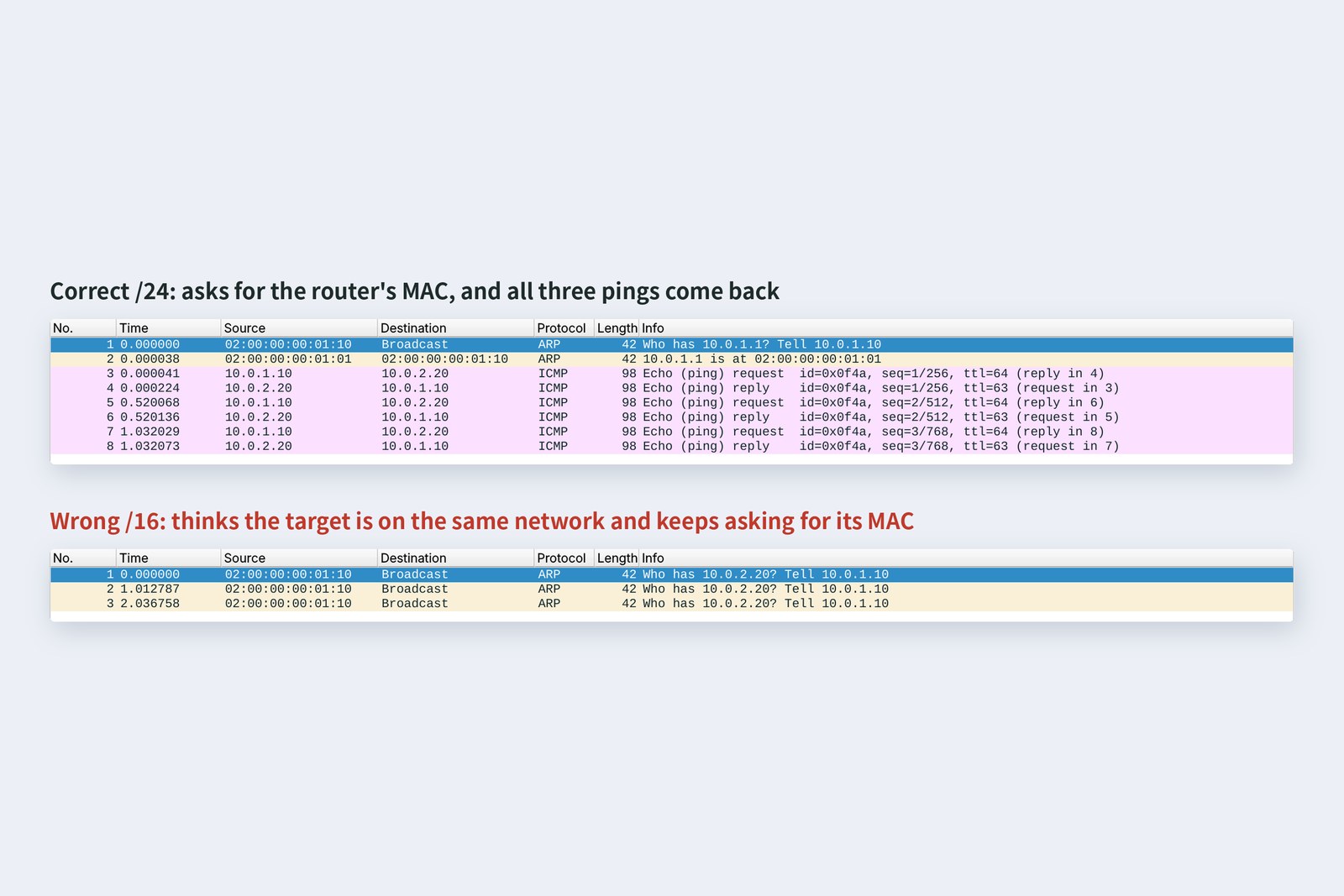
With /16, the PC decided 10.0.2.20 was on “the same network”, tried to send directly without the router, and asked everyone for its MAC. But the server is beyond the router, so nobody answered. After three tries, not a single ping got out (100% failure). A mask isn't “a bit wider or narrower”; it changes how the route is chosen.
AraiMaking it wider made it stop working...
FuruiIt's like assuming someone in the next town lives on your street and shouting for them from your doorstep. The post office would have delivered it.
Special addresses
Some IPv4 addresses are set aside for special jobs. On a number line of the first byte, they look like this.
Addresses with special meanings
The most important are the private addresses (10.0.0.0/8, 172.16.0.0/12, 192.168.0.0/16). Inside a home or office you can use them freely without asking anyone, but they can't be used as-is on the internet. This series' 10.0.1.10 is private too. Your home router swaps them for its own global address on the way out (NAT), hiding many machines behind one address (part 5).
Addresses starting with 127 are this machine. 127.0.0.1 is the famous one, but it's a /8, so anything starting with 127 is you.
# Every address starting with 127 means “this machine”
$ ping -c 1 127.42.42.42
    64 bytes from 127.42.42.42: icmp_seq=1 ttl=64 time=0.285 ms
$ ip addr show lo
    inet 127.0.0.1/8 scope host lo
If your PC has an address starting with 169.254, it failed to get one from DHCP (next section). 100.64.0.0/10 is for carriers to share among subscribers, and the 100.x.y.z addresses in the Tailscale article come from this range too.
DHCP: getting an address
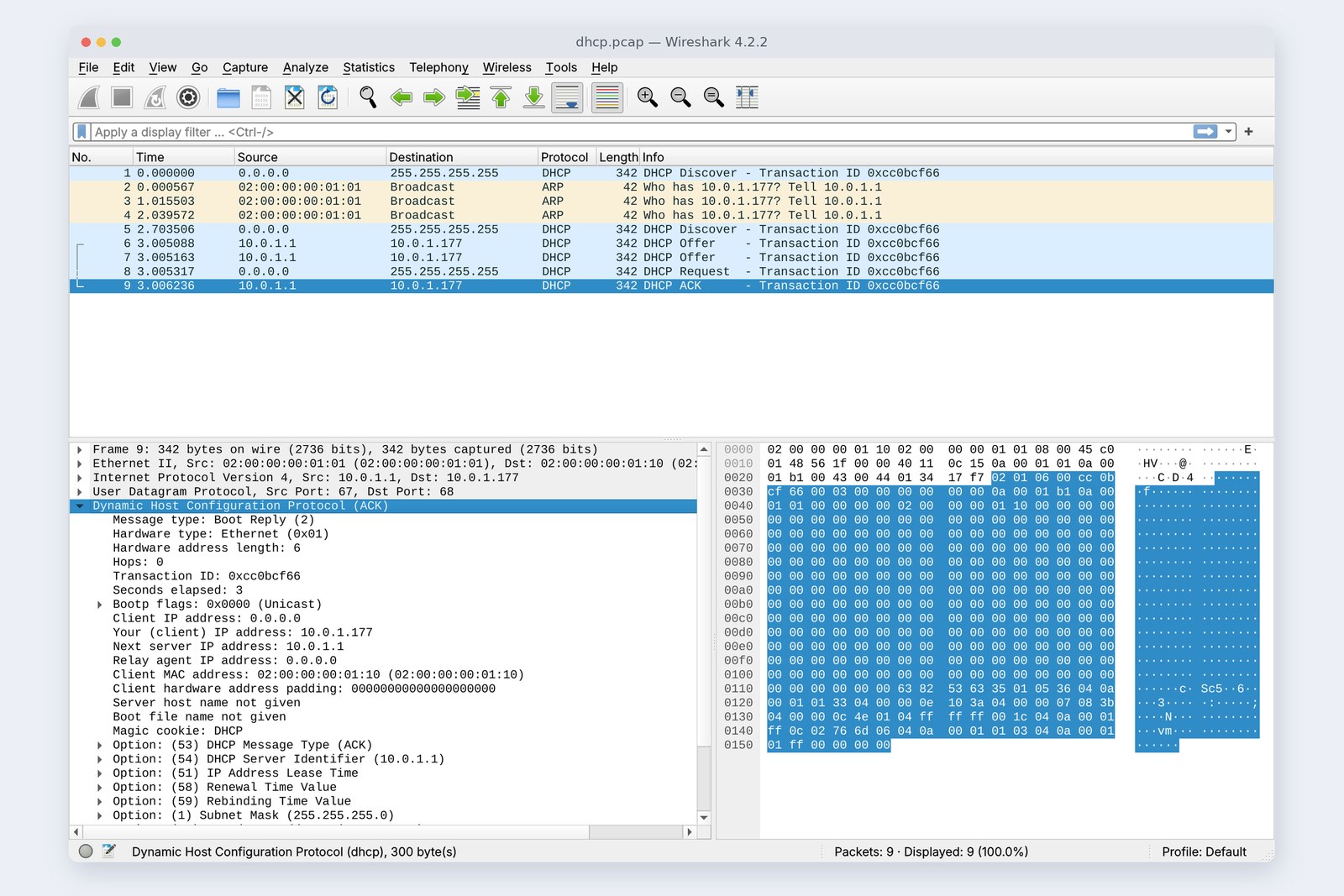
Join your home Wi-Fi and your PC simply has an address. It's handed out by the DHCP server inside the router. I added DHCP to the practice network's router and recorded a PC with no address getting one (the cover photo).
# dhclient on a PC with no address (it gets one via DHCP)
$ dhclient -v eth0
    DHCPDISCOVER on eth0 to 255.255.255.255 port 67 interval 3 (xid=0xcc0bcf66)
    DHCPDISCOVER on eth0 to 255.255.255.255 port 67 interval 5 (xid=0xcc0bcf66)
    DHCPOFFER of 10.0.1.177 from 10.0.1.1
    DHCPREQUEST for 10.0.1.177 on eth0 to 255.255.255.255 port 67 (xid=0x66cf0bcc)
    DHCPACK of 10.0.1.177 from 10.0.1.1 (xid=0xcc0bcf66)
    bound to 10.0.1.177 -- renewal in 1714 seconds.
# What the ACK it received contained (from Wireshark's details)
    Your (client) IP address: 10.0.1.177
    Subnet Mask:              255.255.255.0
    Router:                   10.0.1.1
    Domain Name Server:       10.0.1.1
    IP Address Lease Time:    1 hour (3600)
    Renewal Time Value:       30 minutes (1800)
Measured: four messages (and a wait) before the address is settled
The exchange has four steps: Discover (an address, please), Offer (how about this?), Request (I'll take that) and ACK (it's yours). A PC with no address knows neither its own nor the server's, so it shouts from 0.0.0.0 to 255.255.255.255 (everyone).
The interesting part: settling on an address took about 3 seconds. Before handing out 10.0.1.177, the router checked three times with ARP that no machine was using it. Meanwhile the PC heard nothing and sent another Discover, which is why two Offers arrived.
The address comes with a lease. This one was an hour; after half of it, 30 minutes (dhclient added some jitter and chose 1,714 seconds), the PC asks to renew. If a closed laptop lets the lease expire, the address may go to another machine.
Running out
32 bits make 232, about 4.3 billion addresses: fewer than the people on Earth, and that's before the special ranges and generous early allocations.
A timeline of IP addresses
IANA, which hands addresses to the regions, ran out on 3 February 2011. APNIC, covering Asia-Pacific including Japan, ended normal allocations on 15 April the same year. The internet keeps working because homes and offices use private addresses and NAT, with many machines sharing one global address. The real fix is IPv6.
IPv6
An IPv6 address is 128 bits. That makes 2128 addresses: not 4 times IPv4, but 296 times. Because it's long, it's written in hex as eight groups of 16 bits, with runs of zeros collapsed.
The shape of an IPv6 address
The cloud Linux used for this article has no IPv6 support, so here I check things by calculating with Python's ipaddress module.
>>> import ipaddress
# runs of zeros shrink to ::, and leading zeros are dropped
>>> ipaddress.ip_address('2001:0db8:0000:0000:0000:0000:0000:0001').compressed
'2001:db8::1'
# how many addresses
>>> 2 ** 128
340282366920938463463374607431768211456
>>> 2 ** 32
4294967296
# a link-local address made from part 3's MAC (EUI-64: insert ff:fe, flip the local bit)
>>> def eui64(mac):
...     b = bytes.fromhex(mac.replace(':', ''))
...     iid = bytes([b[0] ^ 0x02]) + b[1:3] + b'\xff\xfe' + b[3:]
...     return 'fe80::' + ':'.join(iid[i:i+2].hex() for i in range(0, 8, 2))
...
>>> ipaddress.ip_address(eui64('02:00:00:00:01:10'))
IPv6Address('fe80::ff:fe00:110')
In IPv6, machines can make their own addresses. The first 64 bits are the network number announced by the router; the last 64 are made up by the machine. They used to come from part 3's MAC address (EUI-64 above, where part 3's local bit gets flipped), but that lets machines be tracked, so modern operating systems normally use random numbers. Addresses starting fe80:: are link-local, usable only within the same network, and every IPv6 machine has one.
Adoption is slow but steady. The share of connections to Google using IPv6 reached about half for the first time in April 2026. Many homes now run IPv4 and IPv6 side by side (dual stack), and whichever works gets used. If you build servers, remember to check they listen on IPv6 too (part 7).
Checking your own PC
| To find out | Mac | Windows | Linux |
|---|---|---|---|
| Your address and mask | ifconfig | ipconfig | ip addr |
| Default gateway | netstat -rn | route print | ip route |
| What DHCP gave you | ipconfig getpacket en0 | ipconfig /all | nmcli -f DHCP4 device show |
| Whether IPv6 works | ping6 | ping -6 | ping -6 |
On a home PC, ipconfig or ifconfig will usually show an address starting with 192.168 or 10 (private) alongside one starting fe80::. If it starts with 169.254, DHCP didn't give you an address: check the router's power and the cable first (part 2).
§ — On one page, and next time
- An IP address is the final destination's address. IPv4 is 32 bits; 10.0.1.10 is the four bytes 0a 00 01 0a.
- “/24” means the first 24 bits are the network number = mask 255.255.255.0. A /24 holds 256 addresses, 254 usable.
- Before sending, mask and compare: same network goes direct, otherwise to the router.
- With /16 by mistake, the PC kept asking for the MAC of a host beyond the router and ping failed 100%.
- Private (10, 172.16, 192.168), this machine (127), and the sign DHCP failed (169.254).
- DHCP is Discover, Offer, Request, ACK. Measured, the router's check made it take about 3 seconds; the lease was one hour.
- IPv4 pools ran out in 2011. IPv6 is 128 bits, and about half of connections to Google now use it.
AraiSo once it's “elsewhere”, it goes to the router... How does the router decide where to send it next?
FuruiRouters carry a table of directions. Next time: that table, traceroute, which uses the TTL to map the path, and what your home router really is.
References
- RFC 791 — Internet Protocol (1981)
- RFC 4632 — Classless Inter-domain Routing (CIDR)
- RFC 1918 — Address Allocation for Private Internets
- RFC 6598 — Shared Address Space (100.64.0.0/10)
- RFC 3927 — Link-Local IPv4 Addresses (169.254.0.0/16)
- RFC 2131 — Dynamic Host Configuration Protocol
- JPNIC — IPv4 address pool ran out in the Asia Pacific region
- RFC 8200 — Internet Protocol, Version 6 (IPv6) Specification(RFC 2460 の後継)
- RFC 4291 — IP Version 6 Addressing Architecture
- RFC 8981 — Temporary Address Extensions for SLAAC in IPv6
- APNIC Blog — Google hits 50% IPv6 (2026-04-28)
- Python — ipaddress
The recordings were made on 24 October 2026 on a practice network the author built with network namespaces on Linux (Ubuntu 24.04) in the cloud. DHCP used dnsmasq on the router (one-hour lease) and dhclient (isc-dhcp-client 4.4.3); everything else is as in part 1. Every number in the tables was read from these recordings and the command output at the time. This environment's kernel lacks IPv6, so the IPv6 examples are calculations with Python's ipaddress. Exhaustion dates are from JPNIC and the IPv6 share from the APNIC Blog (Google's statistics, April 2026). The characters are fictional.
Old-School Networking, part 4 — IP addresses / 2026.10