Old-School Networking / 2026 ・ No.06
Old-School Networking
Part 6: TCP — ports, the three-way handshake, retransmission, windows and congestion
Published
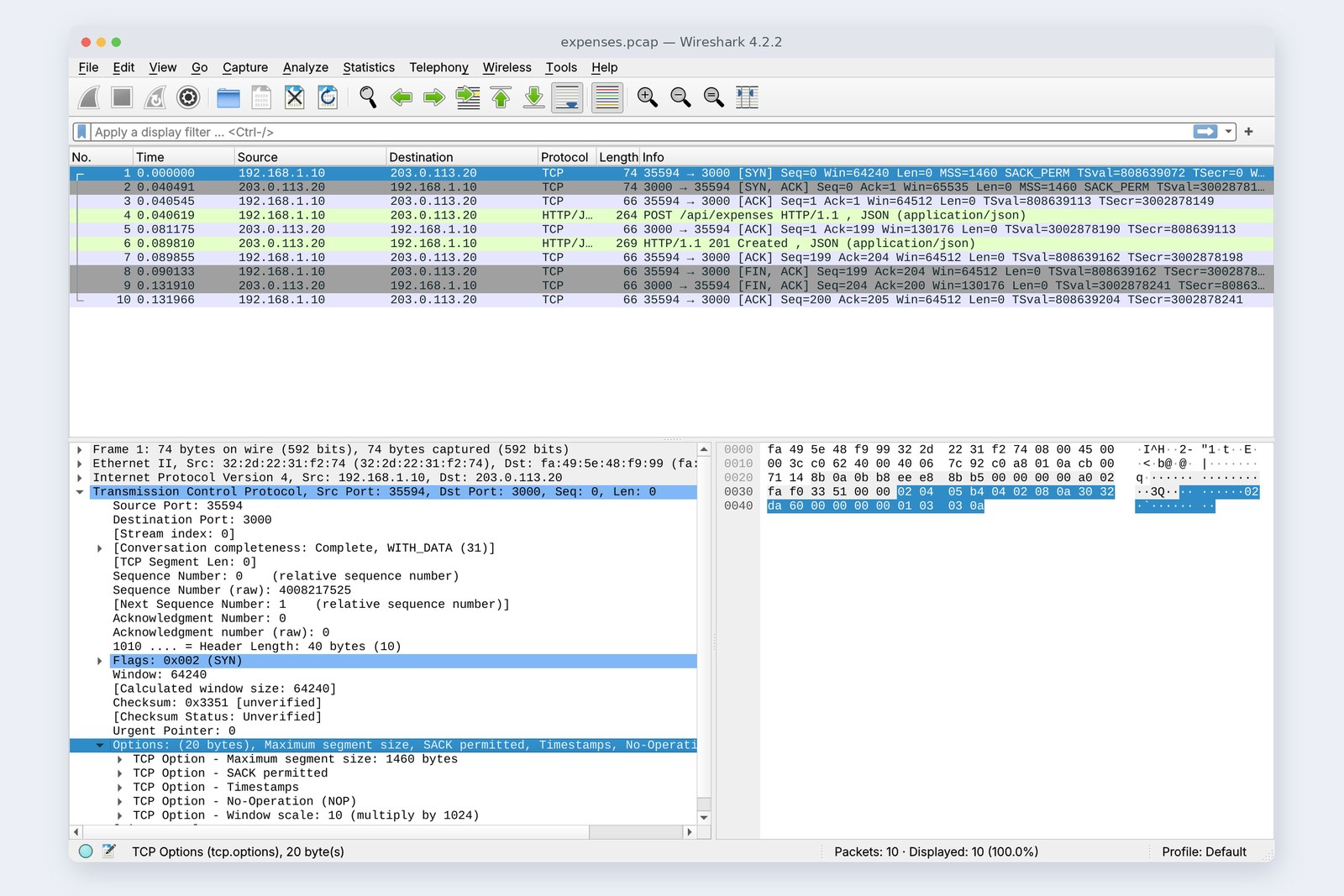
In part 5, packets travelled from router to router by their destination address. But packets get lost on the way, or arrive out of order. From this part we're in layer 4, the transport layer.
TCP gets the submission there reliably through loss, reordering, slow receivers and congested roads. We build a “mischief wire” that drops packets on purpose and check each mechanism in turn.
The room-number layer
AraiThe 40418 and 3000 in last time's NAT table. You said they were room numbers.
FuruiRight. The address gets you to the building. Which room, which program, from there on is one of TCP's jobs.
Arai“One of”? There are others?
FuruiRouters that drop packets, roads that shuffle them, servers that read slowly, crowded links. IP looks after none of that. TCP takes it all on. Today we cause every one of them on purpose.
The 12-part route map (you are here: part 6)
- Port numbers — an address is a building, a port a room; a connection is four values
- Greetings and numbering — the handshake, Seq and Ack, refused vs. left waiting (measured)
- Retransmission — drop one packet, swap two (measured)
- Windows and congestion — a receiver that won't read, and how much is in flight on a crowded link (measured)
- Goodbyes — FIN, TIME-WAIT, RST
This part's practice network puts a small program the author wrote between the PC (192.168.1.10) and the server (203.0.113.20). It relays traffic and can delay it, limit bandwidth, drop chosen packets and reorder them: a “mischief wire”. Unless stated otherwise it adds 20 ms each way (40 ms round trip). Part 5's routers and NAT are left out to keep things focused.
Port numbers
An address is a building, a port is a room
A port number is 16 bits: 0 to 65535. Server programs listen on a fixed port, and the PC borrows a free one each time it connects.
# Ports the server is listening on (LISTEN)
srv$ ss -tln
    State Recv-Q Send-Q Local Address:Port Peer Address:PortProcess
    LISTEN 0 128 0.0.0.0:4000 0.0.0.0:*
    LISTEN 0 511 0.0.0.0:3000 0.0.0.0:*
# The range the PC picks its own port from (Linux default)
pc$ sysctl net.ipv4.ip_local_port_range
    net.ipv4.ip_local_port_range = 32768 60999
On the server, the Node.js expenses API waits on 3000 and the “slow server” made for this part on 4000. On the PC side, Linux picks from 32768–60999 (Windows and Mac use 49152–65535). This submission got 35594.
| Port | Typically |
|---|---|
| 22 | SSH |
| 80 / 443 | HTTP / HTTPS (parts 8 and 10) |
| 53 | DNS (part 9; mostly UDP) |
| 3306 / 5432 / 6379 | MySQL / PostgreSQL / Redis |
| 3000 / 5173 / 8080 | common for development servers (a habit, not a rule) |
A connection is identified by four values: the address and port at each end. Two browser tabs on the same PC connecting to port 3000 on the same server are two connections, because the PC-side ports differ. If you see “Address already in use” while developing, something is already listening on that port.
Start with a greeting
Before sending any data, TCP sets up a connection with three greetings (the three-way handshake): “I'd like to connect” (SYN), “Go ahead, and so would I” (SYN+ACK), “Got it” (ACK). Here is one submission.
# One submission (20 ms each way; Seq and Ack counted from 0, as Wireshark shows them)
    0.000  pc  → srv  SYN      Seq=0    Ack=0    Len=0
    0.040  srv → pc   SYN+ACK  Seq=0    Ack=1    Len=0
    0.041  pc  → srv  ACK      Seq=1    Ack=1    Len=0
    0.041  pc  → srv  PSH+ACK  Seq=1    Ack=1    Len=198  POST /api/expenses
    0.081  srv → pc   ACK      Seq=1    Ack=199  Len=0
    0.090  srv → pc   PSH+ACK  Seq=1    Ack=199  Len=203  201 Created
    0.090  pc  → srv  ACK      Seq=199  Ack=204  Len=0
    0.090  pc  → srv  FIN+ACK  Seq=199  Ack=204  Len=0
    0.132  srv → pc   FIN+ACK  Seq=204  Ack=200  Len=0
    0.132  pc  → srv  ACK      Seq=200  Ack=205  Len=0
# the first three are the greeting, the last three the goodbye
One submission: greeting, request and reply, goodbye (measured times)
The cover photo has that first SYN opened. A SYN also carries requests. MSS 1460 means “keep each segment's contents to 1460 bytes”: part 2's MTU of 1500 minus 20 bytes each for the IP and TCP headers. The two sides also agree here on SACK (reporting exactly which ranges arrived), timestamps and the window scale.
# curl's timings: 1 round trip to connect, 2 to the first byte of the reply
pc$ curl -w '…' -X POST … http://203.0.113.20:3000/api/expenses
    connect 0.0407 s   first byte 0.0900 s   total 0.0901 s   local port 35594
# the PC closed first, so it keeps a TIME-WAIT for 60 seconds
pc$ ss -tano dst 203.0.113.20
    TIME-WAIT 0 0 192.168.1.10:35594 203.0.113.20:3000 timer:(timewait,59sec,0)
curl's numbers show one round trip (0.041 s) to connect and two (0.090 s) to the first byte of the reply. The greeting alone costs a round trip. With a server 100 ms away, that's 0.1 s before anything happens. So reusing one connection is faster.
# Two submissions, connecting each time
    0.0827 s + 0.0824 s = 0.1652 s
# Two submissions over one reused connection (connects 0 the second time)
    0.0825 s + 0.0421 s = 0.1246 s
The second submission took 0.042 s over a reused connection and 0.082 s with a fresh one: exactly one round trip apart. HTTP keep-alive and database connection pools exist to skip this greeting (part 10).
Numbering the bytes
AraiThe capture says Seq=199 and Ack=204. Does that mean packet number 199?
FuruiNot packets: bytes. TCP treats data not as a series of packets but as one long stream of bytes.
Seq: “this data starts at byte N”. Ack: “send byte N next”
The PC's POST is 198 bytes, numbered 1 to 198. The server's Ack=199 means “I have everything up to 198; send 199 next”. The server's 203-byte reply has its own numbering, and the PC answered Ack=204. Each direction has its own sequence.
Wireshark starts them at 0 for readability, but real sequence numbers start at a random value (Sequence Number (raw) in the photo's details). That stops stray packets from an old connection slipping in, and stops outsiders guessing the numbers and injecting forged packets.
TCP doesn't keep message boundaries. Send 198 bytes in one go, and there's no guarantee one read on the other side returns exactly those 198 bytes: they may be split, or merged with what follows. That's why HTTP writes the length in Content-Length. When you use sockets yourself, agree on lengths or delimiters (part 7).
Refused, or left waiting
A greeting can fail in two ways. Connect to a port where nothing is listening and the server's OS sends back an RST (nobody here). If the SYN is dropped on the way, nothing comes back at all. We had the mischief wire drop SYNs to port 3002 and compared.
# To closed port 3001: the server answers RST (nobody here); refused in one round trip
pc$ curl http://203.0.113.20:3001/
    curl: (7) Failed to connect to 203.0.113.20 port 3001 after 40 ms: Couldn't connect to server
# To port 3002, where the wire drops SYNs: retries continue, and curl gives up at 20 s
pc$ curl --connect-timeout 20 http://203.0.113.20:3002/
    curl: (28) Failed to connect to 203.0.113.20 port 3002 after 20002 ms: Timeout was reached
# times the SYN was sent (s)
    0.0  1.0  2.0  3.0  4.1  5.1  7.1  11.3  19.5
Refusal is instant; silence keeps you waiting
The refusal took 0.041 s: one round trip. With no answer, the PC resent the SYN every second, then doubled the gap to 2, 4 and 8 seconds. This Linux (6.18) spaces the first few one second apart (tcp_syn_linear_timeouts = 4) and by default gives up after about two minutes.
Connection refused: you reached the machine, but nothing runs on that port. Timed out: lost on the way, or at a firewall. The error message tells you where to look (part 12).
Lost? Send it again
We set up an upload of a 1 MB receipt image with the submission, limited the mischief wire to 10 Mbit/s, and dropped only the 40th data segment from the PC.
# Uploading a 1 MB receipt image, the wire drops the PC's 40th data segment (10 Mbit/s, 20 ms each way)
wire: up drop data#40
# The PC-side capture (numbers are Wireshark's packet numbers)
    58  0.1282  pc → srv  Seq=55169 Len=1448
   123  0.1759  srv → pc  Ack=55169  SACK 56617-58065
   128  0.1771  srv → pc  Ack=55169  (Dup ACK #1)
   130  0.1783  srv → pc  Ack=55169  (Dup ACK #2)
   131  0.1784  pc → srv  Seq=55169 Len=1448  (Fast Retransmission)
# Time taken: three runs without loss, one with
    1.007 s  1.007 s  1.006 s   /   1.008 s
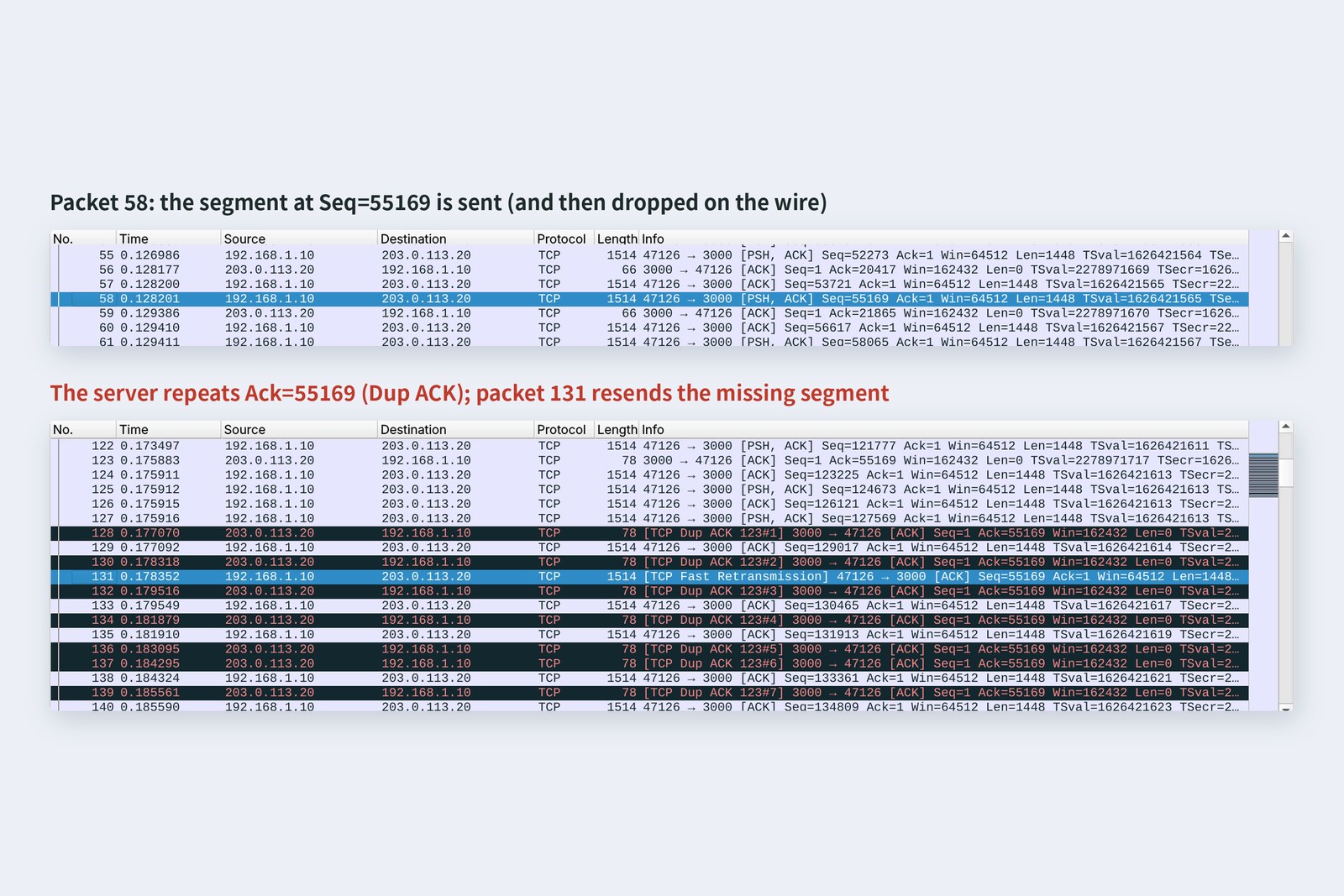
Repeated Acks mean “lost”: send it again
Seq=55169 never arrives, so each later segment makes the server repeat the same Ack, “still missing from 55169”, with a SACK listing what did arrive. After three identical Acks, the PC resent just 55169 without waiting for a timeout (Fast Retransmission): 0.050 s after the loss, about one round trip. The whole upload took 1.008 s, barely different from three runs without loss (1.006–1.007 s).
Each segment carries 1448 bytes: MSS 1460 minus the 12-byte timestamps option. If no later segments follow, so the repeated Acks never come, TCP waits for a timeout (RTO) instead. Linux's minimum timeout is 0.2 s, so that case is noticeably slower.
When the order changes
# The wire delays the 40th segment by one place. Server-side capture:
    76  0.1375  pc → srv  Seq=56617 Len=1448  (arrived ahead of 55169)
    77  0.1376  srv → pc  Ack=55169  SACK 56617-58065
    78  0.1388  pc → srv  Seq=55169 Len=1448  (Out-Of-Order)
# The later segment arrives first; the server says “still missing from 55169, but I have 56617–58065”. Then 55169 arrives and fills the gap
# Retransmissions by the PC: 0
This time the 40th segment wasn't dropped, just moved back one place. The server put 56617, which arrived first, aside and replied “still missing 55169”, but 55169 arrived right after and filled the gap. The PC resent nothing. The app (Node.js) only ever sees the bytes back in order, so it never knows anything was swapped.
The receiver's window
AraiWhat if the sender sends flat out and the receiver can't keep up?
FuruiEvery reply says how much more the receiver can take. That's the window. I've made a server that slacks off reading.
# Sending 1 MB to a server that doesn't read for 3 seconds (32 KB receive buffer)
    48  0.163  srv → pc  Win=0  Ack=40689  (ZeroWindow)
# The buffer fills: window 0. The PC peeks at intervals: “ready yet?”
    49  0.414  pc → srv  Len=0  (probe)
    51  0.966  pc → srv  Len=0  (probe)
    53  2.022  pc → srv  Len=0  (probe)
# After 3 seconds the server starts reading and the window opens
    55  3.082  srv → pc  Win=36200  (Window Update)
    curl: total 4.188 s
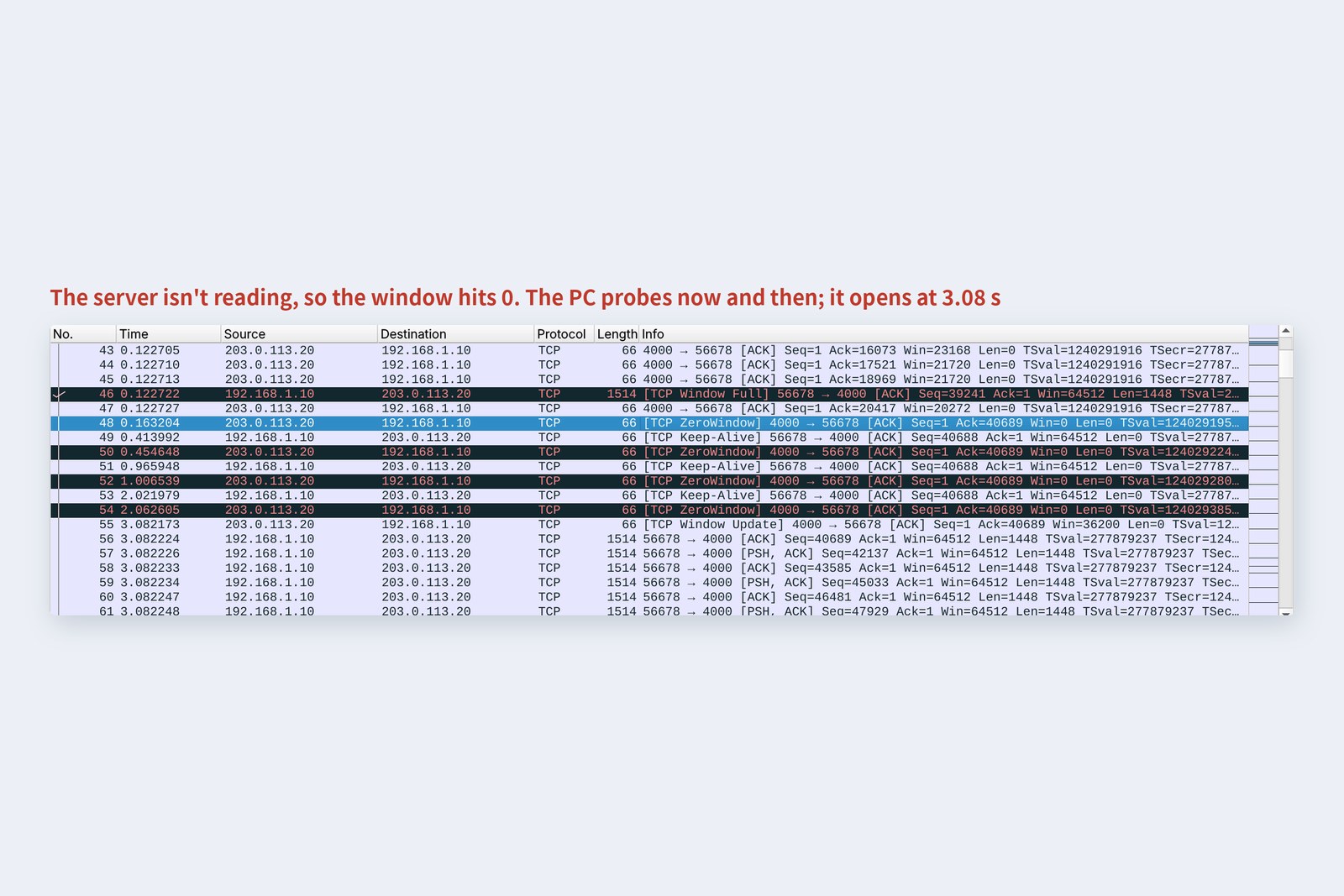
When the receive buffer fills, the window drops to 0
The server on port 4000 reads nothing for 3 seconds after connecting. Its 32 KB receive buffer filled at 40,688 bytes, and at 0.163 s the window hit 0 (ZeroWindow). The PC stopped sending and probed at growing intervals, 0.41, 0.97 and 2.02 s: “open yet?” At 3.08 s the server started reading, the window opened and sending resumed.
The window field is 16 bits, so on its own it can only say 64 KB. The SYN agrees a multiplier (Window scale: 10 in the cover photo means ×1024). This flow control keeps a fast sender from swamping a slow receiver. When Node.js's write() returns false, this window is ultimately behind it.
Congestion on the road
The window is about the receiver. There's also the road in between. Send too much down a thin link and packets overflow the queue in front of a router and are dropped. TCP infers how crowded the road is from the losses and adjusts how much it sends (congestion control).
With the mischief wire at 10 Mbit/s and a queue of at most 30 packets, we downloaded a 2 MB CSV from the server. The chart counts, every 10 ms from the server-side capture, the segments sent but not yet acknowledged.
Double, overflow, cut back, grow slowly again (measured)
# Downloading a 2 MB CSV (10 Mbit/s, 20 ms each way, at most 30 packets queued at the wire)
# Segments the server sent in each round trip (41 ms)
     10   20   40   51   36   36   35   36  …
# The server mid-transfer (ss -ti; cwnd is in segments)
    cubic  mss:1448  cwnd:56  ssthresh:46  rtt:66.713 ms  minrtt:40.738 ms
    queue drops 4  retransmissions 4   curl: 1.884 s, 8.90 Mbit/s
The first round trip sent 10 segments, the next 20, then 40: doubling every round trip, called slow start (the initial 10 comes from RFC 6928). When the link and queue could hold no more, four overflowed; after resending them the server cut its sending to about 70 percent (ssthresh 46), then grew slowly. That's cubic, Linux's default.
Note the gap between rtt:66.7 and minrtt:40.7 mid-transfer. Waiting in the queue added 26 ms to the round trip. Queues so deep that delay balloons are called bufferbloat. Some schemes, like Google's BBR, don't wait for losses but read congestion from rising round-trip times.
Saying goodbye
The last three packets of the submission are the goodbye. The PC sent FIN (nothing more to send), the server answered with its own FIN, and the PC finished with an ACK. Each direction is closed separately, so it's really four messages, but the server's ACK and FIN went together in one.
The side that closes first keeps a TIME-WAIT state for 60 seconds (the timer:(timewait,59sec) above). It's there to answer again if the last ACK is lost, and to stop late packets from an old connection leaking into a new one with the same ports. Programs that open huge numbers of short connections can pile up tens of thousands of TIME-WAITs and run out of PC-side ports: another reason to reuse connections.
An abrupt end with no goodbye is an RST. Besides connecting to a port nobody listens on (section 5), you also get one when the program at the other end crashes. Connection reset by peer means an RST came from the other side.
Checking your own PC
| To see | Mac | Windows | Linux |
|---|---|---|---|
| Connections and states | netstat -an -p tcp | netstat -an | ss -tan |
| What's using a port | lsof -i :3000 | netstat -ano | findstr :3000 | ss -tlnp |
| Can I reach a port? | nc -vz host 443 | Test-NetConnection host -Port 443 | nc -vz host 443 |
| How long connecting took | curl -o /dev/null -s -w '%{time_connect} %{time_starttransfer}\n' URL | ||
Run netstat -an with a few websites open and you should see a row of ESTABLISHED connections to port 443, with recently closed ones in TIME_WAIT.
§ — On one page, and next time
- A port is a room. A connection is four values: address and port at each end. Linux picks PC-side ports from 32768–60999.
- The greeting is SYN, SYN+ACK, ACK: one round trip to connect. Reusing the connection cut the second submission from 0.082 s to 0.042 s.
- Seq and Ack number bytes. Ack says which byte to send next. TCP keeps no message boundaries.
- A closed port was refused with an RST in 0.041 s; dropped SYNs were resent every second while we waited.
- One lost segment produced repeated Acks and a resend about one round trip later; total time barely changed. Reordering caused no resends.
- A receiver that doesn't read sends window 0. The sender waits, probes, and resumes when it opens.
- Sending grew 10, 20, 40, then was cut to about 70% after overflow. The queue added 26 ms to the round trip.
AraiTCP is incredibly thorough. Why not use it for everything?
FuruiSometimes thoroughness gets in the way. On a video call, you don't want a frame from a second ago resent. Next time: UDP, which neither greets nor resends, and sockets, the doorway programs use to reach both.
References
- RFC 9293 — Transmission Control Protocol (TCP)
- RFC 6335 — IANA Procedures for the Management of the Service Name and Transport Protocol Port Number Registry
- IANA — Service Name and Transport Protocol Port Number Registry
- Microsoft Learn — The default dynamic port range for TCP/IP has changed
- RFC 7323 — TCP Extensions for High Performance (Window Scale, Timestamps)
- RFC 2018 — TCP Selective Acknowledgment Options
- RFC 6298 — Computing TCP's Retransmission Timer
- RFC 6928 — Increasing TCP's Initial Window
- RFC 9438 — CUBIC for Fast and Long-Distance Networks
- Linux kernel — IP Sysctl(tcp_syn_retries, tcp_syn_linear_timeouts ほか)
- curl — man page(--write-out)
The recordings were made on 25 October 2026 on a practice network the author built with network namespaces on Linux (Ubuntu 24.04, kernel 6.18) in the cloud. The “mischief wire” between the PC and the server is a small Python program (using AF_PACKET) that relays frames between two interfaces and can be told the delay, bandwidth, queue length, and which packets to drop or reorder. The server is Node.js, the slow-reading server is Python, congestion control is cubic, and segmentation offloads (TSO/GRO) were turned off to keep the captures readable. Every number in the text is a real value read from those recordings and the commands' output. The characters are fictional.
Old-School Networking, part 6 — TCP / 2026.10