Old-School Backend / 2026 ・ No.01
Old-School Backend
Part 1: The big picture — how one submission travels through the server into the database
Published
The frontend series built the submission form, and the networking series read that submission line by line as it crossed the wire. Now it's time for the receiving end: the backend. The language is Java, over a planned fifteen parts.
Part 1 is the big picture. We run an expense server written in Java with Spring Boot and a PostgreSQL database server on a practice network, and measure how one submission travels through the server and into the database.
To the receiving end
AraiThe journey along the wire is done. From today we're inside the server!
FuruiThat's right. The POST /api/expenses we've been sending, this time we receive it ourselves.
AraiSpring Boot, right? Add a few annotations and it runs. An AI could write it in a second.
FuruiIt runs in a second, and in a second you've lost track of what's happening. So first we draw the big picture, then open up what's moving behind it, one piece at a time.
Route map of all 15 parts (you are here: part 1)
- The big picture — one submission passing through eight pairs of hands inside the server and into the database (measured, with Wireshark)
- Doing it by hand — parts 3 and 4 handle HTTP and the database without a framework, to see what Spring does for us
- Business-system staples — validation, error replies, transactions, approval flows, authentication, files, logging, testing
- Measured every time — run on a practice server and explained with real logs, SQL, packets and timings
The subject is the same expense system as before. The submission sent from the page in part 10 of the frontend series and read line by line in part 10 of the networking series is now received in Java and stored in a database.
A server is a program that waits
The practice network has three machines: the PC (192.168.1.10), the expense server (192.168.1.20, named expenses.example) and the database server (192.168.1.30). On the expense server we started the Java program written for this part.
# Start the Java program on the expense server (192.168.1.20)
app$ java -jar expenses-0.0.1-SNAPSHOT.jar
    … Tomcat initialized with port 8080 (http)
    … HikariPool-1 - Start completed.
    … Started ExpensesApplication in 3.183 seconds
# Who is waiting, and where
app$ ss -ltnp 'sport = :8080'
    LISTEN  0.0.0.0:8080   users:(("java",pid=760,fd=18))
# Connections to the DB (already open at startup)
app$ ss -tn 'dport = :5432' | wc -l
    10
# How big the program is
app$ ls -l expenses-0.0.1-SNAPSHOT.jar ; grep VmRSS /proc/760/status ; ls /proc/760/task | wc -l
    24,319,744 bytes
    VmRSS:  200876 kB
    38
A “server” isn't a special machine. It's a program that opens a port and waits for requests. ss shows java waiting on port 8080 of 0.0.0.0 (networking part 11's “wait at every door”). And by the time it has started, it has already opened 10 connections to port 5432 on the database server. Chapter 7 explains why.
Startup took 3.2 seconds, about 200 MB of memory and 38 threads. Even a small expense server has a fair amount of work going on inside.
One submission's trip
From the PC we sent the same submission as in the networking series.
# From the PC, the same submission as in part 10
pc$ curl -D - -X POST -H 'Content-Type: application/json' \
       -d '{"date":"2026-10-26","item":"交通費","amount":1280}' \
       http://expenses.example:8080/api/expenses
    HTTP/1.1 201
    Location: /api/expenses/EXP-2026-0012
    Content-Type: application/json

    {"id":"EXP-2026-0012","status":"submitted"}     (0.281 s)
# Five more of the same
    201 (0.009 s)  201 (0.010 s)  201 (0.007 s)  201 (0.005 s)  201 (0.005 s)
Back came 201 Created and a reference number, also given in Location (networking part 10). What happened inside the expense server meanwhile, we had it write to its log (the log messages are in Japanese, as in the program).
# The expense server's log (2nd submission; every line is thread http-nio-8080-exec-2)
    15:47:44.473 ExpenseController      窓口:申請を受け取った ExpenseRequest[…, amount=1280]
    15:47:44.473 JdbcTransactionManager Creating new transaction with name [example.expenses.ExpenseService.submit]
    15:47:44.473 JdbcTransactionManager Acquired Connection […] for JDBC transaction
    15:47:44.474 JdbcTemplate           Executing prepared SQL statement [select nextval('expense_no')]
    15:47:44.474 ExpenseService         担当者:受付番号を決めた EXP-2026-0013
    15:47:44.474 JdbcTemplate           Executing prepared SQL statement [insert into expense (…) values (?, ?, ?, ?, 'submitted')]
    15:47:44.475 ExpenseRepository      倉庫番:1行書いた EXP-2026-0013
    15:47:44.475 JdbcTransactionManager Committing JDBC transaction on Connection […]
    15:47:44.476 JdbcTransactionManager Releasing JDBC Connection […] after transaction
    15:47:44.476 ExpenseController      窓口:201 を返す EXP-2026-0013
One submission passes through eight pairs of hands inside the server
Tomcat receives the HTTP, Jackson turns the JSON into Java values, and Hibernate Validator checks them. Only then is the “counter” we wrote called. The counter hands it to the “clerk”, who starts a transaction and assigns a reference number, and the “storekeeper” writes one row to the table with SQL. The transaction is committed, the connection goes back to the pool, and the counter returns 201. By the log's clock, 3 milliseconds from receipt to reply.
Split by Wireshark's clock: 3.3 ms from the request arriving to the first DB message, 2.5 ms for four round trips to the DB, and 1.6 ms to write and send the reply.
Counter, clerk, storekeeper
The part we wrote is split into three roles. Here is the actual code (comments and log messages are in Japanese).
// The counter (Controller): takes the HTTP request, hands it on, writes the 201
@PostMapping
public ResponseEntity<Map<String, String>> submit(@Valid @RequestBody ExpenseRequest req) {
    log.info("窓口:申請を受け取った {}", req);
    String id = service.submit(req);
    log.info("窓口:201 を返す {}", id);
    return ResponseEntity.created(URI.create("/api/expenses/" + id))
            .body(Map.of("id", id, "status", "submitted"));
}

// The clerk (Service): the business rules; from here on it's one transaction
@Transactional
public String submit(ExpenseRequest req) {
    String id = "EXP-2026-%04d".formatted(repo.nextNumber());
    log.info("担当者:受付番号を決めた {}", id);
    repo.insert(id, req);
    return id;
}

// The storekeeper (Repository): writes SQL and talks to the DB
void insert(String id, ExpenseRequest r) {
    jdbc.sql("insert into expense (id, applied_on, item, amount, status) values (?, ?, ?, ?, 'submitted')")
        .params(id, r.date(), r.item(), r.amount())
        .update();
    log.info("倉庫番:1行書いた {}", id);
}
One class per role
The counter (Controller) knows only HTTP, the clerk (Service) only the business rules, the storekeeper (Repository) only SQL. Putting SQL in the counter would work, but as approval flows and permission checks pile up, one class becomes unmanageable. With roles separated, “change the database” touches only the storekeeper, and “change the spending limit” only the clerk.
AraiSame idea as network layers. The upper layer doesn't need to know what's inside the lower one.
FuruiExactly. The old merchants kept the counting room, the kitchen and the storehouse apart too.
The database is another program
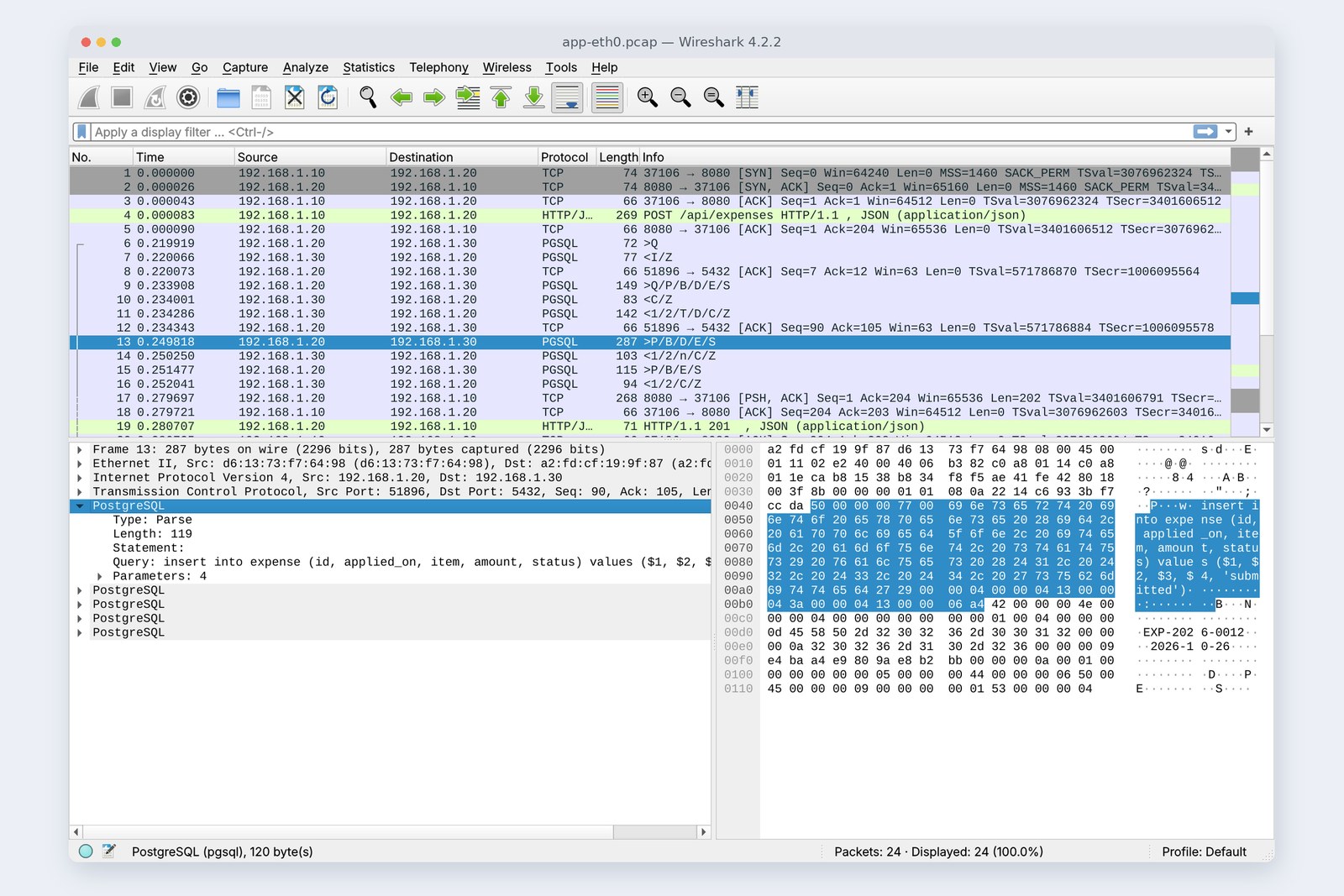
The database isn't a component inside the expense server. It's a separate program running on a separate server, connected to the expense server over TCP port 5432. The cover picture was recorded at the expense server's port: between the PC's submission (4) and the reply (19) sit the exchanges with the database server (6 to 16).
There were four round trips. The first “empty query” checks that the connection borrowed from the pool is still alive. Next come BEGIN (start of the transaction) and fetching the reference number, then the INSERT, and finally COMMIT (make it final). Part 9 covers transactions in depth.
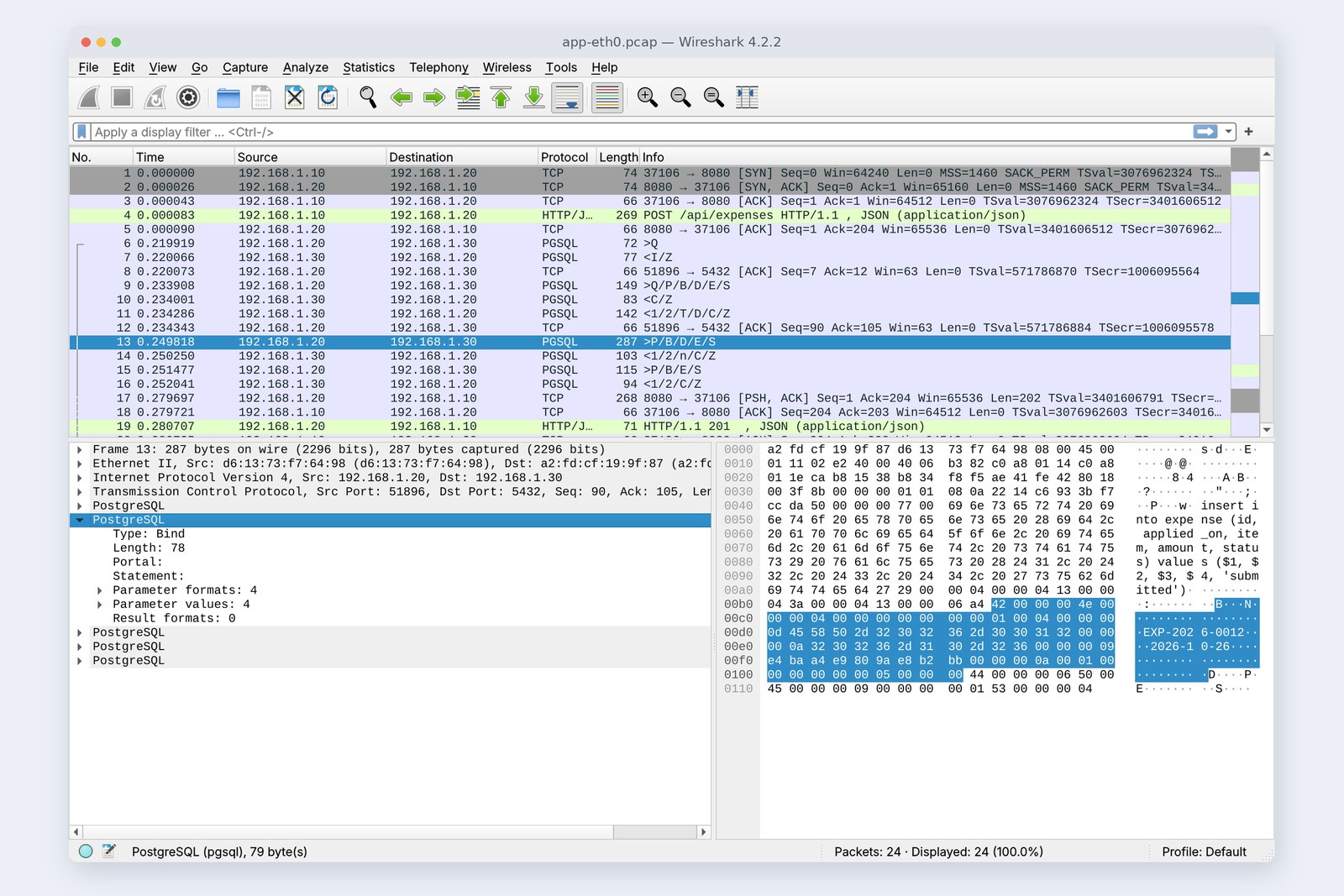
Notice that the SQL statement and its values travel separately. The statement keeps blanks, $1, $2, $3, $4, and the reference number, date, item and amount that fill them arrive in a separate box called Bind. That way, even if the item contains a malicious string, it is never read as part of the SQL statement. In part 4 we'll deliberately mix statement and values and watch it break.
# Look inside the table on the DB server
db$ psql -d expenses -c 'select id, applied_on, item, amount, status from expense order by id limit 3'
          id       | applied_on |  item  | amount  |  status
    ---------------+------------+--------+---------+-----------
     EXP-2026-0012 | 2026-10-26 | 交通費 | 1280.00 | submitted
     EXP-2026-0013 | 2026-10-26 | 交通費 | 1280.00 | submitted
     EXP-2026-0014 | 2026-10-26 | 交通費 | 1280.00 | submitted
On the database server, the table indeed holds one row per submission. The amount is 1280.00: the 1280 sent from the page has become a number with two decimal places. How to hold money in Java is the big topic next time.
The first one is slow
Chapter 3's submission took 0.281 seconds by curl's clock. The next five took 0.005 to 0.010 seconds.
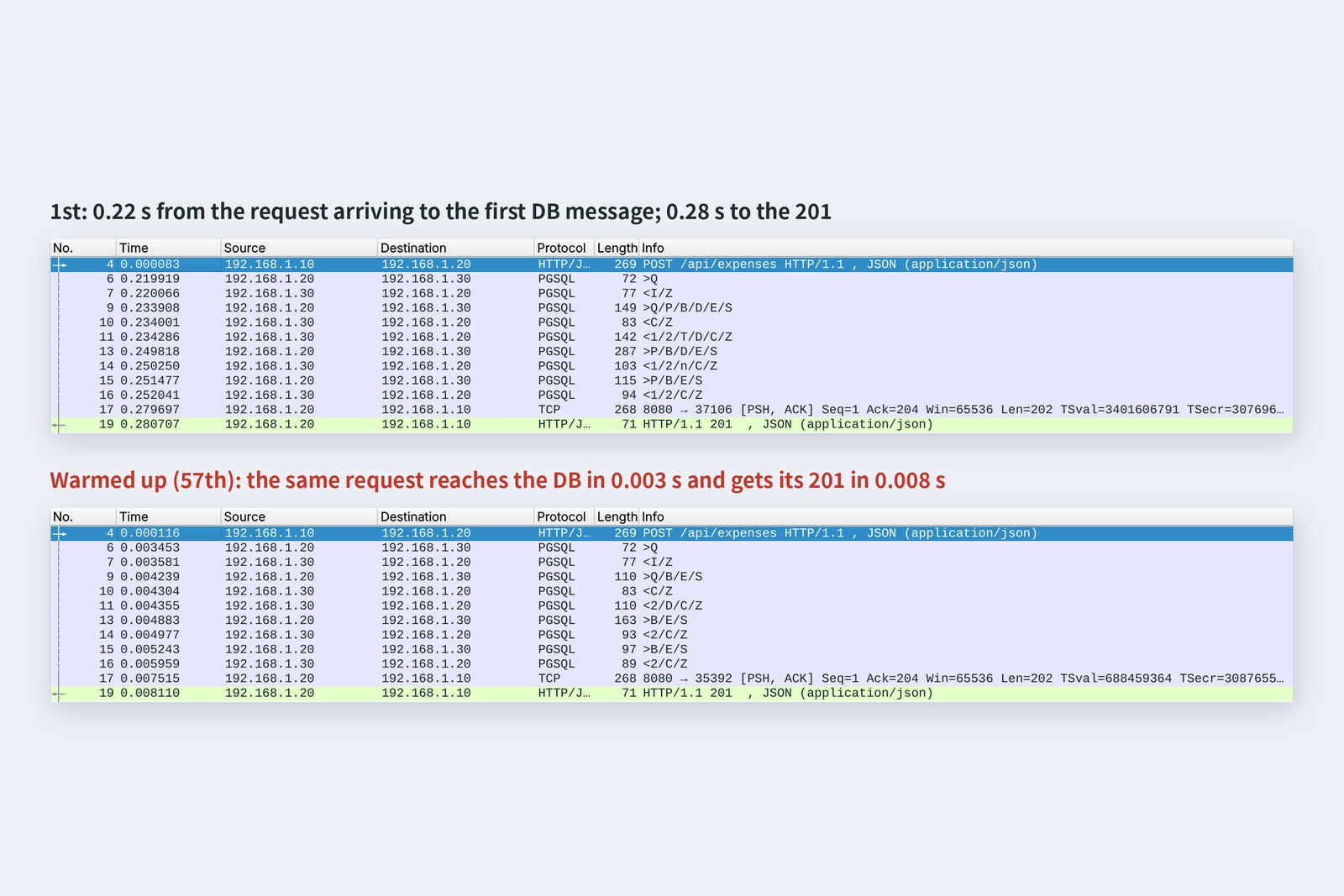
Almost all the difference comes before the first DB message: 0.22 s for the first submission, 0.003 s once warmed up. The log shows the first one spent about 0.15 s before reaching the counter. On first use, the JSON reader and the validator get themselves ready, Java classes are loaded, and the JVM gradually compiles the busiest paths into faster machine code.
A Java server is “slowest right after startup”. When measuring performance, throw away the first few requests. The same reason explains slow responses just after a production deployment (part 15).
Many at once
At month end, submissions pile up before accounting's deadline. We sent 50 at once from the PC.
# Send 50 submissions at once from the PC
pc$ python3 par.py
    status {201: 50}
    total 0.157 s  slowest 0.135 s  fastest 0.030 s
# Count the thread names that received them in the server log
app$ grep … app.log | (thread names) | sort -u | wc -l
    36
# Threads in the Java program (38 right after startup)
app$ ls /proc/760/task | wc -l
    66
One thread per request; DB connections are borrowed from a pool
All 50 got 201 within 0.157 seconds, and the log shows 36 different threads receiving them. Tomcat assigns each incoming request to a thread (a worker inside the program that can run at the same time as others). Database connections, on the other hand, are the 10 opened at startup, reused (a connection pool). It saves starting over with the TCP greeting each time, exactly networking part 6's “reusing connections”.
With 36 workers sharing 10 phones, some wait for a free line. Thread counts, pool sizes and virtual threads (since Java 21) are measured in part 15.
The toolkit
This expense server is a template made with Spring Initializr (start.spring.io), plus five Java files, a table definition (schema.sql) and a few changed settings. Building it produces a single jar file.
Inside the jar: this part's 112 lines of Java, and 48 libraries
| Tool | Job | Version used here |
|---|---|---|
| JDK (OpenJDK) | compiles Java and runs it on the JVM | 25.0.4 |
| Maven | gathers libraries and builds | the template's mvnw |
| Spring Boot | assembles libraries, saves configuration work | 4.1.2 |
| Tomcat | takes HTTP (bundled with Spring Boot) | 11.0 |
| PostgreSQL | the database server | 16 |
112 lines of Java, counting the one file from the template. Receiving HTTP, reading and writing JSON, validation and the connection pool were all done by libraries. That's a good thing in itself. But without knowing what the libraries do, you're helpless when they stop working. So this series deliberately handles HTTP and the database by hand in parts 3 and 4, and comes back to Spring Boot in part 5.
The backend's standard jobs
Today's expense server only “receives and stores”. A business system's backend has other standard jobs too. Here they are in the order this series covers them.
| Job | What to watch | Part |
|---|---|---|
| Holding values correctly | no floating point for money; dates and times, and “whose time” | 2 |
| Validation | checks in the page are courtesy; the server is the guard | 6 |
| Error replies | status codes, and error bodies people can read | 7 |
| Reading and writing the DB | SQL injection, code that slows down as data grows (N+1) | 4, 8 |
| Transactions | how far to roll back on failure; simultaneous updates | 9 |
| Approval flow | where to enforce submitted → approved → returned | 10 |
| Authentication and permissions | holes that show other people's submissions; storing passwords | 11 |
| Files | receipt uploads, CSV and Excel statements | 12 |
| Logging and monitoring | records you can trace later, without personal data | 13 |
| Testing | automatic checks after every change | 14 |
| Keeping it running | deployment, performance, library updates | 15 |
There are two well-known ways to read and write the database: JPA and MyBatis. Part 8 tries both on the same submission and compares them. Until then we use the plain approach of writing SQL ourselves (Spring's JdbcClient).
Getting your own PC ready
So you can follow along from next time, gather the tools now.
| What | How, for example | Check |
|---|---|---|
| JDK 25 | install a distribution such as Eclipse Temurin | java -version |
| Editor | IntelliJ IDEA, or VS Code with the Java extensions | can open a new project |
| PostgreSQL | easiest with Docker | docker run -d -p 5432:5432 -e POSTGRES_PASSWORD=practice postgres:16 |
| Template | on start.spring.io, pick Spring Web, JDBC API, PostgreSQL Driver and Validation | ./mvnw spring-boot:run |
| curl | already on Mac, Windows and Linux | curl --version |
Maven is set up automatically by the template's mvnw (mvnw.cmd on Windows), so there's no need to install it separately.
§ — On one page, and next time
- A server is a program that opens a port and waits: 8080 for the expense server, 5432 for the database server.
- One submission passes Tomcat → Jackson → Validator → counter → clerk → storekeeper → DB → reply: eight pairs of hands, 7.4 ms once warmed up.
- We write the counter, clerk and storekeeper, one class per role.
- The database is another program. SQL statements and values travel separately, wrapped in BEGIN and COMMIT.
- A Java server's first request is slow (0.28 s → 0.008 s).
- Requests arriving together get a thread each; DB connections are borrowed from a pool and reused.
- This part's 112 lines of Java stand on 48 libraries. To see inside, parts 3 and 4 do it by hand.
AraiSo many people involved in one submission.
FuruiHomework, then. We sent a date of the 26th, but the reply's Date header said the 25th, the log said a little after 15:00, and the database's log said a little after midnight. Which is right?
Arai…All of them?
FuruiNext time, Java basics, starting with holding money, dates and times correctly.
References
- Spring Boot Reference Documentation
- Spring Boot — Servlet Web Applications
- Spring Framework — JDBC Core Classes(JdbcClient)
- Spring Framework — Declarative Transaction Management
- Spring Initializr
- OpenJDK — JDK 25
- Eclipse Adoptium(Temurin)
- Apache Tomcat
- Jakarta Validation
- PostgreSQL 16 — Frontend/Backend Protocol: Message Flow
The recordings were made on 26 October 2026 on a practice network the author built with network namespaces on Linux (Ubuntu 24.04, kernel 6.18) in the cloud. The expense server is OpenJDK 25.0.4 with Spring Boot 4.1.2 (a Spring Initializr template plus this part's code, talking to the database through Spring's JdbcClient); the database server is PostgreSQL 16; the PC side uses curl 8.5.0 and Python 3. All names and addresses are made up for the practice. Log times are left as the expense server had them (UTC). Every number and output in the text is a real value read from those recordings and the commands' output (long outputs are trimmed). The characters are fictional.
Old-School Backend, part 1 — The big picture / 2026.10