Old-School Backend / 2026 ・ No.08
Old-School Backend
Part 8: Database access — the same list in JdbcClient, JPA and MyBatis
Published
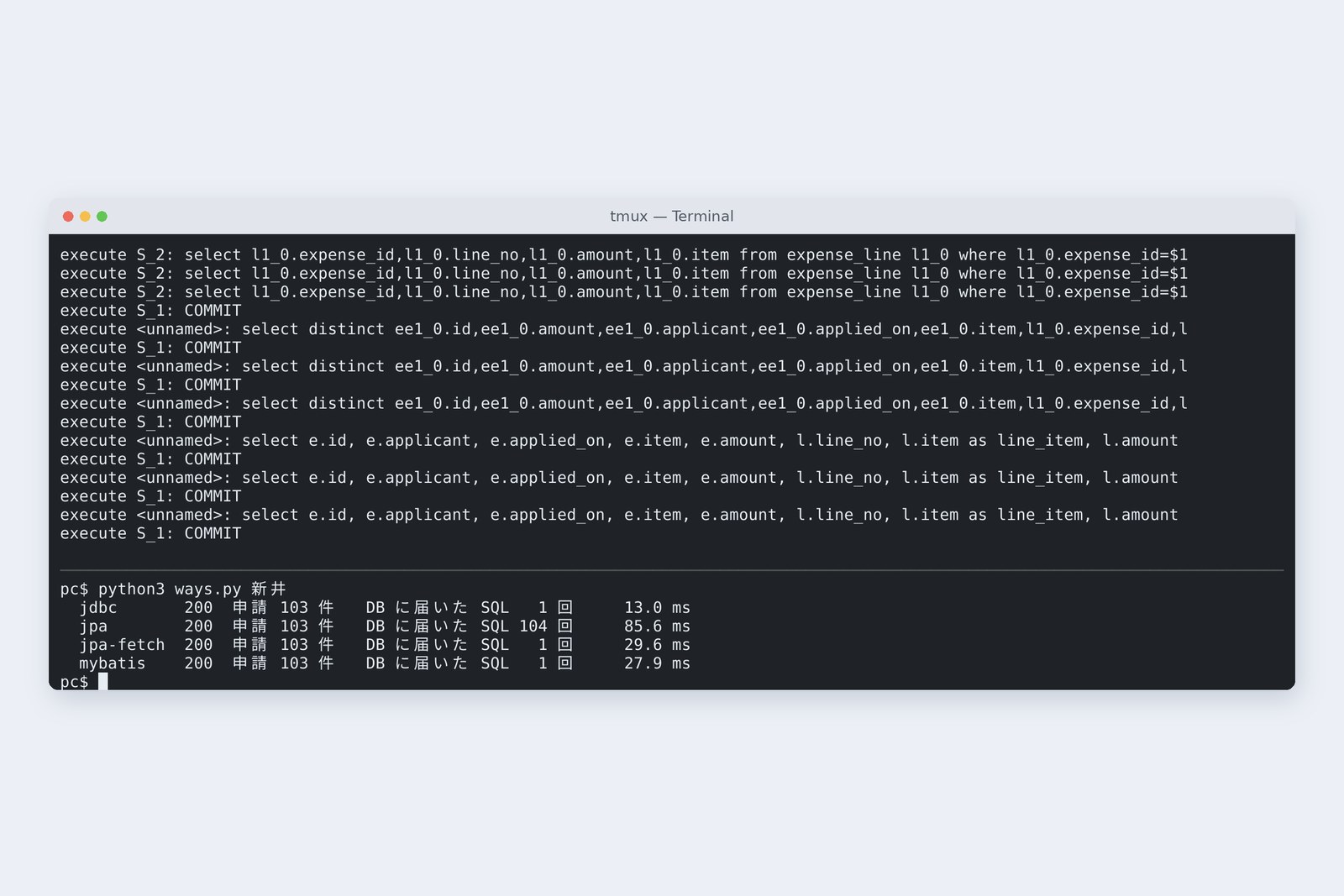
Since part 1 our storekeeper has been JdbcClient, with SQL written by hand. Java shops have other standard storekeepers too: JPA (Hibernate), which generates SQL, and MyBatis, which keeps SQL in XML.
This time we write the same job, “a list of claims with their lines”, in all three and measure how many SQL statements reach the database and where the traps are: N+1, updates without save, open-in-view, and MyBatis's ${}.
Choosing a storekeeper
AraiWith JPA you don't have to write SQL. Why have we been writing it by hand?
Furui“Don't have to write” isn't “nobody writes”. Someone writes it. Today we count who, when, and how many.
AraiAnd MyBatis? I used it at my last job.
FuruiStill common in Japanese business systems. It has one trap of its own, the same as part 4's.
The 15-part route map (you are here: part 8)
- Three ways — the same answer (JSON identical to the byte) in 35, 62 and 56 lines
- N+1 — plain JPA sent 104 SQL statements where one would do (measured)
- Silent updates — the database changed without save being called (measured)
- open-in-view — left at its default, SQL runs in the counter; turned off, a 500 (measured)
- ${} — MyBatis too gets SQL injection from one way of writing (measured)
The application is last time's Spring Boot 4.1.2 with JPA (Hibernate 7.4, Spring Data JPA 4.1) and MyBatis (3.5.19, mybatis-spring-boot 4.1.0) added. The database holds business-trip claims, 100 for Arai and 20 for Furui, each with three lines (Shinkansen, hotel, taxi). With part 4's six, Arai has 103 claims.
Three ways to write it
First, hand-written JdbcClient. One SQL statement joins claims and lines, and Java assembles the rows.
# ① JdbcClient: SQL by hand, rows assembled by hand (the gist of JdbcClaims.java)
public List<ClaimView> findByApplicant(String applicant) {
    Map<String, ClaimView> byId = new LinkedHashMap<>();
    jdbc.sql("""
            select e.id, e.applicant, e.applied_on, e.item, e.amount, l.line_no, l.item as line_item, l.amount as line_amount
            from expense e left join expense_line l on l.expense_id = e.id
            where e.applicant = ? order by e.id, l.line_no""")
        .param(applicant)
        .query(rs -> {
            ClaimView c = byId.computeIfAbsent(rs.getString("id"), id -> {
                try {
                    return new ClaimView(id, rs.getString("applicant"), rs.getObject("applied_on", java.time.LocalDate.class),
                            rs.getString("item"), rs.getBigDecimal("amount"), new ArrayList<>());
                } catch (java.sql.SQLException e) { throw new RuntimeException(e); }
            });
            if (rs.getObject("line_no") != null)
                c.lines().add(new ClaimView.Line(rs.getInt("line_no"), rs.getString("line_item"), rs.getBigDecimal("line_amount")));
        });
    return new ArrayList<>(byId.values());
}
Next, JPA. A table row is written as a Java object (an entity), and relations between tables with @OneToMany. The storekeeper is just an interface; Spring Data builds the SQL from method names.
# ② JPA: a table row held as a Java object (the gist of ExpenseEntity.java)
@Entity
@Table(name = "expense")
public class ExpenseEntity {
    @Id
    private String id;
    private String applicant;
    @Column(name = "applied_on")
    private LocalDate date;
    private String item;
    private BigDecimal amount;
    private String status;

    @OneToMany(mappedBy = "expense")  // lines are fetched when touched (LAZY)
    @OrderBy("id.lineNo")
    private List<ExpenseLineEntity> lines;
# The storekeeper is just an interface (ExpenseJpaRepository.java)
public interface ExpenseJpaRepository extends JpaRepository<ExpenseEntity, String> {
    List<ExpenseEntity> findByApplicantOrderById(String applicant);  // SQL made from the method name

    @Query("select distinct e from ExpenseEntity e left join fetch e.lines where e.applicant = :applicant order by e.id")
    List<ExpenseEntity> findWithLines(String applicant);  // lines fetched in the same query
}
Finally, MyBatis. The SQL is written by hand in XML, along with how to assemble the results (a resultMap).
# ③ MyBatis: SQL and how to assemble results, in XML (the gist of ClaimMapper.xml)
<resultMap id="claim" type="example.expenses.v8.ClaimRow">
  <id property="id" column="id"/>
  <result property="applicant" column="applicant"/>
  <result property="appliedOn" column="applied_on"/>
  <result property="item" column="item"/>
  <result property="amount" column="amount"/>
  <collection property="lines" resultMap="line"/>
</resultMap>
<resultMap id="line" type="example.expenses.v8.ClaimView$Line">
  <constructor>
    <idArg column="line_no" javaType="_int"/>
    <arg column="line_item" javaType="string"/>
    <arg column="line_amount" javaType="java.math.BigDecimal"/>
  </constructor>
</resultMap>

<select id="findByApplicant" resultMap="claim">
  select e.id, e.applicant, e.applied_on, e.item, e.amount, l.line_no, l.item as line_item, l.amount as line_amount
  from expense e left join expense_line l on l.expense_id = e.id
  where e.applicant = #{applicant}
  order by e.id, l.line_no
</select>
MyBatis tripped us once. Passing the list of lines into a record's constructor stopped with “argument type mismatch”, so we used a plain class (ClaimRow) that lines can be added to afterwards. Each tool has shapes it likes.
Three storekeepers: who writes the SQL, who assembles the rows
Same answer, different SQL
We fetched Arai's claims four ways (JPA both “as is” and with “join fetch”). The JSON returned was identical to the byte in all four, but the SQL reaching the database was not.
# Arai's 103 claims with lines, four ways (five runs each, median)
  JdbcClient          SQL   1     18.0 ms   (16.7, 17.7, 18.0, 18.0, 19.2)
  JPA (as is)         SQL 104     63.5 ms   (49.9, 62.2, 63.5, 71.2, 91.5)
  JPA (join fetch)    SQL   1     15.8 ms   (14.1, 14.3, 15.8, 19.6, 22.0)
  MyBatis             SQL   1     13.4 ms   (9.7, 12.1, 13.4, 16.6, 17.6)
# SQL JPA (as is) sent: the first statement, and the one repeated 103 times after it
select ee1_0.id,ee1_0.amount,ee1_0.applicant,ee1_0.applied_on,ee1_0.item,ee1_0.status from expense ee1_0 where ee1_0.applicant=$1 order by ee1_0.id
select l1_0.expense_id,l1_0.line_no,l1_0.amount,l1_0.item from expense_line l1_0 where l1_0.expense_id=$1 order by l1_0.line_no   × 103
# The single statement after join fetch
select distinct ee1_0.id,ee1_0.amount,ee1_0.applicant,ee1_0.applied_on,ee1_0.item,l1_0.expense_id,l1_0.line_no,l1_0.amount,l1_0.item,ee1_0.status from expense ee1_0 left join expense_line l1_0 on ee1_0.id=l1_0.expense_id where ee1_0.applicant=$1 order by ee1_0.id,l1_0.line_no
Plain JPA first sends one statement for the list of claims. Then, every time a claim's lines are touched, one more statement fetches “this claim's lines”: 103 of them. Hibernate's SQL uses aliases like ee1_0 and l1_0, a shape no person writes. The photo shows a single run and the table the median of five, so the times differ a little.
N+1: 104 queries where one will do
Arai's 103 claims with lines: SQL reaching the DB (measured)
One statement for the list (1), plus one per item (N): that's N+1. @OneToMany defaults to fetching lines “when touched” (LAZY), so converting each claim to the screen's shape sends another statement. Not one line of SQL appears in the code, so code review won't catch it.
The fix is to say up front that the lines come along. Here the query with join fetch (findWithLines) made it one statement and 15.8 ms. There's also @EntityGraph and batch-fetch settings. Whichever you use, the best medicine is the habit of counting the SQL that reaches the database.
AraiThe test had three claims, so I never noticed…
FuruiN+1 wakes up at month end, the day accounting opens a full year.
An update without save
We gave the JPA clerk a job: “read a claim and return its item with ‘(確認済み)’ (checked) appended, for display.” No intention of writing to the database, and no save().
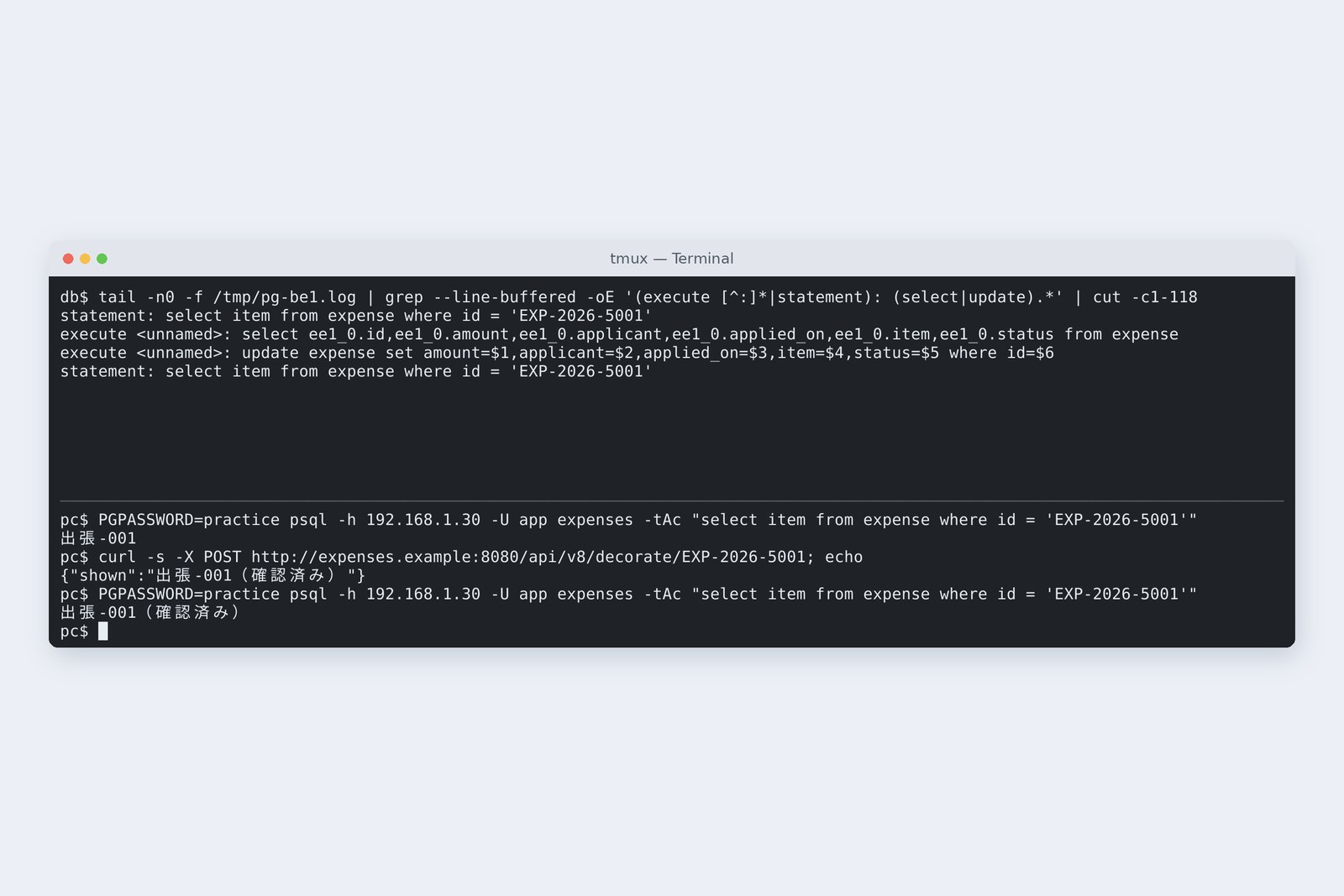
# The clerk: just read it and renamed it for display; save() is never called
@Transactional  // just read it and renamed it for display (or so we thought)
public String decorate(String id) {
    ExpenseEntity e = jpa.findById(id).orElseThrow();
    e.setItem(e.getItem() + "(確認済み)");
    return e.getItem();
}
# DB before / SQL during the call / DB after
  出張-001
  select ee1_0.id,ee1_0.amount,ee1_0.applicant,ee1_0.applied_on,ee1_0.item,ee1_0.status from expense ee1_0 where ee1_0.id=$1
  update expense set amount=$1,applicant=$2,applied_on=$3,item=$4,status=$5 where id=$6
  出張-001(確認済み)
The database's item was rewritten to 出張-001(確認済み). JPA watches the entities read inside a transaction as things it holds; at commit it compares them with snapshots taken when read and sends an update if anything changed. And the update rewrote every column, not just the item. An entity is a thing tied to a database row, not something to rewrite for display.
JPA's “watching what it holds”, and open-in-view
open-in-view
The application with JPA printed a warning every time it started.
# Warning at startup
spring.jpa.open-in-view is enabled by default. Therefore, database queries may be performed during view rendering. Explicitly configure spring.jpa.open-in-view to disable this warning
# A counter returning entities as they are (open-in-view at its default, true)
  200  rows 103  SQL 104  62.7 ms
# Started with spring.jpa.open-in-view=false
  500  SQL 1
  Could not write JSON: Cannot lazily initialize collection of role 'example.expenses.v8.ExpenseEntity.lines' with key 'EXP-2026-0101' (no session)
By Spring Boot's default, the watching (open-in-view) lasts until the reply has been written. So when a counter returns entities as they are, Jackson touches the lines while writing JSON and 104 statements run from the counter. With spring.jpa.open-in-view=false, the watching ends with the clerk's transaction, and touching the lines in the counter gave a 500 with “no session”.
Which is better? False, so the 500 tells you early. Convert what the screen gets into a separate shape inside the clerk (here ClaimView) and gather the needed lines there. It's part 5's “the counter handles only HTTP shapes” again.
MyBatis's #{} and ${}
MyBatis XML has two ways of filling in values: #{} and ${}.
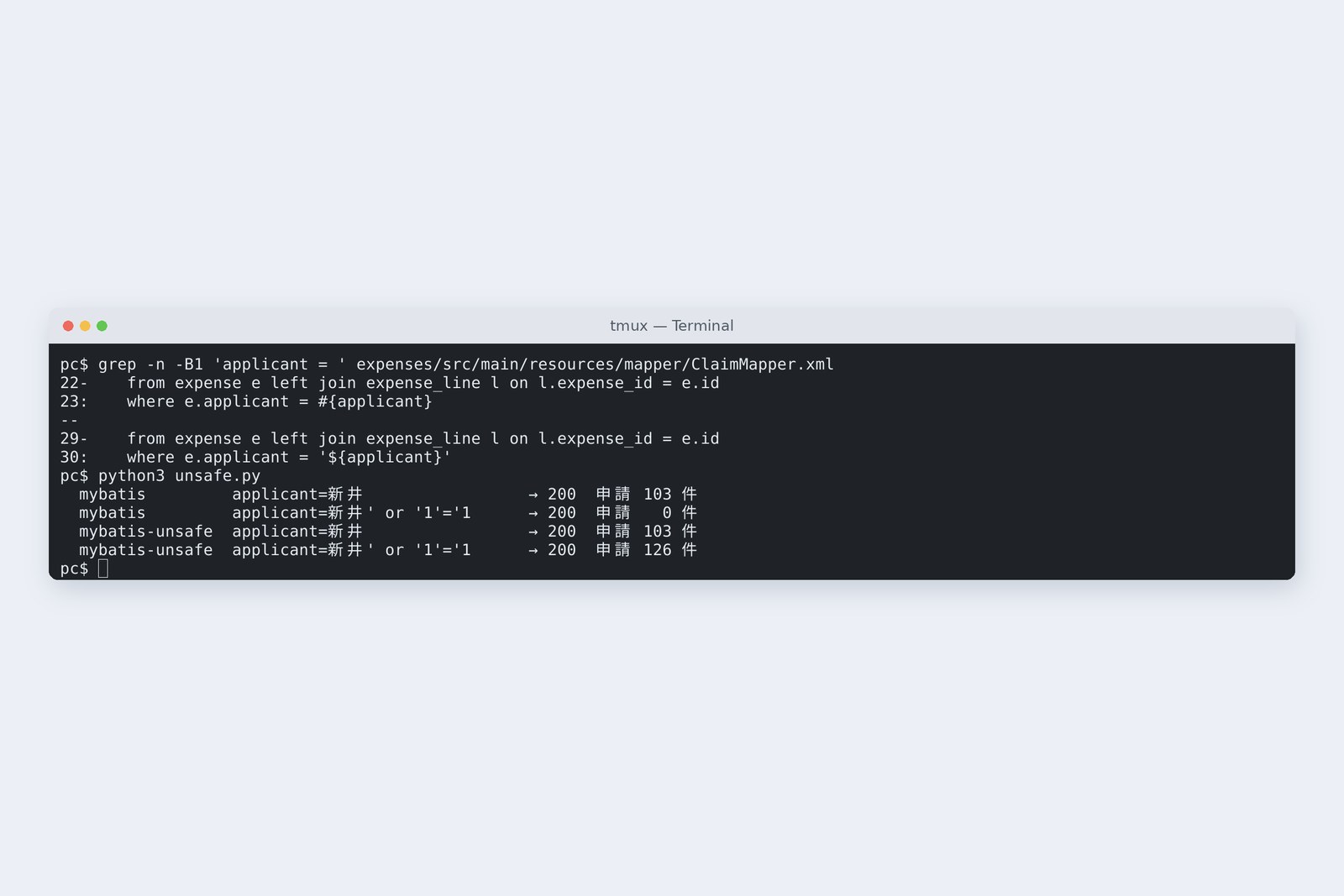
# Two ways of writing it in MyBatis
  #{}  where e.applicant = #{applicant}
  ${}  where e.applicant = '${applicant}'
# Passing the same names
  mybatis         新井' or '1'='1   → 200  0
  mybatis-unsafe  新井              → 200  103
  mybatis-unsafe  新井' or '1'='1   → 200  126
#{} becomes part 4's placeholder (?), so the quote-laden name is just “someone with that name”: 0 rows. ${} pastes straight into the SQL text, so, as in part 4, all 126 claims came back. Use ${} only for values chosen from an allowed list, like a sort column (part 4, section 6). When reading old MyBatis code, search for ${ first.
The weight of the tools
# The toolkit (compared with part 7's application)
  part 7: jar 24,340,548 bytes, libraries 48, startup 3.667 s / 3.558 s / 3.651 s
  part 8: jar 55,029,971 bytes, libraries 75, startup 7.846 s / 8.0 s / 7.589 s
With JPA and MyBatis added, the jar grew from 24 MB to 55 MB, libraries from 48 to 75, and startup from 3.6 to about 7.8 seconds. This part's application carries both JPA and MyBatis, where a real one would carry one. Even so, Hibernate inspects entities and prepares at startup, which makes starting heavier.
Which to choose
| Tool | Suits | Watch for |
|---|---|---|
| JdbcClient | few tables, building while looking at SQL, fine performance tuning | writing row assembly yourself; SQL scattered through Java |
| JPA | tables shaped like objects, mostly create/update/delete, many tables | N+1, change tracking (silent updates), open-in-view; always look at the SQL sent |
| MyBatis | complex SQL, existing databases, SQL-strong teams (common in Japanese business systems) | ${}; moving between XML and Java |
Whichever you choose, the SQL reaching the database was written by someone. Log the SQL and count it, don't return entities to the screen as they are, and always use placeholders for values; these three hold whatever the tool. The rest of this series stays with part 1's JdbcClient, where the SQL is in plain sight. The same can be written in JPA or MyBatis.
Checking on your own PC
| What to try | How to write it |
|---|---|
| Show Hibernate's SQL in the application log | logging.level.org.hibernate.SQL=DEBUG |
| Log every SQL statement reaching the DB (practice DB only) | alter system set log_statement = 'all'; |
| Fetch the lines along with the claims | select distinct e from … left join fetch e.lines … |
| End the watching inside the clerk | spring.jpa.open-in-view=false |
| Find MyBatis string gluing | grep -rn '\${' src/main/resources |
The easiest way to spot N+1: open a list screen once and count the lines in the database log. Increase the data from 3 to 100 rows; if the number of statements grows too, it's N+1.
§ — On one page, and next time
- JdbcClient, JPA and MyBatis can return the same answer. The difference is who writes the SQL.
- Plain JPA gives N+1: 104 statements where one will do, 63.5 ms; join fetch makes it one, 15.8 ms.
- JPA watches the entities it read. Change one and it's updated, save or no save. Don't rewrite entities for display.
- Set open-in-view to false and build the screen's shape inside the clerk.
- MyBatis's ${} glues strings. Use #{} for values.
- Whatever the tool, count the SQL reaching the database.
AraiOpening the SQL log is starting to be fun.
FuruiA good sign. Next time, back to transactions: what happens when you and I change the same claim at the same time? The old-school “last save wins” problem.
References
- Spring Framework — Using the JDBC Core Classes(JdbcClient)
- Spring Data JPA — Reference Documentation
- Hibernate ORM — Documentation
- Jakarta Persistence 3.2
- Spring Boot — SQL Databases(open-in-view)
- MyBatis 3 — Mapper XML Files(String Substitution)
- MyBatis Spring Boot Starter
The recordings were made on 31 October 2026 on a cloud Linux machine (Ubuntu 24.04, kernel 6.18) with Spring Boot 4.1.2 (Hibernate 7.4, Spring Data JPA 4.1, MyBatis 3.5.19, mybatis-spring-boot 4.1.0), OpenJDK 25.0.4 and PostgreSQL 16.15. The claims server and the database server are separate network spaces (network namespaces) inside one machine, about 0.04 ms apart. Times are the median of five runs (the photo is a single run) and vary every run. Line counts exclude blank lines. Every number and output in the text is a real value read from the commands' output at the time. The characters are fictional.
Old-School Backend, part 8 — Database access / 2026.10