Old-School Front-End · Frameworks / 2026 ・ No.06
Old-School Front-End: Frameworks
Part 6: Forms and input checks — controlled and uncontrolled, Actions, and the double click
Published
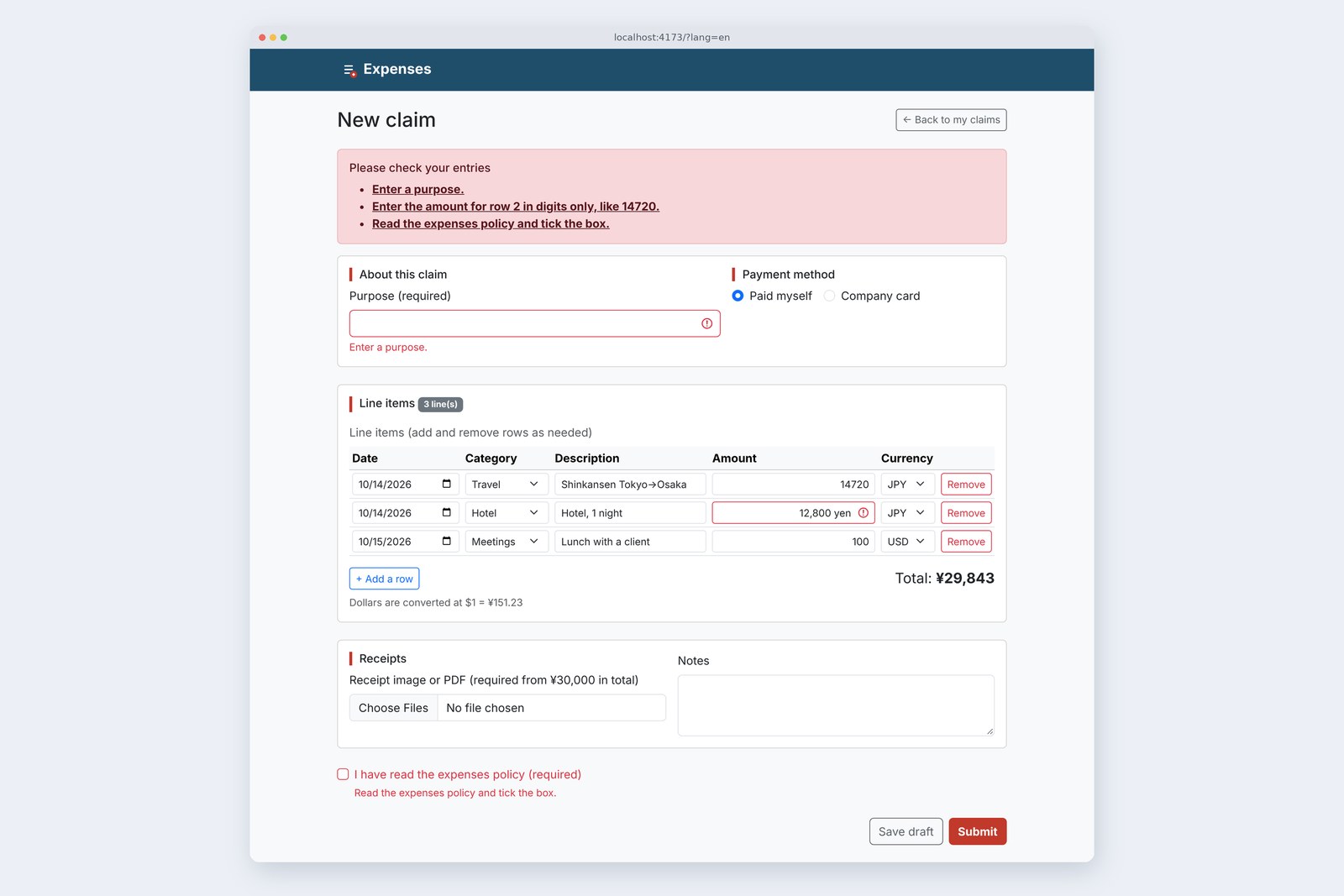
Since part 5 the rows work, but nothing can be sent. Part 6 adds a submit using React 19 Actions (useActionState and useFormStatus) and checks the claim with the same rules as the front-end series' parts 9 and 10, both on screen and on the server.
Then we cause, and measure, three stumbles on purpose: the purpose vanishing after a send, a double click making two claims, and an error sliding onto the next row.
Where the values live
AraiTo send it, I'll put the purpose and notes in useState too, and fetch from the button. Done.
FuruiBefore making everything state, look at where the values are now. In part 5 only the line items went into state.
The 15-part route map (you are here: part 6)
The claim form's boxes come in two kinds. The line items are tied to state with value and onChange: controlled. The purpose, payment method, notes, policy tick and receipt file leave their values to the browser: uncontrolled. As part 5's section 5 measured, typing a purpose re-renders nothing.
Where the values live
For sending, either kind is fine. The browser's FormData gathers both, using each name. State only needs the values other components use (totals, counts, error rows). A file box can't be given a value by code at all, so it has to be uncontrolled.
Sending with Actions
/** Turn 'amount-2' (row 2's amount) into the id of row 2 at send time, so errors don't slide to a neighbour when a row is removed */
function tie(errors, ids) {
  return errors.map((e) => {
    const m = /^(date|category|item|amount)-(\d+)$/.exec(e.field);
    return { ...e, key: m ? `${m[1]}:${ids[Number(m[2]) - 1] ?? ids[0]}` : e.field };
  });
}

/** The work done on send (the Action): takes the previous result and the form data, returns the next result */
async function submitClaim(prev, formData) {
  const ids = formData.getAll('rowId').map(Number);
  const draft = formData.get('action') === 'draft'; // drafts are stored without checking
  const at = prev.at + 1;
  if (!draft && CHECK) {
    const errors = validateClaim(claimOf(formData), localDate(), RATE);
    if (errors.length > 0) return { errors: tie(errors, ids), at, from: 'client' };
  }
  const r = await sendClaim(formData);
  return { ...r, errors: tie(r.errors ?? [], ids), at, from: 'server' };
}

/** The claim form screen. The rows state lives here, in one place only */
export default function App() {
  countRender('App');
  const [rows, setRows] = useState(SAMPLE_ROWS);
  const [result, formAction] = useActionState(submitClaim, { errors: [], at: 0 });

  // … (change, add and remove as in part 5)

  // With <form action={…}>, React empties the boxes after sending (even on errors).
  // Here onSubmit takes it, so neither the browser nor React empties anything, and we call formAction ourselves
  const onSubmit = (event) => {
    event.preventDefault();
    const formData = new FormData(event.currentTarget, event.nativeEvent.submitter); // include the pressed button (submit / draft)
    startTransition(() => formAction(formData));
  };

  return ( … <form onSubmit={onSubmit} noValidate> … </form> … );
}
React 19 wraps the work done on send in a function called an Action. useActionState(submitClaim, initial) returns the current result and formAction, which calls the Action. submitClaim just takes the previous result and the form data, and returns the next result. When the result changes, the screen re-renders.
The flow of a submit
Normally <form action={formAction}> is all it takes. This app deliberately takes the event in onSubmit and calls formAction itself, inside startTransition. Section 6 measures why.
Check on screen first
/** Build the claim from FormData (read the same way as the practice server) */
export function claimOf(formData) {
  const all = (k) => formData.getAll(k).map(String);
  const [d, c, i, a, cur] = ['date', 'category', 'item', 'amount', 'currency'].map(all);
  return {
    title: String(formData.get('title') ?? ''),
    rows: d.map((_, n) => ({ date: d[n], category: c[n], item: i[n], amount: a[n], currency: cur[n] })),
    receipts: formData.getAll('receipt').filter((f) => f.size > 0).length,
    agreed: formData.get('agree') === 'yes',
  };
}

/** Check the claim and return [{ field: 'amount-2', message: '…' }, …] (an empty array means it passes) */
export function validateClaim(claim, today = localDate(), rate = null) {
  const errors = [];
  // … (the same rules as the front-end series, parts 9 and 10)
}
The rules are the front-end series' validate.js from part 9 and part 10, turned into something you can import. The practice server re-checks with the same validate.js, so even the wording matches. FormData is read the same way as on the server.
# The same mistakes (no purpose, a currency word in row 2's amount, no tick), then Submit
                        screen check          server check (?check=off)
  requests              0                     1
  until the list shows  21.9 ms               627 ms
  items in the list     3                     2 (purpose was filled)
  focus                 #error-summary        #error-summary
# Medians of five runs on the production build; 600 ms of the server's time is the practice server's deliberate wait
# The wording is identical on both sides (same rules, same sentences). Below: the server's list
  Enter the amount for row 2 in digits only, like 14720.
  Read the expenses policy and tick the box.
The screen check showed its list in about 0.02 seconds without sending anything. The server check took about 0.63 seconds (mostly the practice server's deliberate wait). The words are the same. The screen checks for speed and kindness, the server for safety. As section 5 shows, anyone can skip the screen.
# JavaScript from npm run build (part 5 → part 6)
  index-*.js   229.71 kB → 239.35 kB   gzip 72.57 kB → 75.95 kB
# The extra 3.4 kB (gzip) is the rules and the messages in three languages; Actions are already part of React
Showing the mistakes
/** The list of input mistakes. When it appears, focus moves here (so screen readers read the list first) */
export default function ErrorSummary({ errors }) {
  const go = (event, key) => { // clicking an item jumps to its box
    event.preventDefault();
    document.getElementById(key.replace(':', '-r'))?.focus();
  };
  return (
    <div className="alert alert-danger" id="error-summary" tabIndex={-1} ref={(el) => el?.focus()}>
      <h2 className="h6 alert-heading">{T.check}</h2>
      <ul className="mb-0">
        {errors.map((e) => (
          <li key={e.key + e.message} id={`err-${e.key.replace(':', '-r')}`}>
            <a href={`#${e.key.replace(':', '-r')}`} className="alert-link" onClick={(event) => go(event, e.key)}>{e.message}</a>
          </li>
        ))}
      </ul>
    </div>
  );
}
The display follows front-end part 9: a list at the top that takes focus, and each box gets aria-invalid plus aria-describedby pointing at its list item. Moving focus needs no useEffect. Pass a function as the list's ref and it's called when the list appears. Each send changes the list's key so it is built afresh, and focus returns on the second "no" too.
The awkward part: the server answers with amount-2 (row 2's amount), a position. The same trap as part 5's key is waiting here.
# The server said "amount-2 (row 2's amount) is wrong"; then row 1 was removed
  errors remembered by            red before            red after
  position (2)                    Hotel, 1 night        Lunch with a client (moved)
  row id (row 2 at send time)     Hotel, 1 night        Hotel, 1 night
# Same in the claim form: remembered by id, the red stayed on the hotel's amount after row 1 went
Remembered by position, the red box jumped to Lunch the moment row 1 was removed. So each row sends an <input type="hidden" name="rowId">, and the Action swaps the position for the id of "row 2 at send time" (tie in section 2). It's fixed on the screen side, without touching the server.
Forwarding to the practice server
The destination is the front-end series' practice server (port 3000). React's dev server is on 5173, so as things stand that's a different place (origin). We ask Vite to forward it.
export default defineConfig({
  plugins: [react()],
  server: {
    // Part 6: forward calls starting with /api to the practice server (same origin, as the browser sees it)
    proxy: { '/api': process.env.KEIHI_API ?? 'http://localhost:3000' },
  },
})
import { T } from './text.js';

export async function sendClaim(formData) {
  const res = await fetch('/api/expenses', { method: 'POST', body: formData });
  const body = await res.json().catch(() => ({}));
  if (res.status === 201) return { id: body.id, draft: Boolean(body.draft) };
  if (res.status === 400 && Array.isArray(body.errors)) return { errors: body.errors };
  if (res.status === 401) return { message: T.signedOut }; // sign-in troubles are part 7
  return { message: T.failed(res.status) };
}
As the browser sees it, the destination is /api/expenses on the same 5173. Neither CORS nor CSRF shows up yet (that's part 7, with the real Spring Boot). Sign in first on the practice server's own page (localhost:3000). Cookies don't care about ports, so the cookie from 3000 is sent to 5173 as well.
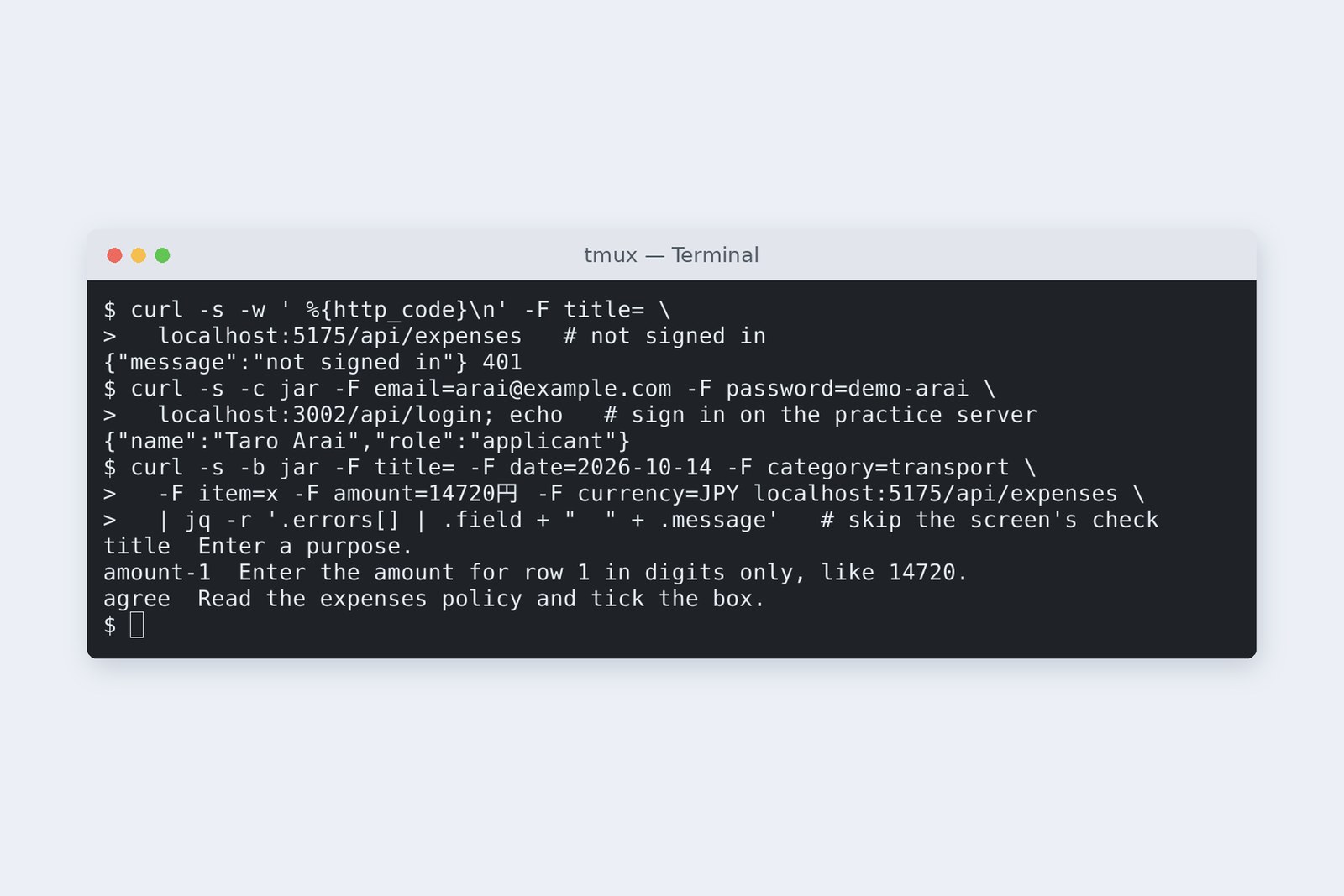
Skipping the screen, we sent with curl. Without signing in: 401. With the signed-in cookie, the server named the same three problems (no purpose, "14720円", no tick) in the same words as the screen. The screen's check can be skipped; the server's can't. That's why both exist.
Sent, and the purpose was gone
AraiWith <form action>, the purpose box was empty after the "no". Do I type it all again...?
FuruiAnd pick the receipt again. Let's compare three ways of sending.
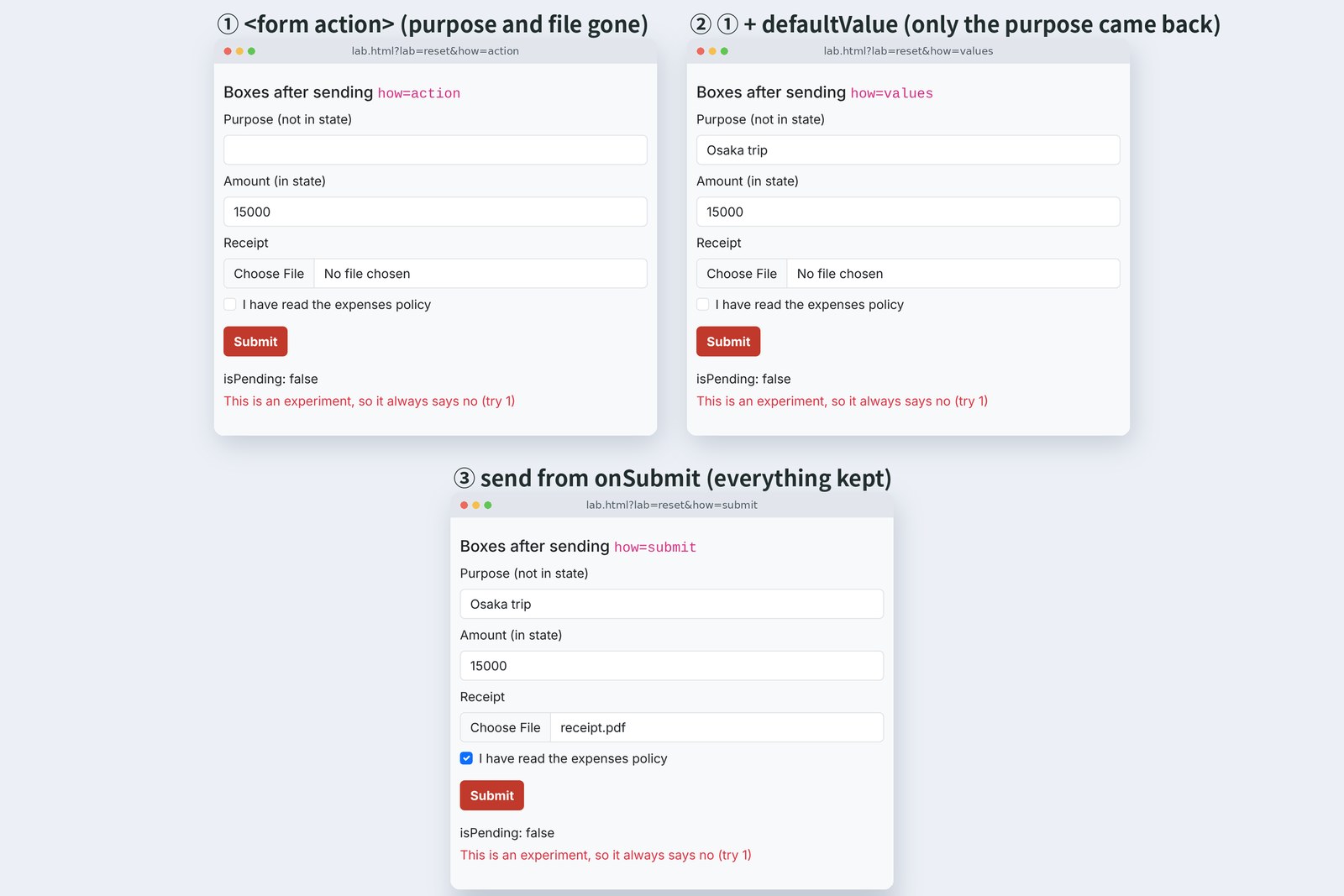
# Filled purpose, amount, receipt and tick, sent; 600 ms later the Action said no
  how                           purpose     amount    receipt   tick
  ① <form action>emptykept0cleared
  ② ① + defaultValuekeptkept0cleared
  ③ send from onSubmitkeptkept1kept
# The amount is tied to state (value), so it survives every time. The receipt column is the number of chosen files

                          useFormStatus in a child  useFormStatus where <form> is drawn   isPending
  ① <form action>true → falsefalsetrue → false
  ③ send from onSubmittrue → falsefalsetrue → false
# pending lasted 603 ms in both. The pressed button's value: null with new FormData(form) alone, "submit" when the submitter is passed
① With <form action={formAction}>, React empties every uncontrolled box once the Action finishes. That's meant as a kindness after success, but when the Action returns a "no", React still sees it as finished, and empties them. The purpose, the chosen file and the tick all went.
② The usual fix is to put the received values into the result and restore them with defaultValue. The purpose came back, but the file can't (code can't give that box a value). Restoring the tick means adding more, box by box.
③ Call preventDefault() in onSubmit and call formAction inside startTransition, and nobody empties anything. useFormStatus's pending still behaved exactly as in ①, because React treats a send started inside onSubmit as that <form>'s send. This app uses ③. To empty the form after a success, ask for it yourself with requestFormReset.
One catch with ③: new FormData(form) alone leaves out the pressed button (submit or draft), giving null. Pass event.nativeEvent.submitter as the second argument and it's there.
Two clicks, two claims
# lab.html?lab=double: a claim that always passes, really sent to the practice server
  how                                       double-click                      two clicks 0.15 s apart
  fetch in onSubmit each time2 0013 00142 0015 0016
  useActionState (button as is)2 0017 00182 0019 0020
  useActionState + disabled while pending1 00211 0022
# The numbers are claim ids (EXP-2026-…). useActionState sent the second only after the first answered (0 ms and 603 ms)
# Double-click in the claim form (SendButtons): 1 request; while sending the button reads "Sending…" and is disabled
Do nothing, and a double click made two claims. We'd rather stop it before an approver signs off the same Shinkansen fare twice. useActionState waits for the first answer before sending the second (it keeps the order), but it doesn't stop the send. Stopping it means making the button unpressable while sending.
/** The Save draft and Submit buttons. They can't be pressed while sending (press twice, still one claim) */
export default function SendButtons() {
  countRender('SendButtons');
  const { pending, data } = useFormStatus(); // is the nearest parent <form> sending right now? data is what it's sending
  const which = pending ? data?.get('action') : null;
  return (
    <div className="d-flex flex-wrap justify-content-end gap-2">
      <button type="submit" className="btn btn-outline-secondary" name="action" value="draft" disabled={pending}>{which === 'draft' ? T.sending : T.draft}</button>
      <button type="submit" className="btn btn-brand" name="action" value="submit" disabled={pending}>{which === 'submit' ? T.sending : T.submit}</button>
    </div>
  );
}
useFormStatus tells you whether the nearest parent <form> is sending. As the middle column of section 6's table shows, called in the very component that draws the <form> (App), it stayed false. So the buttons get a small component of their own. data holds what's being sent, so only the pressed button says "Sending…".
Side by side with back-end part 6
# The same "no", written on screen (validate.js and the practice server) and in back-end part 6 (Bean Validation)
  rule                    screen / practice server  back-end part 6
  date empty              date === ''               @NotNull
  date in the future      date > today              @PastOrPresent
  item blank              item.trim() === ''        @NotBlank(strip)
  item too long           (none)                    @Size(max = 100)
  amount empty            toAmount → null           @NotNull
  amount not a number     toAmount → NaN            JSON unreadable, 400
  amount is 0             amount === 0              @Positive
  amount digits           yen whole, $ 2 places     @Digits(9, 0)
  receipt from ¥30,000    needsReceipt              (none)
  reason above ¥50,000    (none)                    @AssertTrue
  policy tick             agreed                    (none)
# The replies look alike too: 400 with a [{ field, message }] list (the back end puts it in ProblemDetail's errors)
In back-end part 6, Spring Boot took a single expense as JSON and checked it with Bean Validation annotations. Most rules have the same shape, but some drift.
- Rules the screen lacks — the item length (100 characters) and a reason above ¥50,000. They go on the screen too, before part 7 connects the real server
- Reading differently — the screen fixes a full-width "12800" and lets it through; the back end says 400 at the JSON stage. Sending the screen's cleaned value is the safe choice
- "Today" — the screen's today is the PC's clock, the server's is the server's (back-end part 6, section 7). Near midnight, something the screen accepts can still be refused by the server
However closely the screen matches, the server decides. Think of the screen as the one who "tells you early, before the server says no", and the drift stops mattering.
On your own PC
Start the practice server with node server15.mjs en 3002, sign in at localhost:3002, then run KEIHI_API=http://localhost:3002 npm run dev in the React project and open ?lang=en. Empty the purpose and press Submit: the list appears with nothing at all in DevTools' Network tab. Add ?check=off to the URL and this time /api/expenses comes back 400.
Section 6's experiment is /lab.html?lab=reset&how=action (and values, submit); section 7's is ?lab=double&how=plain. Section 7 really creates claims; restart the practice server and the numbers go back to 0013.
§ — On one page, and next time
- Put in state only what other components use. On send, FormData gathers controlled and uncontrolled boxes alike.
- An Action turns the previous result and the data into the next result. useActionState returns the result and a way to call it.
- The screen check sent nothing and took about 0.02 s; the server took about 0.63 s, in the same words. The screen can be skipped, the server can't.
- <form action> empties the boxes even on a "no". Call it from onSubmit inside startTransition and they stay; don't forget the submitter.
- Two clicks make two claims. Read useFormStatus in a child component and disable the buttons while sending. Remember errors by row id.
AraiIt sends! But the exchange rate is still hard-coded at 151.23.
FuruiNext time: side effects and fetching data. useEffect fetches the rate, and we connect the real Spring Boot. CORS, CSRF and 401 are waiting together.
References
- React — useActionState
- React — useFormStatus
- React — <form>
- React — <input>(controlled / uncontrolled)
- React — startTransition
- React — requestFormReset
- MDN — FormData() constructor(submitter)
- Vite — server.proxy
Recorded by the author on a cloud Linux machine on 2 November 2026. Sending and checks were added to part 5's project (Vite 8.3.5, React 19.3.1), forwarded with Vite's server.proxy to the front-end series' practice servers (Node.js, ports 3000–3002). Both dev (npm run dev) and production (npm run build served by npm run preview) were opened in Chromium 153.0.8010.12 driven by Playwright. Times are medians of five runs on the production build. Sections 6 and 7 used separate pages in lab.html.
Old-School Front-End, Frameworks part 6 — Forms and input checks / 2026.11