Old-School Front-End · Frameworks / 2026 ・ No.07
Old-School Front-End: Frameworks
Part 7: Side effects and fetching data — useEffect, use with Suspense, and the real Spring Boot
Published
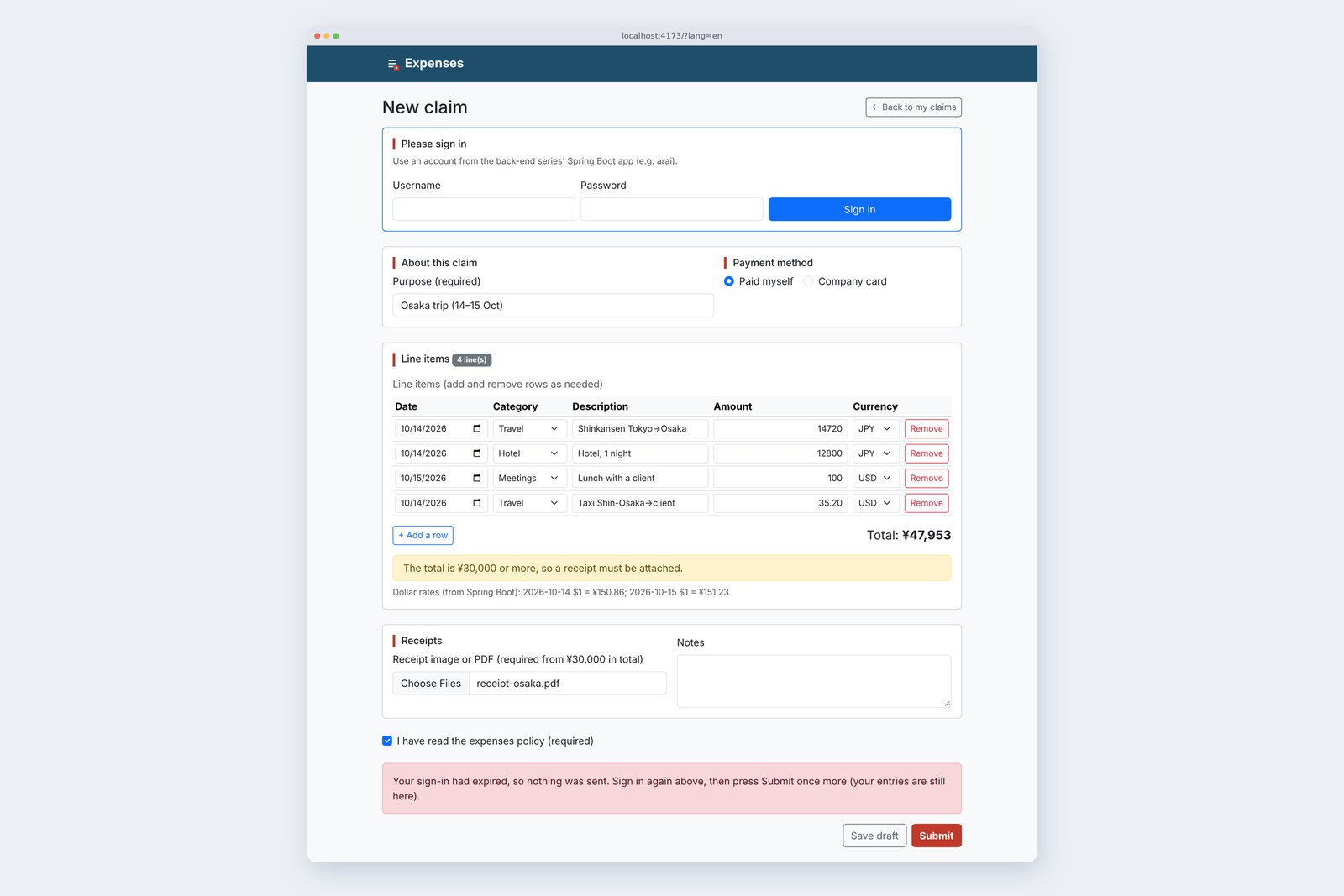
Up to part 6 the rate was hard-coded at 151.23 and claims went to the practice server. Part 7 connects the Spring Boot app from the back-end series: rates are fetched per date with useEffect, and the signed-in user is read with use and Suspense.
Then we measure five things: dev firing requests twice, answers arriving out of order, CORS blocking, the CSRF token changing at sign-in, and the sign-in expiring.
No more hard-coding
AraiTo get the rate, I just fetch inside App and call setRate, right?
FuruiWrite that in the component function and it fetches on every render, and setRate renders again. It never stops.
The 15-part route map (you are here: part 7)
As part 5 showed, a component function is "the calculation for drawing" and runs many times. Anything that does something to the outside world, like a request (a side effect), is kept apart from drawing and written in useEffect. This time we connect the back-end series' part 15 app: Spring Boot 4.1.2 with Spring Security 7.1.2. Sign-in uses a session cookie and writes need a CSRF token, as set up in part 11.
Two new endpoints on the server
The back-end app lacked two endpoints the screen needs: the rate for a given day, and a way to take a claim with its lines in one go. A small fw7 package adds them.
    /** Yen per dollar that day. ms is for practice: answer slowly on purpose (for the out-of-order experiment) */
    @GetMapping("/api/v11/rates")
    public Map<String, Object> rate(@RequestParam @DateTimeFormat(iso = DateTimeFormat.ISO.DATE) LocalDate date,
                                    @RequestParam(defaultValue = "0") long ms) throws InterruptedException {
        BigDecimal rate = Rates.of(date);
        if (rate == null) throw new ResponseStatusException(HttpStatus.NOT_FOUND, "no rate for " + date);
        Thread.sleep(Math.min(ms, 5000));
        return Map.of("date", date.toString(), "base", "USD", "quote", "JPY", "rate", rate);
    }

    /** Take a claim with its lines in one request: the claim as JSON (claim), receipts as files (receipt, zero or more) */
    @PostMapping("/api/v11/claims")
    public ResponseEntity<Map<String, Object>> create(@Valid @RequestPart("claim") ClaimRequest claim,
                                                      @RequestPart(name = "receipt", required = false) List<MultipartFile> receipts,
                                                      @AuthenticationPrincipal LoginUser u) throws Exception {
        ScreenClaimService.Created c = claims.create(claim, receipts == null ? List.of() : receipts, u);
        return ResponseEntity.created(URI.create("/api/v11/claims/" + c.id()))
                .body(Map.of("id", c.id(), "total", c.total().setScale(0, RoundingMode.DOWN)));
    }
The rates are practice values (151.23 on 15 Oct 2026, wobbling a little each day). A claim arrives as one multipart request: the claim as JSON, receipts as files. The rules match part 6's validate.js, written as Bean Validation annotations; the rules that span fields (a receipt from ¥30,000, a reason above ¥50,000) are checked in the service class.
Fetching rates with useEffect
  // The dollar rows' dates, sorted and joined into one string. Ask for rates only when it changes
  const usdDates = [...new Set(rows.filter((r) => r.currency === 'USD' && r.date !== '').map((r) => r.date))].sort().join(',');
  useEffect(() => {
    if (usdDates === '') return;
    const ctrl = new AbortController();
    for (const date of usdDates.split(',')) {
      getRate(date, ctrl.signal)
        .then((rate) => setRates((prev) => ({ ...prev, [date]: rate }))) // stored per date, so answers arriving out of order do no harm
        .catch((e) => {
          if (e instanceof SignedOut) recheck();
          // AbortError means cleanup stopped it. Do nothing
        });
    }
    return () => ctrl.abort(); // cleanup: when the dates change or the screen goes away, stop requests in flight
  }, [usdDates, logins]);
Each dollar row uses the rate for its own date. Put usdDates, the dollar rows' dates joined into one string, in the dependency array, and React compares it after each render, running the effect only when it changed. Answers go into rates by date, so whatever order they arrive in, each lands in its own slot.
The order effects run in
# Opened the claim form after signing in (one dollar row, 15 Oct)
                              dev (StrictMode)        production
  /api/v11/rates sent2                       1
  of which aborted1                       0
  /api/v11/me sent1                       1
  until the name shows537 ms                  236 ms
  until the rate shows556 ms                  255 ms
# Times from opening in Playwright; dev includes Vite's transforms
The function an effect returns is its cleanup. It's called when the dates change (before the next effect) and when the component leaves the screen. Here an AbortController stops requests still in flight.
Dev fires twice
In section 3's table, only dev sent the rate request twice, and one was aborted. A small component compares ways of writing the cleanup.
# lab.html?lab=effect (inside StrictMode, dev): a component that fetches the 15 Oct rate once
  how                       sent    setRate   order of events
  [], no cleanup2       2         effect → cleanup → effect → apply → apply
  [], abort on cleanup2       1         effect → cleanup → effect → AbortError → apply
  no array (3 s)289     288       effect → cleanup → effect → apply → cleanup …
# StrictMode (dev only) runs effects mount → cleanup → mount; production runs them once
# Forget the array and it asks on every render, and setRate renders again: 289 times in 3 s
In dev only, <StrictMode> unmounts and remounts the component once, running the effect twice. Without cleanup, both answers called setRate. Here both carry the same value, so no harm done, but an effect that "creates one claim" would create two. Stop the first in the cleanup and the result matches production. StrictMode's double run is a device for catching missing cleanups.
Forget the dependency array and it fetches on every render, setRate renders again, and it asked 289 times in 3 seconds. The other way round, leave a used value out of the array and the linter tells you.
# Remove usdDates from App.jsx's dependency array and run npx oxlint
  src/App.jsx:59:9: warning react-hooks(exhaustive-deps): React Hook useEffect has a missing
  dependency: 'usdDates' help: Either include it or remove the dependency array.
Answers out of order
Requests don't necessarily come back in the order they were sent. Keep the date in a single state and pick a slow date, then a fast one.
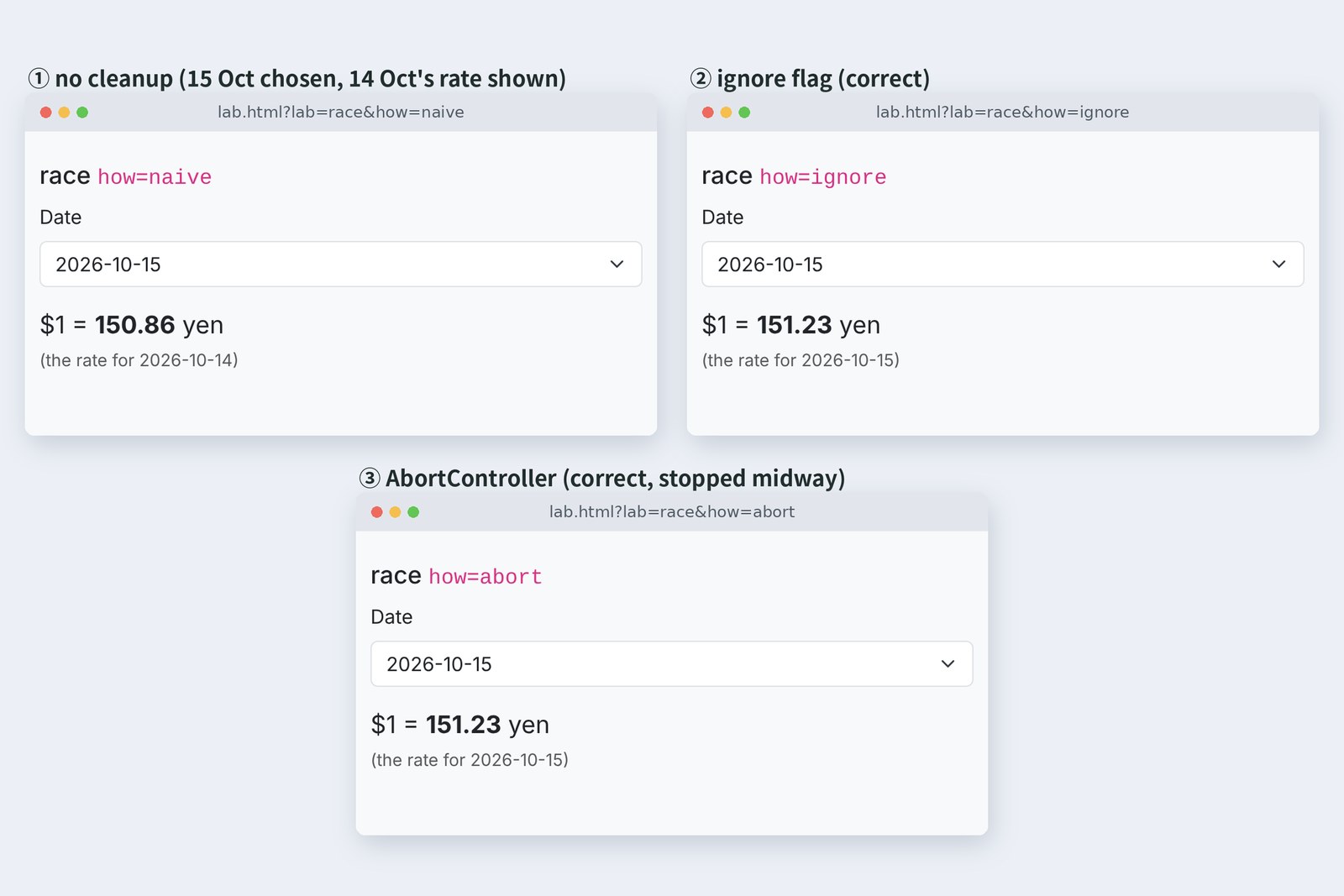
# lab.html?lab=race: chose 14 Oct (takes 1.2 s), then 15 Oct (0.1 s) 0.15 s later
  how                     after 0.4 s       after 2 s                 aborted
  ① no cleanup151.23 (15 Oct)150.86 (14 Oct) wrong-
  ② ignore flag151.23 (15 Oct)151.23 (15 Oct)-
  ③ AbortController151.23 (15 Oct)151.23 (15 Oct)13, 14
# All show 15 Oct as selected; in ① the late 14 Oct answer overwrote it afterwards
In ①, the 15 Oct rate appeared correctly, then the late 14 Oct answer overwrote it. The screen says "15 Oct" while calculating with 14 Oct's rate. ② marks the old run "no longer wanted" in the cleanup and throws the late answer away. ③ stops the request itself, saving the server work and the network. The claim form uses ③ and also stores rates per date, so order doesn't matter at all.
Waiting with use and Suspense
// Ask once who's signed in and remember it (the Promise read by use must not be recreated on every render)
import { getMe } from './api.js';

let mePromise = null;
export const meOnce = () => (mePromise ??= getMe());
export const forgetMe = () => { mePromise = null; }; // after a new sign-in, the next meOnce() asks again

// App.jsx
<Suspense fallback={<p>{T.meLoading}</p>}>
  <Account key={checks} me={meOnce()} onLogin={onLogin} />
</Suspense>

// components/Account.jsx
/** Who's signed in. me is a Promise; use waits for it (Suspense's fallback shows meanwhile) */
export default function Account({ me, onLogin }) {
  const user = use(me);
  if (user) return <p className="small text-body-secondary mb-3" id="who">{T.hello(user.displayName)}</p>;
  return <LoginCard onLogin={onLogin} />;
}
Who's signed in is written another way. use(me) waits for the Promise; while it waits the component isn't drawn and the nearest <Suspense> shows its fallback ("Checking your sign-in…"). There's no "render empty first, fill in later" as with useEffect, and Suspense decides how much of the screen waits.
# lab.html?lab=uncached (3 seconds)
  where the Promise is made     /api/v11/me   screen
  getMe() inside, each render317           stuck on "waiting…"
  once, outside (meOnce)1             新井 (Arai)
# While use waits nothing is drawn; each retry makes a new Promise and waits again. No warning appeared
But make the Promise once, outside the component. Write use(getMe()) inside it and each wait triggers a re-render, each re-render makes a new Promise, and it waits again. 317 requests in 3 seconds, and the name never appeared. No warning either. Here meOnce() keeps one and forgets it only on a new sign-in.
CORS: the browser says no
Two ways to reach the server
  server: {
    // forward calls starting with /api to Spring Boot (8080): same origin as the browser sees it (part 6 used the practice server)
    proxy: { '/api': process.env.KEIHI_API ?? 'http://localhost:8080' },
  },
As in part 6, Vite forwards /api during development (only the destination changed to 8080). So what happens if the page (5173) talks to 8080 directly?
# lab.html?lab=cors: the page on 5173, only the destination changed (sign in as arai, get a rate)
  step                      direct to 8080        direct + CORS config      /api (via Vite)
  GET /api/csrfTypeError             200                       200
  POST /api/loginTypeError             200                       200
  GET /api/csrf (again)TypeError             200                       200
  GET ratesTypeError             200 151.23                200 151.23
  GET rates (no cookies)TypeError             401                       200
# TypeError is "Failed to fetch"; the console says blocked by CORS policy: No 'Access-Control-Allow-Origin' header
# Even without config the server answered the GET with 200, token and all (checked with curl). The browser is what refused to read it
# The sign-in POST is preceded by an OPTIONS preflight. With config the answer was:
  Access-Control-Allow-Origin: http://localhost:5173
  Access-Control-Allow-Methods: GET,POST
  Access-Control-Allow-Headers: x-csrf-token
  Access-Control-Allow-Credentials: true
# A preflight from another origin (http://evil.example) got 403
Without config, every step was TypeError: Failed to fetch. The interesting part: the server did answer with 200. CORS doesn't protect the server; it's the browser deciding whether a page may read another origin's answer. Only when the server allows it with Access-Control-Allow-Origin can the page read the reply.
/** Part 7: allow direct calls from another origin (Vite on 5173), only with --demo.cors-origin=http://localhost:5173 */
@Configuration
@ConditionalOnProperty("demo.cors-origin")
public class CorsDemoConfig {
    @Bean
    CorsConfigurationSource corsConfigurationSource(@Value("${demo.cors-origin}") String origin) {
        CorsConfiguration c = new CorsConfiguration();
        c.setAllowedOrigins(List.of(origin));                       // name the origin, not *
        c.setAllowedMethods(List.of("GET", "POST"));
        c.setAllowedHeaders(List.of("Content-Type", "X-CSRF-TOKEN"));
        c.setAllowCredentials(true);                                // cookies (the sign-in) may come along
        UrlBasedCorsConfigurationSource s = new UrlBasedCorsConfigurationSource();
        s.registerCorsConfiguration("/api/**", c);
        return s;
    }
}
To send cookies, name the origin instead of *, set allowCredentials to true, and send with credentials: 'include' on the screen side. Without that it was 401 even with the config. In production this app will also put the screen and the API on one origin behind nginx (part 15), so it doesn't use CORS.
CSRF: sign-in changes the token
let csrf = null; // the write token { header, token }. It changes on sign-in, so fetch it again each time

/** Signals that the sign-in has expired (401) */
export class SignedOut extends Error {}

async function csrfToken() {
  csrf ??= await fetch(BASE + '/api/csrf', { credentials: 'include' }).then((r) => r.json());
  return csrf;
}

async function call(path, { method = 'GET', body, signal } = {}, retried = false) {
  const headers = { 'Accept-Language': T.lang }; // match the server's wording (Bean Validation) to the screen's language
  if (method !== 'GET') {
    const c = await csrfToken();
    headers[c.header] = c.token; // attach the token to everything but GET (403 without it)
  }
  const res = await fetch(BASE + path, { method, body, headers, signal, credentials: 'include' });
  if (res.status === 401) throw new SignedOut();
  if (res.status === 403 && method !== 'GET' && !retried) { // stale token (sign-in expired or renewed): fetch a new one and resend once
    csrf = null;
    return call(path, { method, body, signal }, true);
  }
  return res;
}

/** Yen per dollar on that day; null if there's no rate for the day */
export async function getRate(date, signal) {
  const res = await call(`/api/v11/rates?date=${date}`, { signal });
  return res.ok ? (await res.json()).rate : null;
}
Every request except GET carries the token from /api/csrf in X-CSRF-TOKEN. A form planted on another site can still send a request, but that site doesn't know the token, so it gets 403: the defence from back-end part 11.
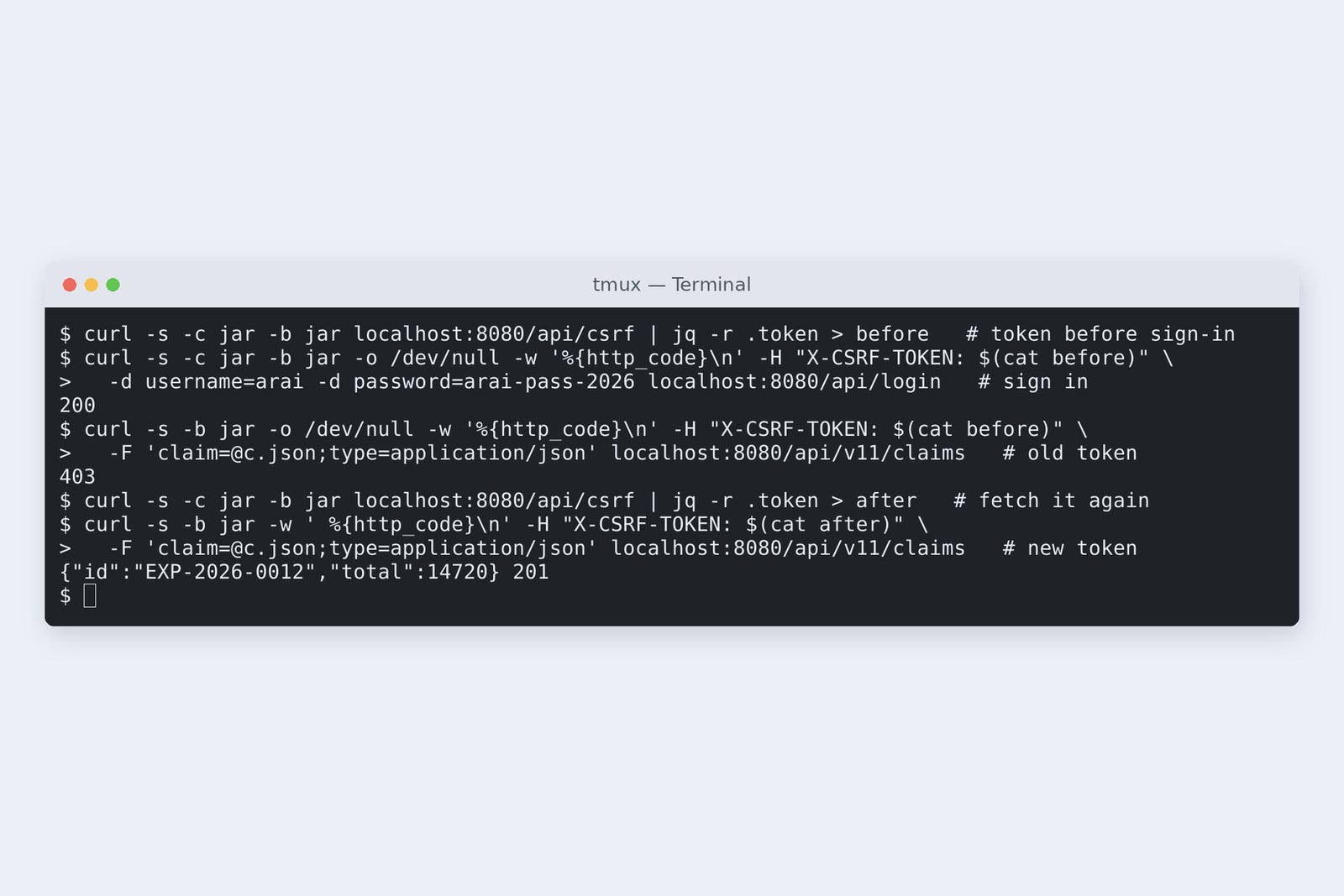
The catch: signing in changes the token. A claim sent with the token fetched before sign-in got 403 (Spring Security renews the session and the token at sign-in). So api.js drops its remembered token after signing in, and if a 403 still comes back, fetches a new one and resends once.
401: expired, but nothing lost
# Opened signed out → wrong password → right password
  GET /api/v11/me 401
  GET /api/v11/rates 401
  GET /api/v11/me 401
  GET /api/csrf 200
  POST /api/login 401
  POST /api/login 200
  GET /api/v11/me 200
  GET /api/v11/rates 200
# After the mistake: username still "arai", password empty

# Filled the claim, deleted the cookies (sign-in expired), pressed Submit
  GET /api/csrf 200
  POST /api/v11/claims 401
  GET /api/v11/me 401
# Screen: the sign-in box appeared; purpose and receipt (1 file) untouched
# Signed in again and pressed Submit once more
  POST /api/login 200
  GET /api/v11/rates 200
  GET /api/v11/me 200
  GET /api/csrf 200
  POST /api/v11/claims 201
Signed out, both me and the rates got 401. getMe() reads a 401 as "not signed in" (null), and Account shows the sign-in box. That box keeps <form action>: an empty password box after a mistake is exactly right, and the username alone is kept with part 6's option ② (return the value and restore it with defaultValue).
The cover photo is the sign-in expiring halfway through a claim. Sending returns 401; the Action brings up the sign-in box and says "your entries are still here". Because part 6 switched to sending from onSubmit, the purpose and the receipt file survived. Sign in again, press Submit: 201.
# Row 2 set to 25800, total 55,643 円, notes empty
  screen check: nothing sent
  ?check=off: GET /api/csrf 200 → POST /api/v11/claims 400
  合計が5万円を超えるので、備考に理由を書いてください。
# The server answers with the short code "reason required"; the screen turns it into the same sentence
Part 6's homework, "descriptions up to 100 characters" and "a reason above ¥50,000", is now on both the screen and the server.
# JavaScript from npm run build (part 6 → part 7)
  index-*.js   239.35 kB → 246.10 kB   gzip 75.95 kB → 78.19 kB
On your own PC
Start the back-end series' part 15 app with section 2's endpoints added, using SEED=true docker compose up, and sign in as arai (password arai-pass-2026), which that seeds. Run npm run dev in the React project and watch DevTools' Network tab: on load the rate request goes out twice, one marked "(canceled)". With npm run build and npm run preview it goes once.
Section 5's experiment is /lab.html?lab=race&how=naive (and ignore, abort); section 6's is ?lab=uncached&how=inside. inside never stops asking, so close the tab once you've seen it. To expire the sign-in, delete the JSESSIONID cookie in DevTools' Application tab.
§ — On one page, and next time
- Requests go in useEffect. It runs only when the dependency array changes; the cleanup stops what's in flight.
- Dev's StrictMode runs effects twice (production once). With a cleanup the result is the same.
- Answers arrive out of order. Stop them or ignore them, and ideally store by key so order doesn't matter.
- use and Suspense let you decide what waits. Make the Promise once, outside (inside: 317 requests in 3 s).
- CORS is the browser's rule. The CSRF token changes at sign-in. On a 401, keep the input and show a sign-in box.
AraiIt's connected! But every keystroke still re-renders every component, doesn't it?
FuruiNext time: the cost of re-rendering. More rows, measured with the Profiler, and how much memo and the React Compiler take off.
References
- React — useEffect
- React — Synchronizing with Effects
- React — You Might Not Need an Effect
- React — use
- React — <Suspense>
- MDN — Cross-Origin Resource Sharing (CORS)
- MDN — AbortController
- Spring Security — Cross Site Request Forgery (CSRF)
- Spring Security — CORS
Recorded by the author on a cloud Linux machine on 2 November 2026. Part 6's project (Vite 8.3.5, React 19.3.1) was connected to the back-end series' part 15 Spring Boot 4.1.2 app (Spring Security 7.1.2, PostgreSQL 16, plus the fw7 endpoints). Both dev (npm run dev) and production (npm run build served by npm run preview) were opened in Chromium 153.0.8010.12 driven by Playwright. The rates are practice values, not real market rates. Sections 4 to 7 used separate pages in lab.html.
Old-School Front-End, Frameworks part 7 — Side effects and fetching data / 2026.11