Dev Guide / 2026 ・ No.04
Running large models locally
From CUDA versus Metal to Qwen3.8-27B in LM Studio
Published
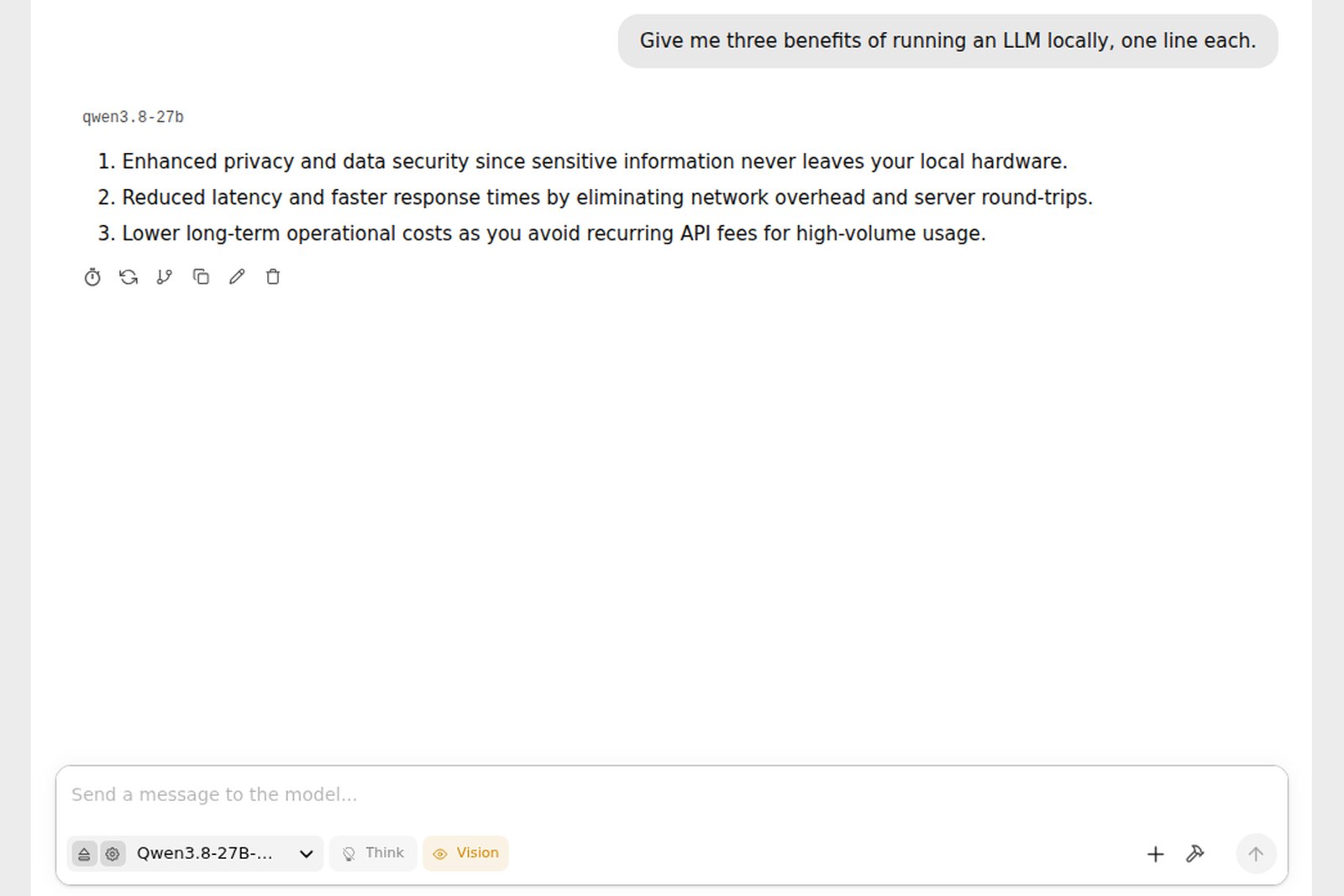
AI like ChatGPT normally runs on servers somewhere across the internet.
These days you can also download an openly published model and run it entirely on your own computer.
This guide first sorts out the technology families, what runs on Windows, Mac and Linux, and what labels like 27B and Q4_K_M mean.
It then picks practical models for text, images, voices, OCR and translation, and walks through running Qwen3.8-27B in LM Studio, screen by screen.
Why run it locally?
Running a model locally means keeping its weights (the mass of numbers learned in training) as files on your machine and doing the maths on your own GPU or CPU. Questions and answers never leave the computer.
| Local | Cloud AI service | |
|---|---|---|
| Data | Stays with you; easier for confidential or personal material | Sent to the provider |
| Cost | Hardware and electricity; unlimited use | Subscription or pay per use |
| Offline | Works | Doesn't |
| Capability | Capped by your machine's memory | The largest frontier models |
| Effort | You choose and update models | Almost none |
The local catch is that there's a ceiling on what fits. Put the other way round, picking a model that suits your machine's memory decides most of whether running locally works. The first half of this guide is about making that choice.
Technology families: CUDA, Metal, ROCm, CPU
It helps to see the setup in layers: app, inference engine, GPU API and memory. When people talk about the "CUDA camp" and the "Metal camp", they mean the bottom two.
Same apps, different layers underneath
The llama.cpp engine supports every family, which is why LM Studio and Ollama run on any machine
| Family | Typical machines | Strengths | Weaknesses |
|---|---|---|---|
| NVIDIA, CUDA | Windows and Linux PCs with GeForce RTX | The most software support; image, audio and training all work; fast | VRAM of 8 to 32 GB; big models don't fit |
| Apple, Metal / MPS / MLX | M1 to M5 Macs | CPU and GPU share memory (unified memory); 64 or 128 GB Macs hold large models; quiet and efficient | Slower compute than NVIDIA at the same price; CUDA-only software won't run |
| AMD, ROCm / Vulkan | Radeon, Ryzen AI Max machines | Cheap per GB of VRAM; Ryzen AI Max has large shared memory | Less software support than CUDA; varies by OS and model |
| Intel, oneAPI / Vulkan | Arc GPUs, Core Ultra | Affordable | Little software support |
| CPU only | PCs and servers without a GPU | Runs anywhere | Slow; small models only |
- CUDA is NVIDIA's platform for computing on its GPUs. Nearly all AI software, PyTorch first of all, supports it before anything else.
- Metal is Apple's GPU platform, MPS is the part that runs PyTorch on it, and MLX is Apple's own machine-learning framework for Apple Silicon. On a Mac, the MLX version of a model is usually the fastest.
- Vulkan is a vendor-neutral GPU interface; llama.cpp uses it on AMD and Intel GPUs.
- NPUs (Copilot+ PCs, Apple's Neural Engine) are built for AI too, but as of autumn 2026 they are not yet the main way to run large language models freely.
Options on Windows, Mac and Linux
| Use | Windows | Mac (Apple Silicon) | Linux |
|---|---|---|---|
| Chat in a GUI | LM Studio, Ollama | LM Studio (MLX), Ollama | LM Studio (AppImage) |
| Command line, background service | Ollama, llama.cpp, lms | Ollama, llama.cpp, mlx-lm, lms | Ollama, llama.cpp, lms, llmster |
| Serving many users | vLLM under WSL2 | (Not suited) | vLLM, SGLang (for NVIDIA) |
| Image generation | ComfyUI | ComfyUI, Draw Things | ComfyUI |
| Voice, OCR, translation | Each model's official repo (Python) or ComfyUI nodes; where a model runs in Ollama or LM Studio, use that | ||
- LM Studio: search, download, load, chat and even an API server, all in one app. Apple Silicon Macs; Windows on x86 and ARM64 (Snapdragon); Linux on x86 and ARM64 (per the download page). This guide uses it.
- Ollama: the classic one-liner, ollama run model-name. Mac and Windows get a GUI app too; on Linux you install it from the command line.
- llama.cpp: the inference engine inside LM Studio and Ollama, for people who want fine control.
- vLLM: a fast serving engine for many simultaneous users, mainly Linux plus NVIDIA.
Terms: what 27B, Q4_K_M and A3B mean
Model names and download pages are full of cryptic labels. Once you can read them, you can tell at a glance whether a model will run on your machine.
| Term | Meaning | Example |
|---|---|---|
| xB | Number of parameters (weights); B is billion. More is smarter but needs more memory and compute | 27B = 27 billion |
| ExB | "Effective" parameters actually used in computation (Gemma's small models) | Gemma 4 E4B |
| xB-AyB (MoE) | Mixture of experts. The first number is the total, the one after A is what runs per token. Memory follows the total; speed follows the active part | Qwen3.6-35B-A3B (35B total, 3B active) |
| Dense | Uses every parameter every time. Usually smarter than MoE of the same size, but slower | Qwen3.8-27B |
| Quantisation | Storing weights in fewer bits to shrink them: BF16 (16-bit), then 8-bit, then 4-bit, losing a little accuracy each step | Q8_0, Q4_K_M |
| Q4_K_M | A llama.cpp quantisation of roughly 4 to 5 bits; the standard balance of size and quality | 16.8 GB for 27B |
| MXFP4, NVFP4 | Newer 4-bit formats. gpt-oss ships in MXFP4; NVFP4 targets NVIDIA's newest GPUs | gpt-oss-20b |
| GGUF | llama.cpp's file format, used by LM Studio and Ollama; one self-contained file | ...-Q4_K_M.gguf |
| MLX | The Apple Silicon format; usually faster on a Mac | ...-MLX-4bit |
| safetensors | The original weights, used by PyTorch, vLLM, ComfyUI and others | Official repos |
| Context length | How much the model can keep in view at once, in tokens. Longer means more memory for the KV cache | 256K (262,144) |
| Token | The unit text is cut into; roughly three quarters of an English word | |
| tok/s | Tokens generated per second: the speed. Faster than you read feels smooth | 20 tok/s |
| VRAM / unified memory | Memory dedicated to the GPU / memory a Mac's CPU and GPU share. The model has to fit here | 24 GB on an RTX 4090 |
| GPU offload | How many of the model's layers go on the GPU. All of them is fastest | |
| -Instruct, -it | Tuned for conversation; the one you normally want (Base is the raw model) | gemma-4-31B-it |
| Thinking | Shows a reasoning process before answering: smarter but slower | Switchable in Qwen3.8 |
| VL, Vision | Models that read images. GGUF versions come with a separate mmproj file | mmproj-....gguf |
| Licence | Whether you may use it commercially. Apache 2.0 and MIT allow it; some licences are custom, research-only or non-commercial |
Rules of thumb for memory and speed
Memory needed is roughly parameters × bits ÷ 8. The chart shows the actual file sizes of Qwen3.8-27B, the model used here.
How many GB is a 27B model?
File sizes from lmstudio-community/Qwen3.8-27B-GGUF on Hugging Face (BF16 computed as 27.78B × 2 bytes)
Speed is set almost entirely by how fast the weights can be read from memory (bandwidth), because every new token means reading all the weights again.
Speed = memory bandwidth / model size
Theoretical ceilings. Real speeds are lower; MLX on a Mac and MTP (multi-token prediction) claw some back
| Your memory | Comfortable size | Examples |
|---|---|---|
| 8 GB (laptop without GPU) | 2B to 4B | Gemma 4 E2B, E4B |
| 12-16 GB VRAM / 16-24 GB Mac | Up to 12B, or a 20B-class MoE | Gemma 4 12B, gpt-oss-20b |
| 24-32 GB VRAM / 32-48 GB Mac | 27B to 35B at 4-bit | Qwen3.8-27B, Gemma 4 26B-A4B, 31B |
| 64 GB+ Mac | 35B at 8-bit, larger MoE | Qwen3.6-35B-A3B (8-bit) |
| 128 GB+ Mac and similar | 100B-class MoE | gpt-oss-120b |
A Mac can't give all its memory to the GPU; by default it's roughly two thirds to three quarters. Leave room for macOS and other apps too: a model file a little over half your memory is a safe target.
Practical models today (October 2026)
Release dates, sizes and licences were checked on each model's official Hugging Face page. "Commercial" is ticked for Apache 2.0, MIT and similar licences that allow it (check each licence for the details).
Text and chat (LLMs)
| Model | Size | At 4-bit | Comm. | In short |
|---|---|---|---|---|
| Qwen3.8-27B (Alibaba, Aug 2026) | 27B dense | 17 GB | Yes | Top of its size class; reads images and video; 256K |
| Gemma 4 (Google, from Mar 2026) | E2B, E4B, 12B, 26B-A4B, 31B | E4B a few GB to 31B about 20 GB | Yes | Pick your size; small ones suit laptops |
| Qwen3.6-35B-A3B (Apr 2026) | 35B MoE, 3B active | About 24 GB | Yes | Fast, because little of it runs per token |
| gpt-oss-20b / 120b (OpenAI, Aug 2025) | 21B, 117B MoE | About 14 / 65 GB | Yes | Ships in MXFP4; runs in 16 GB |
Text to image
| Model | Size | Comm. | In short |
|---|---|---|---|
| Z-Image-Turbo (Alibaba Tongyi, Nov 2025) | 6B | Yes | Eight steps, fast; practical on 16 GB GPUs; strong at photorealism |
| FLUX.2 [klein] 4B / 9B (Black Forest Labs, Jan 2026) | 4B, 9B | 4B only | Light, and can edit images. 9B is non-commercial |
| Qwen-Image-2512 (Dec 2025) | 20B | Yes | Strong at text inside images (Chinese, English); heavy, use a quantised build |
| Qwen-Image-2.1 (Sep 2026) | 7B | Research | New and light, but under a research licence |
| SDXL (Stability AI, 2023) | About 2.6B | Yes (conditions) | Old but light, with by far the most add-ons (LoRAs) |
Voice cloning (speech synthesis)
| Model | Size | Comm. | In short |
|---|---|---|---|
| Qwen3-TTS (Alibaba, Jan 2026) | 0.6B, 1.7B | Yes | Clones from three seconds of audio; ten languages incl. English, Chinese, Japanese |
| VoxCPM2 (OpenBMB, Apr 2026) | 2B | Yes | 30 languages, 48 kHz; can also design a voice from a text description |
| IndexTTS-2.5 (bilibili, Aug 2026) | — | Own licence | Fine control of emotion and duration; 2.5 adds Japanese |
| Fun-CosyVoice3-0.5B (Alibaba, Dec 2025) | 0.5B | Yes | Light and fast |
| GPT-SoVITS (open source) | — | Yes (MIT) | Fine-tunes on about a minute of audio; big community |
Only clone voices whose owners have agreed. Publishing audio made with someone else's voice as if it were theirs invites fraud and rights violations.
OCR (reading text in images and PDFs)
| Model | Size | Comm. | In short |
|---|---|---|---|
| PaddleOCR-VL-1.6 (Baidu, May 2026) | 0.9B | Yes | Tables, formulas and charts too; 96.33% on OmniDocBench v1.6 (official figure) |
| GLM-OCR (Z.ai, Jan 2026) | About 0.9B | Yes (MIT) | Small and fast; runs in Ollama |
| DeepSeek-OCR-2 (Jan 2026) | 3B | Yes | Reads long documents with few tokens |
| MinerU2.5-Pro (OpenDataLab, May 2026) | 1.2B | Yes | For turning PDFs into Markdown |
| olmOCR-2 (Ai2, Oct 2025) | 7B | Yes | For batch-processing large PDF collections |
Translation
| Model | Size | Comm. | In short |
|---|---|---|---|
| Hy-MT2 (Tencent, May 2026) | 1.8B, 7B, 30B-A3B | Yes | 33 languages; official GGUF; 1.8B runs on a laptop |
| TranslateGemma (Google, Jan 2026) | 4B, 12B, 27B | Yes (Gemma terms) | Gemma tuned for translation |
| PLaMo 2 Translate (PFN, May 2025) | About 10B | Conditions | Specialised in Japanese and English |
| NLLB-200 (Meta, 2022) | 0.6B to 3.3B | Non-commercial | 200 languages; old but good for rare ones |
The LLMs above (Qwen3.8, Gemma 4) translate well too. Dedicated models win on being small and fast.
If you pick one: Qwen3.8-27B
For one model that is easy to run locally and still highly accurate, our pick is Qwen3.8-27B, released in August 2026.
- Accurate: in Qwen's own comparison it beats the previous Qwen3.6-27B across the board; for writing, code, research and agent tasks it is at the top of its size class (SWE-bench Pro 61.7 against 53.5; GPQA Diamond 89.2).
- Just fits: 16.8 GB at 4-bit (Q4_K_M), so it sits on a 24 GB GPU (RTX 3090, 4090 and the like) or a Mac with 32 GB or more.
- Reads images: hand it photos, diagrams or PDF screenshots. Context is 262,144 tokens.
- Apache 2.0: free for commercial use.
- Runs anywhere: GGUF and MLX builds are published, so LM Studio, Ollama (ollama run qwen3.8), llama.cpp and vLLM all work.
With 16 GB or less, follow the same steps with Gemma 4 12B (about 8 GB) or Gemma 4 E4B. Only the search term changes.
Step 1: install LM Studio
The screenshots use LM Studio 0.4.25 for Linux. The Mac and Windows versions look the same apart from the window frame and menus.
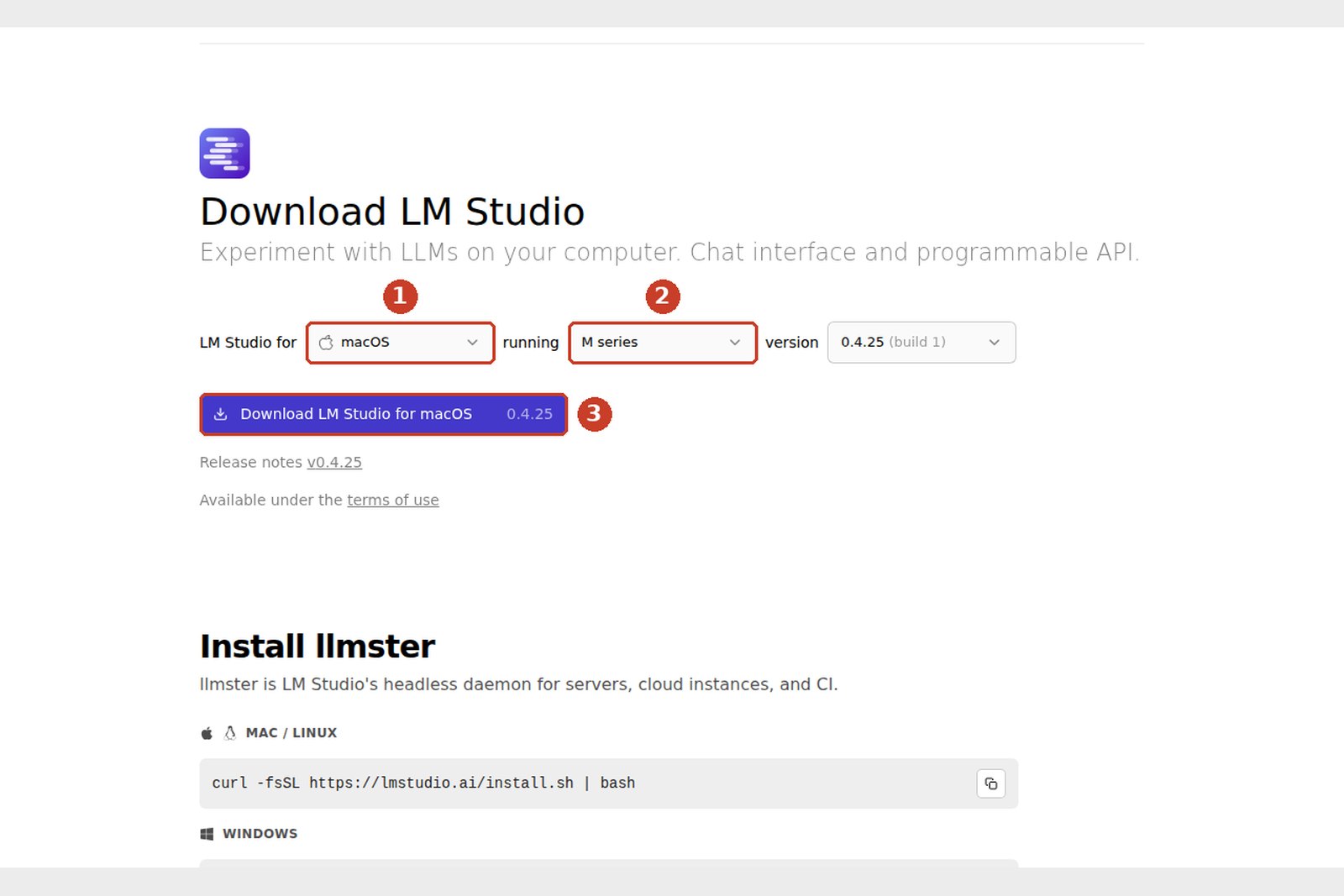
- Open lmstudio.ai/download. The top of the page features a separate product, LM Studio Bionic (an agent app); what we want is Download LM Studio further down.
- Mac: open the dmg and drag LM Studio into Applications. Windows: run the installer. Linux: make the AppImage executable (chmod +x) and run it.
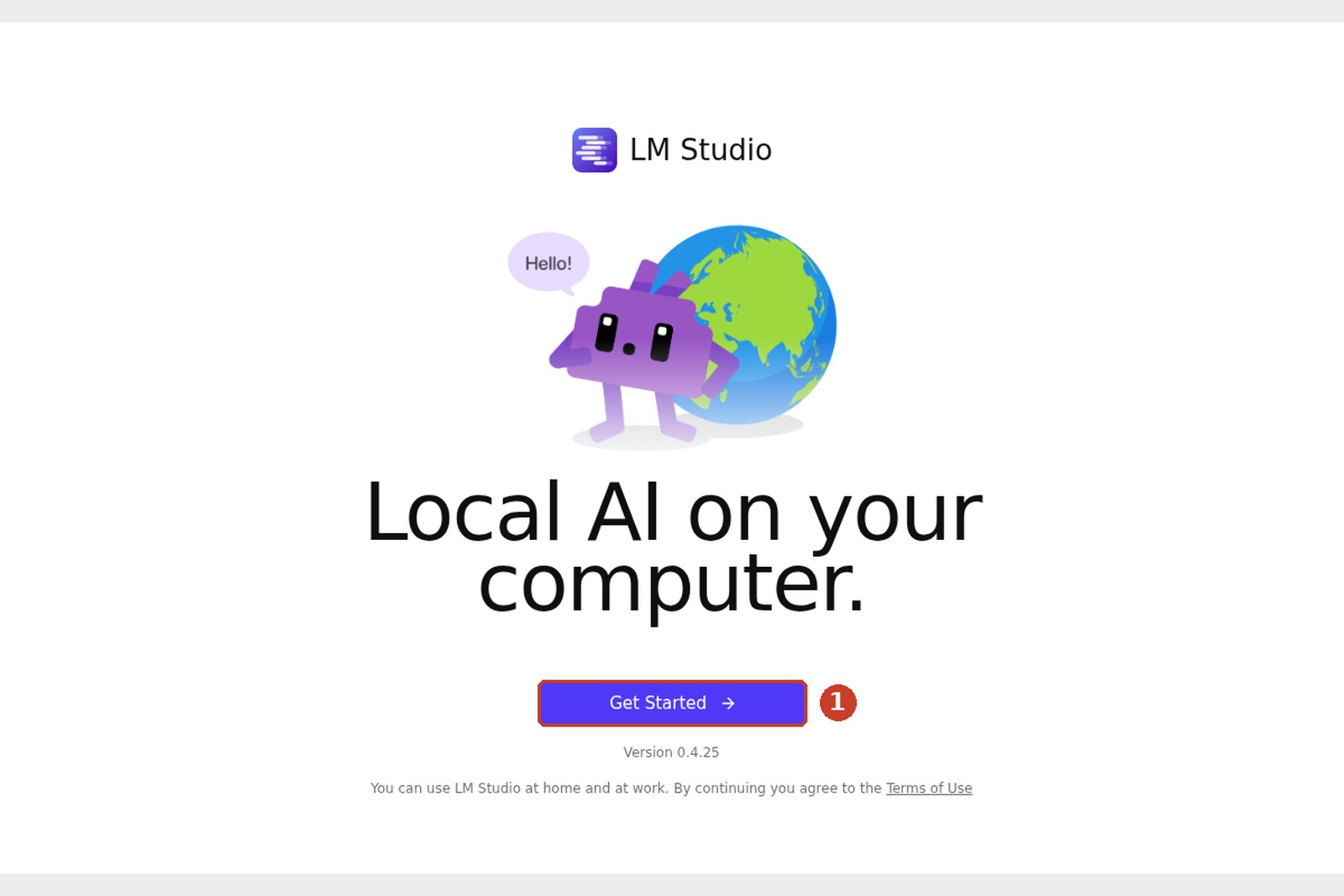
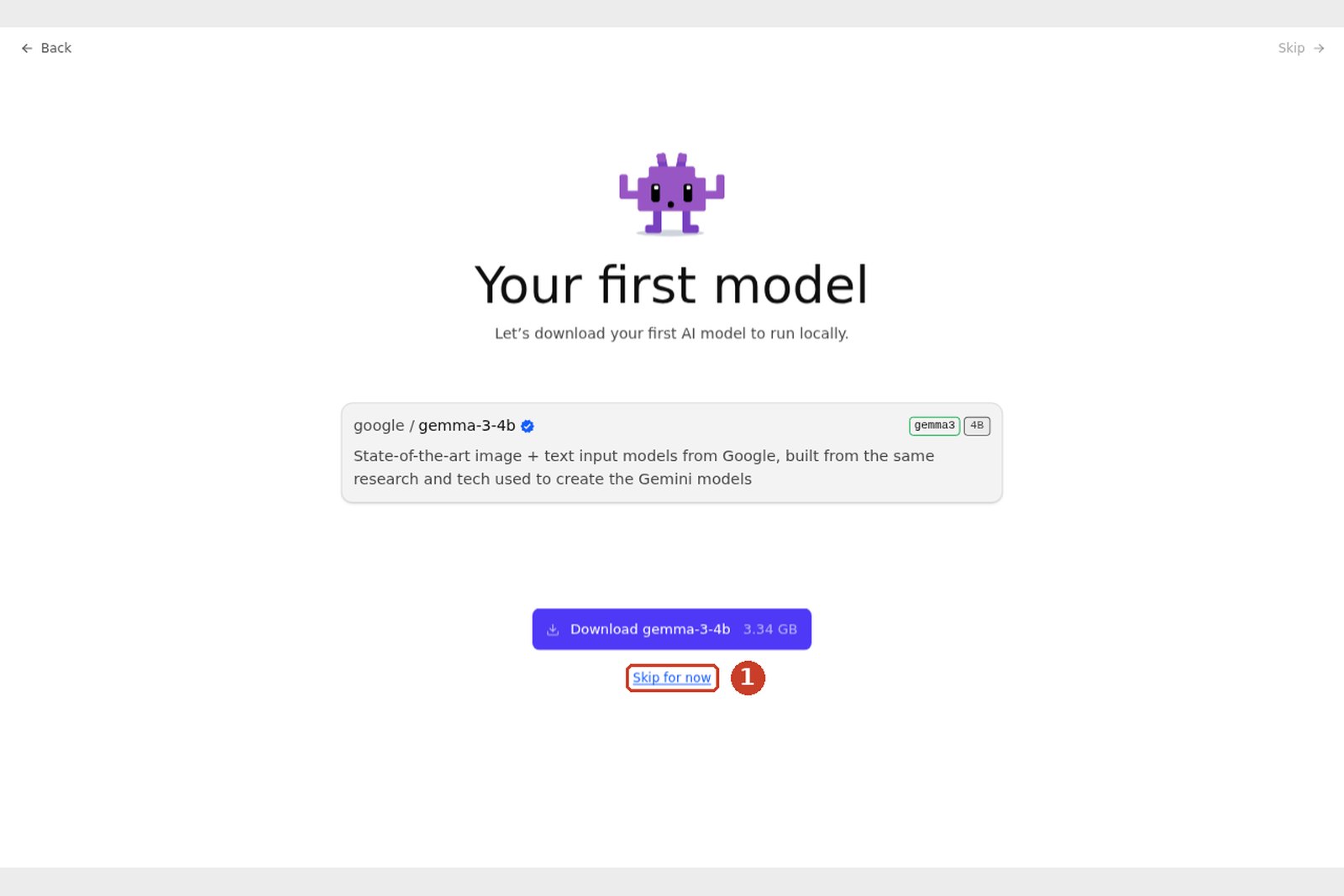
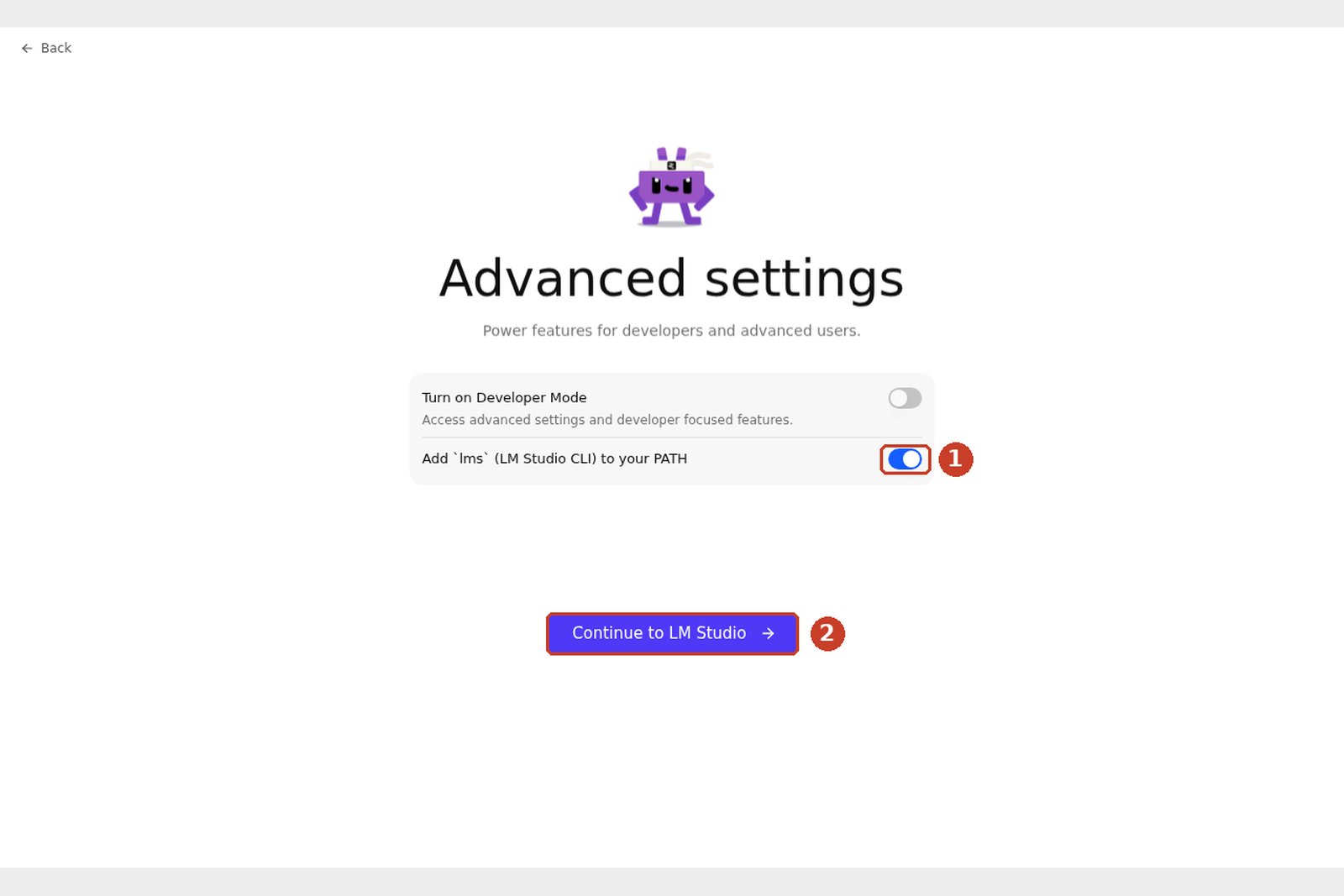
No sign-in is needed. That's the setup done.
Step 2: download Qwen3.8-27B
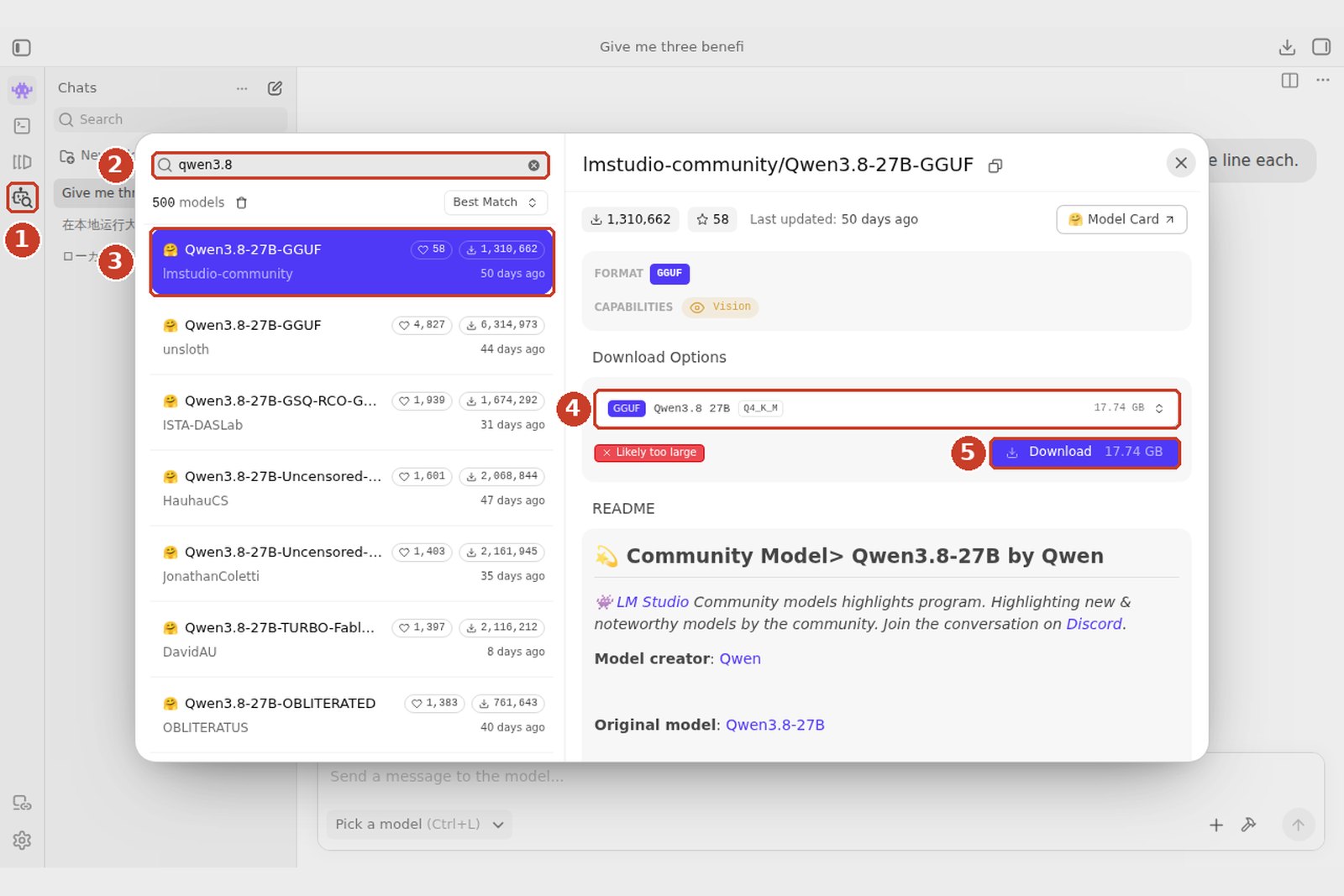
- On a Mac, choose lmstudio-community/Qwen3.8-27B-MLX-4bit at step 3: the MLX build for Apple Silicon, which runs faster.
- If unsure about quantisation, take Q4_K_M. With memory to spare, Q6_K (22.4 GB) or Q8_0 (29.0 GB) are slightly more accurate.
- The mmproj file for images (about 0.9 GB) downloads too, for about 17.7 GB in all.
- The red Likely too large means "this machine probably lacks the memory". It shows because our test machine has 8 GB; you won't see it on a 24 GB GPU or a 32 GB Mac.
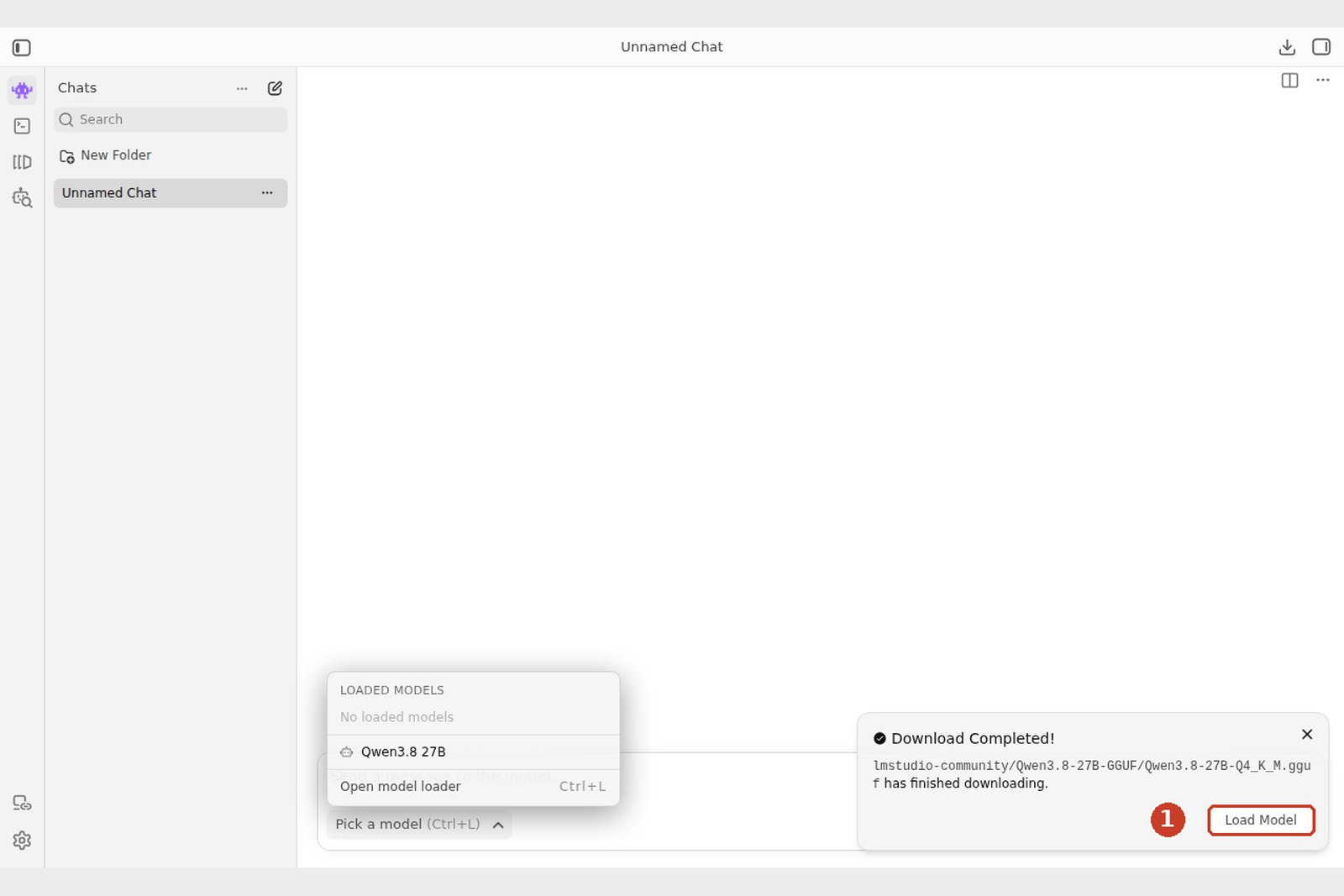
Step 3: load it and chat
Choose the model from "Pick a model" under the chat (⌘+L on a Mac, Ctrl+L on Windows and Linux) and the load settings open.
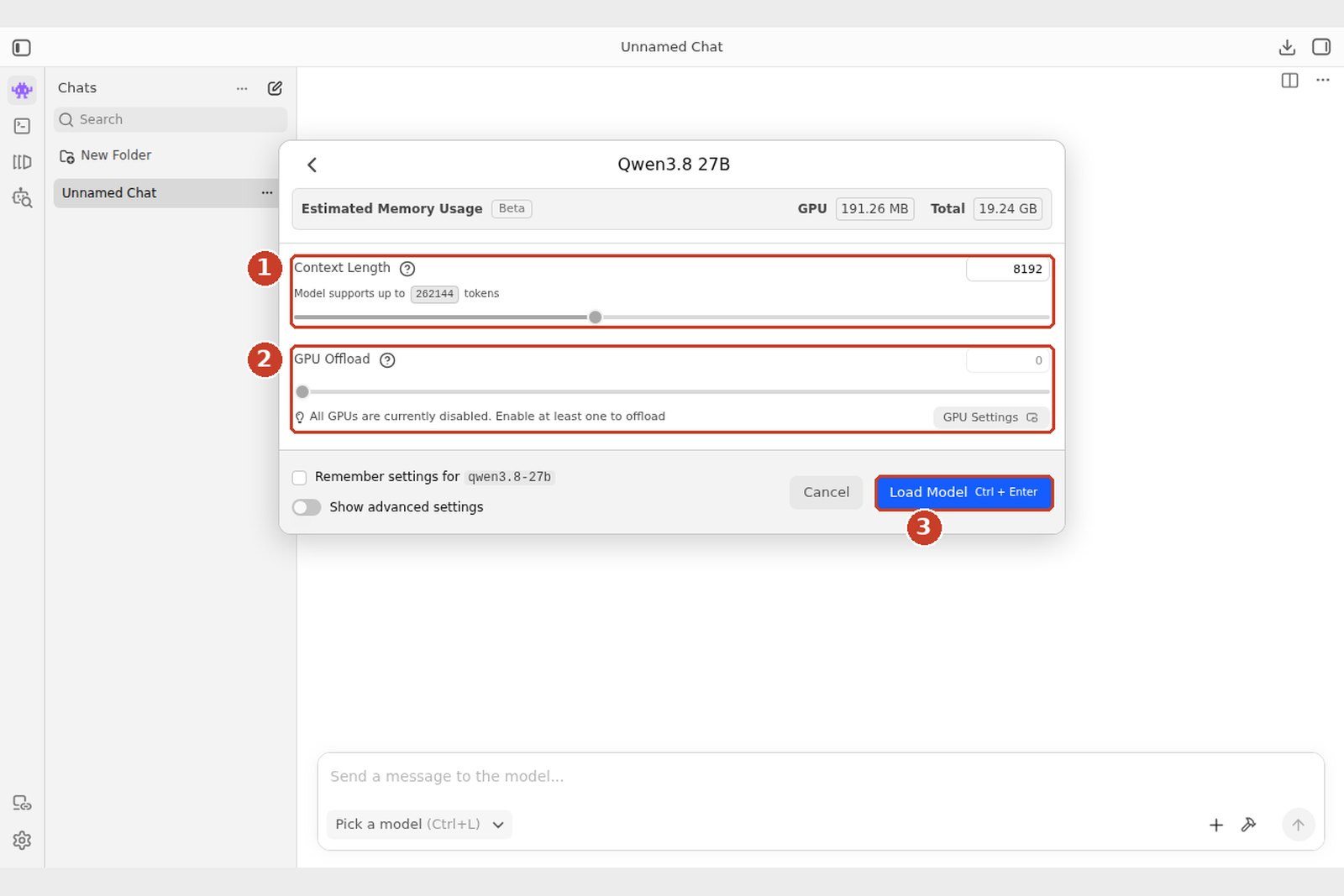
- Context Length: 8,192 is fine to start. Raise it for long documents (memory use rises too).
- GPU Offload: on a machine with a GPU, slide it all the way right. All layers on the GPU is fastest; anything left over runs on the CPU and slows things down.
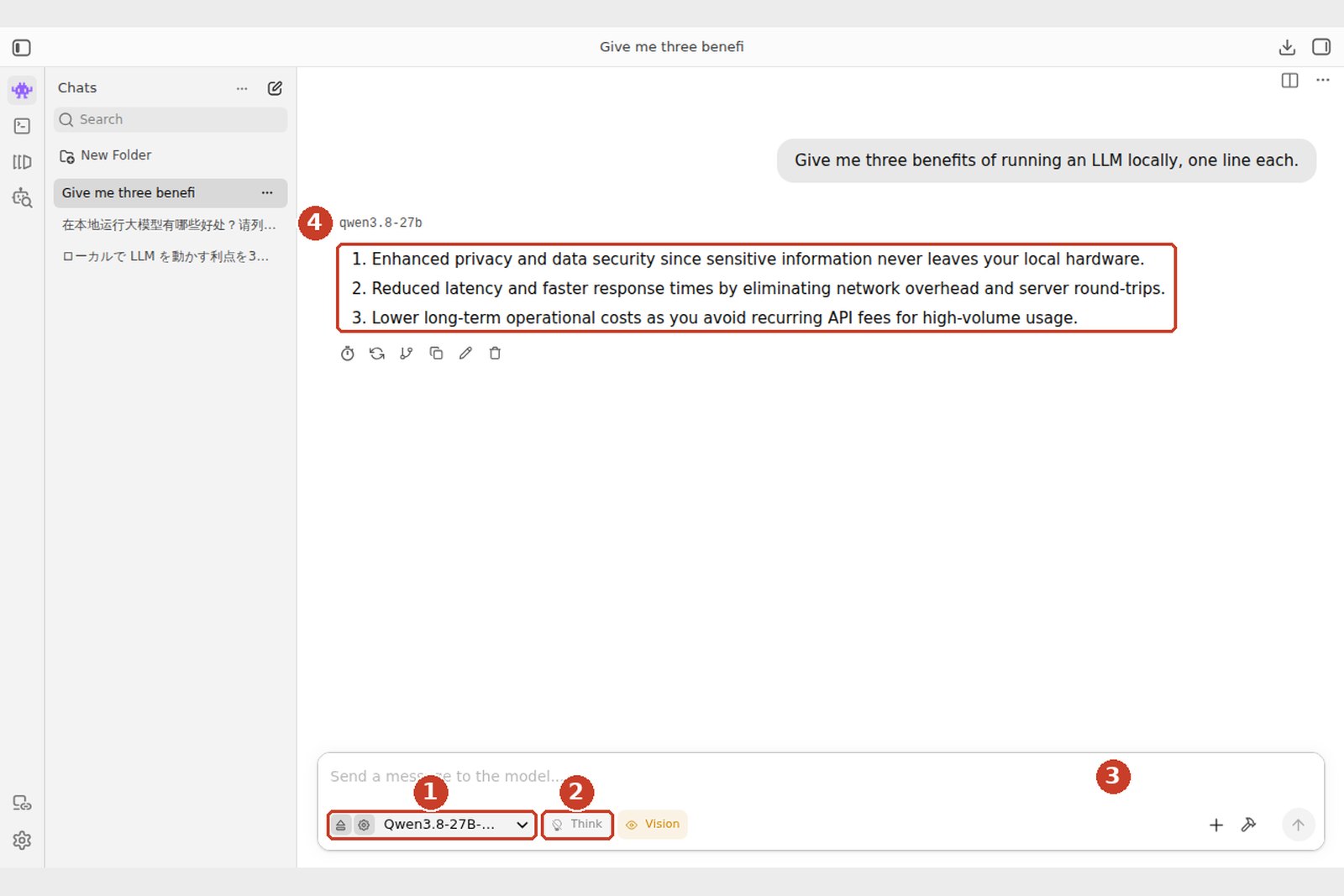
Once loaded, the model's name sits left of the input box. Type a question and press Enter. The Think button toggles the reasoning process: on for hard problems, off for everyday chat, which is faster.
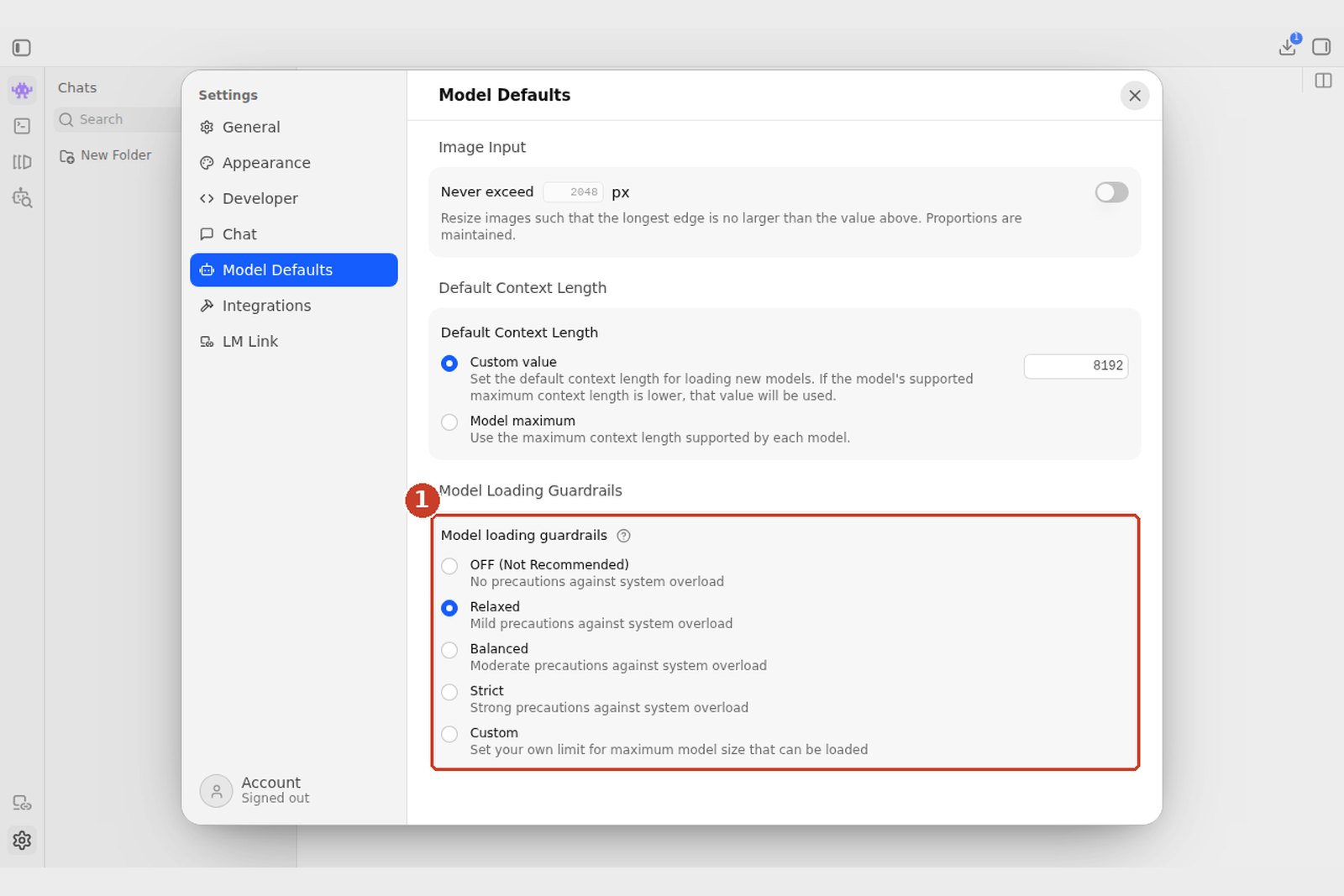
These screenshots come from a Linux test machine with no GPU and 8 GB of memory. A 27B model doesn't fit, so we turned off the guardrails described below and let it read the weights from disk as it went, which took roughly 5 to 15 seconds per token. On a 24 GB GPU or a 32 GB Mac, the same steps give a comfortable chat speed.
Step 4: use it as an API (optional)
LM Studio can also act as a server you call exactly like the OpenAI API, so your own programs, and tools that accept an OpenAI-compatible API, can use the model on your machine.
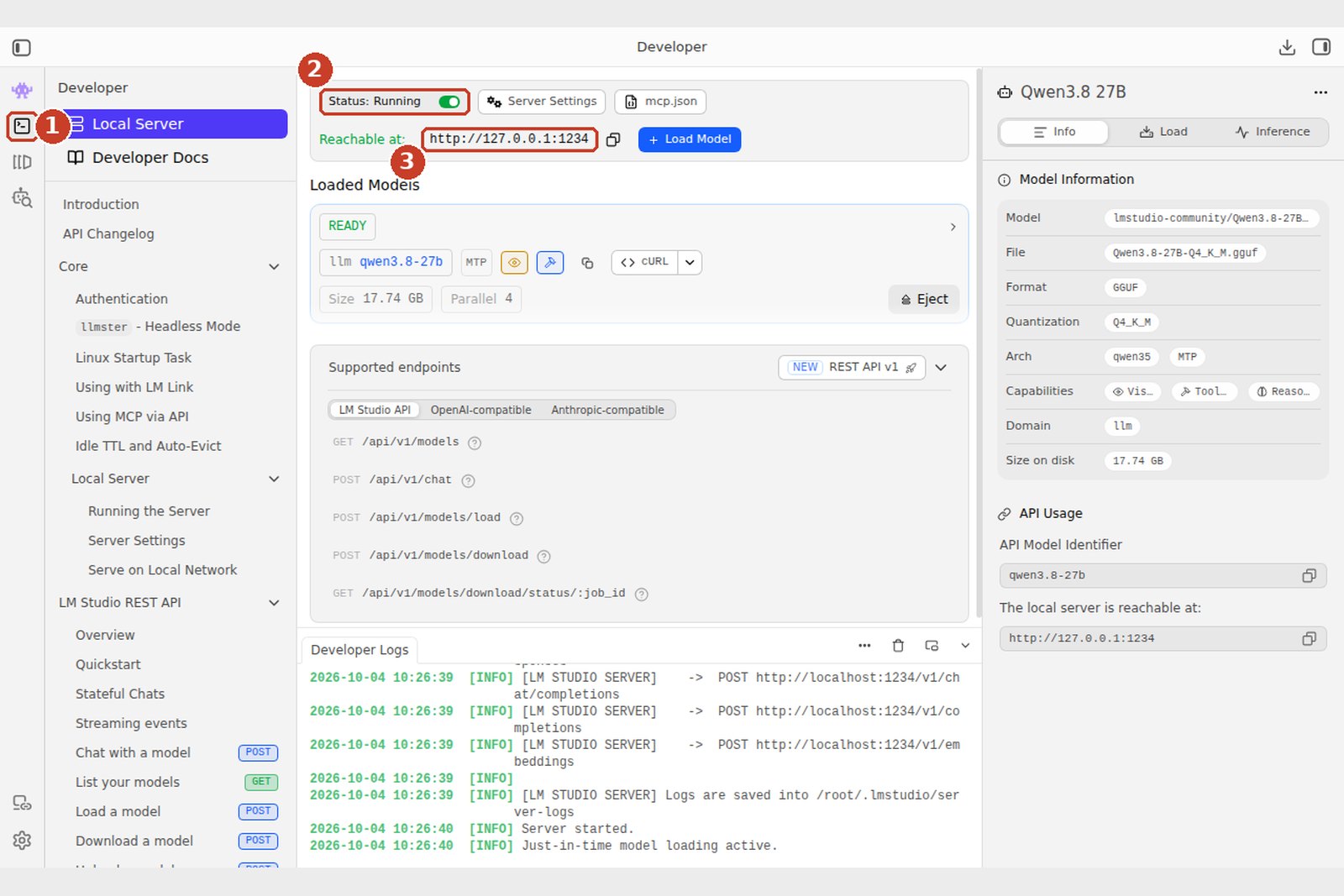
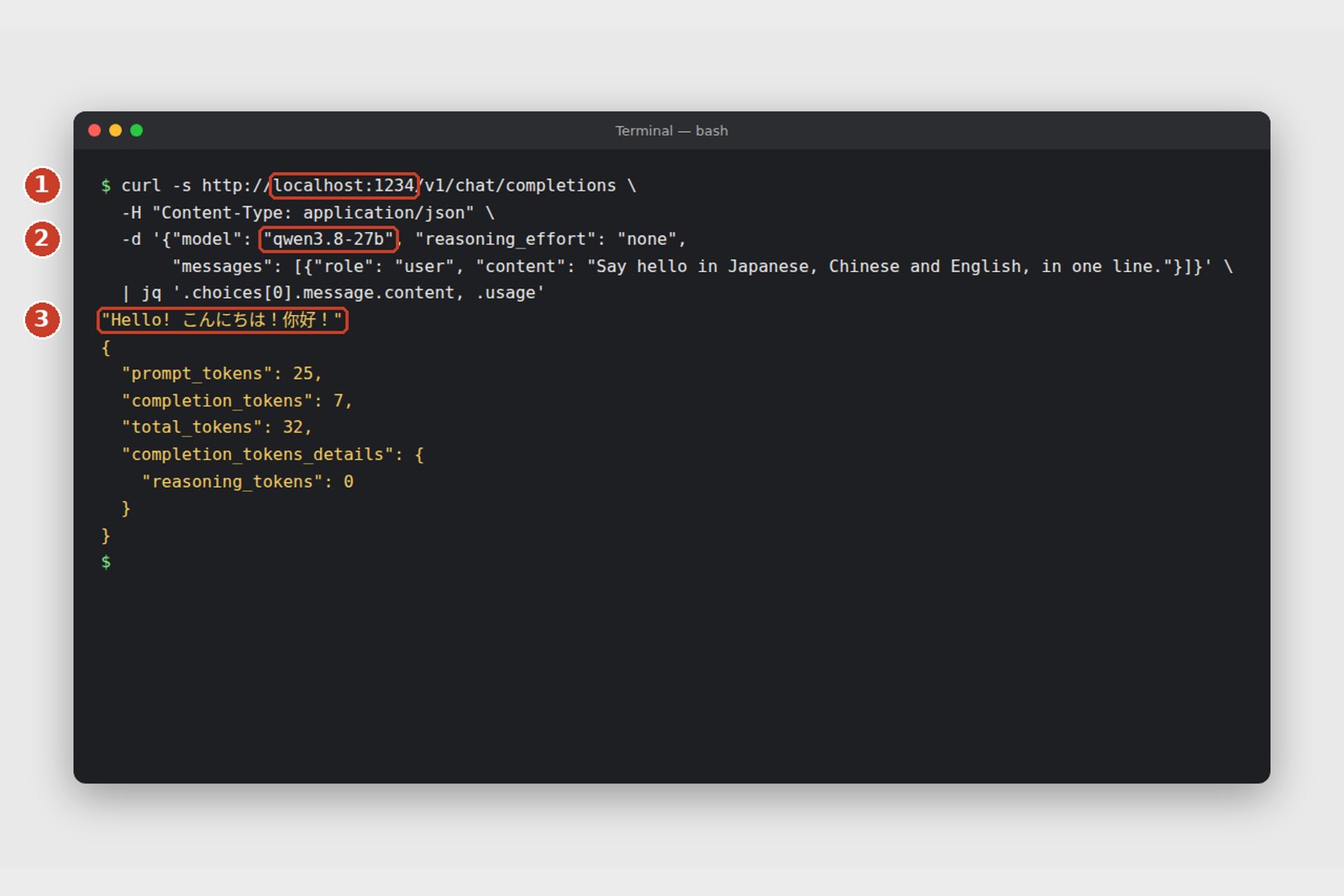
# Send a question from a terminal (write curl.exe in Windows PowerShell)
curl http://localhost:1234/v1/chat/completions \
  -H "Content-Type: application/json" \
  -d '{"model": "qwen3.8-27b", "reasoning_effort": "none",
       "messages": [{"role": "user", "content": "Hello"}]}'
Through the API, Qwen3.8 also thinks out loud by default. Adding "reasoning_effort": "none" skips that and answers straight away (checked on our test machine).
Without the GUI, the lms command does the same (lms get to download, lms load to load, lms server start to serve). With Ollama, the one line ollama run qwen3.8 takes you from download to chat.
Troubleshooting
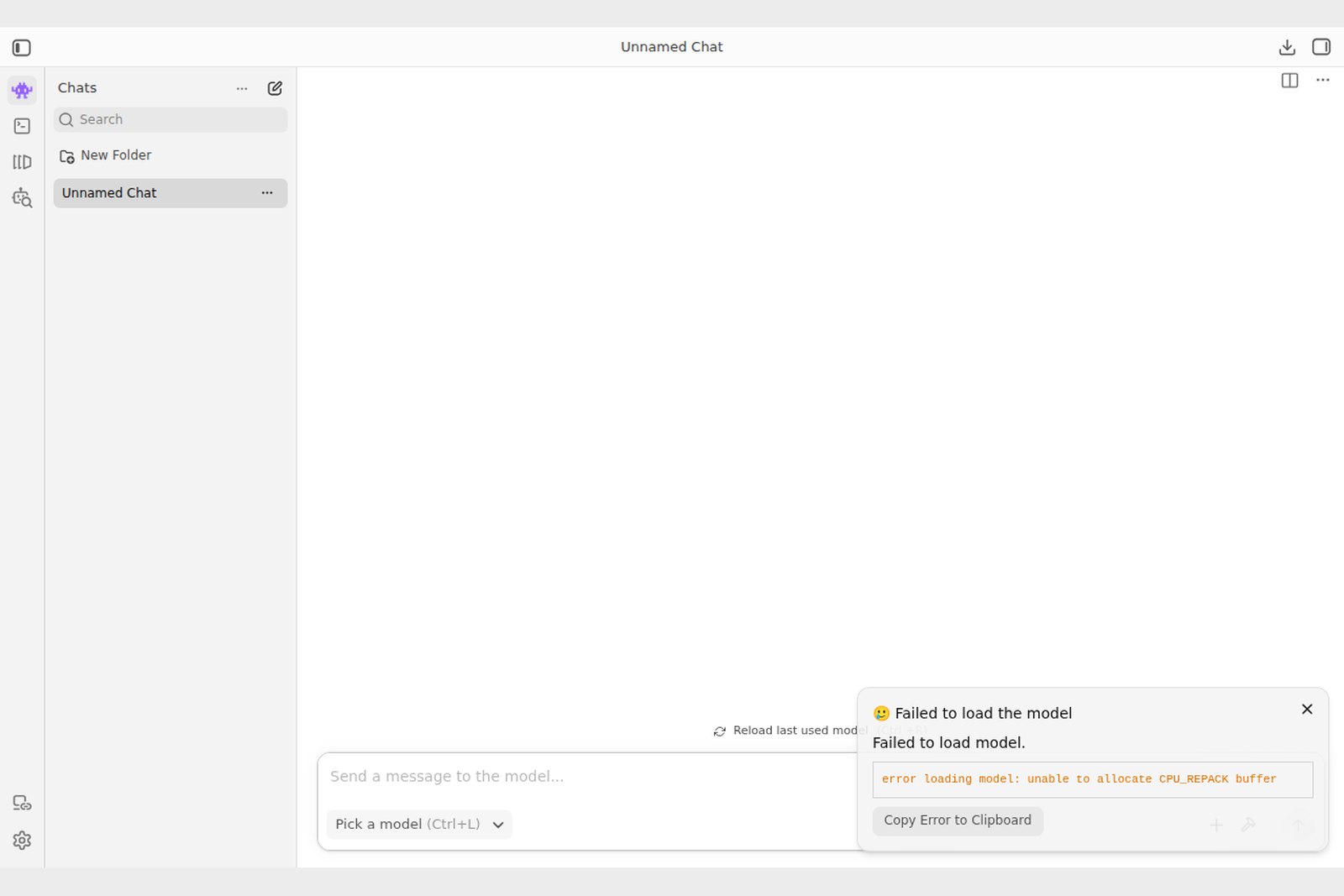
| Symptom | Cause | Fix |
|---|---|---|
| Likely too large / won't load | Not enough memory | A smaller quantisation (Q4_K_M to Q3) or model (Gemma 4 12B); close other apps |
| Loads but crawls | Doesn't fit on the GPU, so the CPU does the work | Max out GPU Offload; if that's not enough, go smaller |
| Stalls or slows on long documents | Context too short, or the KV cache eats memory | Raise or lower Context Length; split the document |
| Thinks for ages before answering | Thinking is on | Turn Think off |
| Windows isn't using the GPU | Old driver or wrong runtime | Update the GPU driver and choose CUDA (Vulkan for AMD) in LM Studio's Runtime settings |
§ — On one page
- Local AI comes in layers: app, engine, GPU API, memory. "CUDA" versus "Metal" is about the bottom two.
- NVIDIA (CUDA) wins on software and speed, Macs (Metal, MLX) on large unified memory; AMD and Intel get by with Vulkan and friends.
- Memory: parameters × bits ÷ 8, so 27B at Q4_K_M is about 17 GB. Speed: memory bandwidth ÷ model size.
- Practical picks: text Qwen3.8 and Gemma 4, images Z-Image and FLUX.2 klein, voices Qwen3-TTS and VoxCPM2, OCR PaddleOCR-VL and GLM-OCR, translation Hy-MT2.
- If you pick one, pick Qwen3.8-27B: search in LM Studio, download Q4_K_M (MLX on a Mac), load, chat. It doubles as an API server.
References
- LM Studio — Download
- LM Studio Docs
- Ollama — Download
- Ollama — qwen3.8
- GitHub — ggml-org/llama.cpp
- GitHub — ml-explore/mlx
- Hugging Face — Qwen/Qwen3.8-27B
- Hugging Face — lmstudio-community/Qwen3.8-27B-GGUF
- Hugging Face — google/gemma-4-26B-A4B-it
- Hugging Face — openai/gpt-oss-20b
- Hugging Face — Tongyi-MAI/Z-Image-Turbo
- Hugging Face — black-forest-labs/FLUX.2-klein-4B
- Hugging Face — Qwen/Qwen-Image-2512
- Hugging Face — Qwen/Qwen3-TTS
- Hugging Face — openbmb/VoxCPM2
- Hugging Face — IndexTeam/IndexTTS-2.5
- Hugging Face — PaddlePaddle/PaddleOCR-VL-1.6
- Hugging Face — zai-org/GLM-OCR
- Hugging Face — deepseek-ai/DeepSeek-OCR-2
- Hugging Face — tencent/Hy-MT2-7B
- Hugging Face — google/translategemma-4b-it
- Hugging Face — pfnet/plamo-2-translate
The LM Studio screenshots were taken by us while actually using LM Studio 0.4.25 (Linux x64), with the circled numbers added afterwards. Model release dates, sizes and licences follow the official Hugging Face pages as of 4 October 2026. GPU memory bandwidths are vendor figures, and the speed chart shows theoretical ceilings. Versions and screens may change.
Dev Guide No. 4 — Running Large Models Locally / 2026.10