Dev Guide / 2026 ・ No.06
n8n in Practice
How it works, where it fits, a web-development example, and a comparison with UiPath
Published
“Put this data into that system as well.” “Collect these numbers every morning and post them to chat.”
Development teams and business teams alike are full of small jobs done by hand.
n8n automates jobs like these by wiring nodes together. This post covers n8n's history, how it works and where it fits,
then builds and runs a real example from web development: an acceptance check after each deployment. Finally it compares n8n with UiPath,
the best-known RPA product, to see where n8n can take over and where UiPath is still the better choice.
What n8n is
n8n is a workflow automation tool. A workflow starts from a trigger such as “when a webhook arrives” or “every day at 9:00”, and continues through nodes that call APIs, transform data, branch on conditions or post to chat, all wired together on a canvas.
The name shortens “nodemation” (node plus automation): eight letters between the two n's. Zapier and Make are in the same category, but n8n stands out in a few ways.
- You can run it on your own server (self-hosting) — it starts with Docker, so data never has to leave the company. A cloud version exists too
- You can write code — besides wiring nodes, you can drop JavaScript or Python in as a node. Developers feel at home
- Lots of integrations — nodes for Slack, GitHub, GitLab, Jira, Google Sheets, PostgreSQL and more ship built in. The integrations list on the official site runs past 2,000 entries
- AI fits in easily — there is an AI Agent node for LLMs, and MCP (the protocol that connects AI to outside tools) is supported
n8n is a tool for automating things that already talk through APIs, in a form developers can reach into. That is a different strength from a robot that clicks through screens (what is usually meant by RPA). The comparison with UiPath later in the post goes into this.
History
n8n started in 2019 as a project by Jan Oberhauser, a developer in Berlin. It has grown from a personal tool into an automation platform for the AI era.
| Year | What happened |
|---|---|
| 2019 | First version on npm in June, public launch in October, n8n GmbH registered in November. Licence: Apache 2.0 plus the Commons Clause (no reselling the software itself) |
| 2020–21 | $1.5 million seed (Sequoia and others) and a $12 million Series A. Over 200 integrations by 2021 |
| 2022 | Switch to its own Sustainable Use License: source stays open, but selling n8n as a service to others is restricted (the “fair-code” idea) |
| 2023 | Version 1.0, marking a stable line for production use |
| 2024 | A big turn towards AI: LangChain-based AI nodes and the AI Agent node |
| 2025 | Series B in March (€55 million) and Series C in October ($180 million at a $2.5 billion valuation). Over 110,000 GitHub stars in one year, topping JavaScript Rising Stars. Version 2.0 in December |
| 2026 | An SAP investment reported in May, valuing n8n at about $5.2 billion. Stable release as of 10 October: 2.42.6 (new releases come almost every week) |
Version 2.0 brought many safer defaults: Code nodes run in a separate process (task runners), and the Execute Command node, which runs shell commands on the server, is disabled by default. Also, saving a workflow no longer changes production; it switches only when you “Publish”, so a half-edited workflow cannot run live by accident.
How it works: triggers, nodes, items
An n8n workflow is one trigger plus the nodes connected to it. What flows between nodes is an array of JSON items.
Wire up nodes, pass items along
When three items enter an HTTP Request node, the API is called three times and three results flow on
| Term | Meaning |
|---|---|
| Workflow | The unit of automation. On screen it is a diagram of connected nodes; underneath it is JSON you can export and import |
| Trigger | What starts a workflow: a webhook (an HTTP call from outside), a schedule, a form, an incoming email, an event from a service |
| Node | One step: HTTP Request, IF, Code, or a service node (Slack, PostgreSQL and so on) |
| Item | One record (JSON) flowing between nodes. Most nodes repeat their work once per item |
| Expression | Syntax like {{ $json.url }} that puts data from earlier nodes into a setting. It is JavaScript inside |
| Credential | Connection details such as API keys and passwords. Stored encrypted and referred to by name |
| Execution | The record of one run. Every node's input and output is kept for later inspection |
| Data table | A simple table inside n8n, handy for settings, test cases and other small data |
| Publish | Since 2.0, the edited version and the live version are separate; publishing switches the live one |
When a step fails, each node can either stop or pass the error on and continue. Failures of the whole workflow can be caught and reported by a separate error workflow (Error Trigger).
Getting started, and the licence
Cloud or self-hosted
| n8n Cloud | Self-hosted | |
|---|---|---|
| Getting started | Sign up and go (14-day trial) | Set it up yourself with Docker or similar |
| Price | Starter €20 a month, Pro €50 a month (billed annually). Enterprise on quote | Community edition is free. Team features need the paid Business plan (€667 a month billed annually) or Enterprise |
| What is counted | Workflow executions (one run counts once, however many nodes) | No execution limit on Community (only your server's capacity) |
| Where data lives | n8n's cloud | Your own servers |
| Operations | Handled by n8n | Updates, backups and monitoring are yours |
To try it locally, start it with Docker as in the official guide and open http://localhost:5678 in a browser. Create the owner account and you are ready.
# Create a volume for the data (workflows, encryption key) and start
docker volume create n8n_data
docker run -it --rm --name n8n -p 5678:5678 \
  -e GENERIC_TIMEZONE="Asia/Tokyo" -e TZ="Asia/Tokyo" \
  -e N8N_ENFORCE_SETTINGS_FILE_PERMISSIONS=true \
  -v n8n_data:/home/node/.n8n \
  n8nio/n8n:2.42.6
For production, switch storage from SQLite (the default) to PostgreSQL, pin the version (2.42.6 rather than latest) and back up the encryption key (N8N_ENCRYPTION_KEY). Docker itself is covered in Dev Guide No. 5.
Self-hosted editions
| Edition | Cost | Main differences |
|---|---|---|
| Community | Free | Almost every feature, but no sharing of workflows and credentials, no projects, SSO, Git version control, separate environments (dev and prod), external secret stores or log streaming |
| Registered Community | Free (register by email) | Adds folders, debugging with past execution data, and custom execution data |
| Business | Paid | SSO (SAML, LDAP), Git version control, multiple environments, project-based permissions and more |
| Enterprise | On quote | External secret stores, log streaming, custom roles, longer data retention, support with an SLA and more |
What to watch in the licence (Sustainable Use License)
n8n's licence is “source available, but not open source in the usual sense”. The official FAQ boils down to the table below. Agencies and system integrators in particular should check how they will hand work over to clients.
| Allowed (free Community edition) | Not allowed (needs a commercial licence) |
|---|---|
| Using it to run your own business; personal learning and research | Offering n8n as a service that lets clients build workflows |
| Building automations for clients on your own instance (as long as clients cannot create or edit them) | Letting users of your product build their own workflows (through your own UI, the API or an AI agent, it makes no difference) |
| Charging for building and maintaining workflows, training and consulting | Forking n8n into your own automation product, or white-labelling it |
| Using n8n behind your product, where users only use the automations you built | Using paid features that need a licence key without a contract |
The test is who decides what the workflow does. For unclear cases the official guidance is to ask n8n ([email protected]). This post is not legal advice.
Where it is used
| Area | Examples |
|---|---|
| Connecting systems | Put contact-form entries into the CRM and ping the owner in chat; copy orders into the accounting system |
| Notifications and alerts | Route monitoring alerts by rule; at night only the serious ones go to phone or chat |
| Scheduled reports | Each morning, pull numbers from the database and the ad platform's API and post a table to chat |
| Syncing and cleaning data | Keep a spreadsheet and a database in step; receive CSV files, validate and import them |
| Approvals | A form request, an approve button in chat, then on to the next system. A workflow can wait for a person (Wait) |
| AI processing | Classify and summarise support emails with an LLM and route them; a chat that answers from internal documents |
| Development and operations | Tests and checks tied to CI, tickets opened automatically on incidents, release-note drafts, dependency update checks |
| Back end for internal tools | Expose a webhook as an API and use it as the back end of a small internal tool |
- A good fit — work that APIs or databases can reach, event-driven work, repetitive jobs with clear steps, teams with engineers nearby
- A poor fit — operating systems that only have a screen (RPA's territory), work that needs millisecond speed or bulk processing of huge data (use a proper batch or streaming system), and core business logic that needs strict transactions (keep it in the application)
Practice: automating the post-deploy acceptance check
Now for one real example from web development, built and run. The subject is the customer management system from Dev Guide No. 5 (Spring Boot, Vue and PostgreSQL).
A familiar pain
Every time a new version lands on staging, someone works through a checklist in Excel, checking pages and APIs by hand, pastes screenshots, writes the result in chat and opens a ticket if something is wrong. Each round is short, but it happens on every deployment, and things get missed or go unrecorded.
The flow, built in n8n
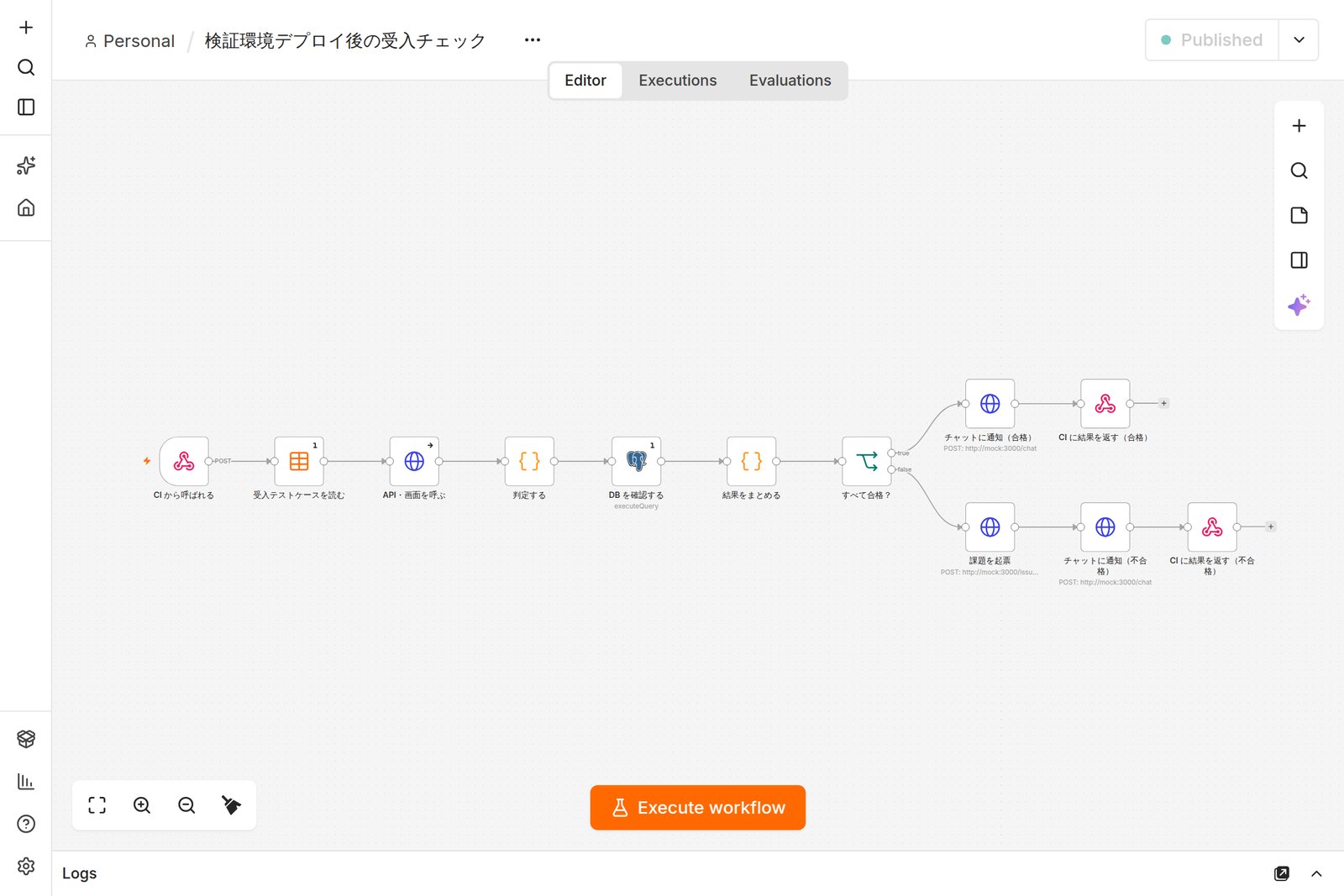
Called by CI, from checks to tickets
The test cases live in an n8n data table, so QA can add a check by adding a row
- After deploying to staging, CI (GitLab CI, GitHub Actions) calls an n8n webhook
- n8n reads the test cases (URL, expected status, text that must appear), calls each page and API and judges the result
- It also connects to the database with a read-only user to confirm no migration failed and the master data is there
- It posts a summary to chat and, on failure, opens a ticket automatically
- It answers CI with an HTTP status (200 or 422), so a failure stops the pipeline
This is not RPA in the narrow sense of clicking through screens in place of a person; it is automation that checks through APIs and the database. If you also need to verify how pages look, an E2E test with Playwright or UiPath Test Cloud can become one step in this flow. The division of roles is sorted out later.
How it is built
1. Put the test cases in a data table
| case_no | title | method / url | Expected |
|---|---|---|---|
| AC-01 | The top page loads | GET http://web/ | 200, contains <div id="app"> |
| AC-02 | The app is up | GET http://app:8080/actuator/health | 200, contains "UP" |
| AC-03 | The customer list loads | GET http://web/api/customers | 200, contains the sample company |
| AC-04 | A customer can be created | POST http://web/api/customers | 200, contains the new name |
2. Call the webhook from CI
Set the Webhook node to authenticate with a header token, and choose to respond with a Respond to Webhook node. On the CI side, GitLab CI could look like this (an example).
# .gitlab-ci.yml (excerpt)
acceptance:
  stage: verify
  needs: [deploy_staging]
  script:
    - >
      curl --fail-with-body -sS -X POST "$N8N_URL/webhook/acceptance"
      -H "X-Api-Key: $N8N_TOKEN" -H "Content-Type: application/json"
      -d "{\"env\":\"staging\",\"version\":\"$CI_COMMIT_TAG\",
           \"commit\":\"$CI_COMMIT_SHORT_SHA\",\"pipeline\":\"$CI_PIPELINE_URL\"}"
3. Call with an HTTP Request node
- Set Method to {{ $json.method }} and URL to {{ $json.url }}, taking values from the test case. Four items come in, so it calls four times
- Turn on Include Response Headers and Status and Never Error under Options. A 404 or 500 no longer stops the run, and the next node can judge the status
- Set On Error under Settings to continue, so even a connection failure reaches the judging step
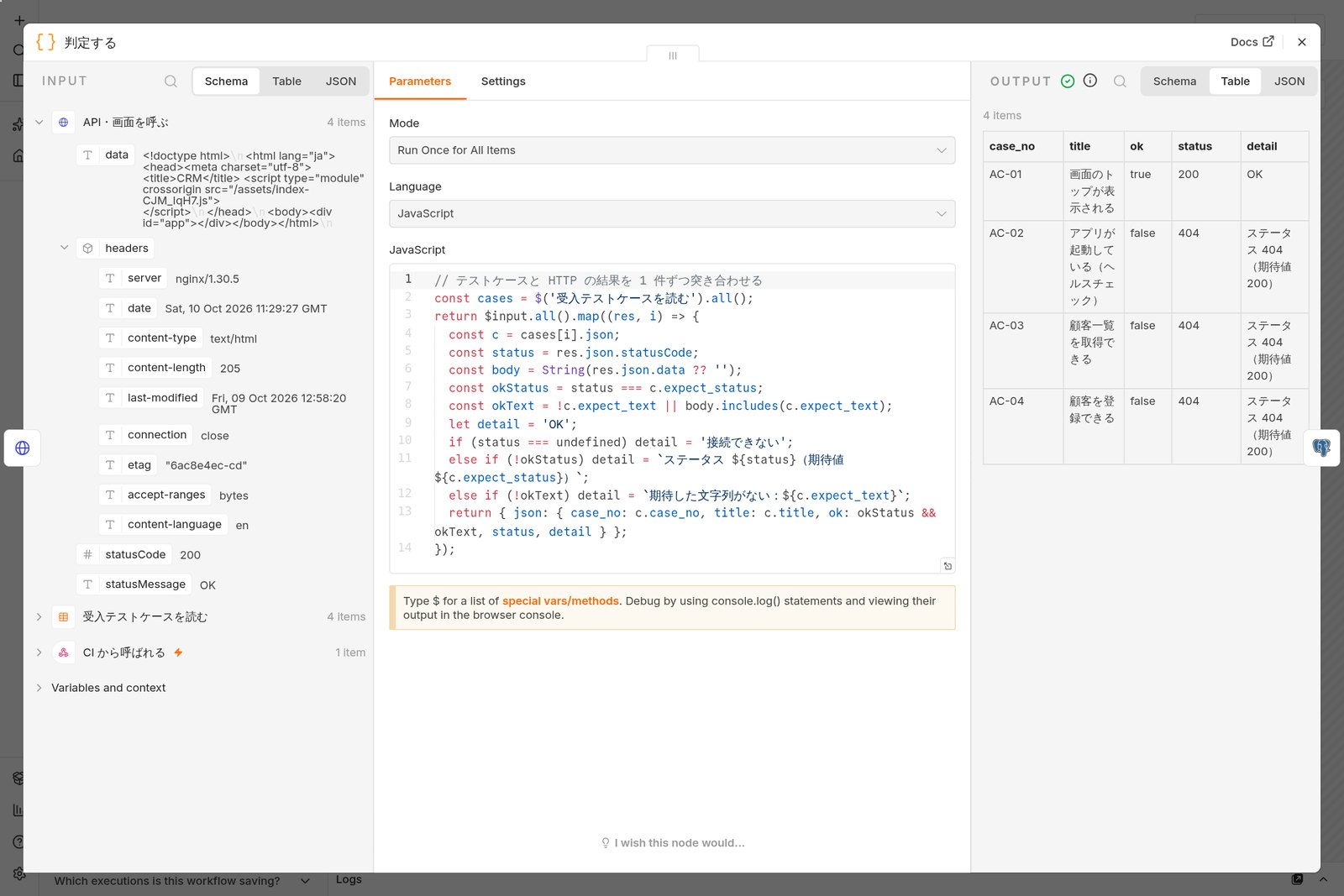
4. Judge in a Code node
// Match each test case with its HTTP result (excerpt)
const cases = $('受入テストケースを読む').all();
return $input.all().map((res, i) => {
  const c = cases[i].json;
  const status = res.json.statusCode;
  const body = String(res.json.data ?? '');
  const okStatus = status === c.expect_status;
  const okText = !c.expect_text || body.includes(c.expect_text);
  let detail = 'OK';
  if (status === undefined) detail = '接続できない';
  else if (!okStatus) detail = `ステータス ${status}(期待値 ${c.expect_status})`;
  else if (!okText) detail = `期待した文字列がない:${c.expect_text}`;
  return { json: { case_no: c.case_no, title: c.title, ok: okStatus && okText, status, detail } };
});
Node names and messages are in Japanese because the example was made for a Japanese team.
5. Check the database
The Postgres node queries with a user that can only SELECT, looking at the migration (Flyway) history and the number of master records.
SELECT
  (SELECT count(*) FROM flyway_schema_history WHERE NOT success) AS failed_migrations,
  (SELECT max(version) FROM flyway_schema_history WHERE success) AS schema_version,
  (SELECT count(*) FROM customer) AS customers;
6. Sum up, branch, answer
A second Code node merges the API and database results and writes the chat message and ticket text. An IF node checks whether everything passed: on a pass it posts to chat and answers CI with 200; on a failure it opens a ticket, posts to chat and answers 422. Tickets can go through the GitLab, GitHub or Jira nodes, or an HTTP Request to any tracker's API.
In 2.x, always Publish after editing. If you only save, the webhook keeps running the last published version (the author once ran an old version believing it was fixed).
Results and what changes
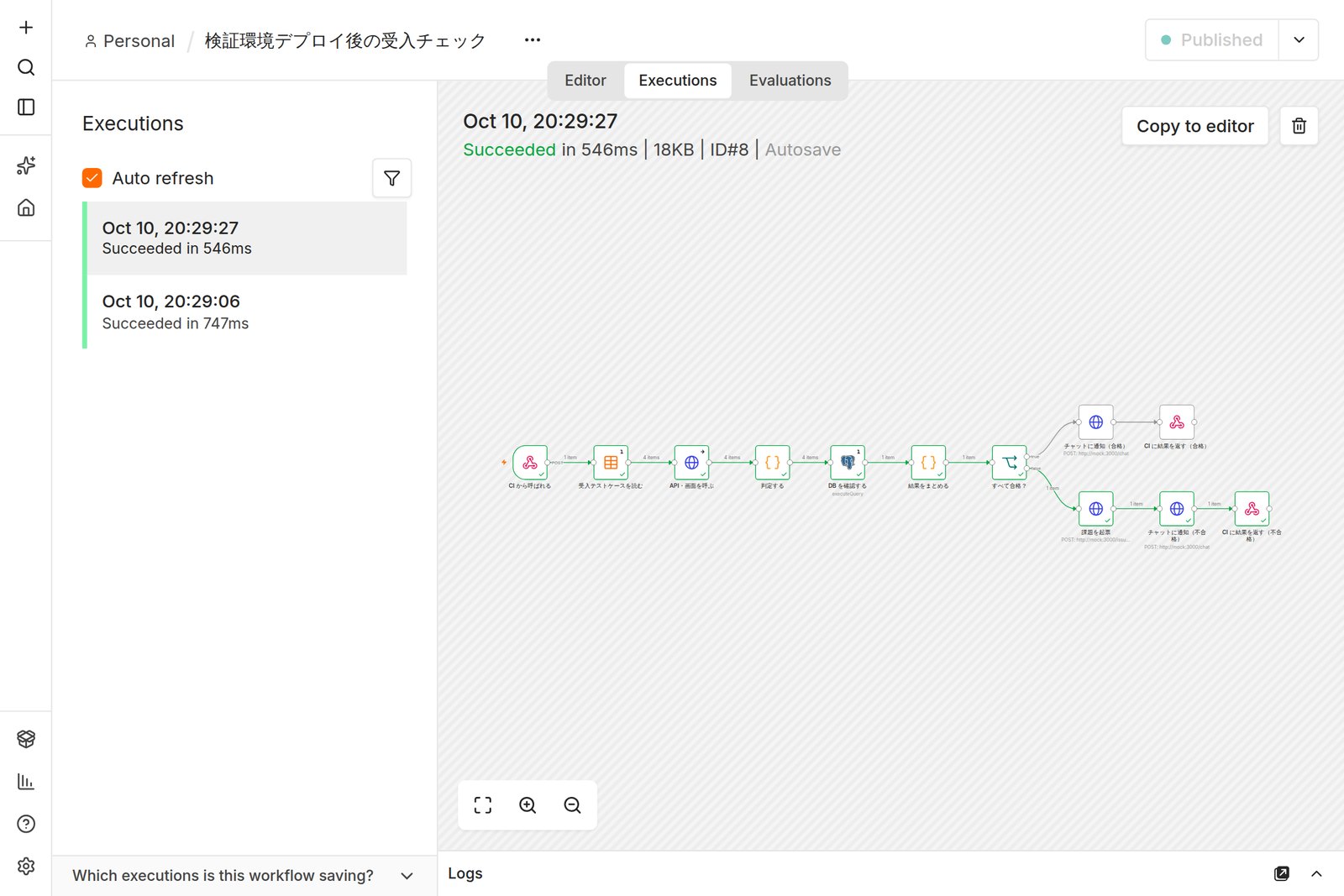
With version 1.0.1 on staging, all six checks passed. Then version 1.0.2, whose configuration error shifted the API path (an error added on purpose for this test), failed three checks: a ticket was opened and CI received 422.
# Response to the CI call (1.0.2)
{"result":"failed","passed":3,"total":6,"issue":"https://gitlab.example.com/crm/-/issues/102"}
HTTP 422

# Message that arrived in chat (Japanese original)
【受入チェック NG】staging v1.0.2(9d81e0c)3/6 件 合格
[OK] AC-01 画面のトップが表示される:OK
[NG] AC-02 アプリが起動している(ヘルスチェック):ステータス 404(期待値 200)
[NG] AC-03 顧客一覧を取得できる:ステータス 404(期待値 200)
[NG] AC-04 顧客を登録できる:ステータス 404(期待値 200)
[OK] DB-01 マイグレーションの失敗がない:失敗 0 件(適用済み V1)
[OK] DB-02 顧客マスタにデータがある:3 件
課題:https://gitlab.example.com/crm/-/issues/102
Chat and the issue tracker were stand-in receivers (mocks) set up for this test. In real use, swap in the Slack, Teams or GitLab nodes or their APIs.
What changes
| By hand | With n8n | |
|---|---|---|
| Time per check | Roughly 10–30 minutes (depends on the number of items; an estimate) | Under a second (0.5–0.7 seconds measured here) |
| Records | Excel and screenshots | The execution history keeps every node's input and output |
| Notices and tickets | Written by a person, sometimes forgotten | Always sent on failure |
| Defects slipping through | Work may move on before the check | CI stops, so nothing moves to the next environment |
| Adding a check | Edit the checklist and share the steps | Add one row to the data table |
| Who can change it | Whoever knows the checklist | Developers; QA can edit the test cases |
Things to watch
- Test data piles up — the create test adds a record each run. Give test data an obvious name and add a cleanup workflow
- Least privilege — a read-only database user and a token on the webhook. Point it at staging only, never production
- Not a replacement for tests — unit and E2E tests stay; this only confirms the deployment went right. Detailed behaviour belongs in the application's tests
- n8n needs operating too — pin and upgrade versions, back up, keep the encryption key safe. With releases almost weekly, decide your upgrade routine
- For teams — the free Community edition cannot share workflows or credentials with other members. If several people maintain it, consider a paid edition
What RPA is: where UiPath and n8n sit
RPA (robotic process automation) means software robots doing work by operating screens the way people do: reading fields, clicking, typing, pasting into another application. Its defining strength is that even when a system has no API, anything a person can operate on screen can be automated.
Still, RPA is not the only kind of automation tool. Roughly, they divide like this.
| Type | Main products | How it works | Strength |
|---|---|---|---|
| RPA | UiPath, Power Automate (desktop flows), WinActor, BizRobo! | Records and replays screen actions | Screens without APIs, Windows applications |
| Workflow automation, iPaaS | n8n, Zapier, Make, Power Automate (cloud flows), Workato | Connects through APIs and webhooks | Linking SaaS and databases, event-driven work |
| Test automation | Playwright, Selenium, UiPath Test Cloud | Drives screens with code or tools and verifies results | Regression tests before release |
| Business process management (BPM) | Camunda, UiPath Maestro and others | Models processes in BPMN, connecting people and systems | Approvals and long-running processes |
| AI agents | n8n's AI Agent, UiPath Agent Builder and others | An LLM decides and uses tools (APIs etc.) | Inputs without a fixed format |
Where automation tools sit (the author's view)
Across: what the tool works on. Up: who builds it and how it is governed. n8n and UiPath sit almost diagonally opposite
What UiPath is
UiPath was founded in 2005 in Bucharest, Romania, as DeskOver, renamed UiPath in 2015 and listed on the New York Stock Exchange in 2021. It is the best-known RPA company: Gartner named it a Leader in the Magic Quadrant for RPA seven years in a row up to 2025. Today it presents itself not just as RPA but as an “agentic automation platform” that includes AI agents.
| Component | Role |
|---|---|
| Studio | The tool for building robots, assembling actions by pointing at screen elements |
| Robot | The robot that runs: attended robots work alongside a person on their PC; unattended robots run on servers with no one present |
| Orchestrator | Manages robot deployment, schedules, queues, credentials and run records |
| Document Understanding | Reads invoices and other documents and extracts fields, with a screen for human review |
| Integration Service | Connectors for API integration. UiPath can do API work too |
| Test Cloud | Test automation for applications |
| Maestro, Agent Builder | Coordinates AI agents, robots and people in one process (BPMN); builds agents |
| Healing Agent | When a screen change stops a robot, fixes or suggests fixes for element selectors and similar |
On price, there is a free Community plan for individuals and eligible organisations, Basic from $25 a month (up to two robots, data in the European region only), and Standard and Enterprise on quote; costs add up by users and robots (official site, October 2026).
Where n8n can replace UiPath
The short answer: if the target system has an API or a database connection, and the builders are developers (or a team developers support), n8n can take over in many places.
| Area | What n8n does | Conditions, caveats |
|---|---|---|
| Copying between SaaS tools | Form to CRM to chat, spreadsheet to database. Connecting straight through APIs, without opening screens, is faster and less brittle | The target's API must be available (sometimes only on paid plans) |
| Data work on internal systems | Connect to the database directly to aggregate, copy and check | Database access must be allowed; be careful with writes |
| Notifications, scheduled reports | Gather on a schedule or event, tidy, send | — |
| Approvals and requests | Take a request by form or chat, wait for approval, move on | Complex, long processes are BPM territory |
| Email, files, AI | Read email and classify or summarise it with an LLM; pull text from PDFs | For large volumes of documents at high accuracy, specialised products win |
| Development and operations | This post's acceptance check, tickets on incidents, CI follow-up work | — |
| Small to mid-sized, cost-conscious | Self-hosted Community edition has no execution limit | You pay in servers and operating effort; team features cost money |
Plenty of RPA automations click through screens for work an API could do. They break when screens change and take effort to maintain. Moving those parts to n8n (API integration) often makes them faster, steadier and cheaper.
Where UiPath keeps the edge
On the other hand, in the situations below, replacing UiPath (or an enterprise RPA product) with n8n is hard or not worth it.
| Area | Why |
|---|---|
| Systems with only a screen | Old business applications without APIs, SAP GUI, mainframe terminals, screens reached through Citrix or other virtual desktops. UiPath can operate them through element selectors or image recognition. n8n has no official node for operating screens; at most, community nodes or code can drive Playwright |
| Working on a person's PC | A person presses a button and the robot carries on in that person's screen (attended). n8n runs on a server, so it cannot work this way |
| Large volumes of documents | Reading invoices or applications and sending only uncertain fields to a person is a complete, packaged capability |
| Company-wide governance | Schedules and queues for hundreds of robots, permissions, a credential vault, records for audit. n8n's paid editions add SSO, log streaming and external secrets, but UiPath's machinery for running RPA across a whole company runs deeper |
| Coping with screen changes | Features such as Healing Agent fix element selectors automatically when screens change |
| Business teams building their own | Builder tools for non-developers, learning content (UiPath Academy), certifications, partner firms. There is a system for running “citizen development” across a company |
| Testing desktop applications | Tests for Windows applications or SAP can be written with the same tools as business automation |
Put the other way round: if none of “screen only”, “on a person's PC” or “hundreds of robots governed company-wide” applies, n8n deserves to be a serious candidate.
Choosing, and combining the two
You do not have to pick one. A practical split is n8n wherever an API reaches, RPA where there is only a screen, joined through APIs.
Combining n8n and UiPath
n8n has no dedicated UiPath node, but the HTTP Request node can call the Orchestrator API
What to check when choosing
| Check | n8n fits | UiPath fits |
|---|---|---|
| The target system | Has an API, a database or webhooks | Screen only, Windows applications, virtual desktops |
| Who builds and fixes it | Developers, or a team developers support | Mainly business teams (with a CoE or similar driving it) |
| Where it runs | On servers (cloud or on-premises) | On people's PCs or on servers |
| Governance and audit | Small to mid-sized, or within what paid editions cover | Company-wide, strict audit requirements |
| How cost works | Executions (cloud), or servers and operating effort (self-hosted) | Number of users and robots, plus add-ons |
| Where data lives | Self-hosting keeps it in-house | From Standard up, self-hosting in-house is an option too |
If you already run UiPath, the quickest win is usually to review your existing robots and move the ones an API could handle to n8n. If your development team is just starting with automation, start small with n8n on development and operations work, and look at RPA when a screen-only system turns up.
§ — On one page
- n8n automates work by wiring a trigger to nodes and passing JSON items between them. Born in Berlin in 2019; version 2.0 (December 2025) brought safer defaults and the idea of publishing.
- The self-hosted Community edition is free, but under the Sustainable Use License you cannot let clients build their own workflows. Sharing, SSO and other team features are paid.
- In web development, a post-deploy acceptance check called from CI handled API and database checks, chat, a ticket and the verdict for CI in under a second.
- n8n can replace UiPath for API and database integration, notifications, reports, and development and operations automation.
- UiPath keeps the edge for screen-only systems, work on people's PCs, large document volumes and company-wide governance. The two can be combined through APIs.
References
- n8n Docs
- n8n Docs — Install with Docker
- n8n Docs — Compare editions
- n8n Docs — License FAQ (Sustainable Use License)
- n8n Docs — v2.0 breaking changes
- n8n Docs — Data tables
- n8n — Pricing
- Wikipedia — n8n
- UiPath — Pricing
- UiPath Docs — Unified Pricing: Licensing plan framework
- UiPath Docs — Maestro overview
- UiPath Docs — What is Healing Agent?
- UiPath Docs — Integration Service connectors
- Business Wire — UiPath Recognized as a Leader in the 2025 Gartner Magic Quadrant for RPA
- Wikipedia — UiPath
The example was run on 10 October 2026 with n8n 2.42.6 (self-hosted on Docker) against the sample from Dev Guide No. 5 (Spring Boot 4.1.1, Vue 3, nginx 1.30, PostgreSQL 18). Chat and the issue tracker were mocks, and the URL (gitlab.example.com) is an example. The error in version 1.0.2 was added on purpose. Prices, editions, licence terms and funding follow the official sites and press reports as of October 2026; funding figures are as reported.
Dev Guide No. 6 — n8n in Practice / 2026.10